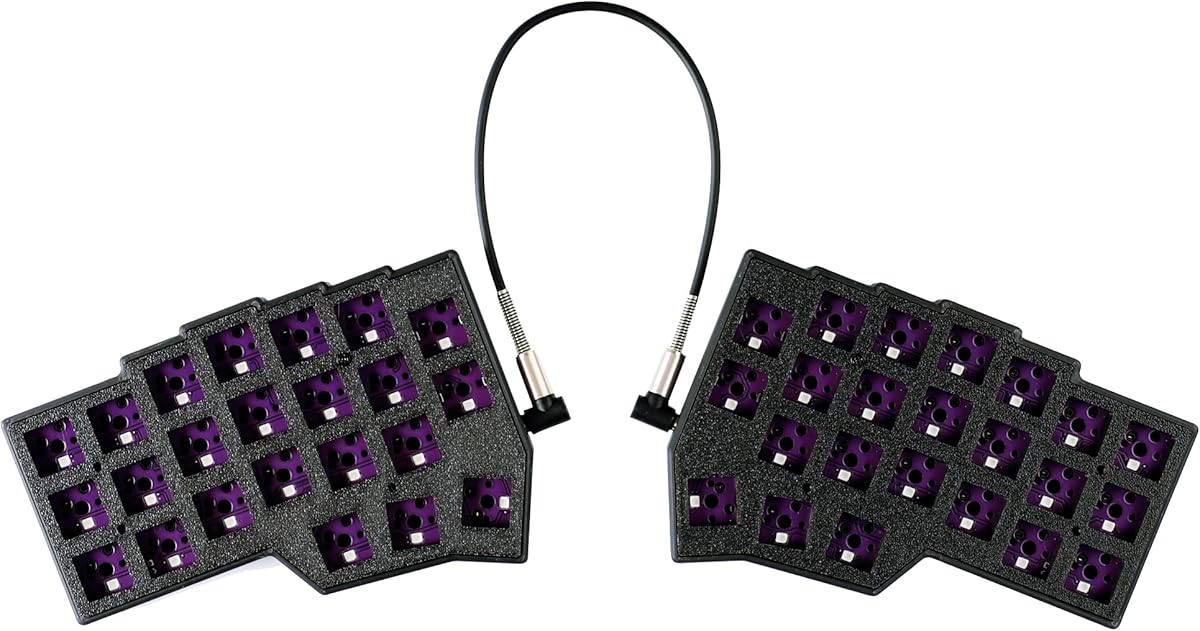
YMDK Corne V4.1
4.2Editor score
Split 46-key column layout
Hot-swappable QMK and Vial
Compact PLA keyboard kit
Our ortholinear keyboard guide compares ten split, low-profile, and programmable models for typing comfort, key layout, build quality, and customization.
Ortholinear keyboards arrange keys in straight vertical and horizontal columns rather than shifting each row. This grid-style approach can create a cleaner finger path and is especially useful for programmers, writers, and anyone interested in split or column-staggered layouts. The best model depends on comfort, footprint, firmware, and willingness to adapt.
We compared all ten products by layout, key count, connectivity, switch support, programmability, lighting, and ergonomic adjustability. The list includes true ortholinear boards, compact split keyboards, and several conventional-layout alternatives that help illustrate the trade-offs between ortholinear design, familiar typing, portability, and premium ergonomics.
Each review identifies the strongest feature, practical limitations, and the type of user most likely to benefit. Ratings and product details reflect the supplied information, while availability and pricing can change. First-time buyers should pay particular attention to layout compatibility, firmware support, and the learning curve associated with unfamiliar key arrangements.
4.2Editor score

4.3Editor score

4.4Editor score
This comparison highlights the major differences in layout, dimensions, connectivity, and customization. It also distinguishes purpose-built ortholinear and column-staggered models from conventional keyboards that serve as ergonomic or compact alternatives.


The KBDcraft 07Israfel is a purpose-built 50% ortholinear keyboard with a 4.3 rating and a feature set aimed at users who want a small, highly adjustable mechanical board. Its straight-column layout, low-profile switches, split hinge, gasket mount, RGB lighting, and support for both QMK and Vial make it one of the most complete choices in this guide.
We may earn a commission when you buy through this link, at no additional cost to you.
The most impressive feature is the combination of a genuinely ortholinear grid and a low-profile physical design. That combination can preserve a compact footprint without forcing users into the much taller profile associated with many mechanical keyboards. The hinge-split construction offers up to seven tilt options, allowing the two halves to accommodate different hand positions and preferences.
There are trade-offs. The wired design keeps the keyboard tied to a desk, and users coming from a traditional staggered keyboard will need time to adjust to straight columns. Low-profile hot-swap sockets also use a specific three-pin system, so buyers should verify switch compatibility before purchasing replacement switches or considering extensive future changes.
This is the strongest all-around pick for programmers, writers, and experienced keyboard enthusiasts who specifically want an ortholinear layout without a full-size footprint. It combines thoughtful ergonomics, a compact frame, flexible positioning, and deep firmware support. For a newcomer, it is less approachable than a conventional board, but its physical adjustability and broad programming support make it especially compelling for committed users.
Unlike conventional staggered keyboards, the 07Israfel places its keys in aligned vertical and horizontal columns. The low-profile Core56 system keeps the overall board compact, while the custom MX-style keycaps and three-pin switch platform provide a mechanical feel without the height of a standard keyboard.
QMK and Vial support opens the board to custom key mappings, macros, shortcuts, and lighting effects. That flexibility is valuable for programmers and productivity-focused users who want task layers or relocated controls rather than relying on a standard key arrangement.
We may earn a commission when you buy through this link, at no additional cost to you.
This 4×6 Corne keyboard delivers a 60% split configuration with 58 keys, two rotary knobs, hot-swappable mechanical switches, per-key RGB lighting, and Vial remapping. Its 4.2 rating reflects a capable custom-board experience, although the unusual column-staggered arrangement and higher degree of customization make it better suited to committed users.
We may earn a commission when you buy through this link, at no additional cost to you.
The two knobs are particularly useful for controlling volume, scrolling, zooming, media playback, or application-specific actions. The key count is also well suited to people who want more control options than a minimal 40% board but still want to reduce desktop clutter. Hot-swappable support and pre-lubed 40g linear switches give users a convenient starting point and make future switch changes more approachable.
This is not a casual plug-and-play purchase. The product information specifically notes that it requires an adaptation period, is not intended for people accustomed to traditional staggered layouts, and involves advanced customization. It is also wired, with separate 1.5-meter and 28-centimeter USB-C cables that can be used to join or separate the two halves.
Choose this keyboard if you enjoy configuring split layouts and want granular control over every key. Programmers, keyboard enthusiasts, and users working with short productivity or gaming workflows can gain meaningful benefits from its thumb clusters and knobs. Those who want effortless familiarity should instead consider a standard-layout alternative from this guide.
Four thumb keys on each hand expand the available shortcut space without increasing the main key grid. Once the layout is learned, frequently used commands can be placed closer to the fingers, helping users reduce reaching between a conventional keyboard and a separate control device.
Every key can be remapped through Vial, and the two knobs can supplement the keyboard with dedicated controls. These features make the board suitable for layered workflows, compact desktop setups, and users who prefer controlling software behavior directly from the hardware.
We may earn a commission when you buy through this link, at no additional cost to you.
The YIVU Corne V4.1 is a compact 40% split mechanical keyboard built around a 46-key, 3×6 column-staggered layout. It carries a 3.8 rating and offers adjustable spacing, tilt, and rotation, hot-swappable switches, per-key RGB, and support for both Vial and QMK programming.
We may earn a commission when you buy through this link, at no additional cost to you.
Its main appeal is minimalism. The 40% format removes navigation clusters and extra keys, leaving a clean two-hand arrangement that can free significant desk space. The split halves can be positioned independently, and three thumb keys per hand create a larger command surface than a standard compact keyboard without changing the core column-staggered structure.
The supplied information includes important operating cautions. The two parts can be used together or independently, but both USB ports should not be connected to the computer at the same time. In addition, the TRS cable used to connect the halves does not support hot-swapping, so it should not be connected or disconnected while the keyboard is powered.
This board fits programmers and minimalist enthusiasts who want a small, programmable split keyboard and are comfortable with its three-thumb-key arrangement. The 3.8 rating warrants checking recent customer feedback before purchasing, particularly regarding cable handling and the expected adaptation period. It is less suitable for users who need dedicated function, navigation, or number keys.
Removing secondary clusters keeps the YIVU focused on text entry and custom shortcuts. Vial and QMK provide multiple ways to build layers, remap controls, and adjust RGB, allowing the limited key count to cover more tasks than the visible layout suggests.
The included 40g pre-lubed linear switches offer a responsive starting configuration for typing and gaming. Hot-swappable sockets for compatible three- or five-pin MX-style switches also make it easier to refine the feel later without replacing the entire keyboard.
We may earn a commission when you buy through this link, at no additional cost to you.
The black KBDcraft 07Israfel shares the award-winning white version's core 50% ortholinear design, low-profile mechanical system, hinge split, gasket mount, and RGB lighting. With a 4.3 rating, it stands as a strong choice for users who prefer the function of the compact layout in a darker, more understated enclosure.
We may earn a commission when you buy through this link, at no additional cost to you.
The board's 56 keys and straight-column arrangement remain the defining features. Its split hinge can be set at one of seven tilt angles, letting users optimize each side for their hands, shoulders, and desk height. The low-profile design keeps the keyboard compact, while the gasket mount is intended to provide a flexible feel and reduce transmitted vibration.
Like the white model, it is a wired keyboard with low-profile three-pin hot-swap sockets. Users should not assume every standard MX-style switch will fit, and the low-profile platform creates a different typing height and feel from conventional mechanical boards. RGB legends or lighting visibility may also require a suitable environment to identify keys quickly.
Choose this version if you want the 07Israfel experience without the visual impact of a white case. It is particularly well suited to programmers and writers who value a compact ortholinear grid, adjustable ergonomics, and extensive key programming. It is less convenient for frequent travel or desk-to-desk moves, but as a fixed workstation keyboard its features are well focused.
The black finish suits offices and creative desks where a bright white keyboard might feel visually dominant. Its restrained appearance does not reduce the board's technical focus: the ortholinear grid, adjustable hinge, and RGB lighting remain fully featured.
Low-profile switches reduce vertical travel and desk footprint compared with many mechanical keyboards. The gasket-mounted construction adds flexibility at the case level, offering a different way to address vibration and fatigue during prolonged typing.
We may earn a commission when you buy through this link, at no additional cost to you.
The YMDK Corne V4.1 is a 46-key, 40% split keyboard kit built around 3D-printed PLA cases, hot-swappable QMK PCBs, RGB lighting, and Vial programming. Its 4.2 rating and open construction make it a compelling entry point for keyboard enthusiasts who want to assemble and customize a compact split board themselves.
We may earn a commission when you buy through this link, at no additional cost to you.
The package includes two bottom PLA cases, two top PLA plates, two hot-swap PCBs, a USB-A-to-C cable, and an inter-board data cable. The split halves can operate independently, which is useful for arranging the hands at different angles or keeping the overall footprint compact. Direct Vial support makes the board approachable for users who want visual key remapping rather than a command-line workflow.
This is a kit rather than a complete ready-to-type keyboard. Switches and keycaps must be obtained separately, and compatibility, stabilizer fitting, and assembly all matter to the finished experience. The design also uses a single wired Type-C mode, so it does not provide the wireless flexibility found in some conventional compact alternatives.
The YMDK is best for a hands-on buyer who enjoys the process of building a custom keyboard and can tolerate a learning curve. It offers a practical way to enter the split ortholinear category without buying a fully assembled board. For users seeking immediate plug-and-play use, a complete kit such as the YIVU Corne V4.1 will be more convenient.
Choosing compatible switches and keycaps gives users control over both typing feel and appearance. The included hot-swap PCB and plate reduce the complexity of assembling the electronics, while the separate cases allow each half to be placed independently.
Opening Vial directly gives users a graphical way to remap keys and program the board. That accessibility is particularly valuable in a kit because it allows the compact layout to be adapted to personal shortcuts without immediately resorting to advanced QMK source-code customization.
We may earn a commission when you buy through this link, at no additional cost to you.
The Maketheone M is an 80% ergonomic mechanical keyboard with a butterfly-style arrangement, tactile Gateron Brown switches, white backlighting, hotkeys, and a wired USB-C connection. It is not a conventional ortholinear grid, but its unusual key placement and retro design make it a relevant alternative for buyers interested in experimentation.
We may earn a commission when you buy through this link, at no additional cost to you.
The butterfly layout creates a distinctive visual pattern and differs from a standard staggered keyboard without requiring the extreme footprint reduction of a 40% split board. Tactile Brown switches provide noticeable feedback during typing, while the white backlighting helps illuminate the key field. The wired design and plug-and-play connection are straightforward for everyday use.
Its 3.4 rating is the lowest among the ten products, and the supplied information is much less detailed than for the programmable models. There is no indication of QMK, Vial, hot-swappable sockets, or detailed angle adjustment. Prospective buyers should therefore treat it as a style-and-layout choice rather than assume it offers the same customization depth as the other split boards.
The Maketheone M may appeal to collectors, retro-design enthusiasts, and typists who want a conversation-starting keyboard without configuring firmware. It is less appropriate for buyers whose primary goal is a true ortholinear layout. Its stronger appeal lies in the butterfly arrangement, tactile switches, and distinctive enclosure.
The X-Bows-inspired arrangement creates a visual center and changes the relationship between nearby keys. It offers an alternative for users who find conventional ortholinear layouts too uniform but still want something other than a standard rectangular keyboard.
Gateron Brown switches deliver a tactile bump that many typists appreciate for confirming keystrokes without relying on a heavy linear force. The wired USB-C connection and white illumination keep the core experience uncomplicated.
We may earn a commission when you buy through this link, at no additional cost to you.
The Keychron K2 HE is a 75% wireless magnetic-switch keyboard with a 4.4 rating. It does not use an ortholinear layout, but it serves as a modern alternative for buyers who prioritize adjustable actuation, multi-device connectivity, and browser-based customization over a split or column-staggered arrangement.
We may earn a commission when you buy through this link, at no additional cost to you.
Its magnetic sensors allow actuation to be adjusted from 0.2 to 3.8 millimeters with 0.1 millimeter sensitivity. That creates a wider range of response options than a standard mechanical switch and supports rapid-trigger behavior for gaming. The Launcher web configurator brings remapping, macros, actuation adjustments, and rapid-trigger settings together in a browser interface.
Connectivity is more versatile than on most boards in this guide. It supports 2.4GHz wireless, Bluetooth 5.2, and USB-C, with the ability to connect up to three devices. Compatibility with macOS and Windows is reinforced by included Mac and Windows keycaps. The tradeoff is that the hot-swappable sockets accept only compatible Gateron Double-Rail Magnetic switches.
Choose the K2 HE if you want a familiar layout and advanced magnetic performance rather than an ortholinear grid. Gamers and office users who switch among devices can benefit from its connectivity and 1000 Hz polling rate. Its non-shine-through legends may be harder to see in low light, and users who specifically want straight-column ergonomics should look elsewhere.
Magnetic sensing allows each key's activation point to be adjusted rather than relying on a fixed mechanical contact. Users can make keys more sensitive, require a deeper press, or configure rapid reset behavior according to the task.
Support for 2.4GHz, Bluetooth 5.2, and USB-C makes the K2 HE adaptable to desktop, mobile, and multi-computer workflows. Included platform-specific keycaps help maintain familiar modifier placement when moving between systems.
We may earn a commission when you buy through this link, at no additional cost to you.
The Logitech K835 TKL is a conventional 80% mechanical keyboard with a 4.6 rating, the highest customer rating among the products listed. It does not meet the strict definition of an ortholinear keyboard, but its familiar layout, slim mechanical design, aluminum frame, and linear switches make it a practical option for buyers who want compactness without relearning their keyboard.
We may earn a commission when you buy through this link, at no additional cost to you.
The TKL format removes the numeric keypad while retaining a conventional arrangement, so it saves desk space but does not introduce the pronounced adaptation period of a split ortholinear board. Curved keycaps, a slim front edge, and adjustable tilt brackets are designed to support a comfortable typing position. Linear Red switches provide smooth, light feedback.
Compared with the programmable boards in this guide, the K835 offers limited control over key mappings and lighting. Its wired five-foot USB cable and Windows-focused compatibility are straightforward, but there is no Bluetooth or multi-device switching. The aluminum frame is a strong construction feature, and the switches are stated to have been tested for up to 50 million clicks.
This keyboard is ideal for users who want a recognizable layout, mechanical linear feel, and reduced desk footprint. It can also serve as an easy-to-adjust baseline before moving to a more specialized split board. However, buyers searching specifically for straight columns, independent halves, or thumb clusters should choose one of the actual ortholinear models instead.
The TKL layout retains familiar letter, function, navigation, and modifier positions while omitting the number pad. That makes it a practical middle ground for laptop users and compact desks where a full-size keyboard would feel crowded.
An aluminum frame provides a rigid foundation, while the curved keycap profile and front-edge shape improve hand positioning. Linear Red switches deliver a smooth action that can suit fast typing and gaming without a tactile bump.
We may earn a commission when you buy through this link, at no additional cost to you.
The Nuphy Air60 V2 is a portable 60% low-profile mechanical keyboard with 64 keys, wireless connectivity, and QMK/VIA support. It is not ortholinear, yet it competes with the split boards on portability, customization, and desk efficiency, making it useful for frequent travelers who prefer a familiar layout.
We may earn a commission when you buy through this link, at no additional cost to you.
Its three connection methods—Bluetooth 5.1, 2.4GHz, and wired USB-C—provide useful flexibility at a desk and on the move. The keyboard can connect to up to four devices, and the aluminum frame includes two RGB light bars: one indicates Caps Lock and connection mode, while the other displays battery and system status.
The design removes a dedicated F-row to reduce size, although the function-key functions remain available. The stated battery figures vary depending on whether lighting is active, so users who travel regularly should account for that when charging less frequently. VIA and QMK provide excellent customization despite the conventional layout.
This is a strong portable option for writers, programmers, and hybrid workers who need wireless flexibility but do not want to adapt to split keys. Its low-profile body and 1000 Hz wireless return rate also suit gaming on the move. It remains a conventional grid rather than an ortholinear board, so it is best viewed as the portability-focused alternative in this comparison.
Bluetooth and 2.4GHz connections remove the need to remain tethered to one computer. Four-device switching is especially convenient for people who alternate between a desktop, laptop, tablet, and phone throughout the day.
QMK and VIA support lets users remap keys and build personal layouts even though the visible 60% design omits a dedicated function row. This is useful for programmers who want alternate layers while keeping the keyboard physically compact.
We may earn a commission when you buy through this link, at no additional cost to you.
The Logitech ERGO K860 is a full-size wireless ergonomic keyboard with a curved split frame, integrated memory-foam wrist rest, and a 4.4 rating. It does not use an ortholinear layout, but its premium approach to posture and wrist support makes it the strongest conventional ergonomic option in this guide.
We may earn a commission when you buy through this link, at no additional cost to you.
The split and curved keyframe encourage a more natural hand position, while the sloping design and scooped keycaps are intended to reduce strain through the wrists and forearms. The integrated wrist rest offers a larger support area than a simple palm pad, and the keyboard's tilt legs provide zero, negative four-degree, and negative seven-degree palm-lift positions.
It preserves a familiar full-size layout, including a number pad, so it does not provide the dramatic desk-space savings of a 40% or 50% board. Logitech Options provides Fn-key customization and shortcut support, but this is not the deep remapping and layer environment offered by QMK or Vial. The receiver is usually included, though its location may vary depending on whether it is sold alone or in a keyboard-and-mouse set.
Choose the ERGO K860 if a mature, wireless ergonomic design matters more than an ortholinear grid or enthusiast firmware. Its wrist support, adjustable angles, and familiar layout can be particularly attractive for long workdays. Users seeking the smallest footprint or the most programmable split experience should instead consider one of the dedicated ortholinear boards.
The curved wrist rest uses a memory-foam layer to support the palms while the keyboard frame raises and separates the typing angle. Logitech states that the design provides substantially more wrist support and less wrist bending than a standard keyboard without a palm rest.
Connection through the USB receiver or Bluetooth removes the cable from the desk, while the full-size layout avoids the need to relearn navigation or number entry. Users can also customize the Fn key and create shortcuts through Logitech Options.
We may earn a commission when you buy through this link, at no additional cost to you.
The most important decision is the layout you will actually use every day. Beyond that, switch compatibility, adjustment options, firmware, connectivity, and assembly requirements determine whether a keyboard becomes a productive long-term tool or an appealing but frustrating desk project.
A true ortholinear keyboard places keys in uninterrupted vertical columns, while many compact split boards use column staggering to create a more natural transition between letters and thumb keys. The distinction affects both finger travel and the adaptation period. Buyers who want the defining geometry of an ortholinear board should verify that the listing explicitly uses that term rather than relying on a split shape alone.
Choose a straight-grid layout for the most distinctive ortholinear experience, or a column-staggered design for a potentially more natural transition into the thumb cluster. Give yourself time to practice before deciding that the keyboard is uncomfortable.
Independent halves allow the user to change the distance between hands, rotate each side inward, or select different tenting angles. A hinge with several positions is more useful than a fixed frame because shoulder position, desk depth, and body size vary considerably. Some models also permit complete separation, which can support different keyboard and mouse arrangements.
Prioritize adjustable spacing, tenting, and palm height. A split board should fit your posture rather than force you to adapt your posture to a fixed factory shape.
Compact ortholinear boards commonly omit dedicated function, navigation, and number keys. That is useful for maximizing desk space, but those functions must be recreated through alternate layers or remapped keys. A 40% board is particularly minimal, a 50% arrangement offers a modest step up, and a 60% design can balance compactness with more direct access to common controls.
List the keys you use outside standard typing before choosing. If you require visible function or navigation keys, factor that into the decision or confirm that your firmware can recreate them reliably.
Hot-swappable sockets make it easier to change switch feel, but they only accept compatible switch platforms. Standard three- and five-pin MX-style switches are common on conventional boards, while low-profile models may require a specific three-pin system. Magnetic keyboard sockets are also limited to compatible magnetic switches. The supplied switch type matters as well: light linear switches suit speed, while tactile switches provide a visible bump.
Check the socket specification and included switch details before purchasing. If assembly is involved, confirm that switches, keycaps, stabilizers, and the required mounting hardware are included or compatible.
Ortholinear layouts are most useful when they can be adapted to the user's preferences. Vial provides a graphical interface for key remapping and often lighting configuration, while QMK offers deeper control over layers, macros, and behavior. The capability to relocate arrow keys, navigation commands, and modifiers can make a compact board much easier to use every day.
Choose a model with Vial for approachable visual setup, or QMK and Vial support for deeper customization. Make sure the operating system and configuration method are compatible with your workflow.
Low-profile keyboards reduce vertical travel and can keep the wrist at a shallower angle, while standard-height mechanical switches offer a larger switch ecosystem and often a more substantial key feel. The KBDcraft 07Israfel combines low-profile construction with an ortholinear grid, whereas other split boards use more conventional switch heights.
Choose low profile when desk height and portability matter. Choose standard height when switch variety, replacement-part availability, and a pronounced mechanical feel take priority.
Wired keyboards are dependable and avoid battery management, but they limit desk arrangement and travel. Wireless models add Bluetooth, 2.4GHz, or multi-device switching, though they introduce charging requirements and possible variation in latency or battery life. Check whether a USB receiver is included and whether the keyboard can remember multiple paired systems.
Pick a wired board for a stationary workstation or competitive responsiveness. Pick a wireless model when you regularly move between devices or want a cleaner desk, and verify the stated battery behavior before relying on long intervals between charges.
A finished keyboard is convenient because its switches, keycaps, firmware, and case are already coordinated. A kit may offer more customization and a more affordable entry point, but it requires additional components and assembly knowledge. Missing keycaps or switches can stop a new builder from using the product immediately, even if the PCB and cases are present.
Beginners should favor a complete board unless they enjoy sourcing parts and troubleshooting fit. Experienced builders may prefer a kit with hot-swappable PCBs, clearly documented compatibility, and direct access to Vial or QMK.
Begin by placing the two halves at a distance that lets your forearms remain relaxed and your shoulders stay down. Use the available hinge, tilt, or tenting options to angle the keyboard toward your hands, then begin with a moderate typing speed. For the first one or two weeks, resist the urge to reach for a conventional keyboard after a few minutes; regular practice is what allows the new finger movements to become automatic.
Configure layers and shortcuts before beginning a long work period. Move navigation, editing, application controls, and frequently used macros to comfortable positions using Vial or QMK. Keep a temporary reference for the remapping until recall becomes reliable, and avoid changing the entire layout while trying to complete a deadline-critical task.
For maintenance, disconnect the keyboard before changing switches or keycaps, and never unplug a cable while the device is powered. Clean keycaps with a soft, lightly damp cloth, avoid spraying cleaner directly onto switches, and keep debris away from the hinge and stabilization areas. Wireless models should also be protected from excessive heat and given regular attention to their charge level.
Ortholinear keyboards can be comfortable and precise for users whose fingers naturally move in vertical columns. They may also encourage more efficient movement during programming and text entry. However, they are not universally better because the straight-grid layout requires adaptation and can feel unusual to people accustomed to staggered rows.
Most users need several days to a couple of weeks to become comfortable with an unfamiliar split layout. Start by setting the halves at a natural distance and practicing basic typing before adding shortcuts or layers. Consistent use is more helpful than trying to change the entire arrangement during the first session.
No. Split keyboards can use conventional staggered rows, column-staggered arrangements, or fully straight ortholinear columns. Check the specific layout wording carefully because splitting the keyboard into two halves does not automatically make it ortholinear.
These platforms let users remap keys, create layers, assign macros, and sometimes configure lighting. Vial is especially useful for visual, mouse-driven configuration, while QMK provides more advanced control. This customization is particularly valuable on compact boards that omit function, navigation, or number keys.
Hot-swappable sockets make switch changes faster because they reduce the need to desolder components. They are valuable when you are unsure about switch preference or expect to change the feel later. Compatibility remains essential, since low-profile and magnetic sockets do not accept every ordinary mechanical switch.
A 40% board removes many secondary keys, so it usually requires remapping and alternate layers. It is easiest for users who type frequently and already rely on keyboard shortcuts. Buyers who need dedicated function, navigation, or number keys should consider a larger layout.
Wireless performance depends on the model's connection technology, polling rate, and latency behavior. Some compact wireless keyboards are optimized for rapid input, while wired split boards provide a straightforward connection with no charging requirement. Gaming users should examine the specific latency and battery details rather than assuming all wireless boards respond identically.
A complete board is easier for everyday use because it normally arrives with switches, keycaps, and firmware ready. A DIY kit is better for users who want to select every component and enjoy assembly. Kits such as the YMDK Corne require separate switches and keycaps, so buyers should account for that before ordering.
The KBDcraft 07Israfel is the strongest all-around ortholinear choice because it combines a genuine 50% straight-column layout with a low-profile system, seven-position hinge adjustment, gasket mounting, hot-swappable switches, and QMK/Vial support. The YMDK Corne V4.1 Kit is the best budget route for builders, while the Logitech ERGO K860 stands apart as the premium conventional ergonomic alternative.
Prioritize the layout you can live with before considering lighting, knobs, or other secondary features. Ortholinear users should evaluate column geometry, split adjustment, and key count, while conventional-layout shoppers may value wireless connectivity, familiar key placement, and wrist support more. Ensure that any hot-swap socket and included switches match your future customization plans.
Finally, check current product availability, configuration options, and pricing before ordering, since they can change. A board that supports the required operating system, firmware, and connection method will be more useful than one with a longer feature list but an incompatible layout or software ecosystem.