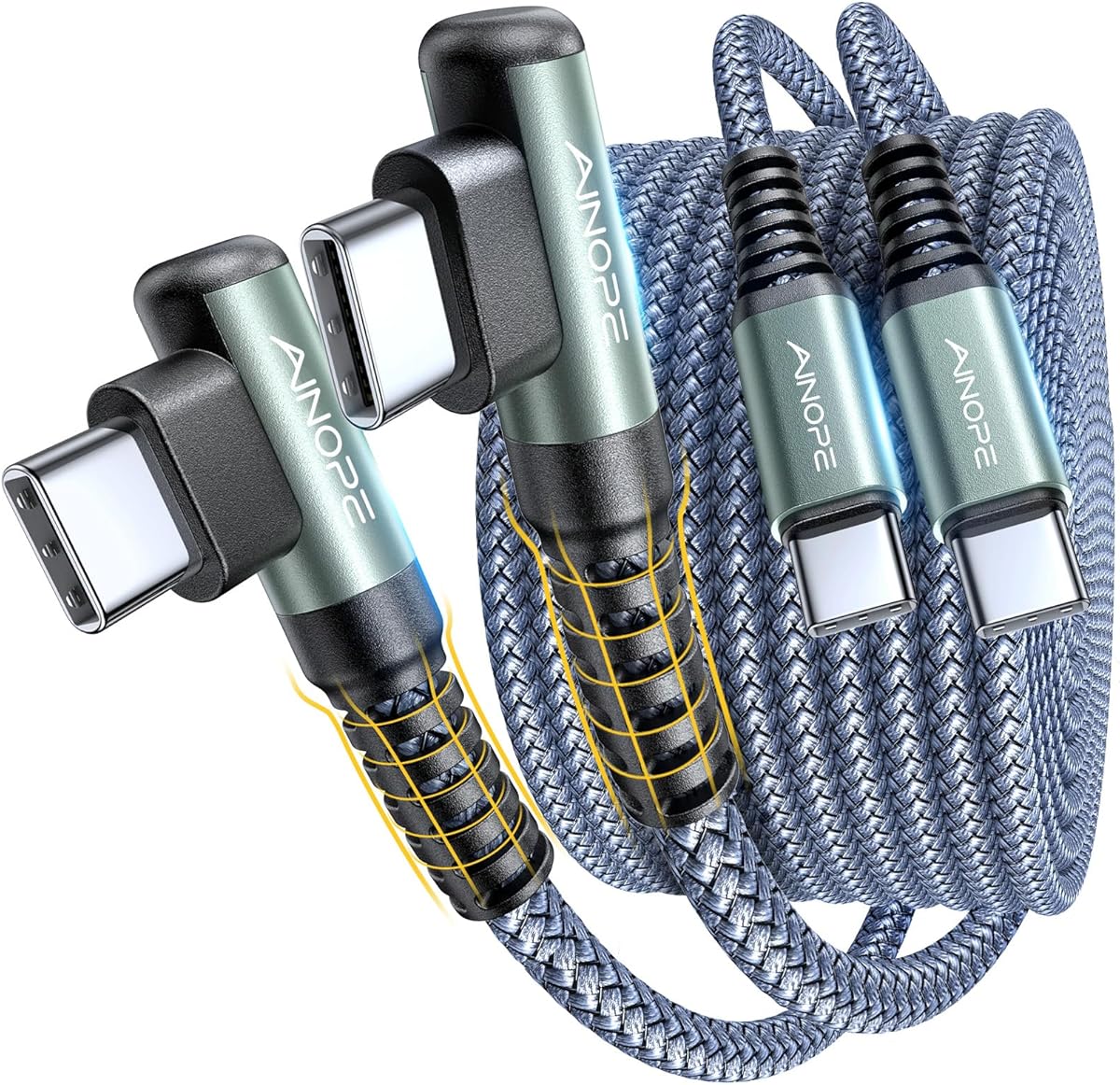
AINOPE 60W 6.6-Foot Cable
4.7Editor score
Up to 60W charging
400,000-plus bend claim
480Mbps data transfer
Our 90 Degree USB C Cable guide compares charging speed, connector design, length, durability, compatibility, and data transfer across 10 top-rated options for
A 90-degree USB-C cable uses a right-angle connector to reduce awkward cable bends, improve comfort during long charging sessions, and make crowded desks, gaming setups, and car interiors easier to organize. The right connector also places less sideways force on a device’s charging port, which can be especially useful with frequently handled phones and tablets.
This guide compares ten right-angle cable options by examining connector type, supported charging power, cable length, data-transfer capability, construction, bend-test claims, device compatibility, and practical use cases. It includes USB-C-to-USB-C models for modern laptops, phones, and tablets, plus USB-A-to-USB-C alternatives for chargers that still use the older rectangular connector.
Each review identifies the product’s most useful qualities and any important limitations, including connector mismatches, case-fit restrictions, video-output limitations, and dependence on a compatible charging adapter. The selections highlight options for high-power charging, compact everyday use, extended reach, gaming, travel, and multi-cable setups, while current listing details and availability can change over time.
4.7Editor score

4.6Editor score

4.5Editor score
The table below compares connector arrangement, charging capacity, length, data support, and the most important use case for all ten cables, making it easier to identify the right option before buying.




The Anker USB C to USB C Right-Angle Cable, 240W (2-Pack, 6 ft, Black) earns a 4.6 rating and stands out as the most capable charging option in this guide. Its right-angle USB-C connector is designed to improve comfort and reduce the awkward sideways pull created by a straight connector, while the advertised 240W capacity gives it substantially more headroom than the 60W cables in the list.
We may earn a commission when you buy through this link, at no additional cost to you.
The six-foot length is a strong balance between reach and portability. It can comfortably reach across a desk, from a wall outlet, or from a farther position on a couch without becoming the unwieldy length of a ten-foot cable. The braided exterior and a stated lifespan exceeding 10,000 bends support everyday portability, while the two-pack makes it practical to place one cable at home and another at work or in a travel bag.
The main limitation is device and case fit. Anker states that the connector works with phone cases up to 3 millimeters thick but is not recommended for heavy or bulky cases. Achieving the full advertised charging performance also depends on using a device and power adapter that support the appropriate USB-C power-delivery profile. The high rating and construction details make this a sensible choice for demanding modern devices, but a smaller, lower-capacity setup may not benefit from the extra capability.
This is the strongest all-around recommendation for someone who wants a flexible right-angle cable for a phone, tablet, or laptop and values charging headroom over minimum size. It is especially well suited to desk setups, travel, and frequently used devices where port strain and connector longevity matter. For basic charging, several less demanding alternatives are available, but this Anker option delivers the most advanced power specification in the group.
The advertised 240W output makes this cable suitable for devices that demand more power than a conventional fast-charging cable can provide. Anker specifically describes charging an iPhone 15 Pro to 57% and a 15-inch MacBook Air with M2 chip to 44% in 30 minutes under suitable conditions.
The connector's 90-degree shape keeps the cable closer to the device and away from the user's hand during gaming, reading, or video viewing. That geometry can also reduce repeated bending immediately behind the plug, where ordinary charging cables commonly experience early wear.
We may earn a commission when you buy through this link, at no additional cost to you.
The AINOPE USB C to USB C Cable (60W 2Pack 6.6ft) C to C Cable Fast Charging has a 4.7 rating, the highest numerical rating among the ten products. It combines an ergonomic 90-degree connector, 60W charging, 480Mbps data transfer, and a substantial stated bend-test figure, making it a particularly well-rounded cable for phones, tablets, and compatible laptops.
We may earn a commission when you buy through this link, at no additional cost to you.
Its 6.6-foot length offers more freedom than a compact three-foot cable while avoiding the extreme reach of the ten-foot options. The reinforced right-angle end, military-grade nylon braid, laser-welded metal connection, and stated tensile strength of 175 pounds form a persuasive durability package. AINOPE states that laboratory testing produced a lifespan of more than 400,000 bends, with the product also supporting PD 3.0, QC 4.0, and PPS 2.0 charging protocols.
Important limitations remain. This is a USB-C-to-USB-C cable, so it cannot connect to a traditional USB-A wall charger without an appropriate adapter or hub. It also does not support video output, which rules it out for some monitor, projector, and display arrangements. The stated charging figures depend on a compatible power-delivery adapter and a device that supports the relevant protocol, so a basic USB-A adapter may limit performance.
The best buyer for this cable is someone who regularly uses USB-C devices, values a long service life, and wants the right-angle shape to remain comfortable during mobile gaming or extended reading. It is also a strong multipack choice for keeping a cable in multiple locations. The Anker option offers more maximum wattage, but this AINOPE model offers the highest listed rating and a more detailed durability proposition.
The reinforced elbow and braided jacket target the part of a cable that typically fails first: the narrow section immediately behind the plug. AINOPE's stated 400,000-plus bend lifespan and 175-pound tensile-strength claim indicate that this option is intended for frequent repositioning, travel, and active use.
Support for PD 3.0, QC 4.0, and PPS 2.0 makes the cable versatile across many USB-C phones, tablets, and laptops. The internal smart-chip claim is also relevant because stable current management is important when using a compact cable with a higher-powered adapter.
We may earn a commission when you buy through this link, at no additional cost to you.
The AINOPE USB A to USB C Cable 6.6FT 2 Pack Type C Charger Fast Charging Cord is a 4.6-rated option for people who still rely on a USB-A wall charger. Unlike the top two products, it terminates in a rectangular USB-A plug on the wall side and a right-angle USB-C connector on the device side, making it a direct replacement for many older charging leads.
We may earn a commission when you buy through this link, at no additional cost to you.
The cable supports stable charging up to 9 volts and 3.1 amps, which AINOPE describes as up to 30 watts, along with data synchronization at up to 480Mbps. Its 6.6-foot length, nylon braid, laser-welded connection, and stated 400,000-plus bend lifespan are especially useful for a cable expected to travel between a bedside, desk, and travel bag. A two-pack provides another spare without requiring a separate purchase.
The crucial trade-off is that a cable cannot create power its charger does not provide. AINOPE recommends a power block rated for at least 5 volts and 3 amps for full speed, and some compatible devices, including certain Google Pixel models, may not receive their fastest charging rate. The listed case allowance is 5.5 millimeters, which is helpful for case compatibility, but the connector still has a more specific fit than some straight cables. This is also not a USB-C-to-USB-C cable and does not work with Lightning-connector devices.
Choose this cable if your charger has a USB-A port, your devices use USB-C, and you want a long, reinforced right-angle lead with data transfer. It is less appropriate for a new laptop setup centered entirely on USB-C-to-USB-C charging or for owners of older Lightning-based phones. As a legacy-compatible option, it fills a practical gap without trying to compete with the Anker cable's 240W ceiling.
Many wall adapters, power banks, and older charging setups still include USB-A. This cable allows those products to charge compatible USB-C devices while preserving the low-profile benefit of a right-angle device connector.
The stated 5.5-millimeter charging-port thickness allowance is a useful buying detail, especially for phones in protective cases. Charging speed still depends on the phone, wall adapter, cable rating, and whether the adapter provides the required voltage and current.
We may earn a commission when you buy through this link, at no additional cost to you.
The DbillionDa USB C to USB C Cable, 60W PD Fast Charging, 90 Degree (3.3 ft) has a 4.2 rating and offers a simple combination of a right-angle USB-C connector, 60W power delivery, and a 3.3-foot length. It is a practical option for users who want a manageable cable for a desk, car, or travel bag without carrying a much longer lead.
We may earn a commission when you buy through this link, at no additional cost to you.
Its 90-degree C-port is intended to reduce strain on the device's USB-C port and improve the connection's ergonomics. The listed one-meter length gives enough reach for many charging arrangements while remaining easier to coil and store. It also supports file, photo, and music transfer, making it suitable for more than basic device charging when connected to a compatible USB-C interface.
Compared with the leading alternatives, the product information provides fewer durability details. There is no stated bend-test count, connector material description, or specific compatibility limit for video output. The 4.2 rating is also lower than the ratings assigned to the other nine products. Buyers who require guaranteed video output, a particular fast-charging protocol, or a precisely documented bend rating should check the current product page and device specifications before ordering.
This cable makes the most sense for compact, straightforward charging setups where USB-C-to-USB-C connectivity and a right-angle connector are priorities. It may be sufficient for a phone, tablet, or laptop that stays near the charger, but it does not offer the same high-power ceiling as the Anker selection. Its uncomplicated design and manageable length make it a credible everyday option rather than a specialized high-power cable.
At 3.3 feet, the cable is long enough to reach a nearby outlet or connect a device in a stand without creating a large loop. Its shorter profile also reduces the amount of cable that can snag when the device is moved.
The 60W specification is sufficient for many mainstream USB-C phones and tablets when paired with a suitable adapter. As with every cable in this guide, actual charging performance is limited by the connected device and power source.
We may earn a commission when you buy through this link, at no additional cost to you.
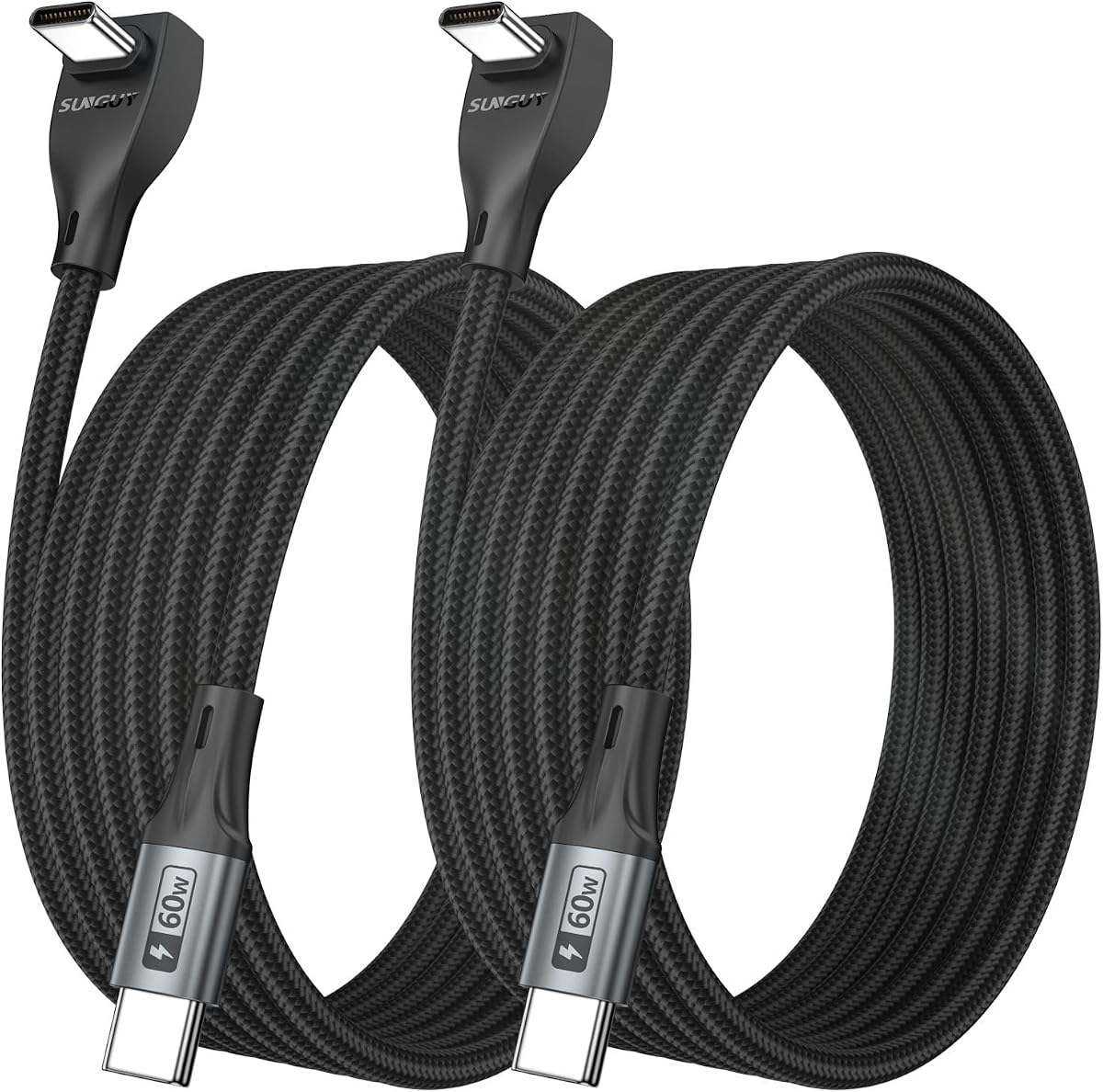
The SUNGUY Right Angle USB C to USB C Cable 3FT 2Pack 60W Fast Charging has a 4.5 rating and delivers a useful balance of compact size, 60W charging, and two-cable convenience. It is a particularly accessible choice for users who want the right-angle benefit without carrying a long cable.
We may earn a commission when you buy through this link, at no additional cost to you.
SUNGUY highlights gaming, couch-side charging, bedside use, and tight spaces as natural applications for the 90-degree form. The low-profile connector can sit more comfortably against a device and leave the cable out of the way during play or viewing. The nylon braid, aluminum-alloy housing, and pure-copper wire are supported by a stated test of more than 30,000 times, while built-in overcurrent, short-circuit, overvoltage, and temperature protections add useful safeguards.
The cable supports charging up to 60 watts and data transfer up to 480Mbps, but it is explicitly intended for charging and data transfer rather than video output. Consequently, it should not be selected for a monitor or projector arrangement that depends on DisplayPort Alternate Mode. Three feet is also less useful when the outlet is behind furniture, across a large desk, or on the opposite side of a room.
This is an attractive selection for gaming phones, bedside charging, car interiors, and compact workspaces. The two-pack can cover multiple locations, while the short length reduces bulk and tangling. Buyers needing longer reach, higher laptop charging power, or video functionality should compare the other options carefully, but for a small right-angle cable with broad everyday features, this SUNGUY model is especially well matched to the request.
The right-angle connector redirects the cable away from the user's hand, which can make portrait gaming, app use, reading, and video viewing more comfortable. It also reduces the amount of connector movement created when a device is lifted or repositioned.
Overcurrent, short-circuit, overvoltage, and overtemperature protection form a useful safety layer. These controls work alongside the compatible charger and should not be viewed as a substitute for using a certified or reputable power supply.
We may earn a commission when you buy through this link, at no additional cost to you.
The USB to USB C Cable 3.3ft, 60W Fast Charging, Right Angle USB A to USB C has a 4.4 rating and brings fast-charging protocol support to a USB-A-to-USB-C design. This makes it a flexible option for users who have a mix of USB-C devices and wall adapters that still use rectangular USB-A ports.
We may earn a commission when you buy through this link, at no additional cost to you.
The product states support for PD 3.0, QC 4.0, and PPS 2.0, with charging up to 60 watts when paired with a compatible 30-, 45-, or 60-watt Type-C power-delivery adapter. Data transfer reaches 480Mbps. Its right-angle USB-C end is designed to reduce strain during gaming, reading, and video viewing, while the nylon braid and stated 175-pound tensile strength support regular use.
There are two meaningful qualifications. First, a 60W rating over USB-A does not mean the cable can deliver 60W from every USB-A charger; the adapter and device must support the required protocols. Second, the product information specifically says that the cable does not support CarPlay when charging compatible iPhone series. It also remains limited to USB-C devices and cannot replace a Lightning cable.
Choose this model for a mixed-device household that needs a short right-angle lead for USB-A charging and occasional data synchronization. Its protocol list and stated charging ceiling are more ambitious than many basic USB-A cables. For newer USB-C-to-USB-C laptop setups, the equal-length alternatives offer a cleaner connection, but for existing USB-A power blocks this is a capable and thoughtfully constructed choice.
PD 3.0, QC 4.0, and PPS 2.0 cover several widely used fast-charging methods. This makes the cable more adaptable than a basic USB-A lead, provided the wall adapter and connected device support the same protocol.
The angled device-side connector changes the direction of the cable immediately above the port. That can reduce repeated sharp bends and make the connection more comfortable when a phone is held, mounted, or used in landscape orientation.
We may earn a commission when you buy through this link, at no additional cost to you.
The SUNGUY Right Angle USB C Cable 2Pack 10FT, 60W Fast Charging Type C Cord has a 4.6 rating and stands out for its generous ten-foot length. It is designed for situations where the charging source is far from the device, such as a wall outlet behind a sofa, a vehicle console, a standing desk, or a room where a shorter cable would not reach.
We may earn a commission when you buy through this link, at no additional cost to you.
The 90-degree connector adds value in those same environments. SUNGUY specifically highlights compatibility with a vehicle storage-compartment charging port, where the angled form can sit neatly without being sharply bent or crushed by a compartment lid. It can also reduce interference around phone stands and keep the cable aligned in narrow setups. The cable supports up to 60 watts and data transfer up to 480Mbps, with braided nylon, aluminum-alloy components, and pure-copper wire.
The product does not support video output to monitors, projectors, or similar equipment, and its 60W ceiling is lower than the 240W offered by the Anker model. A ten-foot cable also requires more deliberate coiling and storage than a three-foot version. Despite those limitations, the extended reach and two-cable bundle are meaningful advantages for people who need placement flexibility.
This is the right choice for travel, vehicles, larger rooms, and charging setups where the outlet is inconveniently distant. It may be less attractive for a carry-on or pocket, where a shorter cable is more convenient. For users who prioritize reach without needing display connectivity, it combines a practical angled connector with solid charging and data features.
Ten feet gives a device much more positioning freedom than a compact three- or 3.3-foot cable. That can be valuable when furniture blocks access to an outlet, when a device is used while moving around a room, or when charging from a power bank placed at a distance.
The angled connector is especially appropriate where vertical clearance is limited. Its shape can keep the cable from projecting outward at a sharp angle, which may improve the appearance and organization of a vehicle or mounted-device setup.
We may earn a commission when you buy through this link, at no additional cost to you.
The UGREEN USB A to USB C Cable 90-Degree Fast Charging Cable, 1.6ft has a 4.6 rating and focuses on portability. At just 1.6 feet, it is the shortest option in the guide, making it well suited to a pocket, small bag, travel pouch, or a charging station that is always close to the device.
We may earn a commission when you buy through this link, at no additional cost to you.
The right-angle USB-C connector is intended to improve comfort while charging, while the USB-A end keeps compatibility with common wall adapters. Charging is rated at up to 18 watts, and data synchronization reaches 480Mbps. UGREEN reports more than 20,000 bending tests and 3,000 plug-and-unplug tests, providing a more concrete durability statement than many competing product descriptions.
Its limits are straightforward. The 18W charging ceiling is suitable for many phones and smaller USB-C devices but not for demanding modern laptops. The right-angle connector also requires care with case design: UGREEN states that the maximum allowable case thickness is 0.08 inch, or 2 millimeters. Video transmission is not supported. Buyers should also confirm the orientation of the fixed USB-A plug, as its direction cannot be reversed.
This cable is best for everyday phone charging, travel, and locations where a short lead is more convenient than a long one. Its 4.6 rating, broad compatibility, and documented testing make it a dependable compact option, although the AINOPE and SUNGUY choices offer more room for charging power and cable length. It fills the niche for users who value a minimal footprint over maximum charging capability.
A 1.6-foot lead is easy to carry and less likely to tangle. It works well for a phone kept beside a charger, a hotel nightstand, or a desk where the wall adapter is already within easy reach.
The stated 2-millimeter maximum thickness is the most important fit detail. A thick protective case may prevent the angled housing from seating fully, which can also compromise the stability of the connection.
We may earn a commission when you buy through this link, at no additional cost to you.
The SUNGUY Right Angle USB C Cable 2Pack 3.3FT, 60W Fast Charging Type C Cord has a 4.6 rating and offers a balanced combination of moderate length, 60W charging, and two included cables. It is a versatile choice for users who want enough reach for a stand or couch without dealing with a ten-foot lead.
We may earn a commission when you buy through this link, at no additional cost to you.
SUNGUY identifies gaming, vehicle compartments, and phone stands as major use cases. The 90-degree elbow keeps the cable aligned while a device is mounted or handled and can sit more neatly in constrained spaces. The braided nylon exterior, aluminum-alloy housing, pure-copper wire, and more than 30,000 stated tests support the product's durability claims. Overcurrent, short-circuit, overvoltage, and overtemperature protection are also listed.
The cable is intended for charging and data transfer up to 480Mbps, not for video output to displays or projectors. Its 60W maximum is appropriate for many mainstream devices but below what some recent laptops require. As always, the connected charger must support the appropriate power-delivery profile, and the device must be designed to accept that level of input.
This is a strong general-purpose recommendation for a phone, tablet, handheld gaming device, or compact computer setup. The two-cable bundle makes it particularly convenient for separating a home cable from a travel or work cable. Buyers prioritizing maximum charging wattage should choose the Anker option, while those needing greater reach can consider the ten-foot SUNGUY version.
A right-angle connector sits naturally when a phone is placed in a stand, which helps avoid the lateral push created by a straight plug. The same geometry is useful for handheld gaming because the cable does not project directly into the user's grip.
The two-pack provides enough cable to place one in a permanent charging location and another in a bag. It also allows two compatible devices to have their own right-angle cable without repeatedly sharing one connector.
We may earn a commission when you buy through this link, at no additional cost to you.
The AINOPE USB C to USB C Cable 10FT 2Pack 60W Type C Cable Righe Angle for iPhone 16 Pro Max Charger Fast Charging Long Charger Cord Cable 10FT Compatible with iPhone 16 MacBook iPad Pro Airpods Pixel has a 4.6 rating and offers an extended USB-C-to-USB-C reach with a 60W charging specification. It is well suited to larger rooms, travel, and charging arrangements where a short cable cannot reach the available power source.
We may earn a commission when you buy through this link, at no additional cost to you.
The 90-degree L-shaped connector is designed to reduce bending at the cable end and improve comfort while gaming, watching video, or reading. AINOPE states that the reinforced connector, special joint, laser-welded metal connection, and braided construction can withstand 40,000 laboratory bends, while the cable is rated for tensile strength up to 175 pounds. PD 3.0 and QC 3.0 support make it broadly relevant to compatible USB-C devices.
The maximum charging output is 60W, below the Anker cable's 240W, and actual performance depends on the adapter and device. A ten-foot cable is also less convenient to carry than the three-foot options and requires proper coiling to avoid tangles. Product compatibility is broad but not universal, so buyers should verify the connector and power requirements of every device they intend to use.
This cable is a good fit for users who prioritize reach and multipack convenience over minimum size. It works well for a phone or tablet across a room, for travel, and for people who want a spare at home and in a vehicle. It also supports data transfer up to 480Mbps, although it is not the appropriate choice for a user who needs a 240W-class cable for a high-power laptop.
A ten-foot cable can connect a phone or tablet to an outlet that is several feet away, reducing the need to remain close to a wall or sit directly beside the charger. The extra length is especially useful when furniture and stands create awkward cable runs.
The angled connector is the cable's most likely stress point, so AINOPE's reinforced joint and laser-welded metal construction are meaningful features. The 40,000-bend laboratory claim provides a useful durability indicator without guaranteeing a particular service life for every user.
We may earn a commission when you buy through this link, at no additional cost to you.
The best right-angle USB-C cable depends on connector compatibility, charging requirements, length, data needs, case fit, and the places where it will be used. Reviewing these factors before purchasing helps prevent a cable that looks convenient from becoming incompatible or frustrating in daily use.
The term USB-C cable can describe either USB-C-to-USB-C or USB-A-to-USB-C products. A USB-C-to-USB-C cable plugs into USB-C ports on both ends and works directly with many modern phone, tablet, and laptop chargers. A USB-A-to-USB-C cable has a rectangular USB-A plug for the charger and a USB-C plug for the device, making it useful with older wall adapters and many power banks. The right-angle feature is usually found at the device-side USB-C connector, so the entire cable should be checked before ordering.
In short, match the wall-side connector to your charger and the device-side connector to your device. Do not assume every product in a USB-C roundup can connect to the same adapter.
Charging capacity is expressed in watts, and higher numbers are not automatically better for every device. The cable's maximum rating must be supported by the power adapter, and the device must accept the relevant voltage and current. A 60W cable is useful for many phones, tablets, and smaller computers, while a cable advertised for 240W offers additional headroom for demanding modern laptops. A cable cannot overcome the limits of a low-output charger, and a device will normally draw only the power it was designed to accept.
In short, consider both the device's charging requirement and the adapter's output. Choose a higher-capacity cable for a high-power computer and a standard fast-charging cable for typical phone charging.
Length determines how much freedom the connected device has. A 1.6-foot cable is easiest to carry and works well beside a charger, while a 3.3-foot cable is more versatile for desks, couches, and phone stands. A 6.6-foot cable can reach across larger furniture or from a more distant outlet. Ten-foot cables are useful in vehicles, large rooms, and travel situations but are bulkier and require careful coiling. The best length is the shortest one that comfortably reaches the intended charging location.
In short, measure the actual distance from the outlet or power bank to the device. A longer cable is helpful only when that additional reach solves a real placement problem.
For USB-C-to-USB-C cables, the relevant standards include USB Power Delivery, USB-C PD, and protocols such as QC and PPS. Compatibility must exist on the cable, charger, and device. A cable may carry 60 watts on one protocol but provide reduced performance on another, so a matching protocol list is useful when using a particular charger. USB-A cables have additional limitations because the legacy connector and adapter determine what power is physically available.
In short, identify the charging protocol supported by the adapter and confirm that the cable supports it. This prevents a cable from appearing compatible while delivering only basic charging speeds.
Durability matters most at the point where the cable meets the connector, especially for an angled design. Look for braided jackets, reinforced strain relief, laser-welded or similarly reinforced metal connections, and a stated bend-test figure. A high bend count indicates laboratory endurance rather than a guaranteed lifespan, but it still provides a useful basis for comparison. Also note whether the right-angle housing is larger than a straight connector, since additional bulk can affect case compatibility.
In short, favor a braided cable with a reinforced elbow and documented testing. Avoid judging durability by appearance alone, and compare the connector size with the device's case opening.
A right-angle connector is intended to sit more closely to a device, but its shape and thickness can prevent it from entering a heavily protected case. The product information gives useful limits for several options: Anker describes compatibility with cases up to 3 millimeters thick, AINOPE's USB-A model states a 5.5-millimeter limit, and UGREEN specifies a maximum of 2 millimeters for its compact cable. These are manufacturer-stated allowances and should be checked against the exact case and device combination.
In short, compare the connector's stated thickness limit with the case design. If the allowance is uncertain, a case with an open charging-port cutout offers the safest fit.
Charging capability does not guarantee that a cable can transfer files or display a video. Several products explicitly support data synchronization at up to 480Mbps, which is suitable for routine file transfers, but the same products may exclude video output to monitors, projectors, and similar displays. Video requires compatible USB-C ports, the correct Alternate Mode support, and a cable designed for that function. A phone used for Android Auto or CarPlay also has platform-specific requirements that should be checked before purchase.
In short, treat charging, data transfer, and video output as separate capabilities. Read the exclusions and device requirements rather than assuming all USB-C cables perform the same function.
A multipack can be more useful than one extra-long cable because it allows the same connector and length to be kept in several locations. Two-pack options are common in this guide, making it easy to maintain separate setups at home, work, in a car, and in a travel bag. Warranty duration and customer-support terms can also help distinguish otherwise similar products, although none of the cables include a wall charger. The power adapter must be sourced separately unless it is already included with the device.
In short, consider where separate cables would be most useful, then compare multipack convenience against the need for a different length. Always verify that a suitable charger is already available.
Connect the straight wall-side plug to a compatible power adapter or host device first, then insert the right-angle USB-C connector into the device. The angled end should feel fully seated without force. If it does not fit, check the connector type, inspect the port for debris, and verify that the device's case leaves enough clearance for the larger right-angle housing. Never force the plug into a port that appears obstructed.
To protect the cable, hold the connector housing rather than pulling the cable itself when unplugging. Avoid sharply folding the wire immediately behind the elbow, and do not wrap the cable tightly around a charger or place it under furniture where it can be crushed. When storing a longer cable, loosely coil it and use a soft tie or a dedicated cable organizer. A breathable pouch is preferable to a tight plastic bag for long-term storage.
For the best charging experience, use an adapter and device that support the cable's stated protocols and wattage. Keep charging connectors clean and dry, inspect the jacket for cracks or exposed conductors, and retire a cable that has visible damage. If a connection becomes intermittent, test the setup with another cable and outlet before assuming the device is faulty. These practices help preserve both charging performance and connector longevity.
A 90-degree USB-C cable has an angled connector that changes the direction of the cable where it enters the device. This can make charging more comfortable during gaming or viewing and may reduce sideways strain on the port. A straight cable is often smaller and may fit more easily in unusually thick cases.
No. Some terminate in USB-C on both ends, while others use USB-A on the charger side and USB-C on the device side. Check both connector types and the orientation of the angled end before ordering, especially if your power adapter or power bank only has a USB-A port.
It depends on the cable's power rating, the laptop's charging requirements, and the wall adapter. The Anker option in this guide advertises up to 240 watts, while several alternatives support up to 60 watts. A higher-rated cable cannot force a laptop to charge faster if the device or adapter has a lower limit.
It depends on the case and connector design. Right-angle housings can be deeper than straight plugs, and manufacturer-stated limits differ among the cables reviewed. Compare the case's charging-port opening with the connector's published thickness allowance, and avoid heavy or bulky cases when compatibility is uncertain.
No. Several cables in this guide are explicitly limited to charging and data transfer and do not support video output. For monitor or projector use, confirm that both the source device and display support the required USB-C video mode and that the cable itself is designed for that function.
Coil it loosely and avoid creating a tight bend directly behind the connector. Keep it away from heat, moisture, and crushing pressure, and use a pouch or organizer that does not compress the elbow. Pulling the plug by the reinforced housing rather than the wire also reduces strain on the most vulnerable area.
The cable may be delivering power correctly but be limited by the wall adapter, device, charging protocol, thermal conditions, or port. A cable also cannot exceed the output of the charger it is connected to. Test with a known-compatible adapter and confirm that both support the protocol and wattage listed for the cable.
No. Length is useful only when it solves a reach or placement problem. Longer cables are harder to organize and carry, while shorter options are easier to use beside a desk, charger, or nightstand. The most practical length is the shortest one that comfortably reaches the intended location.
The Anker 240W Right-Angle Cable is the strongest all-around choice because it combines substantial charging headroom, a useful six-foot length, braided construction, and a two-cable bundle. AINOPE's 6.6-foot 60W model stands out for its higher customer rating, extensive bend-test claim, and strong protocol support, while SUNGUY's three-foot 60W two-pack provides a compact and practical everyday option.
Prioritize connector type before any other feature. USB-C-to-USB-C is the most relevant for newer laptops and modern charging setups, while USB-A-to-USB-C remains valuable when the available adapter is older. From there, match the wattage to the device, choose a length that solves the placement problem, confirm case clearance, and check whether data transfer or video output is required.
Finally, review the current listing details and device requirements before ordering, as product specifications and compatibility information can change. A right-angle cable is most valuable when it makes charging more comfortable, protects the port from repeated sideways pulls, and fits naturally into the places where a device is actually used.