SABRENT EC-PNVO
4.5Editor score
10Gbps USB-C interface
Tool-free drive installation
Four M.2 size support
Our expert NVME Enclosures for Mac guide compares 10 leading models for speed, cooling, portability, capacity, ease of use, and Mac compatibility.
An NVMe enclosure turns a compatible M.2 solid-state drive into portable external storage for a Mac. The best choice depends on more than headline transfer speed: your Mac’s ports, drive protocol, cooling needs, capacity, and workflow all matter when choosing between everyday USB-C models and Thunderbolt or USB4 enclosures.
We compared ten enclosures based on the supplied specifications, including interface speed, supported SSD formats and sizes, cooling design, installation method, portability, host compatibility, and maximum drive capacity. The list covers budget 10Gbps options through premium 40Gbps and 80Gbps models intended for demanding creative and professional workloads.
Each recommendation identifies where the enclosure stands out, where its requirements may cause limitations, and the kind of Mac user it suits best. Product availability, specifications, and prices can change, so confirm the enclosure and your Mac ports before purchasing, especially when pursuing the highest transfer rates.
4.5Editor score

4.4Editor score

4.5Editor score
The comparison below organizes all ten enclosures by interface class, cooling approach, SSD compatibility, capacity ceiling, and installation style, making it easier to match a drive to a Mac and workflow.

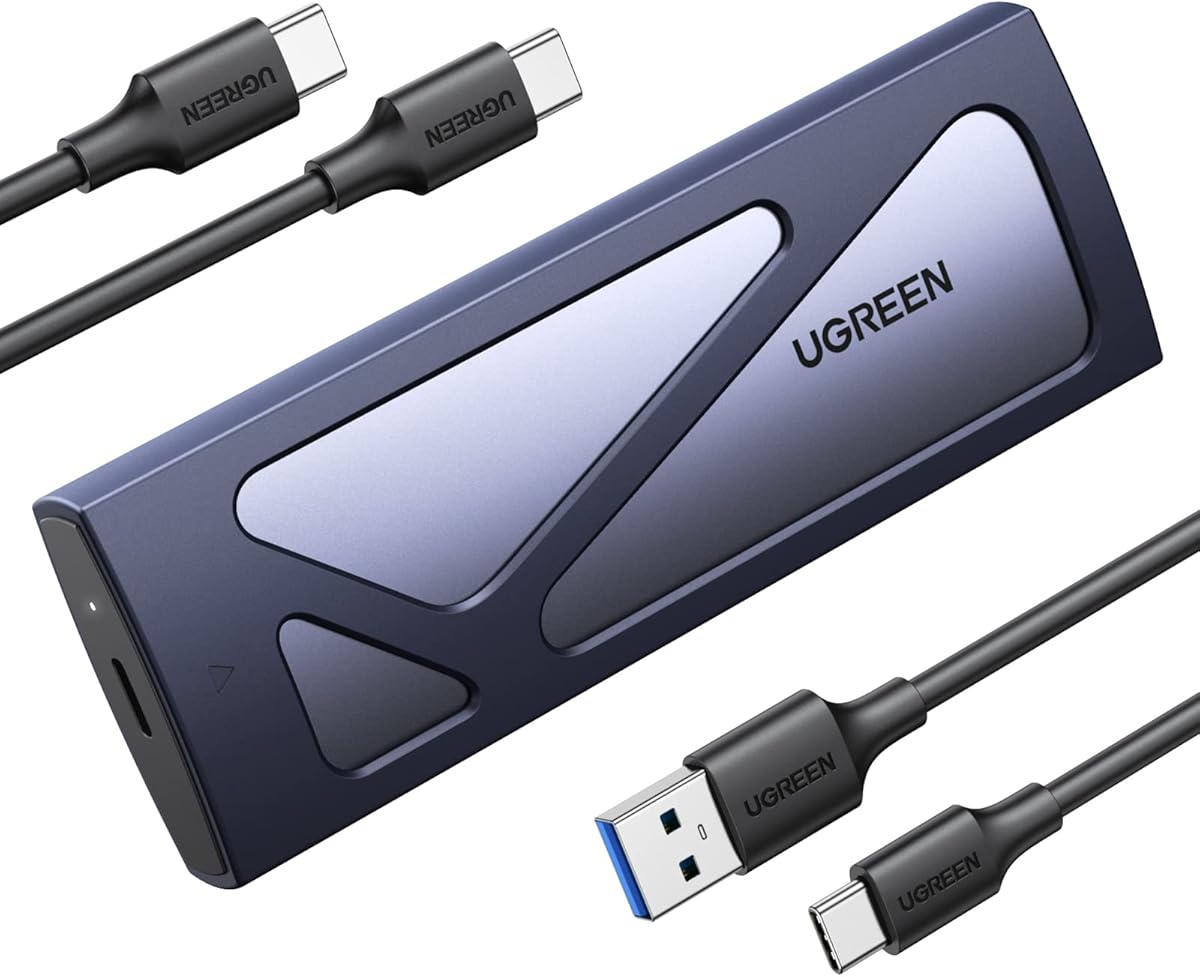


The UGREEN 40Gbps M.2 NVMe Enclosure is a high-speed USB4 storage option that combines a compact aluminum body with a claimed maximum transfer rate of 3600MB/s. Its standout qualities are the ASM2464PD controller, broad interface compatibility, and a passive cooling design intended to maintain performance without a fan.
We may earn a commission when you buy through this link, at no additional cost to you.
The enclosure can use USB4, USB 3.2, USB 3.1, USB 3.0, USB 2.0, Thunderbolt 3, and Thunderbolt 4 connections. Achieving the maximum stated speed requires Thunderbolt 4 cables and compatible devices. Internally, it accepts 2230, 2242, 2260, and 2280 NVMe drives, with support for capacities up to 8TB.
Its double-sided fin structure and three-dimensional cooling system are intended to improve heat dissipation compared with a basic enclosure. That passive approach avoids fan noise, although very long or sustained transfers still depend on the drive, Mac, ambient conditions, and thermal pad contact. The enclosure does not support SATA NGFF or mSATA drives.
This is a strong choice for Mac users who want USB4-level performance without moving to the highest-cost 80Gbps category. It is especially useful for large project files, backups, and scratch storage when the Mac has a suitable Thunderbolt port. Buyers who only have basic USB-C connections should expect lower real-world throughput, but the backward compatibility makes the enclosure versatile.
The 40Gbps interface makes this enclosure appropriate for large media libraries, compressed video files, and fast working sets. Thunderbolt 3 and 4 hosts can exploit its high-speed path, while older USB ports remain usable at their own limits.
Double-sided fins and a three-dimensional thermal structure provide a quieter alternative to actively cooled designs. The aluminum enclosure also helps move heat away from the drive, making it suitable for travel and shared workspaces.
We may earn a commission when you buy through this link, at no additional cost to you.
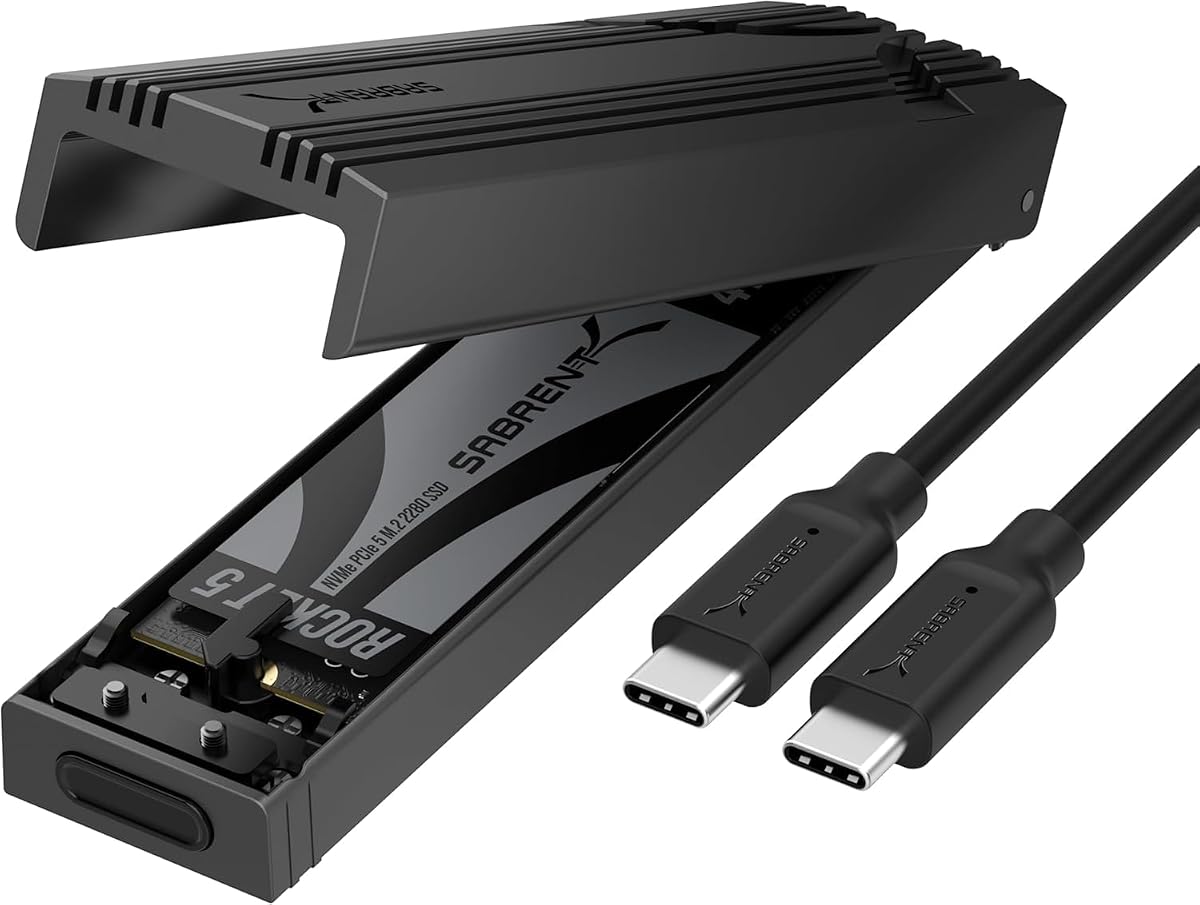
The SABRENT EC-PNVO is an affordable, straightforward way to add removable NVMe storage to a Mac. It uses USB 3.2 Gen 2 at up to 10Gbps and distinguishes itself with a flip-open, tool-free design that makes changing drives fast and uncomplicated.
We may earn a commission when you buy through this link, at no additional cost to you.
Installation starts by opening the cover, placing an NVMe drive in the connector, locking it in position, and closing the enclosure. The design supports 2230, 2242, 2260, and 2280 NVMe SSDs up to at least 8TB. It is bus-powered and plug-and-play, with no external power supply or driver installation required.
Its aluminum housing and reinforced ABS frame provide structure, while a thermal pad presses against the SSD to improve heat transfer. The trade-off is interface speed: a 10Gbps enclosure cannot approach the throughput of USB4 or Thunderbolt models. M.2 SATA drives are also unsupported, so buyers must verify that their drive uses NVMe.
This is an excellent choice for everyday document storage, photo transfers, school projects, and lightweight backups where simplicity matters more than maximum throughput. It also suits users who want to move between several compatible NVMe drives without carrying a screwdriver. For high-resolution video editing or large compressed media, a faster USB4 enclosure would be more appropriate.
The hinged cover and locking mechanism remove the most tedious part of installing an M.2 drive. This makes the EC-PNVO practical for quickly swapping between an active work drive and a secondary library.
USB-C plug-and-play operation reduces setup friction across laptops and desktops. The enclosure is bus-powered, making it particularly convenient for working away from a wall outlet or moving between locations.
We may earn a commission when you buy through this link, at no additional cost to you.
The UGREEN USB-C M.2 NVMe SSD Enclosure offers a balanced mix of portability, ease of use, and everyday performance. It supports up to 10Gbps through USB 3.2 Gen 2 and uses an aluminum body with an included silicone case for protection during travel.
We may earn a commission when you buy through this link, at no additional cost to you.
A tool-free buckle secures drives in sizes from 2230 through 2280, with support for capacities up to 8TB. The RTL9210 controller includes short-circuit, over-current, and other protection features, while UASP and Trim support help maintain efficient transfers and drive management.
The supplied information lists compatibility with Windows, macOS, Linux, Android, and iOS. As with most 10Gbps enclosures, reaching the full interface rate requires a USB-C 3.2 Gen 2 data cable. SATA NGFF and mSATA drives are excluded, reducing ambiguity for buyers who already own suitable NVMe media.
This enclosure fits users who want a dependable secondary drive for backups, personal files, and general creative work without requiring Thunderbolt hardware. Its compact shell and protective case make it easy to carry. Those who routinely move multi-gigabyte compressed video files would benefit from the greater bandwidth of a 40Gbps USB4 model.
The slim aluminum enclosure is paired with a silicone case that adds protection during transport. It offers a practical way to carry a separate NVMe drive without treating the drive as a permanently installed internal component.
Support for major desktop and mobile operating systems makes the enclosure useful beyond a single Mac setup. The combination of UASP, Trim, and controller protections also supports practical daily operation.
We may earn a commission when you buy through this link, at no additional cost to you.
The UGREEN 80Gbps M.2 NVMe SSD Enclosure is designed for Mac and PC users who need the highest interface bandwidth in this roundup. Its dual-chip architecture combines an Intel JHL9480 Thunderbolt controller with a JMicron JMS583 bridge controller and supports speeds up to 7000MB/s.
We may earn a commission when you buy through this link, at no additional cost to you.
Thermal management is handled by a three-dimensional design with dual-sided aluminum alloy fins. The supplied information states that this structure increases heat dissipation by 91% and reduces surface temperatures by 10%. The enclosure accepts 2230, 2242, 2260, and 2280 NVMe drives up to 8TB.
Compatibility extends to Windows, macOS, Linux, and Android, though actual speed depends heavily on the Mac, port, cable, SSD, and workload. SATA and mSATA drives are not supported. SSDs with pre-installed heatsinks are also excluded, and some thicker drives may require a thinner thermal pad.
This enclosure makes the most sense for users with recent high-speed USB4 or Thunderbolt hardware and workflows involving large, continuously transferred files. It is overkill for routine document storage and may deliver little benefit on Macs limited to 10Gbps USB-C. Its strengths justify inclusion for creators, engineers, and power users who prioritize throughput.
Using separate Intel and JMicron controllers gives this enclosure a specialized architecture for high-bandwidth storage. It is aimed at workflows where reducing transfer time matters more than minimizing cost or physical size.
Biomimetic fins on both sides and a carefully shaped airflow structure help dissipate heat. The approach preserves portability without adding an active fan, although drive fit and thermal pad selection remain important.
We may earn a commission when you buy through this link, at no additional cost to you.
The ACASIS TBU405 Pro is a well-balanced 40Gbps enclosure that stands out for its active cooling and broad Thunderbolt support. The Intel JHL7440 controller enables USB4 performance while retaining compatibility with Thunderbolt 4, Thunderbolt 3, and lower-speed USB standards.
We may earn a commission when you buy through this link, at no additional cost to you.
Unlike passive designs, it includes a built-in fan and precision-engineered ventilation holes. The fan is activated with a switch and is intended to reduce thermal throttling during sustained transfers. The enclosure supports 2280, 2260, 2242, and 2230 drives and is designed for M1, M2, and M3 Pro and Max Macs.
The supplied specifications list tested read and write rates of up to 2805MB/s and 2734MB/s with a Samsung 980 Pro on a MacBook. Results will vary with the SSD, host, file size, and thermal state. Its 40Gbps interface and active cooling make it a strong middle ground between basic 10Gbps enclosures and the highest-bandwidth 80Gbps models.
This is the recommendation for creative professionals, editors, and developers who regularly transfer large files and want Thunderbolt-class performance with explicit cooling control. It is also suitable for storage-heavy MacBook workflows. Users with only basic USB-C ports can still connect it, though they will not receive the advertised high-speed performance.
The integrated fan gives users direct control over cooling when long transfers or repeated writes generate heat. This is a meaningful advantage for fast SSDs used in demanding editing or backup workflows.
Thunderbolt 3 and 4 support makes the enclosure well suited to compatible MacBook and Mac Studio systems. Backward compatibility with USB 3.2, 3.1, and 3.0 broadens its usability across other hosts.
We may earn a commission when you buy through this link, at no additional cost to you.
The SABRENT EC-SNVE stands apart from most NVMe-only enclosures by supporting both M.2 PCIe NVMe and M.2 SATA SSDs. It uses USB 3.2 Type-C at up to 10Gbps, making it a practical option for Mac users who may already own different generations of M.2 drives.
We may earn a commission when you buy through this link, at no additional cost to you.
Its tool-free installation lets the SSD slide into place without a screwdriver. The enclosure supports 2242, 2260, and 2280 lengths. Because it accepts both protocols, it offers useful flexibility, but it cannot take 2.5-inch SATA drives or mSATA modules, and bare drives are required because there is no room for a pre-installed heatsink.
A thermal pad transfers heat away from the drive, while the slim aluminum shell and ABS frame keep the enclosure light. It is bus-powered, includes an eight-inch Type-C-to-Type-C cable, and works with Windows 7 or later, macOS 10.5 or later, and Linux without additional drivers.
Choose the EC-SNVE when protocol flexibility is more important than maximum speed. It can serve as an everyday work drive, a system for migrating files from SATA M.2 media, or a general-purpose backup enclosure. Users handling large 4K or 8K video should look toward USB4, while those with only NVMe drives may prefer a model with broader size support.
Supporting NVMe and SATA removes the need to identify the protocol before selecting a compatible case. That makes the EC-SNVE useful for mixed drive collections and straightforward system migrations.
The included cable and tool-free construction simplify the first connection. Bus power also means the enclosure can operate without a separate power adapter beside a Mac.
We may earn a commission when you buy through this link, at no additional cost to you.
The SABRENT EC-U4TN combines USB4 transfer performance with an integrated active cooling fan, making it a strong option for Mac users who work with large files. Its stated performance reaches 3900MB/s over USB4 and 2700MB/s over Thunderbolt 3 or 4.
We may earn a commission when you buy through this link, at no additional cost to you.
The enclosure accepts PCIe NVMe drives in 2230, 2242, 2260, and 2280 sizes. Tool-free installation allows the SSD to be inserted or removed without tools. Backward compatibility with USB-C connections at 20Gbps, 10Gbps, and 5Gbps allows use on more systems, although lower host connections naturally reduce throughput.
Its aluminum and ABS construction works with the active fan to manage heat during large transfers. Host compatibility covers Thunderbolt 3, Thunderbolt 4, USB4, and USB-C ports on Windows and macOS. No external power or drivers are required, which keeps the enclosure convenient for portable professional use.
This model is best for editors, photographers, and developers who need high throughput and predictable cooling without moving to an 80Gbps enclosure. It is optimized for PCIe Gen4 x4 SSDs, including the Sabrent Rocket 4 Plus. Mac users should verify that their computer and cable support the appropriate high-speed interface before expecting the stated maximum transfer rate.
USB4, Thunderbolt 3, and Thunderbolt 4 support make the enclosure adaptable to current and recent Mac workflows. Wider USB-C backward compatibility is useful when moving between high-speed and ordinary connections.
The integrated fan is a major advantage for sustained transfers with fast PCIe Gen4 drives. It helps maintain performance while the enclosure travels with the Mac.
We may earn a commission when you buy through this link, at no additional cost to you.
The OWC Express 1M2 is a premium 80Gbps USB4 enclosure built for demanding Mac storage workflows. It claims a peak real-world speed above 6000MB/s and combines broad platform support with a portable, upgradeable design that lets users install their own 2280 or 2242 NVMe SSD.
We may earn a commission when you buy through this link, at no additional cost to you.
The enclosure works with Macs, PCs, iPad Pros, Chromebooks, and Surface devices. It supports PCIe Gen3, Gen4, and carefully selected PCIe Gen5 NVMe SSDs, while the included USB4 cable and bus power keep it simple to connect. Its patented heat-dissipating design is designed to cool the drive silently without an active fan.
Gen5 compatibility comes with an important power caveat: sustained read or write consumption should remain at 11 watts or less because host computers, docks, and hubs have bus-power limits. A drive that exceeds that limit may perform differently depending on the connection. The enclosure is therefore less about unrestricted compatibility than intelligently matching the drive to the available power budget.
OWC’s enclosure is best suited to professionals who want near-internal-drive performance, flexible SSD selection, and a premium portable design. It is especially compelling for high-capacity storage, creative project archives, and advanced laptop workflows. The hardware requirement is meaningful: a compatible USB4 or Thunderbolt host and carefully matched SSD are essential to realize its potential.
An 80Gbps interface and more than 6000MB/s peak capability position this enclosure for large creative files and fast working sets. The result can approach the responsiveness of internal storage when the complete host-and-drive chain supports it.
The enclosure accepts user-selected 2242 or 2280 NVMe drives rather than locking users to one included configuration. That flexibility makes it easier to change capacity or performance as storage needs evolve.
We may earn a commission when you buy through this link, at no additional cost to you.
The Satechi USB4 Slim NVMe SSD Enclosure combines high-speed storage with a restrained, Mac-oriented industrial design. It supports up to 40Gbps and lists read speeds of up to 3840MB/s and write speeds of up to 3200MB/s based on internal testing.
We may earn a commission when you buy through this link, at no additional cost to you.
The enclosure accepts 2230, 2242, 2260, and 2280 NVMe drives up to 8TB. Cooling vents and a thermal pad help manage heat and reduce the likelihood of thermal throttling. It works with Mac Mini M4 systems, MacBooks, iPads, PCs, Thunderbolt 5, Thunderbolt 4, Thunderbolt 3, and USB4 hosts without external power or additional drivers.
Its most distinctive feature is the slim 16mm profile, which closely resembles the dimensions of the M4 Mac Mini. A hidden cable compartment keeps the braided cable organized, and the enclosure weighs 197 grams. Installation differs from many competitors because a screw, screwdriver, and thermal pad are included for securing the drive.
This is a compelling choice for a minimalist desk setup or portable creative workstation where aesthetics and organization matter. Its main practical limitation is the included 15-centimeter host cable, which may be too short for some desk arrangements. A longer USB4 cable is recommended for more flexible positioning. Actual transfer performance also depends on the Mac, cable, SSD, and usage conditions.
The enclosure mirrors the compact proportions of the M4 Mac Mini and keeps its cable tucked away when not in use. These details make it particularly appealing on an uncluttered desktop.
Support for up to 8TB drives and current Thunderbolt generations provides useful flexibility. The enclosure works equally well as a high-speed backup destination, media store, or working drive.
We may earn a commission when you buy through this link, at no additional cost to you.
The Satechi USB4 NVMe SSD Pro Enclosure is designed for Mac users who want a portable drive with substantial capacity. It supports NVMe SSDs up to 16TB across 2230, 2242, 2260, and 2280 sizes, while its USB4 interface provides up to 40Gbps bandwidth.
We may earn a commission when you buy through this link, at no additional cost to you.
The enclosure supports PCIe Gen4 x4 configurations and lists read speeds up to 3840MB/s. It is compatible with Mac, Windows, and Linux systems and can operate over USB4 as well as backward-compatible USB 3.2 Gen2, USB 3.2 Gen1, and USB 2.0 connections, with each link limited by its own speed.
Its polycarbonate casing is designed to dissipate heat during transfers, and the package includes a thermal pad, silicone installation pin, clear case, and 15-centimeter USB4 cable. The silicone pin supports tool-free handling, while the compact dimensions make the enclosure easy to carry. It does not require extra drivers.
This is a strong recommendation for users who want to carry a large, swappable storage volume rather than the smallest possible enclosure. It suits backup archives, photo libraries, project media, and other high-volume needs. Users wanting maximum speed should still verify that their Mac supports USB4 or a comparable high-bandwidth interface. The included short cable may also be less convenient in some desk arrangements.
Support for drives up to 16TB makes the enclosure relevant to photographers, filmmakers, and archivists who need more room than a typical personal SSD provides. Swapping drives also allows multiple storage sets to share one enclosure.
The included silicone pin simplifies installation without requiring a dedicated mounting tool. The enclosure remains compact despite accommodating large NVMe capacities and standard 2280 lengths.
We may earn a commission when you buy through this link, at no additional cost to you.
The right enclosure depends on your Mac’s ports, the SSD protocol and size you own, the amount of data you move, and how long transfers run. Start with interface capability, then narrow the field by cooling, capacity, installation, and portability.
Choose 10Gbps for routine files and 40Gbps or 80Gbps for demanding creative workflows.
Verify NVMe or SATA before purchasing, and choose a dual-protocol case if you own both.
Match the enclosure to your drive’s exact dimensions and leave room for cooling hardware.
Use passive cooling for typical transfers and active cooling for prolonged writes.
Choose capacity based on your media library and decide whether removable or fixed storage fits.
Prioritize tool-free insertion when you change drives frequently or work on the move.
Balance durability, weight, cable length, and accessory quality for your workspace.
Choose a drive whose sustained power needs fit within the host’s bus-power limits.
Before inserting a drive, confirm that it uses the supported M.2 protocol and physical size. Open the cover or release the retention mechanism, align the connector correctly, and secure the SSD without forcing it. For models with thermal pads, ensure the pad sits flat and does not fold. Reassemble the enclosure fully before connecting it to the Mac.
Format the drive using the file system and partition scheme appropriate for your workflow and macOS configuration. The enclosure should appear as an external volume once connected. Safely eject it before unplugging, especially during active transfers, and avoid pulling the cable or drive while the enclosure is mounted. Do not move an enclosure between hosts while a file operation is underway.
To protect performance, keep the enclosure ventilated and avoid placing it under heavy objects or inside a closed bag during sustained transfers. Monitor the Mac for unusually slow transfers, which can indicate thermal throttling, a loose connection, an unsuitable cable, or an unsupported drive. Clean the exterior with a dry, soft cloth, and do not open the case while the drive is powered.
For 40Gbps and 80Gbps enclosures, a compatible Thunderbolt or USB4 host is generally necessary to achieve their intended transfer rates. A Mac limited to 10Gbps USB-C will connect to these products but remain limited by the slower host connection. Use a cable that supports the required interface generation and confirm that the port on the Mac offers the expected bandwidth.
No. Most of the listed products support M.2 NVMe drives only, including the UGREEN, ACASIS, OWC, and high-speed SABRENT models. The SABRENT EC-SNVE is designed to accept both M.2 NVMe and M.2 SATA drives. In every case, the drive must be a bare M.2 module, and pre-installed heatsinks may not fit.
No. These products are enclosures, so the compatible M.2 SSD is purchased separately. That separation lets you choose the capacity, interface protocol, and performance level that match your needs. Check enclosure compatibility before buying a drive, especially regarding NVMe versus SATA and the supported M.2 length.
The listed enclosures are designed for bus-powered operation, so they normally draw power through the USB connection and do not require a separate power supply. The primary exception in practice is host-imposed bus power, which can limit performance or compatibility with particularly power-hungry PCIe Gen5 SSDs. Check drive power requirements and host limitations before using a Gen5 module.
The enclosure may be connected through a slower USB-C port, a limited cable, or a hub rather than a direct Thunderbolt or USB4 connection. The SSD itself, file size, background activity, and thermal throttling can also reduce results. Large sustained transfers may be slower than short bursts because the drive and enclosure need to manage heat.
The SABRENT EC-PNVO and EC-SNVE prioritize tool-free installation, while the SABRENT EC-U4TN also offers tool-free NVMe installation. These designs make it easier to swap SSDs for different projects or storage sets. The Satechi USB4 Slim uses a screw-secured installation, which may be less convenient for frequent swaps but remains compact and straightforward.
It depends on the drive and workload. Passive aluminum designs with effective thermal pads are suitable for many ordinary transfers, while active cooling is preferable for fast SSDs during long or repeated writes. The ACASIS TBU405 Pro and SABRENT EC-U4TN include fans, whereas the OWC Express 1M2 focuses on a quiet patented passive thermal design.
Compatibility depends on the device, its port, and its operating system rather than the enclosure alone. Several products list iOS or iPad support, and some are explicitly compatible with iPad Pro models. Check the current storage support and connector requirements of the specific Apple device before purchasing, especially for a 40Gbps or 80Gbps model.
The ACASIS TBU405 Pro is the most balanced recommendation for creative and professional users because it combines 40Gbps performance, Thunderbolt support, and active cooling. The SABRENT EC-PNVO is the practical budget choice for everyday storage, while the OWC Express 1M2 offers the most premium bandwidth and advanced host compatibility in this group.
Prioritize the complete connection chain rather than the largest number on the box. Your Mac port, cable, enclosure interface, SSD capability, and thermal conditions all influence the result. Also choose a drive with the correct protocol and dimensions, and consider active cooling if your workflow involves sustained writes or large project files.
Finally, check current prices, product availability, and the latest manufacturer specifications before purchasing. Enclosure technology and Mac port support evolve quickly, and accessories such as longer USB4 cables can influence both convenience and performance. The right model is the one that meets your actual capacity needs while fitting cleanly into your Mac workflow.