
IWORKBOARD Tilting TV Wall Mount
4.6Editor score
Supports 24 to 65-inch TVs
Fits 16-inch stud spacing
Offers smooth tilting adjustment
A lightweight TV wall mount can create a clean, comfortable viewing area without demanding a complex installation. The right model balances screen support, wall compatibility, mounting depth, adjustment range, and hardware quality. These options range from fixed low-profile brackets to articulating mounts that tilt, swivel, pull forward, and retract.
We compared all 10 mounts by examining their supported screen sizes and weights, VESA ranges, wall types, installation methods, adjustment capabilities, and included accessories. The list also distinguishes studless drywall systems from conventional mounts that require wood studs, concrete, brick, or block anchors.
Each review shows what a mount does best, where its requirements may create friction, and which type of viewer it suits. Product specifications and customer ratings can change over time, so confirm your television's weight, VESA pattern, wall construction, and the current mounting instructions before purchasing.
4.6Editor score

4.8Editor score

4.5Editor score
As an Amazon Associate we earn from qualifying purchases.
The table below compares all 10 mounts by screen capacity, weight limit, VESA range, and mounting style. These details make it easier to identify a model that fits both your television and wall before considering adjustment features or installation requirements.


This Mounting Dream full-motion bracket combines a strong 4.8 rating with unusually flexible positioning. Designed for most 32- to 70-inch televisions weighing no more than 110 pounds, it offers both a 17.5-inch extension and a compact 3.4-inch retracted position, making it useful in rooms with changing seating or viewing needs.
We may earn a commission when you buy through this link, at no additional cost to you.
Its adjustment range is the defining advantage. The screen tilts up 5 degrees and down 15 degrees to reduce reflections, while lateral swivel allows viewers to redirect the television without moving the mount. Six articulating arms support the movement, and a post-installation adjustment of plus or minus 3 degrees helps correct the final level of the screen.
The mount supports VESA patterns up to 400 by 400 millimeters and is designed for standard 16-inch wood-stud spacing. That makes it a broad conventional-wall option, although it is not designed for drywall-only installation. Concrete anchors are available upon request, so buyers with masonry walls should confirm the proper hardware before installation.
This is the strongest general recommendation for viewers who want useful movement without accepting a deep fixed bracket. Choose it when you have accessible framing or masonry, a television within its weight and size limits, and a room where glare or off-axis viewing is likely. It is less suitable for renters who cannot install into studs or masonry.
Pulling the display forward and swiveling it toward the main seating area can make a large television feel better positioned in an open-plan room. The ability to retract it afterward helps preserve the room's clean appearance when the viewing arrangement changes.
Pre-labeled hardware, a paper template, clear instructions, and an Allen key storage feature reduce the organizational burden of assembly. The included leveling options are especially helpful because small alignment errors are more noticeable on larger screens.
We may earn a commission when you buy through this link, at no additional cost to you.
This tilting Mounting Dream bracket earns a 4.7 rating by combining a low 1.5-inch wall profile with support for televisions as large as 90 inches. Its 132-pound capacity and maximum 600 by 400 millimeter VESA pattern make it a practical conventional-wall choice for larger displays.
We may earn a commission when you buy through this link, at no additional cost to you.
The defining feature is controlled forward tilting up to 8 degrees. That movement can reduce glare from windows or lamps while retaining a simple fixed structure. A level and clear instructions accompany the bracket, and the manufacturer describes installation as a three-step process for eligible wall types.
Unlike many compact fixed mounts, this model supports wood-stud spacing up to 24 inches. It is still not intended for drywall-only installation, and concrete or other masonry walls may require suitable 10 by 50 millimeter anchors. The lack of lateral swivel or extension means its position is less flexible than a full-motion bracket.
This mount is best for a permanently positioned large television in a room where glare is the main viewing problem. It suits buyers who value a clean profile and broad size compatibility more than side-to-side movement. Confirm the television's VESA pattern and the wall structure before ordering.
The 1.5-inch profile keeps a television close to the wall, reducing the visual bulk often associated with larger screens. That makes this a sensible option when floor space matters but adjustable viewing position is secondary.
An eight-degree forward tilt offers a focused solution for overhead reflections. Because the bracket does not swivel, it works best where the television can be mounted high enough and angled directly toward the principal viewing area.
We may earn a commission when you buy through this link, at no additional cost to you.
The Perlegear No Drill mount has a 4.7 rating and offers a convenient alternative to conventional stud-mounted brackets. It supports most 24- to 65-inch televisions up to 100 pounds when the screen size, weight, and 100- to 400-millimeter VESA range all meet the stated requirements.
We may earn a commission when you buy through this link, at no additional cost to you.
Installation uses a wall plate secured to drywall with nails, avoiding the need to drill large holes or locate studs in every case. Included hardware also supports 8-, 12-, and 16-inch wood-stud spacing, while concrete, brick, and block walls are recommended alternatives. Cavity walls are not suitable.
The steel wall plate is described as twice as wide for strength, with anti-drop edges and pull-cord security locks. Once installed, the fixed bracket sits only 1.12 inches from the wall. Its simplicity is the main advantage, though users do not receive tilt, swivel, or extension.
This is a strong choice for renters, homeowners with suitable masonry, or anyone who wants a quick installation without large drilled openings. Be cautious in hollow drywall cavities, and check all three television compatibility requirements before purchase. A bubble level, template, and instructions support careful setup.
The nail-secured wall plate avoids the appearance of a conventional drilled bracket and can be installed without identifying a stud in every possible location. It is still important to understand the wall material and follow the supplied instructions carefully.
Pull-cord locks help prevent accidental separation from the brackets, while the wall plate's reinforced edges add stability. The result is uncomplicated for a television that will remain in one position.
We may earn a commission when you buy through this link, at no additional cost to you.
This Auoace studless hanger carries a 4.6 rating and is built around a drywall-friendly installation that avoids both studs and screws through the wall surface. Its description supports televisions from 13 to 55 inches, monitors from 13 to 35 inches, and a maximum load of 99 pounds.
We may earn a commission when you buy through this link, at no additional cost to you.
A cold-formed steel bar and wall bracket form the core of the system. The package includes 25 nails, a steel security cable, a bubble level, washers, spacers, and multiple M4, M5, M6, and M8 bolts in different lengths. Those bolt sizes allow the television-side bracket to accommodate a range of VESA holes.
The fixed profile sits approximately 1.1 inches from the wall, and the included hardware is intended to make the mount adaptable to different television backs. There is no tilt, swivel, or pull-out movement, so it is better suited to a stable viewing location. Buyers should also note that the product title says 12-55 inches while the detailed description starts at 13 inches.
Choose this hanger for smaller televisions, lightweight displays, or monitors when avoiding screws and locating studs is the priority. It is particularly useful in furnished rental spaces or rooms where a permanent drilled mount is undesirable. Confirm the television's weight, VESA measurements, and wall condition before installation.
The assortment of bolt lengths allows the bracket to match several common mounting-hole distances, including smaller monitor standards and larger television patterns. This flexibility makes the kit useful for displays beyond the main television category.
A steel cable and bear-claw style security component add a secondary safeguard against accidental separation. Those pieces complement the primary hanger rather than replacing the need to follow the installation instructions.
We may earn a commission when you buy through this link, at no additional cost to you.
The Amazon Basics articulating mount is a straightforward option for 26- to 55-inch flat-panel televisions up to 80 pounds. Its 4.6 rating reflects a familiar combination of single-stud installation, lateral swivel, forward tilt, and pull-out positioning.
We may earn a commission when you buy through this link, at no additional cost to you.
The arm extends from 2.6 to 16.3 inches, allowing the display to move closer to viewers in rooms where seating is spread out. It offers a 180-degree swivel and a tilt range of plus 10 to minus 5 degrees. VESA support extends from approximately 3.9 by 3.9 inches through 15.7 by 15.7 inches.
Concrete, brick, and wood-stud walls are supported, with the wood-stud configuration using a single stud. Mounting hardware, a bubble level, mounting template, and user manual are included. The design is lighter-duty than many larger mounts, which makes careful adherence to the stated limits important.
This bracket suits smaller or medium televisions in an office, bedroom, or modest living room where occasional repositioning is valuable. It may be less appropriate for a large display, a very heavy television, or a seating arrangement demanding wider movement than the arm provides.
The combination of extension and swivel lets users bring the screen toward a side seat or reduce reflections when direct sunlight reaches the display. It is a practical way to improve a fixed room without replacing the television itself.
A bubble level, paper template, and user manual support accurate layout and alignment. Including the basic installation tools reduces the need to source several separate accessories before mounting the bracket.
We may earn a commission when you buy through this link, at no additional cost to you.
The EZISE Studless mount combines a 4.7 rating with support for televisions from 32 to 75 inches. Its listed 150-pound capacity is the highest among these picks, making it notable for buyers who associate large screens with stronger mounting hardware.
We may earn a commission when you buy through this link, at no additional cost to you.
The aluminum-alloy structure uses a hammer-secured wall plate rather than drilled holes. It offers a very low 0.8-inch distance from the wall and supports VESA patterns from 200 by 100 through 600 by 400 millimeters. Major television brands named in the product information include Samsung, LG, Sony, VIZIO, Panasonic, Hisense, TCL, and Toshiba.
The fixed design offers no tilt, swivel, or extension, so installation placement determines the final viewing angle. Its no-drill approach is convenient in principle, but wall construction still matters. The system is not a substitute for structural framing, and users should follow the supplied instructions rather than assume every wall condition is suitable.
This mount is best for a large television in a fixed position, especially where avoiding drilled openings is important. Its high capacity deserves attention, but compatibility with the actual television and wall should be confirmed first. The included instructions and hardware make setup more approachable for inexperienced installers.
A stated 150-pound limit provides useful room above the weight of many modern televisions. It also demonstrates why lightweight mounting language should be considered alongside actual load specifications rather than used as the only selection criterion.
At only 0.8 inch, the mount produces one of the cleanest profiles in the group. That visual neatness is especially noticeable with large screens and in rooms where the display should blend into the wall.
We may earn a commission when you buy through this link, at no additional cost to you.
The ECHOGEAR No Stud mount stands out with a 4.8 rating, support for screens up to 77 inches, and a choice between tilt and flush configurations. It uses 32 nails to attach directly to drywall, avoiding the need to drill or find a stud.
We may earn a commission when you buy through this link, at no additional cost to you.
The television can sit about 1.18 inches from the wall in its standard position. Magnetic standoffs are offered for a flush-looking arrangement, while the tilt feature is intended to reduce glare. A built-in bubble level and straightforward instructions make alignment and installation more accessible.
Compatibility is broad, with VESA patterns spanning 75 to 625 millimeters and support for displays up to 100 pounds. The fixed installation means there is no articulated movement, and the stated weight limit should be treated as a firm limit rather than a target. Wall condition and nail placement remain important to safe installation.
Choose this product when you want a large-screen studless solution with more viewing options than a completely flat hanger. It is well suited to rooms where glare reduction or cable access matters and drilling is undesirable. Users expecting frequent screen repositioning should select an articulating design instead.
The tilt position offers functional viewing adjustment, while the magnetic standoff option creates a flush appearance and may improve access to cables. The right choice depends on whether glare reduction or the cleanest visual line matters more.
A 77-inch upper size limit and 625-millimeter maximum VESA dimension cover many current television configurations. Buyers should still compare the exact mounting pattern and weight of their own screen against the stated limits.
We may earn a commission when you buy through this link, at no additional cost to you.
The SANUS No Stud mount has a 4.7 rating and focuses on a compact, straightforward installation for most 22- to 55-inch televisions up to 80 pounds. It holds the screen approximately 1.1 inches from the wall and can be mounted directly to drywall without locating studs or drilling.
We may earn a commission when you buy through this link, at no additional cost to you.
A built-in safety latch helps keep the television attached, while a lateral shifting feature allows the screen to move left or right after mounting. This modest movement is useful for centering the display over furniture or a fireplace, although it does not provide full tilt, swivel, or extension.
The package includes the necessary mounting hardware and a bubble level for installation. A stated installation time of about 30 minutes and a five-year warranty add convenience and reassurance. The absence of heavy articulation also keeps the overall installation relatively simple compared with a full-motion system.
This is a good choice for a smaller television in a bedroom, office, or rental property where a low-profile fixed mount is desired. It is less suitable for a large screen, heavy display, or room requiring frequent viewing-angle changes. Its primary appeal is controlled simplicity rather than mechanical flexibility.
Lateral shifting makes it easier to align the screen with the room's focal point after installation. It offers more placement flexibility than a completely rigid hanger without adding large mechanical arms.
The integrated latch adds a secondary retention feature, while the bubble level helps prevent a crooked finished position. Both details are especially helpful for a straightforward drywall installation.
We may earn a commission when you buy through this link, at no additional cost to you.
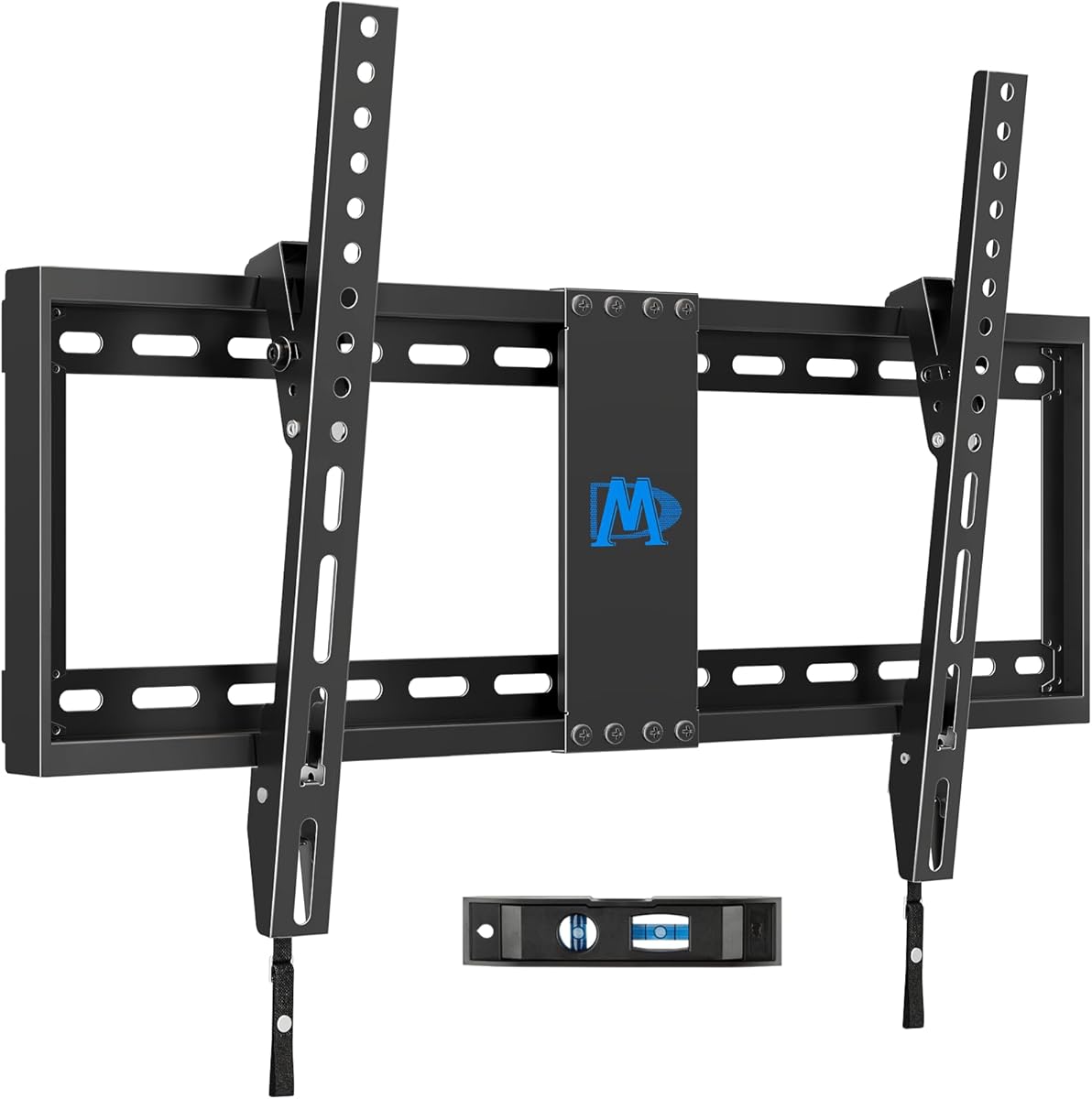
The IWORKBOARD tilting mount offers a practical combination of size support, glare adjustment, and a low-profile design. It carries a 4.6 rating and fits most 24- to 65-inch televisions weighing up to 99 pounds, with VESA support from 100 by 100 through 400 by 400 millimeters.
We may earn a commission when you buy through this link, at no additional cost to you.
Its smooth adjustment range of plus or minus 10 degrees is wider than many fixed or one-direction tilting brackets. The steel construction includes a locking mechanism, and the product information states that the mount was rigorously tested to twice its rated weight. The display sits about 1.97 inches from the wall.
Installation is designed for 8- to 16-inch wood-stud spacing, with instructions and a complete hardware kit included. Masonry installations may require separate anchors, while drywall-only mounting is not appropriate. The fixed structure does not swivel or extend, making final placement especially important.
This is a value-focused option for a common television in a bedroom, office, or living room where tilt is useful but full articulation is unnecessary. It offers more glare control than a completely fixed bracket while remaining straightforward to install. Verify the wall type and stud spacing before proceeding.
The plus or minus 10-degree range lets users fine-tune the screen in either direction. This is useful when a window, lamp, or bright wall creates reflections at the default height.
Supporting 8-, 12-, and 16-inch stud spacing covers many common framing layouts. The included instructions, level, template, and labeled hardware help keep the installation organized.
We may earn a commission when you buy through this link, at no additional cost to you.
The Perlegear Ultra Slim mount delivers the most expansive feature set in this group, earning a 4.5 rating for a combination that includes very large television support, a 1.1-inch retracted profile, and substantial articulation. It fits most 42- to 90-inch LCD, LED, and OLED televisions up to 132 pounds.
We may earn a commission when you buy through this link, at no additional cost to you.
The screen can tilt 5 degrees upward and 15 degrees downward, extend 15 inches from the wall, and swivel plus or minus 45 degrees. Post-installation leveling of plus or minus 3 degrees improves the finished alignment. An extendable wall plate accommodates wood studs from 16 to 24 inches apart and also allows more flexible hole placement.
Heavy-duty steel construction provides the structural foundation, and the product information states that the mount passed a four-times-maximum-load test. Installation resources include clear instructions, a bubble level, drilling template, and pre-labeled hardware bags. Concrete and brick walls are supported, but drywall alone is not.
This is the premium choice for a large screen that needs both near-flush appearance and meaningful movement. It is particularly suitable for expansive living rooms, bedrooms, and home theaters where seating varies. Buyers should accept its greater size and complexity in exchange for the widest articulation and largest television range among these recommendations.
Fifteen inches of extension, 90 degrees of total stated swivel movement, and broad tilt options give the display substantial placement freedom. These controls are useful when a television is viewed from several angles or when reflections move throughout the day.
Heavy-duty steel and a four-times-load test support confidence in the bracket's structural design. The post-installation leveling control helps compensate for minor installation and wall-alignment variations without moving the entire mounting system.
We may earn a commission when you buy through this link, at no additional cost to you.
Choosing a lightweight TV wall mount involves balancing television compatibility, wall construction, installation method, viewing flexibility, and physical clearance. The most important first step is to identify the screen's exact weight and VESA pattern, then determine what kind of wall can securely support the chosen bracket.
Every bracket has a stated screen-size range and maximum load, and both limits should be treated as hard boundaries. A television can fall within the advertised dimensions yet exceed the bracket's capacity, while some mount listings use broad size ranges that do not guarantee support for every model in that range. Check the television's manual or its rear specification label for the exact weight without the stand or attached components.
Match the screen size and weight first. Then confirm that your particular television fits comfortably within both limits.
VESA describes the horizontal and vertical distance between the four mounting holes on the back of a television. The mount's supported pattern must equal the television's pattern or fall within the bracket's stated range. Pay particular attention to unusually wide or narrow patterns, especially with older screens and ultrawide monitors, because a television's diagonal size alone does not determine compatibility.
Measure the hole spacing and compare every dimension. Do not rely on screen size as a substitute for the VESA specification.
Wood studs provide reliable attachment points when their locations are accessible. Concrete, brick, and block walls require suitable masonry anchors, while drywall alone generally cannot support a conventional television mount without locating framing or using a purpose-designed studless system. Nail-based no-drill hangers can reduce visible damage, but their suitability still depends on wall condition and correct installation.
Identify the wall before selecting a mount. Choose framing, masonry anchors, or a rated studless system accordingly.
A fixed bracket can sit between roughly 1 and 2 inches from the wall, while articulating mounts generally need more space for their arms. Full-motion models normally pull forward for side viewing and retract afterward, but even their closed position may be deeper than a fixed bracket. Consider the television's rear connections, cable bends, and any nearby furniture when measuring clearance.
Lower wall projection creates a cleaner appearance. Allow extra depth when movement or easy cable access matters.
Tilt adjusts a screen vertically to reduce glare from windows and lighting. Swivel moves the screen horizontally, extension pulls it away from the wall, and retraction brings it back for a cleaner view. A fixed mount suits a stable seating arrangement, while an articulating model is more useful when viewers sit off-center or the screen is affected by changing reflections.
Choose fixed mounting for simplicity and consistent alignment. Choose articulation when you regularly need glare control or flexible viewing.
Studless mounts appeal to renters and people who want fewer drilled holes. Their nail-based or hooked mechanisms differ, so review the complete installation method rather than treating every no-drill product as interchangeable. Conventional mounts anchor directly into studs or masonry and generally provide more structural certainty for large or heavy televisions.
Use a studless design for eligible walls and manageable loads. Use conventional framing or masonry anchors for large screens.
A paper template, bubble level, labeled hardware bags, and clear instructions can make a significant difference during installation. Templates help position the wall plate accurately, a level reduces crooked placement, and labeled bags simplify identifying fasteners. Some packages also include Allen-key storage or security cables, which are useful additions but do not replace correct anchor selection.
Look for a complete accessory package. Accurate layout tools can prevent avoidable drilling errors.
Steel construction, articulated-arm reinforcement, anti-drop edges, locking mechanisms, and secondary safety cables can improve stability. The strongest option is still the one whose size, weight, VESA range, and wall requirements align with your exact setup. Treat customer ratings as useful evidence of overall satisfaction, while remembering that installation conditions vary more than product specifications.
Check the structural rating and retention features first. Then verify compatibility before considering decorative advantages.
Begin by locating a wood stud, confirming a masonry surface, or evaluating whether a studless system is appropriate for the wall. Mark the bracket position using the supplied template, use a bubble level to establish a straight baseline, and install the wall plate with the hardware specified for that wall type. Do not substitute drywall anchors for structural framing or masonry fasteners.
Attach the television-side bracket while the screen is safely supported on a table or by another person. Remove existing stands or accessories only when the television manufacturer permits it, and connect cables before lifting the display into place. Once attached, secure any locking mechanisms, safety cables, pull cords, or other retention features described in the manual.
For a tilting or articulating mount, move the screen gently within the stated range and never force it beyond its mechanical stops. Periodically check that fasteners remain tight and that the display still hangs level. Keep ventilation openings clear, avoid resting objects against the television, and consult the manual before cleaning the mount or changing its position.
There is no single weight that applies to every mount because weight depends on the bracket's construction and movement. Fixed low-profile mounts are often the simplest options, while nail-based studless hangers are marketed as lightweight alternatives for smaller televisions. Choose based on your screen's exact weight, wall type, and required adjustments rather than the mount's physical weight alone.
Yes, but only with a mounting system specifically designed and rated for studless drywall installation. Conventional wall mounts generally require wood studs or appropriate masonry anchors, while the studless products in this guide use nails or other wall-engaging methods. Confirm wall type, installation instructions, and load limits before choosing a studless approach.
Measure the horizontal and vertical distance between the four mounting holes on the back of your television, usually in millimeters or inches. Compare those measurements with the mount's supported VESA range, making sure they match exactly or fall within the stated limits. Screen size and weight alone cannot confirm VESA compatibility.
A tilting mount is better when glare is a recurring issue and you want to angle the screen slightly up or down. A fixed mount is simpler, often sits closer to the wall, and works well when the television is positioned directly in front of the main seating area. Tilting adds flexibility without the space and mechanical complexity of a full-motion arm.
Usually, yes. The articulating arms need room to extend, swivel, and retract, so a full-motion mount requires more wall clearance than a compact fixed bracket. Check the stated minimum and maximum extension values, the television's rear connections, and any planned cable routing before selecting a position.
A mount can fit multiple brands when their VESA patterns, weights, and dimensions fall within the bracket's stated limits. Popular brands such as Samsung, LG, Sony, TCL, Hisense, and VIZIO appear in the compatibility information for several products here. The television model must still satisfy the exact weight, VESA, and size requirements.
Only use anchors specified for the wall material and load requirement. Brick can differ significantly from poured concrete, hollow brick, and concrete block, so general-purpose masonry anchors may not be appropriate for every surface. Follow the mount manufacturer's guidance or consult a qualified installer when the wall structure is uncertain.
Plan cable routing before placing the wall plate, leaving enough slack behind the television for its power and signal cables to bend safely. Some brackets offer a low-profile position that improves access to connectors, while articulating mounts provide more room during installation. Avoid sharply bending cables and follow the television manufacturer's guidance for cable placement.
The Mounting Dream full-motion mount is the strongest all-around choice because it combines broad television compatibility with useful extension, swivel, tilt, and leveling. For a straightforward conventional installation, the IWORKBOARD tilting mount offers practical glare adjustment and broad everyday compatibility, while the Perlegear Ultra Slim provides the group's most extensive articulation for large screens.
Prioritize exact weight and VESA compatibility before considering appearance or movement. Next, confirm the wall type and select a mounting method that is genuinely supported. After those essentials, narrow the field by deciding whether you need a fixed profile, basic tilt, lateral shifting, or a full range of viewing adjustments.
Finally, review the current product listing, included hardware, customer rating, and manufacturer instructions before buying. Product specifications and availability can change, and the wall and television in your home remain the deciding factors. With those checks complete, you can choose a lightweight mount that fits your room and viewing habits rather than simply chasing the broadest feature list.
