
Cooler Master QUBE 540
4.4Editor score
Reversible horizontal or vertical setup
Full front mesh airflow panel
Up to 415 mm graphics clearance
Explore the best cube shaped PC case options in this expert guide, comparing airflow, compatibility, connectivity, storage, cooling, dimensions, and build
Cube-shaped PC cases turn a compact computer build into a striking centerpiece, with broad glass panels, square proportions, and room for powerful components in a relatively small footprint. The strongest models balance presentation with practical cooling, cable management, motherboard support, accessible front ports, and enough flexibility for different hardware configurations.
The products in this guide were compared using the supplied specifications, ratings, included features, and intended form factors. The list covers compact micro-ATX models, larger ATX cube designs, dual-chamber gaming cases, portable mini-ITX enclosures, and premium aluminum-and-steel builds, so the right choice depends on more than exterior shape.
Each review explains where a case stands out, where its compromises may matter, and which builders it suits most. The guide also compares component clearance, cooling support, drive options, front I/O, and installation features. Product pricing and availability can change, so confirm current details before making a purchase.
4.4Editor score
4.7Editor score

4.5Editor score
This side-by-side comparison evaluates every listed cube-style enclosure across motherboard support, graphics-card clearance, cooling provisions, included fans, front connectivity, storage capacity, and overall design approach.



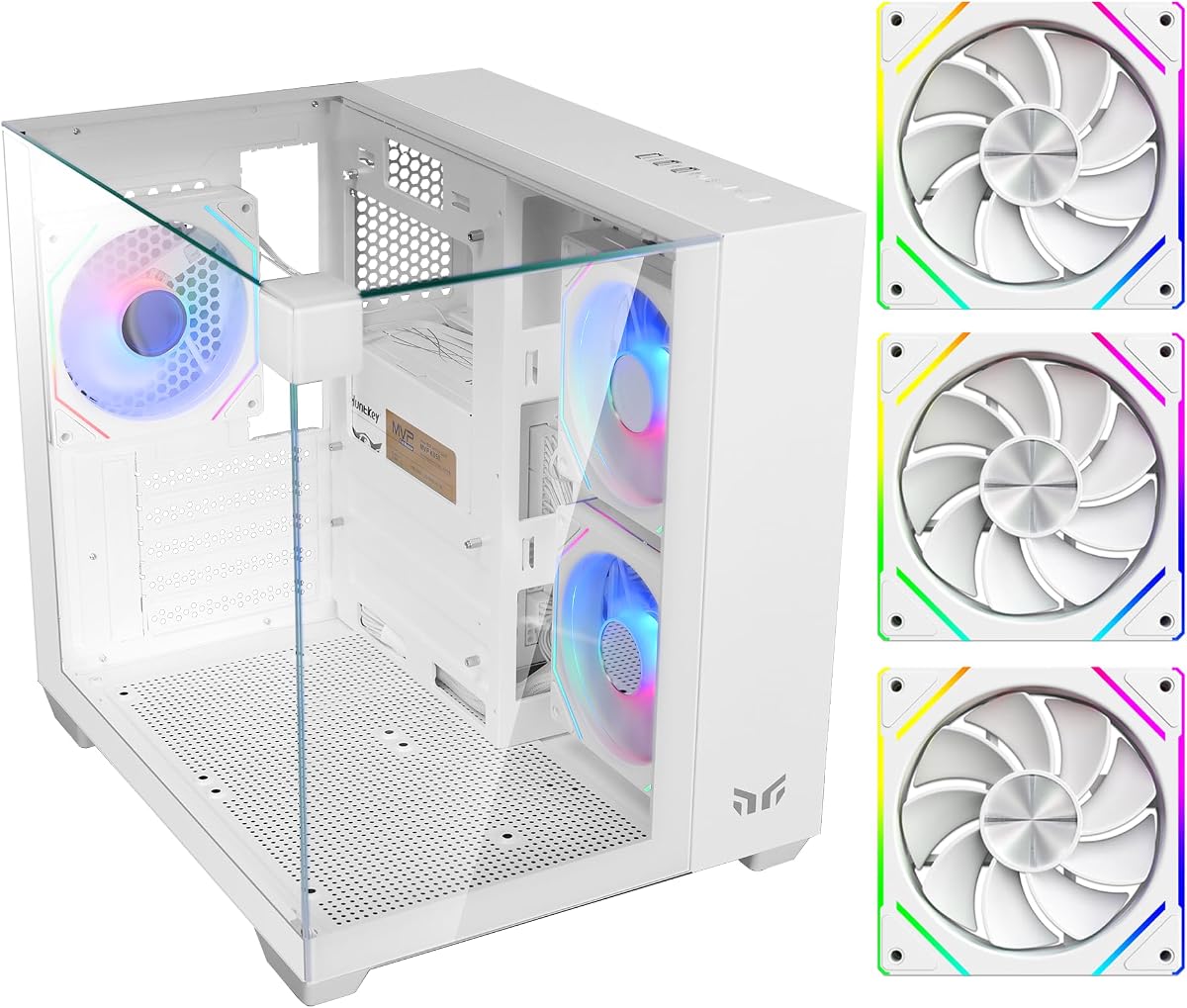
The Yeah Magic Cube combines a compact 28.5-liter footprint with one of the most expansive viewing designs in this guide. Its three tempered-glass panels and pillar-less structure create a 270-degree showcase for the motherboard, graphics card, power supply area, and lighting. With a supplied rating of 4.7, it offers a strong balance of visual appeal, cooling support, and build flexibility.
We may earn a commission when you buy through this link, at no additional cost to you.
Three preinstalled 120 mm ARGB fans provide useful airflow and immediate illumination without requiring separate purchases. The layout supports as many as five 120 mm fans and a 240 mm side-mounted liquid cooler, giving builders room to tune thermals as their hardware and workload change. Support for graphics cards up to 325 mm and CPU coolers up to 155 mm is generous for a compact enclosure.
The main limitation is motherboard format: only Mini-ITX and Micro-ATX are supported, so builders starting with a full ATX board will need to change their plan. The front I/O also provides USB 3.0, USB 2.0, and audio connections but no USB Type-C. Neither issue undermines the package for users who have already selected a compatible board and prioritize appearance.
This is the strongest general recommendation for a builder who wants a recognizable cube design, several glass viewing angles, and substantial cooling hardware compatibility in a manageable volume. It suits gaming systems and showcase builds that need to look impressive without occupying the footprint of a full-size tower. Verify your motherboard format, CPU cooler, graphics-card length, and radiator placement before ordering.
The three-glass-panel design is not merely decorative: the listed support for five 120 mm fans and a side-mounted 240 mm liquid cooler gives the enclosure meaningful thermal flexibility. The three included ARGB fans create a capable starting configuration while leaving additional fan positions available for future upgrades.
A dedicated routing design and PSU shroud help keep wiring out of the primary viewing area. That combination is especially useful in a glass-heavy case, where otherwise visible cables can undermine the clean, pillar-less presentation.
We may earn a commission when you buy through this link, at no additional cost to you.
The Cooler Master QUBE 540 is a premium ATX mid-tower that treats the cube form as a flexible arrangement rather than a fixed orientation. Its reversible I/O panel and movable handles allow horizontal or vertical placement, making it adaptable to different desks, stands, and viewing preferences. The supplied 4.4 rating reflects a well-rounded feature set with broad hardware support.
We may earn a commission when you buy through this link, at no additional cost to you.
Compatibility is one of the model's strongest attractions. It accepts ITX, ATX, and large E-ATX motherboards, including boards up to 11 inches wide. Graphics-card clearance reaches 415 millimeters when the front fan is absent, providing considerable room for high-end cards. That figure makes the case particularly relevant to builders who want cube proportions without a strict micro-ATX limitation.
Cooling begins with a full mesh front panel and a preinstalled SickleFlow 120 mm fan. Mesh reduces the need for a sealed decorative front, although buyers seeking a complete quiet or RGB-heavy fan configuration may need to add more fans themselves. The listing highlights only one included fan, so the case is not as immediately equipped for elaborate lighting as several gaming-focused alternatives.
This QUBE 540 is the best choice for a premium, component-rich build that may be repositioned after assembly. It is especially attractive for users with a long graphics card or an E-ATX motherboard, provided they can accommodate its mid-tower dimensions. It also offers modern front access through two USB 3.2 Gen1 ports and one USB 3.2 Gen2 Type-C port.
The reversible I/O panel and movable handles make it practical to switch between horizontal and vertical arrangements. This is a meaningful feature for a cube case because the same enclosure can suit a wide desktop, a shelf, or a dedicated display-oriented setup.
Support for E-ATX boards and graphics cards up to 415 millimeters expands the case beyond the usual compact-cube limits. The 415 mm figure applies without the front fan, so builders should plan fan placement around their chosen hardware and cooling strategy.
We may earn a commission when you buy through this link, at no additional cost to you.
The Apevia Prism-WH prioritizes a colorful gaming presentation and arrives with an unusually complete five-fan package. Its dual-chamber, cube-style micro-ATX design uses two tempered-glass panels, a ventilated metal side panel, and matching interior and exterior finishes. The supplied 4.2 rating makes it a strong option for builders who want coordinated lighting and substantial airflow from the outset.
We may earn a commission when you buy through this link, at no additional cost to you.
All five included 120 mm fans provide ARGB lighting and PWM speed control. They offer 366 lighting modes through the top button, with a motherboard synchronization mode for compatible ARGB motherboards. A ventilated metal side panel adds another airflow path, while 240 mm water-cooling support gives users an option beyond the bundled air-cooled configuration.
Component limits remain reasonable for a micro-ATX model, with support for graphics cards up to 340 millimeters and CPU coolers up to 155 millimeters. The dual chamber provides room to hide and route cables behind the main hardware area, and the screw-in PCI-E covers simplify graphics-card installation. However, the storage provision is limited to two 3.5-inch drives or one 3.5-inch plus one 2.5-inch drive.
Choose the Prism-WH when coordinated RGB lighting, a large included fan set, and clean cable concealment matter more than extensive storage. It is well suited to compact gaming builds using compatible ARGB motherboards. Buyers should confirm RGB header compatibility, check GPU length, and ensure their chosen liquid cooler can be mounted in one of the supported positions.
The five included ARGB PWM fans reduce the need to source a separate matching set immediately. Their lighting control can operate through the top button or synchronize with a compatible ARGB motherboard, while PWM connections allow fan-speed tuning.
The secondary chamber provides a place to conceal and route wiring, preserving the open visual effect of the glass panels. Screw-in PCI-E slot covers also support a neater installation when a builder does not need every expansion-slot position.
We may earn a commission when you buy through this link, at no additional cost to you.
The Zalman CUBIX-G Panda, also identified as the BW version, brings a compact cube-inspired micro-ATX format to budget-conscious builders. It includes three preinstalled fixed-RGB fans and supports graphics cards up to 280 millimeters, ATX power supplies up to 140 millimeters, and CPU air coolers up to 155 millimeters. Its supplied 4.4 rating is solid for the category.
We may earn a commission when you buy through this link, at no additional cost to you.
Its appeal lies in delivering the basic ingredients of a compact gaming system without requiring separate fan purchases. The three illuminated fans provide both airflow and decoration, while the front panel adds USB Type-C and USB 3.0 for convenient peripheral connections. The case can hold up to three 2.5-inch hard drives and one 3.5-inch drive, including the listed two-2.5-inch-plus-one-combo arrangement.
The fixed-RGB implementation is simpler than configurable ARGB. The fans use 3-pin DC lighting connections, meaning users should not expect the same software-controlled synchronization or color-zone flexibility offered by ARGB ecosystems. The 280-millimeter GPU limit is also narrower than several competing cases, which can constrain choices among larger modern graphics cards.
The CUBIX-G is a sensible option for a smaller Micro-ATX gaming or general-purpose build where footprint, included lighting, and front USB-C matter. It works best when the builder accepts fixed illumination and selects components within the documented clearance limits. Check the power supply and graphics card before ordering to avoid fitment problems.
Three fixed-RGB fans give the enclosure an illuminated gaming appearance immediately after assembly. The simpler lighting system may also reduce the need to understand motherboard RGB headers or sync software.
Although the case is compact, it offers support for several 2.5-inch drives and a 3.5-inch option. That makes it more practical than extremely small builds for users who want to retain local data or a mixture of drives.
We may earn a commission when you buy through this link, at no additional cost to you.
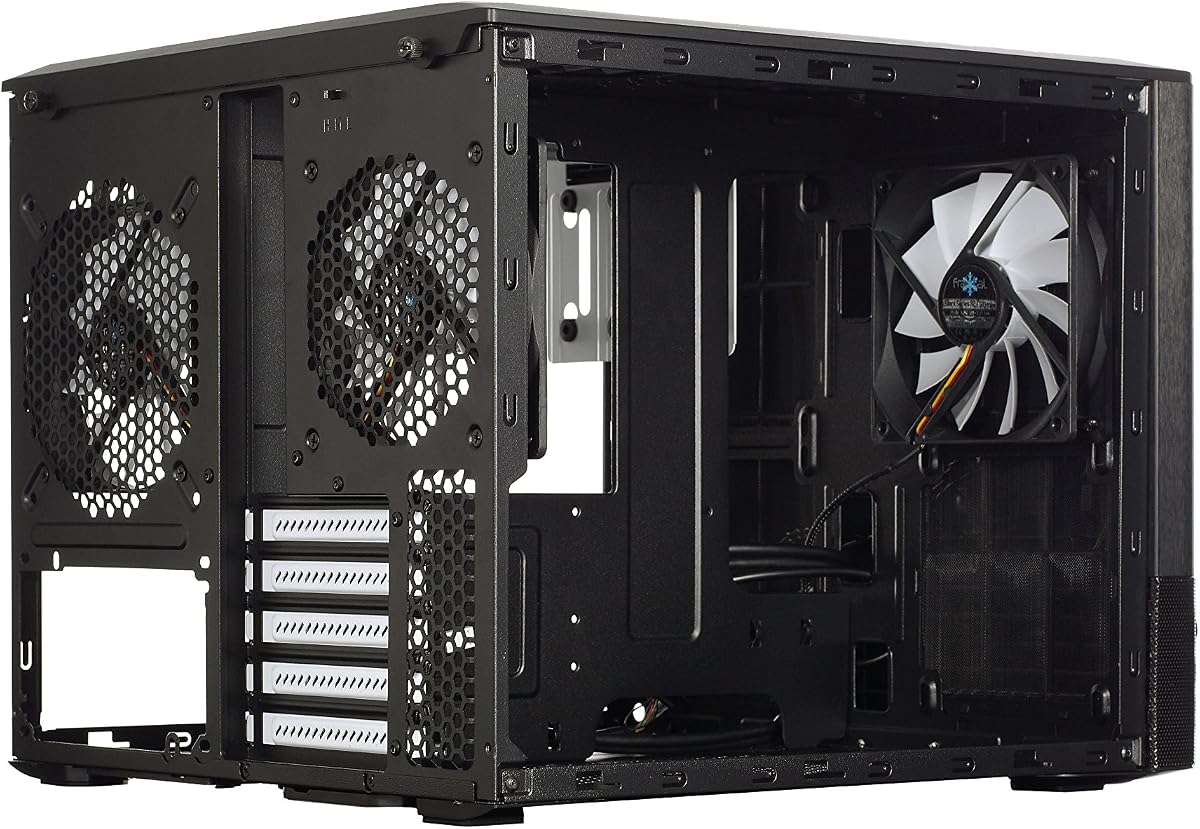
The Fractal Design Node 804 is built around a dual-chamber cube layout that separates components and encourages effective cooling. Its brushed aluminum front panel and windowed side panel give it a restrained, Scandinavian-inspired appearance rather than the overtly aggressive styling common among gaming cases. The supplied 4.7 rating reflects its strong feature set and established cube design.
We may earn a commission when you buy through this link, at no additional cost to you.
Storage is the standout advantage. The unique mounting system supports up to eight 3.5-inch and four 2.5-inch drives, or alternative arrangements reaching up to ten 3.5-inch and two 2.5-inch devices. That capacity makes the Node 804 especially attractive to users building a home server, a storage workstation, or a system with numerous drives.
Cooling support is equally substantial. Three Fractal Design Silent R2 120 mm fans are included, and the specification lists space for seven additional fans. The chassis can also accommodate as many as four radiators simultaneously, giving water-cooling builders considerable flexibility. Removable filters at the intakes help control dust and make routine cleaning more manageable.
The design is best for builders who value storage, modularity, and airflow over a compact footprint or contemporary front I/O. Its listed connectivity centers on USB 3.0 rather than USB Type-C, so modern laptops and devices requiring Type-C may need an internal header or an alternative connection method. The Node 804 is an excellent enthusiast cube for unusually component-heavy configurations.
Separating the main build area from another chamber can help keep airflow paths clear and move cables away from sensitive components. The design also gives builders freedom to configure drives and cooling around their specific workload.
Few compact cases support so many drives and radiator positions at once. The combination makes this enclosure a natural candidate for a multi-drive enthusiast build, a small server, or a creator who needs both local storage and serious cooling.
We may earn a commission when you buy through this link, at no additional cost to you.
The Apevia Prism-Elite-BK is a full-featured ATX cube for builders who want a large, visually dramatic system with extensive cooling already installed. Seven 120 mm PWM ARGB fans are included, along with dual tempered-glass panels and a ventilated metal side panel. Its supplied 4.0 rating is the lowest in this group, but the documented hardware and cooling capacity is extensive.
We may earn a commission when you buy through this link, at no additional cost to you.
Graphics cards up to 400 millimeters and CPU coolers up to 165 millimeters are supported, giving users more freedom than the average compact micro-ATX case. The rear accepts 120 mm cooling, while top and side positions support 240, 280, and 360 mm radiators. Seven included fans make it easy to create positive pressure and a coordinated lighting effect from the start.
The top I/O includes USB-C, USB 3.0, USB 2.0, and HD audio, providing a more modern and comprehensive set of connections than many competing cube cases. Storage consists of up to three 2.5-inch SSDs or one 3.5-inch hard drive with two 2.5-inch SSDs. A large magnetic top dust filter can be removed and washed, helping maintain airflow over time.
This is the pick for an ATX gaming build that should look dramatic from several angles and function as a complete cooling showcase. It is less suitable for a small desk or portability-focused system because the ATX mid-tower format is much larger than a true mini-ITX cube. The seven-fan bundle and broad radiator options reduce the need to plan every cooling position from scratch.
The included PWM fans support speed control and ARGB synchronization with compatible motherboards. Their number, combined with 366 lighting modes, creates a coordinated appearance that is difficult to achieve with a minimal installation.
Support for 240, 280, and 360 mm radiators in top and side positions makes the chassis adaptable to different water-cooling layouts. Rear 120 mm support rounds out the options for compact loops or additional exhaust.
We may earn a commission when you buy through this link, at no additional cost to you.
The Zalman CUBIX M-ATX is a compact 17.1-liter case designed for straightforward desktop builds rather than elaborate gaming showcases. It uses sturdy 0.8 mm steel, includes a perforated front panel, and arrives with an 80 mm fan. Its supplied 4.5 rating suggests a dependable fit for users who value size, simplicity, and conventional component support.
We may earn a commission when you buy through this link, at no additional cost to you.
Despite its small exterior, the case accepts standard ATX power supplies, graphics cards up to 260 millimeters, and CPU coolers up to 137 millimeters. Those limits should shape component selection, particularly for modern graphics cards and tower-style CPU coolers. The front I/O provides one USB 3.0 port, one USB 2.0 port, and a 3.5 mm stereo connection.
Its minimal design omits some features associated with enthusiast cubes, including a glass display panel, RGB lighting, USB Type-C, and a substantial fan bundle. Cooling also begins with just one 80 mm fan. These are meaningful trade-offs for a build intended for presentation or quiet operation, although the perforated front still supports a practical airflow route.
The CUBIX M-ATX works best for a compact office, home theater, or straightforward gaming system where the enclosure should stay out of the way. Choose it when low volume and a standard power supply matter more than visible components or extensive lighting. Users should measure both the graphics card and CPU cooler carefully because the documented clearance is more restrictive than in larger cubes.
At 17.1 liters, the case is substantially more compact than the ATX and dual-chamber models elsewhere in the list. That reduced volume is valuable on crowded desks or in entertainment cabinets where every centimeter matters.
A perforated front panel allows air to reach the preinstalled 80 mm fan and the internal components. It is a basic cooling solution, but one that suits a modest system better than a sealed decorative enclosure.
We may earn a commission when you buy through this link, at no additional cost to you.
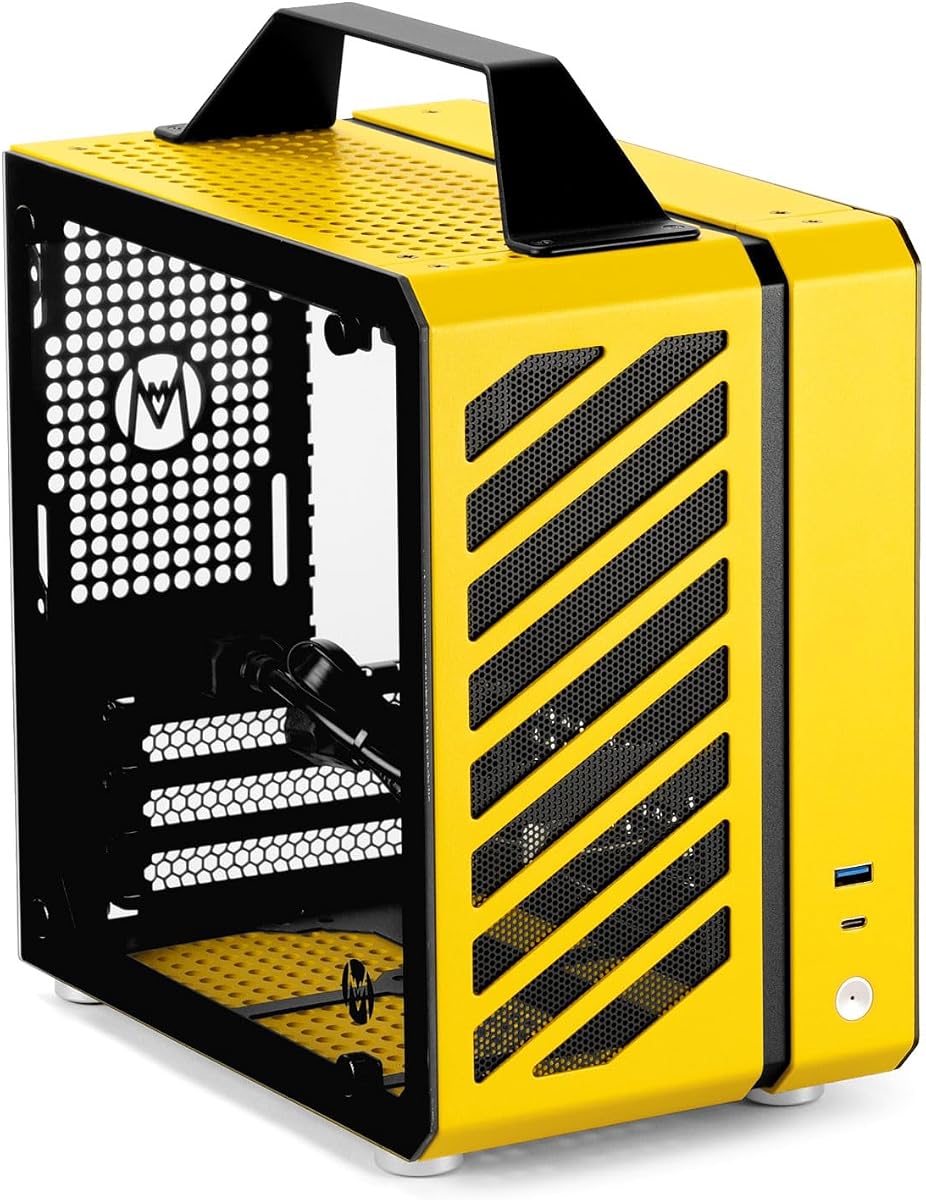
The Mechanic Master C24 is the smallest true cube in the guide, with a 9.9-liter volume and an integrated aluminum handle. Those figures make it a compelling choice for a portable Mini-ITX system, a LAN setup, or a desktop where space is extremely limited. The supplied 4.4 rating is favorable for such a specialized enclosure.
We may earn a commission when you buy through this link, at no additional cost to you.
The case supports Mini-ITX and DTX motherboards but requires an SFX power supply, a significant consideration compared with standard ATX units. CPU cooling can reach 135 mm with air or 120 mm with liquid cooling. The specification also names compatible RTX 3060 and RTX 4060-series graphics cards, making the intended compact-gaming use case clear.
Cooling is supported at several positions: two 8 cm fans on top, one 9 cm fan at the rear, and one 12 cm fan on the bottom. The aluminum-and-steel frame uses detachable panels and tool-free installation features, while dual 2.5-inch SSD mounts, preinstalled filters, and a detailed screw kit improve assembly convenience.
Buyers should treat this as a purpose-built portable cube rather than a conventional replacement for a roomy desktop tower. The SFX power-supply requirement, small motherboard support, and constrained graphics options require more careful planning than a standard micro-ATX build. In return, you gain an exceptionally compact and genuinely portable enclosure suited to compact gaming or event use.
The integrated handle is more than a stylistic detail because the case is designed for transport between locations. At only 9.9 liters, it is far easier to move than a conventional mid-tower or large dual-chamber cube.
Detachable panels, tool-free installation features, preinstalled dust filters, and a supplied screw kit make assembly more approachable. Dual 2.5-inch mounts also give users dedicated SSD positions without requiring a separate drive cage.
We may earn a commission when you buy through this link, at no additional cost to you.
This Fractal Design Node 804 listing provides a concise view of a MicroATX cube built from aluminum and steel, with a supplied rating of 4.7. It supports Micro-ATX and Mini-ITX motherboards, making it compatible with a broad selection of compact boards while preserving the distinctive square proportions associated with the Node series.
We may earn a commission when you buy through this link, at no additional cost to you.
Its defining strength is storage flexibility. The listed internal-bay configuration supports eight 3.5-inch and four 2.5-inch drives, with an alternative arrangement reaching up to ten 3.5-inch and two 2.5-inch HDD or SSD devices. That is a considerable amount of storage for a cube and supports multi-drive, backup, or enthusiast configurations.
The title specifies that no power supply is included, which is normal for a case but important when planning a complete build. The abbreviated supplied data does not detail included fans, front I/O, radiator support, or dust-filter arrangements, so buyers should consult the current product listing before assuming features found in the more extensively documented Node 804 variant.
The case is a compelling minimalist choice for builders who need extensive drive capacity and value the material mix of aluminum and steel. It is best for Mini-ITX or Micro-ATX users with multiple storage devices and a preference for restrained styling. Confirm current dimensions, cooling provisions, and connectivity because those details are not fully expanded in the supplied product information.
The two listed drive configurations make it possible to prioritize capacity or a mixture of drive sizes. This is one of the most useful features for a home server, a large data archive, or a system using several hard drives.
Aluminum and steel combine a refined exterior feel with structural material commonly used in computer enclosures. The restrained presentation suits offices, studios, and showcases where a heavily illuminated gaming case would feel out of place.
We may earn a commission when you buy through this link, at no additional cost to you.
The Cooler Master Qube 540 Moonstone is a compact ATX case with a light-colored finish intended for clean, space-conscious desktop systems. The supplied information is brief, identifying the core ATX format without a detailed fan, clearance, storage, or connectivity breakdown. Its supplied rating of 3.8 is the lowest among the ten models.
We may earn a commission when you buy through this link, at no additional cost to you.
Its principal appeal is the combination of a recognized QUBE 540 design and the Moonstone finish. A pale enclosure can make a glass-sided system feel more understated, particularly in offices, studios, or minimalist rooms where dark gaming cases dominate. The compact ATX positioning also suggests a more manageable footprint than a conventional full-size tower.
Because the supplied product data does not list detailed dimensions, included fans, GPU clearance, radiator support, or front I/O, those points should not be assumed from another listing in the guide. In particular, the more extensively documented Cooler Master QUBE 540 offers useful orientation, motherboard, and clearance information, but buyers should verify whether it applies to this specific Moonstone version.
The Moonstone is most appropriate for a buyer who likes the QUBE design language and prioritizes a clean, light appearance in a compact ATX build. It is a less certain recommendation for someone who needs fully verified cooling and component limits before purchasing. Review the current listing, product dimensions, and component compatibility carefully, and consider whether a more fully documented cube better matches your needs.
The Moonstone finish gives the familiar QUBE platform a lighter visual character. It can sit more naturally in a bright workspace or minimalist setup than a predominantly black enclosure.
The case is explicitly described as a compact ATX model, which is useful for users who want ATX motherboard flexibility without moving to a large full tower. Exact dimensions and component clearances should be confirmed in the current product details.
We may earn a commission when you buy through this link, at no additional cost to you.
A successful cube-case purchase depends on matching the enclosure to your motherboard, graphics card, cooling plan, and workspace. The most useful comparisons are component clearances, thermal provisions, included fans, and daily-access ports, followed by storage and visual design.
Begin with the motherboard because it determines which cases are physically possible. The products in this guide span Mini-ITX, Micro-ATX, ATX, and E-ATX support. The Yeah Magic Cube, Apevia Prism-WH, and Zalman CUBIX M-ATX are limited to compact boards, while the Cooler Master QUBE 540 accepts ITX, ATX, and E-ATX. The Mechanic Master C24 is even more specialized, accepting Mini-ITX and DTX boards. Check socket position, board dimensions, rear-panel cutouts, and the location of power and data connectors before choosing a case based on appearance alone.
Choose based on the board you already own or plan to buy. Micro-ATX offers a useful balance of expansion and compactness, while full ATX support provides more room for a broader feature set. A smaller case is not automatically more efficient if it forces a compromise elsewhere.
Modern graphics cards can be long, heavy, and power-hungry, so clearance deserves careful attention. Documented limits range from 260 millimeters in the Zalman CUBIX M-ATX to 415 millimeters in the Cooler Master QUBE 540, with the latter figure requiring the front fan to be absent. The Apevia Prism-Elite-BK supports cards up to 400 millimeters, while the Yeah Magic Cube allows 325 millimeters. Compare the card's exact length, including any protruding power connector or cooler, with the case specification and consider the position of the front fans and radiator.
Longer clearance provides more upgrade freedom, but it is not an automatic guarantee of fit. A radiator, thick fans, a vertical GPU, or a front-mounted power supply can reduce usable space. Measure the intended combination rather than relying on the case's headline GPU limit alone.
Cube cases need deliberate airflow because their broad glass panels and square geometry can create restrictions or short circulation paths. The Apevia Prism-WH and Prism-Elite-BK include five and seven ARGB PWM fans respectively, while the Yeah Magic Cube includes three ARGB fans and the Fractal Design Node 804 includes three Silent R2 fans. The Cooler Master QUBE 540 uses a full front mesh panel, and the Zalman CUBIX M-ATX relies on a perforated front with one 80 mm fan. Consider radiator positions, exhaust paths, dust filters, and the temperatures produced by your CPU and GPU.
More included fans are convenient, but airflow quality matters more than the raw count. Match the case to the cooling hardware already in your build, then confirm that intake and exhaust positions create a sensible path. Users adding liquid cooling should verify both radiator size and mounting location.
CPU coolers are often overlooked because their height is not shown in standard case dimensions. The supplied limits range from 125 millimeters in the Mechanic Master C24 to 175 millimeters in the Fractal Design Node 804, with several models clustered between 137 and 165 millimeters. Compare the exact height of an air tower, including its top portion, against the case specification. If the cooler is close to the limit, verify whether the side panel or a nearby radiator reduces the available space.
Compact cases are often best paired with low-profile coolers, although some models provide enough clearance for standard towers. Low-profile cooling is also useful when the case will be moved frequently or placed in a confined cabinet.
Front I/O determines how conveniently you connect daily devices. The Cooler Master QUBE 540 and Apevia Prism-Elite-BK include USB Type-C, while the Zalman CUBIX-G Panda and Mechanic Master C24 also list USB-C. Other models emphasize USB 3.0 and USB 2.0, and the Fractal Design Node 804 listing highlights USB 3.0. Also consider the number and type of audio jacks, the location of the power and reset buttons, and whether the I/O orientation suits horizontal or vertical placement.
Choose the connectivity that matches your daily routine. If you regularly connect a phone, portable drive, or modern laptop, USB-C is valuable. A full set of USB-A ports can remain useful for keyboards, controllers, and older peripherals, so consider both rather than focusing on one connector type.
Drive capacity can determine whether a cube works for a multi-drive workstation, home server, or ordinary gaming machine. The Fractal Design Node 804 is the clear storage leader, with listed configurations reaching up to ten 3.5-inch and two 2.5-inch drives. The Apevia Prism-WH supports smaller combinations, while several compact models offer only 2.5-inch bays. Also verify whether a drive cage obstructs airflow, reduces radiator clearance, or takes away useful cable-routing space.
Choose a case with enough mounting points for the drives you will actually use, plus room for future expansion. More drive positions are not always better if they interfere with cooling or make assembly unnecessarily crowded.
Cube cases vary from a 9.9-liter portable Mini-ITX enclosure to a much larger dual-chamber ATX model. Measure the intended location, including clearance behind the I/O panel, space for cables, and the room required to open side panels. The Mechanic Master C24 is especially useful where portability and minimal volume matter, while the Fractal Design Node 804 and Apevia Prism-Elite-BK suit users with more desk or cabinet space. Consider whether the system will remain visible or operate more like a compact appliance.
Smaller is beneficial only if the components still fit and the result meets your cooling and serviceability needs. The most practical cube is the smallest enclosure that comfortably supports your hardware, fans, cables, and maintenance routine.
The defining appeal of a cube is often its visual presentation, but appearance should be evaluated alongside practical features. Dual or triple tempered-glass panels expose the interior and make cable management especially noticeable. The Yeah Magic Cube uses a pillar-less layout and PSU shroud, while both Apevia cases provide dedicated rear routing space. Fixed RGB fans are simpler, ARGB fans offer motherboard synchronization, and restrained aluminum-and-steel cases can suit non-gaming environments. Match the finish and lighting intensity to the room rather than selecting solely by trend.
Prioritize a clean layout if the case will be displayed. Look for dedicated routing paths, a covered power-supply area, screw-in expansion covers, and removable filters that can be cleaned without disturbing every component.
Before assembly, compare every major component with the case's documented limits, including motherboard format, graphics-card length, CPU-cooler height, power-supply type, radiator size, and drive positions. Install standoffs matching the selected board, secure the power supply, and mount the motherboard before routing the permanent cables. Keeping temporary hardware out of the case while fitting large cards or coolers reduces the chance of scratching components or loosening connectors.
Plan the cooling path before connecting fan power. For example, use front or bottom positions as intake and rear or top positions as exhaust, then adjust the arrangement to suit your CPU, GPU, and ambient conditions. Route cables through dedicated channels, keep the glass panels unobstructed, and use the included RGB or PWM controls only when they are compatible with the motherboard and controller. Secure every connector and leave enough slack for future maintenance.
Dust filters and fans need periodic attention. Remove washable magnetic filters as directed, clean them gently, and allow them to dry completely before reinstalling. Check that fan blades remain unobstructed, tighten loose screws, inspect dust buildup around intake openings, and keep the removable panels closed during operation. After installing new hardware, monitor temperatures and verify that no cable interferes with a fan, radiator, or drive.
Not automatically. Cooling depends on the case's airflow paths, fan positions, filter design, and supported radiator sizes rather than its exterior shape. Some cubes include many fans and excellent mesh panels, while others provide only a single small fan. Compare the complete cooling layout with the heat generated by your CPU and graphics card.
Yes, but not every cube supports full ATX. The Cooler Master QUBE 540 accepts ATX and even E-ATX boards, while the Apevia Prism-Elite-BK is designed around ATX hardware. Other compact models support only Micro-ATX or Mini-ITX. Check the case's motherboard format before buying a board or case.
Cable management depends heavily on the model. A pillar-less glass design exposes wiring, so dedicated routing paths and a PSU shroud become particularly valuable. Dual-chamber cases often provide a better space for hidden wiring. Plan routes before the motherboard is installed and avoid closing a panel on a bundle of cables that has not been secured.
They can, particularly very small Mini-ITX models such as the Mechanic Master C24. Portability depends on weight, handles, panel security, and the power supply and GPU used. A compact case alone does not guarantee portability if the completed system includes large, heavy components or a dense power-supply installation.
Micro-ATX is common because it offers more expansion and connector options than Mini-ITX while preserving a manageable footprint. Mini-ITX suits very small systems, while ATX and E-ATX support appears in larger cubes. Select the board first or confirm compatibility before purchasing a case.
Yes, especially models with restrained finishes, fixed-RGB lighting, or minimalist styling. Highly visible RGB lighting may be distracting in an office, while a light-colored or aluminum-and-steel case can blend into a professional setting. Choose a model whose lighting controls let you keep the appearance subdued.
There is no fixed number because the hardware, case volume, and intended workload vary. Three fans can be sufficient for a modest compact build, while five or seven preinstalled fans are useful for a fully configured gaming system. Check the radiator options, front-intake restrictions, and rear exhaust position rather than judging only by fan count.
No. Liquid-cooling compatibility depends on the exact radiator size and mounting position. The Yeah Magic Cube supports a side-mounted 240 mm unit, the Apevia Prism-WH lists 240 mm options, and the Prism-Elite-BK supports 240, 280, and 360 mm radiators in top and side positions. Confirm the specific mounting area and pump clearance before ordering.
The Yeah Magic Cube is the strongest all-around recommendation, pairing a dramatic three-panel tempered-glass presentation with three ARGB fans and useful cooling flexibility. The Cooler Master QUBE 540 stands out for premium versatility, broad motherboard support, and the ability to operate horizontally or vertically. For a restrained build at minimal size, the Zalman CUBIX M-ATX delivers a compact steel enclosure with straightforward airflow and conventional connections.
The right priority depends on the build. Choose the Apevia Prism-WH for five coordinated ARGB fans, the Prism-Elite-BK for a fully equipped ATX cube, the Fractal Design Node 804 for exceptional storage, and the Mechanic Master C24 for true portability. Before purchasing, compare the case's exact motherboard, GPU, cooler, power-supply, radiator, and drive limits against the components you already own or plan to use.
Finally, confirm current specifications, included accessories, dimensions, and availability on the retailer listing before ordering. Cube-case designs and component compatibility can change between versions, especially for models sharing similar names. Checking the latest listing helps ensure that the enclosure you select still matches your hardware and your expectations for cooling, connectivity, and presentation.