
Lemorele 4K 60Hz HDMI to USB C Adapter
3.9Editor score
4K at 60Hz support
Independent power input
Compact 0.57-ounce body
Driver-free operation
Explore the best AR Glasses HDMI Adapter options, comparing video, power, compatibility, portability, and setup for immersive displays.
An AR Glasses HDMI Adapter connects an HDMI source, such as a console, laptop, or streaming device, to USB-C AR glasses or portable displays. A capable adapter makes mirrored entertainment more immersive while preserving useful resolution, stable power delivery, and straightforward operation across your connected equipment.
We compared the ten featured adapters by examining signal direction, supported refresh rates, power requirements, glasses compatibility, included cables, portability, and special features. The list covers conventional one-way converters, a wired display adapter, a Lightning-focused option, and a wireless receiver with a built-in battery.
Each review explains what the adapter is best suited for, where its specifications stand out, and which limitations deserve attention before purchase. Product details and prices can change over time, so verify the current listing, device compatibility, and package contents when you are ready to buy.
3.9Editor score

4.6Editor score

4.2Editor score
The comparison below highlights each adapter's core design, resolution support, power approach, and key compatibility considerations so readers can quickly identify the right fit for their AR glasses and source devices.




The KIHENG HDMI to USB-C AR Glasses Adapter is a conventional wired hub that converts an HDMI source into a USB-C video output for compatible AR glasses and portable displays. Its 4.3 rating reflects a generally capable product with broad device support. It is especially notable for supporting resolutions up to 4K at 60Hz and 1080p at 120Hz or 144Hz when every device in the chain supports the selected mode.
We may earn a commission when you buy through this link, at no additional cost to you.
The hub can serve consoles such as Switch, Switch 2, PlayStation 4, PlayStation 5, and Xbox, along with laptops, television boxes, and other HDMI sources. Its USB-C output is listed for RayNeo, VITURE, Xreal, and Rokid glasses, plus USB-C portable displays. A separate 5V power connection can deliver up to 10W to the glasses or display, which is useful for avoiding unstable operation during extended viewing.
There are important setup caveats. Xreal glasses may need to be switched into DisplayPort Alt Mode, while DHCP should be disabled on certain PlayStation and laptop outputs. The hub cannot power the source device, and portable displays may need their own external power before the adapter is connected. It also excludes Meta Quest, PICO, HTC Vive, and Epson AR glasses, making compatibility verification essential.
This is a strong all-around choice for someone who wants multiple supported source types, useful high-resolution modes, and included HDMI and power cables. Choose it when your setup includes one of the explicitly supported glasses families and you are comfortable checking source settings. It is not suitable for VR headsets, reverse conversion, or touch functionality, but within its stated AR-glasses focus it offers generous capability.
The broad HDMI source support is one of the strongest reasons to consider this hub. It can sit between a console, laptop, television box, or other conventional HDMI output and a compatible pair of USB-C AR glasses, making it easier to reuse one display across entertainment and gaming.
Although the hub supports 4K at 60Hz and higher 1080p refresh rates, the actual result depends on the source, cable, glasses, and display. The adapter carries an available signal rather than upgrading equipment that cannot produce it.
We may earn a commission when you buy through this link, at no additional cost to you.
The Guermok HDMI to USB C Video Display Adapter is designed to move video from an HDMI source to a USB-C display without requiring drivers or companion software. Its 4.2 rating and stated support for 4K at 60Hz or 1080p at 120Hz make it a practical option for users who prioritize a clean setup and responsive entertainment.
We may earn a commission when you buy through this link, at no additional cost to you.
Compatibility extends to XREAL One and One Pro, XREAL Air models, RayNeo Air series glasses, and Rokid Max glasses. It can also feed compatible portable monitors and projectors. The package includes a 4.9-foot HDMI-to-USB-C adapter assembly and a separate 3.3-foot full-function USB-C video cable, providing useful flexibility for different source and display positions.
The adapter is strictly one-way. HDMI is always the source side, while USB-C serves as the display side; reverse transmission is unsupported. It does not act as a capture card, transfer USB data, recognize devices, or enable spatial and 3D functions. Studio displays may also present video without audio, for which an external audio device is recommended.
A dedicated 5V power connection is required for reliable output. The manufacturer recommends a 5V, 1A to 1.5A source and warns against higher-voltage or multi-port fast chargers. Its aluminum housing helps dissipate heat during long sessions. This adapter suits straightforward users who understand its display-only purpose and want broad AR glasses support without complex setup.
Keeping the source and display roles unambiguous reduces installation errors. HDMI always enters from the game console, computer, media player, or dock, while the USB-C side connects to the glasses or another compatible display.
Because the adapter will not produce a reliable image without suitable external power, users should connect the 5V supply before testing. A stable 5V source helps prevent flickering, disconnections, and black screens during extended use.
We may earn a commission when you buy through this link, at no additional cost to you.
The RayNeo HDMI 2.0 Adapter is tailored to RayNeo smart glasses, particularly the Air 4 Pro, and carries a 4.3 rating. Its distinguishing feature is HDR10 support, which can improve contrast and color when the content source also supports HDR10. That makes it more specialized than the general-purpose hubs in this comparison.
We may earn a commission when you buy through this link, at no additional cost to you.
The product supports 4K at 30Hz, 2K at 30Hz, and 1080p at 120Hz. It also allows the connected device to charge while the user watches, a helpful feature for longer gaming or streaming sessions. Its virtual-display concept creates a theater-like field of view, although actual comfort and apparent screen size depend on the glasses and individual wearer.
HDMI sources include Xbox, PlayStation 4, and PlayStation 5 systems. Lightning compatibility extends to iPhones through iPhone 14, but an Apple Digital AV Adapter is required and is not included. As a result, buyers interested in iPhone use must account for that additional requirement rather than expecting a completely self-contained iOS solution.
This adapter is a natural choice for a RayNeo-centered setup that values HDR10, charging convenience, and direct glasses integration over the highest possible refresh rate. It is less attractive for users seeking 4K at 60Hz or a broad USB-C portable-monitor ecosystem. Within its narrower RayNeo focus, the feature set is distinctive and potentially well matched to the right hardware.
HDR10 output only makes a visible difference when the source content and connected display chain support HDR. Users should confirm that their games, streaming services, and glasses can negotiate a compatible HDR mode.
Simultaneous charging reduces the risk of a phone or other connected source running out of power during a long session. The Lightning path still requires Apple's separate Digital AV Adapter, so the complete setup should be planned before purchase.
We may earn a commission when you buy through this link, at no additional cost to you.
The AR Glasses HDMI to USB C Adapter with Play & Charge stands out with a 4.6 rating, the highest in this roundup, and a broad compatibility list. It supports 4K at 60Hz video, low-latency transmission, and a dedicated 5V power port for compatible glasses, portable monitors, and USB-C projectors.
We may earn a commission when you buy through this link, at no additional cost to you.
Its supported glasses include XREAL Air, Air 2, Air 2 Pro, One, One Pro, and Ultra models; Rokid Air and Max; RayNeo Air 2s XR; VITURE Pro and One; and Thunderbird AR. Sources include Switch 2 and Switch 1, PlayStation 5 and 4, Xbox One, Steam Deck, ROG Ally, Google TV, Fire TV Stick, laptops, iMacs, iPads, and selected Android or Windows devices with video output.
The adapter performs one-way HDMI-to-USB-C video transmission and requires external 5V power. Its USB-C display must support DisplayPort Alt Mode for video and audio. It cannot reverse the signal, and it is not intended for headphones, docks, Meta Quest, PICO, or HTC Vive devices. Studio Display users are advised to use external speakers because its audio path is not supported.
The compact aluminum housing measures 2.3 by 1.2 by 0.5 inches and weighs 0.08 pounds, making it easy to carry. A two-year warranty and included USB-A-to-USB-C power cable reinforce the value proposition. This is the most balanced recommendation for buyers who want extensive compatibility, strong resolution support, and a compact format with dependable active power.
The dedicated 5V input supplies power to connected glasses and displays, helping maintain stable operation during extended gaming or movie viewing. External power is mandatory, and users should connect it before troubleshooting video output.
The compatibility list covers several major glasses ecosystems, mainstream consoles, and portable displays. This makes the adapter attractive to households that regularly switch between a laptop, console, and streaming device without wanting a different converter for each setup.
We may earn a commission when you buy through this link, at no additional cost to you.
The AIMIBO Wireless Display Adapter offers a fundamentally different approach from the wired converters in this guide. Instead of requiring a direct HDMI source connection, it mirrors content wirelessly from compatible iPhones, iPads, Android phones, tablets, and laptops. Its 4.2 rating reflects a versatile premium option for travel, presentations, and casual gaming.
We may earn a commission when you buy through this link, at no additional cost to you.
The receiver has both USB-C and HDMI outputs. USB-C supports glasses and portable monitors using DP Alt Mode, including XREAL, Rokid, RayNeo, and VITURE models. The HDMI output can feed televisions, monitors, and projectors. AirPlay, Miracast, and DLNA support covers iOS, Android, Windows, and macOS devices, making it less dependent on a particular source ecosystem.
A built-in 5000mAh battery provides up to seven days of standby time and approximately three to four hours of continuous use. Dual-band 2.4GHz and 5GHz Wi-Fi supports Full HD video at a 60Hz refresh rate. The device includes a USB-C charging cable, an HDMI cable, and a setup guide, while its USB-C ports allow simultaneous charging and use.
The package does not include a separate wireless source transmitter, although an optional AIMIBO transmitter can expand support to HDMI and USB-C sources such as laptops, PCs, cable boxes, DVD players, Switch, and PS5. This makes AIMIBO a strong premium pick for wireless-first users, though direct wired adapters remain more predictable for latency-sensitive competitive gaming.
A built-in battery and wireless casting eliminate the need to remain beside a source device during many mirroring sessions. That makes the receiver useful in hotel rooms, temporary workspaces, and other situations where convenient power or cable access is limited.
AirPlay, Miracast, and DLNA allow the same receiver to work across major mobile and desktop operating systems. For consoles and other HDMI sources, the optional external transmitter is necessary, so users should confirm that capability against their intended setup.
We may earn a commission when you buy through this link, at no additional cost to you.
The HDMI to USB-C AR Hub is a direct-plug adapter designed for people who want a compact connection without a separate HDMI cable at the source. It carries a 4.4 rating and supports 4K at 60Hz output with low latency. Its HDMI male plug enters a source device, while a USB-C female port accepts the cable leading to the glasses or display.
We may earn a commission when you buy through this link, at no additional cost to you.
Compatibility is extensive. Supported glasses include XREAL Air, Air 2, Air 2 Pro, One, One Pro, and Ultra; Rokid Air and Max; RayNeo Air 2s XR; VITURE Pro and One; and Thunderbird AR. Sources include Switch 2 and Switch 1, PlayStation 5 and 4, Xbox One, Steam Deck, ROG Ally, media players, and HDMI streaming devices. USB-C portable monitors and projectors are also supported.
The separate Type-C power port accepts a 5V supply and can operate at 5V and 1A or higher, although the included three-foot USB-A-to-USB-C cable is intended for that purpose. Without adequate power, users may see black screens, flicker, or dropped signals. XREAL glasses may require DP Alt Mode, and DHCP may need to be disabled on some laptop and console outputs.
Its compact aluminum construction helps with heat dissipation and portability, and the product includes a two-year warranty. This is an appealing choice for a travel kit or desktop setup where minimizing source-side clutter matters. Remember that the USB-C connection cable between the adapter and glasses is separate, and the entire path is strictly one-way.
The integrated HDMI male plug reduces the number of loose connections at the source. The remaining USB-C cable connects the adapter to the AR glasses, and a separate 5V lead keeps the converter and attached display operating reliably.
The adapter supports several leading glasses families and mainstream HDMI sources in a small housing. That balance makes it useful for users who want broad coverage without carrying a larger multi-port hub.
We may earn a commission when you buy through this link, at no additional cost to you.
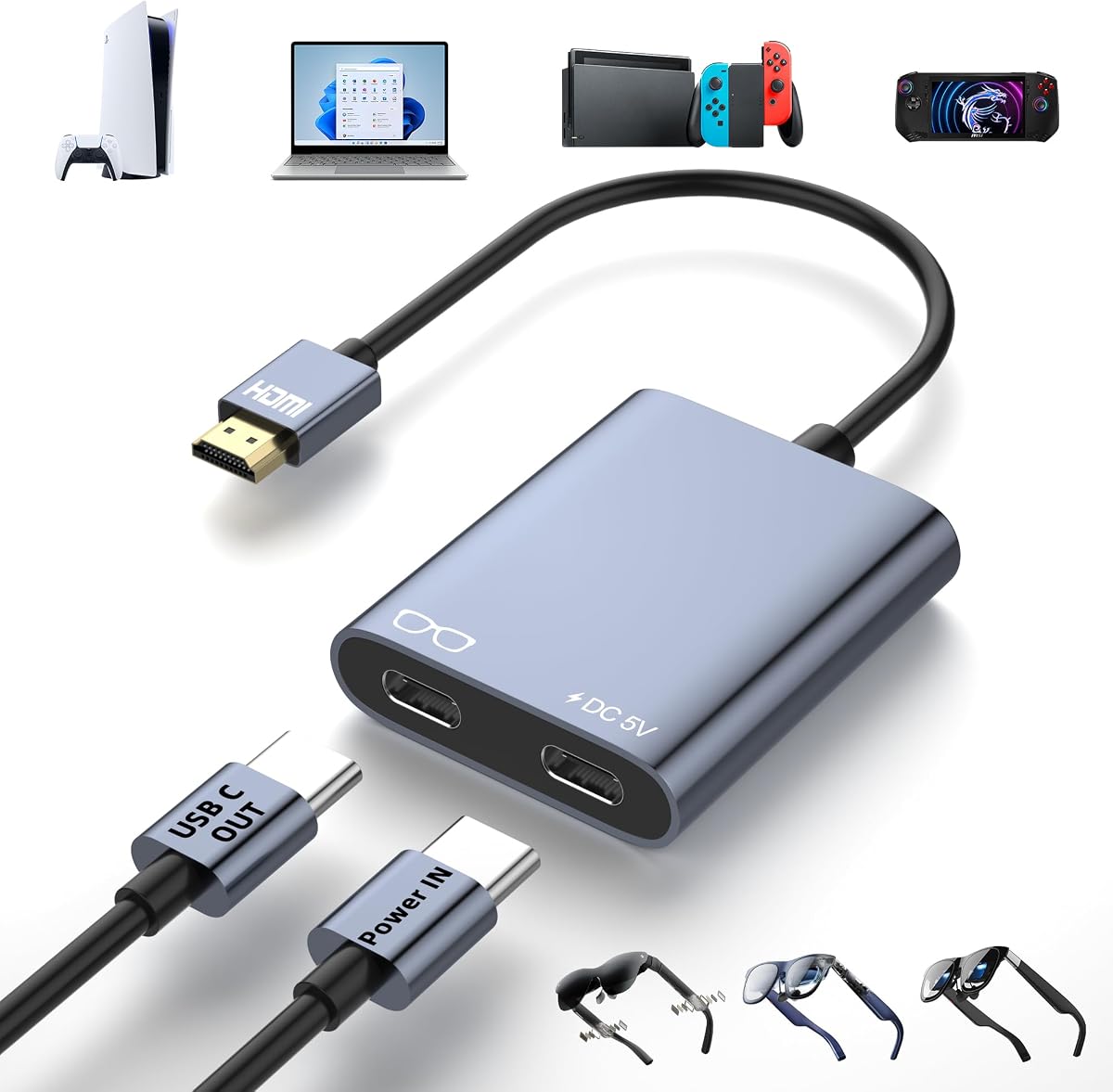
The Lemorele 4K 60Hz HDMI to USB C Adapter is the lightest dedicated converter in the roundup, weighing 0.57 ounces and measuring approximately 1.93 by 0.98 by 0.39 inches. Its 3.9 rating is the lowest listed, but its core functions remain useful for buyers focused on affordability, portability, and a simple connection.
We may earn a commission when you buy through this link, at no additional cost to you.
The adapter supports 4K at 60Hz and connects HDMI sources such as a Switch dock, PlayStation 5, PlayStation 4, Xbox, and Steam Deck dock to mainstream XREAL Air, Rokid, and RayNeo glasses. It can also feed USB-C portable monitors. Signal flow is one-way only, so USB-C-to-HDMI use and reverse transmission are unavailable.
A dedicated DC 5V and 2A input provides stable auxiliary power, which is intended to reduce black-screen and unstable-display problems during longer sessions. The power adapter is not included, so buyers must supply one if they do not already have a suitable USB power source. No drivers or complicated software are required, and compatibility extends to Windows and macOS systems.
Two Type-C ports have separate jobs: one carries video output, while the other is only for power input. That distinction is important when arranging cables. This adapter makes sense for a minimal, portable setup with supported glasses and dock-based consoles. It is less attractive for users needing Thunderbolt-class cables, included accessories, or a more extensive compatibility roster.
At only 0.57 ounces, the adapter is easy to carry in a pocket, small case, or laptop bag. Its compact footprint also reduces desk clutter, although users must plan for separate power and USB-C display connections.
The dedicated 5V and 2A input is valuable for stable output, but the listed package does not include a power adapter. Confirm that you have a suitable supply or add one to your setup budget before purchasing.
We may earn a commission when you buy through this link, at no additional cost to you.
The HDMI to USB-C AR Adapter weighs just 0.035 pounds and combines 4K at 60Hz support with a broad list of compatible glasses and displays. Its 4.2 rating places it among the stronger conventional converters here. The aluminum housing provides heat dissipation while preserving a small profile for travel and desktop use.
We may earn a commission when you buy through this link, at no additional cost to you.
Compatibility includes XREAL 1S, One, One Pro, Air 2 Pro, Air 2, and Air; VITURE XR, Luma, Pro, and One; Rokid Air and Max; and RayNeo Air 4 Pro, 3S Pro, 3S, and 2S glasses. USB-C portable monitors are also supported. Common sources include PlayStation 5 and 4, Xbox, PCs, laptops, television boxes, and Fire TV Sticks.
The product is a one-way video converter and does not support Meta-series glasses. For XREAL Air glasses with missing sound, the listed guidance is to update the firmware, then press and hold the brightness control until two beeps occur. The adapter can provide no more than 5W through its USB-C power function, so displays with greater requirements need another source of power.
Its setup is straightforward: power the adapter, connect the HDMI source with an HDMI cable, and connect the glasses or monitor with a USB-C cable. A USB power cable and manual are included. This is a compelling lightweight option for a wide range of glasses, but buyers should confirm the 5W limit and power behavior of their exact display.
The adapter's extremely low weight makes it one of the easiest options to include in a mobile glasses kit. It can be packed without adding much bulk, while the aluminum body helps manage heat during sustained use.
The stated 5W ceiling is the key constraint. If the connected glasses or portable monitor needs more power, users should provide suitable external power to the display and verify that the adapter can still deliver a stable signal.
We may earn a commission when you buy through this link, at no additional cost to you.
The XR HDMI to USB-C Adapter offers 4K at 60Hz output, a dedicated 5V power connection, and a full-function 1-meter USB-C cable in the package. Its 4.1 rating reflects a capable and clearly documented converter. It is designed for one-way video from a conventional HDMI source to AR glasses or a compatible USB-C display.
We may earn a commission when you buy through this link, at no additional cost to you.
Its glasses list includes XREAL One, Air 2 Pro, Air 2, Air 2 Ultra, Rokid Air and Max, RayNeo Air 2s XR, VITURE Pro, and Thunderbird AR. Compatible HDMI sources include PlayStation 4 and 5, Switch 2 and 1, Xbox One, media players, Fire TV Stick, and Google TV. Portable monitors and USB-C projectors are also supported.
The Type-C power port accepts 5V at 1A to 1.5A and must be connected for the adapter to function. Devices needing more than that will not work through this port. The signal path is not reversible, and headphones, docks, and VR headsets are excluded. Studio Display users need external speakers because the adapter does not support audio with that display.
The adapter's aluminum shell improves heat dissipation and fits easily into a pocket or carrying case. It includes a user manual and full-function USB-C cable, though the HDMI source connection still requires a suitable cable. This is a solid choice for users who want straightforward wired conversion and a useful cable bundle without the complexity of a multi-port hub.
The included full-function USB-C cable is designed to carry the required display connection. Users still need to ensure that the source-to-adapter HDMI cable is suitable and that their glasses support DP Alt Mode video input.
Because no power means no signal, the correct sequence is to connect the 5V supply first and then attach the source and glasses. This simple order prevents avoidable black-screen troubleshooting.
We may earn a commission when you buy through this link, at no additional cost to you.
The Lemorele Built-in 5000mAh Battery HDMI to USB-C Adapter is an all-in-one solution for users who want to power a Fire TV Stick, send its video to AR glasses, and avoid a cluster of separate charging cables. Its 4.5 rating makes it one of the strongest-rated products here, while the two-in-one design gives it a clear specialty.
We may earn a commission when you buy through this link, at no additional cost to you.
The adapter supports Fire TV Stick models, XREAL Air glasses, Rokid AR glasses, and USB-C DP portable displays. It delivers video up to 4K at 60Hz and uses an internal high-performance chip for smooth output. The design is driver-free and requires no separate application, making it approachable for travel, camping, and business trips.
The internal battery delivers approximately three hours and forty minutes of continuous use when powering both a Fire TV Stick and AR glasses at 50 percent brightness and full volume. It requires a 5V and 2A charger and takes about three hours to fill with no load attached. Users should account for the shorter runtime when playing at maximum brightness or volume.
This is not a generic console adapter or a wireless receiver; it is a focused portable streaming package. It makes the most sense for someone who primarily watches through a Fire TV Stick and wants the glasses or portable display powered from one integrated unit. For other HDMI sources, the dedicated Lemorele wired adapter or a more universal converter would be the better match.
Combining Fire TV Stick power and HDMI-to-USB-C conversion reduces cable clutter around a streaming setup. It also removes the need for a separate outlet or battery bank when the built-in battery is sufficient for the planned session.
The stated runtime assumes 50 percent brightness and full volume with both the streaming stick and glasses connected. Heavy use may shorten that period, so charging the adapter before travel is advisable.
We may earn a commission when you buy through this link, at no additional cost to you.
The best adapter is the one that matches your glasses, source device, power arrangement, and intended use. Paying attention to signal direction, display modes, and included accessories can prevent most setup problems.
Start with the exact model of your AR glasses and check whether it accepts USB-C video through DisplayPort Alt Mode. The adapters in this guide cover different combinations of XREAL, VITURE, RayNeo, Rokid, Thunderbird, and other glasses, but a brand-level match does not guarantee that every variant behaves identically. Some XREAL models require a specific display mode, while select glasses need updated firmware or a button combination to unlock sound and video.
Also verify exclusions. Several products expressly do not support Meta Quest, PICO, HTC Vive, Epson AR glasses, or Studio Display audio. If your device uses a proprietary capture-based workflow, a simple HDMI-to-USB-C converter may not be the right accessory. Confirm the exact glasses model and its required display mode before making a final decision.
Nearly every dedicated adapter in this comparison performs one-way conversion from an HDMI source to a USB-C display. That arrangement works when a console, laptop, game system, or streaming box sends video into AR glasses. It does not let a USB-C laptop, tablet, or phone transmit to an HDMI television, and it does not transform an adapter into a capture card.
Wireless adapters are conceptually different because they mirror compatible mobile or desktop devices over Wi-Fi. An optional transmitter can extend such a receiver to traditional HDMI sources. Make sure the direction of your intended workflow matches the product before purchasing, especially if you expect the adapter to work in both directions.
Most adapters advertise 4K at 60Hz, which is a useful target for modern consoles and media sources, but the complete chain determines the final output. Your source must support the desired resolution, the HDMI cable must carry it, and the glasses or portable display must accept the corresponding DP Alt Mode profile. The adapter cannot increase the quality available from weaker equipment.
The RayNeo option differs by supporting 4K at 30Hz while emphasizing HDR10 and 1080p at 120Hz. That may be preferable for certain glasses or content, but it will not satisfy a buyer whose main requirement is 4K at 60Hz. Check both the glasses' native mode and the source settings rather than relying solely on the adapter's headline specification.
Power is one of the most important practical considerations. Several adapters will not output a reliable signal unless a suitable 5V source is connected, and portable displays may require their own power before the adapter is attached. Recommended power figures vary from 5V and 1A to 5V and 2A or 10W, so use only a compatible supply and avoid fast chargers that deliver a voltage the adapter cannot safely accept.
Battery-powered designs remove the need for a continuous cable but introduce charging and runtime considerations. The AIMIBO receiver can operate for several hours and includes standby capacity, while the Lemorele Fire TV Stick adapter offers roughly three hours and forty minutes under its stated conditions. For dependable all-day use, a wired powered adapter is usually less complicated.
Adapters with an integrated HDMI male plug can reduce source-side clutter, but they may require a separate USB-C cable to reach the glasses. Other converters use a full cable assembly and may include an HDMI lead. If your source sits several feet from your seating position, included cable length and flexibility deserve attention before checkout.
Look for a full-function USB-C cable when using portable monitors, since a charge-only cable may not carry video. The product descriptions specifically mention USB 3.1 or newer, USB4, or Thunderbolt cables for certain high-resolution setups. Keep the cable path short and strain-free to avoid intermittent disconnections.
A wired adapter generally provides a direct, predictable connection and is well suited to gaming, desktop use, and home entertainment. Wireless adapters offer freedom from source cables and can be especially convenient for travel or presentations, but their latency and behavior depend on Wi-Fi conditions and the software protocol used by the source device.
The AIMIBO adapter supports AirPlay, Miracast, and DLNA and can use either USB-C or HDMI outputs. It is a strong choice for mixed mobile ecosystems. If your priority is the most direct game-console connection and minimal network variability, choose one of the powered wired adapters instead.
Special features can make one adapter much more convenient for a particular setup. The RayNeo model prioritizes HDR10, Lightning support, and simultaneous charging. The Lemorele battery model combines a Fire TV Stick power supply with video conversion. The AIMIBO model uses a built-in battery and casting protocols rather than a conventional wired HDMI input.
Avoid buying on feature count alone. Consider whether the special function applies to your actual source device. A Lightning port is irrelevant if your content comes from a console, while an integrated streaming-stick power function is unnecessary if you already have a television or powered hub. Match the specialty to the dominant part of your setup.
Compact aluminum bodies are convenient for travel and can dissipate heat effectively, but size should be balanced against port accessibility and included accessories. Lemorele's wired adapter weighs 0.57 ounces, while the feature-rich AR Glasses HDMI to USB C Adapter with Play & Charge weighs 0.08 pounds. Both are small, though the latter offers a broader support package and warranty.
Review the warranty and customer-support terms as well as the hardware. Several products include multi-year warranties, while others list customer service through the seller. Troubleshooting instructions are also valuable because correct connection order, firmware state, DP mode, and power sequencing resolve many common failures.
Begin by confirming the direction of the connection. Connect HDMI to the source, such as a console, laptop, television box, or streaming device. Connect the adapter's USB-C output to the glasses or portable monitor using a video-capable full-function cable. On direct-plug models, insert the HDMI male end into the source and attach the separate USB-C display cable to the female port.
Next, provide the required power. Connect the specified 5V supply before testing the image, particularly on adapters that state that no power means no signal. If using a portable monitor, consult its manual and connect its own power when required. Avoid higher-voltage chargers, and do not interpret USB-C charging as permission to use any wall adapter regardless of output settings.
If there is no picture or sound, reconnect every cable, confirm DP Alt Mode, select the appropriate display output on the source, and check the glasses' required mode or firmware. For XREAL models, some adapters specifically require DisplayPort Alt Mode and selective firmware guidance. Keep the adapter ventilated, avoid tightly enclosing it while in use, and clean its ports gently with dry, nonabrasive tools.
No. The glasses must accept USB-C video through DisplayPort Alt Mode, and the specific model must also appear in the adapter's compatibility information. Some models additionally require a particular display mode or firmware version. USB-C power alone does not guarantee that a device can receive video through it.
Most adapters listed here are one-way converters from an HDMI source to a USB-C display. They do not send USB-C video back to an HDMI screen and do not work as video capture devices. Wireless receivers use a different workflow, so check whether the required source transmitter is included or sold separately.
A black screen commonly results from missing external power, an incorrect connection order, or a cable that carries power but not video. Disconnect everything, connect the specified 5V power source first, and then reattach the HDMI and USB-C connections. Also verify DP Alt Mode, the source's display setting, and any firmware requirement for your glasses.
No. The source, HDMI cable, adapter, glasses, and portable display must all support the selected resolution and refresh rate. An adapter can pass an available high-resolution signal but cannot upgrade a source or display that is limited to a lower mode. High-speed or certified video cables may also be necessary.
Many of the recommended products require a specified 5V supply and will not produce a stable image without it. Battery-powered options reduce cable requirements but have a finite runtime and require regular charging. Follow the product's voltage and current requirements and avoid chargers with a higher output voltage.
Yes, when the console has a compatible HDMI output and the glasses support USB-C video input. Switch 2 and Switch 1 may need an appropriate dock or adapter arrangement, while PS4, PS5, Xbox, Steam Deck, and ROG Ally are listed among supported sources by several products. VR headsets generally require a capture-based solution instead.
The connected glasses or display may not receive audio through the adapter, or it may need a specific DisplayPort audio mode. Studio Display is specifically unsupported for audio in several product descriptions and requires external speakers. Check the source's audio output selection, DP mode, glasses firmware, and the adapter's compatibility notes.
Wireless is more convenient for mirroring phones, tablets, and travel use, while a wired adapter usually offers a more direct and predictable connection for consoles and computers. The AIMIBO receiver supports AirPlay, Miracast, and DLNA, but traditional HDMI sources may require its optional transmitter. Choose based on source platform, mobility, and tolerance for wireless variation.
The AR Glasses HDMI to USB C Adapter with Play & Charge offers the strongest overall balance, combining a 4.6 rating, 4K at 60Hz support, broad glasses compatibility, active power, a compact body, and a two-year warranty. For the lightest wired option, the Lemorele 4K adapter is compact and straightforward, though buyers must supply their own power adapter.
Prioritize the connection that matches your actual setup. Choose the AIMIBO wireless adapter for cable-free mobile mirroring and travel, the RayNeo HDMI 2.0 adapter for HDR10-oriented RayNeo use, and the battery-powered Lemorele model for a consolidated Fire TV Stick and glasses arrangement. In every case, verify exact glasses compatibility, video direction, power requirements, and DP Alt Mode support.
Current specifications, package contents, ratings, and prices can change, so review the latest product listing before ordering. Checking the glasses manual, source-device output settings, required firmware, and the adapter's current instructions will provide the best foundation for a smooth and satisfying AR viewing setup.