
PC Test Bench PC Case
4.1Editor score
Tool-free component access
Multiple motherboard standards
Open-air cooling design
Dedicated component mounting
Our Open Frame PC Case guide compares 10 models for motherboard support, cooling, expansion, portability, build quality, and everyday DIY use in modern systems.
An open frame PC case exposes the core components of a desktop while making installation, troubleshooting, and hardware upgrades easier. Unlike a conventional closed chassis, it prioritizes accessibility, unrestricted airflow, and a visible engineering-style layout, making it useful for builders, technicians, collectors, and performance enthusiasts.
We compared these 10 options by examining motherboard support, power supply compatibility, graphics card clearance, cooling provisions, drive support, structural materials, and intended use. The list covers portable test benches, flexible aluminum frames, durable steel models, and feature-rich display cases, so readers can compare very different approaches to the same category.
Each pick reveals what it is best suited for, whether that means hardware testing, compact DIY projects, unrestricted expansion, or a polished showcase build. Product availability and pricing can change, so confirm the current listing and compatibility details before ordering, especially for unusual server or E-ATX configurations.
4.1Editor score

4.6Editor score

4.0Editor score
The comparison below highlights the most important differences among 10 open frame cases, including their supported hardware, chassis material, cooling approach, and practical strengths for DIY builders and enthusiasts.
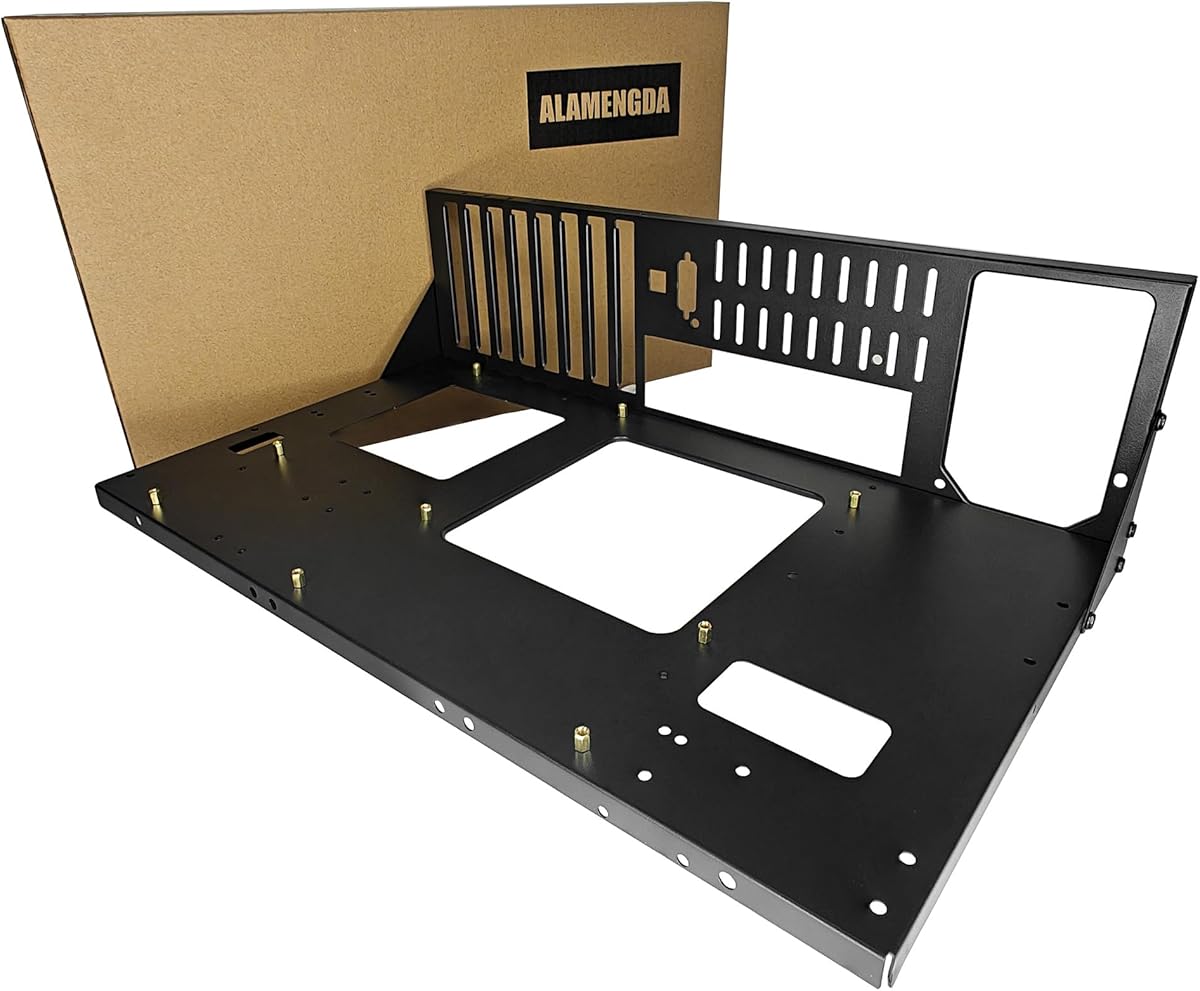



The AL01 is a straightforward DIY test bench with a 4.4 rating and a construction-focused design. Its 0.8mm SPCC steel frame, folded edge reinforcement, and triangular reinforcing plates make it appealing to builders who want a rigid platform that can hold a working system while leaving its components accessible. The open-air format also suits continuous inspection and maintenance work.
We may earn a commission when you buy through this link, at no additional cost to you.
Motherboard support covers ATX, Micro ATX, and ITX boards within the stated 305 by 245mm mounting area. Graphics cards are not restricted to a fixed length or width, which is valuable when the exact board layout and cooler arrangement are still changing. Standard ATX power supplies are supported, while reserved routing holes help keep cables behind the system rather than across exposed components.
Its main compromise is that the feature set focuses on structural support and flexibility rather than integrated lighting, front connectivity, or an elaborate accessory ecosystem. The optional extended baseboard for E-ATX dual-server motherboards also suggests that specialized builds may require additional planning. Buyers comparing it with more elaborate open cases should verify all case dimensions against their own hardware.
The AL01 makes the most sense for a builder creating a functional test rig, an exposed work system, or a simple display build where easy access matters more than styling. It is a strong candidate when steel rigidity, motherboard flexibility, and unrestricted graphics clearance are the leading priorities.
The 0.8mm SPCC steel construction and folded reinforcement create a more substantial foundation than a basic sheet-metal frame. The scratch-resistant black sand-grain finish also helps the chassis maintain a clean appearance during frequent maintenance.
Wide graphics card accommodation and support for three common motherboard standards allow the frame to change as components are upgraded. Rear cable routing helps preserve access while reducing visual clutter.
We may earn a commission when you buy through this link, at no additional cost to you.
With a 4.6 rating, the DIY Aluminium PC Open Case is the strongest all-around choice in this group. It combines a broad hardware envelope with an easy-to-customize chassis concept, making it suitable for anyone assembling a test bench, gaming system, workstation, or server-inspired open build. Its defining advantage is flexibility across motherboard, graphics card, power supply, and cooling choices.
We may earn a commission when you buy through this link, at no additional cost to you.
The chassis supports motherboard sizes from ITX through ATX and E-ATX, and the listing describes compatibility with all motherboard models. Graphics cards are not limited by length, which is especially useful for large accelerators. ATX, SFX, and 1U power supply formats are supported, while both air and water cooling can be incorporated for demanding processor configurations.
That flexibility does not mean every cooler, cable, or compact component will fit without planning. The open construction provides little dust protection, and water-cooling hardware must be installed carefully with the radiator and pump positioned appropriately. The lack of specified front I/O or lighting features may also matter to buyers seeking a finished display build.
This is our Editor's Choice because it offers the most balanced combination of compatibility and build flexibility. Choose it when you want room to experiment, may use a large GPU or unconventional power supply, and value the ability to revise the layout over time.
Support for E-ATX, ATX, Micro ATX, and ITX boards makes the frame suitable for projects of several sizes. Unrestricted graphics card length further reduces the risk of a future upgrade being blocked by a fixed chassis boundary.
Air and water cooling support gives builders a path for high-performance CPUs. Compatibility with ATX, SFX, and 1U power supplies broadens the range of systems that can be assembled without changing the chassis.
We may earn a commission when you buy through this link, at no additional cost to you.
The DIY Open Frame PC Chassis combines an aluminum structure with broad hardware support and a 4.5 rating. It is designed for enthusiasts who want to personalize a build visually while retaining the access and cooling advantages of an exposed layout. Type-C support adds a more modern connection option than a barebones technical frame may otherwise offer.
We may earn a commission when you buy through this link, at no additional cost to you.
Motherboard support extends from ITX through Micro ATX, ATX, and E-ATX. Graphics cards have no stated length limit, and the case accepts ATX, SFX, or 1U power supplies. Both water and air CPU cooling are supported, allowing the frame to accommodate a quiet air-cooled system or a more advanced custom loop.
The main uncertainty is storage and accessory planning, because the supplied product information does not state a specific drive count or identify a full front-panel port layout. As with any open aluminum chassis, a wide GPU and tall cooler may extend beyond the nominal frame, so physical measurements should be checked before assembly.
This chassis is best for a customized visible build where component flexibility and modern connectivity matter. It is less compelling for a buyer who requires a clearly stated number of storage mounts or a conventional enclosed, dust-resistant system.
Aluminum gives the chassis a clean, lightweight character while its four supported motherboard standards make it useful across compact and large builds. The exposed arrangement makes component placement visible and straightforward to adjust.
Type-C support improves the chassis relevance for contemporary peripherals. Air and water cooling options provide flexibility for processors ranging from everyday systems to enthusiast configurations.
We may earn a commission when you buy through this link, at no additional cost to you.
The PC Test Bench PC Case is a budget-oriented option with a 4.1 rating, offering a practical alternative to a conventional tower. Its open-air design keeps the motherboard, graphics card, power supply, and storage devices visible and accessible, while the claimed tool-free installation process should make repeated component changes more convenient.
We may earn a commission when you buy through this link, at no additional cost to you.
It supports ATX, MATX, and ITX motherboards, including use in X79 and X99-style systems. Dedicated brackets for the motherboard, power supply, and storage devices establish the main mounting structure. The same accessibility that makes it useful for testing also allows it to function permanently as an open-air display case.
The feature list is less complete than that of some premium models. It does not specify water-cooling support, drive quantities, included fans, or detailed power supply formats, so buyers with specialized requirements need to inspect the current listing and dimensions. Its 4.1 rating also suggests it may not deliver the same refinement as more highly rated frames.
It is a sensible choice for a first test bench, a frequently serviced development system, or a visible PC that prioritizes fast access. The Best Budget designation reflects its straightforward utility rather than an exhaustive feature list.
A tool-free approach reduces the time needed to install, remove, or reposition components. This is especially useful when diagnosing boot problems or comparing different memory and graphics configurations.
The same structure can serve as a temporary diagnostic platform or a permanent open-air display. Dedicated component brackets make it more organized than a completely improvised mounting arrangement.
We may earn a commission when you buy through this link, at no additional cost to you.
This upgraded portable chassis bracket uses zinc-coated steel to provide a more robust alternative to a lightweight aluminum test frame. Its 4.1 rating reflects a product whose central appeal is construction and portability rather than an extensive list of integrated features. The black finish is designed to coordinate with a wide range of differently colored components.
We may earn a commission when you buy through this link, at no additional cost to you.
The open frame accommodates ITX, MATX, and ATX motherboards, covering the most common desktop standards. Its portable bracket form factor should appeal to builders who move systems between locations or need a dedicated platform for maintenance and testing. Zinc-coated steel can also provide reassuring rigidity for a frame that supports a complete PC.
The supplied information is sparse, with no explicit fan, radiator, drive, graphics card, or power supply specifications. Those omissions matter because they prevent direct comparison with models that advertise no component-length restrictions. Buyers should also check the assembled dimensions and included hardware before committing to a layout.
This is a good fit for a straightforward, portable steel test platform with a restrained appearance. It is best chosen after confirming that the motherboard, power supply, cooling hardware, and any large accelerator fit the actual bracket dimensions.
Zinc-coated steel gives the portable bracket a more substantial feel than a minimal folding frame. The coating process is intended to support durability during repeated transport and reassembly.
Support for ITX, MATX, and ATX boards allows the platform to handle compact and full-size mainstream systems. Its understated black finish is practical for builds that mix metallic and colorful components.
We may earn a commission when you buy through this link, at no additional cost to you.
The TGDGAMER E-ATX Open Chassis stands out for its wide-body layout and unusually clear component limits. With a 4.4 rating, it supports E-ATX, ATX, M-ATX, and ITX motherboards, giving it broader board coverage than many mainstream test benches while maintaining an open structure for access and heat dissipation.
We may earn a commission when you buy through this link, at no additional cost to you.
Storage capacity includes two SSDs and two hard drives, which is useful for systems that need both fast scratch storage and higher-capacity files. The chassis places no stated limit on graphics card length or CPU cooler height, reducing two common restrictions encountered in compact frames. Standard ATX power supplies are the specified power option.
The trade-off is a narrower power supply ecosystem than products supporting ATX, SFX, and 1U formats. No fans, radiator locations, or water-cooling support are listed in the available information, so enthusiasts should treat those features as requiring verification rather than assumptions. Open-frame construction also does not provide the dust filtering of a closed case.
This chassis is best for a large test rig, content system, or multi-drive workstation that needs generous storage and E-ATX flexibility. It is especially compelling for builders who prioritize expansion limits over compactness or a dense accessory ecosystem.
Two solid-state drive positions and two hard drive positions support a more varied storage strategy. This is useful for projects that combine operating systems, caches, working files, and archival data within one exposed system.
Graphics card length and CPU cooler height are both unrestricted according to the product information. That makes the frame more accommodating for visually substantial or high-performance components.
We may earn a commission when you buy through this link, at no additional cost to you.
The TGDGAMER Open Chassis is a more streamlined counterpart to the brand's E-ATX model. It carries a 4.4 rating and retains the open, cooling-oriented approach while limiting storage to one SSD and one hard drive. ATX, M-ATX, and ITX motherboards are supported, which covers most mainstream enthusiast platforms.
We may earn a commission when you buy through this link, at no additional cost to you.
Its strongest stated benefits are unrestricted graphics card length and no limit on CPU cooler height. Those allowances are valuable when the open frame is used to test powerful components or maintain a system with a prominent air cooler. The wide open structure supports the same quick inspection and maintenance workflow associated with a conventional test bench.
The one-SSD, one-HDD arrangement is the main limitation for storage-heavy systems, and only standard ATX power supplies are supported. The product information does not mention liquid cooling, included fans, front I/O, or lighting, so it is best viewed as a functional chassis rather than a fully furnished showcase case.
Choose this option for a gaming test bench or visible DIY system that needs generous component clearance without a large number of drives. It is a good match for builders who value flexibility above integrated extras.
The absence of a stated graphics card length limit gives large accelerators more room to fit. An unrestricted CPU cooler height is similarly useful for builds using tall tower coolers.
ATX, M-ATX, and ITX support covers the majority of conventional gaming and development boards. One SSD and one hard drive keep the storage layout simple for a focused working system.
We may earn a commission when you buy through this link, at no additional cost to you.
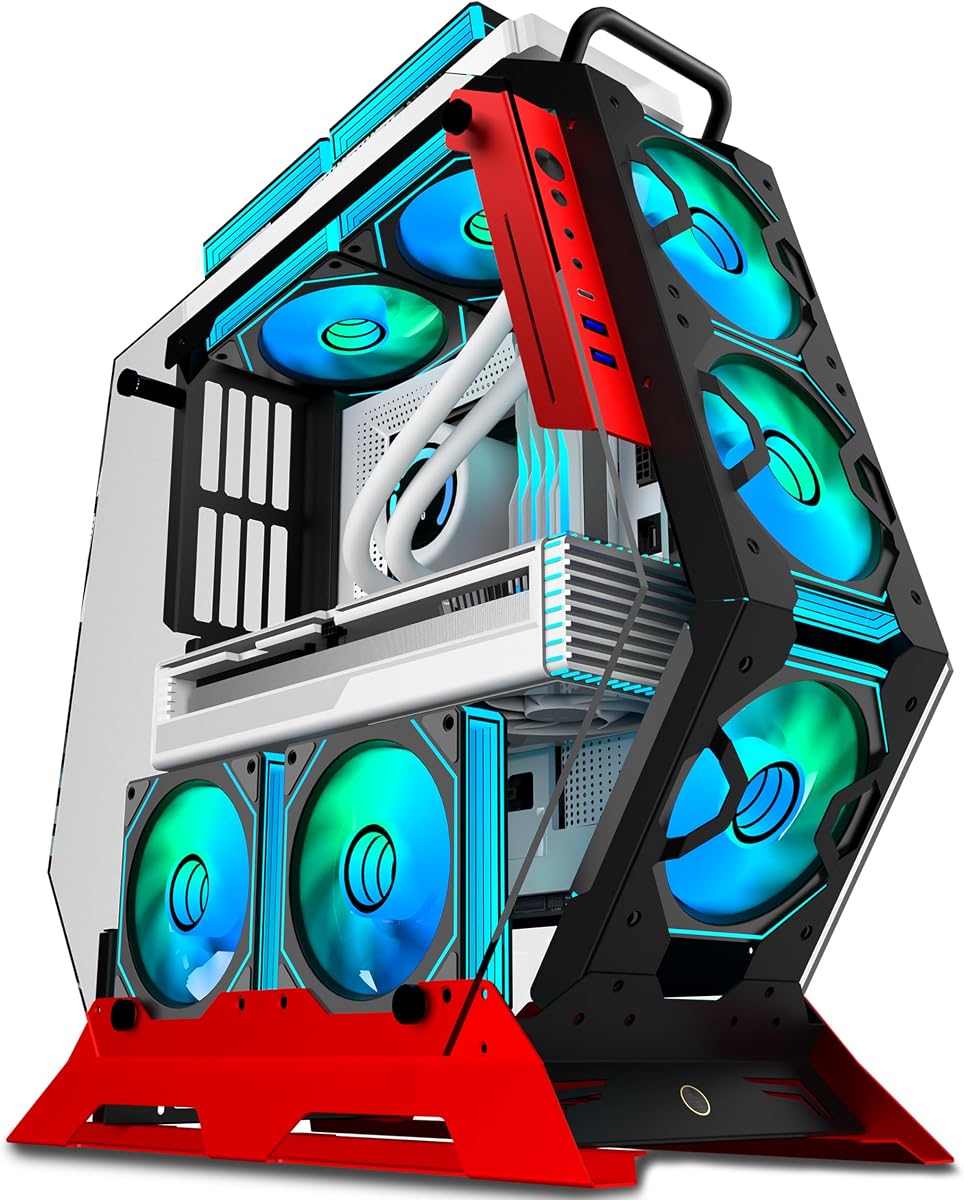
The KEDIERS C570 brings the most dramatic visual treatment to the group and holds a 4.5 rating. Its creative irregular frame, thick metal construction, two tempered glass panels, and red finish are intended to make the computer a display piece rather than merely an exposed test platform. Seven preinstalled PWM ARGB fans provide immediate cooling and illumination.
We may earn a commission when you buy through this link, at no additional cost to you.
Fan lighting can be synchronized through software using a simple 5V ARGB motherboard header, with no separate controller indicated. The system supports ATX, Micro ATX, and Mini-ITX motherboards. Front connectivity includes one USB-C port, two USB 3.0 ports, and one HD audio connection, giving this open gaming case a more complete exterior interface than many basic frames.
Storage support and power supply format are not specified, so those details require confirmation. The open and irregular shape may also offer less conventional mounting flexibility than a rectangular test bench, and the glass panels still do not turn the chassis into a dust-sealed enclosure. Buyers should verify clearance for their exact motherboard, cooler, and graphics card.
The C570 is a strong choice for a gaming display build where RGB, visible components, and an unconventional silhouette are priorities. It is less suitable for a technician who primarily wants a simple, universally adjustable bench.
Preinstalled PWM ARGB fans provide a combination of cooling and lighting from the first setup. Their synchronization through the motherboard simplifies management of a visually coordinated system.
The irregular frame, tempered glass, and red finish give the build a recognizable appearance. USB-C, two USB 3.0 ports, and HD audio provide practical front-panel connections for a finished gaming setup.
We may earn a commission when you buy through this link, at no additional cost to you.
The CORSAIR 4000D RS ARGB Frame has the highest rating in this roundup at 4.7, reflecting a polished, feature-rich approach to the frame concept. Rather than presenting a basic open skeleton, it uses a modular FRAME system that allows the motherboard tray, front I/O, and other elements to be changed as needs evolve.
We may earn a commission when you buy through this link, at no additional cost to you.
Three CORSAIR RS ARGB PWM fans are preinstalled at the front. They use daisy-chainable four-pin PWM connections, support Zero RPM behavior at low loads, and connect to a 5V ARGB header on the motherboard. The InfiniRail steel mounting system lets fans be positioned along adjustable points in the front and roof, supporting fan sizes up to 200mm in the front and 140mm in the roof.
The side panel beside the motherboard tray can remain as a cable cover or be removed for side-mounted fans and additional cooling. A three-dimensional Y-pattern perforated front panel seeks high airflow with minimal restriction. Compared with a bare test bench, however, it is less minimalist, and the supplied information does not explicitly list supported motherboard sizes, storage layout, or power supply format.
This is a strong pick for a builder who wants open-frame visual appeal but also values established cooling hardware, modularity, polished lighting, and organized cable management. It is better suited to a long-term display build than to rapid, improvised diagnostic testing.
The FRAME modular system allows major exterior pieces to be changed rather than locking the build into one configuration. That makes it easier to adapt the chassis as component requirements or personal preferences evolve.
Adjustable InfiniRail mounting points place fans where they are most useful, while the removable side cover creates another airflow route. Three preinstalled ARGB PWM fans provide a strong visual and cooling foundation.
We may earn a commission when you buy through this link, at no additional cost to you.
The Cooler Master MasterFrame 360 Stage Mirror is the premium selection in this guide, with a 4.0 rating and an emphasis on both display quality and thermal capacity. Its mirrored front stage creates a 360-degree showcase effect, reflecting the components and collectibles within the frame. It is designed for builders who want the computer itself to become part of a room's presentation.
We may earn a commission when you buy through this link, at no additional cost to you.
Cooling capacity is a defining feature. The frame accepts fan sizes from 120mm to 200mm and provides positions for up to twelve 120mm fans, split between six top and six bottom locations. Radiators up to 360mm are supported, creating ample opportunity for a substantial liquid-cooling loop or a dense array of air-cooled fans.
The frame supports Mini-ITX, Micro-ATX, and ATX motherboards, including ATX BTF back-connect layouts, but not E-ATX. Graphics cards may be up to 430mm long, and power supplies up to 210mm. Its USB 4.0 Gen 2×2 Type-C port supports speeds up to 20Gbps, with two USB 3.2 Gen 1 Type-A ports also included.
This is the Best Premium pick for a polished collector's build, themed workstation, or creator system that needs both visual presentation and extensive cooling. It is less suitable for E-ATX projects or graphics cards exceeding the stated length, but for compatible hardware it delivers the most sophisticated showcase experience in the lineup.
The front mirrored stage reflects internal hardware and collectibles from multiple angles. Rather than simply exposing components, the design makes them the visual focus of the installation.
Up to twelve 120mm fan positions and 360mm radiator support provide room for intensive thermal configurations. The 200mm fan allowance in appropriate locations offers additional flexibility for high-airflow arrangements.
We may earn a commission when you buy through this link, at no additional cost to you.
The right open frame case depends on motherboard size, component dimensions, cooling strategy, storage needs, and whether the system will function as a test bench or permanent display. These factors help prevent compatibility problems before assembly begins.
Begin by identifying the exact motherboard standard used in the planned build. ATX is the most common desktop format, while Micro ATX and Mini-ITX suit smaller systems. Several frames in this guide also accept E-ATX, but the AL01 requires an extended baseboard option for certain dual-server E-ATX configurations. The Cooler Master MasterFrame 360 supports ATX, Micro ATX, Mini-ITX, and ATX BTF layouts, but not E-ATX.
Check both the board standard and the dimensions around its sockets and rear ports. A frame that technically supports a form factor can still be awkward if a tall CPU cooler, large heatsink, or rear-mounted connectors reduce usable clearance. Reviewing the manufacturer's supported list before selecting other components is the safest approach.
Long modern graphics cards can extend far beyond the motherboard, so graphics clearance deserves careful attention. Multiple test benches in this roundup advertise no limit on graphics card length, while the MasterFrame 360 specifies support up to 430mm. Width can also matter with wide coolers, power connectors, or multi-slot card designs, so a length statement alone may not capture the complete fit.
Consider the card's full assembled dimensions, including the cooler and power cable bend radius. Leave enough room to connect display cables and avoid pressing a card sideways against another component. If a future GPU upgrade is likely, an unrestricted or generously dimensioned frame is usually more convenient.
Power supply format affects whether an open frame can accommodate a compact workstation, a standard desktop build, or a specialized server arrangement. Most models in this guide support standard ATX power supplies, while the DIY Aluminium PC Open Case and the DIY Open Frame PC Chassis also list SFX and 1U support. The KEDIERS C570 and CORSAIR 4000D RS do not have a power standard specified in the supplied information.
Beyond the format, check the power supply's length and the room required for modular cable bends. A frame that accepts ATX units but offers no depth may still restrict larger power supplies. Consider cable routing at the same time, because a tidy open build is easier to service when wires do not obstruct removable components.
Open frames promote airflow, but open air alone does not replace a complete CPU cooling solution. The aluminium frames and AL01 list support for water and air cooling, while the TGDGAMER products advertise wide cooling and no stated CPU cooler height restriction. The MasterFrame 360 goes furthest with fan positions for up to twelve 120mm units and radiator support up to 360mm.
Match the frame to the cooler's physical height and mounting pattern. For liquid cooling, also verify radiator size, pump placement, and the available route for tubing. A tall tower cooler may be unrestricted by the chassis yet still be constrained by the motherboard, memory modules, side panels, or graphics card.
Storage support is easy to overlook in a visually minimal chassis. The TGDGAMER E-ATX model supports two SSDs and two hard drives, while the standard TGDGAMER supports one of each. Other frames either do not state a drive count or focus on modular or adjustable mounting systems. A clear drive specification is especially useful for a working system rather than a display-only build.
Think about how frequently you will replace a drive, connect a temporary disk, or route a front-panel cable. Accessible mounting points are useful in a test bench because storage can be changed without dismantling an entire enclosed tower. If the frame is intended to look finished, examine whether exposed cables and adapters would harm the intended presentation.
Material influences weight, rigidity, and the character of the finished build. The AL01 uses 0.8mm SPCC steel with folded and triangular reinforcement, the portable bracket uses zinc-coated steel, and the two DIY aluminium frames use aluminum. The KEDIERS C570 uses a thick metal frame, while the CORSAIR and Cooler Master designs combine structured panels with a more refined finish.
A heavier frame may be reassuring for a full system but less convenient to transport. Aluminum can reduce weight and offer a clean industrial appearance, while steel tends to feel robust and stable. Inspect bracing, folded edges, and mounting points rather than relying on material alone; a well-supported thin frame can still perform well.
A test bench and a display case have different priorities. A diagnostic platform benefits from tool-free access, removable parts, and easy cable tracing, while a display case benefits from lighting, glass, refined shaping, and front connectivity. The PC Test Bench PC Case is explicitly designed to switch between testing and display roles, and the portable steel bracket is aimed at users who may move their systems.
Decide how often the computer will be transported and whether it will remain powered and visible. A permanent showcase may justify integrated fans and lighting, whereas a frequently serviced test rig may value open mounting more. Matching the frame to the actual use prevents a visually striking but impractical purchase.
Begin by assembling the frame on a stable, clean surface and installing the motherboard before adding heavy or awkward components. Fit the power supply, storage, graphics card, and cooling hardware in an order that leaves room to route cables. Refer to the product listing and component manuals for exact mounting positions, as each open frame has a different arrangement.
Keep the open structure free of dust, especially around heatsinks, fans, filters, and exposed connectors. Use a soft brush or compressed air held at a safe distance to remove dust without spinning fans uncontrollably. Clean tempered glass with a lint-free cloth and a suitable nonabrasive cleaner, and avoid spraying liquid directly onto any chassis component.
While a working system is exposed, inspect cable connections and mounting screws periodically, especially after moving the computer. Keep liquids away from the open frame, route power cables securely, and do not leave the system running where children or pets can contact it. For storage, access, and hardware maintenance, power down the system and disconnect the power supply before changing components.
Yes, many open frame cases are used as permanent gaming systems because they expose attractive components and encourage strong airflow. Models with preinstalled ARGB fans, tempered glass, and front I/O are particularly suited to display-oriented gaming builds. You should still confirm motherboard, graphics card, power supply, and cooler dimensions before assembly.
An open frame case leaves most or all of the internal structure exposed, improving component access and making installation and troubleshooting straightforward. A conventional tower encloses the hardware behind panels, usually offering more dust protection, a tidier appearance, and a wider range of dedicated storage and cable-management features. Open frames are therefore especially useful for test benches and visible builds.
Open frames generally provide less dust protection than enclosed cases because their components are directly exposed to the surrounding air. Regular cleaning becomes more important, particularly around fans, heatsinks, and drive connections. A display case placed in a clean room or a dedicated computer area will generally require less frequent attention than one used in a dusty workshop.
Several models in this guide do, including the DIY Aluminium PC Open Case and the DIY Open Frame PC Chassis, which list both water and air cooling support. The MasterFrame 360 goes further with radiator support up to 360mm. Confirm radiator dimensions, mounting locations, and pump clearance because a general cooling statement does not guarantee every possible layout will fit.
Open frames are well suited to testing because the motherboard, graphics card, power supply, and storage are easy to inspect, connect, and replace. The PC Test Bench PC Case and the TGDGAMER models are especially oriented toward testing. You should still use a proper power supply, connect the required monitor and peripherals, and make sure all mounting points are secure.
Check the chassis listing for a stated graphics card length and compare it with the full dimensions of your card, including its cooler and power connector. Products that advertise no length limit can be easier to upgrade, but width and neighboring component clearance may still matter. If the specification is missing, measure the card and ask the seller for the chassis's available GPU space.
That depends on the model. Aluminum frames may be lighter, while steel platforms such as the AL01 and portable bracket can feel more substantial. Before moving a powered system, shut it down, disconnect peripherals and power, and make sure the GPU and other heavy components are securely supported. A portable bracket is intended to suit users who regularly relocate their hardware.
An open frame can be useful for a workstation because multiple boards, power supply formats, and cooling solutions may be supported. The DIY Aluminium PC Open Case is especially flexible, while the TGDGAMER E-ATX model offers two SSD and two HDD positions. For professional use, verify the exact drive, expansion, and power requirements, since some display-oriented frames focus more on appearance than storage capacity.
The DIY Aluminium PC Open Case is the most flexible overall option, combining broad motherboard support, unrestricted graphics card length, several power supply formats, and both air and water cooling. The PC Test Bench PC Case is a practical budget choice for accessible testing, while the Cooler Master MasterFrame 360 is the premium option for collectors and builders who want extensive cooling and a mirrored showcase.
Prioritize the dimensions and standards that affect your actual system before focusing on appearance. Confirm motherboard format, graphics card length, power supply type, cooler height, radiator placement, and drive capacity. A simple test bench may serve your workflow better than a polished frame, while a display build should still provide the ports, cable management, and stability required for regular use.
Finally, check the current product listing and updated compatibility information before purchasing. Component support can vary between frame revisions, and product details may change as sellers update their listings. Reviewing the latest dimensions and included accessories alongside current pricing will help ensure the selected open frame PC case remains suitable for your build.