
TEACH TECH Hydrobot Arm
4.5Editor score
Water-powered hydraulic operation
Six movement axes
Detailed hands-on STEM build
This Robotic Arm Kits guide compares ten options for kids, teens, educators, and hobbyists, covering build complexity, controls, programmability, and features.
Robotic arm kits combine mechanical assembly, electronics, and problem-solving in a format that can be educational, entertaining, and surprisingly challenging. A worthwhile kit should feel approachable for the intended builder while offering meaningful control options, durable components, and enough customization to encourage experimentation beyond the first successful build.
The products in this guide span wooden beginner kits, hydraulic constructions, app-controlled tracked robots, Arduino and Scratch platforms, and advanced six-axis systems for AI and imitation-learning experiments. We compared their stated degrees of freedom, control methods, included accessories, intended audiences, programming support, construction demands, and expandability.
Each review explains what distinguishes its kit, while the comparison and buying guide clarify which option suits a particular learner. Ratings and specifications reflect the supplied product information, and availability, features, and prices can change, so readers should confirm current listing details before making a purchase.
4.5Editor score

4.8Editor score
4.3Editor score
This side-by-side overview compares the ten kits by mechanical freedom, control options, programming depth, construction style, and intended experience, from simple wooden builds to advanced AI experimentation.


The TEACH TECH Hydrobot Arm is a 4.5-rated STEM building kit for ages 12 and older, distinguished by a genuinely mechanical rather than electronic approach. It uses water pressure to operate a six-axis arm capable of rotating up to 270 degrees, offering a tangible way to explore mechanical engineering without batteries or a coding interface.
We may earn a commission when you buy through this link, at no additional cost to you.
Its strongest feature is the combination of realistic hydraulic motion and hands-on assembly. The arm can move, rotate, and grasp objects through lever-operated controls, while the supplied suction components can replace the gripper for different tasks. This creates several forms of play while teaching how fluid pressure, joints, and mechanical linkages work together.
The trade-off is that it is a build project first and a programmable robot second. It does not offer app control, custom action sequences, or software integration, and the stated audience begins at age 12. Some builders may also prefer a powered system that can repeat programmed motions rather than one operated manually through its controls.
This is an excellent choice for older children, families, and educators who want meaningful STEM learning without electronics complexity. It is especially suitable for a classroom demonstration, family weekend project, or gift for a mechanically minded teen who enjoys learning by constructing and operating a model.
Water-powered movement provides an immediate demonstration of how pressure and valves affect an articulated mechanism. Learners can observe cause and effect directly without needing programming, making the kit approachable while preserving a substantial engineering component.
The ability to switch between grasping and suction components broadens the range of tasks the finished arm can attempt. That versatility helps turn a display model into an interactive tool for lifting, carrying, and experimenting with different objects.
We may earn a commission when you buy through this link, at no additional cost to you.
The Wooden Electronic Robot Arm is a 4.2-rated electronics kit intended to introduce children ages eight and up to robotic movement and circuit control. It combines wooden structural pieces, motors, a printed circuit board, wires, and a mechanical hand in a design that feels approachable without becoming a simple model.
We may earn a commission when you buy through this link, at no additional cost to you.
The educational value comes from the connection between three-dimensional assembly and electronic control. Builders see the physical structure take shape before learning how the motor system causes the arm to move. No soldering is required, which makes the project more approachable for younger students and family settings.
Its limitations are meaningful for more experienced robotics enthusiasts. Six AA batteries are required but not included, and the supplied information does not describe advanced software, graphical programming, or a high degree of freedom. The kit also focuses on one arm rather than a mobile or multi-attachment robot platform.
This kit is best for a curious child, parent-child project, or beginner classroom activity centered on mechanics and simple circuits. It suits buyers who want a manageable introduction to electronic robotic arms and would rather learn basic assembly and control than advanced programming or computer vision.
The combination of visible wooden mechanisms and enclosed circuit components gives beginners something tangible to examine. It demonstrates that robotic movement depends on carefully connected parts rather than a preinstalled electronic brain.
A precision assembly tutorial and the absence of soldering requirements reduce common barriers for younger builders. The experience remains challenging enough to encourage patience while remaining suitable for a supervised family STEM session.
We may earn a commission when you buy through this link, at no additional cost to you.
The VANLINNY 4DOF Robot Arm carries a 4.6 rating and combines a durable metal construction with programmable movement. Aimed at children around ages eight to twelve, it presents robotics as a hands-on science project that can move across multiple angles while its arm and excavator mechanisms rise, fall, and grasp.
We may earn a commission when you buy through this link, at no additional cost to you.
This kit stands apart from basic wooden arms through its range of functions. It supports simple programming, includes simulation sound effects, and can be controlled remotely. The supplied data also notes a robotic car, excavator features, a battery, USB charging cable, DIY tools, and a remote with an indicated 30-to-50-meter range.
A four-axis arm is not as flexible as six-axis systems, so buyers should not expect the same range of positioning. The product description also refers to different configurations and functions without clearly separating every included component, making the final package contents worth reviewing before purchase.
It is a strong option for a child who wants more than manual control and prefers a durable, mobile robot with visible programming functions. It is also well suited to teen gift buyers seeking a dramatic, feature-rich STEM project with both a display model and interactive play value.
Simple programming gives younger builders a direct way to connect commands with motion. The ability to create repeatable actions helps turn the arm and mobile base into a small platform for testing sequences and cause-and-effect relationships.
Remote control, wheels, and an articulated arm create more possibilities than a stationary desktop model. Learners can move the robot toward an object, position the arm, and experiment with lifting or gripping across the surrounding area.
We may earn a commission when you buy through this link, at no additional cost to you.
The 3 in 1 Technical Robotic Arm is the highest-rated option in this guide at 4.8, and its combination of scale, mobility, and control options justifies attention. It assembles a tracked robot with an articulated arm, four M-motors, and a large 975-piece construction measuring approximately 15 by 7.9 by 12 inches.
We may earn a commission when you buy through this link, at no additional cost to you.
Its defining feature is the quick-swappable attachment system. Builders can configure the arm with a gripper, bucket, or drill bit, creating three distinct engineering missions from one model. A 2.4GHz controller offers direct remote operation, while the companion app adds drag-and-drop programming, gyroscope control, and custom path drawing.
The 975-piece count makes this a substantial project rather than a quick assembly. Four independent motors and a mobile chassis also create more mechanical demands than a basic wooden arm. Buyers should verify the app's device compatibility and account for the time required to build, align, and test the many moving components.
This is the ideal choice for a motivated teen, adult hobbyist, or family seeking a showpiece that can be controlled and programmed in several ways. The interchangeable tools create repeated missions, while the tracked platform and detailed design make it especially engaging for builders who want to display a completed robotic system.
A gripper, bucket, and simulated drill transform the arm into a different tool for each mission. The quick-swap arrangement also reduces the need to rebuild the entire robot, encouraging users to revisit the model with a specific task in mind.
Drag-and-drop sequences, device tilting, and drawn paths offer distinct ways to learn control logic. The variety makes the platform useful for both intuitive play and more deliberate lessons in sequencing, spatial awareness, and cause and effect.
We may earn a commission when you buy through this link, at no additional cost to you.
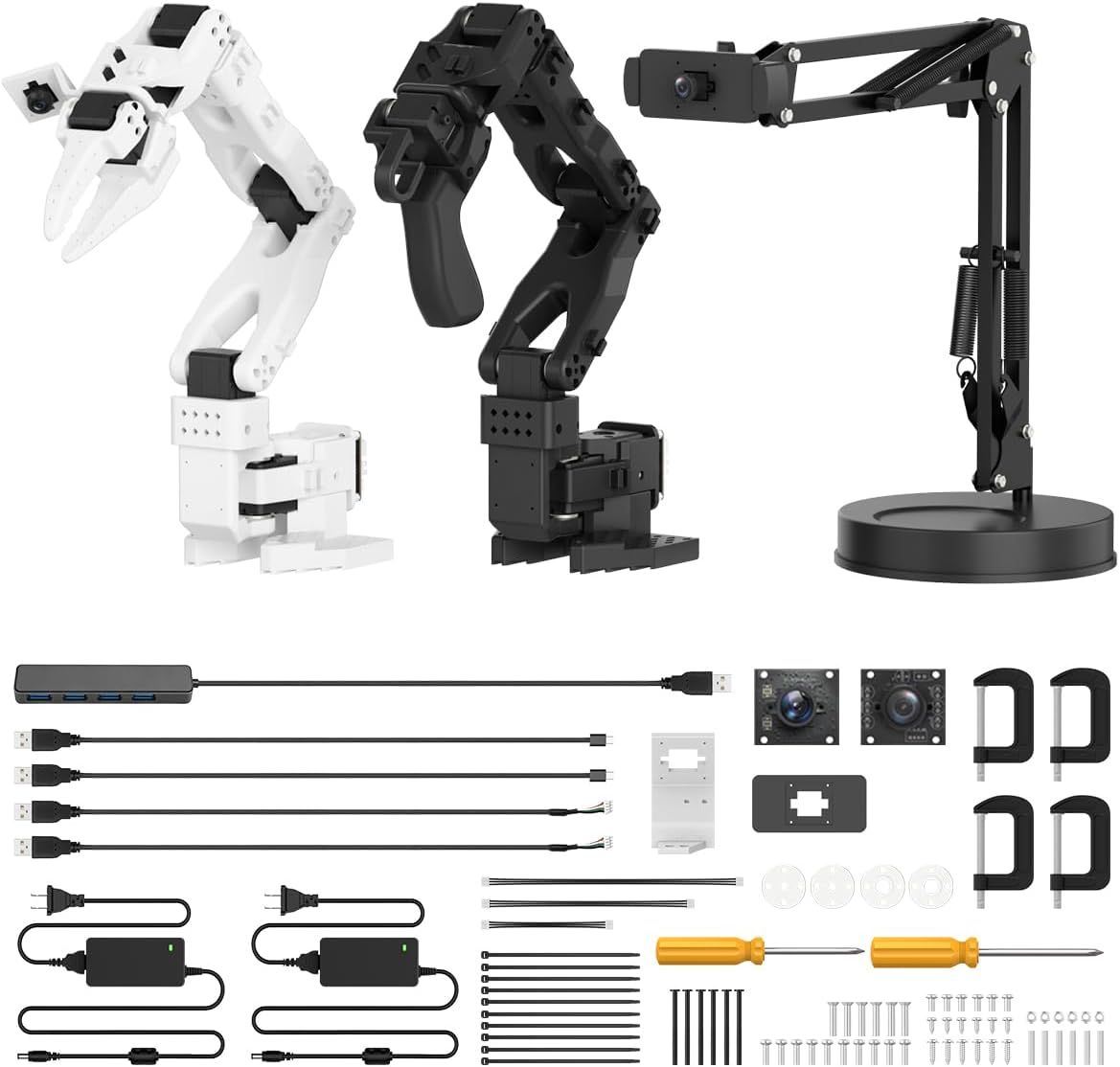
The Hiwonder SO-ARM101 is a 4.3-rated advanced robotic arm intended for embodied AI, imitation learning, and serious experimentation. It combines six-axis movement, twelve high-torque bus servo motors with magnetic feedback, and an advanced kit that includes a 3D-printed part and arrives assembled.
We may earn a commission when you buy through this link, at no additional cost to you.
Its strongest technical feature is the dual-camera vision arrangement. A gripper-mounted camera supports close manipulation while an external camera adds environmental awareness. The arm is compatible with the LeRobot open-source framework, giving developers access to shared code, templates, and pre-trained models for research and experimentation.
This is not a simple classroom toy or an introductory gift. Professional PC software, the BusLinker V3.0 debugging board, servo scanning, status monitoring, trajectory control, and calibration all point toward users who understand robotics workflows or are prepared to learn them. The advanced hardware also requires appropriate setup and careful handling.
The SO-ARM101 is best for adult hobbyists, students, educators, and developers who want a ready-made foundation for imitation learning. It is the strongest choice in this list for computer vision and AI research, while the included 3D-printed part saves builders from producing at least one component themselves.
The external camera can observe the broader environment while the gripper camera follows the manipulation area. That dual view is valuable for tasks where object context and precise hand positioning are both important.
Servo feedback, status monitoring, trajectory control, and calibration features support the iterative process of developing robot behaviors. These tools make the system more useful for advanced experimentation than a conventional programmable toy arm.
We may earn a commission when you buy through this link, at no additional cost to you.
The miniArm is a 4.6-rated five-axis robotic arm built around the Atmega328 platform and compatible with Arduino programming. Unlike kits designed primarily for preset remote-control play, it emphasizes open-source code, learning tutorials, and secondary development examples for users who want to create custom behaviors.
We may earn a commission when you buy through this link, at no additional cost to you.
Its hardware supports several ways to interact with the arm. A six-channel knob controller provides real-time manual input, Bluetooth is included, app control is available, and offline action editing lets users prepare movements independently. Expansion ports create a path to integrate components such as an ESP32 camera, accelerometer, touch sensor, and ultrasonic sensor.
The included information distinguishes a starter kit from a standard kit. The starter version does not include the glowing ultrasonic sensor, touch sensor, acceleration sensor, ESP32Cam module, Type-C data cable, or 4PIN wire, so buyers must choose deliberately rather than assuming every expansion accessory is present.
This platform best suits teens, adult learners, and engineering students who want to move beyond ready-made actions. It rewards users comfortable with Arduino, while the provided examples and tutorials reduce the initial barrier. For a buyer seeking a simple finished toy, however, its development focus may feel unnecessarily involved.
Published programs and secondary-development examples let users inspect how movement commands are created. This transparency makes it easier to change behavior, add sensors, and understand the relationship between code and physical motion.
Expansion ports provide a practical route from basic arm control to ranging, touch response, motion sensing, or camera-based projects. That progression is particularly valuable for learners who want their setup to evolve over time.
We may earn a commission when you buy through this link, at no additional cost to you.
The LewanSoul LeArm is a 4.2-rated six-degree-of-freedom desktop arm designed for students, engineers, university courses, and robot enthusiasts. It uses six digital servos and combines remote grasping, object transportation, custom actions, and graphical programming within a compact desktop format.
We may earn a commission when you buy through this link, at no additional cost to you.
Control flexibility is a central strength. The arm supports a PC, app, mouse, and wireless handle, giving users both detailed programming access and more casual ways to operate it. Metal brackets, high-torque base servos, and industrial-grade bearings contribute to stability, while three anti-blocking servos with gear clutches help protect the end mechanism.
The broad feature set can make the initial process more complicated than a simple kit. Builders still need to assemble the structure, align the joints, and become familiar with the programming software. The supplied title mentions five servos while its description specifies six, so confirming the final package contents before buying is sensible.
LeArm is a strong fit for desktop robotics projects, coursework, and users who want multiple input methods. It offers enough programming capability for custom sequences while retaining direct controls for interactive demonstrations, making it versatile for both learning and experimentation.
A mouse and app provide approachable interaction, while the PC software and wireless handle suit more deliberate operation. This makes the same arm useful for demonstrations, learning exercises, and hands-on programming sessions.
The anti-stall arrangement uses geared clutches intended to extend servo life. It adds mechanical resilience for repeated grasping or movement tasks, although careful operation remains important.
We may earn a commission when you buy through this link, at no additional cost to you.
The Wooden 270-Degree Robot Arm is a 4.2-rated construction kit for ages eight and up that combines natural wooden parts, motors, a microcontroller, and circuit boards. Its most prominent mechanical feature is the ability to rotate through 270 degrees, supporting a wide range of lifting and steering positions.
We may earn a commission when you buy through this link, at no additional cost to you.
This model provides an engaging introduction to how electronics command mechanical movement. The wooden pieces create a satisfying 3D assembly process, and clear instructions help learners progress from identifying components to operating the completed arm. It can serve as a solo project, a parent-child activity, or part of a class or STEM-night program.
The kit is less suitable for users seeking advanced coding, artificial intelligence, or extensive sensor expansion. Because the main structure is wood, it is also better treated as an educational construction project than as a heavy-duty industrial-style machine. Its product information emphasizes learning and play rather than configurable action sequences.
This is a good choice for a young builder who wants a more tactile and traditional robotics set. The combination of rotating mechanics, visible circuitry, and wooden construction provides a memorable introduction to engineering without the complexity of a full programmable research platform.
The 270-degree range gives the arm more freedom to reach across a work area than a limited-turn model. It also provides an easy visual reference for exploring how joint positioning affects the overall movement envelope.
Visible wooden structure allows builders to see how the frame and joints transfer motion. The material choice gives the kit a craft-oriented quality that can make assembly feel more like building a working machine.
We may earn a commission when you buy through this link, at no additional cost to you.
The ACEBOTT 4 in 1 Smart Robot is a 4.1-rated modular kit for children and teens that combines a five-degree-of-freedom robotic arm with a tank-car platform. The supplied QD001 base, QD004 track expansion, and QD007 arm kit can be arranged as a robot car, tracked tank, robotic arm car, or combined arm tank.
We may earn a commission when you buy through this link, at no additional cost to you.
Its ESP32 controller supports Arduino and Scratch, making the kit accessible to users entering coding through block-based tools while still supporting text-based development. Sixteen story-based tutorials and HD assembly videos provide a structured path from construction to programming, with resources available through the ACEBOTT website.
Modularity adds complexity, and beginners may need to follow the assembly videos carefully to connect each configuration correctly. The product's many advertised capabilities also make it important to distinguish included modules from optional or separately referenced functions. Direct app and infrared remote controls provide immediate operation, but the deeper learning comes from coding.
ACEBOTT is well suited to families, classrooms, STEM programs, and older children who want more than a single-purpose arm. It is especially attractive when a learner enjoys reconfiguring a robot and comparing how an arm behaves on wheels, tracks, or a combined mobile platform.
The modular design lets builders compare a standard car, tracked tank, arm-equipped car, and arm-equipped tank. Each arrangement changes mobility, reach, and task possibilities while reusing familiar core components.
Story-based tutorials and assembly videos help users progress without starting from a blank instruction sheet. Arduino and Scratch compatibility creates a flexible path from visual code blocks to more advanced programming.
We may earn a commission when you buy through this link, at no additional cost to you.
The Hiwonder xArm1S is a 4.0-rated six-axis desktop arm with a full-metal structure, positioning it as a sturdy option for programming, grasping, transportation, and custom action projects. Its six intelligent serial bus servos report position, voltage, and temperature information, providing more visibility into the arm's mechanical state.
We may earn a commission when you buy through this link, at no additional cost to you.
The arm's controls are extensive. It supports a PC interface, phone app, mouse, wireless PS2 controller, and direct fingertip control, while its action editor offers PC, app, and offline manual methods for creating custom sequences. This variety is useful for classroom demonstrations, individual experimentation, and development of repeatable motions.
The full-metal design and six high-precision servos add weight and assembly demands compared with a wooden beginner kit. The stated ability to grasp objects up to 500 grams is useful, but actual performance will vary with object shape, balance, and joint positioning. The 4.0 rating should also be considered when weighing the overall value proposition.
This is a capable platform for older students, engineers, and hobbyists who want a durable arm with broad control support. It is less appropriate as a first electronic build, but it offers enough feedback, programming, and handling options to support sustained experimentation and polished desktop projects.
Position, voltage, and temperature feedback give users useful insight into the arm's operating condition. That visibility can help with calibration and makes the platform more suitable for methodical engineering work.
PC, app, and offline editing options allow motion sequences to be created in several ways. This flexibility supports both quick demonstrations and more structured programming exercises.
We may earn a commission when you buy through this link, at no additional cost to you.
The right robotic arm kit depends on the builder's age, interest in coding, desired control methods, available workspace, and tolerance for assembly complexity. These factors help narrow a broad category to a model that feels challenging without becoming frustrating.
Beginner kits should make the first stages of assembly understandable, with clear instructions and manageable control systems. The TEACH TECH Hydrobot Arm and the wooden electronic kits are more approachable for children beginning to explore mechanics, although the Hydrobot is specifically intended for ages 12 and older. Teen and adult builders can consider Arduino platforms, mobile robots, and six-axis arms that support more advanced experimentation.
Choose a kit matched to the builder's current skills, not simply to an age label. A younger or less experienced user benefits from guided assembly, while a confident builder may prefer open examples, expansion ports, and software control.
Degree of freedom indicates how many independent directions the arm can move. A four-axis model can perform many useful tasks, while a six-axis arm generally offers more positioning flexibility. Tracked mobility changes the reachable workspace, and interchangeable tools can make one platform suitable for gripping, scooping, or simulated drilling.
Prioritize the movements required by the intended projects. More axes and attachments add possibilities, but they also increase assembly, alignment, and control complexity.
Manual controls, apps, graphical programming, and code-based environments serve different learning styles. Younger builders may appreciate immediate remote operation, while experienced users often want Arduino, Scratch, open-source examples, action editors, or custom trajectories. Verify whether control software is included, whether a computer or mobile device is required, and what platforms are supported.
Select the control environment that matches the learner's goals. A kit with several interfaces offers more flexibility, but software setup should not obscure the mechanical experience.
Wooden kits tend to provide a traditional, approachable building experience, while metal and ABS structures often appear more technical and durable. Large tracked models need more space and assembly time than compact desktop arms. Check the stated dimensions, piece count, included tools, and the surface on which the finished robot will operate.
Choose materials and scale based on the available workspace and the builder's interest. A smaller, lighter model may be easier to manage, while a larger build can become a more impressive display.
Sensor expansion creates a path from a finished toy to an adaptable experimental platform. The miniArm includes multiple expansion ports and supports options such as touch, motion, distance, and camera modules. The Hiwonder SO-ARM101 goes further with dual cameras and an imitation-learning ecosystem, while the ACEBOTT supports both Arduino and Scratch.
Look for documented ports, example projects, tutorials, and compatible accessories. Expansion is most valuable when the manufacturer supplies enough guidance to connect new hardware with existing code.
Power requirements affect convenience and portability. The TEACH TECH Hydrobot uses water power and requires no batteries, while several electronic kits need standard batteries, an included battery, or a USB charging cable. The Wooden Electronic Robot Arm specifically requires six AA batteries that are not included. RC kits generally need their remote available, and app-based systems depend on a compatible phone or tablet.
Check the supplied accessory list before ordering. Include replacement batteries, charging equipment, and compatible devices in the purchase plan if they are not bundled.
A high piece count is less intimidating when diagrams, videos, and written tutorials guide the build. The ACEBOTT provides 16 guided tutorials and HD assembly videos, while the LewanSoul LeArm includes tutorials and programming software. Open-source examples can be highly valuable, but only when the builder has enough context to adapt them.
Prioritize kits with resources suited to the intended learner. Clear visuals help younger builders, while detailed code examples and documentation matter more for advanced experimentation.
Some kits are optimized for learning, some for interactive play, and others for technical development or desktop display. A family STEM activity, a classroom program, a moving desk toy, and an AI research platform require different balances of durability, accessibility, and programmability. Appearance can matter for display-oriented purchases, but mechanisms and instructions should remain the priority.
Define the main purpose before comparing appearance. The best kit is the one that supports the intended activities and is likely to be used rather than simply displayed.
Begin with a clear workspace, sort the components, and read the full assembly sequence before joining small parts. Build slowly, align each joint as directed, and avoid forcing screws or connectors. For electronic kits, connect power only when the instructions specify it, and use the correct battery type or supplied charging cable. A careful first assembly reduces troubleshooting later.
After construction, test one movement at a time with the arm supported and the workspace cleared. Begin with low-power or manual-control exercises, then add programmed sequences gradually. For sensor-equipped platforms, confirm wiring and calibration before placing the arm near objects. With app-controlled kits, test the basic connection before building longer routines that depend on stable positioning.
Store powered kits with motors relaxed and removable attachments secured. Keep wooden parts dry, wipe metal and plastic components with a soft dry cloth, and prevent dust from entering gears or ventilation openings. Never immerse an electronic arm, and do not operate a hydraulic model without following its fluid and leak-safety instructions. Replace worn fasteners and address unusual servo heat or looseness before reuse.
The wooden electronic kits are generally the easiest starting point for children around age eight and older because they use approachable components, clear assembly instructions, and no soldering. The TEACH TECH Hydrobot Arm offers a different kind of first project, using hydraulics rather than electronics, but its stated age guidance begins at 12. The easiest option ultimately depends on the child's interest in building, coding, or mechanical movement.
The ACEBOTT is convenient for learners who want both Arduino and Scratch, while the miniArm provides open-source examples and multiple sensor expansion ports. The LewanSoul LeArm and Hiwonder xArm1S are suited to users who want desktop action editing and multiple control interfaces. A child ready for block-based coding may find ACEBOTT more approachable than a development-focused research platform.
It depends on the model. The TEACH TECH Hydrobot Arm is powered by water and requires no batteries, while the Wooden Electronic Robot Arm needs six AA batteries that are not included. Other electronic models use included rechargeable batteries, USB charging, or their own power arrangements. Check the current product listing and accessory list before assembly to avoid an interrupted build.
A four-axis arm has four main movement directions, while a six-axis arm adds two more degrees of freedom for positioning. The additional axes generally allow the end of the arm to reach a wider range of angles and orientations. They do not automatically make a kit better, because more movement can also mean more complex assembly, alignment, and programming.
The Hiwonder SO-ARM101 is the strongest dedicated option in this guide because it includes a gripper-mounted camera, an external camera, and compatibility with the LeRobot open-source framework. It is intended for embodied imitation learning and requires more technical understanding than a conventional STEM toy. Other kits can support introductory sensor or coding projects but are not presented as complete vision-based AI systems.
App operation can be intuitive because it provides familiar visual controls, but the initial app connection and device compatibility should be checked before giving the kit as a gift. Some platforms also offer remote controllers, offline editing, or graphical programming, allowing builders to begin with direct control before moving to more complex routines. A parent may wish to test the setup before the child starts a longer project.
Useful classroom kits combine clear instructions, manageable group procedures, reliable controls, and learning goals that extend beyond a single demonstration. The ACEBOTT's tutorials, the wooden construction kits' visual mechanics, and the VANLINNY's simple programming options can support structured STEM activities. Teachers should also account for assembly time, device availability, and the amount of supervision each configuration requires.
Keep the mechanism clean and dry, loosen no gears unnecessarily, and store the arm in a position that avoids stress on its joints and servos. Inspect fasteners, wiring, and attachments for looseness, and stop using the arm if a motor becomes unusually hot or a joint behaves erratically. Electronic models should be powered off before changing attachments, batteries, or sensor connections.
The TEACH TECH Hydrobot Arm stands out as a value-focused mechanical project, the 3 in 1 Technical Robotic Arm offers the most extensive mix of mobility, attachments, and app-based control, and the Hiwonder SO-ARM101 serves the most advanced vision and embodied-learning goals. Together, they illustrate how robotic arm kits can range from a focused hydraulic exercise to a research-oriented AI platform.
Prioritize the intended builder first, then choose based on control methods, mechanical freedom, construction demands, and expansion potential. Young learners generally benefit from guided wooden or hydraulic projects, while older students and hobbyists may prefer mobile configurations, Arduino or Scratch support, multiple interfaces, and sensor integration.
Finally, confirm the current package contents, component specifications, software requirements, and accessory availability before ordering. Ratings, features, and prices can change over time, so the latest listing is the best source for current availability and purchase terms.