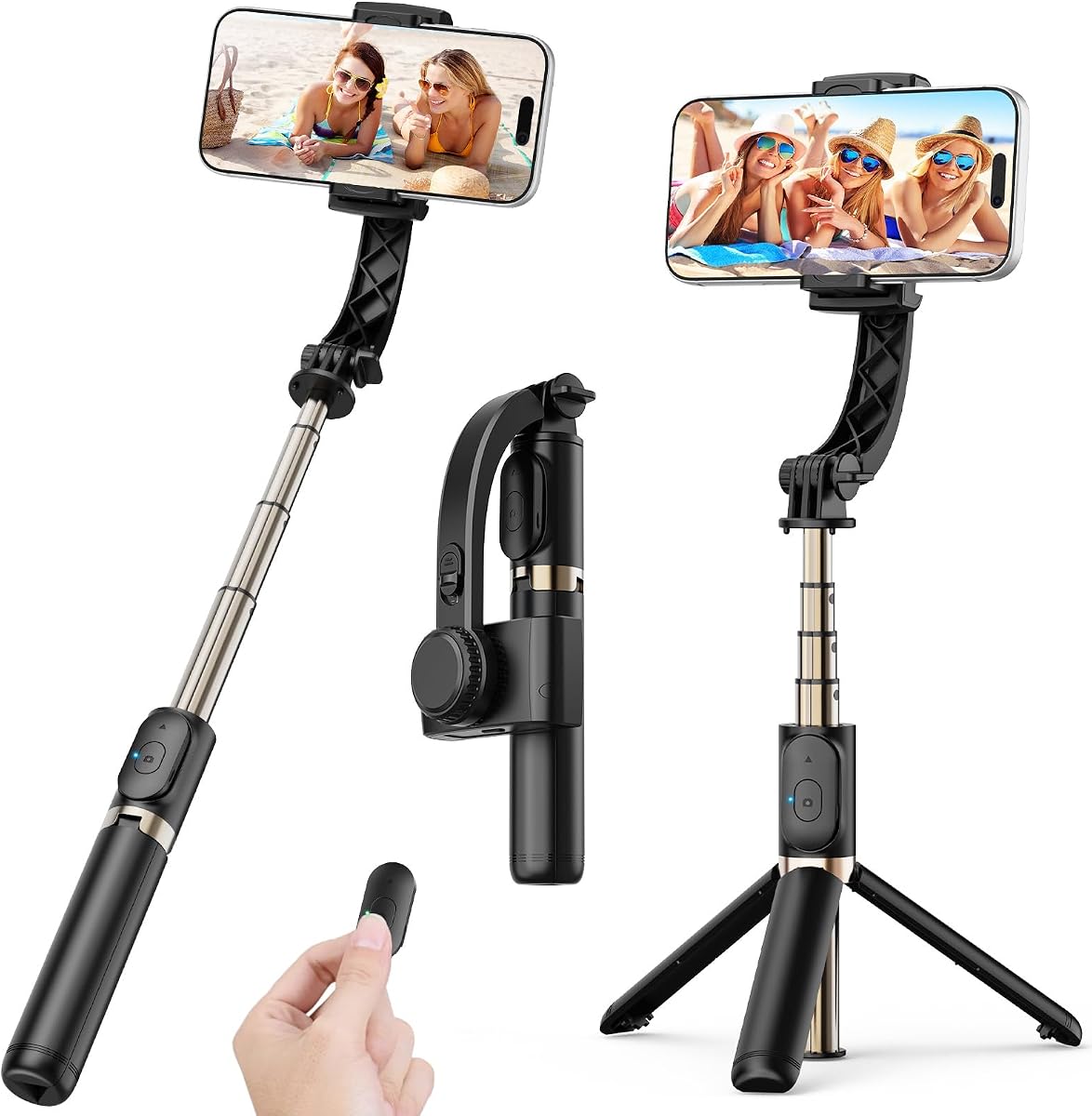
COOVOAMAE 1-Axis Gimbal Stabilizer
4.7Editor score
App-free one-button operation
Extendable selfie stick
Bluetooth remote control
Our expert guide compares the best gimbals for beginners, covering stabilization, tracking, portability, battery life, controls, smartphone compatibility, and
A gimbal can make handheld phone footage look noticeably smoother by keeping the camera level as you walk, turn, or follow a moving subject. For beginners, the most useful model is not necessarily the most advanced one; balance, controls, portability, app support, and battery life often matter more than a long specification list.
This guide compares ten phone and camera gimbals across stabilization systems, subject tracking, folding designs, charging options, payload capacity, controls, and creative shooting features. It includes simple one-axis options for first-time users, three-axis phone gimbals for social content, and camera stabilizers for beginners who may eventually shoot with a mirrorless camera.
Each recommendation highlights the product's strongest qualities and the trade-offs a new user should understand. The list shows how the picks differ in stability, subject tracking, portability, and flexibility, while prices and availability can change, so readers should confirm current listings and phone compatibility before purchasing.
4.7Editor score

4.5Editor score

4.4Editor score
The comparison below places each option according to its core design, stabilization, tracking, portability, and creative features, helping beginners identify the model that matches their phone and preferred type of footage.



The DJI Osmo Mobile 8 is a premium phone gimbal for beginners who want a capable, polished shooting setup without carrying a separate camera. Its 4.4 rating reflects a strong balance of useful features, and its standout combination of three-axis stabilization, native tracking, 360-degree panning, lighting, and phone charging gives it more room to grow than a simple handheld stabilizer.
We may earn a commission when you buy through this link, at no additional cost to you.
Stability comes from a robust three-axis system intended to reduce shake while walking, filming daily vlogs, or following action. The gimbal can rotate through 360 degrees horizontally, while intelligent tracking follows a subject and allows the operator to maintain framing. A built-in tripod and extension rod also make it possible to capture group selfies, low angles, and hands-free shots without adding separate accessories.
Battery life is another strength. The stated maximum operating time is 10 hours, and the gimbal can charge the connected phone while filming, which is useful for long events, travel days, and live streaming. Native tracking, integrated audio reception, and lighting add further value, although these features can make the controls less obvious to someone encountering a gimbal for the first time.
The important trade-off is app availability. The supplied information states that DJI Mimo has been removed from Google Play and recommends downloading the latest version through the official DJI website. That is an extra setup step, but users who value the complete feature set should install the official app before filming. For beginners seeking the most advanced phone-focused option in this list, the Osmo Mobile 8 is the strongest recommendation.
Native tracking works together with the three-axis motors, allowing the camera to follow a subject while remaining level. This is particularly useful for solo creators filming walks, family moments, and short action sequences.
The extension rod, integrated tripod, lighting, audio reception, and phone charging reduce the need for several accessories. It is a practical package for travel and events where carrying more equipment would be inconvenient.
We may earn a commission when you buy through this link, at no additional cost to you.
The hohem iSteady X3 SE is a compact three-axis phone gimbal designed to be approachable for first-time users. Its 4.2 rating and straightforward feature set make it a practical choice for anyone who wants smoother walking shots, AI tracking, gesture control, and remote operation in a foldable design.
We may earn a commission when you buy through this link, at no additional cost to you.
The gimbal weighs 0.79 pounds and folds down for travel, which helps address one of the biggest barriers to carrying stabilization equipment. It includes a detachable magnetic remote that works from up to 32.81 feet away, allowing a creator to record solo travel moments or family gatherings without repeatedly returning to the phone. A 0.66-pound payload capacity allows it to hold a range of smartphones, including larger-screen devices.
Inside the Hohem Joy app are multiple shooting modes, including AI tracking and gesture control, along with creative templates. Its battery is rated for up to 11 hours of operation after a two-hour charge, which gives it an advantage for long events, full-day vlogging, and live streaming. Landscape and portrait switching is also designed to be straightforward for social video.
The trade-off is that advanced features require an app and proper setup, so it is less immediate than an app-free model. New users still need to mount and balance their phone rather than simply attaching it. Overall, the iSteady X3 SE is a strong middle ground for beginners who want three-axis stabilization, tracking, and strong portability without moving to a full camera gimbal.
Its foldable shape and 0.79-pound weight make the X3 SE easier to carry than a conventional camera stabilizer. Beginners can keep it in a daily bag and use it for short-form content without committing to dedicated filming gear.
The detachable controller makes solo filming more flexible, while AI tracking, gesture control, and templates provide creative tools through Hohem Joy. These features reward a short period of initial setup and learning.
We may earn a commission when you buy through this link, at no additional cost to you.
The DJI Osmo Mobile 7 combines a low 300-gram weight with three-axis stabilization, subject tracking, and a 10-hour maximum operating time. Its 4.4 rating makes it an attractive option for beginners who travel light and want stable phone footage for daily vlogs, sightseeing, and social posts.
We may earn a commission when you buy through this link, at no additional cost to you.
ActiveTrack 7.0 follows subjects through varied situations, while the dual-lens system in a compatible phone can support smarter tracking and steadier focus. The included magnetic clamp and foldable construction make the device easy to deploy, and the integrated tripod helps with hands-free framing. An anti-slip handle is designed for comfortable use over longer sessions.
The gimbal can also charge a connected phone through USB-C, adding useful flexibility during outdoor shoots and live streams. The supplied information also notes that a separate DJI OM 7 Series Tracking Kit is available for additional creative possibilities. That optional nature may be an important consideration for buyers who want the fullest tracking setup immediately.
As with the other DJI models in this guide, the product information warns that DJI Mimo is unavailable through Google Play and should be obtained from the official DJI website. That makes app installation an extra step, particularly for Android users. Even so, the Mobile 7 remains a well-rounded beginner gimbal for users who prioritize low weight, reliable stabilization, and useful tracking.
At 300 grams, the Mobile 7 is among the lightest full three-axis phone gimbals listed. Its foldable design and integrated tripod make it convenient to carry, deploy, and place for hands-free shots.
ActiveTrack 7.0 adds automated subject following, while the phone-charging function extends shooting options during long events. These conveniences make the model more useful than a basic stabilizer for active creators.
We may earn a commission when you buy through this link, at no additional cost to you.
The DJI Osmo Mobile 7P is the most well-rounded recommendation in this guide, earning the highest listed rating at 4.5. It brings together three-axis stabilization, native intelligent tracking, a multifunctional module, an extension rod, a tripod, and easy magnetic phone mounting in a package well suited to beginners.
We may earn a commission when you buy through this link, at no additional cost to you.
The Multifunctional Module adds intelligent tracking, reception for DJI Mic 2 or DJI Mic Mini, and lighting features. That means users can follow subjects, improve the look of a shot, and potentially incorporate compatible wireless microphone audio without assembling several separate accessories. The gimbal's 360-degree-style creative workflow is complemented by dual-lens enhanced tracking that helps the camera maintain focus on a moving subject.
Setup is designed to be brief. The user unfolds the gimbal, powers it on, mounts a paired phone using the magnetic clamp, and the Mimo app is described as popping up automatically. A built-in extension rod and tripod support wide selfies and steady vlogs, while the maximum operating time of 10 hours suits extended filming. When the module serves as a microphone receiver, the gimbal also supplies extra power to the phone.
The same app caveat applies as with the other DJI phone gimbals here: the supplied information says DJI Mimo has been removed from Google Play and advises downloading the latest version from DJI's official website. Despite that setup step, the combination of automation, stabilization, audio readiness, and physical shooting features makes the 7P an excellent first serious gimbal for a new creator.
The magnetic phone clamp and automatic app launch reduce the friction between unpacking the gimbal and beginning a shoot. That makes the system especially approachable for creators who want to record without a complicated routine.
Tracking, lighting, and compatible microphone reception are integrated into the Multifunctional Module. This makes the gimbal especially useful for vloggers who want one device to handle several production tasks.
We may earn a commission when you buy through this link, at no additional cost to you.
The COOVOAMAE 1-Axis Gimbal is the easiest starting point for a beginner who wants smoother phone footage without learning a complicated app. It has a 4.7 rating, app-free operation, one-button orientation control, and a straightforward combination of stabilization, selfie stick, tripod, and remote.
We may earn a commission when you buy through this link, at no additional cost to you.
Its built-in sports gyroscope reduces hand shake along one axis, making it useful for walking, vlogging, live video, streaming, and basic action shots. Because it does not rely on a companion app, users can mount the phone and begin shooting with minimal setup. A 360-degree rotating holder supports both horizontal and vertical framing, which is valuable for switching between conventional video and short-form vertical content.
Portability is exceptional. The gimbal weighs 0.49 pound, folds to 7.5 inches, and extends to 31.5 inches through its aluminum alloy rod. Opening the grip converts it into a tripod for hands-free calls, tutorials, and group recording. The included detachable Bluetooth remote works up to 32 feet away, and compatibility extends to most phones measuring 4.0 to 6.2 inches, with GoPro support through a 1/4-inch adapter.
The limitation is its one-axis design, which cannot provide the same pitch, roll, and pan control as a true three-axis gimbal. Its 450mAh battery also provides up to two hours of use after a 1.5-hour charge, substantially less than most three-axis choices. It is still an excellent first gimbal for short clips, selfies, calls, and simple travel footage where ease of use is the priority.
One-button horizontal and vertical switching removes the app-learning barrier. This is particularly useful for users creating occasional short videos instead of building a full production workflow.
The extendable aluminum rod, rotating holder, and deployable tripod transform the device into several shooting tools. The remote makes group shots and solo recording more practical without adding another controller.
We may earn a commission when you buy through this link, at no additional cost to you.
The AOCHUAN Smart XE is a foldable three-axis gimbal for beginners who want more creative tools than a basic stabilizer. Its 4.1 rating reflects a capable package centered on AI face tracking, adjustable focus and zoom, multiple camera-inspired modes, and an approachable control layout.
We may earn a commission when you buy through this link, at no additional cost to you.
Three brushless motors support smooth movement, while the 0.78-pound body folds to a compact form for travel. A focus wheel and zoom slider let creators adjust the image during recording, and a one-click video button switches between landscape and portrait orientation. The stated payload is 250 grams, enough for many iPhones and Android devices but narrower than several competing models.
The AOCHUAN app expands the creative range with panorama, wide-angle, cinematic, movie, live-stream, time-lapse, and motion-lapse modes. AI Face Track 4.0 adds automated subject following, and the supplied information notes that tutorial videos are available through the app and product channels. The 2600mAh battery supports up to 10 hours of continuous shooting.
New users need to spend time learning the app and understand how its modes affect the phone's native camera. The shorter battery life than the X3 SE and 11-hour Hohem model is another consideration for extended work. Even so, the Smart XE offers an appealing mix of three-axis stabilization, manual focus control, creative templates, and portability for new content creators.
Physical focus and zoom controls add a more deliberate creative dimension. They let users refine framing during a take rather than relying entirely on the phone's automatic focus behavior.
Panorama, time-lapse, cinematic, and other modes make the gimbal useful beyond basic stabilization. A short tutorial session can help beginners understand when each mode produces a better result.
We may earn a commission when you buy through this link, at no additional cost to you.
The DJI RS 3 Mini is the choice for a beginner who wants to begin with a phone but may move to a Canon, Sony, Nikon, or Fujifilm camera later. Its 4.3 rating reflects a capable three-axis camera gimbal with a 2 kg payload, a 1.4-inch color touchscreen, and a body that weighs 795 grams.
We may earn a commission when you buy through this link, at no additional cost to you.
The relatively high payload supports a wide range of camera and lens combinations, giving the user more creative flexibility than a phone-specific model. A third-generation RS stabilization algorithm supports smooth low-angle and flashlight-mode shots, while native vertical shooting makes social-oriented framing possible by repositioning the quick-release plate. Bluetooth shutter control can operate photo capture and video recording after the initial pairing.
The compact touchscreen provides access to frequently used settings without relying entirely on a phone screen, which can make the gimbal feel more self-contained. However, the device is more involved than a simple phone stabilizer. It requires compatible camera hardware, careful balancing, an appropriate mounting configuration, and a period of learning how camera controls and gimbal settings interact.
DJI's supplied information states that Ronin-series gimbals require the DJI Ronin app for activation and full functionality, including wireless firmware updates, and that the app should be downloaded from DJI's official website because of Google Play availability issues. For a user committed to learning mirrorless-camera filmmaking, that trade-off is worthwhile. For someone who only records with a phone, a dedicated phone gimbal offers a simpler and more relevant experience.
The 2 kg payload and broad camera compatibility make the RS 3 Mini useful across different camera and lens combinations. It is a more future-oriented choice for creators who expect their equipment needs to grow.
The color touchscreen gives the operator direct access to important settings, while Bluetooth shutter control reduces the need to return to the camera. Learning these controls is an essential part of becoming comfortable with a camera gimbal.
We may earn a commission when you buy through this link, at no additional cost to you.
The hohem iSteady Mobile Plus stands out for its long battery life and creative 3D rotation mode. With a 4.2 rating, it offers beginner-friendly three-axis stabilization alongside an ultra-wide-angle feature designed to reduce obstruction from the gimbal's motors.
We may earn a commission when you buy through this link, at no additional cost to you.
The wide-angle mode is activated through a four-trigger press and addresses a common frustration in phone gimbals: the roll motor can intrude on the camera's field of view. The product information also describes a 3D Fantasy auto-rotation mode capable of rotating the phone vertically through 360 degrees, with a stated 600-degree wide rotation range. These are distinctive tools for short videos, transitions, and imaginative camera movement.
The Hohem Joy app adds face and object tracking, beauty touch-up, pan-mode switching, panoramic video, time-lapse, dolly zoom, and one-click templates. Stability comes from iSteady 7.0 technology, while motor torque has been increased by 20 percent according to the supplied information. Maximum battery life is listed at 13 hours, and the gimbal can charge a phone when its own power is available.
The wide-angle feature does not eliminate every compatibility concern. The supplied information specifically recommends manually balancing the phone, especially with an iPhone Pro Max, and notes that large-screen devices might not support the wide-angle mode because of motor interference. Users should confirm their phone model and test the view before filming important scenes. Even with that caveat, the Mobile Plus is a creative and long-lasting option for beginners who want more than basic stabilization.
The dedicated ultra-wide-angle mode helps preserve more of the scene when the roll motor would otherwise block the lens. Compatibility varies, so a quick test with the intended phone remains essential.
The 3D Fantasy mode and 600-degree rotation range create movement that can make short-form videos more dynamic. These effects are best practiced in a safe, open space before attempting a complex sequence.
We may earn a commission when you buy through this link, at no additional cost to you.
The FeiyuTech SCORP Mini 2 is a versatile three-axis gimbal that can carry a mirrorless camera, smartphone, DSLR camera, or action camera. Its 4.2 rating and broad device support make it an interesting option for a beginner who wants one stabilizer for several kinds of equipment.
We may earn a commission when you buy through this link, at no additional cost to you.
The gimbal weighs 852 grams and has a payload capacity of 1.2 kg, giving it meaningful capability for a compact model. The kit includes a carrying case and extension rod, which improves portability and makes wider framing possible. Bluetooth and cable controls allow the shutter or focus to be adjusted, helping the user begin recording without returning to the device after every setup change.
A particularly useful feature is the built-in AI tracker, which can follow faces or objects without connecting to an app. That reduces dependence on software and makes autonomous subject framing more accessible. The 1.3-inch touch screen and five-way joysticks provide direct control over settings, pan, tilt, roll, and framing, including lower-angle shots.
The larger control surface is not as simple as a one-button phone gimbal, and a first-time user will need to balance whichever device is being mounted. Compatibility also involves choosing the correct support and connection method for the camera or phone. In return, the SCORP Mini 2 offers more device freedom and independent tracking than most simple alternatives, making it suitable for a beginner who anticipates using more than one camera system.
The built-in tracker can recognize and follow faces or objects without an app connection. This makes the gimbal more flexible for quick demonstrations and situations where wireless setup would be inconvenient.
Support for mirrorless cameras, phones, DSLRs, and action cameras creates a useful bridge between phone content and camera filmmaking. Correct balancing and the appropriate mounting configuration remain critical with each new device.
We may earn a commission when you buy through this link, at no additional cost to you.
The Hohem iSteady M6 combines three-axis phone stabilization with magnetic AI tracking, an adjustable fill light, and an OLED status display. Its 4.3 rating makes it a strong creative choice for beginners who want better-looking video and more control over the setup.
We may earn a commission when you buy through this link, at no additional cost to you.
The magnetic tracking module can follow a subject using the phone's native camera, while the product information states that AI tracking works across mobile apps. The integrated fill light offers cool, warm, and RGB lighting, with a stated color-temperature range of 2700K to 6500K. This makes the gimbal useful indoors, at evening events, or in situations where inconsistent ambient light would otherwise affect the appearance of a clip.
The OLED display visualizes parameters, Bluetooth status, battery level, and the current gimbal mode. A control wheel supports roll-axis rotation, focus adjustment, and changes to the cool, warm, and RGB light settings. The ultra-wide-angle arrangement can also be powered on with the phone positioned in front of or behind the roll motor, helping users find an unobstructed view.
The stated payload is 400 grams, which accommodates most smartphones but may be less forgiving with very large or heavily accessorized phones. AI tracking also depends on the relevant mobile-app connection, so the user should install and test the required software before an important shoot. With that setup in place, the M6 is an attractive option for creators who want lighting, status information, and flexible subject tracking in one phone gimbal.
Cool, warm, and RGB fill-light options help users adapt to different scenes without carrying a separate light for every shoot. The control wheel makes adjustments more immediate during filming.
The OLED display gives a clear view of settings and connectivity, reducing guesswork for new users. Magnetic AI tracking adds automated framing, but it should be tested with the intended camera app before production.
We may earn a commission when you buy through this link, at no additional cost to you.
A first gimbal should be easy to balance, simple to operate, compatible with your device, and capable of producing the stabilization you actually need. The following factors help narrow the field without requiring an experienced filmmaker to decode every technical term.
A one-axis gimbal corrects movement along one direction and can still reduce visible shake for short clips, selfies, and casual video. A three-axis gimbal controls pan, tilt, and roll, producing much more consistent framing while walking, turning, or following a subject. Three-axis models are the better general choice for beginners who want to develop their filming skills, while one-axis designs are useful for users who value simplicity above everything else.
Check whether the gimbal is designed specifically for phones or can also support a camera. Phone models vary in width, weight, lens placement, and accessory use, so a narrow phone clamp may not fit a large device comfortably. Camera gimbals require attention to payload and lens combinations, while multi-device models offer more freedom but usually need correct adapters and support hardware. Reviewing the mount, listed payload, and phone-size guidance before buying can prevent an early disappointment.
Tracking can follow a face, person, or object automatically, but the implementation varies. Some models use the phone's native camera, some depend on a companion app, and others can track independently without an app connection. App-based tracking may provide templates and filters, while independent tracking can make quick demonstrations more convenient. Beginners should understand which feature they actually need and be willing to complete the required setup before filming.
A compact gimbal is easier to carry consistently, which can matter more than extra features for a new user. Foldable bodies, integrated tripods, extension rods, and included cases reduce the number of separate items needed. Weight also affects comfort during longer recordings. Whatever the design, the phone or camera must be balanced carefully; even a capable gimbal can produce poor results when the device is not centered or the axis lock is not adjusted correctly.
Stated operating times can range from a few hours for compact entry models to much longer for three-axis gimbals designed for full-day work. Consider how long you usually film and whether a phone will remain connected during a shoot. Models that can charge the connected phone are especially useful for long events, travel days, and live streaming. Fast charging is also convenient, but the full recharge time should be considered when planning a production schedule.
Beginner-friendly does not mean feature-free. One-button operation is excellent for immediate use, while screens, joysticks, control wheels, and app modes offer more precise control. A model with more buttons may feel complicated at first but can be more useful once the controls become familiar. Look for quick orientation switching, clear mode indicators, and an intuitive display, and allow time to practice before using complicated tracking or rotation effects.
Built-in tripods support hands-free framing, extension rods make group selfies and wide shots easier, and fill lights can improve footage in dim conditions. Wireless remotes are useful for solo creators because they reduce the need to return to the phone. Compatible microphone reception is valuable for vloggers who want cleaner sound. These features can make a gimbal more versatile, although they also increase its weight, complexity, and cost compared with a basic stabilizer.
Some of the strongest tracking and editing functions operate through companion apps. Before purchasing, confirm that the required app is available for your phone and operating system, particularly when the listing mentions store availability issues. Download the official app before filming so that firmware, device pairing, and tutorials can be completed in advance. A product should still be judged on its physical stabilization, but dependable software access is essential when tracking or guided shooting is central to the design.
Begin by charging the gimbal according to its instructions, then install the relevant official app and complete any required activation or firmware updates. Install the phone before mounting it, or prepare the camera according to the gimbal's instructions. Power on the unit, select the appropriate operating mode, and allow the axes to initialize before making any movement. Avoid lifting or turning the gimbal while it is calibrating.
Mount the phone or camera, center the device, and adjust the balance axis by axis. A balanced setup should remain nearly neutral when supported, allowing the motors to correct small changes rather than large shifts. Connect Bluetooth or the app, set the desired tracking subject, and test a short recording at the final shooting distance. Confirm that the phone remains secure, the screen stays visible when needed, and the lens has an unobstructed view.
For care, fold or store the gimbal as directed and protect its motors from dust and impact. Keep the phone clamp and tracking module clear of dirt, and avoid leaving the device in extreme heat or moisture. Charge the internal battery periodically rather than leaving it completely depleted for long periods. If the movement sounds strained, the framing drifts, or the app reports an error, stop filming, rebalance the device, and check for obstructions or an app update before trying again.
Yes, a phone gimbal can make walking videos, selfies, travel footage, and live streams look more stable than ordinary handheld recording. The improvement is especially noticeable when the phone is mounted on a three-axis model with strong stabilization. A one-axis option can still reduce some shake, while three-axis models also control tilt and roll. The best results still depend on smooth movement, proper balance, and a stable grip.
A one-axis gimbal corrects shake in one direction and is usually simpler, lighter, and less expensive. A three-axis gimbal controls pan, tilt, and roll, providing more consistent framing during walking, turning, and subject tracking. Three-axis models also tend to offer more shooting modes and creative controls. Beginners seeking basic short clips may prefer one axis, while new creators who want to grow should usually consider three axes.
Yes, the phone should be balanced before each use, particularly when changing the mount, adding an accessory, or switching to a different phone. A balanced device lets the gimbal's motors make smaller corrections instead of constantly working to compensate for a large imbalance. If the gimbal drifts, struggles to remain upright, or emits a strained sound, stop and repeat the balancing process.
Only if the gimbal is specifically designed and rated for camera use. The DJI RS 3 Mini supports compatible Canon, Sony, Nikon, and Fujifilm combinations within its 2 kg payload, and the FeiyuTech SCORP Mini 2 supports several device categories within a 1.2 kg payload. Most phone-specific models should be used only with compatible phones. Check the mount, payload, and balance requirements before attaching a camera.
The most common causes are poor balance, abrupt hand movements, walking too quickly, or using a phone model that is not properly supported. A gimbal stabilizes movement; it cannot create professional footage from a poorly composed shot. Balance the device, walk slowly, hold the grip lightly but securely, and check that stabilization mode is active. Low light can also force the phone camera to use a slower shutter speed, which may create additional motion blur.
Subject tracking is helpful but not essential for every type of footage. It is valuable for solo vlogs, walking tours, pet videos, and shots in which the creator needs the camera to follow a moving person or object. It may be less important for static tripod recordings, carefully composed walk-throughs, or simple stabilized clips. Beginners should first master balancing, framing, and smooth movement before relying on automated tracking.
The useful duration depends on the model and the shoot. The compact COOVOAMAE one-axis gimbal is rated for up to two hours, while several three-axis models list operating times of 10 to 13 hours. Those maximum figures do not necessarily apply under every condition, so charging between major shoots is sensible. If you film long events or stream frequently, consider a model with a stated long runtime and the ability to charge the connected phone.
Start with a phone gimbal if you already create content with your phone or want an inexpensive, portable way to learn stabilization. It is easier to carry and usually requires less equipment. A camera gimbal makes more sense if you own a compatible mirrorless camera, need its controls and lens flexibility, or plan to grow into serious camera-based filmmaking. Choosing the right device first prevents spending on a system that cannot support your actual equipment.
The DJI Osmo Mobile 7P is the strongest all-around choice for a new creator because it combines three-axis stabilization, native tracking, a multifunctional module, an extension rod, and a tripod in one approachable package. The DJI Osmo Mobile 8 is the premium alternative for users who want 360-degree panning, integrated lighting, audio reception, and phone charging, while the COOVOAMAE one-axis model offers the simplest path into gimbal-assisted filming.
Prioritize the features that solve your specific problem. Casual creators may value portability, a tripod, and app-free operation; social video producers may want tracking and portrait switching; travel vloggers may prioritize battery life; and future camera filmmakers may want payload capacity and multi-device support. Whichever model you choose, learn the balance routine, use smooth body movement, and practice the controls before relying on the gimbal for an important recording.
Finally, check the current listing, package contents, phone or camera compatibility, and app availability before buying. Product configurations and software distribution can change, and the information presented in this guide reflects the supplied product data. Comparing current details with your specific device and shooting needs will help ensure that the chosen gimbal remains practical and enjoyable as your skills develop.