
Magic Style Case Keyboard
4.8Editor score
Large multi-finger touchpad
Seven-color adjustable backlighting
Detachable magnetic keyboard
Cantilever floating stand
A Galaxy Tab S10 Lite keyboard case can transform a compact tablet into a much more practical typing and browsing machine. The best models balance a stable viewing stand, comfortable keys, useful navigation features, reliable Bluetooth, and enough protection for travel. Compatibility must be confirmed before purchase because similarly sized Samsung tablets do not always share the same openings or layout.
This guide compares ten keyboard cases based on the supplied compatibility details, construction features, input options, stands, touchpads, backlighting, battery information, and included accessories. It covers cases intended specifically for the Galaxy Tab S10 Lite as well as multi-model designs that also support the S10 FE, S9 FE, S9, and selected S8 versions. Feature pages do not always establish every aspect of long-term durability.
The recommendations range from straightforward, lightweight folio designs to premium productivity setups with large touchpads, adjustable hinges, multi-device pairing, and AI shortcuts. Each review explains who the product appears best suited for and where compromises may arise. Product listings and promotions change over time, so shoppers should confirm the current listing details, included items, warranty information, and current price before ordering.
4.8Editor score

4.5Editor score

4.4Editor score
As an Amazon Associate we earn from qualifying purchases.
This side-by-side comparison highlights each case's supported Galaxy tablets, navigation features, viewing adjustments, and standout productivity functions.

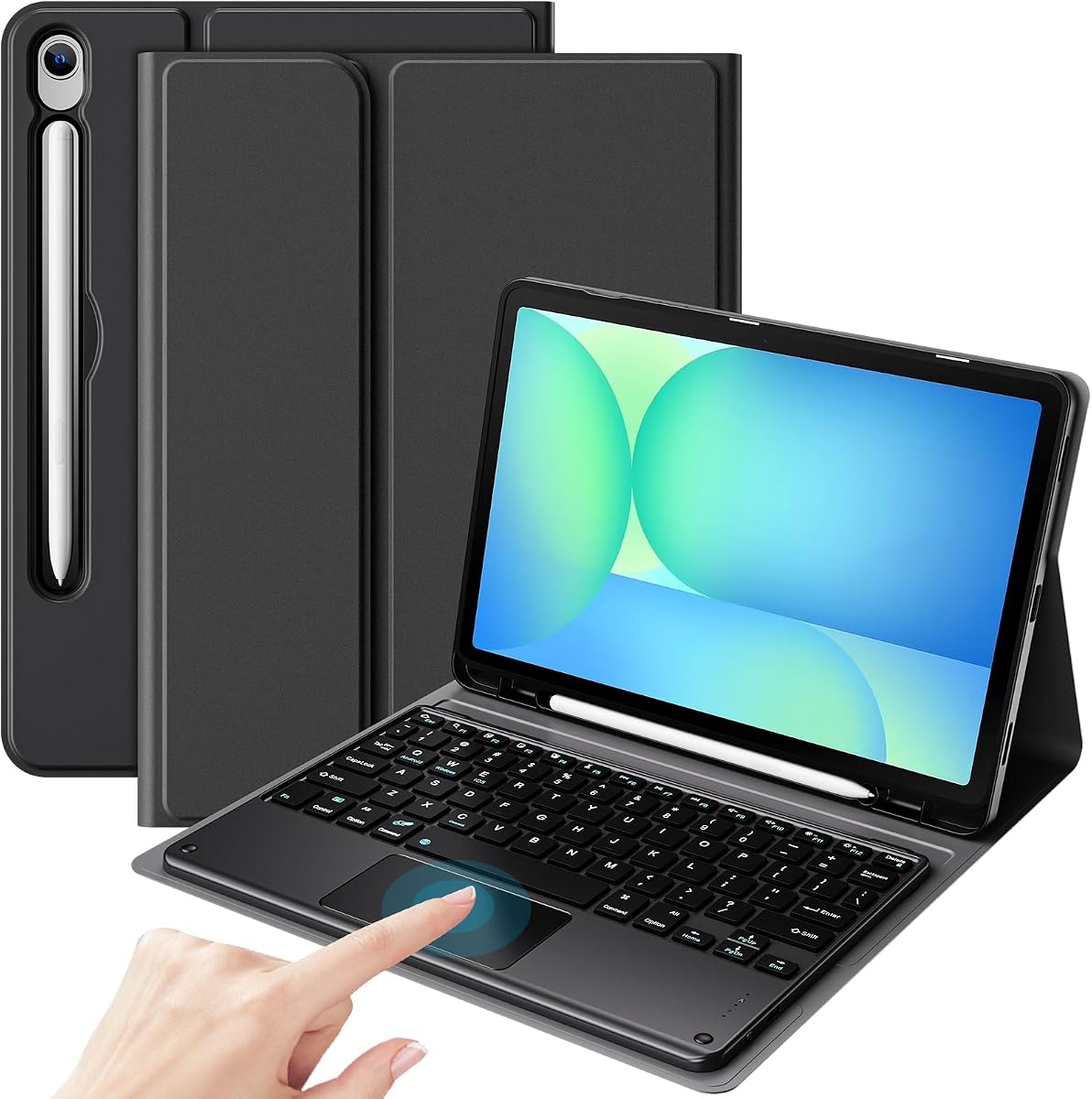


The FINTIE Keyboard Case is a versatile folio option for Galaxy Tab S10 Lite users who want a protective cover, stable stand, and physical keyboard without a large trackpad. It carries a 4.4 rating and supports the S10 Lite, S10 FE, S9 FE, and 11-inch S9 according to the stated model numbers. Its strongest appeal is the combination of portability, a rechargeable keyboard, and a straightforward three-angle stand.
We may earn a commission when you buy through this link, at no additional cost to you.
The magnetic keyboard is described as slim at seven millimeters and compatible with both iOS and Android operating systems. Scissor-style keys with rebound are intended to reduce noise while retaining a familiar laptop-like response. A stated ten-meter Bluetooth range gives it enough flexibility for separate placement on a desk, while the cover's anti-slip grooves and movable tablet position allow the viewing angle to be adjusted for typing, reading, or media viewing.
Protection comes from a PU leather exterior, rubber-lined interior, and polycarbonate shell around the tablet. The keyboard's automatic energy-saving mode after ten minutes of inactivity helps preserve standby time, while the case-only sleep and wake function can reduce screen activity when the cover is closed. The main compromise is that it does not list a touchpad, so mouse-style navigation would require a separate accessory.
This is a strong recommendation for students, commuters, and casual users who type documents, answer messages, or browse while wanting a relatively slim folio. It also suits anyone who values a mechanical-key feel over gesture navigation. Buyers should verify the exact tablet model before ordering and decide in advance whether a separate mouse is worthwhile for their workflow.
At only seven millimeters for the keyboard component, the design keeps bulk manageable for a tablet that is frequently carried. The detachable construction also allows the cover to function independently when typing is unnecessary.
The rechargeable battery, quiet scissor keys, and flexible ten-meter range suit travel and shared workspaces. Buyers gain a practical typing surface without carrying a separate full-size keyboard.
We may earn a commission when you buy through this link, at no additional cost to you.
The Dexnor for Samsung Galaxy Tab S10 Lite and S10 FE is among the most complete productivity-oriented cases in this guide. Its 4.5 rating reflects a feature set that goes beyond basic typing: a multi-touch trackpad, sturdy hinged folio, backlit keyboard, and two S Pen storage positions. It is a particularly compelling choice for people who regularly edit documents, browse with a cursor, or work in DeX mode.
We may earn a commission when you buy through this link, at no additional cost to you.
The aluminum alloy hinge uses embedded magnets to hold the tablet in a laptop-like position while allowing viewing-angle adjustments. The precision trackpad supports multi-finger gestures for document editing, browsing, and presentation work, closing one of the biggest gaps left by compact tablet keyboards without touchpads. On the keyboard side, seven solid backlight colors and three brightness levels make the keys easier to locate in dim conditions.
The listed 650mAh battery is rated for up to 200 working hours and 1,200 standby hours, with a stated recharge time of 3.5 hours using the included USB-C cable. Auto wake and sleep help conserve power. The tablet and S Pen are not included, although the package itself includes the keyboard, cable, quick-start guide, and detailed manual, backed by stated lifetime technical support and a one-year manufacturer's warranty.
Choose this case when mouse-like control and a substantial desktop-style stand matter more than minimum weight. Its folio design may occupy more bag space than a detached keyboard, but the combination of navigation, hinge construction, backlighting, and stylus storage makes it well suited to intensive mobile productivity.
Multi-finger gestures make selecting text, moving through pages, and organizing files more natural than repeated screen taps. This is particularly helpful in Samsung DeX environments and detailed productivity applications.
The aluminum alloy hinge provides a premium structural element and permits the tablet to be angled for different work positions. It looks more like a compact notebook setup than a simple folding folio.
We may earn a commission when you buy through this link, at no additional cost to you.
This Galaxy Tab keyboard and mouse bundle stands out for offering a complete accessory package at a high 4.7 rating. It supports the Galaxy Tab S10 Lite, S10 FE, and 11-inch S9 based on the listed model numbers. The included mouse fills the navigation gap left by a traditional keyboard, while the rainbow backlight adds visual appeal for evening use.
We may earn a commission when you buy through this link, at no additional cost to you.
The magnetic keyboard offers seven adjustable backlight colors and a breathing mode that cycles through lighting patterns. Function shortcut keys are included for common editing tasks, and a separate mouse gives users another way to move the pointer. The folio provides three viewing settings with anti-slip grooves, supporting writing, reading, viewing, and creative work rather than a single fixed typing position.
The PU leather exterior is described as helping resist water splashes, dust, and stains. Opening and closing the cover activates the tablet's auto wake and sleep function, while a built-in pen slot keeps the stylus accessible. The package contains the protective case, RGB keyboard, mouse, USB-C data cable, and user manual, although the stylus and tablet are not included.
This is a practical choice for a new Galaxy Tab S10 Lite owner who wants typing and mouse navigation immediately. It is less suited to people who prefer gesture controls on a large built-in touchpad. Buyers should confirm that the included mouse size suits their desk and verify the precise model number before purchasing.
The case, keyboard, mouse, and charging cable provide the core accessories needed for a mobile workstation. It reduces the need to source a separate pointing device for basic navigation.
Seven selectable colors and a cycling breathing effect offer more visual customization than a single-color backlight. Users can still choose a preferred solid color for regular typing.
We may earn a commission when you buy through this link, at no additional cost to you.
The ProCase Keyboard Case combines a 4.5 rating with a restrained, practical feature set. It is designed for the Galaxy Tab S10 Lite, S10 FE, S9 FE, and 11-inch S9, with explicit model numbers provided for verification. Its principal attraction is the combination of a detachable keyboard, multi-gesture touchpad, and stable adjustable stand.
We may earn a commission when you buy through this link, at no additional cost to you.
The touchpad supports common gestures for browsing, application switching, and file management, making the setup more productive than a keyboard-only cover. Three viewing angles accommodate typing, streaming, and video calls, and the stand is described as stable on desks, laps, and sofas. A detachable magnetic keyboard lets users shift quickly between laptop mode and holding the tablet as a regular tablet.
A built-in slot keeps a stylus within reach, while the exterior is intended to protect the tablet from drops and scuffs. The case is described as ultra-slim for portability, and its low-power design is intended to extend overall usage time. Unlike several competing models, however, the supplied details do not list keyboard backlighting, battery capacity, or charging specifications.
ProCase is a strong option for buyers who need touchpad navigation but do not want lighting effects or an elaborate mouse bundle. It suits students and professionals working across travel locations where a stable stand and gesture support matter. Check the current listing if backlighting is important, since that feature is not confirmed in the provided product information.
The gesture touchpad allows common desktop-style actions without requiring a separate mouse. It is a meaningful addition for editing, file handling, and web navigation.
Three angles and a stable structure support desk use, lap use, and couch viewing. That flexibility makes the case suitable for both focused work and media consumption.
We may earn a commission when you buy through this link, at no additional cost to you.
The Pink Rainbow Keyboard Case combines a colorful exterior with a detachable seven-color backlit keyboard. Its 4.3 rating reflects a feature-rich design aimed at style-conscious users and households that may move between several compatible Samsung tablets. The Galaxy Tab S10 Lite is supported alongside the S10 FE, 10.9-inch S9 FE, S9, and selected S8 models.
We may earn a commission when you buy through this link, at no additional cost to you.
The magnetic keyboard attaches to the folio and turns the tablet into a compact laptop. Seven iridescent backlight options make the keys easier to use in low light, while three viewing positions and anti-slip slots allow adjustment for writing, reading, drawing, and viewing. A built-in pen holder provides a dedicated stylus location, though the stylus is not included.
The cover has full edge coverage and a honeycomb-grid inner layer intended to cushion the tablet and reduce overheating. Automatic sleep and wake occur when the cover opens and closes. Although the product title mentions a mouse, the supplied feature bullets do not explicitly describe a touchpad or confirm the mouse as an included package item, so shoppers should check the package contents carefully.
This model is a good fit for users who value a colorful, flexible folio and want broad compatibility across selected tablet generations. It is less suitable for buyers who require a confirmed multi-touch trackpad or need support for every regional S9 variant. Verify the model number and package list before checkout.
Seven selectable rainbow tones let the keyboard adapt to different moods and lighting conditions. The pink folio further distinguishes the setup from conventional black office accessories.
Full edge coverage and a honeycomb cushioning layer add physical protection. The textured interior also allows the tablet position to be adjusted without readily losing grip.
We may earn a commission when you buy through this link, at no additional cost to you.
The Rainbow Touchpad Keyboard Case blends expressive lighting with a navigation-focused keyboard. It has a 4.4 rating and supports the Galaxy Tab S10 Lite, S10 FE, 10.9-inch S9 FE, S9, and selected S8 model numbers. The keyboard can switch among seven vibrant backlight modes, including a pulse effect, while the touchpad adds mouse-like operation.
We may earn a commission when you buy through this link, at no additional cost to you.
Its high-sensitivity touchpad is designed for clicking, swiping, application switching, and other gesture controls. This makes the product useful for document work and extended browsing without requiring a separate mouse. A three-point stand permits the tablet to be moved to a preferred angle, and a textured anti-slip surface helps maintain the chosen position.
The outer leather layer is described as scratch resistant and protective against ordinary bumps and drops, while the honeycomb mesh interior provides cushioning and is intended to limit heat buildup. Precisely placed openings maintain access to cameras, speakers, ports, and buttons. The keyboard and mouse can be stored within the case for easier transport, though the supplied information does not clearly specify whether a mouse is included.
This option fits users who want visual customization and comfortable pointer navigation in one folio. It is less suitable for someone who needs published battery figures, a wired connection, or confirmed multi-device switching. Those shoppers should examine the current listing and manufacturer documentation before purchasing.
The animated backlight creates a distinctive look while the gesture touchpad adds practical control. The combination is useful for evening work and touch-oriented tasks.
A durable outer layer, cushioned honeycomb interior, and precise cutouts protect the device while keeping its physical functions accessible.
We may earn a commission when you buy through this link, at no additional cost to you.
The Samsung Galaxy Book Cover Keyboard Slim is a productivity-focused accessory with a 4.6 rating. Its listing emphasizes Galaxy ecosystem integration rather than the colorful lighting and touchpad functions common among third-party alternatives. It specifically names the Galaxy Tab S9, S9 FE, and S10 FE, making model confirmation essential for Galaxy Tab S10 Lite shoppers.
We may earn a commission when you buy through this link, at no additional cost to you.
A dedicated AI key provides quick access to AI assistance through services such as Bixby or Gemini. The keyboard supports DeX mode, allowing the tablet to deliver a more PC-like workspace when applications and compatible software are used. It also supports wireless keyboard sharing, allowing it to type on or navigate compatible Galaxy devices without treating the keyboard as a dedicated tablet-only accessory.
The cover is slim and lightweight, and magnets provide a quick installation method. Its integrated design emphasizes a familiar Samsung experience and a low-profile alternative to a bulky third-party folio. Because the product information is concise, it does not detail a touchpad, battery capacity, lighting colors, or specific viewing-angle range in the same way as several other cases.
This is an attractive recommendation for Galaxy users already invested in the ecosystem who value AI access, DeX workflows, and cross-device keyboard sharing. Before ordering a Galaxy Tab S10 Lite, verify the current manufacturer compatibility list because the S10 Lite is not explicitly named in the supplied title. It may suit S10 FE or S9 FE users better.
The dedicated shortcut key reduces the steps needed to begin an AI-assisted request. It is a particularly relevant feature for Galaxy users who already use Bixby or Gemini.
Wireless Keyboard Sharing can extend typing and navigation to compatible Galaxy phones or tablets. This makes the accessory more versatile than a conventional tablet-bound keyboard.
We may earn a commission when you buy through this link, at no additional cost to you.
The GreenLaw Keyboard Case is built for Galaxy Tab S10 Lite users who want to alternate typing between a tablet and another Bluetooth device. Its 4.4 rating and dual-channel Bluetooth system distinguish it from simpler single-device cases. The product is also compatible with the S10 FE, S9 FE, and 11-inch S9 according to the supplied model information.
We may earn a commission when you buy through this link, at no additional cost to you.
Two Bluetooth channels can maintain connections to two devices, with FN+Q and FN+W used to switch between them. The keyboard offers seven backlight colors and three brightness levels, while its precision touchpad supports multi-gesture operations such as horizontal movement and returning to the desktop. Both the keyboard and protective cover can be used independently because the components detach from one another.
The folio uses three built-in card slots to support viewing angles of 110, 120, and 130 degrees. This creates a stable platform for typing or media viewing without requiring a much larger hinge mechanism. A stylus slot is not expressly highlighted in the supplied description, so buyers who require a built-in pen holder should inspect the product images and current package details.
GreenLaw is a good match for professionals who move between a Galaxy tablet and a phone, or for families sharing equipment. Its gesture touchpad and backlight also make it more capable than a basic keyboard folio. The primary limitation is the modest selection of stand angles compared with premium products offering continuous hinge adjustment.
Dual Bluetooth channels reduce the need to repeatedly disconnect and reconnect the keyboard. The shortcut keys make moving between a tablet and phone efficient.
Removing the keyboard allows the case to serve as a lighter protective cover. Users can also position the keyboard independently when their preferred angle differs from the folio's three fixed options.
We may earn a commission when you buy through this link, at no additional cost to you.
The One-Click DeX Keyboard Case is a feature-rich option for Galaxy Tab S10 Lite users who alternate among typing, sketching, reading, and entertainment. Its 4.3 rating is still solid, while the listed hinge, touchpad, backlighting, and DeX functions give it broad functionality. It supports the S10 Lite, S10 FE, S9 FE, and 11-inch S9.
We may earn a commission when you buy through this link, at no additional cost to you.
A dedicated one-click DeX control is intended to simplify the transition into a desktop-style workflow. The smart touchpad supports multiple gestures, and the keyboard includes a full row of Android shortcut keys for brightness, media, and volume. Its ABS construction and spring mechanism under each key are designed to offer tactile feedback and support more accurate typing.
The alloy hinge uses precision construction, self-locking damping, and a stated 270-degree stepless adjustment range. This allows the tablet to move through work, gaming, reading, and drawing positions without being restricted to a few fixed grooves. A magnetic detachable keyboard and button-based split design allow the case and keyboard to operate separately, creating four stated usage modes.
This is a compelling recommendation for creative users and DeX-focused professionals who value angle control. The built-in S Pen holder helps keep a stylus accessible, though neither the tablet nor pen is included. The more complex hinge and feature set may also be unnecessary for buyers who only need a basic keyboard cover.
The 270-degree stepless hinge is more flexible than a cover with three fixed grooves. It can accommodate upright work, lower viewing, and creative stylus positions.
Separating the keyboard and using the case alone supports typing, sketching, viewing, and reading. The result is one accessory designed to cover both productivity and media use.
We may earn a commission when you buy through this link, at no additional cost to you.
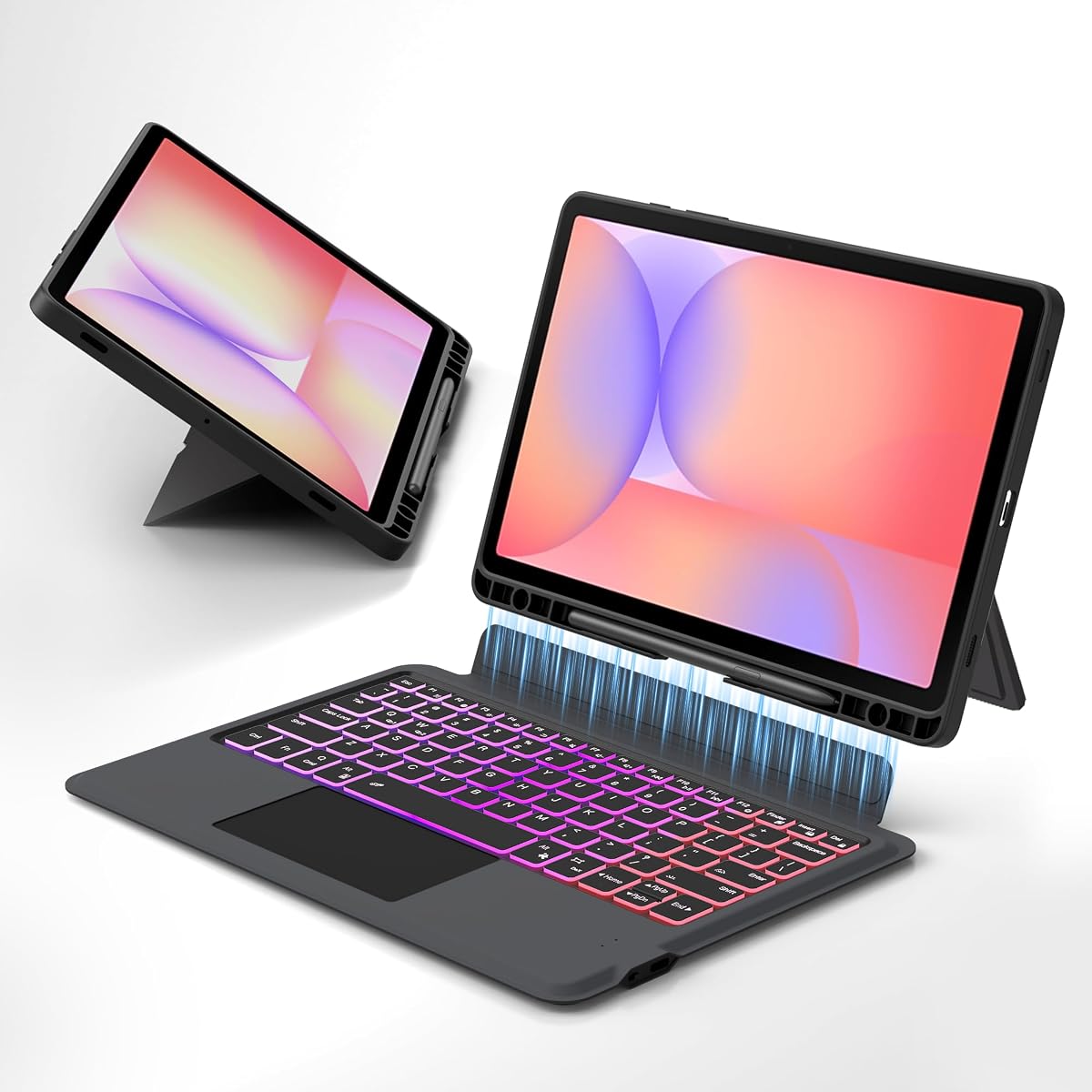
The Magic Style Case Keyboard is the premium selection in this guide, carrying the highest supplied rating at 4.8. It is built around a large multi-finger touchpad, a floating cantilever stand, a detachable magnetic keyboard, and adjustable lighting. Although its title emphasizes the S10 Lite and S10 FE, the supplied compatibility details also list the S9 FE, S9, S8, and selected S7 models.
We may earn a commission when you buy through this link, at no additional cost to you.
The floating cantilever design lets users adjust the tablet's position while retaining an ergonomic stated viewing angle of 125 degrees. The keyboard and case attach magnetically but separate when a lighter standalone cover is more appropriate. The large touchpad supports swiping, pinching, three-finger application switching, and other gestures, offering the most expansive navigation specification among the listed options.
A 420mAh rechargeable battery is rated for up to 80 hours of continuous typing with the backlight off and recharges through USB-C. Seven solid color options and three brightness settings cover different lighting environments. The scissor-switch keys are described as well spaced with a controlled rebound, while a stain-resistant surface is intended to simplify cleaning fingerprints and marks.
This case is recommended for users willing to carry a more substantial accessory in exchange for a large touchpad, refined stand, premium materials, and extended battery life. Its listed weight of 2.04 pounds is the main portability tradeoff. Verify the exact model number because its wide compatibility list includes several older Samsung generations and regional variants.
The oversized touchpad is the case's defining feature, with support for multi-finger gestures that can replace many mouse movements. It suits users who navigate frequently in DeX or productivity applications.
The cantilever stand allows the tablet to appear suspended while remaining adjustable. It creates a polished notebook-like presentation for work, study, and entertainment.
We may earn a commission when you buy through this link, at no additional cost to you.
The right Galaxy Tab S10 Lite keyboard case depends on model fit, typing comfort, navigation style, portability, and how the tablet will be used. Check these factors before comparing the appearance of otherwise similar folios.
Compatibility is the most important purchase check because Samsung tablet dimensions, port placement, cutouts, and magnetic attachment positions can differ even among models with similar screen sizes. The Galaxy Tab S10 Lite model numbers listed across these products include SM-X400 and SM-X406B. Some cases also support the S10 FE, S9 FE, 11-inch S9, and selected S8 or S7 variants, but the exact supported list should be checked rather than inferred from screen size alone.
Open the tablet settings and locate the model number before ordering. Compare it with the listing's compatibility chart, and distinguish Wi-Fi and cellular variants where applicable. Do not assume that a keyboard made for the Galaxy Tab S10 FE will fit the S10 Lite merely because both are described as 10.9-inch tablets.
A keyboard-only design is lighter and often less complicated, but a touchpad or mouse can make web browsing, document editing, and selection much easier. Consider whether you mainly type short messages or perform sustained desktop-style work. Products in this guide offer gesture touchpads, full multi-finger trackpads, an included mouse, or no pointing device, so the correct choice depends on how you interact with the tablet.
Look for touchpads that explicitly support gestures such as swiping, pinching, and application switching. A larger surface may feel more natural, although it generally adds weight and bulk. If you already carry a compact mouse, prioritize a stable detachable keyboard and skip an unnecessary accessory.
Tablet keyboards are smaller than notebook keyboards, so key spacing, travel, and shortcut placement matter. Models using scissor switches or spring mechanisms are designed to provide familiar rebound and a more controlled typing response. Android shortcut keys can adjust brightness, media, and volume more quickly than navigating through tablet menus.
Also consider whether the keyboard detaches. A detachable design lets you use the cover independently for reading or watching video and can make it easier to position the screen at a comfortable angle. Anyone who types long messages should pay particular attention to the stated key spacing and the inclusion of a complete shortcut row.
A keyboard case is only as useful as its support for the tablet. Fixed three-angle folios are adequate for most desk tasks, while premium hinges may provide continuous or stepless adjustment. Wider ranges can help with typing, drawing, video calls, reading, and DeX mode. The stand should also remain stable on a lap or soft surface rather than wobbling when the touchpad is used.
Check whether anti-slip grooves or a damping mechanism holds the chosen position. A cantilever or floating design may look polished and allow more positioning freedom, but it can add weight. Buyers using the case mainly at one desk may prefer a simpler three-position arrangement.
Rechargeable Bluetooth keyboards avoid disposable batteries, while stated operating hours can help indicate expected convenience between charges. Lighting improves visibility in dim spaces and may offer seven colors, brightness levels, or animated effects. Backlights consume power, so the published typing duration may be based on the light being off.
Compare battery capacity, recharge method, and claimed use time rather than treating them as directly interchangeable. USB-C charging is convenient because it uses the same broad charging ecosystem as many modern devices. Users who type at night should also consider whether a single color or selectable lighting best matches their preferences.
A folio can protect the tablet from scratches, bumps, and drops while also providing a stand. Premium polycarbonate shells, leather or PU exteriors, rubber liners, and honeycomb interior layers are common protective elements. Check the edge coverage and whether openings provide full access to buttons, speakers, cameras, and charging ports.
Portability depends on both weight and whether the keyboard detaches. A magnetic or button-release keyboard can make the tablet much lighter for reading and travel. Premium large-touchpad designs may weigh more, while a folio with an attached mouse or built-in cable can become bulky. Compare the complete setup rather than judging the tablet case alone.
Samsung DeX can give compatible tablets a desktop-style workflow, and a few cases include shortcuts that simplify entering it. A dedicated AI key may provide fast access to Bixby or Gemini, while wireless keyboard sharing lets the keyboard control another compatible Galaxy device. These features are most useful to users already invested in the Samsung ecosystem.
Multi-device Bluetooth pairing is another valuable productivity feature. It allows a single keyboard to move between a tablet and phone, which can be convenient for frequent messaging. Confirm which devices are supported, what combination keys activate switching, and whether the feature depends on Samsung software versions.
The package contents can materially affect value. Some options include a mouse, USB-C cable, user guide, and detailed manual, while the tablet and stylus are usually excluded. Other cases may include a stylus holder without providing the stylus itself. Review the package list before assuming a mouse, pen, or charging cable is supplied.
Warranty and technical support deserve attention for a hinged product containing electronics. Stated coverage can differ among manufacturers, and the presence of a one-year warranty is more reassuring than no stated support. Keep purchase documentation and verify manufacturer policies directly when a long-term ownership commitment is planned.
Begin by confirming the case model and installing the tablet according to the manufacturer's directions. Place the Galaxy Tab S10 Lite in the protective shell, connect the charging cable to the keyboard, and allow the stated initial charging period before first use. Pair the keyboard through the tablet's Bluetooth settings, then update the tablet and keyboard software if prompts appear. Some functions, including DeX or AI shortcuts, may depend on compatible Samsung software.
For a typing session, attach the keyboard magnetically or by its locking mechanism and open the folio into the desired position. Use a firm, uncluttered surface for touchpad work, and keep the anti-slip grooves engaged. When typing, use the keyboard's shortcut row to change brightness, volume, or media controls. For reading or video, detach the keyboard if supported and use the case independently. Never pull on the keyboard while it is connected, since a sudden sideways force can damage the attachment or charging contacts.
To preserve the case, keep the interior free of grit and avoid placing the tablet face down against dusty surfaces. Clean the outer cover with a soft, lightly dampened cloth and avoid soaking the leather or PU finish. Do not use abrasive cleaners, alcohol-heavy solutions, or liquid near the keyboard, touchpad, hinge, and charging port. When the tablet is not in use, disconnect the keyboard if traveling for an extended period, close the cover to trigger sleep where supported, and store the case in a dry, padded location.
Some cases support both the Galaxy Tab S10 Lite and S10 FE, but compatibility depends on the exact model number and the physical cutouts. Check whether the listing names SM-X400 or SM-X406B for the S10 Lite and SM-X520, SM-X526, or SM-X526B for the S10 FE. Do not rely on screen size alone, and avoid cases that only support 12.4-inch FE models.
Many magnetic or detachable designs can be used as a standalone folio, although not every case supports that arrangement. The FINTIE, ProCase, GreenLaw, One-Click DeX, and Magic Style products all describe detachable components, while the Dexnor design functions as a keyboard folio. Confirm that the protective case retains a stable viewing position when the keyboard is removed.
A touchpad is built into the keyboard assembly and supports gestures such as swiping, pinching, and application switching. A mouse is a separate pointing device and may feel more familiar or precise for some users. The RGB Keyboard and Mouse Set explicitly includes a mouse, whereas most alternatives in this guide rely on an integrated touchpad or do not provide a pointing device.
Several cases are designed to support a desktop-style workflow, with the One-Click DeX model offering a dedicated activation control and the Samsung Book Cover Keyboard Slim explicitly supporting DeX. Other cases should work with DeX if their keyboard and touchpad are recognized by the tablet, but this is not guaranteed by the supplied feature information. Confirm current Galaxy software and accessory support.
Stated battery life varies substantially among the listed products. Dexnor reports up to 200 working hours and 1,200 standby hours, while Magic Style reports up to 80 hours of continuous typing with the backlight off. Lighting, touchpad use, connection stability, and individual work patterns affect actual runtime, so these figures should be treated as maximum conditions rather than guarantees.
No case in the supplied product information is listed as including the S Pen. Several provide a built-in holder, including the FINTIE, Dexnor, ProCase, RGB bundle, Pink Rainbow, One-Click DeX, and Magic Style cases. These holders secure a compatible stylus, but the tablet and stylus remain separate purchases unless the current listing explicitly says otherwise.
That depends on the case. GreenLaw explicitly supports two simultaneous Bluetooth device connections with FN+Q and FN+W switching. The Samsung Book Cover Keyboard Slim offers wireless keyboard sharing with compatible Galaxy devices. Other cases list standard Bluetooth operation but do not clearly advertise multi-device switching, so check the manual before attempting it.
Most cases in this guide provide some protection through a rigid shell, reinforced edges, cushioned interior, or scratch-resistant exterior. No listing establishes a formal drop rating or laboratory impact result, so protective benefits should not be treated as guaranteed. A fitted case can reduce exposure to scratches and minor bumps, but a dedicated protective sleeve may be preferable for rugged travel.
The Magic Style Case Keyboard stands out as the premium option because of its high rating, large multi-finger touchpad, floating stand, and stated battery endurance. The Dexnor case is the strongest all-round productivity recommendation for buyers who value a precise trackpad, metal hinge, adjustable lighting, and dual stylus storage. For a lighter, simpler setup, the FINTIE case provides a slim rechargeable keyboard, quiet scissor keys, a three-angle stand, and integrated S Pen holder.
The most important priority remains correct model compatibility. Shoppers should locate the tablet's SM-X model number, verify the openings and magnetic layout, and then choose based on workflow. Frequent document editing or DeX use favors a touchpad, while portable reading favors a detachable keyboard. Backlighting, multi-device pairing, AI shortcuts, and continuous hinge adjustment are useful only when they match the way the tablet is actually used.
Listings, included accessories, warranties, and promotions can change, so shoppers should review the current product page immediately before ordering. Confirm whether a mouse, charging cable, or stylus is included, and verify the case against the exact tablet model. With those checks completed, the Galaxy Tab S10 Lite Keyboard Case becomes a practical way to improve typing, navigation, protection, and everyday productivity.