
Akko FUNBOX Leverless Controller
4.2Editor score
Hall Effect rapid trigger
Eight-thousand-hertz PC polling
Two-inch full-color LCD
Tournament Lock mode
Discover the best fightpads for PC, comparing button layouts, connectivity, customization, build quality, portability, and features for competitive online
Fightpads give PC fighting games the focused controls competitive players need, with action buttons arranged around a compact body and a short-stick design that reduces accidental movement. A worthwhile pad should feel consistent, connect reliably, fit your game mode, and offer configuration options without becoming unnecessarily complicated.
We compared the following pads by examining their button layouts, stick design, platform support, connection methods, customization features, and practical form factors. The list includes premium leverless models, officially licensed HORI fightpads, a wired arcade stick, and more affordable conventional controllers, giving PC players a broad range of choices.
Each review highlights the most useful strengths and the trade-offs that may matter to different players. Ratings and product details reflect the supplied marketplace information, while availability and pricing can change, so readers should confirm the current listing and condition before purchasing.
4.2Editor score

4.4Editor score

4.2Editor score
The table below compares all ten fightpads and controllers by layout, connectivity, primary strengths, and PC compatibility, making it easier to identify the most suitable option for your preferred fighting games.



The HORI Fighting Commander OCTA combines a traditional six-button arrangement with the short-throw stick and microswitch action buttons favored in competitive fighting games. Its 4.1 marketplace rating reflects a well-established pad with practical hardware, although buyers seeking a wireless or leverless design will need to look elsewhere.
We may earn a commission when you buy through this link, at no additional cost to you.
The most important feature is the 8-way-gated short stick, which limits unwanted diagonal movement and supports precise directional inputs. Six microswitch buttons provide a more deliberate response than many standard controllers, while adjustable D-pad sensitivity lets players tune the directional pad to their preferences. A headset input, onboard audio controls, and companion-app customization round out the package.
Its wired design is not inherently a drawback, since many competitive players deliberately favor a stable cable connection over wireless convenience. The official PlayStation and PC support also makes it useful for users who own multiple systems. On the other hand, it has only six main buttons, so games requiring eight-button input will need a different arrangement, and some competitors may prefer a larger, more adaptable leverless platform.
This is the strongest general recommendation in the list for a PC player who wants a proven six-button fightpad without moving into specialist leverless hardware. It suits players focused on precise execution, straightforward ergonomics, and shared PlayStation and PC use. Those seeking rapid triggers, programmable inputs, or a wireless connection should examine the more configurable alternatives.
The short-throw stick uses an 8-way gate to help players produce clean directions without drifting into unwanted diagonals. That makes it easier to practice quarter-circle motions, charge motions, and other techniques that depend on deliberate input.
A permanent cable removes the need to manage batteries or monitor wireless connectivity. Official PlayStation 4, PlayStation 5, and PC support also gives the pad broader appeal for players who do not want separate controllers for every platform.
We may earn a commission when you buy through this link, at no additional cost to you.
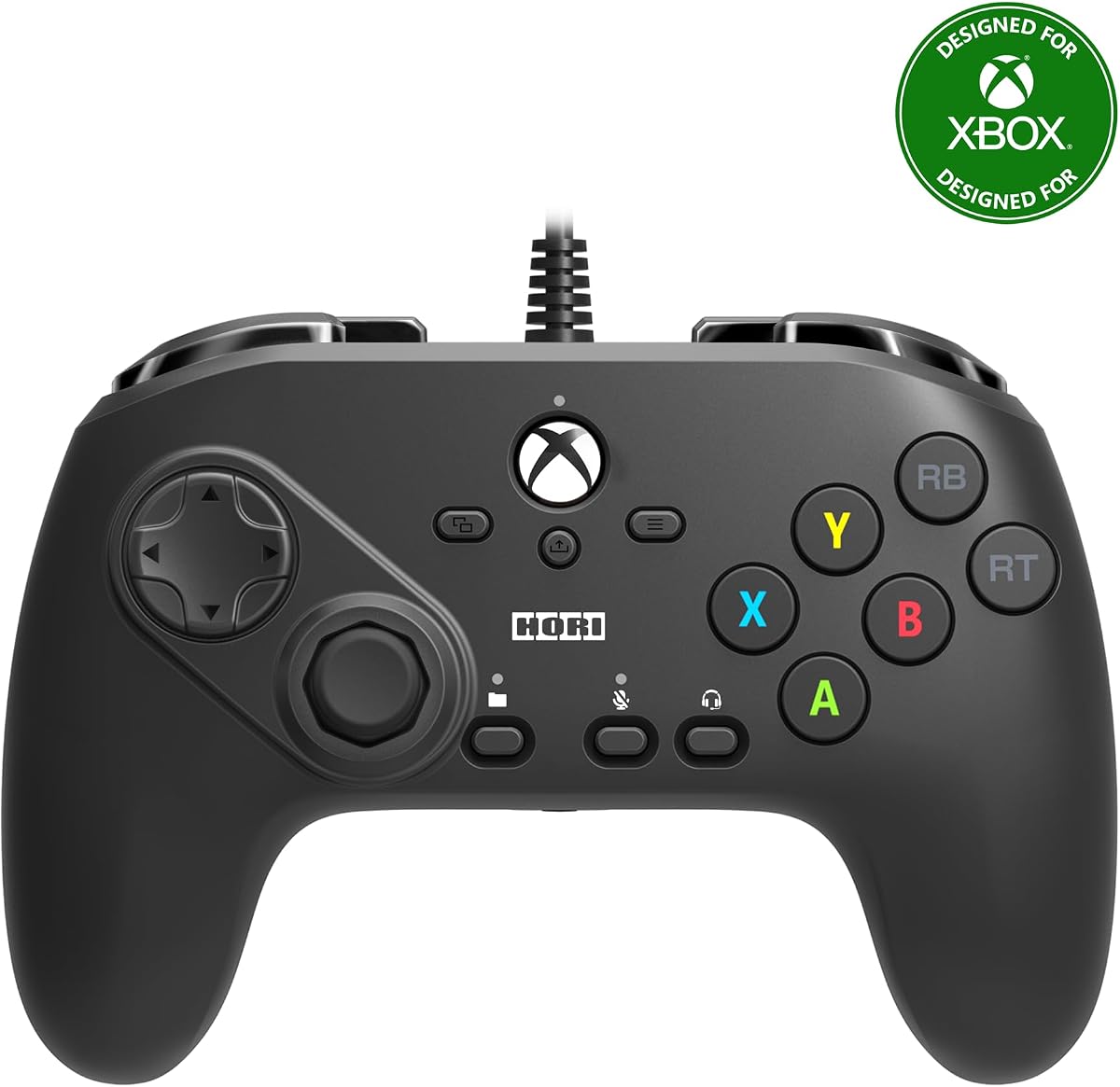
This Xbox-oriented version of the Fighting Commander Octa brings a six-button layout, short analog stick, and dedicated fighting-game features to Windows 10 as well as current and older Xbox systems. Its 3.5 rating is the lowest numerical score among the rated picks, so buyers should examine the listing carefully and understand the exact package contents.
We may earn a commission when you buy through this link, at no additional cost to you.
The adjustable D-pad and short-throw 8-way-gate stick are valuable for players who need cleaner directional commands. The action buttons use micro switches, and the companion app can save up to four profiles that can be changed with a front-facing profile button. Compatibility with Xbox Series X, Xbox One, and Windows 10 broadens its appeal within the Microsoft ecosystem.
Compared with the 8Bitdo M30, this HORI offers a more specialized short-stick design and a greater number of stored profiles. However, it lacks the M30's newer-looking platform coverage and earns a lower user rating. Some buyers may also find that the premium over a conventional controller is harder to justify if they only need the most common fighting-game buttons.
Choose this pad if you regularly use Xbox consoles and Windows, value switchable profiles, and want a short stick that encourages disciplined motion inputs. It is less convincing for PC-only players who prioritize the newest features, wireless flexibility, or a leverless layout. Checking compatibility and reading recent owner feedback is especially advisable given its lower score.
Saving up to four configurations in the companion app makes it practical to keep separate layouts for different fighting games or training routines. The profile button allows a player to change setups without repeatedly opening software between matches.
Support for Xbox Series X, Xbox Series S, Xbox One, and Windows 10 makes this a practical single-device option for players who move between Microsoft's console and PC platforms.
We may earn a commission when you buy through this link, at no additional cost to you.
The 8Bitdo M30 offers a dedicated six-button arrangement at a comparatively accessible level, making it a strong starting point for PC fighting games. Its 4.2 rating is among the stronger scores in the group, and official Xbox licensing supports use across Xbox Series X, Xbox Series S, Xbox One, and Windows.
We may earn a commission when you buy through this link, at no additional cost to you.
Two bumpers, two triggers, and six action buttons cover the layout expected by many competitive fighters. The USB-C wired connection provides a stable, low-latency connection, while a profile button gives access to three saved configurations through 8BitDo Ultimate Software. A 3.5 mm audio jack and volume control add everyday convenience without complicating the core design.
The M30 does not offer a short-throw 8-way stick, leverless mechanics, or adjustable rapid trigger, so more specialized players may find a better fit elsewhere. Its USB-C connector also means it is less universally compatible with older PCs than a controller using a standard USB-A plug. Nevertheless, the essential fighting-game controls and broad platform support make it more relevant than a generic gamepad.
This is the best value-oriented fightpad for someone who wants an uncomplicated six-button pad, dependable wired operation, and profile support without moving to a premium leverless system. It is especially appropriate for new PC fighting-game players, local multiplayer users, and Xbox fans. Players already invested in advanced leverless controls will want to consider more specialized options.
The two bumpers, two triggers, and six action buttons mirror the controls used by most competitive 2D fighters. This keeps the learning curve low while still providing the inputs required for common special moves and super moves.
USB-C provides a consistent wired connection for online matches, and three selectable profiles let users keep different games or button arrangements organized. The included audio connection adds useful control without occupying a USB port.
We may earn a commission when you buy through this link, at no additional cost to you.
The DOYOKY Leverless Controller combines a 16-button hitbox-style layout with an OLED display and web-based configuration, and its 4.4 rating is tied for the highest numerical score in the list. It supports PC, PS4, PS3, Nintendo Switch, and Steam Deck through five input modes, making it unusually versatile for a fightpad.
We may earn a commission when you buy through this link, at no additional cost to you.
Its most distinctive feature is the hot-swappable mechanical switch system. A spare switch, switch puller, and spare keycaps are included, allowing players to change the tactile feel without soldering. An OLED panel displays the active input mode, SOCD setting, and Turbo status, while browser-based controls cover button assignments, macros, and other settings.
The controller also offers Neutral, Last-Input, and Up-Priority SOCD modes along with Turbo macros. That depth is useful for players who understand leverless terminology, but beginners may find the number of options intimidating. The 29.6 by 21 cm base and non-slip feet help stabilize it on a desk or lap, while the reinforced USB-C port and detachable braided cable address durability concerns.
This is a compelling recommendation for adaptable PC fighting-game players who want more than a fixed six-button pad and do not need to pay for the highest-end premium hardware. It is particularly useful for Switch, Steam Deck, and older PlayStation users as well as PC players. Those wanting a simpler device should look toward the 8Bitdo M30, while enthusiasts seeking advanced rapid-trigger and polling options should examine the Akko FUNBOX.
Browser-based configuration allows input modes, macros, and button assignments to be managed through a web interface. The OLED then provides a quick visual reference to the current mode and SOCD status without forcing players to open menus during a session.
Hot-swappable switches let users alter the feel of individual buttons, and the reinforced detachable USB-C cable is designed to withstand repeated daily use. Broad platform support strengthens its value for console and handheld players as well as PC users.
We may earn a commission when you buy through this link, at no additional cost to you.
The Akko FUNBOX is a feature-rich leverless controller aimed at competitive players who want rapid trigger control, extensive customization, and a premium display. Its 4.2 rating indicates a well-received product, while the stated PC performance centers on an adjustable 0.1 to 2.8 mm rapid-trigger range, a 50KHz scan rate, and 8,000 Hz polling.
We may earn a commission when you buy through this link, at no additional cost to you.
The action buttons use Kailh Star Mini 2.8 mm low-profile Hall Effect magnetic switches. Because they operate without physical contact, the manufacturer says they avoid conventional mechanical wear and debris buildup. They are also hot-swappable, allowing the user to substitute low-profile mechanical switches without soldering when a different feel is desired.
A two-inch full-color LCD handles mode selection, SOCD settings, input testing, and customizable standby animations, while an aluminum dial provides tactile access to menus. Tournament Lock restricts simultaneous opposing directional inputs to a single Up direction and disables Home, Turbo, Select, and Start. When unlocked, four SOCD modes and full button remapping become available through the browser driver.
This is the premium choice for PC players who can exploit rapid trigger, high polling, and granular remapping. Its platform support includes PC, PS4, Xbox, Switch, and Android, with PS5 requiring a Brooks adapter. The sophisticated feature set may be unnecessary for casual play, but tournament-minded and technically engaged users get considerably more control than conventional fightpads provide.
The 0.1 to 2.8 mm adjustment range lets players determine how far a button must travel before the controller registers a second press. This can support different play styles across fast multi-button sequences and deliberate single inputs.
Tournament Lock provides a straightforward way to restrict directional and system-button behavior for rule-compliant play. Outside that mode, remapping and four SOCD options offer a high level of control for training and competitive sessions.
We may earn a commission when you buy through this link, at no additional cost to you.
The Tekken 8 edition of the HORI Fighting Commander OCTA is a Windows-focused, six-button wired fightpad with a 3.8 rating. Its official Bandai Namco licensing and fighting-game design make it relevant to PC players who want a straightforward, dedicated control rather than a general-purpose gamepad.
We may earn a commission when you buy through this link, at no additional cost to you.
The action buttons use microswitches and are arranged in a six-button layout, while the accurate D-pad and short-throw 8-way-gate stick support precise directional commands. An analog slide pad provides menu navigation without changing the main control scheme. As a tournament-grade wired device, it should fit naturally into a fixed desk setup.
Compared with the standard PlayStation-oriented OCTA, this model's defining features are its narrower software focus and Tekken 8 branding. It does not mention companion-app profiles, adjustable D-pad sensitivity, or support for the newest PlayStation systems. That specialization can be advantageous for a PC-only buyer, but it also limits versatility compared with multi-platform pads.
This model is best for PC players whose library centers on six-button fighters and who want a short stick with microswitch buttons. It is less suitable for users who need a broad eight-button layout, wireless freedom, or extensive leverless customization. A slightly lower rating than the leading products also makes it wise to review recent owner feedback before deciding.
The short-throw stick and 8-way gate create a controlled directional environment for quarter-circle commands and other motion-based techniques. This makes the pad especially relevant for training and competitive PC fighting games.
Rather than spreading its features across multiple platforms, the controller focuses on Windows PC. That specialization may appeal to buyers who want a straightforward tournament pad for one system.
We may earn a commission when you buy through this link, at no additional cost to you.
The Wireless Fighting Commander OCTA Pro brings a six-button layout and short-stick design to PlayStation 5 and Windows 11 or 10. Its 3.6 rating is lower than most alternatives in the guide, but wireless operation, rear buttons, and interchangeable D-pads set it apart from simpler wired pads.
We may earn a commission when you buy through this link, at no additional cost to you.
The main controls include an 8-gate analog stick, six microswitch buttons, tactile shoulder switches, and an analog slider for lobby navigation. Programmable rear buttons offer additional inputs without crowding the face, while three interchangeable D-pad options allow the directional pad to be changed for different game types or personal preferences.
Wireless freedom is the main reason to choose this model over the standard OCTA. The included USB-C charging cable has a locking feature intended to prevent accidental disconnects, although players should still monitor battery status during long sessions. HORI also instructs owners to install the latest firmware from its website before use or when encountering problems.
This is the pick for PC players who specifically want a wireless fightpad and can accept more involved setup. It is less appealing for users who demand a leverless layout, extensive rapid-trigger adjustment, or a high marketplace rating. Recent feedback and firmware behavior should be checked before purchase, particularly for online competitive use.
Programmable rear controls add flexibility for games that benefit from extra assignments. Three D-pad options let players choose the directional feel that best fits their games and technique.
The wireless format removes cable management from the desk, but updating the firmware is an important first step. Users should also maintain the controller's charge to avoid interruptions during a match.
We may earn a commission when you buy through this link, at no additional cost to you.
This renewed HORI PlayStation 5 Fighting Commander OCTA is a multi-platform pad with eight action buttons, a touchpad, and programmable macros. It is designed for PS5, PS4, and PC, making it relevant to PC players who want more buttons than a standard six-button fightpad.
We may earn a commission when you buy through this link, at no additional cost to you.
The eight-button layout supports games that ask for more attack and auxiliary commands than a typical face-button controller provides. A touchpad preserves an important PS5 control, while programmable macros can help users standardize complex sequences. Official Sony licensing and support for both PlayStation generations add flexibility for cross-platform libraries.
Because this is a renewed product, physical and functional condition may vary. There is no numerical marketplace rating in the supplied information, which makes direct assessment more difficult than for the other picks. The listing should be checked for the seller's return terms, included accessories, signs of use, and the degree of testing completed before delivery.
This option makes sense for a budget-conscious player who specifically wants an eight-button HORI layout and accepts renewed condition. It is less suitable for buyers who prioritize consistent appearance, immediate confidence in condition, or the newest wireless and leverless features. Ensure that the selected game supports the intended eight-button arrangement before purchasing.
The expanded button layout provides additional attack and auxiliary inputs compared with a conventional six-button pad. That makes the controller more suitable for fighting games with broader move sets.
Renewed hardware can provide value when the listing includes clear condition details and a straightforward return process. Checking accessory completeness and warranty information is especially important for a specialized controller.
We may earn a commission when you buy through this link, at no additional cost to you.
The Logitech G F310 is not a dedicated arcade-style fightpad, but it remains a practical choice for PC fighting games because of its familiar layout, 4.4 rating, and broad compatibility. The floating D-pad rests on four switches rather than a single pivot point, improving responsiveness when changing direction quickly.
We may earn a commission when you buy through this link, at no additional cost to you.
Ten programmable buttons and an eight-way programmable D-pad provide a degree of customization that is helpful for games without native controller support. Profiler software can assign keyboard and mouse commands, while the six-foot cable allows comfortable distance from a desktop monitor. The familiar Xbox 360-style layout also means most fighting-game players can adapt quickly.
The main limitation is its conventional gamepad design. It lacks the short 8-way-gated stick, dedicated six- or eight-button fighting arrangement, microswitch action buttons, leverless controls, and rapid trigger found in dedicated pads. The listed operating-system support also emphasizes older Windows versions, so current-game compatibility should be confirmed for the specific title.
Choose the F310 when your priority is an affordable, familiar controller for a mix of fighting games and other genres rather than tournament-specific features. It is best for casual play, training on older PC games, and users who want programmable inputs without learning extensive fighting-pad terminology. Competitive specialists should move up to a dedicated short-stick or leverless design.
Resting the D-pad on four switches allows it to register directional changes more cleanly than a single-pivot design. That can be useful for menus and in games where rapid cardinal inputs are common.
Programmable buttons and Profiler software make the pad useful beyond simple console-style play. Its familiar layout and long cable also prioritize comfort for a desk-based PC setup.
We may earn a commission when you buy through this link, at no additional cost to you.
The HORI Fighting Stick Mini provides a traditional eight-button arcade layout in a compact, lightweight design. Its 4.2 rating is among the stronger results in the list, and support for PS5, PS4, and PC makes it a versatile choice for players who enjoy both arcade-style and modern fighting games.
We may earn a commission when you buy through this link, at no additional cost to you.
The eight-button configuration covers games that need a broader move set, while HORI's original joystick with V-cut housing supplies a traditional control feel. An eight-foot attached cable provides plenty of reach from a PC desk, and the compact body is easier to store and transport than a full-size arcade cabinet.
Although smaller than traditional fight sticks, it still requires more desk space than a leverless pad. The attached cable is convenient because it cannot be lost, but it can be less tidy to store than a detachable connection. It also does not offer the rapid-trigger, high-polling, or extensive remapping functions of the premium leverless models.
This is the best fit for a PC player who wants a genuine eight-button arcade layout in a relatively portable package. It is ideal for limited desk space and for games whose move lists exceed six buttons. Those who want the smallest possible control surface should choose a leverless pad, while players seeking tournament-grade leverless features should look to the Akko or DOYOKY options.
The Mini reduces the bulk associated with full-size fight sticks while preserving a traditional joystick and eight-button arrangement. That balance makes it practical for players with limited desk space.
Eight buttons give modern fighters more command options than a six-button pad. The original HORI joystick and V-cut housing preserve the feel of a familiar arcade control.
We may earn a commission when you buy through this link, at no additional cost to you.
The right PC fightpad depends on your games, platform habits, and preferred level of control. A useful shortlist should balance button count, stick design, connection method, customization, tournament requirements, desk space, and long-term maintenance rather than focusing on a single specification.
In short, select the layout your favorite games actually use rather than choosing solely for visual style.
In short, use a short 8-way stick for disciplined execution and consider alternatives if comfort is the priority.
In short, wired is straightforward for competition, while wireless is more convenient when cable-free play matters.
In short, choose simple profiles for ease of use and comprehensive remapping for greater control.
In short, advanced competitive features matter most for dedicated players who understand their impact.
In short, favor serviceable parts and robust connections when planning to use the pad for years.
In short, confirm platform and game support before purchasing, especially for specialized configurations.
In short, measure your available area and choose the smallest layout that meets your game requirements.
Begin by connecting the controller to the PC using the supplied connection method and placing it where your wrists and forearms can remain relaxed. For a short-stick pad, keep the stick centered until you intentionally move it. For a leverless model, learn the neutral position and practice the directional combinations required by your game before increasing the difficulty.
Complete any required firmware or configuration software before an important session, then save a separate profile for each game or training setup. Test every action button, directional input, bumper, trigger, profile switch, and Turbo or SOCD setting. If the controller includes a tournament lock, activate it only when the event rules require that behavior.
Keep the controller dry and free from dust, and avoid pulling the cable by the connector. When using hot-swappable switches, power down the device and follow the included removal instructions. Clean keycaps and the surrounding housing gently, inspect the port for debris, and charge wireless models before long sessions. Periodically checking firmware and settings can prevent avoidable input problems.
A dedicated fightpad can be better when its layout matches the game and the player prefers its stick or leverless design. Six-button pads support standard competitive layouts, while leverless controllers can offer more buttons and advanced functions. A conventional gamepad may still be more comfortable for casual play or games that do not require specialized controls.
No. Many competitive players use six-button fightpads because their game and tournament rules call for that layout. Leverless controls are useful when you want more inputs, remapping, rapid trigger, or customizable SOCD behavior. The better choice depends on your preferred games and the features you genuinely use.
Wired pads avoid battery concerns and provide a permanent physical connection, which is attractive for online play. Wireless models can also work well, but battery level and the quality of the wireless implementation should be considered. Keep either type updated and confirm inputs during a practice session before a ranked match.
SOCD settings determine how the controller handles simultaneous opposing or directional inputs. Rapid trigger changes the activation distance for leverless buttons, allowing them to register again without returning fully. They address different problems, and a controller may offer one, both, or neither depending on its design.
A conventional six-button pad with a short stick and a familiar directional arrangement is usually easier for a new PC fighting-game player to learn. The 8Bitdo M30 is a straightforward example, while premium leverless models provide more adjustment but also introduce additional concepts. Beginners should begin with a layout supported by the games they intend to play.
Many officially licensed fightpads are designed to work across both console and Windows platforms, but compatibility varies by model. Check the product details for supported operating systems and platforms before buying. Some premium models also require an additional adapter for particular console versions.
Begin with Neutral SOCD if you want the safest general behavior, then test Last-Input and Up-Priority to understand the difference. Tournament Lock can further restrict directional behavior and disable system functions for competition. Switching a physical lock or profile button also helps prevent accidental changes during a match.
Keep the controller away from liquids and dust, and avoid striking or twisting the action buttons. If switches are hot-swappable, power down the controller and follow the manufacturer's tool instructions before replacing them. Periodically inspect the connection and clean around the buttons with a dry, soft method.
The DOYOKY Leverless Controller stands out for its 4.4 rating, broad input support, OLED display, hot-swappable switches, and browser-based customization. The Akko FUNBOX is the premium selection for players who want rapid-trigger adjustment, high polling, a full-color display, and tournament controls, while the 8Bitdo M30 offers the most approachable dedicated fighting layout.
Prioritize the features your favorite games require: six buttons for traditional competitive layouts, eight buttons for broader move sets, a short stick for disciplined motion inputs, or a leverless grid for granular control. Wired operation, software support, desk space, and tournament features should be considered only after establishing which control scheme feels natural to you.
Marketplace ratings, product availability, and pricing can change, so review the current listing before buying. Check platform support, included accessories, software requirements, and return terms, and use a practice session to verify every assigned input. With those steps complete, you can choose a PC fightpad that matches both your games and your preferred playing style.
