
BlueSwan MacBook Air 15 Inch Case
4.5Editor score
Slim reinforced polycarbonate construction
Precise M2 through M5 compatibility
Logo-visible midnight clear finish
A MacBook Air 15 Inch Protective Case should do more than hide scratches. It should preserve the laptop’s clean appearance, maintain access to every port, support proper cooling, and remain easy to carry. The best choice depends heavily on whether you prefer a nearly invisible hard shell, a grippy fabric cover, or a padded sleeve for commuting.
This guide compares ten protective cases and sleeves for 15-inch MacBook Air models using the information supplied for each product. We examine model compatibility, shell or sleeve construction, corner protection, ventilation, portability, grip, and useful accessories. The list includes hard-shell cases for users who want to protect the laptop in place and sleeves for travelers who carry it separately.
Each review identifies the product’s strongest benefits, practical limitations, and ideal owner, while the comparison table makes major differences easier to scan. Ratings and specifications reflect the supplied product data, and availability, included components, and pricing can change. Always verify the model number on the underside of your MacBook before ordering.
4.5Editor score

4.7Editor score

4.4Editor score
As an Amazon Associate we earn from qualifying purchases.
The comparison covers hard-shell, hybrid, and sleeve designs for supported MacBook Air 15-inch models. It highlights the practical differences in protection, cooling, handling, and included accessories without treating product ratings as substitutes for checking model compatibility.



The Soonjet Invisible Armor Case is a slim hard-shell option with a 4.6 rating and a clear focus on preserving the MacBook Air 15-inch appearance. Its high-transparency matte construction uses subtle Midnight tones, while the Apple logo remains visible. The case is designed for MacBook Air 15-inch M5, M4, M3, and M2 releases from 2026 through 2023.
We may earn a commission when you buy through this link, at no additional cost to you.
Its most attractive feature is the second-skin fit. Precision molding and micro 3D cutting are used to create accurate cutouts, smooth closure, and accessible ports. Tiny clips hold the case in place, and their soft protective coating is intended to reduce scratching during installation and removal. A one-millimeter profile and 198-gram weight keep the laptop easy to carry without adding substantial bulk.
Protection comes from high-performance polycarbonate combined with elastic micro-particles, which the product information says help disperse corner stress. The matte texture, oil-repellent coating, and scratch-resistant treatment target fingerprints, smudges, and everyday abrasions. Hinge-aligned ventilation openings, raised non-slip feet, and 1:1 vent placement are intended to preserve airflow and stability during use.
This is a strong choice for students and commuters who want the original laptop profile to remain visible. The tradeoff is that a rigid, thin shell cannot provide the same padded isolation as a sleeve or the more substantial construction of a rugged hybrid case. Buyers should also inspect the open-bottom ventilation area regularly, since the product description itself notes that trapped dust can accelerate wear.
The clear matte finish is intended to blend with the Midnight appearance rather than conceal the laptop behind an opaque panel. A micro-etched surface reduces the visibility of fingerprints, while the visible Apple logo maintains the familiar look of the device.
Precision-aligned openings mirror the laptop’s cooling area, and raised feet create space beneath the chassis. The design also keeps ports accessible and avoids adding pressure to the screen or hinge.
We may earn a commission when you buy through this link, at no additional cost to you.
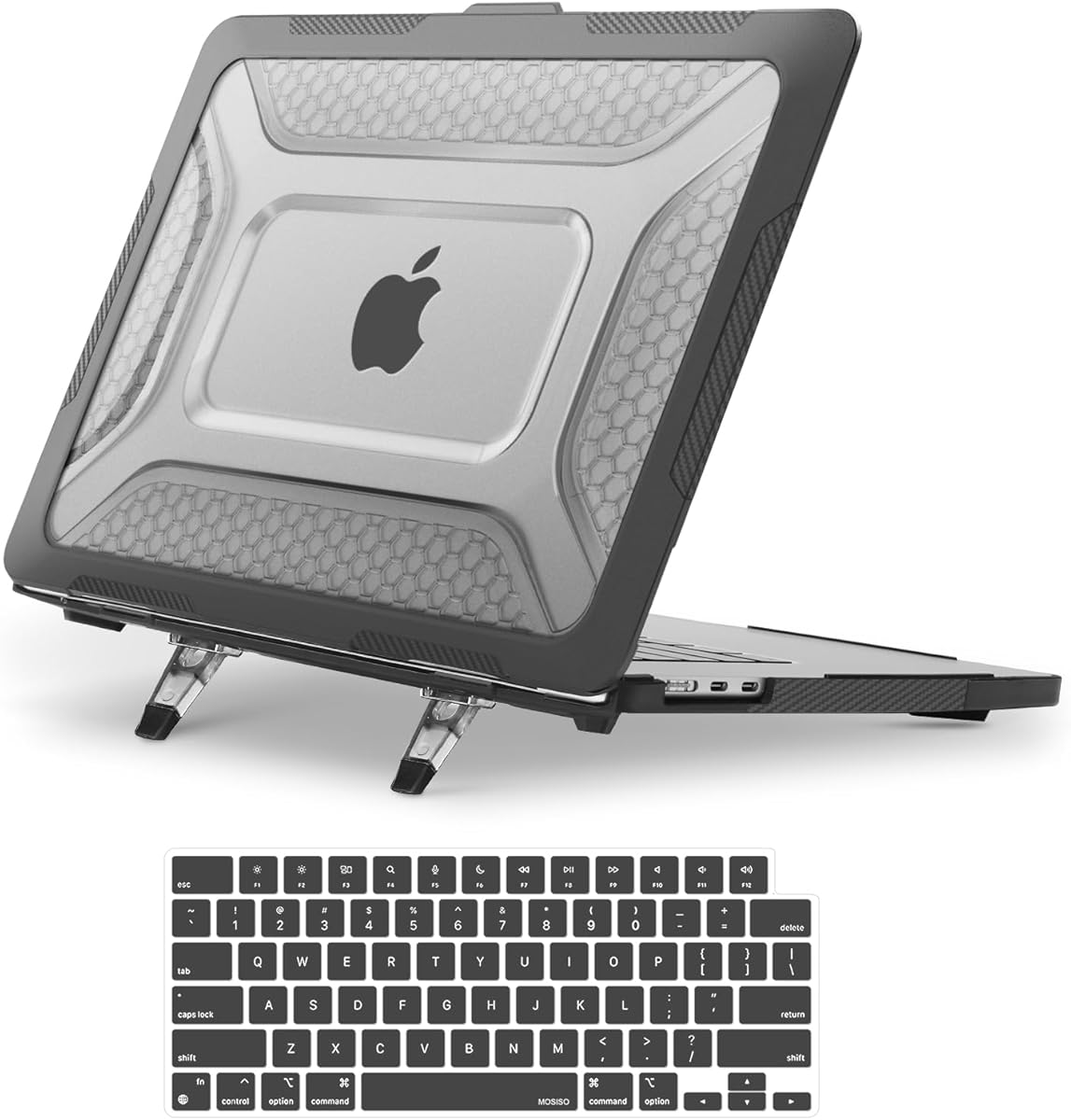
The MOSISO Hard Case with Kickstand earns a 4.7 rating and stands out by combining a protective shell with a built-in elevated viewing position. It supports the 15-inch MacBook Air M5, M4, M3, and M2 models, with the supplied information listing the relevant A3448, A3241, A3114, and A2941 model numbers.
We may earn a commission when you buy through this link, at no additional cost to you.
Construction combines a rigid polycarbonate core with a rugged TPU bumper and beveled, shock-absorbing ridges. The wraparound structure is designed to guard against scratches, drops, scuffs, and other everyday damage. Its foldable kickstand raises the laptop for a more comfortable viewing and typing angle, which is useful for desk sessions, calls, and media viewing.
A keyboard cover is included to help guard the keyboard from spills, adding a practical layer beyond the hard shell itself. The case is removable and described as easy to install without risking damage to the laptop. Exact port access and a snug fit are supported by the product’s stated dimensions and model-specific design.
The MOSISO case is most appropriate for buyers who alternate between carrying the laptop and working with it on a desk. The kickstand adds function, but it is not for everyone: some users prefer the laptop’s native open position, and a complete shell is still needed when transporting the device. Confirm the exact model number before purchase because the case is not intended for other laptops.
The folding kickstand changes the laptop’s angle without requiring a separate accessory. That makes the case useful for typing, video calls, and entertainment when the device is placed on a desk or other stable surface.
A rigid polycarbonate core helps the case retain its shape, while the TPU perimeter and honeycomb-inspired ridges are intended to absorb everyday impacts. A removable keyboard cover provides additional spill protection.
We may earn a commission when you buy through this link, at no additional cost to you.
The SUPCASE Shock-Absorbing Case provides a balanced mix of visibility, impact protection, and functional design. It holds a 4.6 rating and is listed for MacBook Air 15-inch models from 2026, 2025, 2024, and 2023, corresponding to the M5, M4, M3, and M2 model numbers in the supplied data.
We may earn a commission when you buy through this link, at no additional cost to you.
Its defining feature is a wraparound bumper designed to absorb shocks during drops and falls. The transparent cover keeps the Apple logo visible, which gives the case a more natural appearance than a fully opaque shell. Precise openings are provided for ports, sensors, speakers, the camera, and other device functions.
Raised rubber feet at the bottom corners are designed to improve heat disbursement by keeping the laptop slightly elevated. The case therefore addresses both protection and routine thermal performance. The product does not list a keyboard cover, screen protector, or other accessories, making it a more focused choice for buyers who only need the enclosure.
SUPCASE is a sensible middle option for anyone who wants stronger perimeter cushioning than a thin clear shell without moving to the larger rugged construction of a military-style case. The transparent exterior may reveal cosmetic marks over time, and exact model verification remains essential. Within the supported 15-inch range, it offers a practical combination of appearance, access, and impact-oriented design.
The wraparound bumper is the core protection feature, adding cushioning around the laptop’s perimeter. This approach is useful for users who regularly move their computer between a desk, café, and backpack.
Dedicated cutouts preserve access to ports, speakers, sensors, and the camera. Raised rubber feet create space beneath the lower corners to support heat disbursement during normal operation.
We may earn a commission when you buy through this link, at no additional cost to you.
The UAG Plyo Rugged Case is our Editor’s Choice for buyers who prioritize impact resistance over minimal weight. It carries a 4.7 rating and uses a one-piece hinged construction that combines an armor shell with an impact-resistant soft core. The product information states that it meets the MIL STD 810G 516.6 military drop-test standard.
We may earn a commission when you buy through this link, at no additional cost to you.
The translucent Ice/Black color and modern honeycomb body allow some of the MacBook’s design to remain visible without presenting the completely bare look of a thin clear case. Air-soft bumpers cushion the corners, while a tactile, non-slip frame improves handling. Four rubberized feet also help keep the laptop from moving on smooth surfaces.
Compatibility is broad across the supported 15-inch MacBook Air range. The product is designed for M2, M3, M4, and M5 machines, including the A2941, A3114, A3241, and A3448 model numbers. Precision cutouts maintain access to ports and features, while cooling vents are positioned to support airflow and reduce the risk of overheating.
UAG is the strongest recommendation for commuters, field workers, and anyone who travels frequently or worries about drops. Its trade-off is size: the layered shell is more protective than a minimalist polycarbonate cover, but it also adds bulk. Buyers who value ruggedness, stable footing, and a distinctive translucent design will find that trade-off worthwhile.
A hard armor exterior is paired with a softer internal core and air-soft corner bumpers. This multi-material structure is intended to manage both scrapes and the shocks associated with everyday falls.
The claimed military drop-test compliance, reinforced corners, and stable rubber feet make the Plyo suitable for people who carry their MacBook through airports, campuses, workspaces, and other demanding environments.
We may earn a commission when you buy through this link, at no additional cost to you.
The tomtoc 360 Degree Sleeve is the highest-rated product in this guide at 4.8 stars. It takes a different approach from the hard shells: the MacBook is removed and carried inside a padded sleeve. The supplied information lists compatibility with the 15-inch MacBook Air M5/A3448, M4/A3241, M3/A3114, and M2/A2941 models, as well as several other laptops.
We may earn a commission when you buy through this link, at no additional cost to you.
Protection comes from high-resilience edges, dense soft padding, and CornerArmor Technology. The sleeve is described as having passed a military-standard drop test while retaining a streamlined shape. Spill-resistant recycled fabric, YKK zippers, and a soft lining add practical refinements for daily commuting and travel.
Storage is another major benefit. A front pocket provides room for a charger, cable, mouse, or external drive, while a small strap is designed for an AirTag or keys. Internal dimensions are listed as 13.58 by 9.6 by 0.87 inches, with an 11.22 by 8.46-inch front pocket.
This sleeve is ideal for users who move between locations and want a single bag that can carry both the laptop and small accessories. It does not protect the MacBook while it is open on a desk, so it works best alongside a hard shell or for users who always pack the laptop away. A 12-month warranty is also included according to the product information.
High-density padding and reinforced edges separate the laptop from the exterior fabric and surrounding objects. The construction is intended to protect against falls, shocks, and vibration during transport.
The front pocket reduces the need for a separate accessory pouch, and the attachment loop offers a place for an AirTag or keys. Spill-resistant recycled fabric and YKK zippers support regular commuting use.
We may earn a commission when you buy through this link, at no additional cost to you.
The BlueSwan Ultra-Slim Case is a practical pick for buyers seeking a lightweight shell without a prominent logo or bulky bumper. It has a 4.5 rating and is designed for the MacBook Air 15-inch M5, M4, M3, and M2 models, with compatibility tied to the A3448, A3241, A3114, and A2941 model numbers.
We may earn a commission when you buy through this link, at no additional cost to you.
Micro 3D cutting is used to create a close fit around the laptop, with accurate port cutouts and full body coverage. Secure snap-on clips remain firmly attached while allowing the shell to be removed without an elaborate process. The product information also describes straightforward installation and removal when the user needs to clean the laptop.
Reinforced high-density polycarbonate is intended to resist cracks, scratches, and breaks during normal use. Its 1:1 heat-dissipation ports are aligned with the laptop’s cooling area, helping preserve airflow without changing the slim outline. The Midnight-inspired finish uses a holographic optical simulation to closely reproduce the original color while leaving the Apple logo subtly visible.
BlueSwan suits students, office workers, and frequent travelers who prioritize low weight and an understated appearance. It provides scratch and everyday wear protection rather than deep impact isolation, and the transparent-looking surface may eventually collect visible marks. Those limitations are reasonable for a deliberately slim, portable case.
The reinforced polycarbonate construction hugs the contours of the MacBook while resisting cracks and scratches. A close-fitting profile makes the case easy to move between a desk, sleeve, or backpack.
The Midnight clear finish is designed to resemble the laptop’s color while keeping the logo visible. One-to-one heat-dissipation ports and a close-fitting profile support cooling and reduce the visual and physical impact of protection.
We may earn a commission when you buy through this link, at no additional cost to you.
The MOSISO Complete Protection Kit combines a hard case with several useful accessories, making it the strongest option for buyers who want more than a simple shell. It has a 4.5 rating and supports the MacBook Air 15-inch M5, M4, M3, and M2 releases through the listed A3448, A3241, A3114, and A2941 model numbers.
We may earn a commission when you buy through this link, at no additional cost to you.
The case uses a shock-absorbing TPU exterior surrounding a rigid polycarbonate inner frame. Reinforced edges add protection around common impact areas, while precision contours and scratch-resistant clips create a stable fit. Port openings, including those for Thunderbolt and the headphone jack, remain unobstructed, and the shell is designed to slide into sleeves and backpacks.
Its adjustable kickstand raises the screen and supports a more comfortable typing position. The package also includes two spill-resistant keyboard covers, a clear screen protector, and two USB-C adapters. Those extras make it convenient to protect the keyboard, guard the display, and maintain connectivity immediately after unpacking.
This kit makes sense for a new MacBook Air owner who wants a coordinated protection setup. Some users may already own a keyboard cover or adapters and therefore receive less value from the bundle. The included screen protector and keyboard covers also require careful installation, and the case must be removed for full access to those components.
The case, two keyboard covers, screen protector, and USB-C adapters cover several common protection and connectivity needs. It is especially useful for users who do not want to assemble an accessory setup one item at a time.
The integrated stand provides an elevated typing and viewing position. Around it, a TPU exterior cushions bumps while the polycarbonate frame helps the case retain its shape and resist cracking.
We may earn a commission when you buy through this link, at no additional cost to you.
The Incase Edge Makrolon Case delivers a restrained, modern hardshell design with a 4.3 rating. It is specifically made for the MacBook Air 15-inch M5, M4, M3, and M2 models, matching the A3448, A3241, A3114, and A2941 identifiers in the supplied product information.
We may earn a commission when you buy through this link, at no additional cost to you.
Made from 100 percent Makrolon polycarbonate, the form-fitting shell is intended to guard against scratches and bumps while preserving the silhouette of the MacBook. Matte edges and an inset center window give the case a clean visual finish without relying on a highly transparent or fabric-wrapped surface.
Precision cutouts maintain access to ports, buttons, lights, and other device features. An integrated airflow system supports thermal performance, and rubberized feet improve traction on desks and tables. Raised perimeter bumpers add wraparound coverage, while micro-clips allow the case to be attached and removed without adding substantial bulk.
The Incase case is best for users who want a simple, professional enclosure that allows the laptop to close fully and work with a privacy screen. Its trade-offs are modest: it does not include a keyboard cover or screen protector, and its rigid construction provides less impact suspension than the UAG Plyo or a padded sleeve.
The combination of matte edges and an inset center window creates a professional look suited to offices and classrooms. The shell remains slim enough to preserve the original laptop profile.
Integrated ventilation is designed to support airflow during regular use. Rubberized feet provide traction and elevate the base slightly, while perimeter bumpers add protection as the device moves between workspaces.
We may earn a commission when you buy through this link, at no additional cost to you.
The MOSISO Sleeve Protection Bundle is a carrying-focused option with a 4.6 rating. It supports MacBook Air 15-inch M5, M4, M3, and M2 models and is built around a 360-degree protective polyester sleeve with a handle. The case is positioned for business, daily use, study, and travel.
We may earn a commission when you buy through this link, at no additional cost to you.
The soft sleeve is intended to protect against accidental spills and everyday transport while adding little bulk to the laptop. Its coordinated package includes a keyboard cover, a screen protector, and a webcam cover. The keyboard cover helps protect against spills, while the privacy sticker can cover the camera when it is not in use.
Port alignment is another practical feature, allowing the case to be used without creating unnecessary interference. The supplied data also describes a clear screen protector and notes that transparency may differ between individual units, which is useful context when comparing appearance with other accessories.
This bundle is a good fit for buyers who primarily carry the MacBook in a briefcase or backpack and already own, or do not need, a rigid hard shell. It does not protect the computer while it is being used on a desk, and the soft construction cannot match the corner reinforcement of a rugged polycarbonate case.
The polyester sleeve offers a lightweight way to protect the laptop from spills and daily handling during transport. Its low-bulk profile allows it to slide into a briefcase, backpack, or other larger bag.
The included keyboard cover, screen protector, and webcam sticker address several frequently overlooked areas. Together, they create a convenient bundle for students and office users who want protection beyond the carrying sleeve.
We may earn a commission when you buy through this link, at no additional cost to you.
The Spigen Urban Fit Protective Case offers a premium alternative to smooth polycarbonate shells. It has a 4.4 rating and combines a durable inner shell with a knit fabric exterior. The resulting texture is designed to resist scratches and fingerprints while improving the way the case feels during handling.
We may earn a commission when you buy through this link, at no additional cost to you.
Compatibility covers the MacBook Air 15-inch M5/A3448, M4/A3241, M3/A3114, and M2/A2941 models. The dual-layer design remains lightweight, while precise openings preserve access to charging, ports, and other functions without requiring the user to remove the case.
Raised TPU feet elevate the base, support cooling, and reduce slipping on smooth surfaces. Secure snap-on clips hold the shell firmly in place and allow quick installation. The fabric provides a more tactile grip than glossy plastic and gives the device a distinctive, professional appearance.
Spigen is a good option for buyers who value texture, grip, and understated style over a completely transparent or color-matched finish. The fabric-covered shell is more visually substantial than a minimal clear case, and it does not provide the deep padded isolation of a sleeve. Even so, the combination of inner shell, fabric exterior, raised feet, and precise fit makes it a strong premium pick.
The knit exterior creates friction that can make the laptop easier to hold securely. It is also intended to hide fingerprints better than a glossy plastic shell, which is valuable in shared workspaces and busy travel environments.
A protective inner shell supports the fabric exterior, while snap-on clips keep the assembly secure. Precise cutouts allow normal use without removing the case, and raised TPU feet contribute to cooling and stability.
We may earn a commission when you buy through this link, at no additional cost to you.
The right protective case depends on how you carry and use the laptop, how much visual bulk you accept, and whether you need one product or a coordinated set of accessories. Compatibility should always be confirmed before appearance or protection is considered.
MacBook Air cases are model-specific, even when several generations appear to share the same 15-inch dimensions. The products in this guide list support for combinations of the M5, M4, M3, and M2 generations, with model identifiers including A3448, A3241, A3114, and A2941. Check the model number printed on the underside of the laptop and compare it directly with the seller’s supported list. Do not rely on screen size alone, and do not assume that a case for a 13-inch Air will fit a 15-inch model.
A hard shell remains attached while the MacBook is used, making it convenient for moving between desks and adding protection against scratches and minor bumps. A sleeve is removed during use and provides padded isolation while the laptop is carried. The tomtoc and MOSISO sleeve options are useful for commuters, while the rigid cases suit people who want protection available at all times. Many owners use both types, but this guide focuses on the main use case of each product.
Thin one-piece polycarbonate cases are best for guarding against scratches, fingerprints, and cosmetic wear. Hybrid cases add a TPU perimeter, shock-absorbing ridges, or an impact-resistant core for more cushioning around the corners. The UAG Plyo goes further with an armor shell, soft core, and air-soft bumpers, and it states that it meets a military drop-test standard. Protection claims should be compared carefully, but the construction and intended use provide useful context.
A protective case should not block the MacBook’s cooling path. Several selections use precision-aligned or one-to-one ventilation openings, while the UAG, Incase, and Spigen options describe dedicated ventilation features or raised feet. The Soonjet listing specifically warns about open-bottom vents that can collect dust. Inspect the case’s openings, keep them free of debris, and avoid placing the laptop on soft surfaces that can restrict airflow.
The Soonjet and BlueSwan cases emphasize a slim profile, while the UAG Plyo and MOSISO hard case use more substantial structures to improve impact resistance. The Spigen Urban Fit adds a textured knit exterior that changes the laptop’s appearance. A sleeve generally remains out of sight while the laptop is used. Choose based on how conspicuous the case should be, how often you move the computer, and whether low weight and sleeve compatibility matter more than maximum structural protection.
Smooth cases can attract fingerprints, while textured fabric and tactile frames improve handling. The Spigen model uses a knit surface for enhanced grip, and the UAG includes a non-slip tactile frame. The Soonjet uses a matte, oil-repellent coating intended to reduce fingerprints. Hard-shell users should also consider raised feet, which improve stability and help with airflow, and bumper edges, which protect the perimeter during handling.
A case can become a broader protection kit. The MOSISO options include a keyboard cover, while one adds a screen protector, two keyboard covers, two USB-C adapters, and an adjustable kickstand. Another MOSISO bundle includes a webcam privacy cover. These extras can be convenient, but they may duplicate items you already own. Check the complete package before choosing a bundle, and consider whether extra films, covers, and adapters will actually be used.
Useful details include accurate port cutouts, accessible cooling openings, a case that allows the laptop to close fully, and clips that hold without scratching. Kickstands add a raised viewing and typing position, while sleeves add front storage for chargers, cables, and drives. Privacy-screen compatibility may matter in shared environments. The best choice should support the way you work, not merely add a layer around the device.
Before installation, confirm that the MacBook is powered off, disconnect its charger, and clean the outer shell with a soft microfiber cloth. Remove stickers or adhesive residue that could trap grit against the case. Compare the laptop’s model number with the seller’s compatibility list, then inspect the case and its clips for damage before bringing the two parts together.
Install a hard shell in the direction indicated by the manufacturer, working around the edges gradually rather than forcing one corner. Micro-clips, snap-on tabs, and molded edges should engage without requiring excessive pressure. If the case does not settle evenly, remove it and check for debris or a misaligned clip. For a sleeve, place the MacBook inside with ports and openings unobstructed, close the zipper carefully, and ensure the laptop is not forcing the sleeve wider than its intended shape.
For ongoing care, wipe the case with a soft, slightly damp cloth and dry it before returning the laptop to the case. Avoid abrasive pads, harsh chemicals, and excessive moisture around openings or clips. Check hinge and bottom vents for accumulated dust on a regular basis, and clean them with a method approved for your device. Inspect clips, feet, zippers, and bumpers periodically, especially if the case is used daily in a backpack or travel bag.
Check the model number on the underside of the MacBook and compare it with the compatibility list provided by the seller. The relevant models in this guide include A3448, A3241, A3114, and A2941 for M5, M4, M3, and M2 generations respectively. Screen size alone is not enough because shell openings, port positions, dimensions, and cooling layouts can differ between models.
A well-designed case should preserve the original cooling path, but buyers should verify that vents and openings align with the supported model. Cases with one-to-one ventilation, raised feet, or dedicated airflow features are designed to support heat disbursement. Keep the openings free of dust and never place a cased laptop on a soft surface that blocks ventilation.
A sleeve is often more convenient for travel because it adds padding and can be carried with a charger and other accessories. A hard shell is better for protecting the laptop while it is open or moving between workspaces. Travelers who want maximum convenience can use both, although the products in this roundup are designed to serve distinct use cases.
Yes. The MOSISO Complete Protection Kit includes two keyboard covers, a clear screen protector, and two USB-C adapters. The MOSISO Sleeve Protection Bundle includes one keyboard cover, one screen protector, and a webcam privacy cover. Other hard-shell options focus primarily on the enclosure and do not list these extras.
The MOSISO cases with integrated kickstands raise the laptop and can create a more comfortable viewing and typing angle. They may be helpful during video calls, typing sessions, or media viewing on a stable surface. The raised position is not necessary for every user, and the laptop must still be placed on a firm, flat surface for stability.
The Spigen Urban Fit is specifically described as scratch-resistant and fingerprint-resistant. Its knit texture is intended to provide secure handling and reduce visible smudges. The Soonjet uses a different approach with a matte, oil-repellent coating, while transparent cases may reveal more superficial marks over time.
The Soonjet, BlueSwan, and SUPCASE options are designed to keep the Apple logo visible to varying degrees. Soonjet uses a high-transparency matte Midnight finish, BlueSwan uses a color-matched clear appearance, and SUPCASE uses a transparent cover. Exact visibility can vary with lighting, surface condition, and the color of the underlying MacBook.
Hard-shell cases are designed to remain attached during normal use, provided their ports, vents, feet, and cutouts are unobstructed. Sleeve cases must be removed because they enclose the device. Screen protectors, keyboard covers, and privacy stickers may also need careful alignment or temporary removal to clean the laptop.
The top picks serve different priorities. BlueSwan is the best budget-oriented choice for a light, understated shell; UAG Plyo is the Editor’s Choice for users who want stronger impact-oriented construction, a tactile grip, and a distinctive honeycomb design; and Spigen Urban Fit is the best premium option for those who prefer knit fabric, secure handling, and a refined appearance. Each still requires the buyer to confirm the exact MacBook model.
Most buyers should begin with compatibility, then decide whether the primary need is scratch prevention, drop protection, padded transport, cooling, grip, or accessories. Thin shells work well for everyday desk use, rugged hybrids suit frequent travelers, and sleeves are convenient when the laptop is primarily carried between locations. A kickstand or bundled accessories may be useful, but they should not outweigh fit and ventilation.
Finally, check the current product listing before ordering because included components, model availability, and pricing can change. Compare the seller’s latest compatibility chart with the model number on your MacBook, read recent customer feedback, and confirm that the case supports the features you actually use. With that final check completed, the appropriate protective case can add useful protection without compromising the laptop’s everyday usability.