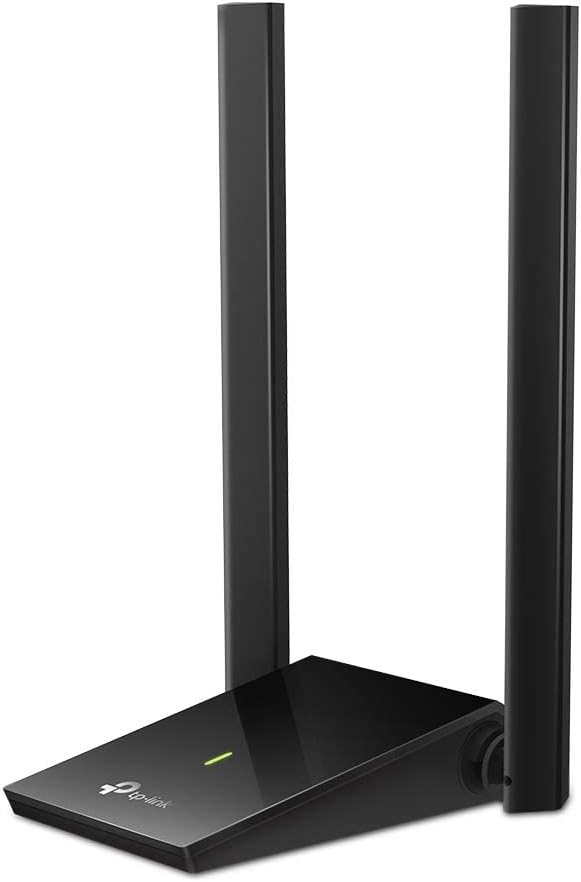
AX1800 USB 3.0 Adapter
5.0Editor score
Rotatable 7 dBi antenna
Wi-Fi 6 dual-band radio
Automatic Windows setup
Our High Gain USB WiFi Adapter guide compares ten adapters across speed, range, antenna design, security, compatibility, and setup for desktops and laptops.
A high gain USB WiFi adapter can give a desktop or older laptop a stronger, more flexible wireless connection without requiring a full internal card installation. The most useful models combine external antennas, dual-band or tri-band radios, modern security, and a USB connection fast enough to avoid becoming the bottleneck.
We compared the ten featured adapters using their stated wireless standards, theoretical band speeds, antenna configurations, USB interfaces, security features, operating-system support, and installation methods. The list covers Wi-Fi 5, Wi-Fi 6, and Wi-Fi 7 options for users who prioritize range, speed, flexibility, or simple setup.
Each review explains where the adapter stands out and where its limitations matter. The three leading picks are highlighted for overall balance, budget practicality, and premium capability, while the remaining models provide worthwhile alternatives. Product availability and pricing can change, so check current retailer details before purchasing.
5.0Editor score

4.4Editor score

4.4Editor score
The table below compares all ten adapters by wireless generation, stated band performance, antenna approach, and major compatibility or installation considerations. Theoretical link speeds indicate adapter capability, but real-world results depend on the router, distance, interference, walls, and placement.


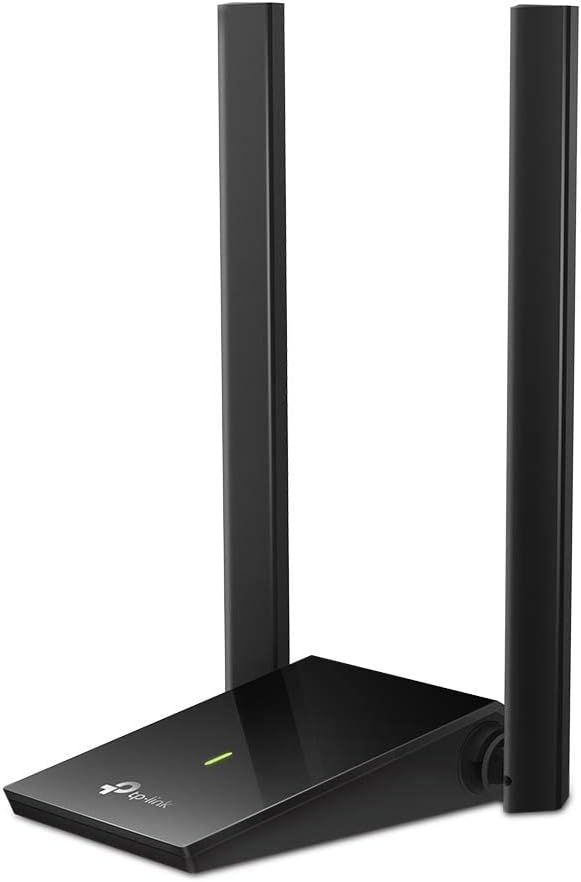

The TP-Link Archer T2U Plus is a compact dual-band adapter built around a 5 dBi high-gain antenna. Its stated maximum wireless rates are 433 Mbps on the 5 GHz band and 200 Mbps on 2.4 GHz. With a 4.4 rating, it remains a practical option for desktops and laptops that need better signal reach without a bulky antenna array.
We may earn a commission when you buy through this link, at no additional cost to you.
Its defining advantage is the rotatable, multidirectional antenna. Rather than fixing the adapter permanently beside the computer, the user can reposition the antenna toward the router and adjust it as conditions change. The dual-band radio also allows the PC to use the less crowded 5 GHz band when nearby devices and the router support it, while 2.4 GHz remains available for distance and coverage.
The main limitation is its Wi-Fi 5 hardware. It cannot deliver the capabilities of a Wi-Fi 6 or Wi-Fi 7 adapter, and actual speeds will depend on the connecting router. It also supports Windows versions only, including older releases, which is less convenient for Mac users. Nevertheless, its antenna flexibility, compact footprint, and broad Windows support make it a balanced general-purpose recommendation.
Choose the Archer T2U Plus when you want a dependable high-gain adapter for everyday browsing, streaming, and gaming, especially if your computer lacks good internal Wi-Fi. It is also sensible if you need broad Windows compatibility and do not need the newest wireless generation. For a modern Wi-Fi 6 setup, a faster model may offer a longer upgrade path.
The adjustable antenna can be rotated toward the router, making it easier to improve reception without moving the entire desktop. This is particularly helpful when the computer sits behind a monitor, beneath a desk, or across several walls from the access point.
The adapter supports both 2.4 GHz and 5 GHz networks, allowing users to balance range against speed. The 5 GHz band is best suited to nearby, high-speed connections, while 2.4 GHz can be more useful through obstructions.
We may earn a commission when you buy through this link, at no additional cost to you.
The TP-Link Archer TX20U Plus is an AX1800 dual-band Wi-Fi 6 adapter for desktop PCs and compatible laptops. It offers stated maximum speeds of 1201 Mbps on 5 GHz and 574 Mbps on 2.4 GHz. Its 4.1 rating reflects a generally capable modern adapter, though those headline rates require support from the connected router and suitable conditions.
We may earn a commission when you buy through this link, at no additional cost to you.
High-gain antennas can be adjusted to improve reception and transmission, and the included one-meter USB 3.0 cable allows the radio body to be positioned away from the computer. MU-MIMO and OFDMA support can improve efficiency when several devices share the network. WPA3 support provides a stronger security option than older WPA and WPA2 protocols.
Compatibility is the main constraint. This model supports Windows 11 and 10 only, and it cannot be used directly with Mac or Linux systems. It also cannot exceed the capabilities of an older router. For users with a modern Windows computer and Wi-Fi 6 router, though, the combination of speed, security, and placement flexibility is attractive.
The Archer TX20U Plus suits users who want to add a modern Wi-Fi 6 radio without opening their desktop. It is especially useful for upgrading an older Windows computer with weak internal Wi-Fi. Check your operating system and router generation before buying; users with a Wi-Fi 7 network or a need for Mac support should look elsewhere in this list.
MU-MIMO and OFDMA help the adapter handle shared network conditions more efficiently. These features are most valuable in a busy home or office where multiple clients transmit and receive data at the same time.
The one-meter USB 3.0 cable gives the adapter more freedom than a compact dongle with a fixed body. Positioning the radio higher or closer to the router may improve stability without moving the computer itself.
We may earn a commission when you buy through this link, at no additional cost to you.
The TP-Link Archer T3U Plus combines AC1300 dual-band performance with two external 5 dBi high-gain antennas. Stated rates reach 867 Mbps on 5 GHz and 400 Mbps on 2.4 GHz. Its 4.4 rating and cross-platform support distinguish it from several similarly sized Wi-Fi 6 alternatives in this roundup.
We may earn a commission when you buy through this link, at no additional cost to you.
The antennas can be rotated toward the router, which offers practical control over reception and transmission. MU-MIMO support can improve network efficiency, while the dual-band radio provides flexibility between faster short-range connections and longer-range 2.4 GHz coverage. Its simple setup interface also reduces friction for less experienced users.
The trade-off is age. AC1300 belongs to the Wi-Fi 5 generation, so it cannot take advantage of Wi-Fi 6 features such as OFDMA, WPA3, or the full efficiency benefits of newer hardware. Its stated macOS compatibility also covers versions 10.9 through 10.15 rather than every modern Mac configuration. Windows users have a broader range of supported releases.
This is a strong choice for a desktop or laptop that needs better antenna range without switching operating systems. Choose it when both Windows and macOS support matter and an existing dual-band router provides a suitable connection. If you have a Wi-Fi 6 router and want to prepare for future standards, one of the AX1800 or Wi-Fi 7 options may be a better long-term investment.
Two adjustable 5 dBi antennas give the adapter options that many compact dongles lack. They are useful in homes where the router is downstairs, around a corner, or separated from the PC by multiple walls.
Compatibility with both Windows and the specified macOS versions broadens the potential audience. It makes the adapter a more flexible shared option for offices, homes, and mixed-device environments.
We may earn a commission when you buy through this link, at no additional cost to you.
The TP-Link Archer TX30U Plus is a Wi-Fi 6 adapter designed around two high-gain dual-band antennas. It provides stated maximum rates of 1201 Mbps at 5 GHz and 574 Mbps at 2.4 GHz. Its 4.2 rating and emphasis on coverage make it particularly relevant to desktops placed away from the router.
We may earn a commission when you buy through this link, at no additional cost to you.
Beamforming is used to direct wireless energy toward the connected router, while the adjustable antennas provide additional placement control. MU-MIMO and OFDMA support address efficiency in congested networks. A preloaded internal driver simplifies installation, and the radio can fold for more compact storage when the antennas are not in use.
Its platform limitations are clear: only Windows 11 and 10 are supported. The adapter also requires a suitable router to approach its stated link speeds. WPA3 support is welcome, but buyers should not confuse security standards with improved range. Walls, distance, neighboring networks, and antenna orientation will continue to shape real-world performance.
Choose the TX30U Plus for a Windows desktop with a Wi-Fi 6 router, especially when the PC is in an inconvenient location. The two-antenna arrangement gives it a compelling advantage over small single-antenna dongles. Users who need broader operating-system support should look toward the AC1300 TP-Link models instead.
The adapter combines targeted beamforming with adjustable external antennas. These features work together to preserve useful signal when the computer and router do not have a clear line of sight.
A preloaded internal driver streamlines the first connection. The foldable antennas also let the adapter be stored more easily when it is not needed, without sacrificing adjustability during use.
We may earn a commission when you buy through this link, at no additional cost to you.
The TP-Link Archer TBE401UH is a tri-band Wi-Fi 7 USB adapter built for high-end desktop connectivity. Its stated maximum rates are 2882 Mbps on both 6 GHz and 5 GHz and 688 Mbps on 2.4 GHz. The 4.4 rating reflects a capable adapter whose real benefits depend heavily on a matching Wi-Fi 7 network.
We may earn a commission when you buy through this link, at no additional cost to you.
Access to the 6 GHz band can provide additional clean spectrum when supported by the router. The adapter also supports 160 MHz channels, Multi-RUs, 4K-QAM, MU-MIMO, and OFDMA. Two high-gain antennas work with beamforming, while a detachable cradle and 3.9-foot cable allow careful placement away from the computer.
This is not a general-purpose adapter for an older network. Its USB 3.0 interface, advanced radio, and premium features require a modern PC, and its full potential is best realized with a tri-band Wi-Fi 7 router. Only Windows 11 and 10 are supported. Buyers with a Wi-Fi 6 router may still connect, but will not unlock the headline capabilities.
The Archer TBE401UH is the premium selection for a user who already owns Wi-Fi 7 infrastructure or plans to build around it. Its tri-band design, generous placement hardware, and modern security make it the most advanced option here. For a Wi-Fi 6 network, a less costly AX1800-class adapter is the more proportionate choice.
The 6 GHz band adds a third route for wireless traffic and can provide cleaner conditions in suitable environments. Multi-RU and 4K-QAM support further distinguish this adapter from dual-band Wi-Fi 6 models.
The detachable cradle and 3.9-foot cable allow the radio to sit in a better location than the computer's USB port. This is valuable when a monitor, cabinet, or desk position interferes with the original signal path.
We may earn a commission when you buy through this link, at no additional cost to you.
This AX1800 USB 3.0 adapter combines a Wi-Fi 6 dual-band radio with a prominent 7 dBi high-gain antenna. Stated maximum speeds are 1200 Mbps on 5 GHz and 576 Mbps on 2.4 GHz. Its perfect 5.0 rating makes it an appealing budget-oriented recommendation, although ratings can change over time.
We may earn a commission when you buy through this link, at no additional cost to you.
The 90-degree rotatable antenna can be aimed toward the router to improve reception, and the product is described as providing a stable long-range connection. USB 3.0 reduces the chance that the wired connection will bottleneck a fast wireless radio. WPA3 is supported alongside WPA2, WPA, and WEP, giving users modern security options when their router permits them.
Its scope is simpler than the premium alternatives. There is one antenna rather than a multi-antenna array, and the adapter supports Windows 10 and 11 only. It does not support Windows 7 or Mac systems. Actual speed also remains limited by the router, and a large nominal antenna gain does not guarantee the same performance in every building or interference environment.
Choose this model for a Windows desktop that needs a stronger external antenna and straightforward installation without a separate driver download. It balances range, modern wireless speed, and compact placement in a way that should appeal to practical users. A Wi-Fi 7 setup or a multi-antenna requirement would favor one of the more advanced alternatives.
The 7 dBi antenna is larger and more prominent than those found on basic dongles. Because it rotates through 90 degrees, it can be aligned toward the access point when signal quality is inconsistent.
Windows 10 and 11 can detect and install the driver after the adapter is connected. That makes this a convenient option for users who want improved Wi-Fi without navigating a complicated installation utility.
We may earn a commission when you buy through this link, at no additional cost to you.
The BrosTrend AX1800 is a Wi-Fi 6 adapter with two 5 dBi high-gain antennas and a 3.3-foot USB 3.0 extension cable. It offers stated dual-band rates of 1201 Mbps at 5 GHz and 574 Mbps at 2.4 GHz. Its 4.1 rating and cable-based design make it a practical option for relocating the radio within a desktop setup.
We may earn a commission when you buy through this link, at no additional cost to you.
Beamforming helps direct the signal toward the router, while the extension cable provides more flexibility than a fixed USB dongle. OFDMA and bidirectional MU-MIMO are included to improve efficiency in busy networks. The preloaded driver eliminates the need to run a CD-ROM during initial setup, which is convenient for repair or upgrade projects.
Compatibility is restricted to Windows 11 and 10, and Linux is explicitly unsupported. As with every adapter, real-world performance depends on the router and environmental conditions. The two antennas make the adapter more adaptable than a single-antenna design, but it does not include the 6 GHz band or tri-band operation of the premium Wi-Fi 7 choices.
This BrosTrend model suits a Windows user who wants Wi-Fi 6 speed and meaningful antenna placement control. It is a sensible choice when the computer is under a desk, behind a large display, or otherwise surrounded by obstructing materials. Users who need Mac support should look at the cross-platform TP-Link AC1300 options instead.
The pair of 5 dBi antennas gives users another way to optimize reception. Different orientations can help when the router is off to one side or partially hidden behind furniture.
The 3.3-foot cable can move the radio away from metal cases and crowded USB ports. In many setups, this positioning flexibility matters as much as the adapter's theoretical wireless class.
We may earn a commission when you buy through this link, at no additional cost to you.
The WAVLINK BE6500 is a visually substantial tri-band Wi-Fi 7 adapter with four adjustable 5 dBi antennas. Its stated maximum rates are 2882 Mbps on both 6 GHz and 5 GHz and 688 Mbps on 2.4 GHz. The 4.4 rating reflects a feature-rich design aimed at performance-oriented Windows desktops.
We may earn a commission when you buy through this link, at no additional cost to you.
Wi-Fi 7 features include Multi-Link Operation and Multi-RU, intended to improve stability and latency on crowded networks. The adapter can operate in Receive Mode or Hotspot Mode, allowing a PC to connect to a router or share its internet connection with nearby devices. A multicolor LED and responsive touch switch provide visual status and lighting control.
Its four antennas and USB 3.0 interface make it well suited to stationary desktop use, but the physical size may be less convenient for a laptop. The product supports Windows 11 and 10 and requires driver installation for recognition, although a built-in driver normally handles the process automatically. Pairing it with a standard Wi-Fi 6 or 6E router will limit its capabilities.
Choose the WAVLINK BE6500 for a desktop builder with access to Wi-Fi 7 and a preference for abundant antenna placement options. It stands out for hotspot support, elaborate physical design, and a broad feature set. For a simpler installation or smaller footprint, the TP-Link Archer TBE401UH may be easier to integrate.
Supporting both Receive and Hotspot modes makes the adapter more versatile than models limited to client connections. It can join a tri-band network or share the PC's connection with compatible nearby devices.
Four foldable 5 dBi antennas offer several possible orientations. The larger body and ventilation slots are intended for sustained desktop use, with cooling considerations that are less relevant to tiny dongles.
We may earn a commission when you buy through this link, at no additional cost to you.
The TP-Link Archer T3U Plus is an AC1300 dual-band USB adapter with two high-gain antennas. It provides stated rates of 867 Mbps on 5 GHz and 400 Mbps on 2.4 GHz. Its 4.1 rating makes it a familiar alternative for desktop users who want external antennas and a USB 3.0 connection without moving to Wi-Fi 6.
We may earn a commission when you buy through this link, at no additional cost to you.
The adjustable, multidirectional antennas can be positioned to improve reception and transmission. USB 3.0 is designed to transfer data faster than USB 2.0, helping the adapter avoid becoming a wired bottleneck on a modern system. Windows 11 and 10 are supported, along with the specified macOS X 10.9 through 10.14 versions.
The main limitation is its older wireless class. AC1300 cannot access Wi-Fi 6 or Wi-Fi 7 features, and the listed security support does not include WPA3. Compatibility with older macOS releases may also be insufficient for some current users. Nevertheless, when paired with a suitable AC1300 router, it remains a straightforward way to add dual-band wireless capability.
Choose this adapter for a compatible desktop or laptop that needs a quick improvement over weak internal Wi-Fi. It is particularly sensible for users who prioritize antenna range and cross-platform flexibility rather than future wireless standards. If the PC will be connected to a Wi-Fi 6 router for several years, an AX1800 model may be a smarter long-term choice.
The pair of adjustable antennas allows the radio to point toward the router. This is useful when a desktop is positioned below a desk, behind a monitor, or near sources of interference.
The USB 3.0 connection provides a higher data-transfer ceiling than USB 2.0. While it cannot create faster wireless throughput by itself, it better complements a high-speed dual-band radio.
We may earn a commission when you buy through this link, at no additional cost to you.
The Tenda U11Pro is an AX900-class Wi-Fi 6 USB adapter built around a 6 dBi omnidirectional high-gain antenna. It supports Windows 7, 10, and 11 on x86 and x64 systems. Its 4.3 rating and built-in driver make it an accessible option for reviving or adding Wi-Fi to a compatible PC.
We may earn a commission when you buy through this link, at no additional cost to you.
The high-gain antenna is designed to improve signal reception in areas with interference, while Tenda's stated intelligent algorithm focuses on signal stability and coverage. MU-MIMO allows the adapter to communicate with multiple devices simultaneously. AP mode can turn the computer into a 5 GHz Wi-Fi hotspot for up to eight devices, adding useful functionality beyond ordinary client use.
As an AX900 product, it sits below the AX1800 adapters in stated class performance. Its headline figures are also presented as comparisons with AC600 hardware rather than as explicit band-by-band maximum rates. Windows-only support excludes Mac and Linux users, and the listed system range does not cover every modern Windows configuration.
The U11Pro is a good choice for a user who values a simple built-in driver, strong antenna design, and hotspot functionality. It is also more accommodating than many recent adapters in its stated Windows 7 support. Users who want the highest Wi-Fi 6 throughput and multiple adjustable antennas should consider an AX1800 alternative instead.
The adapter is designed to connect without a separate driver download on supported Windows systems. This simplifies installation for basic computing tasks and makes it easier to test whether an upgrade resolves weak wireless performance.
AP mode allows the computer to share its internet connection over 5 GHz with up to eight devices. It is a convenient alternative to buying a separate hotspot when occasional shared access is needed.
We may earn a commission when you buy through this link, at no additional cost to you.
The right high gain USB WiFi adapter depends on your router, computer, operating system, and location. Compare wireless generation, antenna design, USB interface, security, and placement options rather than focusing only on the largest advertised speed.
An adapter cannot deliver more than the connected router supports. Wi-Fi 6 adapters are a sensible match for Wi-Fi 6 networks and may remain useful with older routers, while Wi-Fi 7 products need a Wi-Fi 7 router to unlock their tri-band and 6 GHz capabilities. A Wi-Fi 5 adapter can still provide a practical connection on an AC router, but it offers less long-term headroom.
Choose a wireless generation that corresponds to your router and how long you expect to keep the computer.
Dual-band adapters connect to 2.4 GHz and 5 GHz networks. The 2.4 GHz band generally reaches farther and handles obstacles more gracefully, while 5 GHz offers greater speed and often encounters less interference in crowded areas. Tri-band Wi-Fi 7 adapters add 6 GHz, creating another high-speed path when both the router and network permit it.
More bands provide options, but a good router and sensible placement are still necessary.
High-gain antennas can improve usable signal when carefully positioned. Adjustable or rotatable designs are more useful than fixed antennas because the router, walls, and furniture can change the preferred orientation. Models with multiple antennas may offer additional placement options, although the antenna count alone does not guarantee better results in every environment.
Prioritize an antenna you can orient and place close to your router.
USB 3.0 provides a substantially higher data-transfer ceiling than USB 2.0 and is a better match for fast Wi-Fi 6 or Wi-Fi 7 radios. It also matters on computers where the adapter must handle large downloads, streaming, or other sustained traffic. The adapter remains usable on USB 2.0, but the wired link may become the limiting factor.
Use USB 3.0 whenever the adapter and computer support it.
Compatibility varies substantially across the list. Some adapters support only Windows 11 and 10, while others include older Windows releases or specified macOS versions. A product that works with Windows does not necessarily work with Mac or Linux, so verify the operating system before buying. Driver requirements also vary between preloaded, automatic, and downloadable installation methods.
Check your exact system version, not just the operating-system family.
WPA3 provides stronger protection than older WPA and WPA2 protocols, though it requires compatible infrastructure. The AX1800 and Wi-Fi 7 models in this guide include WPA3 support. If you operate an older router or mixed network, check whether your chosen adapter also supports the security modes used by that network before making the final selection.
Prioritize WPA3 when your router supports it.
A long USB cable, detachable cradle, or adjustable body can move the radio away from obstructions around the PC. This often has a greater practical effect than choosing a slightly newer standard with a fixed antenna. Wireless adapters also work best when elevated, unobstructed, and directed toward the router rather than hidden behind a monitor or inside a cabinet.
Choose a design that lets you reposition the antenna or radio.
Advertised link speeds are theoretical maximums under favorable conditions. Walls, distance, neighboring Wi-Fi systems, router quality, processing overhead, and the internet connection all affect the result. The router's maximum speed remains the ceiling, and a strong signal does not automatically translate into the same throughput as a weak one.
Use stated speeds to compare capability, not to predict exact daily results.
Begin by checking the operating system, USB port availability, and router security type. Connect the adapter using the appropriate USB port, preferably a USB 3.0 port on a desktop or laptop that supports the required bandwidth. Follow the manufacturer's driver instructions, including the instruction to visit the support page for current drivers where applicable.
After connecting, select the appropriate 2.4 GHz or 5 GHz network in the operating system's Wi-Fi menu and enter the correct security credentials. If both bands use the same name, test each one to determine which provides the more stable connection. Keep the adapter elevated and rotate or position its antenna toward the router, then adjust it gradually if the signal is inconsistent.
For long-term care, avoid pushing the antenna against a wall or enclosing the adapter in a crowded port. Do not repeatedly bend the cable at its connector, and keep the radio away from excessive heat. Update drivers when needed, follow the manufacturer's guidance for a product that is no longer connected, and periodically revisit antenna orientation if furniture or network conditions change.
A high gain adapter can improve the strength and reliability of the PC's wireless connection, which may help when the original Wi-Fi is weak. It cannot exceed the speed provided by the router or internet service. A faster wireless generation may also help if the computer's existing adapter is the bottleneck.
A high gain antenna can improve performance through walls, but no antenna guarantees reception in every building. Construction materials, distance, interference, and router placement all matter. Positioning the adapter higher and directing it toward the router often provides a more noticeable benefit than simply choosing a larger nominal gain.
A Wi-Fi 7 adapter is the best match for a Wi-Fi 7 router and can use its faster features when supported. Older Wi-Fi 6 or Wi-Fi 5 adapters can also connect in many cases, but their capabilities will limit the available throughput. Confirm the router's bands, security, and operating requirements for the most complete experience.
USB 3.0 is recommended for Wi-Fi 6 and Wi-Fi 7 adapters because it offers a much higher transfer ceiling than USB 2.0. The adapter may still work in a USB 2.0 port, but sustained performance can be limited. Older Wi-Fi 5 products may have less demanding requirements, although USB 3.0 is still beneficial.
Some adapters support AP or Hotspot Mode, including the Tenda U11Pro and WAVLINK BE6500. The PC must have an active internet connection and the relevant mode must be configured through the adapter software. Features such as the supported bands and maximum number of clients vary by model.
Compatibility depends on the exact adapter. Several TP-Link AC1300 models support specified macOS releases, while many Wi-Fi 6 and Wi-Fi 7 options in this guide are Windows-only. Linux support is especially limited and should be confirmed from the manufacturer's current support information before purchase.
Place it in an elevated, open location where it is not hidden behind a monitor, metal chassis, cabinet, or other obstruction. Direct the antenna toward the router, and use the USB cable or cradle to move the radio if the computer's main USB port is in a poor position. Small changes in orientation can affect connection stability.
Usually, you can leave the internal adapter installed and simply choose the USB adapter in the operating system's Wi-Fi controls. However, disabling the internal adapter can remove confusion about which radio is active or prevent the system from preferring the weaker connection. Check the adapter's installation instructions for the recommended arrangement.
The TP-Link Archer T2U Plus is the most balanced selection for many users because it combines a compact design, an adjustable 5 dBi antenna, dual-band connectivity, and broad Windows support. The AX1800 USB 3.0 adapter stands out for its larger 7 dBi antenna and straightforward setup, while the TP-Link Archer TBE401UH is the premium choice for a matching Wi-Fi 7 network.
For most buyers, prioritize antenna positioning, operating-system compatibility, and a router that matches the wireless generation. Faster theoretical numbers matter only when the computer, router, USB port, and network conditions can support them. A longer cable or adjustable antenna may deliver a better result than upgrading to a newer standard without solving poor placement.
Before ordering, confirm the current operating-system requirements, supported bands, and available USB ports. Product details, software, and pricing can change over time, so check the current retailer listing and manufacturer support information. With those checks completed, the right high gain USB WiFi adapter can give a desktop or laptop a more stable and flexible wireless connection.