
GL.iNet GL-MT3000 Beryl AX
4.5Editor score
Compact Wi-Fi 6 design
OpenWrt 21.02 firmware
2.5G multi-gig WAN
Preinstalled VPN clients
Explore the best Open Source Routers, comparing hardware, OpenWrt support, Wi-Fi performance, VPN features, portability, and ideal use cases for every home.
Open source routers give users greater control over firmware, networking features, and privacy than many closed-platform alternatives. The right model can improve performance, support advanced services, and remain adaptable as technology changes. Important considerations include hardware capability, wireless generation, OpenWrt compatibility, port speed, memory, and intended location.
This guide compares ten open source routers across homes, offices, gaming setups, and travel use cases. It examines wireless standards, Ethernet connectivity, VPN support, AdGuard Home compatibility, storage, expandability, and practical limitations. Products range from a classic Linksys platform to modern OpenWrt devices designed by the community and supported by GL.iNet.
Each pick highlights a different reason to consider open source hardware, from budget-friendly customization to high-speed gaming, extensive coverage, or a compact travel format. The shortlist also clarifies where older standards, limited storage, or modest ports may affect a purchase. Product prices and availability change, so compare current listings before buying.
4.5Editor score

4.6Editor score

4.5Editor score
The comparison below highlights the principal differences among these open source routers, including wireless generation, Ethernet speed, memory or storage, VPN capabilities, and the environments each model is best suited to handle.




The Linksys WRT54GL is a historically important open source router with a 4.1 rating and a clear place in the traditional Linksys custom-firmware community. Its Linux-based platform, four-port switch, and two external antennas once made it a popular entry point for people interested in replacing restrictive stock firmware. It remains recognizable as an early widely adopted platform for OpenWrt experimentation.
We may earn a commission when you buy through this link, at no additional cost to you.
The supplied specifications identify one 10/100 WAN port and four switched 10/100 LAN ports. It operates on 2.4 GHz 802.11b/g with a maximum link rate of 54 Mbps, which is extremely limited by current standards. WPA2 support and a built-in SPI firewall provide basic network protection, while LEDs show power, DMZ, wireless, Ethernet, and Internet status.
Its main appeal is familiarity rather than leading performance. A buyer who already knows the WRT54GL platform may appreciate its small dimensions, compact footprint, and established custom-firmware history. The router measures approximately 3.91 by 3.85 by 3.92 inches, and the package contains the router without a modem, so it requires an existing broadband connection or upstream device.
Modern applications expose significant limitations. Gigabit service can run through the WRT54GL, but its 10/100 interfaces will bottleneck transfers and high-speed wired devices. Likewise, 802.11b/g lacks Wi-Fi 5, Wi-Fi 6, and Wi-Fi 7 features such as higher efficiency, wider channels, and Multi-Link Operation. Its 54 Mbps ceiling makes it unsuitable for many contemporary connected households.
The platform compatibility listed for Windows XP and Vista also reflects the product's age. It is most sensible for a collector, a learning environment focused on legacy custom firmware, or a lightweight secondary network where very high throughput is unnecessary. For a primary modern home network, a newer Wi-Fi 6 or Wi-Fi 7 platform will offer substantially more practical headroom.
The WRT54GL helped popularize user-controlled router firmware, so its importance extends beyond current network speeds. For learners and retro-computing enthusiasts, that established history can be more valuable than raw performance.
Its compact size and simple wired layout can suit an isolated task, but the lack of gigabit ports and advanced wireless standards makes it a poor fit for bandwidth-heavy daily use.
We may earn a commission when you buy through this link, at no additional cost to you.
The GL.iNet Flint 2 is a high-performance open source router built around the MT6000 platform. Its 4.5 rating reflects a strong combination of Wi-Fi 6, multi-gigabit Ethernet, VPN performance, and flexible firmware. The product is especially appealing to gamers, power users, and households that want a router capable of supporting more demanding custom services.
We may earn a commission when you buy through this link, at no additional cost to you.
Its eight-stream Wi-Fi 6 radio is listed with a maximum speed of 6 Gbps. The hardware also includes 1GB of DDR4 memory and 8GB of eMMC storage, providing a useful foundation for plugins, VPN clients, DNS tools, and other OpenWrt packages. Two 2.5G Ethernet interfaces allow the router to take advantage of faster broadband and local network equipment.
VPN performance is one of its most notable strengths. The supplied data reports speeds of up to 900 Mbps with WireGuard and 880 Mbps with OpenVPN. Actual results will vary with the internet service, network environment, server location, and VPN provider. AdGuard Home is supported, allowing users to filter tracking and selected advertisements through a convenient DNS interface.
The specification also says that the router can accommodate more than 100 devices and support additional plugins. That makes the Flint 2 more appropriate than many basic travel units for a busy home, a gaming-focused network, or a small server environment. Its processing and storage headroom can help prevent resource strain when multiple services run simultaneously.
One important caveat is the manufacturer's instruction to update the firmware during initial setup. Doing so is presented as essential to enhancing performance and the user experience. Buyers should therefore plan for that step before transferring many devices. Overall, the Flint 2 is our premium choice for users who want substantial performance without giving up the flexibility of OpenWrt.
The dual 2.5G ports offer a meaningful upgrade over basic gigabit-only models, especially for fast fiber connections, local storage, and wired gaming devices. They also make the Flint 2 more versatile as the center of a modern home network.
With 1GB of DDR4 memory, 8GB of eMMC storage, and plugin support, the Flint 2 is better equipped than compact alternatives for users who want to run several network services concurrently.
We may earn a commission when you buy through this link, at no additional cost to you.
The GL.iNet Flint 3e is a Wi-Fi 7 open source router intended for homes, workspaces, and gaming environments that value newer wireless capabilities. It carries a 4.2 rating and stands apart through Multi-Link Operation, enhanced OFDMA, 4K-QAM, preamble puncturing, and Multi-RUs. These technologies are intended to improve speed, latency, and performance in crowded wireless environments.
We may earn a commission when you buy through this link, at no additional cost to you.
The stated maximum wireless speed is 6.5 Gbps, with coverage designed for areas of up to 2,500 square feet. Its 1GB DDR4 memory provides solid capacity for firmware customization, VPN tools, and plugins. The product is also described as suitable for more than 100 connected devices, making it relevant to households in which phones, televisions, computers, cameras, and smart-home products are all active.
VPN performance is another central attraction. OpenVPN and WireGuard are listed at speeds of up to 1,100 Mbps, although actual throughput depends on the service provider and network. AdGuard Home support gives users an additional way to manage tracking and selected advertisements, while the integrated Bark parental-control support can filter websites, enforce safe search, and establish usage limits.
As with any newly introduced platform, buyers should consider firmware maturity and device support. Wi-Fi 7 features can be impressive on paper but ultimately depend on compatible clients, the available radio band, congestion, and the user's internet connection. The stated coverage figure is also a guide rather than a guarantee because walls, building materials, and neighboring networks materially affect results.
The Flint 3e is a strong option for someone building a forward-looking network today and willing to prioritize current standards. It is particularly attractive for users who want advanced Wi-Fi 7 behavior, powerful VPN features, and OpenWrt flexibility in the same device. It is less compelling for buyers whose connected equipment still uses older Wi-Fi standards or whose needs are limited to light browsing and travel use.
MLO, OFDMA, 4K-QAM, preamble puncturing, and Multi-RUs work together to improve efficiency and responsiveness. Their practical benefit is greatest when several compatible clients share a congested area.
AdGuard Home and Bark support cover different parts of online safety. The former focuses on DNS-based filtering, while the latter adds child-monitoring tools, safe search, and screen-time limits.
We may earn a commission when you buy through this link, at no additional cost to you.
The Banana Pi OpenWrt One is a purpose-built community router with a 4.6 rating, the highest among the ten products in this guide. It was designed by the people behind the Linux-based OpenWrt operating system in partnership with Banana Pi. OpenWrt is already installed, and the device is based on the AP-24.XY platform, giving it a strong connection to upstream development.
We may earn a commission when you buy through this link, at no additional cost to you.
At its center is a MediaTek Filogic 810 SoC with dual-band Wi-Fi 6, configured as 3×3 on one band and 2×2 on the other. The networking hardware includes a 2.5Gbit WAN port and a 1Gbit LAN port. Memory consists of 1GB DDR4 RAM, 256MiB NAND, and 16MiB NOR. An M.2 SSD slot and USB 2.0 interface add further flexibility.
The device also supports real-time clock functionality, Power over Ethernet, and a MikroBUS socket for expansion modules. Those details make it particularly interesting for developers, tinkerers, and technically experienced users who may want to add custom hardware or build a more specialized network environment. The standard kit includes the OpenWrt One and links to project documentation and support resources.
The primary trade-off is that this is not a conventional plug-and-play consumer router. Although the firmware is already installed, a buyer comfortable with OpenWrt will benefit much more from the available memory, storage, and expansion options. The product does not include a modem, and configuration still requires an internet source and a connected client for initial administration.
Official mainline support is a major advantage for long-term ownership. Instead of depending entirely on a vendor's customized interface, users can work within a widely supported open operating system. That makes the OpenWrt One our editor's choice for users who prioritize openness, expandability, and direct engagement with the OpenWrt ecosystem.
The device's official mainline support and preinstalled firmware reduce the friction of adopting OpenWrt. It offers a direct path to community documentation, package repositories, and development practices.
The M.2 SSD slot, USB 2.0 port, MikroBUS socket, PoE support, and RTC support create possibilities for custom storage, extensions, and specialized projects beyond ordinary household routing.
We may earn a commission when you buy through this link, at no additional cost to you.
The GL.iNet Beryl AX is a compact Wi-Fi 6 travel router with a 4.5 rating and one of the most balanced feature sets in this guide. It combines a 2.5G multi-gigabit WAN port, a gigabit LAN port, USB 3.0, dual-band wireless networking, and OpenWrt 21.02 in a highly portable form.
We may earn a commission when you buy through this link, at no additional cost to you.
The stated wireless rates are 574 Mbps on 2.4 GHz and 2,402 Mbps on 5 GHz. Wi-Fi 6 improves efficiency and performance in dense environments compared with older standards, while the 2.5G WAN interface can accept faster internet connections than a conventional gigabit port. The single gigabit LAN port is sufficient for a travel device, although it offers less wired flexibility than a full-size router.
OpenVPN and WireGuard are preinstalled and compatible with more than 30 VPN services when the user has an active subscription. The listed maximum speeds are 150 Mbps for OpenVPN and 300 Mbps for WireGuard, with local-network test conditions noted. The router can act as a VPN client and server simultaneously, allowing users to access local resources while routing public traffic through a VPN connection.
Security features include WPA3, DNS over HTTPS, DNS over TLS, and IPv6 support. The OpenWrt installation provides access to more than 5,000 ready-made plugins through a no-code management interface. A physical toggle can enable or disable AdGuard Home, OpenVPN, or WireGuard after the button has first been assigned a function in the admin panel.
The Beryl AX is an excellent budget pick for travelers, remote workers, and users who want a small but capable open source router. Its limitations include only one LAN port and lower listed VPN throughput than the larger Flint and Beryl 7 models. Even so, it delivers a rare combination of portability, multi-gig WAN, strong wireless performance, and accessible OpenWrt customization.
The combination of a 2.5G WAN port, USB 3.0, dual-band Wi-Fi 6, and preinstalled VPN software makes the Beryl AX useful in hotels, temporary offices, and other locations where a private network is preferable to public Wi-Fi.
A no-code interface helps users install and manage packages, while the physical control provides quick access to frequently used network-security features. More experienced users still have access to the full OpenWrt environment.
We may earn a commission when you buy through this link, at no additional cost to you.
The Linksys WRT1900ACS combines a recognizable Linksys industrial design with a mature custom-firmware platform. It has a 4.1 rating and delivers AC1900 dual-band wireless performance, gigabit wired connectivity, four adjustable antennas, and features for device prioritization, parental controls, guest networks, and network monitoring.
We may earn a commission when you buy through this link, at no additional cost to you.
Its maximum combined wireless speed is listed as 1.9 Gbps, with up to 600 Mbps on 2.4 GHz and 1,300 Mbps on 5 GHz. The dual-core 1.6 GHz ARM processor is intended to support multiple simultaneous users, and the four external, detachable antennas can be adjusted to improve signal distribution through a home or small office.
Storage connectivity differentiates it from many basic routers. A USB 3.0 port supports faster transfers, while an eSATA interface accommodates external SATA drives and can also work with USB 2.0 devices. The product's network-management features include prioritizing devices or websites, turning Wi-Fi on or off, creating password-protected guest networks, and viewing a visual map of the network.
The open source ready designation is the primary reason to consider this model rather than a more current Wi-Fi 6 or Wi-Fi 7 device. It provides a flexible foundation for custom firmware, but buyers should understand that the wireless hardware belongs to an earlier generation. Newer clients may still connect, but they will not gain the full benefits of current efficiency and multi-link standards.
The package includes the router, four antennas, a quick-start guide, documentation on CD-ROM, an Ethernet cable, and the power components. This is a strong option for someone who values a familiar Linksys chassis, physical antenna control, and a proven customization platform more than having the newest wireless standard. It works with an existing modem.
Device and website prioritization, guest networks, parental controls, and a visual network map make the administration interface more versatile than a minimal router. These tools are helpful in homes where several users or device categories need different treatment.
USB 3.0 and eSATA provide ways to attach external storage to the router. That can be useful for local media or file access, depending on the selected firmware and installed services.
We may earn a commission when you buy through this link, at no additional cost to you.
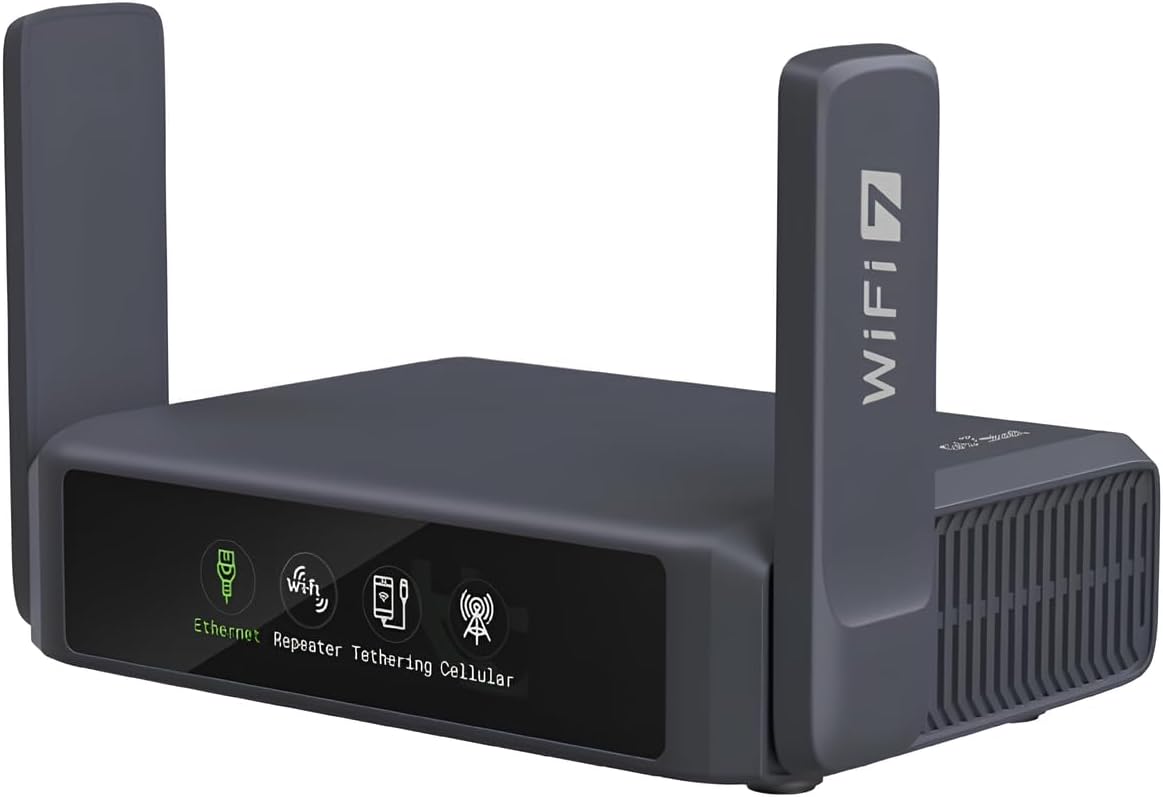
The GL.iNet Slate 7 is a Wi-Fi 7 travel router with a 4.4 rating and a color touchscreen that sets it apart from most compact routers. It is designed to deliver current wireless performance in hotels, cruise ships, temporary offices, and other travel environments while retaining OpenWrt customization.
We may earn a commission when you buy through this link, at no additional cost to you.
The Slate 7 provides dual-band Wi-Fi 7 with listed rates of 688 Mbps on 2.4 GHz and 2,882 Mbps on 5 GHz. Its Ethernet arrangement consists of one 2.5G WAN port and one 2.5G LAN port, plus a USB 3.0 connection. For a travel unit, the inclusion of a multi-gigabit LAN port gives it more potential than models limited to 1G Ethernet.
Its defining interface feature is the color touchscreen. Users can scan QR codes for quick Wi-Fi access, monitor speed in real time, toggle the VPN, and switch providers directly from the display. Color-coded indicators communicate Ethernet, tethering, repeater, and cellular-mode status, which can make diagnosis easier without immediately opening a web interface.
OpenWrt 23.05 with Kernel 5.4.213 provides the base environment, and the router includes 512MB of storage for customization. OpenVPN and WireGuard are preinstalled for supported VPN services. Listed maximum VPN speeds are 100 Mbps for OpenVPN and 540 Mbps for WireGuard under local-network conditions. VPN client and server operation can run together for access to local network resources.
Security features include WPA3, DNS over HTTPS, DNS over TLS, and IPv6 support. AdGuard Home, OpenVPN, and WireGuard can be assigned to the touchscreen toggle after configuration in the admin panel. The main compromises are the single LAN port and the care a touchscreen needs in a packed bag. Even so, the Slate 7 is a polished option for users who prioritize portable Wi-Fi 7 and convenient visual controls.
The display reduces the need to remember admin-panel commands for common actions. QR scanning, speed monitoring, VPN switching, and colored connection indicators are especially useful in unfamiliar travel settings.
Wi-Fi 7 and dual 2.5G Ethernet create a capable travel platform. The 2.5G LAN port also allows the router to serve as a wired network hub when a single high-speed wired device is needed.
We may earn a commission when you buy through this link, at no additional cost to you.
The GL.iNet Opal is a lightweight AC1200 travel router with a 4.2 rating. At 145 grams, it emphasizes easy packing and simple private networking, offering dual-band Wi-Fi, three gigabit Ethernet ports, VPN support, and a repeater mode for public wireless networks.
We may earn a commission when you buy through this link, at no additional cost to you.
Its stated maximum wireless speed is 1,167 Mbps, divided into 300 Mbps on 2.4 GHz and 867 Mbps on 5 GHz. The lower band can handle lighter tasks such as email and web browsing, while the faster band is better suited to gaming and high-resolution video. The data notes that real-world results depend on local network conditions.
The wired configuration is unusually useful for a travel router. It includes two gigabit LAN ports and one gigabit WAN port, allowing direct connection of several wired devices or use of the Opal as a small network hub. This is a meaningful advantage over units with only one Ethernet port, even though none of the interfaces support multi-gigabit speeds.
For online privacy, OpenVPN and WireGuard are preinstalled and compatible with more than 30 providers, while Cloudflare encryption and IPv6 are supported. A physical toggle can enable or disable a VPN client after it is assigned in the admin panel. The repeater function can convert a public wired or wireless connection into a private Wi-Fi network, and the product does not support easytethering.
Retractable antennas can be extended for better reception and positioned vertically for optimal performance. The Opal is best for a traveler who wants a small, inexpensive open source router with full gigabit ports and privacy controls. Its main limitation is that it lacks the newer wireless standards and multi-gigabit WAN found in the Beryl AX and Slate 7.
The 145-gram design and retractractable antennas make the Opal easy to carry without the bulk of a full-size router. It is particularly useful for short trips, business travel, and locations where a private network is more convenient than joining public Wi-Fi directly.
Two gigabit LAN ports and a gigabit WAN port allow several devices to connect and support the router's role as a small travel hub. This wired flexibility distinguishes it from many similarly compact alternatives.
We may earn a commission when you buy through this link, at no additional cost to you.
The GL.iNet Beryl 7 is a compact Wi-Fi 7 travel router with a 4.2 rating. It combines current wireless technology, multi-gigabit Ethernet, and unusually high listed VPN performance in a portable device intended for international travel, hotels, cruise ships, and temporary workspaces.
We may earn a commission when you buy through this link, at no additional cost to you.
Wireless speeds are listed at 688 Mbps on 2.4 GHz and 2,882 Mbps on 5 GHz. The router includes one 2.5G WAN port, one 2.5G LAN port, and USB 3.0. It is advertised for use by up to 120 devices, which is a strong capacity claim for a travel-sized unit, particularly where many wireless clients share a room or temporary office.
VPN performance is the Beryl 7's standout feature. The supplied information lists maximum speeds of 1,100 Mbps with WireGuard and 1,000 Mbps with OpenVPN-DCO. OpenVPN and WireGuard are preinstalled and compatible with more than 30 VPN services, subject to an active provider subscription. As with other performance claims, the figures depend on the local network and actual service conditions.
The router runs OpenWrt 21.02 with Kernel 5.4.281 and has 512MB of storage for plugins and customization. It can run a VPN client and server at the same time, allowing a user to reach local network resources while connected to a remote VPN service. WPA3, DNS over HTTPS, DNS over TLS, and IPv6 provide additional security and privacy functions.
A physical control can enable or disable AdGuard Home, OpenVPN, or WireGuard once assigned in the administration panel. The trade-offs are the single LAN port and the 512MB storage capacity, which is less generous than the 1GB memory found in larger models. Nevertheless, the Beryl 7 is a compelling choice for a traveler who wants Wi-Fi 7 and strong VPN performance without a large desktop router.
The listed WireGuard and OpenVPN-DCO rates make the Beryl 7 relevant to users who routinely connect through a VPN. Its portable form helps retain those capabilities in hotels, temporary offices, and other remote settings.
Wi-Fi 7, dual 2.5G Ethernet, USB 3.0, and support for numerous devices create a capable travel network. The OpenWrt base retains room for packages while remaining manageable in a compact design.
We may earn a commission when you buy through this link, at no additional cost to you.
The Linksys WRT3200ACM is a high-performance AC3200 open source router with a 4.3 rating. It combines a well-known Linksys enclosure and open source firmware support with tri-stream wireless hardware, beamforming, 160 MHz channel support, and MU-MIMO. Although its standards are older than those of the newest models, it remains a notable option for users who prefer Linksys hardware.
We may earn a commission when you buy through this link, at no additional cost to you.
Maximum dual-band wireless speed is listed as 2.6 Gbps, with 600 Mbps on 2.4 GHz and 2,600 Mbps on 5 GHz. Tri-Stream 160 technology can use a 160 MHz channel, while MU-MIMO serves multiple wireless clients at the same time. These features helped the model establish a strong performance reputation when AC3200-class routers were more prominent.
The router is designed to work with an existing modem and supports common home activities such as 4K HD streaming, gaming, and general browsing. Its open source firmware is the key attraction for users who want deeper control than the standard interface provides. The listed operating systems include macOS 10.X or later, Windows 7, and Windows 8.1, with compatibility noted for Windows 10.
Power requirements are relatively substantial for a home router, using a 12-volt, 3-amp output. Buyers should also consider that Wi-Fi 5 equipment no longer represents the current state of wireless development. A Wi-Fi 6 or Wi-Fi 7 router will usually offer better efficiency, newer security capabilities, and improved handling of high-density client populations.
The WRT3200ACM makes the most sense for a buyer who values the Linksys platform, 160 MHz performance, MU-MIMO, and established open source customization. It can also serve as a capable secondary router in a larger network. For a new primary system in 2026, however, a current wireless standard offers a more forward-looking foundation.
MU-MIMO allows the router to communicate with multiple wireless clients at the same time. This reduces some of the inefficiency associated with traditional sequential client servicing and helps busy networks handle multiple active devices.
Open source firmware and the recognizable Linksys design give the WRT3200ACM continued appeal among users who already understand the platform. Its faster radios and MU-MIMO support separate it from entry-level models while newer alternatives offer Wi-Fi 6 or Wi-Fi 7.
We may earn a commission when you buy through this link, at no additional cost to you.
Choosing an open source router means balancing the freedoms of customizable firmware against wireless capability, processing resources, port speed, portability, and the setup skills required to maintain the device. The most suitable model depends on whether the router will serve a busy home, a travel kit, a gaming network, or an experimental project.
Open source routing can mean different things. Some products ship with OpenWrt already installed, while others are supported by the broader custom-firmware community. Buyers should verify the current firmware status, device support level, recovery process, and availability of packages. A model that is officially supported by OpenWrt generally provides a more predictable path than one that merely has an unofficial community image. This is especially important for the Banana Pi OpenWrt One, whose mainline support is a defining feature, and for GL.iNet products, whose supplied firmware is based on OpenWrt.
Wireless generation affects the maximum speed, channel width, efficiency, and ability to serve modern clients. The list includes legacy 802.11b/g, Wi-Fi 5 through AC3200, Wi-Fi 6, and Wi-Fi 7. Wi-Fi 6 remains broadly useful, while Wi-Fi 7 adds Multi-Link Operation, 4K-QAM, enhanced OFDMA, preamble puncturing, and Multi-RUs. A newer standard cannot create faster internet service, but it can improve local wireless performance when clients and network conditions support those features.
Memory and storage determine how comfortably the router can run VPN services, DNS tools, firewalls, monitoring utilities, and other packages. The Banana Pi OpenWrt One and GL.iNet Flint 2 each provide 1GB of DDR4 memory, while the Flint 3e also lists 1GB. The Beryl AX, Slate 7, and Beryl 7 use OpenWrt environments with 512MB of storage. That remains useful for travel and typical customization, but it is less appropriate for ambitious packages or extensive local storage use.
A fast WAN port matters only if the internet service exceeds the standard gigabit threshold, but it can also avoid a bottleneck for local traffic. The WRT54GL is limited to 10/100 Ethernet, while several modern travel routers offer 2.5G ports. The WRT1900ACS, WRT3200ACM, and Opal provide gigabit connectivity. Count both WAN and LAN ports, and consider whether USB or eSATA storage is needed for local media or file services.
OpenWrt makes it possible to add VPN clients, servers, AdGuard Home, and other privacy tools, but the hardware must process encryption at a useful rate. The Flint 2 and Flint 3e list high OpenVPN and WireGuard figures, while the Beryl 7 is notably strong for a portable model. The Beryl AX and Slate 7 also support concurrent client and server operation. Buyers who plan to use a VPN should check provider compatibility, required subscription status, and expected real-world throughput.
A full-size router is easier to place in a central location and generally offers more ports, while a travel router should be small, light, and easy to power from varied outlets. The Beryl AX, Slate 7, Opal, and Beryl 7 target travel, while the Flint models and Linksys devices are better suited to fixed installations. Coverage figures should be treated as approximate because walls, floors, neighboring systems, antenna placement, and client capabilities influence the result.
Expansion options can extend a router's useful life. The OpenWrt One includes an M.2 SSD slot, USB 2.0, PoE, an RTC, and a MikroBUS expansion socket. The WRT1900ACS offers USB 3.0 and eSATA, while several GL.iNet travel models include USB 3.0. Touchscreens, physical feature toggles, QR-code scanning, guest-network controls, and parental-control integrations may also improve daily usability, particularly outside advanced configuration sessions.
Begin by connecting the router to a compatible modem or upstream network using the supplied Ethernet cable. Power it on, open the administration interface from a wired or wireless client, and complete the initial setup guidance in the manual or linked tutorial. For GL.iNet models, the provided setup process uses the admin panel and may include connecting by Ethernet during the first configuration. Record the administration credentials, update the firmware, and change default network settings before inviting many clients to connect.
Firmware maintenance is the most important part of caring for an open source router. Review available updates regularly, use stable release channels unless a specific development build is required, and maintain a known-good configuration backup. When adding packages, add only those needed for the intended role and remove unused services to conserve memory and storage. The GL.iNet Flint 2 specifically requires an initial firmware update for optimal performance, so complete that step before judging its real-world behavior.
For wireless performance, place a fixed router in an open, central location and adjust its antennas after checking signal strength in frequently used rooms. Avoid enclosing it in cabinets or placing it directly beside heat-producing electronics. A travel router should be kept in a protective case, positioned with its antennas in the recommended orientation, and given time to cool. Clean the ventilation openings with dry, soft tools only, and avoid moisture or compressed air that could force debris into the enclosure.
An open source router provides access to firmware that users can inspect, modify, and update, commonly through OpenWrt. That control can enable advanced networking tools, custom services, and privacy features. The exact degree of openness varies, so buyers should check upstream support, package access, and whether the included administration tools still expose standard functions.
GL.iNet routers are generally more approachable because they provide a simplified interface and preinstalled VPN features over an OpenWrt base. The Banana Pi OpenWrt One and traditional Linksys models can demand more configuration knowledge. A first-time buyer should read the documentation, use Ethernet for initial setup, and avoid changing packages until the default network is stable.
A 2.5G WAN port is useful when the internet plan exceeds 1 Gbps or when local transfers involve very fast equipment. It is unnecessary for slower connections. Many travel applications can be served by gigabit ports, so buyers should balance multi-gig support against size, storage, and wireless capability rather than choosing it automatically.
Most of the products work with an existing modem and do not include one. The WRT54GL package explicitly contains no modem, and the WRT3200ACM is described as working with an existing modem. Confirm the router's WAN interface and your service provider's connection requirements before purchase, and check whether your provider supports a compatible router directly.
Wi-Fi 7 can be worthwhile for users with compatible clients who want newer efficiency features and better handling of dense wireless environments. The benefit may be limited if most devices still use Wi-Fi 6 or older standards. Consider the available ports, memory, VPN performance, and coverage alongside the wireless generation, since a stronger Wi-Fi 6 platform may offer better overall value for some users.
The router's VPN client and server functions are built in, but many VPN services require an active subscription. The GL.iNet models are compatible with more than 30 providers, and the supplied information specifically notes that a subscription is required. Users can also run their own VPN server, but that requires additional configuration, a public-facing connection, and attention to security.
Firmware should be checked for updates whenever a new stable release becomes available and before relying on the router in a critical environment. Updates can improve security, compatibility, performance, and device support. Keep the router accessible by Ethernet during major updates, back up important settings, and avoid interrupting power while firmware is being written.
The Beryl AX is a balanced pick for its compact size, 2.5G WAN, USB 3.0, Wi-Fi 6, and preinstalled VPN tools. The Slate 7 adds Wi-Fi 7, dual 2.5G Ethernet, and a touchscreen, while the Beryl 7 offers high listed VPN throughput. The Opal is the lightest option and provides three gigabit Ethernet ports, making it useful when low weight and wired flexibility matter more than the newest wireless standard.
The Banana Pi OpenWrt One stands out as the editor's choice because it was created in partnership with the OpenWrt community, ships with the operating system installed, and offers 1GB of memory, multi-gigabit networking, and meaningful expansion options. The GL.iNet Beryl AX is the best budget-focused choice for travelers, while the Flint 2 is the premium pick for users who want high-speed Wi-Fi 6, multi-gigabit ports, and substantial customization resources.
The right decision depends on priorities. Home users should weigh coverage, client standards, wired speed, memory, and software support. Gamers and VPN users should look closely at encryption throughput and processing power. Travelers should prioritize size, easy setup, public Wi-Fi repeater support, and multi-gig WAN where available. Enthusiasts can consider the OpenWrt One's M.2, PoE, RTC, and MikroBUS capabilities, while established Linksys users may prefer a familiar platform.
Before purchasing, verify the exact firmware version, current device support, required accessories, and physical connectivity for the intended space. Also check the latest listing and product details, because hardware revisions, bundled accessories, firmware, prices, and availability can change. A router that suits the network's real workload will provide a more satisfactory open source experience than one selected only by its headline wireless speed.