
VunLink RTL8127AT
4.3Editor score
Multi-gig RJ45 networking
PCIe 4.0 x1 interface
Compact slot-friendly design
Dual brackets included
Compare the best 10GbE network cards for NAS, servers, workstations, and gaming PCs, including ports, speeds, PCIe fit, OS support, and features.
A 10GbE network card adds a faster Ethernet connection to a desktop, workstation, or server that lacks a suitable built-in port. The right card can improve large file transfers, NAS access, media workflows, virtual machines, and backup performance, but compatibility with the host, switch, cabling, operating system, and connector type matters as much as headline speed.
The cards in this guide were compared by examining port configuration, controller, supported link speeds, PCIe interface, bracket options, operating-system coverage, virtualization features, and intended use. The list includes RJ45 options for standard copper networks, SFP+ adapters for fiber or direct-attach connections, and specialized Synology models, giving each buyer a practical point of reference.
Each review explains where a product fits best, highlights meaningful strengths, and notes relevant limitations without claiming hands-on testing. The top selections emphasize a balanced combination of speed, installation convenience, platform compatibility, and workload suitability. Product availability and prices can change, so compare current listings and verify fit before purchasing.
4.3Editor score

4.2Editor score

4.6Editor score
This side-by-side comparison covers RJ45 and SFP+ 10GbE adapters across link rates, PCIe lanes, port count, platform focus, and installation details, helping identify the most suitable option for each system.




The TP-Link TX401 is the most approachable way to add 10GbE to a compatible desktop or server. It provides a conventional RJ45 port, supports five speeds from 100 Mbps through 10 Gbps, and carries a 4.2 rating. Its combination of backward compatibility, an included CAT6A cable, and two bracket styles makes it particularly approachable for a first 10GbE upgrade.
We may earn a commission when you buy through this link, at no additional cost to you.
The main strength is a connection path that does not require fiber optics or proprietary modules. A standard copper Ethernet cable connects the adapter to a compatible switch or router, while automatic negotiation allows the card to operate at 10, 5, 2.5, 1 Gbps, or 100 Mbps as the network permits. That flexibility is valuable when upgrading incrementally rather than replacing every switch at once. Quality of Service support is another useful feature for gaming PCs, where consistent latency and reduced congestion are more important than raw throughput alone.
The included 1.5-meter CAT6A cable is a meaningful convenience because it removes the need to immediately select an appropriate high-speed cable. The card also includes both full-height and low-profile brackets, which improves its usefulness in mini towers and other compact cases. The trade-off is a single-port design, so users who want two independent 10GbE connections should choose a dual-port card instead.
This is the strongest general recommendation for a desktop, workstation, or home server that uses ordinary copper Ethernet and has a suitable PCIe slot. Verify that the host operating system, switch, and cabling can support 10 Gbps. Buyers prioritizing Synology integration, fiber connectivity, or dual ports should consider the more specialized alternatives in this guide.
The TX401 uses a familiar RJ45 interface and includes a CAT6A cable, reducing setup friction for homes and offices already using copper Ethernet. Its multi-speed negotiation also allows a gradual transition when the connected switch does not yet offer 10GbE.
Quality of Service support can prioritize selected traffic during congested periods. Although it cannot accelerate an internet connection beyond the available bandwidth, it can help maintain responsive gameplay and other latency-sensitive activity.
We may earn a commission when you buy through this link, at no additional cost to you.
The Synology E10G30-T2 is a specialized dual-port 10GbE adapter for compatible Synology systems. It carries a 4.6 rating and is built for high-performance storage applications, offering two RJ45 ports that automatically negotiate between 10 Gbps and 1 Gbps. The two-port layout can support more flexible storage networking than a single-port card without requiring SFP+ modules.
We may earn a commission when you buy through this link, at no additional cost to you.
Synology validation is the defining feature. Buyers can avoid the uncertainty associated with assembling a generic adapter for a NAS or server, particularly when support, driver behavior, and physical fit matter. The product also includes a five-year warranty, making it a compelling option for systems whose primary purpose is fast access to storage, synchronization, backup, or other data-intensive services.
The limitations are important. It is purpose-built for use with Synology systems rather than being a universal desktop upgrade, and the supplied information requires DSM 7.1.1-42962 Update 5 or later. Its two operating modes are narrower than the five-speed flexibility offered by several multi-gig RJ45 cards. A buyer with mixed Synology and general-purpose hardware may need to check compatibility documentation carefully.
For an owner of a compatible Synology platform, this is the most specialized and confident recommendation in the list. It is particularly appropriate for users who want dual 10GbE connectivity for storage-heavy workloads and value vendor validation. Confirm the model-specific compatibility list and DSM requirement before making a final decision.
Two 10GbE ports provide a practical foundation for storage-heavy Synology deployments. This can improve flexibility when separating storage traffic, supporting replication, or connecting systems to multiple high-speed network paths.
Synology validation and a five-year warranty can reduce integration risk. The relevant compatibility list and operating-system update requirement should still be checked against the exact NAS model.
We may earn a commission when you buy through this link, at no additional cost to you.
The 10Gtek Intel 82599EN SFP+ adapter serves users who need a dedicated 10-gigabit server connection rather than a general desktop upgrade. It features an original Intel 82599EN controller, a single SFP+ interface, and a 4.4 rating. The card supports Windows Server, mainstream Windows versions, Linux, ESX, and ESXi, with installation details provided for Windows 11.
We may earn a commission when you buy through this link, at no additional cost to you.
Its greatest benefit is connector flexibility. SFP+ can be used with compatible optical modules, direct-attach copper cables, or active optical cables, allowing the physical network design to change without replacing the adapter. The controller also supports I/O virtualization and is associated with features commonly needed by servers, including iSCSI, FCoE, and NFS storage traffic.
This card is explicitly a 10G design and does not negotiate at 2.5, 5, or 1 Gbps. That limitation makes it less forgiving than multi-gig RJ45 options when connecting to slower equipment. The SFP+ cage also requires separate compatible hardware, adding a component buyers of an integrated RJ45 card do not need. Hot swapping is not supported.
The adapter is best for a homelab or server that already has an SFP+ ecosystem, needs a 10Gbps-only link, and values controller-level server features. Its PCIe x8 design works in compatible x8 and x16 slots. Prospective buyers should confirm driver behavior for their exact operating system and hardware environment before installation.
A standard SFP+ interface can accommodate compatible DAC, AOC, and optical options. This makes the card useful in environments where cabling distance, rack layout, or future media changes are important considerations.
The Intel 82599EN controller supports I/O virtualization and common storage protocols, making the adapter more relevant to server, storage, and hypervisor environments than to basic browsing.
We may earn a commission when you buy through this link, at no additional cost to you.
The VunLink RTL8127AT is an appealing entry into 10GbE networking for a desktop, NAS, server, or home lab. It provides a standard RJ45 connection, a 4.3 rating, and a compact PCIe 4.0 x1 design. Its multi-gig support includes 10, 5, 2.5, 1 Gbps, and 100 Mbps, allowing it to work across several generations of Ethernet equipment.
We may earn a commission when you buy through this link, at no additional cost to you.
The narrow x1 interface is a clever fit for modern compact builds. It can operate in compatible x1, x4, x8, or x16 physical slots, preserving space for other expansion cards while still providing a 10Gbps-capable link. The Realtek RTL8127 controller is designed with lower power consumption and reduced heat output in mind, which is useful in compact systems that need reliable expansion without another high-heat component.
Software support varies by platform. Windows 10, Windows 11, Windows Server, and mainstream Linux systems are listed, but the supplied information notes that driver installation may be required and that NAS, virtualization, and Linux compatibility can vary by operating-system version and kernel. Buyers should therefore confirm the exact combination of hardware and software rather than relying only on generic operating-system labels.
This is a strong budget-oriented choice for a user who wants a single fast copper port and values a small physical footprint. It is less suitable for buyers who require validated Synology integration, a bundled cable, or multiple simultaneous 10GbE links. Correct driver installation and a compatible 10GbE switch are important to achieving the advertised top speed.
The PCIe 4.0 x1 interface makes this one of the more space-conscious options in the guide. Compatibility with wider slots broadens its use in mini PCs, ITX systems, desktops, and servers that have a suitable physical slot.
The RTL8127 controller emphasizes lower power use and heat generation. That makes the card appealing for always-on systems where a compact, relatively cool-running expansion option is valuable.
We may earn a commission when you buy through this link, at no additional cost to you.
The Vogzone X550-T2 combines two 10GbE RJ45 ports with an original Intel ELX550AT2 controller. It earns a 4.3 rating and is positioned for data-center-style workloads where dual high-speed links, traffic management, and virtualization features matter. Its PCIe 3.0 x4 interface can be used in compatible x4, x8, or x16 slots.
We may earn a commission when you buy through this link, at no additional cost to you.
The feature set is extensive for a dual-port card. It includes on-chip Quality of Service, traffic management, CPU load balancing, VMDq, SR-IOV, checksum offloading, jumbo frames, PXE, DPDK, DCB, and support for iSCSI, FCoE, and NFS. An Intel NVM Update Utility can refresh supported adapters under Windows, Linux, and VMware ESXi, potentially simplifying fleet maintenance when the necessary drivers and environment are compatible.
Automatic negotiation with 2.5 and 5 Gbps may occasionally fail according to the supplied guidance. The suggested remedy is manual configuration or contacting customer support, which introduces a minor administrative wrinkle. The product listing also includes broad operating-system support, but users should still verify exact hardware and software combinations before deployment.
This card is a good fit for a server, high-end workstation, or virtualization host that needs two 10GbE connections in a single slot and values Intel-oriented management features. It is more specialized than a straightforward desktop adapter, but for compatible infrastructure the extra functionality can justify the choice.
Dual RJ45 ports can support separate traffic paths, multiple virtual networks, or redundant links within compatible switch configurations. The two-port layout also avoids consuming two PCIe slots.
VMDq, SR-IOV, QoS, jumbo frames, checksum offloading, and multiple storage protocols provide a useful feature set for servers, hypervisors, and high-throughput storage environments.
We may earn a commission when you buy through this link, at no additional cost to you.
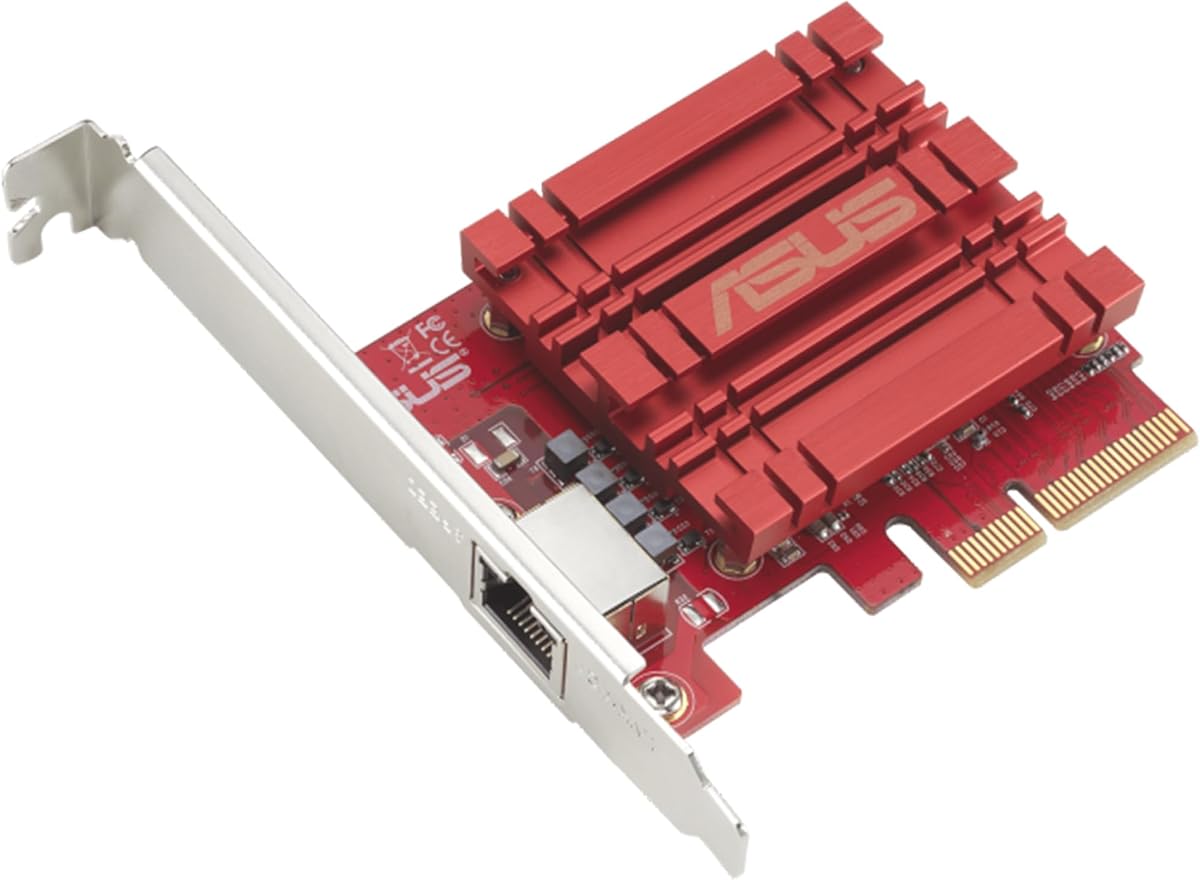
The Asus NADACA0140 is a conventional single-port RJ45 adapter intended to bring 10Gbps networking to a compatible desktop. It supports 10, 5, 2.5, 1 Gbps, and 100 Mbps and carries a 4.1 rating. The straightforward design makes it a practical option for users who want a familiar copper connection without needing specialized modules or a multi-port layout.
We may earn a commission when you buy through this link, at no additional cost to you.
Backward compatibility is one of its most useful attributes. A five-speed card can communicate with older 1Gbps or 100 Mbps hardware, while also supporting faster multi-gig switches. Quality of Service allows selected data packets and bandwidth to be prioritized, helping maintain a smoother experience when the network becomes busy. Windows and Linux support gives it broader relevance than a platform-specific adapter.
The product information does not mention a bundled Ethernet cable or confirm inclusion of every bracket style, so buyers may need to check the computer case and obtain accessories separately. Its 4.1 rating is solid but lower than several alternatives, which may suggest less consistency in user experience. It also offers only one port and no dedicated SFP+ path.
The NADACA0140 is best for a desktop owner who needs a simple 10GbE upgrade over copper and values multi-speed compatibility. Ensure the host has a free compatible PCIe slot, adequate driver support, and a switch and cable capable of the intended link rate. For Synology-specific systems or environments needing two ports, a more specialized card may be a better fit.
Supporting 10 through 100 Mbps allows one adapter to work with current and older network devices. Automatic adaptation makes incremental upgrades less disruptive.
Built-in Quality of Service can give selected traffic priority during congestion. It is a useful complement to a fast link for interactive applications and gaming.
We may earn a commission when you buy through this link, at no additional cost to you.
The Synology E10G30-T1 is a single-port 10GbE adapter for Synology systems that need validated compatibility and flexible copper-network speeds. It has a 5.0 rating, the highest among the products listed, and supports automatic negotiation at 10, 5, 2.5, 1 Gbps, and 100 Mbps. A five-year limited warranty reinforces its specialized positioning.
We may earn a commission when you buy through this link, at no additional cost to you.
Synology validation is more valuable than a generic rating when the card will live inside a NAS. A compatible system and validated adapter reduce uncertainty around firmware, driver, and support expectations. The single RJ45 port also avoids the need for an optical module, making the card accessible for standard Ethernet networks.
The trade-off is narrow applicability. Unlike universal PCIe adapters, this card is designed around Synology systems rather than arbitrary desktops or servers. It also offers only one active network port, so buyers needing redundant links or two independent 10GbE connections should examine the dual-port E10G30-T2 instead.
This is the most compelling option for a compatible Synology owner who values platform validation and warranty coverage over universal flexibility. Before buying, check the official hardware compatibility information and confirm that the existing switch and cabling support the intended rate. For a generic PC, a broader multi-platform adapter will usually be more appropriate.
The 5.0 rating reflects exceptionally positive listed feedback. While ratings alone cannot guarantee fit, it gives compatible Synology buyers an additional signal when comparing specialized alternatives.
Combining one high-speed RJ45 port with broad negotiation makes this adapter convenient for standard copper networks. Synology validation and a five-year warranty add confidence for compatible installations.
We may earn a commission when you buy through this link, at no additional cost to you.
The 10Gtek Intel 82599EN SFP+ card is a four-lane adapter for systems that need flexible 10GbE media. It carries a 4.5 rating and uses the Intel 82599EN controller. Unlike an adapter tied to a narrower set of recognized optics, its SFP+ cage supports compatible third-party DAC cables, AOCs, 10GBASE-SR multimode optics, and 10GBASE-LR single-mode optics.
We may earn a commission when you buy through this link, at no additional cost to you.
The card is presented as suitable for a wide range of infrastructure software, including Proxmox, TrueNAS, Unraid, ESXi, QNAP, Synology, Ubuntu, Debian, and CentOS. It can also step down to 2.5 Gbps, 1 Gbps, and 100 Mbps, although its principal design target is 10 Gbps. Windows users are instructed to install the Intel Ethernet Adapter Complete Driver Pack.
The passive heatsink is described as running warm by design, so adequate case airflow is important. In a silent or tightly packed build, a small fan may be needed. SFP+ hardware is also not included, adding both cost and setup complexity for someone who wants only a simple copper connection. Software detection claims should be treated as general guidance rather than a guarantee for every hardware combination.
This is a strong choice for a homelab, NAS, or virtualization host that already uses SFP+ infrastructure and values broad optics compatibility. Its x4 design fits x4, x8, or x16 slots while leaving the rest of the board free. Verify the exact NAS or hypervisor, operating-system version, and planned optical or direct-attach hardware before ordering.
Supporting compatible DAC, AOC, SR, and LR options lets administrators select cabling based on distance and topology. This flexibility is particularly useful in mixed data-center or homelab environments.
A four-lane interface can fit x4, x8, or x16 slots without occupying the full physical width of the card. Both full-height and low-profile brackets support a wider range of towers and rack systems.
We may earn a commission when you buy through this link, at no additional cost to you.
The TRENDnet TEG-10GECTX is a single-port RJ45 adapter with support for 10, 5, 2.5, 1 Gbps, and 100 Mbps. Its 4.1 rating and PCIe 3.0 x4 interface make it a practical option for many desktops and servers that need a straightforward copper-based 10GbE connection. Standard and low-profile brackets are included for a broader range of installations.
We may earn a commission when you buy through this link, at no additional cost to you.
A distinguishing feature is its stated compliance with NDAA and TAA requirements in the United States and Canada. That matters for government buyers and contractors who need to demonstrate supply-chain compliance. The card also supports relevant IEEE standards, including 10GBASE-T, 2.5GBASE-T, 802.1Q, and 802.3ad, and offers 2.5 and 5 Gbps over Cat5e cabling at distances up to 100 meters.
The product information lists broad Windows and Windows Server compatibility, including several recent and legacy Windows releases. Nevertheless, buyers should verify their precise edition and driver requirements. As with other passive 10GbE cards, airflow is important because sustained high-rate operation can generate meaningful heat. Only one port is provided, and the PCIe 3.0 interface is older than the newest options in the guide.
The TEG-10GECTX is especially attractive for government-related deployments and institutions that value documented compliance. It also works for ordinary users who want multi-speed copper networking and included brackets. If fiber, dual ports, or a newer PCIe generation is a priority, consider one of the SFP+ or PCIe 4.0 alternatives instead.
Stated NDAA and TAA compliance can help organizations that source networking hardware under government contracting rules. Buyers should still review procurement requirements and documentation for their specific project.
Supporting 2.5 and 5 Gbps over Cat5e extends usefulness where newer cable is unavailable. The full range from 100 Mbps to 10 Gbps allows the adapter to operate across changing infrastructure.
We may earn a commission when you buy through this link, at no additional cost to you.
The 10Gtek Intel X550-T1 is a single-port RJ45 adapter built around the original Intel X550-AT2 controller. It supports 100 Mbps, 1 Gbps, 2.5 Gbps, 5 Gbps, and 10 Gbps and carries a 4.1 rating. Its PCIe 3.0 x4 interface fits compatible x4, x8, or x16 slots, making it a candidate for servers, workstations, and virtualization hosts.
We may earn a commission when you buy through this link, at no additional cost to you.
The broad operating-system list includes Windows Server, Linux, several FreeBSD versions, UEFI, and VMware ESXi releases. A low-profile bracket supports smaller systems. The card's one-port design keeps physical demands modest while still providing a high-speed copper path for NAS storage, virtualization, and workstation access.
Two limitations deserve attention. The product does not support firmware updates, which may matter in managed fleets where adapter firmware maintenance is important. The supplied guidance also says that 2.5 and 5 Gbps may need manual configuration if automatic negotiation fails. Hot swapping is not supported.
This card is a reasonable option for a compatible server or workstation that specifically needs the Intel X550 platform and a single RJ45 connection. It is less attractive for buyers who need in-system firmware management or guaranteed multi-speed auto-negotiation. Confirm hardware compatibility, driver support, operating-system version, and cabling before purchasing.
The original Intel X550-AT2 controller provides a recognizable platform for systems already standardized around that family. Its multi-speed support accommodates both modern 10GbE and older copper links.
Support for Windows Server, Linux, FreeBSD, UEFI, and VMware ESXi gives the card broad relevance. Exact version and limited-functionality caveats should still be reviewed for ESXi environments.
We may earn a commission when you buy through this link, at no additional cost to you.
Choosing a 10GbE network card involves matching connector type, PCIe fit, platform support, thermal design, and workload requirements. The fastest advertised link is useful only when the host, switch, cabling, drivers, and applications can all sustain it.
RJ45 cards use the familiar copper Ethernet ecosystem and are usually the easiest choice for homes, offices, and standard network closets. They connect to ordinary compatible switches, although Cat6A is advisable for reliable 10Gbps runs and cable quality becomes increasingly important at that rate. SFP+ cards instead accept compatible direct-attach copper, active optical, or optical transceiver modules. That makes them more appropriate for servers, data centers, longer fiber links, and administrators who want to change physical media independently of the adapter.
In short, select RJ45 for straightforward copper networking and SFP+ when fiber, module choice, or server cabling flexibility is important.
A 10GbE card must physically fit the available slot and electrically satisfy its lane and power requirements. The guide includes PCIe x1, x4, and x8 designs, and many cards can operate in wider slots than their primary interface requires. Check both the physical length of the card and the slot's mechanical position. A card can be electrically compatible with x16 but physically interfere with other components if it is too long. Also verify whether the system needs a low-profile bracket, particularly in mini-ITX cases, 1U servers, and other compact systems.
Match the card's interface to a free slot and confirm physical clearance, bracket style, and lane requirements before ordering.
A 10GbE adapter cannot exceed the slowest relevant part of the connection. The host must support the card, the switch or router must offer a suitable port, and the cable must preserve the intended link rate. Many RJ45 cards can negotiate at lower rates, which makes staged upgrades possible, while some SFP+ cards in this guide are designed specifically for 10G operation. For a new installation, budget for a capable switch and appropriate Cat6A or better copper cabling rather than treating the adapter as the only required upgrade.
Verify that the host, switch, cabling, and adapter all support the intended speed to avoid paying for a connection that cannot reach it.
Single-port cards are economical and compact, making them suitable for a desktop that needs one fast uplink or a server with one high-speed storage network. Dual-port cards can provide more flexible topologies, support multiple virtual networks, or offer a path toward redundancy. Two ports do not automatically create a fault-tolerant link; switch configuration, bonding, failover, and application support also matter. Likewise, a second port can be valuable for management separation or storage migration, but it may not be needed by a user with a straightforward one-switch network.
Choose one port for simplicity and choose two when parallel links, isolation, failover, or multi-service networking justify the added complexity.
Intel 82599EN and Intel X550-based products appear repeatedly in this guide because they target server, storage, and virtualization requirements with features such as I/O virtualization, Quality of Service, traffic management, checksum offloading, jumbo frames, SR-IOV, and support for iSCSI, FCoE, and NFS. The Realtek RTL8127 option is a compact, lower-power, multi-gig choice for more general system expansion. The right controller depends on operating-system maturity, hypervisor requirements, thermal limits, and the management features actually needed.
Use server-oriented controllers for virtualization and storage workloads, and favor a compact multi-gig controller for straightforward desktop expansion.
Operating-system labels require careful interpretation. Windows versions may need an Intel driver pack, while Linux, NAS platforms, and hypervisors can depend on kernel versions, bundled drivers, and product-specific compatibility lists. The two Synology cards are purpose-built and validated for Synology systems, which can simplify setup but makes them unsuitable as universal upgrades. Other cards list broad support but explicitly note exceptions. Check the manufacturer's current support information, especially for Windows 11, recent Linux distributions, QNAP, Synology, TrueNAS, Proxmox, and VMware ESXi.
Verify the exact operating system, kernel, NAS platform, or hypervisor against current documentation rather than relying on a generic compatibility claim.
Ten-gigabit controllers can consume more power and produce more heat than typical gigabit adapters, although newer chipsets can be more efficient. Full-height and low-profile brackets do not solve every thermal concern, and a card in a tightly packed case may need additional airflow. The passive heatsink on the SFP+ adapter is specifically described as warm by design. Consider the position of the card relative to intake fans, GPU coolers, and storage drives. Good airflow helps sustain stable performance and makes a high-speed card more suitable for an always-on server or workstation.
Check airflow and physical clearance, not just connector compatibility, because sustained 10GbE operation can increase card temperature.
Support terms range from three-year coverage on several general-purpose cards to five-year warranties on the specialized Synology adapters, while the TP-Link TX401 includes a two-year warranty and round-the-clock technical support. Long warranty coverage is useful, but it should be balanced against driver availability, firmware policies, and operating-system validation. For example, an adapter that lacks firmware-update support may be less attractive in a fleet even if its headline performance is strong. Look for accessible documentation, compatible drivers, and a clear return policy.
Compare warranty length together with driver, firmware, and platform support because coverage alone does not guarantee long-term manageability.
Before installation, power the computer down completely, disconnect the power cable, and open the case according to its manufacturer's instructions. Identify a compatible PCIe slot, check physical clearance, and install the appropriate full-height or low-profile bracket. For an RJ45 card, use a high-quality Cat6A cable for a 10Gbps copper link; for an SFP+ card, install a compatible DAC, AOC, or optical module that is supported by both the adapter and the connected equipment.
After installing the hardware, boot the system and install the manufacturer's recommended drivers. The operating system should normally detect the card, but Windows systems using an Intel controller may require the Intel Ethernet Adapter Complete Driver Pack. Linux, NAS, and hypervisor users may need kernel modules or platform-specific configuration. Open the network control panel, confirm that the new interface appears, and connect it to the intended switch port or storage network.
For long-term care, keep the card and its heatsink clear of dust and ensure the surrounding case receives adequate airflow. Monitor negotiated link speed rather than assuming the maximum rate is active. If a multi-gig connection consistently negotiates incorrectly, check the switch configuration, cabling, driver version, and advanced adapter settings. Keep firmware and drivers aligned with the manufacturer's guidance, and consult the compatibility list before changing hardware or operating-system versions.
It can be useful during a gradual upgrade because many RJ45 cards negotiate at lower supported speeds. A card and 1Gbps switch will normally operate at 1Gbps rather than 10Gbps, allowing the adapter to remain in service while network infrastructure is upgraded. The final speed still depends on the slowest device, cable, and network setting involved.
Cat6A is a safe and widely recommended choice for new 10GbE copper installations. It provides more margin than lower-rated cable and is appropriate for typical office and home runs. Some multi-gig standards allow 2.5 or 5 Gbps over Cat5e, but reliable 10Gbps performance depends on installation quality, cable length, interference, and every component in the link.
Choose RJ45 when you want the simplest setup using standard Ethernet switches and copper cables. Choose SFP+ when you need fiber optics, direct-attach cables, greater physical-media flexibility, or an established server cabling ecosystem. SFP+ cards generally require separate compatible modules or cables, so the total hardware requirements are more involved.
Only if the internet service itself provides more than the current connection can deliver. A 10GbE adapter can improve transfers between computers, NAS devices, servers, and storage systems, but it cannot increase the bandwidth supplied by an internet provider. It is most useful for local file transfers, virtualization, media workflows, backups, and access to high-speed storage.
The Synology E10G30-T1 and E10G30-T2 are purpose-built for compatible Synology systems, so they should not be treated as universal desktop cards. A general-purpose PCIe adapter may be more appropriate for a PC or server outside the Synology ecosystem. Always check the manufacturer’s current hardware compatibility list before ordering.
They can generate more heat than basic gigabit adapters, especially older or power-hungry server controllers. Some newer chipsets are designed for lower power and heat, but every installation still needs reasonable airflow around the card and heatsink. A tightly packed or fanless case deserves particular attention before installing a high-bandwidth adapter.
First check the negotiated link rate in the operating system's adapter settings, then inspect the switch port and connected device. Replace or test the Ethernet cable, update the driver, and confirm that the system is not limited by storage, virtual networking, or another software bottleneck. For cards with multiple speeds, try manually configuring 2.5 or 5 Gbps if automatic negotiation fails.
No. The cards in this guide use several PCIe interfaces, including x1, x4, and x8 designs. A card may operate in a wider physical slot, such as x16, while using fewer lanes, provided the slot, card, and platform satisfy the relevant requirements. Always verify both electrical lane support and physical clearance.
The TP-Link TX401 is the strongest all-around recommendation because it combines a conventional RJ45 interface, broad multi-speed support, an included CAT6A cable, and brackets for both standard and compact cases. The VunLink RTL8127AT stands out as a budget-friendly, space-conscious option, while the Synology E10G30-T2 is the premium choice for validated Synology storage systems.
The right decision begins with the network rather than the headline rating. Match the connector to your cabling, confirm the PCIe slot and bracket fit, and verify that the host operating system, switch, and drivers support the card. Server and virtualization users should give greater weight to controller features and platform support, while desktop buyers may prioritize simplicity, multi-speed negotiation, and low power use.
Finally, remember that hardware listings and prices change over time. Confirm current specifications, compatibility, included accessories, warranty terms, and the latest price directly on the product listing before purchasing. The right 10GbE network card is not merely the fastest one available, but the one that integrates cleanly with the systems and workloads you already use.