
Xiaomi TV Box S 3rd Gen
4.4Editor score
4K at 60FPS
Dolby Vision and HDR10+
Wi-Fi 6 connectivity
HDMI 2.1 support
This 4K Android Box guide compares ten Google TV and Android TV streamers on 4K output, HDR, audio, performance, connectivity, and ease of use for every home.
A 4K Android Box can transform an ordinary television into a smart entertainment center, but the strongest choices depend on more than resolution alone. Google TV, Android TV, HDR support, voice control, app selection, wireless performance, and everyday responsiveness all shape whether a streaming device feels worthwhile over time.
This guide compares ten 4K Android Box options using their published specifications, platform features, connectivity, storage, memory, audio capabilities, and customer ratings. The list covers certified Google TV devices, Android TV models, and more flexible boxes designed to add modern apps and playback features to a non-smart television.
Each review explains the product's strongest benefits, limitations, and likely audience. The top selections highlight the most compelling combinations of usability, performance, and features, while the comparison table makes the major differences easier to scan. Availability and prices can change, so confirm the current listing before buying.
4.4Editor score
4.4Editor score
4.2Editor score
The table below compares all ten models across their core platform, output, performance, storage, connectivity, and extra features. It is designed to make it easier to identify the right balance for a mainstream television, a premium home theater, or a flexible Android setup.


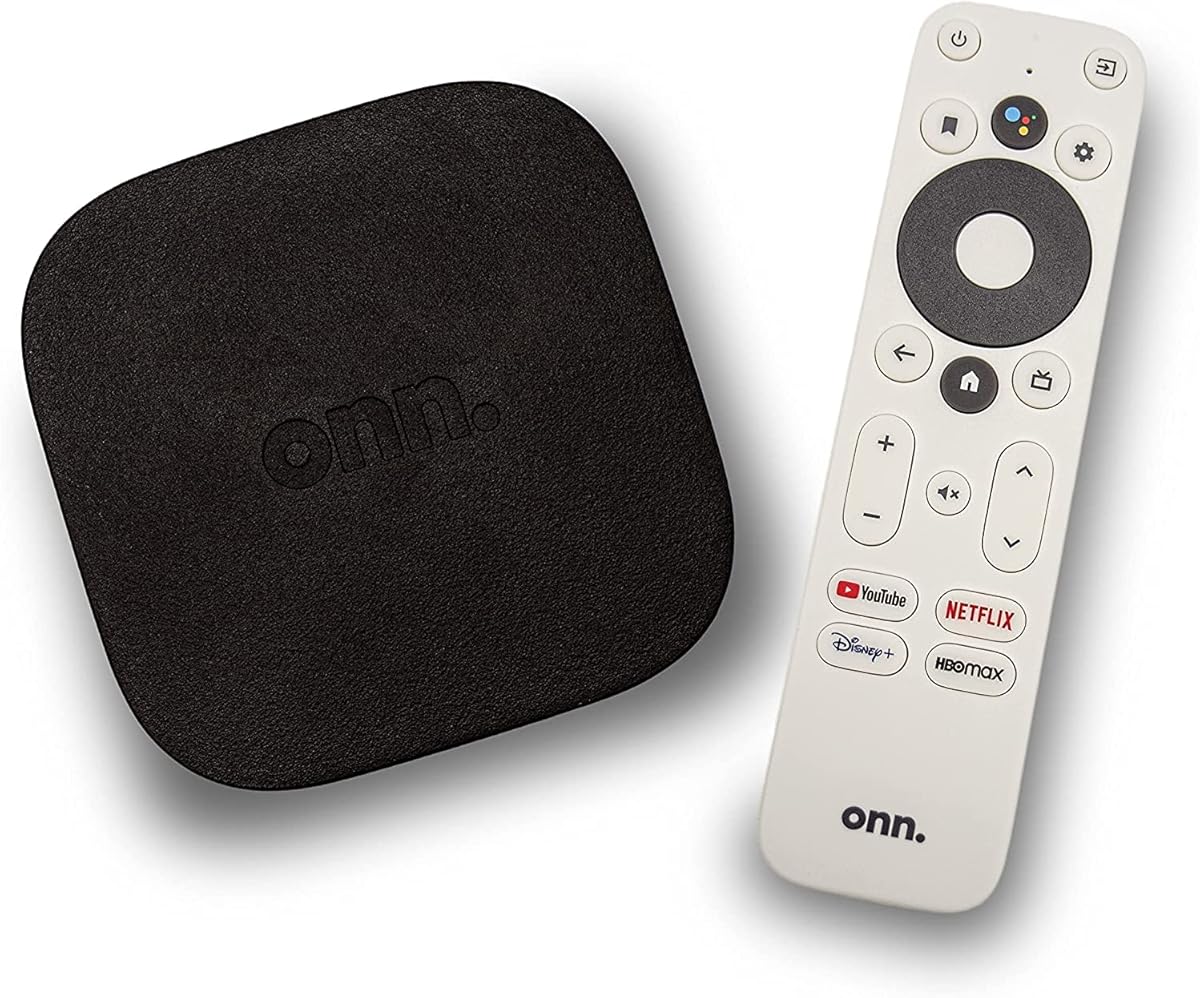
The ONN Android TV 4K UHD Streaming Device is an approachable, well-rounded choice for anyone who wants a dedicated 4K streamer without a complicated setup. Its 4.4 rating reflects a generally favorable customer response, while its core appeal comes from familiar Android TV navigation, a Google Assistant remote, and straightforward access to streaming applications.
We may earn a commission when you buy through this link, at no additional cost to you.
Its standout features are practical rather than extravagant. The device supports 4K Ultra HD output, includes a voice remote, supports Chromecast, and comes with an HDMI cable for direct connection to a television. Setup involves adding a Google account and configuring the preferred language and Wi-Fi network, making the device approachable for new streaming-box owners as well as those moving from another platform.
The principal limitation is that its listing provides fewer details about processor performance, RAM, and storage than several competing products. That makes it harder to judge the device under demanding app loads compared with models that publish a quad-core processor, memory capacity, and modern connectivity specifications. Its Android TV platform may also feel less visually integrated than newer Google TV interfaces.
This is a strong recommendation for a primary television, a second room, or anyone seeking a straightforward Android TV device with voice control and casting. Buyers wanting a newer interface, higher published memory specification, or explicit Dolby Vision support should compare the alternatives, but the ONN remains one of the most approachable choices in the group.
The guided Google account and network setup keeps installation focused. Once connected, the Android TV interface provides a familiar home screen for launching applications, casting content, and using voice commands from the included remote.
The listed compatibility includes ONN, Samsung, Sony, RCA, Vizio, Hisense, TCL, Philips, and Magnavox televisions. Buyers should still verify the television's HDMI availability and current input arrangement before installation.
We may earn a commission when you buy through this link, at no additional cost to you.
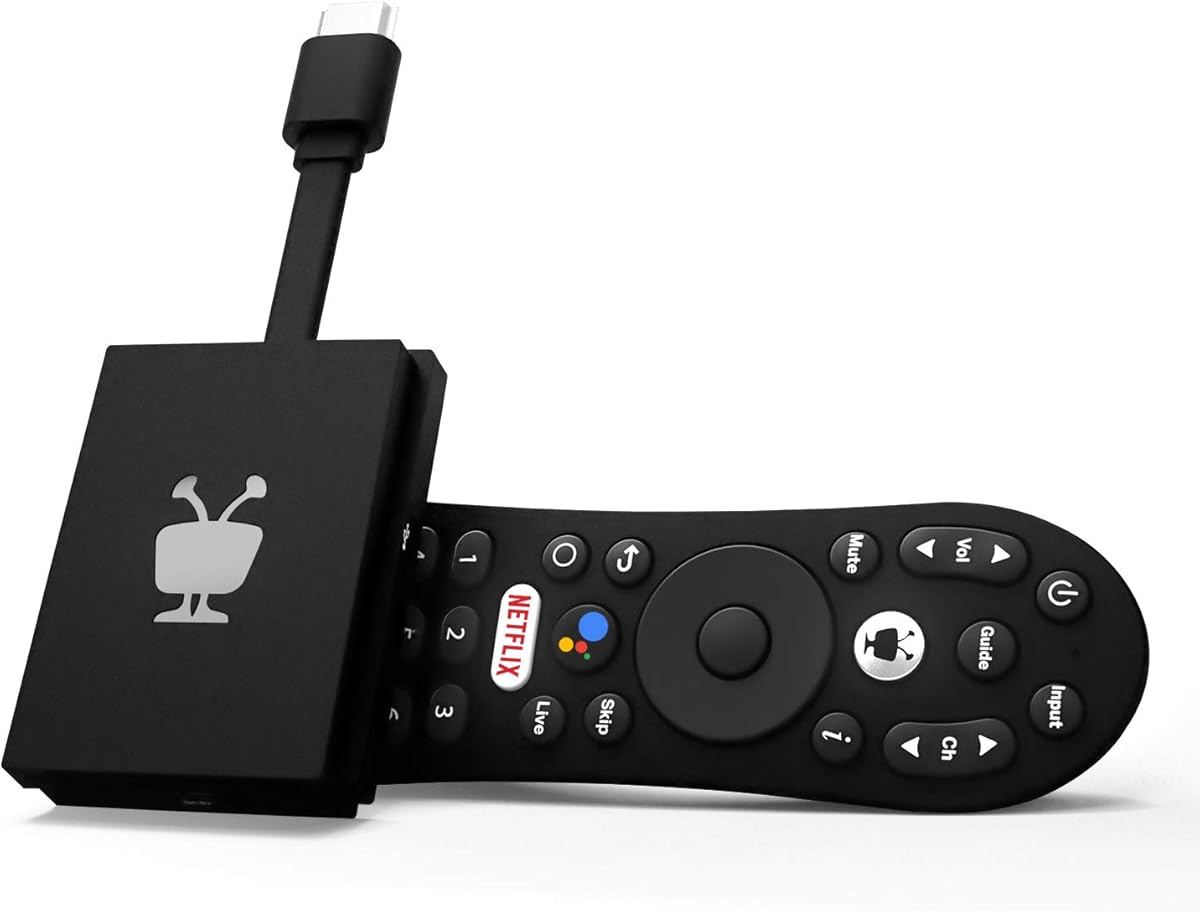
The TiVo Stream 4K stands apart with a single, centralized interface for searching, browsing, and organizing content from different streaming services. It carries a 4.2 rating and brings useful premium media features, including 4K UHD, Dolby Vision HDR, and Dolby Atmos, to a comparatively accessible streaming device.
We may earn a commission when you buy through this link, at no additional cost to you.
Its defining strength is the reduction of app switching. TiVo can recommend programs based on what a viewer likes rather than limiting discovery to one platform, while unified watch lists provide a more coherent way to manage viewing intentions. Netflix, Prime Video, Disney+, and Peacock are included, and the integrated Google Assistant can launch applications, find content, and control compatible functions.
Although the device is powered by Android TV, the TiVo experience is the main attraction. Some users who prefer the raw Android TV launcher may find the curated approach restrictive. The published specification is also less detailed than that of several newer models, particularly around memory, storage, and wireless generation.
The TiVo Stream 4K is especially attractive to viewers who dislike searching through separate service interfaces. It is a good choice for a primary living-room television and offers a refined alternative to a generic Android box, provided the user values unified recommendations and media features over extensive customization.
Cross-app recommendations, search, and watch lists reduce the need to jump between different streaming apps. This makes the device especially approachable for households that subscribe to several services but do not want to manage each one separately.
Dolby Vision HDR and Dolby Atmos support bring stronger picture and sound capabilities to the platform. Actual output depends on the television, source content, selected application, and the audio equipment connected to the setup.
We may earn a commission when you buy through this link, at no additional cost to you.
The Xiaomi Android Google TV Box S 3rd Gen listing combines a modern Google TV experience with high-end display features, Wi-Fi 6, HDMI 2.1, and a Bluetooth remote. Its 4.1 rating is solid, and the specification sheet gives buyers a clearer view of the hardware than many competing listings.
We may earn a commission when you buy through this link, at no additional cost to you.
Picture and sound support is the main attraction. The device supports 4K UHD, HDR10+, Dolby Vision, Dolby Atmos, and DTS:X. Its 64-bit 6nm platform uses a quad-core A55 processor reaching up to 2.5GHz, while 2GB of memory and 32GB of storage provide a practical foundation for streaming applications.
Wi-Fi 6 can improve throughput and reduce congestion on compatible networks, but the listing specifically notes that it requires a Wi-Fi 6-enabled router. The 2GB memory configuration is not generous compared with boxes offering 3GB or 4GB, so buyers should not expect the same headroom for heavy multitasking. The included 360-degree Bluetooth remote also needs regular charging.
This model is best for a modern television, a fast home network, and viewers who prioritize modern streaming software and media standards. It earns a premium recommendation for its balanced feature set, although the ONN 4K Pro offers more memory and an Ethernet connection for buyers who prioritize network flexibility.
Google TV provides personalized recommendations, cross-app search, and a current home interface. These features make it easier to find content across different services without relying entirely on separate app discovery screens.
Wi-Fi 6, HDMI 2.1, and Bluetooth control create a modern connection package. For the fastest and most consistent result, pair the device with a compatible router and a television that supports the desired picture format.
We may earn a commission when you buy through this link, at no additional cost to you.
This Xiaomi TV Box S 3rd Gen listing earns a 4.4 rating and emphasizes a compact, capable package with 4K output at 60FPS, Dolby Vision, HDR10+, Dolby Audio, and DTS:X. It is a particularly detailed specification sheet for a compact streaming device.
We may earn a commission when you buy through this link, at no additional cost to you.
The quad-core CPU can operate at up to 2.5GHz and works with an ARM G310 V2 GPU, 2GB of RAM, and 32GB of internal storage. Dual-band Wi-Fi, Bluetooth 5.2, HDMI 2.1, and USB 2.0 cover the core connection needs, while Google Cast allows compatible phones and tablets to send content to the television.
Its main limitation is the 2GB memory allocation, which is modest next to the onn 4K Pro's 3GB and the Android TV Box's 4GB. The compact housing measures 95.25 by 95.25 by 16.7 millimeters, which is attractive beside a television, but storage is fixed rather than expandable.
The box is well suited to users who want current Google TV features and strong output specifications in a small package. It also includes the box, voice remote, power adapter, HDMI cable, and manual, making it a convenient one-box setup for a new television or secondary room.
The small enclosure does not mean a limited feature set. It still provides modern video standards, dual-band wireless connectivity, Bluetooth support, and a voice-controlled Google TV interface.
The included remote, power adapter, HDMI cable, and manual cover the essential installation needs. Buyers can connect the box to a television and begin the guided Google TV setup without separately sourcing basic accessories.
We may earn a commission when you buy through this link, at no additional cost to you.
The Android TV Box with 4GB RAM and 32GB ROM is a practical upgrade for an older, non-smart television. It carries a 4.4 rating and distinguishes itself through memory capacity, a quad-core processor, dual-band Wi-Fi, Bluetooth 5.0, and support for 4K Ultra HD with HDR.
We may earn a commission when you buy through this link, at no additional cost to you.
Its generous 4GB of RAM should provide comfortable room for ordinary streaming and light multitasking compared with many 2GB devices. The listing also promises H.265 decoding for compressed high-definition and 4K files, while 2.4GHz and 5GHz Wi-Fi options give users more control over network conditions.
The software experience is less clearly documented than that of the Google TV-certified models in this roundup. Buyers should check the current interface, included applications, update policy, and compatibility with their preferred streaming services before purchase. It is also important not to assume that all advertised applications or features behave exactly as they do on a certified Google TV platform.
This box makes the most sense for a household seeking a straightforward way to add apps and modern playback to an older television, especially when memory capacity matters. It is also relevant to users who want standard HDMI and USB connections for peripherals or expanded storage.
The 4GB memory configuration provides additional headroom over common 2GB streaming boxes. That can help when several lightweight apps remain open or when navigating a larger interface alongside video playback.
The plug-and-play format, HDMI connection, and USB ports make the device approachable for a first-time setup. Confirm that the older television has a free HDMI input and that the box's supported streaming applications meet your needs.
We may earn a commission when you buy through this link, at no additional cost to you.
The onn 4K Pro Streaming Device combines Google TV with Gemini, 4K UHD, Dolby Vision, Dolby Atmos, 3GB of RAM, and 32GB of storage. Its 4.3 rating and expanded specification set make it a strong contender for viewers who want more memory and flexible wired connectivity.
We may earn a commission when you buy through this link, at no additional cost to you.
The 3GB memory allocation is 50 percent higher than the 4K Plus model according to the listing, creating more room for app navigation and multitasking. Wi-Fi 6 supports fast wireless streaming, while an optional Ethernet port gives users a dependable alternative when a wired connection is available or wireless congestion is a concern.
Its remote includes a finder function and backlight, addressing two common streaming-box frustrations. The listing does not identify the processor, so it is harder to compare raw performance with boxes that publish CPU details. Wi-Fi 6 also provides the greatest benefit when used with a compatible router and network.
The onn 4K Pro is a good fit for a modern living room with a high-speed connection and a television capable of taking advantage of 4K HDR. It may be especially attractive to buyers who value Google TV, generous storage, a well-equipped remote, and the option to use Ethernet without giving up wireless flexibility.
The Ethernet port is useful for stable high-bandwidth streaming, while Wi-Fi 6 keeps the device flexible when a cable run is inconvenient. Depending on the home network, either connection style can serve as the primary method.
The backlight helps locate the remote in a dim room, and the find-my-remote function can help when it is misplaced. These small conveniences can make everyday interaction noticeably less frustrating.
We may earn a commission when you buy through this link, at no additional cost to you.
This Xiaomi Android Google TV Box S 3rd Gen listing offers a 4K UHD Google TV platform, Dolby Atmos and DTS:X support, Wi-Fi 6, and a Bluetooth voice remote. Its 4.4 rating is among the stronger results in the group, indicating generally favorable owner feedback.
We may earn a commission when you buy through this link, at no additional cost to you.
The device is positioned as a balanced home streaming option. Google TV centralizes recommendations and search, while the 2GB RAM and 32GB storage configuration provides adequate room for standard streaming applications. Bluetooth remote control removes the need to point directly at the box for common commands, and the remote's voice button supports Google Assistant functions.
The supplied information is less detailed than the product data published for the similar Xiaomi listing at rank three, and it does not explain the processor or physical ports in this entry. The 2GB memory figure is also modest relative to newer alternatives that provide 3GB or 4GB. Prospective buyers should compare the live listing for current package details and compatibility.
This model is well suited to users who want 4K, modern Google TV discovery, and upgraded wireless connectivity without moving beyond a conventional compact box. It is a particularly reasonable choice for a 4K television in a room with a Wi-Fi 6 network and a preference for a Bluetooth remote.
The Bluetooth remote supports Google Assistant for content searches, playback control, and compatible smart-home tasks. Its wireless design also makes operation easier when the box is placed away from the television.
Dolby Atmos and DTS:X support provide broader audio options for compatible services and source material. The final experience still depends on the television, soundbar, receiver, and content available through each application.
We may earn a commission when you buy through this link, at no additional cost to you.
The KP1 is a Google Certified streaming device built around Android TV 14, 4K HDR output, and a straightforward 2GB RAM and 16GB storage configuration. Its 4.1 rating reflects a positive but less exceptional customer history than several competitors.
We may earn a commission when you buy through this link, at no additional cost to you.
Google certification is a meaningful advantage for a compact box because it signals access to a large catalog of applications, including Netflix, Prime Video, Disney+, Apple TV+, YouTube, Hulu, and Google Play. The included voice remote supports Google Assistant, and built-in Chromecast makes it easy to send compatible content from a phone, tablet, or laptop to the television.
Its 16GB of internal storage is the most obvious constraint. Users can expand storage through USB, but the base amount may fill quickly with demanding applications, cached content, and updates. It also uses Wi-Fi 5 rather than the Wi-Fi 6 found in several newer competitors, although that can still be sufficient on a stable dual-band home network.
The KP1 is a sensible option for a bedroom, guest room, or secondary television where certified Google TV access matters more than peak networking performance. The white enclosure also gives it a distinctive appearance, while Android TV 14 provides a current foundation for application compatibility and updates.
Google certification is particularly useful for buyers who want dependable access to mainstream streaming catalogs. The listing identifies a broad selection of major applications, reducing uncertainty about compatibility.
Built-in Chromecast and Google Assistant voice search cover two common viewing needs: sending personal content to the television and finding programs without typing. Together, they improve both discovery and everyday control.
We may earn a commission when you buy through this link, at no additional cost to you.
The Xiaomi TV Box S 3rd Gen listing in this position has the highest customer rating in the group at 4.5. It combines 4K Ultra HD, HDR, built-in Chromecast, Google Assistant, 32GB of storage, and an Android TV 8.1 platform in a well-known compact streaming-device format.
We may earn a commission when you buy through this link, at no additional cost to you.
Its appeal centers on familiar Google TV behavior and broad content access. The listing references more than 3,000 channels and applications, including Netflix, YouTube, and VUDU, while the quad-core CPU and 3+2-core GPU are intended to provide stable rendering and a responsive media experience. The built-in voice controls can find content and handle common Google Assistant tasks.
The principal concern is platform age. Android TV 8.1 predates the current Android TV 14 environment used by the KP1, and it does not include the newer Gemini-oriented interface shown by the onn 4K Pro. Buyers should consider app compatibility and future update expectations, especially if they prefer a newly released platform with current Google TV features.
This model is attractive for buyers who value Xiaomi's established streaming hardware, 4K output, casting, and storage in a compact enclosure. It may suit users whose priority is reliable media access over the newest interface, while those seeking the most current Google TV experience should examine the newer alternatives.
Google TV provides a structured home screen and access to mainstream streaming services. Voice search and built-in Chromecast make it convenient to locate programs or move personal content from another device.
The small footprint is useful beside a television, and 32GB provides a reasonable amount of application and cache space. The older operating system is the main consideration when comparing the device with recent Google TV hardware.
We may earn a commission when you buy through this link, at no additional cost to you.
The LEFFOT M2 Plus is the most flexible Android 14 box in the roundup, offering 4GB RAM, 32GB storage, a broad port selection, screen mirroring, and both wireless and wired networking. Its 3.4 rating is the lowest here, so buyers should weigh its extensive feature set against less consistent customer feedback.
We may earn a commission when you buy through this link, at no additional cost to you.
Media specifications include 4K at 60FPS, 8K decoding at 23FPS, H.265 and H.264 support, and HDR10. A Rockchip RK3528 quad-core processor with a Mali-450 GPU handles the platform, while 4GB of RAM gives it more working memory than most certified Google TV boxes. Wi-Fi 6 and 100M LAN expand the available network choices.
Its ports include HDMI, USB, AV, and LAN, while Bluetooth 5.4 supports accessories such as speakers, headphones, and game controllers. DLNA, Airplay, and Wi-Fi Display provide multiple screen-mirroring methods, and the included wireless keyboard and mouse can support light office tasks. However, the product is not identified as Google TV certified, and its rating suggests that app support, software polish, or reliability may be less consistent than on leading Google TV devices.
The LEFFOT M2 Plus is most useful for buyers who want a flexible Android device for local media, casual gaming, communication, light productivity, and a non-smart television. It is less suitable for users who place a high priority on the latest official streaming interface and broad certified-app compatibility.
HDMI, USB, AV, and Ethernet provide an unusually broad set of connections for a streaming box. This makes the device adaptable to external storage, wired networking, legacy audio-video arrangements, and various peripherals.
The included wireless keyboard and mouse, screen-mirroring tools, and support for Bluetooth accessories extend the box beyond a dedicated television streamer. These features are useful for casual browsing, communication, local media, and light office tasks.
We may earn a commission when you buy through this link, at no additional cost to you.
The right 4K Android Box depends on your television, network, applications, and tolerance for a traditional Android interface. Review platform certification, hardware specifications, media formats, and connectivity before choosing a model.
Google TV offers a current, app-focused home screen with personalized recommendations, unified search, voice navigation, and strong integration with major streaming services. Android TV can provide a broader, more traditional launcher for users who prefer direct access to applications, additional customization, or local media tools. A certified Google TV device is generally the safer choice for a household centered on streaming, while a flexible Android box may suit users who want additional peripheral and screen-mirroring functions.
Choose Google TV for polished discovery, certified application access, and a simple living-room experience. Consider a conventional Android interface when customization, ports, local playback, or productivity functions matter more than the latest certified storefront.
A 4K-capable box can output a 3840-by-2160 image, but the television, streaming service, internet connection, and source file must also support that resolution. HDR10 is widely supported across the group, while Dolby Vision provides a more advanced high-dynamic-range option. Some models specify 4K at 60FPS, which is beneficial for motion and certain gaming or sports content, although many streaming services deliver 4K at lower frame rates.
Prioritize 4K60 and Dolby Vision when your television and content support them. For ordinary streaming, reliable streaming, and basic 4K are more important than maximizing specifications that a particular service rarely uses.
A quad-core processor is common in the category and should provide adequate performance for standard streaming. RAM helps when several apps and background processes are active, while internal storage determines how many applications, updates, and cached files can be kept on the device. Models range from 2GB to 4GB of memory and from 16GB to 32GB of storage, creating meaningful differences in navigation and future flexibility.
For the best balance, target at least 2GB of RAM and 32GB of storage. Choose 3GB or 4GB for heavier multitasking, additional apps, or a device expected to remain in use for an extended period.
Fast wireless connectivity matters for high-bitrate 4K streams, especially when several household devices share the network. Wi-Fi 6 can improve throughput and efficiency, but it requires a compatible router and may not produce a visible benefit on every network. Ethernet remains the most direct option for stable streaming in a fixed installation. One model in this roundup combines Wi-Fi 6 with an Ethernet port, offering useful flexibility.
Use Ethernet when the device will remain beside a television and maximum consistency matters. Use Wi-Fi 6 when placement flexibility is more important, and ensure the router is reasonably close and on a clean 5GHz or 6GHz band.
Dolby Atmos and DTS:X support can produce a more engaging soundtrack when paired with a compatible television, soundbar, or receiver. Dolby Vision and HDR10 primarily improve picture presentation, while audio formats require compatible content and output equipment. A box's support list does not guarantee that every application will deliver the same formats or bitrates.
For a home theater, prioritize Dolby Vision, Dolby Atmos, and HDMI compatibility with your display and sound system. For casual viewing, the standard audio and picture options in a simpler Google TV device are usually sufficient.
A useful remote can be more important than a small hardware upgrade. Voice search through Google Assistant makes finding content and controlling playback faster, while a backlight or remote-finder feature helps in dim rooms. Bluetooth remotes avoid the need to point directly at the device. Built-in Chromecast, Google Cast, DLNA, Airplay, or Wi-Fi Display can extend the box to personal content from phones, tablets, and computers.
Choose a device that matches your comfort with voice commands and casting. Bluetooth operation, illuminated buttons, and reliable voice recognition improve daily use more noticeably than a specification that has no effect on your preferred applications.
HDMI is essential for television connection, but additional ports can broaden what the box can do. USB may support external storage, peripherals, or additional accessories, while Ethernet supports wired networking. Bluetooth can connect headphones, speakers, keyboards, mice, and game controllers. Some less specialized Android boxes also include AV output, making them useful with older televisions or secondary displays.
Match the ports to your setup rather than paying for capabilities you will never use. At minimum, confirm HDMI, sufficient power, and a remote; add USB, Ethernet, AV, or Bluetooth only when those connections solve a real need.
Check the television's available inputs, supported HDR formats, refresh rate, and audio capabilities before buying. The selected streaming applications must also work well with the box's operating system, and certified devices generally provide the most consistent major-app experience. A 4K output specification cannot improve a television limited to 1080p, while HDR support cannot create HDR content that the service or source does not provide.
Verify current app support, operating-system version, television compatibility, and included accessories on the live listing. These checks are especially important when buying a less established Android box or a model built around an older platform.
Begin by placing the box near the television with clear access to its power outlet. Connect the included HDMI cable to a compatible television input, attach the power adapter, and turn on the device. If the first image does not appear, try another television input and confirm that the television is set to the correct source. Most Google TV devices then guide you through language, Wi-Fi, account, and privacy settings.
After signing in, install the applications you use, arrange the home screen, and test the voice remote. Streaming quality depends on the service, network, application settings, and television mode, so compare a high-quality stream with a familiar source. If playback buffers, move the device closer to the router, use a less congested band, or connect Ethernet where available. Also check the television's picture mode, but avoid enabling extra processing that can add lag.
Keep the system and applications updated, remove unused apps, and periodically clear cached data if storage becomes tight. Use a surge protector, avoid placing the box in a closed or overheated space, and clean the vents with a dry cloth. Bluetooth remotes should be charged periodically, and a small Ethernet or HDMI cable-management solution can keep the setup tidy without obstructing remote signals.
An Android box can add streaming applications, voice search, casting, and playback to many non-smart televisions that have an HDMI input. It cannot improve the native resolution or capabilities of the display, so a 1080p television will still display a 1080p image. Check the television's inputs and supported audio or video formats before purchasing.
Google TV is generally better for households that mainly want an easy streaming experience. It provides updated recommendations, cross-app search, strong voice control, and certified access to major services. A standard Android box may be preferable for local media, extra ports, screen mirroring, light productivity tasks, or a more traditional launcher.
No, but a 4K box is most useful on a 4K display. On a 1080p television, the device will usually scale the image to the television's supported resolution. A 4K television can take full advantage of 4K source material when the streaming plan, internet connection, application, and television settings also support it.
For typical streaming, 2GB of RAM and 32GB of storage provide a sensible baseline. Models with 3GB or 4GB of RAM provide more headroom for numerous applications, background tasks, and light multitasking. If you install many apps or store media locally, prioritize additional storage or USB expansion over paying solely for a faster-looking specification.
Yes. The television, source content, streaming application, and box must all support compatible Dolby Vision output, and the television's picture settings may need to be configured correctly. The box's support for Dolby Vision does not mean every title will display in that format, and many standard services offer Dolby Vision only on selected plans and content.
A fast and stable internet connection matters more than the wireless label. Wi-Fi 6 can improve capacity and reduce congestion on a compatible network, but it needs a Wi-Fi 6 router and a suitable device. Ethernet is often preferable for a permanently positioned box because it eliminates wireless interference and simplifies troubleshooting.
Usually, yes. Connect the box's HDMI output to the soundbar or receiver's compatible HDMI input, then route video to the television as required. Enable the appropriate audio format in the device and receiver, and confirm that the selected streaming app supports the desired codec. Consult both equipment manuals when the signal does not pass through correctly.
A recent platform can provide better app compatibility, current voice features, security improvements, and a more modern interface. However, the best box is not always the newest one. A well-supported older model with sufficient memory, storage, and preferred features may deliver a better experience than a newer generic model with weak app support.
The ONN Android TV 4K UHD device stands out as the most approachable overall option, combining 4K output, an included voice remote, built-in Chromecast, and a simple setup. The TiVo Stream 4K is a budget-minded alternative for viewers who value a unified interface, while the Xiaomi Google TV Box S delivers a more premium combination of modern Google TV software, Dolby Vision, Wi-Fi 6, and HDMI 2.1.
Prioritize the features your household will actually use. Certified Google TV and adequate memory are important for mainstream streaming, while Dolby formats, Ethernet, extensive ports, and local media support matter for flexible home-theater or Android setups. The television, router, streaming service, and sound system should be considered together because no box can deliver a format the rest of the setup cannot support.
Before purchasing, check the current listing for app compatibility, included accessories, update support, and the exact hardware version. Prices and availability can change, so compare the current cost with the features that matter most rather than choosing solely by headline specification. That approach is most likely to produce a 4K Android Box that remains convenient long after setup.