
ASUS Pro WS W890E-SAGE SE
5.0Editor score
Intel Xeon 600 support
Seven PCIe 5.0 x16 slots
Dual 10Gb network connectivity
Extensive active cooling system
Compare ASUS Server Motherboard options for workstations and servers, evaluating CPU support, memory, expansion, networking, cooling, and IPMI management.
An ASUS Server Motherboard must support demanding processors, dense storage, high-speed networking, and sustained workloads without compromising manageability. The right choice depends on whether you need a Threadripper or Xeon workstation platform, a compact business system, or a conventional server with remote administration.
The products in this guide were compared using their documented processor support, memory capacity, PCIe and storage expansion, networking options, power delivery, cooling, and IPMI capabilities. The list includes EEB, CEB, ATX, microATX, and E-ATX models designed for distinctly different systems.
Each review identifies the hardware most likely to suit a particular workstation or server build. Ratings and product availability can change over time, and retailer listings may be updated, so readers should verify current specifications, driver support, and component compatibility before purchasing.
5.0Editor score

3.7Editor score
4.3Editor score
This side-by-side comparison highlights processor platforms, form factors, expansion, networking, memory, and remote-management capabilities across ten ASUS server and workstation motherboards.


The ASUS Pro WS WRX90E-SAGE SE is an EEB workstation motherboard built around the AMD sTR5 platform and Ryzen Threadripper PRO 7000 WX-series processors. Its 3.7 rating does not reflect the exceptional breadth of its documented hardware, which includes support for processors with as many as 96 cores, as much as 2TB of ECC R-DIMM memory, and seven PCIe 5.0 x16 slots.
We may earn a commission when you buy through this link, at no additional cost to you.
Its standout feature is expansion density. Seven full-length PCIe 5.0 x16 slots make the board suitable for multiple graphics accelerators, specialized accelerator cards, high-speed capture devices, or large-scale NVMe configurations. Four M.2 connectors, SlimSAS support, dual 10Gb LAN, 2.5Gb LAN, and two rear USB4 40Gbps Type-C ports give a workstation platform a broad connection to modern accelerators and high-speed peripherals.
Power delivery and cooling are appropriately substantial. The motherboard uses 32 power stages, two 8-pin CPU connectors, a large VRM heatsink, chipset and M.2 heatsinks, active fans, and an M.2 thermal pad. Server-grade IPMI is integrated through a dedicated AST2600 BMC connection and ASUS Control Center Express, adding remote monitoring and management without requiring a separate expansion card.
This is the strongest choice in the roundup for a large Threadripper PRO workstation that will carry multiple PCIe cards, very high memory capacity, and sustained enterprise workloads. The trade-offs are its large EEB footprint and specialized platform cost, but builders who need those capabilities will find few alternatives with this much native expansion. Prospective buyers should also carefully check case clearance, cooling requirements, GPU spacing, and QVL compatibility.
Seven PCIe 5.0 x16 slots provide exceptional room for multi-GPU configurations and specialized accelerators. The PCIe Q-release Slim mechanism is designed to simplify graphics-card removal by lifting the card directly rather than manipulating a conventional latch.
The dedicated BMC connection and ASUS Control Center Express support remote monitoring and management. This makes the board more practical for deployments that cannot easily remain physically accessible.
We may earn a commission when you buy through this link, at no additional cost to you.
The ASUS Pro WS W890E-SAGE SE is a premium EEB workstation motherboard for Intel Xeon 600-series processors using the LGA 4710-2 socket. It carries a perfect 5.0 rating and pairs that strong reception with a specification sheet aimed at demanding professional and AI-oriented systems.
We may earn a commission when you buy through this link, at no additional cost to you.
Seven PCIe 5.0 x16 slots are joined by four M.2 connectors, MCIO, two SlimSAS connectors, USB4, and a 20Gbps Type-C port. Two Intel E610-XAT2 10Gb LAN ports provide high-bandwidth wired connectivity, while the power system uses a 16+(2+2)+1+2-stage arrangement with multiple CPU and PCIe power connectors and support for dual power supplies.
Remote administration is handled by an AST2600 BMC controller and ASUS Control Center Express. The board also uses NitroPath DRAM technology to support its ECC R-DIMM memory configuration. Active cooling extends across the VRM, chipset, M.2 connectors, and memory, which is appropriate for a platform intended for demanding, continuous workloads.
The ASUS Pro WS W890E-SAGE SE is the pick for builders who want the most complete premium workstation foundation in this list. It combines processor support, high-speed networking, numerous expansion slots, enterprise management, and serious cooling. Its EEB size, Xeon-specific component requirements, and workstation complexity are unavoidable trade-offs for an enthusiast building an extensive professional system.
The LGA 4710-2 platform is tailored to Xeon 600-series workstation processors. NitroPath DRAM technology is included to enhance the performance of the board's ECC R-DIMM memory configuration.
Dual Intel E610-XAT2 10Gb LAN ports suit systems that transfer large datasets or connect to high-speed storage and network infrastructure. MCIO and SlimSAS add further flexibility for specialized workstation configurations.
We may earn a commission when you buy through this link, at no additional cost to you.
The ASUS Pro WS W890-SAGE is a CEB workstation motherboard for Intel Xeon 600-series processors. It retains many high-end traits of the larger W890E-SAGE SE, including seven PCIe 5.0 x16 slots, four M.2 connectors, two SlimSAS connectors, USB4, and a 20Gbps Type-C connection, while using a somewhat more compact board format.
We may earn a commission when you buy through this link, at no additional cost to you.
Networking includes Realtek 10Gb LAN and Intel 2.5Gb LAN, providing both high-speed backbone connectivity and a faster-than-gigabit option for workstations. A 12+(2+2)+1+2 power-stage design, multiple CPU and PCIe connectors, and dual-PSU support address the electrical demands of a Xeon workstation with multiple accelerators or storage devices.
Unlike the W890E-SAGE SE, the board is ready for an IPMI expansion card rather than documenting a dedicated BMC link. It still supports ASUS Control Center Express, and the board is described as validated for 24/7 operation with broad technology compatibility and a solid QVL. It also offers thorough VRM, chipset, and M.2 cooling.
This motherboard is well suited to a professional workstation that needs a full complement of PCIe 5.0 slots but does not require the physical scale of an EEB board. The lack of a published customer rating makes the documented specification especially important, and buyers should confirm expansion-card support, enclosure dimensions, and memory layout before committing.
Seven PCIe 5.0 x16 slots, four M.2 connectors, and two SlimSAS ports create a flexible platform for graphics, accelerators, and high-density storage. The board supports dual power supplies for builds with substantial power requirements.
IPMI expansion-card readiness gives administrators a route to out-of-band monitoring. ASUS Control Center Express provides the associated management software, while the board's 10Gb and 2.5Gb ports handle conventional data traffic.
We may earn a commission when you buy through this link, at no additional cost to you.
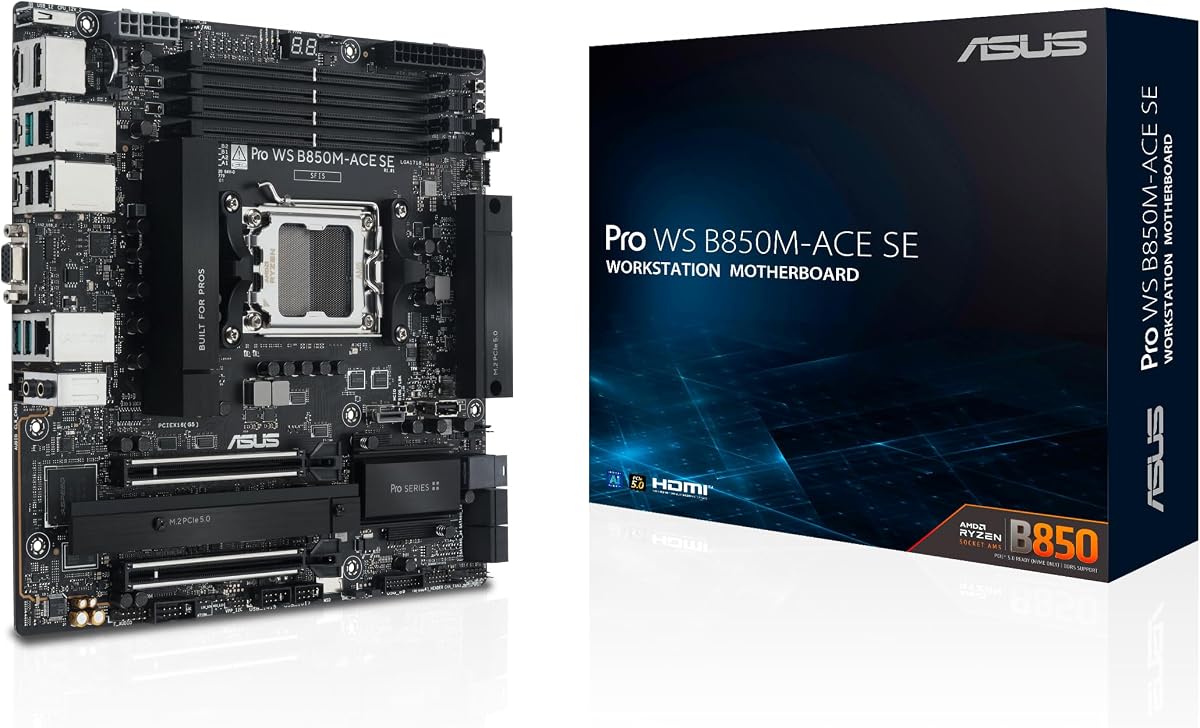
The ASUS Pro WS B850M-ACE SE is the most compact board in this guide and offers an unusual combination of workstation features in microATX form. Its 4.3 rating reflects a favorable balance of AMD AM5 processor support, server-style management, and extensive high-speed connectivity.
We may earn a commission when you buy through this link, at no additional cost to you.
Compatibility spans AMD Ryzen 9000, 8000, and 7000 series processors as well as AMD EPYC 4005 series processors. It provides two PCIe 5.0/4.0 x16 physical slots, although one operates at x4, plus two PCIe 5.0 x4 M.2 connectors, MCIO NVMe support, and U.2 connectivity for storage expansion.
A major advantage is the onboard AST2600 BMC, which enables server-grade IPMI remote management without a separate expansion card. ASUS Control Center Express supplies real-time monitoring and management, while 10Gb and 2.5Gb LAN ports cover high-speed networking and conventional administrative traffic. A front USB 20Gbps Type-C connection and broader platform compatibility strengthen its business positioning.
The B850M-ACE SE is the best budget-oriented selection for a compact professional workstation, especially when out-of-band management matters. It trades several full-size expansion slots and maximum memory capacity for a manageable case footprint, so it is less suitable for multi-GPU builds. Checking physical slot spacing and ensuring the selected processor supports the intended platform is essential.
The onboard AST2600 BMC separates remote administration from normal network traffic and supports out-of-band monitoring. This makes the compact board useful for offices, studios, and distributed business deployments.
Two PCIe 5.0 x4 M.2 connectors support fast local storage, while MCIO and U.2 broaden the options for high-capacity server-style drives. Front USB-C adds another convenient connection for external workstation accessories.
We may earn a commission when you buy through this link, at no additional cost to you.
The ASUS Pro WS TRX50-SAGE WIFI is a CEB Threadripper workstation motherboard supporting AMD Ryzen Threadripper PRO 7000 WX-series and Ryzen Threadripper 7000-series processors. Its 3.6 rating is modest for a board with substantial workstation credentials, including 36 power stages and memory support for as much as 1TB of ECC R-DIMM modules.
We may earn a commission when you buy through this link, at no additional cost to you.
The board provides three PCIe 5.0 x16 slots for multi-GPU configurations, three M.2 storage connectors, front and rear USB 20Gbps Type-C ports, SlimSAS NVMe support, and 10Gb plus 2.5Gb LAN. WiFi 7 adds wireless connectivity, although high-throughput professional storage and networking would still be better served through wired options.
Thermal design includes large VRM, chipset, and M.2 heatsinks plus an M.2 thermal pad. The 36-stage arrangement and dual 8-pin CPU connectors are designed to support the substantial power requirements associated with high-core-count Threadripper processors. ASUS IPMI expansion-card support and Control Center Express add remote administration options.
This motherboard is a good fit for a multi-GPU Threadripper workstation that values a CEB footprint over the absolute maximum number of PCIe slots. The one-terabyte memory ceiling is ample for many professional applications, though the newer TRX50-SAGE WiFi A model lists four M.2 connectors and newer Threadripper PRO 9000 support. Buyers should compare both models before settling on this version.
Three full PCIe 5.0 x16 slots provide room for multiple graphics or compute cards. Multi-GPU support makes the board relevant to rendering, visualization, simulation, and machine-learning configurations.
Thirty-six power stages, dual 8-pin CPU power, and substantial VRM cooling support high-end Threadripper processors. Dedicated M.2 cooling helps keep compact high-speed storage at suitable operating temperatures.
We may earn a commission when you buy through this link, at no additional cost to you.
The ASUS Pro WS TRX50-SAGE WiFi A is an updated CEB motherboard for AMD Ryzen Threadripper PRO 9000 and 7000 WX-series processors, along with Ryzen Threadripper 9000 and 7000 series processors. Its 4.0 rating is among the stronger results in the Threadripper group and is supported by a modern, broad feature set.
We may earn a commission when you buy through this link, at no additional cost to you.
Expansion consists of three PCIe 5.0 x16 slots, one PCIe 4.0 x16 slot, and four M.2 connectors. Two USB4 ports operate at 40Gbps, and front USB-C connections provide 20Gbps. Networking combines 10Gb and 2.5Gb LAN, while SlimSAS NVMe support extends the board's storage options beyond the standard M.2 positions.
Its 20-stage power design uses two 8-pin CPU connectors and substantial VRM, chipset, and M.2 cooling. ASUS IPMI expansion-card support and Control Center Express preserve the management capabilities expected of an ASUS Pro WS board. The platform also supports up to 1TB of ECC R-DIMM memory in a one-DIMM-per-channel configuration.
The TRX50-SAGE WiFi A is most attractive to builders who want a current Threadripper platform with modern USB4 and multi-GPU support without moving to a much larger board. Compared with the earlier TRX50-SAGE WIFI, it adds a fourth M.2 connector and newer processor compatibility. The practical limitations are IPMI expansion requirements and fewer documented power stages than the older board's 36-stage design.
Support for Threadripper PRO 9000 and 7000 WX-series processors gives the board access to recent high-core-count AMD workstation silicon. The sTR5 platform also supports the corresponding Ryzen Threadripper 9000 and 7000 families.
Two 40Gbps USB4 Type-C ports accelerate compatible external devices, while four M.2 connectors provide several internal high-speed storage positions. SlimSAS support is useful for additional server-style storage connectivity.
We may earn a commission when you buy through this link, at no additional cost to you.
The ASUS Pro WS W680-ACE IPMI is an ATX workstation motherboard for 13th Gen and 12th Gen Intel Core processors, as well as Pentium Gold and Celeron processors. Its 4.4 rating is the second-highest published score in the guide, making it one of the most positively received products listed.
We may earn a commission when you buy through this link, at no additional cost to you.
The board includes two PCIe 5.0 SafeSlot connectors, dual PCIe 3.0 slots, and three PCIe 4.0 M.2 connectors. SlimSAS, front-panel USB 3.2 Gen2x2 Type-C, and a Thunderbolt 4 header add flexible expansion, while dual Intel 2.5Gb Ethernet provides reliable wired connectivity.
Its major distinguishing feature is the bundled IPMI expansion card, which gives the system server-style remote management without requiring a separate purchase. A BMC header reinforces that capability. ASUS Control Center Express also adds USB port management, software blacklisting, and registry controls for administrative use.
The W680-ACE IPMI is well matched to a standard ATX professional workstation where remote administration is required but EEB sizing and Threadripper-class complexity are unnecessary. Its processor platform is older than the newest options in the roundup, so future CPU upgrade potential is more limited. Buyers should confirm LGA 1700 processor availability and the exact memory configuration supported by their selected CPU.
The bundled IPMI expansion card provides a dedicated management route for monitoring and control. This is especially useful for workstations deployed in studios, offices, or other locations where physical access may be limited.
Two PCIe 5.0 slots, two PCIe 3.0 slots, and three M.2 connectors cover many professional requirements. SlimSAS and Thunderbolt 4 headers add additional pathways for specialized storage, displays, and peripherals.
We may earn a commission when you buy through this link, at no additional cost to you.
The Asus P12R-M/10G-2T is a microATX server motherboard based on the Intel C252 chipset and LGA 1200 socket. It is designed for Intel Xeon E-2300 processors, making it a compact option for entry-level servers, small business systems, and dedicated infrastructure builds.
We may earn a commission when you buy through this link, at no additional cost to you.
The model name indicates 10G and dual-network functionality, but the supplied product information does not provide a detailed breakdown of the two network interfaces, memory layout, storage connectors, expansion slots, or power delivery. For that reason, the most important buying step is to consult the board's official specification sheet and confirm that every required component is supported.
Its principal advantage over larger workstation boards is physical simplicity. A microATX server motherboard can reduce the footprint of a dedicated machine while preserving the Intel Xeon processor family and business-server positioning. That makes the board potentially useful for file serving, virtualization, storage, or small business workloads when paired with suitable enterprise components.
The P12R-M/10G-2T is a niche pick rather than a broadly specified recommendation. Because no customer rating is listed and the available data is brief, buyers should verify ECC memory support, NIC details, expansion capability, and operating-system compatibility directly. It is best considered after those details have been matched against a planned server configuration.
The microATX form factor can help builders create a more compact server than a full ATX or E-ATX design. It still retains the Intel C252 and Xeon E-2300 platform foundation needed for professional infrastructure.
The available listing is concise, so detailed memory, storage, and expansion specifications should be confirmed from official documentation. Component compatibility is especially important when building a serviceable enterprise system.
We may earn a commission when you buy through this link, at no additional cost to you.
The ASUS Z13PE-D16 is an E-ATX server motherboard designed around two Intel fifth-generation Xeon processors using LGA 4677 sockets. It supports processors with up to a 350-watt TDP and provides up to 16 DDR5 RDIMM slots, allowing memory configurations of as much as 4TB.
We may earn a commission when you buy through this link, at no additional cost to you.
A single CPU can support up to three PCIe cards, while the board includes two PCIe 5.0 x4 M.2 connectors for operating-system or fast local storage. Dual Intel 10Gbps Ethernet ports with teaming support provide a strong foundation for high-bandwidth and redundant network configurations.
Management comes through ASUS Control Center and ASMB11-iKVM, adding administrative and remote-control options appropriate for a traditional server deployment. The large memory capacity and dual-processor architecture make the board appropriate for virtualization, consolidated application hosting, and memory-intensive enterprise services.
The Z13PE-D16 is the roundup's most conventional enterprise server option. It trades the compactness and specialized workstation features of other selections for dual-socket scalability, extensive memory, high-speed networking, and explicit server management. Its E-ATX size, substantial power requirements, and need for compatible server components make it best suited to a carefully planned rack or tower build.
Sixteen DDR5 RDIMM positions and up to 4TB of memory create a platform suited to large databases, virtual machines, and consolidated services. High memory capacity also provides room for future workload growth if the CPU and operating system support it.
Dual Intel 10Gbps ports deliver high throughput and can use teaming for selected availability and traffic-management scenarios. The two PCIe 5.0 x4 M.2 connectors provide dedicated high-speed storage paths for boot or data workloads.
We may earn a commission when you buy through this link, at no additional cost to you.
The ASUS Pro WS W680-ACE IPMI is an ATX Intel W680 motherboard for 13th Gen and 12th Gen Intel Core processors, along with Pentium Gold and Celeron processors. Its 2.6 rating is the lowest published score among the rated products, so the board should be evaluated primarily through its detailed feature set and component compatibility.
We may earn a commission when you buy through this link, at no additional cost to you.
Storage and expansion options include two PCIe 5.0 SafeSlot slots, two PCIe 3.0 slots, three PCIe 4.0 M.2 connectors, SlimSAS, and SATA 6Gbps connectivity. Dual Intel 2.5Gb Ethernet, USB 3.2 Gen2x2 Type-C, and a Thunderbolt 4 header cover modern data connections, while HDMI, DisplayPort, and VGA provide multiple display outputs.
The board is supplied with an IPMI expansion card featuring a dedicated Ethernet controller for the BMC chip. This adds remote server-style management to an otherwise conventional ATX workstation platform. A large VRM heatsink, M.2 heatsinks, hybrid fan headers, and Fan Xpert 4 support cooling and fan control.
This motherboard can make sense for builders who specifically want LGA 1700, ATX dimensions, ECC memory, local IPMI management, and multiple display outputs. Its 2.6 rating suggests that some buyers have encountered issues, although the supplied data does not establish the cause. Prospective owners should carefully review the current listing, recent customer feedback, BIOS support, and exact accessory contents before choosing it over the similarly named W680-ACE IPMI model.
The included IPMI expansion card and its dedicated Ethernet controller enable remote management functions. This distinguishes the board from ordinary consumer ATX models and supports maintenance in inaccessible installations.
Three M.2 slots, SlimSAS, and SATA connections support a mixture of fast and high-capacity storage. HDMI, DisplayPort, and VGA outputs provide flexibility for workstations that need different display-device connections.
We may earn a commission when you buy through this link, at no additional cost to you.
Selecting an ASUS Server Motherboard requires matching the processor, memory, chassis, operating system, expansion cards, storage, and management requirements. The most capable board is not automatically the most suitable one, because workstation and server platforms differ in form factor, memory support, remote administration, and intended operating systems.
Begin with the CPU family because each platform supports a specific generation and socket. The WRX90E-SAGE SE and TRX50 boards use AMD sTR5 for Threadripper families, the W890 boards use Intel LGA 4710-2 for Xeon 600 processors, and the W680 products use LGA 1700 for 12th and 13th Gen Intel Core processors. The P12R-M/10G-2T targets Xeon E-2300, while the Z13PE-D16 uses dual LGA 4677 sockets. A supported socket is only the first requirement; the chosen CPU must also match the board's memory architecture, power delivery, PCIe generation, firmware, and intended operating system.
Choose the platform first, then select the processor within that platform. Verify supported CPU generations, maximum core counts, memory modes, graphics behavior, and any manufacturer qualification lists.
Motherboard size affects nearly every other part of a build. EEB boards offer the most expansion room and are appropriate for large workstation towers or specialized server enclosures, while CEB and ATX are more manageable in conventional professional cases. The B850M-ACE SE is microATX and can reduce the overall system footprint, while the P12R-M/10G-2T is also compact but intended specifically for Xeon E-2300 server systems. The Z13PE-D16 uses E-ATX and demands a correspondingly large enclosure.
Measure the case's motherboard mounting area, connector clearance, expansion-slot positions, and rear I/O space. Remember that a board fitting geometrically may still conflict with a large graphics card, drive cage, or CPU cooler.
Server and workstation workloads may require ECC R-DIMM or RDIMM memory rather than ordinary consumer modules. Capacity limits vary considerably: the WRX90E-SAGE SE supports up to 2TB of ECC R-DIMM memory, the W890-SAGE uses a two-DIMM-per-channel configuration, the TRX50 boards support up to 1TB, and the Z13PE-D16 can address as much as 4TB across 16 RDIMM slots. The exact usable population and speed depend on the processor and board configuration.
Check supported memory type, module count, speed, capacity, and mixing rules. Consider registered memory support for virtualization, databases, and memory-intensive applications, but do not assume every server board supports every RDIMM standard.
PCIe slot count and lane configuration determine how many graphics cards, accelerators, capture cards, or high-speed network devices can be installed. The WRX90E-SAGE SE and W890 boards each provide seven PCIe 5.0 x16 slots, making them the strongest options for large multi-card workstations. The TRX50 models provide three such slots, while the B850M-ACE SE has two physical x16 slots with one operating at x4. M.2 and SlimSAS storage can sometimes reduce pressure on PCIe expansion, but they do not replace lanes needed by compute accelerators.
Count the actual devices the system requires, including the physical space each occupies. For multi-GPU systems, verify cooling clearance, supported card combinations, lane bifurcation behavior, and power-delivery requirements.
Modern server builds may combine M.2 boot drives, U.2 or SATA data drives, and direct-attached NVMe hardware. The WRX90E-SAGE SE provides four M.2 positions and SlimSAS, the W890 boards add MCIO on selected models, and the B850M-ACE SE combines two PCIe 5.0 M.2 connectors with MCIO and U.2 support. The Z13PE-D16 has dual PCIe 5.0 x4 M.2 connectors, while the W680 boards emphasize three PCIe 4.0 M.2 positions and SlimSAS.
Match the board's connectors to your drive controller and backplane. Also verify lane sharing, boot-device support, adapter requirements, and whether the operating system can recognize the intended storage configuration.
Network requirements vary from ordinary office transfers to high-bandwidth storage and virtualization. Common options include dual 2.5Gb Ethernet, 10Gb plus 2.5Gb combinations, and dual 10Gb ports with teaming support on the Z13PE-D16. Remote management is a separate consideration: onboard BMC hardware is present on the WRX90E-SAGE SE and B850M-ACE SE, while other boards use ASUS IPMI expansion-card support or include an expansion card directly.
For an unattended server or managed workstation, prioritize IPMI and out-of-band access. For data-heavy systems, evaluate NIC controller support, driver compatibility, port speed, and whether link aggregation or failover is required.
High-core-count processors and multiple accelerators place substantial demands on a motherboard's voltage regulation and cooling system. The boards in this guide range from 20 power stages in the TRX50-SAGE WiFi A to 36 stages in the TRX50-SAGE WIFI, with the WRX90E-SAGE SE using 32 and the W890E-SAGE SE using a 16+(2+2)+1+2 arrangement. Large VRM heatsinks, active cooling, and well-positioned M.2 thermal solutions are important when CPUs, SSDs, and PCIe cards compete for airflow.
Match the board's CPU power connectors to a quality power supply and confirm the case provides suitable airflow. Do not treat a large heatsink as adequate cooling for a densely populated workstation without considering chassis fans and ambient temperatures.
Server motherboards are commonly used with operating systems and management environments different from consumer desktop boards. The Z13PE-D16 includes ASUS Control Center and ASMB11-iKVM, while the newer Pro WS platforms use ASUS Control Center Express for monitoring and management. Before purchasing, confirm that the intended operating system supports the board's AST2600 BMC, NIC controllers, Intel VROC or related storage features, and any security-management functions.
Review the QVL and compatibility documentation for memory, add-in cards, and the selected processor. For production use, reliability, driver availability, and management support should take priority over an attractive but incomplete specification sheet.
Before assembly, read the board manual, identify every CPU and memory support list, and confirm that the case, power supply, cooler, and expansion cards physically fit. Install the processor and memory according to the manual's sequence, engage the socket retention mechanism carefully, and avoid applying uneven pressure to the socket or CPU contacts. Connect the correct CPU power cables, storage power, fan headers, front-panel connectors, and rear I/O before attempting to boot.
After the first assembly, update the motherboard firmware and verify memory training, storage detection, network speeds, and BMC access before installing the final operating system. Use the manufacturer-recommended BIOS settings for the selected CPU and memory population. If the system is intended for remote administration, assign the BMC and administrative network addresses separately, restrict access appropriately, and test out-of-band operation while normal networking is unavailable.
For ongoing care, keep the chassis dust-free and ensure that cool intake air reaches the VRM, M.2 devices, memory, and expansion cards. Monitor temperatures, fan speeds, storage health, memory errors, and management alerts through the available ASUS utilities. Perform firmware and driver updates during planned maintenance windows, back up configurations, and test remote recovery procedures before relying on the system for critical operations.
An ASUS workstation motherboard is generally designed around professional desktop processors, graphics workstations, and high-end creative or compute workloads. A server motherboard emphasizes enterprise processors, registered memory, out-of-band management, continuous operation, and compatibility with server operating systems. Some products in this guide bridge both categories, so the CPU, memory, IPMI implementation, and intended software are the most useful distinctions.
No. The WRX90E-SAGE SE and B850M-ACE SE document onboard BMC hardware through the AST2600 controller, while several W890, TRX50, and W680 products support or include an IPMI expansion card. The P12R-M/10G-2T and Z13PE-D16 are intended as server platforms, with the latter documenting ASUS Control Center and ASMB11-iKVM management. Buyers should verify the exact implementation rather than assume every model includes onboard IPMI.
It depends on the software, processor generation, memory needs, and accelerator configuration. Threadripper platforms provide strong multi-core performance and numerous PCIe lanes, while Xeon platforms are often preferred for established enterprise software and Intel-specific management ecosystems. The most important step is confirming that the selected CPU and board support the required memory, operating system, add-in cards, and remote-management features.
Generally, the workstation and server boards in this guide are intended to use ECC R-DIMM or RDIMM memory rather than ordinary unbuffered desktop DDR5. The W680-ACE models specifically document ECC memory support, and the server platforms list RDIMM configurations. Confirm the required module type, capacity, speed, and population rules for the exact processor and motherboard before ordering memory.
Physical support varies widely by board. The WRX90E-SAGE SE and W890 models each list seven PCIe 5.0 x16 slots, while the TRX50 boards list three and the W680-ACE models list two. The B850M-ACE SE has two physical PCIe 5.0/4.0 x16 positions, but one operates at x4. Actual multi-GPU operation also depends on processor lanes, operating-system support, cooling, power, and physical spacing.
It depends on the form factor. The B850M-ACE SE and P12R-M/10G-2T are microATX products that can fit cases supporting that size, but EEB, CEB, and E-ATX boards require appropriately large cases. Even when the dimensions fit, the board may need a server-style power supply, specific CPU cooling, rear I/O provisions, and additional expansion clearance. Always compare mounting and connector layouts rather than relying on ATX-family naming alone.
Confirm that the BMC or IPMI expansion card is connected, the management network is operating, and ASUS Control Center Express or the applicable management utility can reach the controller. Update the firmware, set strong administrative credentials, configure network access, and test remote console and power-control functions. The normal network should be separated from the dedicated management path whenever the platform supports that separation.
Choose the EEB models when the system needs the greatest number of full-length expansion slots, maximum physical spacing, or a very large workstation chassis. CEB models can provide similar major expansion features in a smaller workstation format, as illustrated by the W890-SAGE and TRX50-SAGE boards. Compare the actual card count, slot spacing, memory layout, cooling demands, and case dimensions rather than selecting solely by board designation.
The ASUS Pro WS WRX90E-SAGE SE stands out for AMD Threadripper PRO builds that need seven PCIe 5.0 x16 slots, extensive ECC memory capacity, and integrated IPMI. The ASUS Pro WS W890E-SAGE SE is the premium Intel alternative, combining Xeon 600 support, seven expansion slots, dual 10Gb networking, active cooling, and remote management.
For a compact professional build, the ASUS Pro WS B850M-ACE SE offers an attractive balance of Ryzen compatibility, onboard AST2600 IPMI, MCIO, U.2, and 10Gb networking in microATX. Buyers should prioritize the required processor socket, memory type, physical expansion, operating system, and management method before considering features that the finished system will not use.
Retailer listings, component availability, firmware support, and market conditions can change, so confirm the latest specifications and current seller information before buying. Checking the processor QVL, memory rules, case clearance, power connectors, and operating-system support will help ensure that the selected ASUS Server Motherboard integrates smoothly into the completed build.