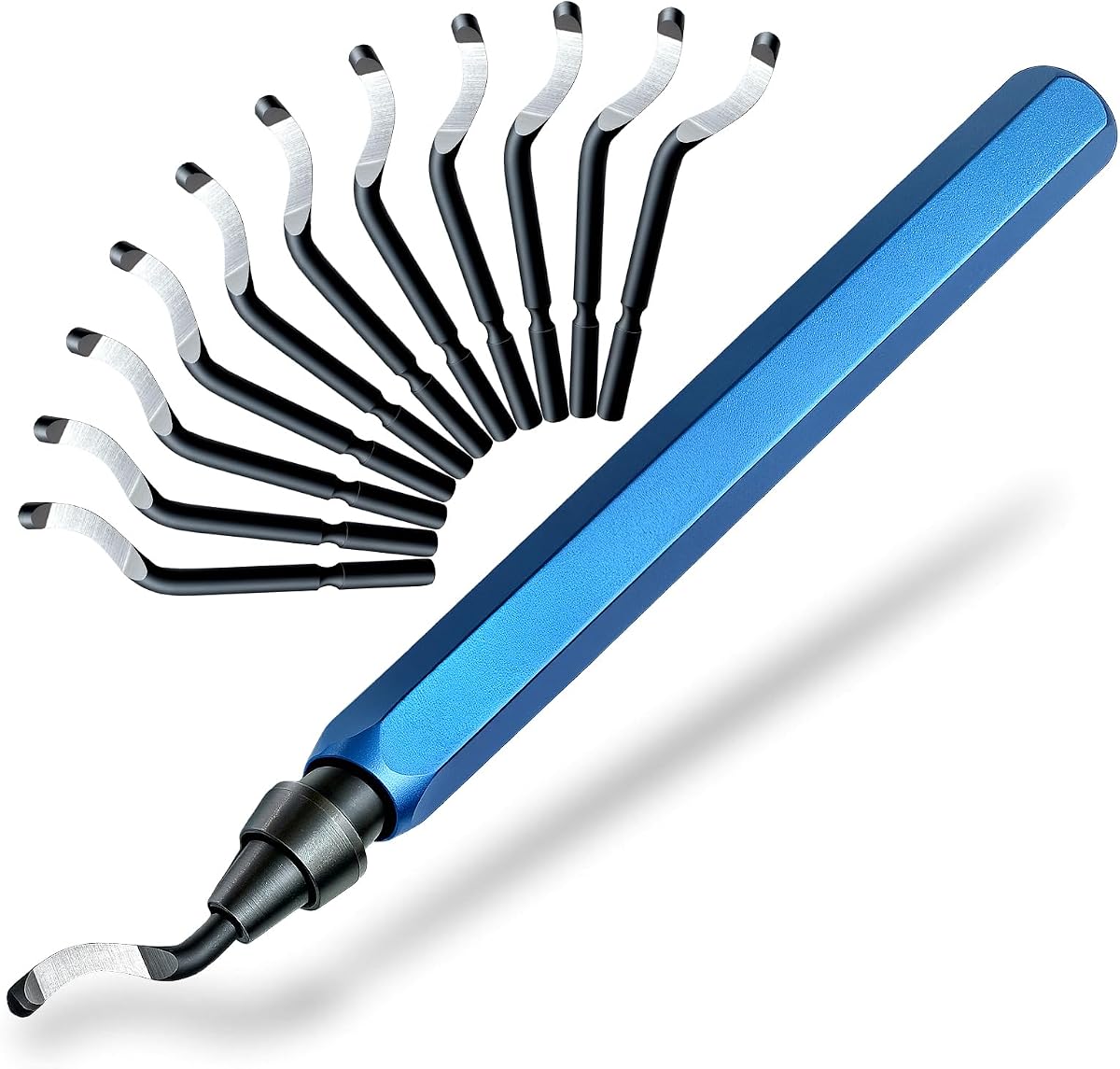
13-Piece HSS Deburring Kit
4.7Editor score
Twelve M2 HSS blades
Spring-loaded blade changes
Non-slip aluminum handle
Explore the best Deburring Tool for 3D Printing with comparisons of blade materials, handles, swivel mechanisms, and multi-material post-processing features.
A deburring tool for 3D printing removes the small ridges, whiskers, and rough edges left by extrusion or resin printing. The right tool helps you clean supports, smooth openings, and refine corners without damaging delicate surfaces. Blade geometry, edge retention, handle control, and compatibility with printed materials are the most important factors.
This guide compares ten manual deburring kits using the supplied product information, focusing on blade count and composition, swivel or rotary mechanisms, grip design, included accessories, and practical applications. It covers compact options for plastic prints as well as multi-material tools intended for resin, PVC, copper, aluminum, and harder metals.
Each review explains who the product suits, which finishing tasks it handles best, and where its included components may fall short of a dedicated workshop setup. Ratings and product details reflect the current listings, while prices and availability can change, so confirm the latest listing before purchasing.
4.7Editor score

4.8Editor score
4.7Editor score
The table below compares the ten shortlisted tools by blade package, cutting materials, handling system, and included post-processing accessories, helping you identify the most suitable option for plastic, resin, or mixed-material work.


The AFA Tooling Deburring Tool combines an 11-blade M2 high-speed steel package with a CNC-machined, anodized aluminum handle. Its most notable strengths are edge retention, smooth swivel movement, and enough versatility to move from delicate PLA or resin cleanup to light metal and pipe finishing. The construction also gives the tool a more substantial feel than a basic plastic-handled deburrer.
We may earn a commission when you buy through this link, at no additional cost to you.
Each M2 blade is tempered to HRC 62-64 according to the product information, providing a hard cutting edge intended to resist wear. The internal swivel mechanism lets the blade track curves, holes, and irregular edges rather than forcing a fixed blade angle against the workpiece. That behavior is especially helpful for printed brackets, miniature parts, and models with tight corners. The anodized aluminum housing also supports steady control during repeated passes.
The main trade-off is that this is a focused manual deburring tool rather than a complete post-processing station. It does not include the diamond files, pliers, or flush cutters found in larger finishing kits, and the supplied information does not mention a storage case for this particular listing. A user working regularly on complex supports may need separate accessories, but those are not required for routine edge cleanup.
This is a strong all-around recommendation for makers who print in several materials or want a dependable manual edge-finishing tool outside the 3D-printing niche. The blade package, precise handle, and contour-following design cover the essential needs without requiring complicated setup. It is especially suitable for cleaning brims, rafts, support marks, holes, and rough edges on PLA, PETG, ABS, and resin prints.
The swivel mechanism reduces the need to reposition the tool aggressively while following a rounded edge. That control is valuable on miniature figures, circular housings, and printed rings where a fixed blade could leave an uneven transition.
Tempered M2 HSS blades make this more than a plastic-cleanup accessory. The listed edge-retention characteristics are particularly relevant for users who also trim PVC, aluminum, copper, or freshly cut metal parts.
We may earn a commission when you buy through this link, at no additional cost to you.
This 12-blade deburring tool is aimed at users who want a simple, manually operated solution for resin, plastic, PVC, and metal. Its defining features are a full-metal handle, a rotating cutter head, and a spring-loaded mechanism that allows worn blades to be replaced without additional tools. The broad material range makes it a practical addition to a mixed maker workspace.
We may earn a commission when you buy through this link, at no additional cost to you.
The rotating head is intended to follow curved and irregular edges with less awkward wrist movement. That can be helpful when cleaning the perimeter of a printed enclosure, trimming a support witness mark, or smoothing a cut copper fitting. The all-metal body offers a secure, comfortable grip, while twelve HSS blades provide a useful stock of replacements for regular use.
The product information specifies high-speed steel but does not identify the exact alloy, hardness rating, or blade geometry of each included piece. Consequently, it is harder to compare its long-term edge retention directly with the M2 HRC 62-64 systems in the list. Its customer rating is also lower than that of most alternatives, although the described construction and feature set remain practical for routine finishing.
Choose this option if you value a simple metal handle, quick blade replacement, and the ability to work across several materials. It is a sensible general-purpose tool for printed models and workshop odds and ends. Buyers needing maximum precision for resin surfaces or extensive hard-metal work may prefer a product with more specific blade-hardness information.
The spring-loaded retention system keeps the installed blade secure while making changes fast. This is useful when a fine edge is needed for resin cleanup and a broader edge is preferable for a rougher support scar.
Compatibility with resin, plastic, PVC, copper, and other metals reduces the need to maintain separate tools. The rotating tip should prove especially handy around holes, contours, and uneven cut edges.
We may earn a commission when you buy through this link, at no additional cost to you.
The 13-piece deburring kit includes an aluminum handle and 12 M2 HSS replacement blades, creating a capable package for printed parts and several workshop materials. It stands out for the unusually generous blade supply, straightforward tool-free changes, and a nonslip handle that should help maintain control around small printed details.
We may earn a commission when you buy through this link, at no additional cost to you.
The razor-sharp swivel head is designed to remove burrs while following the edge of a part. According to the listing, the M2 HSS blades are built for wear resistance, while the aluminum handle offers durability and a stable grip. A spring-loaded release allows the user to pop out a blade and install another in seconds, which helps when switching between delicate and more aggressive finishing tasks.
This kit does not include the broader accessories seen in the 19-piece option, such as diamond files, pliers, or flush cutters. It also does not specify a separate case, so loose blades need to remain organized in the kit or another container. These are modest limitations for a focused deburring tool, but buyers should not expect a complete print-cleaning station.
For a maker seeking strong materials, a useful number of replacement blades, and straightforward operation at an entry-level price, this is one of the most balanced choices. It suits resin models, PVC, copper, aluminum, and routine 3D-print cleanup. The combination of M2 blades, a metal handle, and easy blade changes makes it particularly appealing to new users building a compact toolkit.
Twelve blades reduce the likelihood of a replacement shortage during repeated work. It also leaves several blades in reserve for larger cleanup jobs after the finer pieces have been used.
The compact aluminum construction and simple release mechanism make this convenient to carry between a desk and a larger workbench. It avoids the bulk of a full pliers-and-file finishing bundle.
We may earn a commission when you buy through this link, at no additional cost to you.
This 11-blade HSS tool is designed as a general finishing instrument for 3D prints, metal, resin, epoxy, PVC, and copper pipe. It distinguishes itself through an ergonomic anodized aluminum handle and a stated ability to handle deburring, reaming, and chamfering rather than serving only as a one-purpose print scraper.
We may earn a commission when you buy through this link, at no additional cost to you.
High-speed steel blades provide a practical balance of sharpness and toughness for routine cleanup. The comfortable grip gives the user a steady platform for guiding the cutting edge around a part, while the broad compatibility list makes the tool useful for a range of household and workshop tasks. That makes it a logical companion to pipe-cutting, HVAC, plumbing, or general metal-fabrication equipment.
The product listing does not identify the precise HSS alloy, temper, or hardness range, so buyers cannot directly compare its edge life with the explicitly specified M2 options. It also omits mention of a storage case. For most users those details are secondary to grip and versatility, but a technician focused on maximum tool life may want clearer specifications before buying.
This is a good choice for users who alternate between printed models and physical workshop materials. It provides enough capability to clean holes and sharp corners while remaining relevant for pipe and metal projects. Buyers whose priority is exclusively delicate resin smoothing may favor a kit with diamond files, while heavy workshop users may prefer a product with a larger premium handle and defined blade metallurgy.
The stated reaming and chamfering functions give this tool broader utility than a typical filament-only scraper. It can remain in the toolbox when a 3D-printing task gives way to pipe or sheet-metal cleanup.
The anodized aluminum handle is shaped around an ergonomic grip. That is useful when a model has many sharp edges and repeated passes are required to achieve a consistent finish.
We may earn a commission when you buy through this link, at no additional cost to you.
This AFA Tooling model is among the most fully specified deburring tools in the group, combining 11 tempered M2 HSS blades, a precision CNC aluminum handle, a high-precision internal swivel, and a dedicated storage case. Its strong customer feedback and balanced design make it an especially convincing all-purpose recommendation for detailed post-processing.
We may earn a commission when you buy through this link, at no additional cost to you.
The 148mm handle uses a 12mm hexagonal grip to resist rolling and provide stable tactile control. M2 blades tempered to HRC 62-64 are specified to retain their cutting edge longer than standard carbon steel, which is valuable when switching among plastic, aluminum, and harder metals. The internal swivel is designed to move fluidly as it follows contours, reducing the chance of catching on a printed edge.
The listing specifically targets finishing brims, rafts, and support artifacts on PLA, PETG, ABS, and resin prints. The balanced aluminum weight can support delicate pressure without encouraging the heavy-handed gouging that sometimes occurs with an awkward or unbalanced tool. A minor drawback is that it remains a focused deburring package rather than a set with pliers and abrasive files, and the case is dedicated mainly to spare blades.
This model is a strong choice for makers who value precise specifications, organized storage, and one tool capable of handling both delicate prints and tougher workshop edges. It is particularly compelling for multi-material users who want an M2 blade package, secure grip, and smooth swivel movement in one reasonably compact tool. The included case also makes it easier to maintain a tidy mobile kit.
The 12mm hexagonal profile helps keep the tool from rolling on a bench and gives the fingers a defined purchase. Its stated balance also supports a lighter touch when smoothing resin or thin printed walls.
A dedicated case for the spare blades reduces the chance of losing small components or mixing them with workshop debris. It also makes the kit easier to move between a craft desk and a dedicated workbench.
We may earn a commission when you buy through this link, at no additional cost to you.
The red-handled AFA Tooling deburr pairs 11 M2 HSS blades with a thick, knurled anodized aluminum handle. It is an attractive choice for detailed work because the textured grip is designed to resist slipping while the steel blades provide the strength required for plastics, pipes, and freshly cut metal parts.
We may earn a commission when you buy through this link, at no additional cost to you.
The high-precision swivel mechanism allows the blade to move through curves, holes, edges, and inside diameters. That makes it useful for more than straight perimeter cleanup on a printed model. The handle is described as compact and slightly heavier than a lighter alternative, which can be advantageous during metal finishing because it promotes steadier movement. A spring-loaded collar supports fast blade replacement.
Its product information does not divide the 11 blades into different geometries, so it may offer less flexibility for very specialized hole sizes than the mixed-blade 16-piece model. Like many focused deburring tools, it does not include diamond files, cutters, or pliers. Those omissions are reasonable for users who already own a post-processing setup, but less convenient for a new maker assembling one from scratch.
Choose this model when grip texture and controlled movement matter more than having a broad collection of finishing accessories. It is well suited to PLA, PETG, ABS, resin, PVC, copper, brass, aluminum, stainless steel, and sheet metal. For intricate prints, the knurled grip and responsive swivel should make it easier to guide the blade accurately across small edges and openings.
The pronounced texture gives the fingers additional purchase compared with a smooth cylindrical grip. This is helpful when the workpiece is small, the tool angle changes frequently, or oily workshop conditions make a smooth handle less secure.
The swivel design is described as tracking holes, curves, and inside diameters naturally. That movement can reduce the need to force the tool into a single plane while cleaning circular openings.
We may earn a commission when you buy through this link, at no additional cost to you.
This 19-piece kit goes beyond a standard swivel deburring tool by combining 11 M2 HSS cutters, five diamond files, needle-nose pliers, and flush cutters. It is the most complete post-processing bundle in the list and is particularly relevant to users who want to remove supports and refine resin surfaces as well as clean printed edges.
We may earn a commission when you buy through this link, at no additional cost to you.
The thick knurled aluminum handle measures 5.12 inches long and 0.71 inches in diameter, according to the product information. Its larger shape is intended to disperse pressure and reduce hand fatigue. The cutter set includes two geometries for curved and flat surfaces, while the 360-degree swivel head follows contours. The five differently shaped diamond files address areas that blades cannot reach effectively.
The product description states that the set was developed through multiple rounds of real-world testing, but the available information does not provide detailed test results. Its customer rating is lower than that of the leading deburring-focused tools, and the number of accessories means more parts to sort and maintain. It is also a less compact choice for users who only need to clean a few edges occasionally.
This kit is a strong pick for new 3D-printing hobbyists or users who want one bundle to cover support removal, edge cleanup, and surface detailing. The deburring tool remains the centerpiece, but the pliers, cutters, and files make it more useful for the complete post-processing sequence. Experienced makers with established finishing tools may prefer a slimmer replacement-blade kit.
The pliers and flush cutters can tackle support structures and excess material, while the deburring head refines edges. The diamond files then extend the workflow into flat surfaces, tight spaces, and areas where a rotating blade is less effective.
Two blade geometries allow the user to choose between a more suitable approach for curved or flat surfaces. That selection is useful for miniatures, which often combine broad faces with tight perimeter details.
We may earn a commission when you buy through this link, at no additional cost to you.
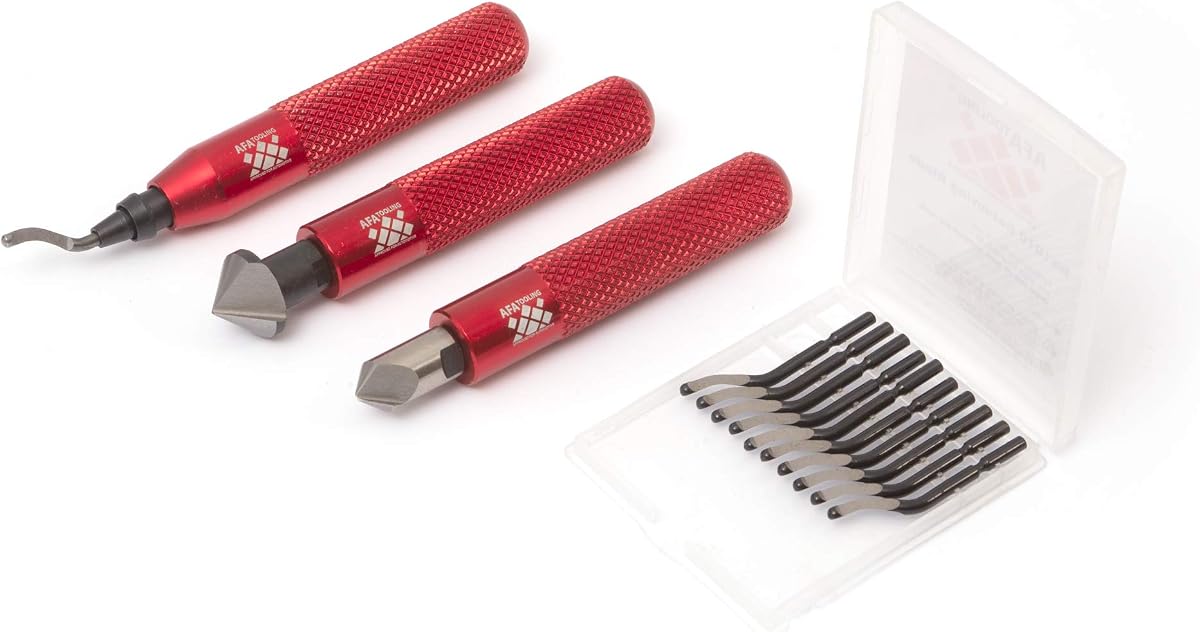
This AFA Tooling set differentiates itself with two countersink hand reamers alongside an 11-blade deburring tool. It is the premium-oriented choice in the group for users who need to enlarge and countersink circular openings as well as remove burrs from printed parts, pipes, gears, and freshly cut metal.
We may earn a commission when you buy through this link, at no additional cost to you.
The deburring side uses tempered high-speed steel blades and a swivel head that follows uneven surfaces. The reamers are described as two differently sized 90-degree HRC 62-64 angled tools intended for accurate countersinking and hole enlargement in wood, plastic, and metal. That combination can eliminate a common source of visible defects in printed parts: openings that look ragged from the slicer or poorly positioned support structures.
Its knurled aluminum handle and protective case offer a more refined workshop package, but the added reamers increase both bulk and cost. A user who only cleans print edges may not need them, and reamers require care because they are designed to remove material rather than merely shear away a thin burr. The set is therefore less convenient for very light, occasional use.
This is the recommendation for advanced makers, modelers, and fabricators who regularly work with holes or need a broader hand-finishing system. Printed enclosures, mounting plates, gears, and fitted parts are particularly suitable applications. If countersinking and hole preparation are not part of your workflow, one of the lighter deburring-only kits will be more focused.
A reamer can establish a cleaner circular opening before a deburring blade removes the raised material around it. This sequence is valuable for parts that accept screws, pins, shafts, or other close-fitting components.
The protective case keeps the extra blades and other small components together. It is a practical addition for users who want to preserve edge condition and avoid searching through mixed workshop hardware.
We may earn a commission when you buy through this link, at no additional cost to you.
The ruthex deburring tool is distinguished by a metal handle that incorporates storage for two spare blades, along with an 11-blade HSS package and a rotating tip. It presents a well-organized option for makers who dislike loose replacement blades but still want to keep a manual edge-finishing tool close at hand.
We may earn a commission when you buy through this link, at no additional cost to you.
The built-in compartment means a replacement can be reached without opening a separate case or searching through a toolbox. A quick-release mechanism supports fast changes, and the 360-degree rotating tip is intended to provide smooth access from different directions. The product listing also notes suitability for both left- and right-handed users, reinforcing its flexible everyday design.
The listing provides less technical detail about blade hardness, tempering, and geometry than the M2-focused competitors. Its rating is also below the leaders, and the storage box, while attractive, adds bulk if the tool is primarily kept in a small bag. None of this removes its core benefit, but it makes the product harder to evaluate on long-term blade performance.
Choose ruthex when convenient storage, compact organization, and a straightforward 11-blade package matter most. It works across resin, plastic, PVC, copper, aluminum, stainless steel, wood, and other hard surfaces, making it useful beyond a single print medium. The integrated compartment and rotating tip give it a distinct identity within a list dominated by external cases or bare replacement blades.
Storing two spare blades inside the handle reduces interruptions during a project. The user can replace a damaged or blunt cutter without leaving the workbench to locate a loose component.
A 360-degree rotating tip changes the working angle without requiring the handle to be turned awkwardly. This can improve access around edges and openings on irregular printed shapes.
We may earn a commission when you buy through this link, at no additional cost to you.
The 16-blade AFA Tooling set offers the most specialized blade package in the comparison. It includes 6 BS1010 M2 HSS blades, 5 BS1018 M35 cobalt HSS blades, and 5 BK3010 M2 HSS blades for small holes, giving users three distinct geometries and material-oriented choices.
We may earn a commission when you buy through this link, at no additional cost to you.
The BS1018 blades are intended for stainless steel and hard metals and carry a listed HRC 65-67 rating. The BK3010 blades address holes down to 1.5 millimeters, giving the tool an advantage when cleaning very small printed openings. The thick, knurled aluminum handle is designed to reduce fatigue during demanding metalwork and maintain a stable grip.
This level of specialization comes with added bulk and requires users to understand which geometry belongs to which application. The package is more complex than a simple set of interchangeable blades, and 16 small components demand careful organization. For occasional plastic cleanup, that additional selection may be unnecessary compared with a compact 11- or 12-blade model.
This set is best for experienced users who deburr both hard metals and detailed 3D prints, particularly those working on small holes or mixed workshop materials. The broad selection allows a better match to each task than a single-geometry tool. It is a strong advanced pick for plumbers, machinists, automotive technicians, and makers with demanding finishing requirements.
The three blade types let users move from general edge cleanup to harder metal and very small holes. This focused selection is more useful when a known range of materials and opening sizes is part of the workflow.
The handle is thicker than many competing designs and uses an anti-slip knurled surface. Its added substance can help stabilize the tool while cutting pressure is applied to aluminum, brass, copper, or steel.
We may earn a commission when you buy through this link, at no additional cost to you.
The most useful deburring tool is not simply the one with the most blades. Material compatibility, blade geometry, control, and included finishing accessories should match the types of prints and workshop tasks you perform most often.
Blade material determines how quickly an edge loses sharpness and whether it can safely handle tougher materials. M2 high-speed steel provides a useful upgrade over conventional carbon steel, while cobalt HSS is better suited to hard metals and stainless steel. The M2 kits in this guide specify tempering around HRC 62-64, and the mixed-blade set includes cobalt options at HRC 65-67. These figures provide a clearer basis for comparison than a general claim that every blade is durable.
A larger count can be reassuring, but the shapes and intended applications of the blades matter more than the number alone. Curved-edge blades are useful for following printed contours, while flatter or smaller geometries can reach tight corners and narrow holes. The 16-piece model offers the clearest specialization through BS1010, BS1018, and BK3010 blades, including a small-hole option for openings down to 1.5 millimeters.
A swivel head lets the cutting edge change direction while remaining seated in the handle. On a 3D print, this reduces the need to force a rigid blade against curved edges, internal corners, and circular openings. Models advertised with 360-degree rotation are particularly useful for irregular miniatures and parts whose outlines change direction frequently. A smooth mechanism also helps maintain consistent contact as the tool travels around an edge.
Control depends on how securely the tool can be held and how its weight is distributed. Knurled aluminum grips provide texture and resist rolling, while hexagonal or cylindrical shapes can feel secure on a bench. A longer handle may distribute pressure across the hand during long jobs, but a compact body is easier to control on tiny parts. The best choice is the balance you can maintain consistently rather than the heaviest design in the category.
PLA, PETG, and ABS usually present less demanding edge-finishing requirements than some resin surfaces or hard-metal models, but a versatile tool can be more useful over time. Metal-focused kits often state compatibility with aluminum, copper, brass, stainless steel, PVC, and sheet metal. If you print in one material exclusively, this may not matter, but makers who handle mixed projects benefit from blades that can move between printed plastic and workshop metal.
A deburring tool removes a thin layer of rough material, but printed models may also need support clipping, flush trimming, and surface sanding. The 19-piece kit includes pliers, flush cutters, and five diamond files, while the premium AFA set adds two countersink reamers. These accessories reduce the need for separate tools, although they also create a larger bundle that must be organized. A focused deburr-only kit remains easier to carry and use.
Spring-loaded retention and tool-free release systems make replacement faster and reduce the chance of damaging small parts during installation. Some kits provide a dedicated case, while the ruthex model stores two spare blades inside its handle. Either approach is useful, but the best system is the one you will actually use. Keeping blades organized protects their cutting edges and makes it easier to select the correct geometry for a particular print.
Fine resin surfaces and miniature details call for a sharp, controlled edge and a swivel head that follows contours. Rougher supports, pipe ends, and freshly cut metal may benefit from a sturdier blade profile and more substantial handle. Before buying, consider whether most of your prints need delicate surface refinement or heavy removal. A mixed package with several geometries gives more flexibility than a tool intended for only one level of cleanup.
Begin with a printed part that has been fully cured or cooled and remove as much loose support material as practical before using the blade. Hold the workpiece securely with one hand and guide the tool with the other, keeping the cutting edge nearly parallel to the surface being cleaned. Use light, repeated passes rather than pressing the blade into the part. The rotating or swivel head should follow the contour naturally, so forcing the handle into a fixed angle can cause chatter or gouging.
For a standard 3D-print edge, remove support witness marks and burrs by working in the direction of the surrounding surface. Change to a smaller or more specialized blade when cleaning a narrow hole, and avoid rotating the tool aggressively while it is inserted. On resin, inspect the area under good light between passes because a sharp HSS blade can mark a surface that is already smooth. If the tool starts to drag, tear, or leave a groove, change the blade rather than increasing pressure.
After use, wipe away resin dust, plastic fragments, and metal residue, then store the blades dry and protected from impacts. Do not leave a wet blade in its handle, because moisture can promote corrosion and contaminate the storage area. Keep replacement blades in their case or the handle compartment, and periodically check that the retention mechanism still holds the installed blade securely. Retire blades that chip, bend, or lose their edge, since a damaged cutter can damage the print or the tool's internal mechanism.
A tool with a sharp HSS blade and a smooth swivel or rotating head is well suited to resin because it can follow curved edges without forcing a fixed cutting angle. Light pressure is essential, and a diamond file can be useful for flatter areas that need more gradual refinement. Check the part under good lighting between passes to avoid creating shiny scratches on an otherwise smooth surface.
Yes, provided its blades are specified for the relevant materials. The M2 and cobalt HSS options in this guide are intended to cover applications ranging from PLA, PETG, ABS, and resin to aluminum, copper, brass, stainless steel, PVC, and sheet metal. A harder metal edge can also work on plastic, but using the correct geometry remains important for a clean finish.
A smaller, hole-specific blade can make a large difference when cleaning narrow printed openings. The mixed AFA Tooling set includes BK3010 blades for holes down to 1.5 millimeters, while other kits focus on general-purpose edge cleanup. Trying to force a broader blade into a tight opening may disturb the surrounding surface, so a properly sized blade is the safer choice.
A swivel head is particularly useful on models with curves, internal corners, and circular features. It allows the blade to rotate as the tool follows the edge, which can produce a smoother transition and reduce the need to reposition the handle constantly. A straight or fixed blade may still work on flat perimeter edges, but it offers less flexibility on detailed shapes.
Use the deburring tool to remove obvious burrs, support fragments, and sharp ridges before fine sanding. Once the basic edge is stable, a file or abrasive can produce the final surface. Switching back to the deburring blade afterward is useful for removing any newly raised edge, but excessive blade work can make a smooth print less uniform.
Replace a blade when it tears rather than cuts cleanly, develops visible nicks, bends under light pressure, or leaves a persistent rough line. A blunt blade can also encourage users to press harder, increasing the risk of scratching or gouging the print. Keeping several matched replacements in the supplied kit or case makes changing the blade straightforward.
An aluminum handle generally offers greater rigidity, a more secure grip, and better resistance to workshop knocks than a lightweight plastic housing. Its weight can also improve stability during metal finishing, although that makes it less ideal for extremely delicate work if control becomes difficult. The best handle is the one that feels precise and comfortable in your hand.
No. A deburring tool is effective for light support residue, raised edges, and small burrs, but it is not a substitute for cutters, pliers, files, or a scraper when substantial support material remains. The 19-piece kit includes several support-removal accessories for a broader workflow. Removing bulk supports first prevents the blade from loading up or damaging the part.
The AFA Tooling kit with 11 M2 HSS blades stands out as the most balanced all-around option, combining precise blade specifications, a CNC aluminum handle, smooth swivel movement, and organized storage. The 13-piece M2 kit is an excellent budget-oriented alternative for makers who value a generous blade supply, while the AFA Tooling set with two countersink reamers is the premium choice for users who also need professional hole preparation.
Prioritize the work you do most often. A smooth swivel head and fine control matter for resin miniatures, a strong grip and tough blades serve mixed-material workshops, and a complete accessory bundle reduces the need for separate finishing tools. Blade metallurgy, geometry, and proper technique are more important than simply collecting the largest number of blades.
Ratings, product configurations, and marketplace listings can change over time, and prices and availability also vary. Before ordering, confirm the current blade package, included accessories, material compatibility, and return terms on the product page. That final check helps ensure the selected deburring tool matches both your print materials and the level of finishing your projects require.