
Eyoyo 3.5-Inch Portable Digital Video Magnifier
4.6Editor score
2X to 25X magnification
Eight selectable color modes
Snapshot and screen locking
A digital magnifier for low vision can make small print easier to read by enlarging text, increasing contrast, and presenting an adjustable image on a dedicated screen. The right model depends on magnification range, display quality, color controls, focusing behavior, portability, battery life, and whether you want to read only printed material or need wider accessibility features.
This guide compares ten digital magnifiers using the specifications and feature information available for each product. It covers models with different screen sizes, zoom ranges, color-mode options, handles, external displays, image capture, and OCR capabilities, helping readers identify the option that best matches daily tasks, comfort preferences, and mobility needs.
Each review explains the product's strongest benefits, practical limitations, and ideal user, while the comparison table makes key differences easy to scan. Product ratings reflect the supplied customer feedback, and specifications may vary by listing. Prices and availability change frequently, so confirm current details on the retailer's page before purchasing.
4.6Editor score

4.3Editor score
4.0Editor score
As an Amazon Associate we earn from qualifying purchases.
The comparison below highlights the major differences in magnification, screen size, display customization, portability, and accessibility features. It is designed to help you narrow the field quickly before considering the full reviews.


The Eyoyo 3.5-inch Portable Digital Video Magnifier combines a compact body with a 2X-to-25X zoom range and eight selectable color modes. Its 4.6 rating is the highest among the products in this guide, making it a strong general-purpose choice for short reading sessions, labels, menus, and other situations where portability matters more than a large viewing area.
We may earn a commission when you buy through this link, at no additional cost to you.
Its stand-out feature set includes screen locking, snapshot capture, TF-card support, and AV output. Freezing the display can stabilize small text during inspection, while captured images can be replayed later. The color choices include full color, black on white, white on black, blue on white, white on blue, yellow on blue, and blue on yellow, offering useful contrast combinations for different viewing needs.
The trade-off is the 3.5-inch display. Although the magnifier is designed for portable, quick-reading support, the smaller screen may be less comfortable than a five-inch model for prolonged reading or for users who prefer broader views. It also does not list OCR or text-to-speech, so users who need spoken content should look at a more specialized alternative.
This model is well suited to readers who want an affordable, uncomplicated magnifier for intermittent tasks such as checking medicine labels, reading a restaurant menu, examining product packaging, or reviewing short passages. Its rating, portability, flexible color settings, and image-capture functions make it our Best Budget selection and a practical first digital magnifier for many users.
The foldable bracket lets the camera sit flat over a page, while the handheld format supports quicker tasks. This makes the device practical for moving around the home, traveling, or checking small print without setting up a fixed station.
Eight color modes help users improve contrast, while the snapshot and screen-lock functions support closer inspection. TF cards up to 32GB can store captured images, although a card is not included.
We may earn a commission when you buy through this link, at no additional cost to you.
This 5-inch digital video magnifier offers a 2X-to-32X zoom range, 26 color modes, and an 800-by-480 color LCD. Its simplified-button design is especially relevant for elderly users and children with amblyopia. The listed 3.9 rating is respectable, although it falls short of the ratings achieved by several higher-ranked products.
We may earn a commission when you buy through this link, at no additional cost to you.
A major convenience is the memory function, which stores familiar user habits and preferred settings before shutdown. That can reduce repeated adjustment during routine reading. The integrated handle and foldable bracket allow left- or right-handed use, and the bracket positions the screen at an angle so the reader does not need to lean over the page.
Its image-processing system is described as restoring color and detail without deforming enlarged fonts. The included cable also allows a connection to a television or computer for a larger, clearer view. Compared with the Eyoyo 3.5-inch model, this unit offers a larger screen and greater magnification range, but it does not explicitly list snapshot, playback, TF-card, or OCR functions.
The magnifier is best for people who value straightforward operation, adjustable contrast, and the ability to work with a larger external display. It may suit households where one user needs a simple reading aid and another wants more color choices. For those who require advanced text recognition, the Zoomax SNOW 12 offers a more specialized route.
The product avoids redundant buttons and prioritizes settings needed for common reading tasks. Its simplified layout may be easier for users who are less comfortable with complicated electronic devices.
Connection to a television or computer can make enlarged content easier to inspect. This is useful when the built-in five-inch display does not provide the viewing area a user prefers.
We may earn a commission when you buy through this link, at no additional cost to you.
The Portable Digital Video Magnifier for Visually Impaired is a well-rounded five-inch model offering 2X-to-32X magnification, 26 color modes, and an HD color LCD. Its 4.3 rating and broad feature set place it squarely among the strongest choices for low vision, macular degeneration, color blindness, and amblyopia.
We may earn a commission when you buy through this link, at no additional cost to you.
The standout combination is magnification range, color flexibility, and personalization. The device can remember preferred viewing settings, reducing the need to select them again for each session. Its ergonomic handle integrates with a foldable bracket, permits left- or right-handed positioning, and can rest at an angle over a page to reduce the need to hunch forward.
Image-processing DSP is included to restore color and detail while limiting distortion at higher magnification levels. The screen has an 800-by-480 resolution, and the magnifier can connect to a television for a larger image. That is helpful for shared viewing or when the user wants more screen area, but the product does not list OCR, speech output, photo storage, or a dual-camera system.
This is our Editor's Choice because it balances a large-enough display, 32X maximum magnification, extensive color selection, remembered settings, and ergonomic handling without becoming excessively specialized. It is a strong recommendation for home and travel users who want flexible viewing and the option of a larger screen, particularly those who find contrast modes helpful.
Twenty-six modes give users more opportunities to separate letters from their background. Remembered preferences then help maintain a comfortable setup during repeated reading.
The integrated handle can be held directly or paired with its folding support. The bracket places the screen at a workable angle and accommodates either dominant hand.
We may earn a commission when you buy through this link, at no additional cost to you.
The 5-Inch Auto Focus Magnifier provides 2X-to-32X magnification on an 800-by-480 color LCD. It targets low vision, color blindness, amblyopia, and macular-degeneration-related reading needs, with automatic focus intended to simplify positioning over different types of printed material.
We may earn a commission when you buy through this link, at no additional cost to you.
Its main appeal is accessibility. The product uses simplified, nonredundant buttons and can memorize user habits before shutdown, allowing preferred configurations to carry over between sessions. The integrated handle and foldable bracket support both handheld use and angled placement, and the handle can be installed for either left- or right-handed operation.
The screen uses DSP image processing to restore color and detail while avoiding deformation of enlarged fonts. A supplied cable enables connection to a television or computer, creating a larger viewing field for text, writing, or image viewing. The listing describes multiple color modes but does not state an exact total, so users who value a specific mode count should verify that detail before buying.
This model is most appropriate for readers who want uncomplicated controls, automatic focusing, and a larger display without needing OCR. Its 3.9 rating puts it below several alternatives, but the overall feature balance remains solid. It is particularly relevant to elderly users and anyone who benefits from reduced setup decisions and an adjustable viewing angle.
Automatic focus and stored preferences can reduce the need for repeated fine adjustments. That simplicity may be more valuable than having a long list of advanced controls.
The foldable bracket holds the magnifier over a page at a suitable angle. For a larger image, the included connection can also send the view to a television or computer.
We may earn a commission when you buy through this link, at no additional cost to you.
The VEVOR Portable Digital Magnifier stands out with 2X-to-48X zoom, a 13-megapixel near-and-far dual-lens system, 26 color modes, and both AV and HDMI outputs. Its 3.4 rating is the lowest in this comparison, so the specification sheet is more persuasive than the aggregate customer feedback.
We may earn a commission when you buy through this link, at no additional cost to you.
The dual-camera arrangement broadens the magnifier beyond close-up page reading. The near lens is intended for books, newspapers, and documents, while the far lens can view signs, boards, and other distant objects. Five brightness levels, adjustable LED lighting, horizontal and vertical curtain modes, and large buttons give users several ways to improve visibility and control the image.
External-display support is another advantage. AV output works with televisions and other compatible displays, while HDMI provides a higher-definition connection option. The built-in 2500mAh rechargeable battery is designed for extended reading and viewing, and a foldable stand keeps the unit compact. TF-card support up to 32GB allows saved images to be reviewed, though a card is not supplied.
This magnifier is a strong fit for people who alternate between reading nearby pages and checking farther-away signs or labels. It is also appealing when an HDMI television is available. Its lower rating warrants checking recent customer feedback, but the exceptional 48X range, dual lens, and flexible connections make it one of the most technically expansive options here.
The near and far lenses reduce the need to reposition a single camera for different subjects. Users can switch between close documents and more distant visual information.
Five LCD brightness levels and adjustable LEDs support different environments. Curtain modes can narrow the visible area, while AV and HDMI outputs expand the available screen size.
We may earn a commission when you buy through this link, at no additional cost to you.
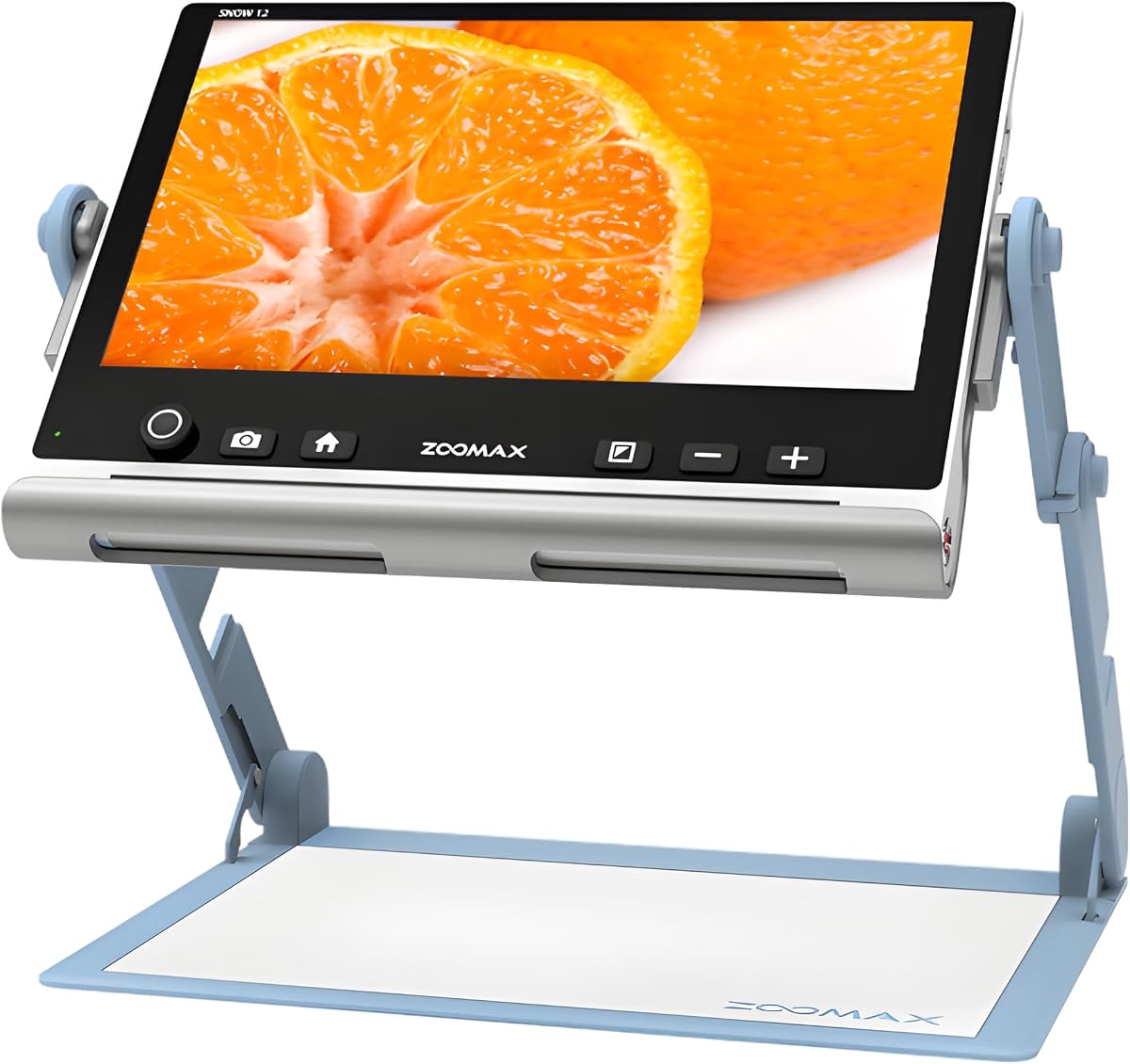
The Zoomax SNOW 12 is the most accessibility-focused product in the guide. It combines a large 12-inch HD display with 19x magnification, optical character recognition, text-to-speech, and support for more than 20 languages. Its 4.0 rating is moderate, but no other listed model provides the same documented combination of visual enlargement and spoken-text support.
We may earn a commission when you buy through this link, at no additional cost to you.
OCR can recognize printed text and convert it into speech, offering a way to move beyond enlarging a page. That is particularly useful for users who fatigue from sustained visual reading or need a different way to access documents. The multilingual support broadens the practical value for readers who encounter more than one language.
The large HD display also differentiates the SNOW 12 from the five-inch models. It gives users a broader view and may reduce the amount of scanning required. The advanced HD camera supports reading, writing, and general visual tasks. A foldable stand provides stability at different angles, while the listing describes the unit as lightweight and portable for easier storage and transport.
The main limitation is that 19x maximum magnification is below the 25X-to-48X ranges of several five-inch alternatives. The large screen also naturally requires more space than a compact handheld model. Even so, the SNOW 12 is our Best Premium pick because OCR, text-to-speech, multilingual support, and a twelve-inch display form a distinct and valuable accessibility package.
OCR recognizes text and turns it into spoken words, creating an alternative to reading enlarged letters visually. This can make document review more comfortable and flexible.
The twelve-inch HD screen offers a wide viewing area for reading and writing. Its folding stand adjusts the viewing angle while remaining portable enough to store between uses.
We may earn a commission when you buy through this link, at no additional cost to you.
The Eyoyo 5-inch Portable Digital Video Magnifier delivers 4X-to-32X magnification, 17 color modes, five brightness levels, and a five-inch LCD. Its 4.0 rating and feature set place it between the more compact Eyoyo model and the more specialized 26-color alternatives.
We may earn a commission when you buy through this link, at no additional cost to you.
The device automatically remembers preferred settings, which reduces setup time during regular reading. Photo capture and playback allow users to preserve important pages or labels and revisit them later. Compatibility with TF cards up to 32GB adds local storage, although the card is not included. Five brightness levels and 17 color modes offer practical ways to improve text visibility.
Its foldable, lightweight handle is comfortable to hold, and the 4500mAh battery is listed as supporting more than four hours of continuous use. AV output allows the magnified image to be shown on a television or another large screen. The trade-off is that the minimum magnification starts at 4X rather than the 2X offered by several competitors.
This magnifier is a good option for users who want a larger Eyoyo screen, long zoom range, and useful storage functions without moving to a specialized OCR device. It suits household, office, or travel use for books, newspapers, labels, and photographs. The combination of remembered settings, multiple display modes, and a substantial battery makes it a balanced five-inch choice.
Stored settings allow the unit to return to a familiar display configuration. This helps reduce repetitive adjustments for users who rely on the magnifier throughout the day.
Photo capture and playback can preserve a label, document section, or other visual reference. A compatible TF card is required for this storage function.
We may earn a commission when you buy through this link, at no additional cost to you.
This five-inch reading aid combines 2X-to-32X magnification, 26 color modes, an 800-by-480 HD color LCD, and separate near and far cameras. Its 4.0 rating matches the Eyoyo 5-inch model, while the wider color selection and camera flexibility distinguish it from several similar listings.
We may earn a commission when you buy through this link, at no additional cost to you.
Large, prominent buttons make the interface approachable for elderly users and anyone who benefits from intuitive controls. The device remembers preferred settings between sessions. Its far and near camera switching allows users to inspect distant subjects and close documents without relying on a single fixed focus distance, adding versatility for labels, signs, and pages.
The integrated handle and foldable bracket support an angled position over a page and can be arranged for either dominant hand. DSP processing is used to restore colors and details while avoiding font deformation. A TV cable can provide a larger display for reading or viewing images, though there is no listed HDMI output or OCR function.
This magnifier is appropriate for users who want many contrast choices, flexible subject distances, and a large button layout. It can handle books, menus, labels, and other printed information around the home or while traveling. Its strongest combination is the 26-mode palette with two camera perspectives, while its basic feature boundaries may be less appealing to users wanting spoken text.
Near and far cameras make the magnifier useful for more than flat-page reading. Users can move from a label to a distant sign while keeping one device.
Twenty-six color modes allow users to find a combination that improves letter definition. Remembered preferences preserve the chosen setup for subsequent sessions.
We may earn a commission when you buy through this link, at no additional cost to you.
The Eschenbach SmartLux is a lightweight, portable handheld digital magnifier with a 4.4 customer rating. Its listed magnification options are 5x, 7x, 9x, and 12x, accompanied by five viewing modes and image-capture support. The supplied Liberty cleaning cloth adds a small practical accessory for maintaining the lens.
We may earn a commission when you buy through this link, at no additional cost to you.
The product's simplicity is its defining feature. Rather than offering the very broad zoom ranges found among several five-inch competitors, it provides four clearly defined magnification levels. This can make selection easier for users who do not want to navigate a more complicated zoom control. The five viewing modes offer additional ways to adjust the displayed image.
The main limitation is range. A maximum of 12x may be sufficient for labels, forms, menus, and moderate small print, but it offers less flexibility than devices reaching 25X, 32X, or 48X. The supplied information does not list screen size, battery capacity, external-display connections, OCR, or storage specifications, so buyers should verify those details if they are priorities.
The SmartLux is best for readers seeking a straightforward, handheld unit with a strong rating and moderate magnification. It is also a logical choice for users who find very high zoom ranges unnecessary and prefer defined magnification steps. Its compact format supports travel, while image capture can help users retain and revisit useful visual details.
Four defined magnification levels reduce the need for fine zoom management. This may make the SmartLux easier to operate for readers who value simplicity.
The handheld body is designed for quick use around the home or while traveling. Image capture lets users save visual details for later review, and the included cloth supports routine lens care.
We may earn a commission when you buy through this link, at no additional cost to you.
The 5-Inch 48X Reading Aid offers 3X-to-48X magnification, an 800-by-480 color LCD, simplified controls, and a preference memory function. Its 4.0 rating places it among the mid-tier products in the guide, but its broad zoom range makes it particularly interesting for very small or distant print.
We may earn a commission when you buy through this link, at no additional cost to you.
The external battery is listed as lasting more than four hours, and the lightweight folding handle supports extended reading sessions. Users can photograph important sections and replay them later through TF-card storage up to 32GB. A memory function stores operating habits, while simplified buttons are designed to be accessible for elderly people and children with amblyopia.
DSP processing is described as restoring color and detail without deforming enlarged fonts. AV output can send the image to a television for a larger view. However, the product is specifically described as not recommended for long books or novels. That limitation is understandable given its handheld emphasis, but it makes it better suited to short documents, labels, instructions, and quick reference tasks.
This magnifier is a compelling option for users who need more magnification than conventional reading aids provide. It is particularly useful for pharmacy labels, recipes, maps, menus, price tags, and fine-print instructions. Those needing extended book reading should instead favor a larger-screen or stand-supported model, while OCR seekers should consider the Zoomax SNOW 12.
A 48X maximum provides a high ceiling for very small text and detailed viewing. The three-times lower limit also allows a broader initial view when locating content.
Photo capture and playback let users preserve short passages or labels. The memory function reduces repeated setup, while the external battery supports longer outings.
We may earn a commission when you buy through this link, at no additional cost to you.
The most useful digital magnifier is the one that makes your typical reading tasks easier without creating unnecessary setup or handling difficulties. Consider screen size, zoom behavior, viewing controls, power, and intended uses before choosing a model.
Screen size affects how much material you can inspect at once and how much scanning is required. The compact Eyoyo 3.5-inch model supports quick, portable reading, while the five-inch products provide a larger working area for documents. The Zoomax SNOW 12 goes further with a 12-inch HD display that can be particularly useful for shared viewing or when text-to-speech and OCR are important.
Choose a screen that feels comfortable without becoming difficult to hold or position. A larger display is not automatically better for every task, since portability and viewing angle can influence the overall experience.
Available zoom ranges vary from 5x-to-12x on the Eschenbach SmartLux to 48x on the VEVOR and 5-Inch 48X Reading Aid. The Eyoyo 3.5-inch model reaches 25x, while several five-inch models reach 32x. Automatic focusing appears on the 5-inch auto-focus model, whereas other listings emphasize placement over books or newspapers for optimal focus.
Look for a lower magnification setting if you want to locate text before enlarging it and a high maximum for fine print. Also consider whether the intended use is short-label inspection or sustained reading, since the supplied descriptions explicitly caution one model against long books.
Color modes can make text easier to distinguish by changing foreground and background colors. Options across the guide range from eight modes on the Eyoyo 3.5-inch model to 26 modes on several five-inch devices. The Eyoyo 5-inch also offers 17 modes and five brightness levels, while the VEVOR includes adjustable LED lighting and curtain modes.
More modes are useful only if the interface makes them easy to select. Pay equal attention to brightness controls, remembered preferences, and a simple button layout, especially if the magnifier will be used by an elderly person or someone with limited dexterity.
Most of the magnifiers in this guide primarily enlarge text and provide visual adjustments. The Zoomax SNOW 12 stands apart with OCR, text-to-speech, and support for more than 20 languages. These functions can convert printed content into spoken words, providing an additional way to access documents when visual reading is tiring.
Choose an OCR-equipped model if spoken content is essential rather than optional. If the main requirement is simply clearer, larger print with adjustable contrast, a five-inch magnifier with numerous color modes may be more direct and economical.
Connecting a magnifier to a television, monitor, or computer can provide a much larger viewing area than the built-in screen. AV output appears throughout much of the guide, and several products include a cable for television or computer use. The VEVOR adds HDMI output alongside AV, while the Zoomax SNOW 12 relies on its unusually large built-in display.
Check which connection types your existing equipment supports. A larger external screen can improve comfort during shared tasks, but it reduces portability unless the magnifier is also usable on its own.
Portability depends on more than size. A folding handle, integrated bracket, and stable tabletop support can make a device easier to position over a page. The Eyoyo models emphasize compact handling, the 5-inch alternatives use integrated handles and brackets, and the Zoomax SNOW 12 uses a large folding stand for stability at different angles.
For frequent travel, favor a lightweight handheld design with a foldable support. For prolonged reading at a desk, prioritize stable placement, screen angle, and a handle that can be used with either dominant hand.
Battery life affects whether a magnifier can support travel, dining out, shopping, or appointments away from a wall outlet. The Eyoyo 5-inch has a listed 4500mAh battery and more than four hours of continuous operation. The VEVOR includes a 2500mAh rechargeable battery, while the 5-Inch 48X Reading Aid uses an external battery listed to last over four hours.
Consider charging routine, battery accessibility, and whether you need an external battery for longer outings. For stationary reading, a model that is always used near an outlet may place less importance on endurance.
Photo capture and playback can help users preserve an important label, document section, map, or recipe. The Eyoyo 3.5-inch, Eyoyo 5-inch, VEVOR, and 5-Inch 48X Reading Aid list image storage through TF cards up to 32GB. The card is not included with these products, so a compatible card must be purchased separately if this feature is wanted.
Storage is a convenience rather than a core reading requirement. Prioritize focus, magnification, and contrast first, then consider capture features if you frequently need to revisit information or share what is on screen.
Begin by charging the device according to its instructions and selecting a bright, evenly lit workspace. Place the magnifier above a stable, flat surface, open the foldable handle or stand as needed, and place the camera over the material. Start at a lower magnification level to locate the text, then increase zoom and adjust focus until the letters are clear.
Next, choose a color mode that provides strong separation between the text and its background. Increase brightness only when necessary, because an overly bright display can be uncomfortable for some users. If the model stores preferences, allow the chosen settings to remain in memory. Use the bracket or angled stand to reduce bending, and connect the device to a television or computer when a larger viewing area would help.
For storage, switch off the magnifier and keep it in a dry, protected place. Clean the lens and screen gently with the supplied or recommended soft cloth, avoiding harsh liquids and aggressive pressure. Protect TF-card slots and ports from dust, and keep the rechargeable or external batteries according to the manufacturer's instructions. Do not use a higher zoom or viewing mode if it causes discomfort; reset the display and choose a more comfortable configuration.
A model offering a low starting level and a strong maximum is versatile. A range around 2x-to-32x is common among the five-inch options, while the VEVOR and 5-Inch 48X Reading Aid reach 48x. The best level depends on the smallest print, viewing distance, and screen size, so it is worth testing several settings rather than assuming the highest number is always clearest.
A larger screen can reduce scanning and make it easier to read several lines at once. However, it may also be heavier, require more space, or be less convenient to hold. The 3.5-inch Eyoyo is suited to quick portable tasks, five-inch models balance viewing area and handling, and the 12-inch Zoomax SNOW 12 emphasizes a spacious display plus OCR features.
Many of the listed products are specifically marketed for macular degeneration, low vision, color blindness, and amblyopia. Their adjustable zoom, contrast modes, and brightness controls can make small print easier to inspect, but performance varies by person. A device should supplement, not replace, professional eye care or the advice of a qualified low-vision specialist.
A digital magnifier uses a camera and screen to enlarge text and can alter colors, brightness, contrast, and focus. An illuminated magnifier generally provides transparent lenses with built-in lighting and does not typically include color modes or external-display connections. Digital models offer more display customization but are larger, require power, and may cost more.
Most models in this guide support AV output, including the Eyoyo 3.5-inch, Eyoyo 5-inch, VEVOR, and 5-Inch 48X Reading Aid. The 5-inch 26-mode and auto-focus models also mention television or computer connections. The VEVOR additionally offers HDMI. You will need a compatible television or monitor and the appropriate cable, which may or may not be included.
The Zoomax SNOW 12 is the only product in this list with supplied information confirming OCR, text-to-speech, and support for more than 20 languages. OCR can convert recognized printed text into spoken words, making it a useful option for users who want an alternative to visually reading an enlarged page.
They can be very helpful because contrast problems are common in several low-vision conditions. Black-on-white, white-on-black, and combinations involving blue or yellow can make letters easier to distinguish for some users. The best mode varies by person, so a device with several options and remembered settings is generally more adaptable than one with a fixed display.
For the models that list TF-card support, a compatible card up to 32GB is needed to save captured images. The cards are not included, so add one to the purchase if you want to retain photos. Models without stated storage features can still display and magnify content, but their image-capture options may not be available.
The Eyoyo 3.5-inch model is the leading budget option because it combines a 4.6 rating, 2X-to-25X magnification, eight color modes, image capture, and a genuinely compact format. The Portable 5-Inch Video Magnifier is our Editor's Choice for its balanced 32X zoom, 26 modes, remembered settings, and comfortable foldable handle. The Zoomax SNOW 12 takes the premium position with its large display, OCR, text-to-speech, and multilingual support.
For most routine reading needs, prioritize comfortable focus, adequate contrast, a usable screen size, and a zoom range that suits the type of print you encounter. Pay special attention to the stated limitation of the 48X model for long books, and consider the VEVOR when near-and-far viewing or HDMI output is important. Users who want spoken text should prioritize the Zoomax rather than choosing solely by magnification.
Ratings, product configurations, prices, and availability can change, so review the current retailer listing and specifications before ordering. Confirm screen size, included cables, battery details, storage requirements, and compatibility with any television or computer you plan to use. A short comparison against your most common reading tasks can prevent choosing a magnifier with unnecessary features or inadequate magnification.