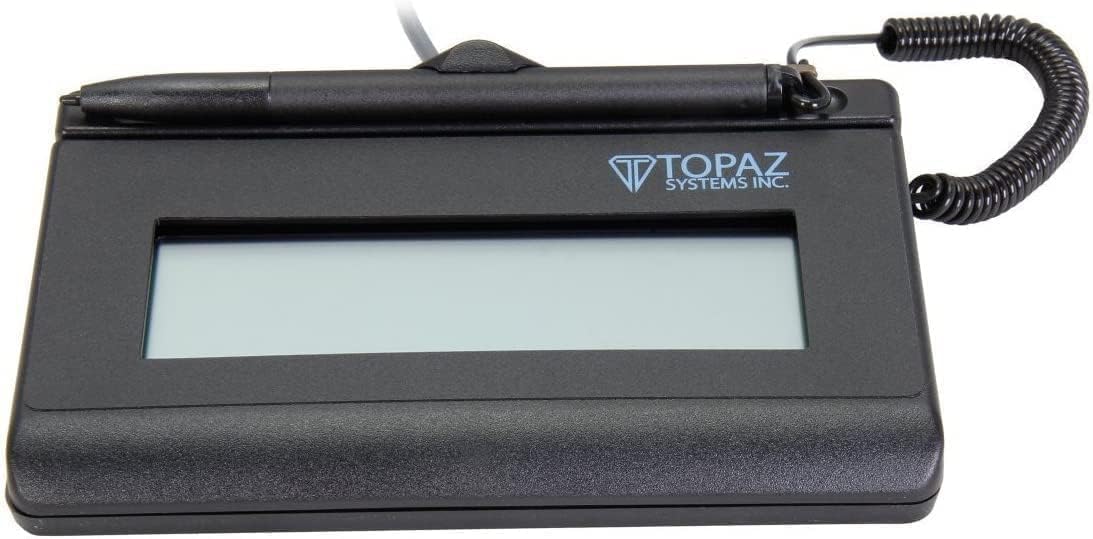
Topaz SigLite T-LBK460-HSB-R
4.9Editor score
Third-generation touch surface
Backlit customizable LCD
Biometric forensic capture
Compact portable construction
A digital signature pad for a PC can turn contract signing, approvals, attendance, and customer intake into a streamlined digital workflow. The most useful models combine a comfortable signing surface with responsive pen tracking, clear onscreen prompts, dependable USB connectivity, and software that fits the way your organization already manages documents.
This guide compares ten signature-focused and writing-capable tablets by examining display characteristics, connection methods, portability, capture technology, operating-system support, and practical features. It includes dedicated electronic signature devices from Topaz and Wacom alongside compact XPPen tablets and the PenPower ePaper SignPad, helping readers distinguish specialized professional hardware from general-purpose alternatives.
Each selection reveals what makes the device useful for a particular kind of signer. Some excel at portable document marking, some are better for professional counters or business workflows, and others offer a familiar pen-and-tablet experience for note taking. Ratings and availability can change, and current prices should always be checked before ordering.
4.9Editor score

4.8Editor score

4.3Editor score
As an Amazon Associate we earn from qualifying purchases.
The comparison below organizes all ten options by their most important practical characteristics, including signing area, display technology, connection style, portability, and intended workflow. Specialized signature devices are best for formal capture, while compact drawing tablets can suit casual signing and annotation.


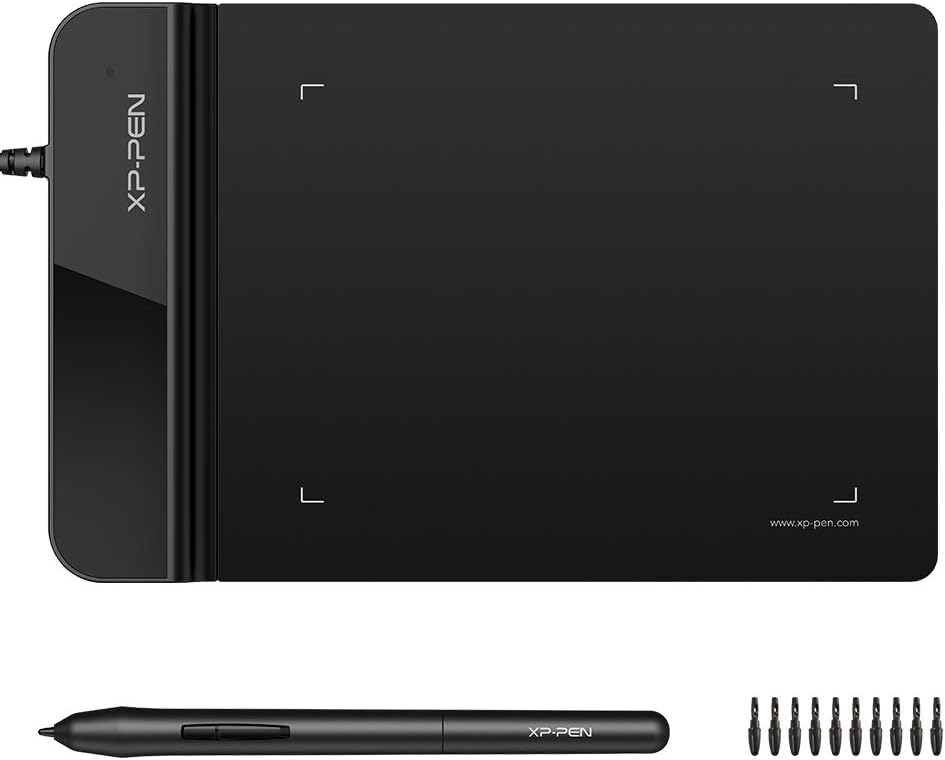


The XPPen StarG640 is a compact, general-purpose pen tablet that brings a useful signing area to a PC without the bulk of a full-size graphics display. Its 4.3 rating reflects a favorable balance of portability, stylus performance, and cross-platform support. The 6 x 4-inch active surface provides enough room to write a signature and add short handwritten notes while remaining much smaller than a conventional monitor.
We may earn a commission when you buy through this link, at no additional cost to you.
Its strongest feature is the battery-free PN01 stylus, which removes the need to recharge a pen or replace batteries in the middle of a workflow. The tablet is listed as compatible with Mac, Windows, and Chromebook, making it a flexible choice for mixed-device offices. Support for Word, PowerPoint, OneNote, Zoom, and other common applications extends its usefulness beyond signing into teaching, remote work, and visual communication.
The main limitation is that this is a writing tablet rather than a dedicated signature-capture terminal. It does not provide an LCD for displaying a PDF or a software-defined prompt directly beneath the pen. It also lacks the specialized biometric and forensic capture functions associated with dedicated Topaz models, so organizations requiring those controls should verify compatibility with their document platform before purchasing.
This is a strong budget choice for independent users, educators, remote workers, and small businesses that need a portable way to sign or mark up documents on a PC. Buyers who want a larger writing area than a pocket-sized model without carrying a display-equipped workstation will find it especially practical.
The StarG640's thin profile and battery-free stylus make it convenient to move between a home office, classroom, or meeting room. It is particularly useful when signatures and annotations are part of a broader note-taking or teaching workflow.
Compatibility with major desktop platforms and applications allows the device to serve as more than a signature accessory. It can handle forms, diagrams, handwritten notes, and light creative work when the required software supports a pen tablet.
We may earn a commission when you buy through this link, at no additional cost to you.
The PenPower ePaper SignPad is designed for quickly turning a handwritten mark into a digital signature or note. It receives a 4.2 rating and differentiates itself from conventional graphics tablets with a direct one-tap transfer function. It is particularly relevant for contracts, quotes, insurance forms, and internal approvals that need to move through a paperless office process.
We may earn a commission when you buy through this link, at no additional cost to you.
The device can place signatures into PDFs as well as Word, Excel, JPG, PNG, and TIFF files. Every signature can include a timestamp and printed name, adding visible traceability to the resulting digital mark. It also supports quick digital sticky notes that can be sent to a desktop or Outlook Calendar, while its compatibility with WhatsApp, Messenger, Slack, Zoom, WeChat, Line, Viber, and KakaoTalk makes it adaptable to communication-heavy workflows.
Users needing integration with an EMR, ERP, CRM, document management system, or specialized enterprise software should not assume that support is included. PenPower states that SDK and custom integration services are available upon request and recommends contacting its team before buying. That limitation makes the standard package more appropriate for individual users and conventional document workflows than for regulated enterprise deployment without advance planning.
The PenPower ePaper SignPad is a compelling choice when the priority is transferring a handwritten signature quickly and adding basic metadata. It is less appropriate when a bankable audit trail, integrated application workflow, or dedicated screen-based signing terminal is required.
Timestamps and printed names help viewers understand who signed and when, although buyers with formal evidentiary requirements should still confirm whether those fields satisfy their internal compliance policy.
One-tap transfer into common document and image formats reduces the steps required for routine approvals. The paperless workflow can be particularly useful for teams already using cloud-based office tools.
We may earn a commission when you buy through this link, at no additional cost to you.
The renewed Topaz T-LBK462-BSB-R SignatureGem is a dedicated electronic signature pad for professional document capture. It carries a 4.0 rating and combines an LCD, rugged signing area, virtual serial connection, and high-quality biometric and forensic capture. Those characteristics place it closer to a purpose-built business terminal than a general drawing tablet.
We may earn a commission when you buy through this link, at no additional cost to you.
Its customizable LCD can present the document, instructions, menus, or soft-key prompts while the user signs. The compact size and low weight make it suitable for counters, mobile service desks, and other environments where a full-size screen would be inconvenient. A virtual serial interface through USB gives compatible software a familiar way to communicate with the device and capture signing events.
Because this listing is for a renewed unit, buyers should review the seller's condition description, included accessories, warranty terms, and return policy carefully. Renewed products can provide substantial value, but visual wear or limited coverage may not suit an organization seeking a uniform new-device deployment. Software compatibility should also be verified before relying on it for a specific EMR, CRM, or document workflow.
This model is best for organizations that prioritize dedicated signature capture, a compact professional footprint, and forensic-quality pen data over the broader creative functions of a graphics tablet. It is a practical choice for repeated customer signatures, approvals, or records where the hardware is intended to remain at a particular workstation.
A rugged signing area and dedicated LCD are better suited to continuous commercial use than a thin tablet without an integrated display. This focus makes the device more relevant to formal customer-facing workflows.
The device's small size and weight make it easier to deploy across counters, departments, or temporary service points. Its virtual serial interface remains important to check against the target PC and signing application.
We may earn a commission when you buy through this link, at no additional cost to you.
The Topaz T-S460-HSB-R is a dedicated USB electronic signature capture pad with a 4.4 rating, the highest among the non-premium single-pad selections here. It combines a non-backlit LCD with high-quality capture technology and displays the signature on the computer screen. It is a sensible option for offices that need dedicated hardware without paying for the extras associated with more elaborate terminals.
We may earn a commission when you buy through this link, at no additional cost to you.
The USB interface simplifies the physical connection to a PC, while the display provides an immediate visual reference for the signer. This setup supports routine contracts, customer acknowledgments, and internal approvals. The device is positioned as a cost-efficient capture solution, making it worth comparing with the broader Topaz range before committing to a purchase.
The defining compromise is the absence of backlighting. In a well-lit office or public counter, that can be perfectly acceptable, and the reflective-style display avoids unnecessary power use. In a dim room, however, the screen may be less comfortable, and users should consider whether a backlit alternative better fits the installation environment. Software and driver requirements should also be confirmed for the intended workflow.
The T-S460-HSB-R suits organizations seeking a proven dedicated signature pad at a comparatively restrained cost. It is especially appropriate for stationary PCs in bright workspaces where a small screen is sufficient and the main priority is responsive, recognizable handwriting capture.
A direct USB connection reduces setup complexity for compatible PC-based signing software. This makes the model practical for routine deployments where the device will remain beside a fixed workstation.
Displaying the signature on the computer screen gives users immediate confirmation of what they wrote. For organizations concerned with legibility, this feedback can be a significant advantage over writing on a tablet with no screen.
We may earn a commission when you buy through this link, at no additional cost to you.
The XPPen StarG430S is one of the smallest and most portable devices in this guide. Its 4.2 rating, 4 x 3-inch active area, and two-millimeter thickness make it well suited to people who need a pen tablet for signatures, teaching notes, or creative work while traveling. The 8192 pressure levels offer noticeably finer input control than basic entry tablets.
We may earn a commission when you buy through this link, at no additional cost to you.
The included battery-free stylus supports left- and right-handed use, and the device can be configured accordingly. Its 266 RPS report rate is intended to produce quick, smooth lines, while compatibility with Windows, Mac, Word, PowerPoint, OneNote, Zoom, and Xsplit extends its practical range. It is not limited to game use, despite the model name and its support for OSU!.
The compact surface is the central drawback. XPPen explicitly warns that 4 x 3 inches is very small, so people who write large signatures or need room for notes may find it restrictive. A Mac without USB-A may also require an OTG adapter, and the product is not compatible with iOS or iPadOS. Driver conflicts with other brands can occur, and compatibility with a particular EMR or signature system should be confirmed before purchase.
The StarG430S is a compelling ultra-portable option for quick signatures, annotations, online teaching, and small sketches. It works best for users who value portability and pressure control over a generous active area or integrated document display.
The 8192 pressure levels make line weight more expressive than a simple finger or basic stylus experience. That capability is useful for sketching and teaching diagrams as well as adding personal marks to documents.
Potential USB-A, macOS permission, and driver-conflict issues can affect the first-use experience. Verifying the PC configuration and target software in advance is the simplest way to avoid avoidable setup problems.
We may earn a commission when you buy through this link, at no additional cost to you.
The Wacom STU500 is a 5-inch monochrome LCD signature pad designed for reliable handwritten capture in business environments. Its 3.2 rating is the lowest in this roundup, but the product description identifies several durable traits that remain important for public counters. A transreflective display provides visibility in bright conditions without requiring backlighting.
We may earn a commission when you buy through this link, at no additional cost to you.
Its 640 x 480 resolution provides enough room for text, images, soft keys, and menu buttons, while the 5-inch panel is larger than the writing surface alone. Wacom's EMR technology provides a maintenance-free electronic pen, and the hardened glass signing surface is designed to resist scratches. The device is also advertised as capable of capturing legally binding electronic handwritten signatures, subject to the law and procedures applicable to the user and jurisdiction.
Its age and monochrome format should be considered. The display is functional rather than visually modern, and buyers who need color, richer graphics, or a contemporary touchscreen experience may prefer newer models. Data encryption is described as available as an option, so buyers should confirm whether it is included for their application. Integration software and legal acceptance also require due diligence.
The STU500 is best suited to a bright public counter, service desk, or other high-frequency location where durability, glare-free readability, and a maintenance-free pen matter more than a modern color display. Its established design makes it a specialist option for buyers who value a physical signing surface and a clear business workflow.
The transreflective LCD is designed to remain easy to see in bright conditions without backlighting. This can be preferable for long deployments at counters where constant power and screen brightness are not priorities.
A hardened glass surface and maintenance-free EMR pen address common durability concerns. These attributes are valuable when a device will be handled by many different users throughout the day.
We may earn a commission when you buy through this link, at no additional cost to you.
The Topaz T-LBK462-BSB-R SignatureGem is a backlit 1 x 5 signature terminal designed for professional electronic capture. It earns a 4.0 rating and offers a customizable LCD, a rugged signing area, biometric and forensic capture, and a USB virtual serial interface. It is especially relevant where a dedicated business device must present information and collect a legally meaningful handwritten mark.
We may earn a commission when you buy through this link, at no additional cost to you.
Backlighting makes the display easier to use in lighting conditions that may be less than ideal for a non-backlit reflective screen. Customization allows the interface to show the document, instructions, menus, or transaction prompts. The compact size and weight also suit service counters and mobile deployment, while the capture system is designed for higher-quality forensic records than a generic graphics tablet.
This is specialized hardware, so compatibility deserves careful attention. A virtual serial connection and proprietary capture workflow may not work with every document-management program, EMR, CRM, or third-party signing application. Buyers should confirm supported operating systems, drivers, SDK availability, and integration requirements rather than assuming it behaves like a standard mouse or pen tablet.
The T-LBK462-BSB-R is a strong choice for organizations that want a dedicated, customizable, backlit signature terminal. It is best deployed where reliable repeat use and formal capture functions justify the investment, particularly in a controlled business workflow with compatible software.
The LCD can present prompts and transaction information directly to the signer. Clear onscreen guidance can reduce ambiguity and make a repeated signing process feel more methodical.
Biometric and forensic capture are designed for workflows where signature data quality and traceability matter. The included software and interface should be tested against the organization's documentation requirements before deployment.
We may earn a commission when you buy through this link, at no additional cost to you.
The Topaz SigLite three-pack is designed for organizations that need to equip several PC-based signing stations at once. It contains three T-S460-HSB-R-style signature pads and carries a 4.3 rating. The package is listed for business use, is compatible with PCs, and has a modern, ambidextrous design that should suit varied users and counter positions.
We may earn a commission when you buy through this link, at no additional cost to you.
Buying a matched set can simplify deployment. Instead of sourcing three devices separately, an administrator receives a consistent group of compact USB signature pads. That standardization makes replacement, training, and workstation setup easier. The 1 x 5 format is focused on signature capture rather than broad drawing, and the direct USB connection suits fixed PC installations.
The package may be unnecessary for a single user, and its benefit depends on having three active locations. The supplied information gives less detail about display customization and capture technology than the individual Topaz listings, so buyers should review the package contents and the exact model specifications. Software and operating-system compatibility should also be confirmed before ordering.
This three-pack is a practical choice for law offices, reception desks, shipping counters, customer-service departments, or registration desks that need several dedicated signing points. It is especially useful when consistent equipment across stations is a priority.
A matched set reduces the need to mix models across several workstations. Uniform devices can simplify staff training and make it easier to keep spare units on hand.
The compact 1 x 5 format prioritizes handwritten capture at a desk or counter. Its ambidextrous styling and PC compatibility make it broadly practical for shared environments.
We may earn a commission when you buy through this link, at no additional cost to you.
The Topaz SigLite T-LBK460-HSB-R pairs a 1 x 5 LCD signature pad with a backlit display, third-generation touch signing surface, and forensic-quality capture. It has a 4.9 rating, the highest among the products in this guide. That combination makes it a particularly attractive premium choice for professional organizations seeking strong signature capture in a compact terminal.
We may earn a commission when you buy through this link, at no additional cost to you.
The backlit LCD provides clear onscreen information and can be customized to suit a transaction. Its third-generation touch surface is intended to improve the interaction experience, while the biometric and forensic capture system focuses on the data behind the ink. The device also remains small and light enough to move between stations, making it more flexible than a bulky all-in-one terminal.
This is a renewed listing, so buyers should carefully examine the condition, accessories, return rights, and warranty. The hardware's advanced capture features are only as useful as the surrounding workflow allows, meaning the target application, integration, and printer output should be evaluated in advance. The mention of monochrome printer output also makes it relevant to organizations that produce signed paper records.
The T-LBK460-HSB-R is best for professional signers who value a polished display, compact construction, and high-quality forensic capture. It is an excellent premium candidate for a company standardizing its signature terminal across customer-facing or compliance-sensitive workflows.
The third-generation touch surface adds a more interactive element to a conventional signature terminal. Combined with biometric capture, it targets organizations that require careful collection and preservation of signing information.
A backlit, customizable display and portable construction bring professional features without the footprint of a large monitor. This balance is valuable for desks with limited room and for temporary signing stations.
We may earn a commission when you buy through this link, at no additional cost to you.
The Topaz T-L460-HSB-R is the strongest all-around choice in this guide, combining a 4.8 rating with a backlit 1 x 5 LCD, HID USB connectivity, included software, and a two-year factory warranty. It is purpose-built for electronic signatures, making it more appropriate for a formal PC workflow than a general drawing tablet without a display.
We may earn a commission when you buy through this link, at no additional cost to you.
HID USB offers a straightforward connection to compatible PCs, while the illuminated display can present a document, prompts, or signing interface. Including software makes the package more complete for evaluators who need a functioning setup rather than a peripheral alone. The warranty adds useful confidence for daily business use, especially when the device will be deployed at a counter or shared workstation.
Users should still verify operating-system support, signing application compatibility, and the exact included software before purchase. A dedicated signature terminal may not offer the drawing, sketching, or annotation flexibility of an XPPen tablet, and organizations with specialized EMR or CRM requirements may need additional integration support. The terminal-block or strip-wiring details should also be reviewed if the installation requires particular cabling.
Overall, the T-L460-HSB-R is the best fit for buyers who want a professional digital signature pad without choosing between basic connectivity and a supportive package. Its display, warranty, software, and strong rating create a balanced option for routine business signing on a PC.
HID USB provides a familiar connection approach for compatible Windows-based deployments. The direct interface supports a cleaner installation than a more specialized or difficult-to-configure peripheral.
The included software and two-year factory warranty make the listing more practical for immediate evaluation. Buyers should still inspect the software features and cable requirements against their document workflow.
We may earn a commission when you buy through this link, at no additional cost to you.
The best digital signature pad depends on the signing environment, the sophistication of the document workflow, and the need for portable or stationary use. Compare display visibility, capture quality, connectivity, software, and total deployment requirements rather than focusing only on the writing surface.
A dedicated LCD lets the signer see the document, agreement, or prompt while writing. Larger displays can show more text and soft keys, while non-backlit reflective panels may perform well in bright offices but be less comfortable in dim rooms. General graphics tablets usually omit a display, so the user must look at the PC screen rather than at the paper-like writing area.
Choose a screen that matches the task. For lengthy terms or guided forms, prioritize usable screen area. For a simple signature line, a compact backlit display may be sufficient.
For legal, compliance, or transactional use, look for dedicated electronic signature hardware with high-quality pen tracking and, where appropriate, biometric or forensic capture. A general-purpose tablet can create a convincing handwritten mark, but it may not provide the same specialized data, security controls, or audit functions as a professional signature terminal.
Match the capture system to the required evidentiary standard and ask the software provider which hardware it officially supports.
USB-connected devices may use HID or virtual serial communication, and the distinction can affect installation. A stylus tablet can also require drivers, while a dedicated terminal may depend on a vendor SDK or a particular document-management application. Enterprise users should verify compatibility with Windows versions, EMR, CRM, ERP, and other required systems before ordering.
Do not assume that every USB pen tablet will work with every signature program. Confirm the operating system, application, and integration path in writing.
A slim tablet is easy to place in a laptop bag and useful for mobile signing, teaching, or fieldwork. A dedicated signature pad with a larger LCD may be better for a fixed counter, reception desk, or point-of-sale station. Weight, thickness, cable length, and whether the device must operate without a separate power supply can influence the decision.
Choose the smallest form factor that comfortably accommodates the user's handwriting and the documents that need review.
Some pads simply reproduce handwriting, while others add timestamps, printed names, onscreen prompts, sticky notes, or integration with enterprise systems. The PenPower ePaper SignPad, for example, emphasizes rapid transfer and metadata, whereas Topaz models focus on dedicated capture terminals. Consider whether the desired output is a signature embedded in a PDF, a record within a CRM, or a traceable approval workflow.
Choose the simplest feature set that fully supports the intended process, and avoid paying for advanced integration that the organization will not use.
Backlighting improves visibility in dark or variable lighting, while a transreflective LCD can remain clear in bright conditions without backlighting. The Wacom STU500 is designed around the latter approach, whereas several Topaz models provide a backlit screen. Think about where the device will be used, not just how it appears in a product photograph.
For public counters and shared offices, test readability under the actual lighting conditions whenever possible.
A signing surface may be touched hundreds of times per day, so scratch resistance, pen reliability, and a stable base are important. Wacom's hardened glass and EMR pen, along with Topaz's rugged signing areas, target frequent use. Tablets without a screen usually protect their active surface differently, so a protective sleeve may be useful during travel.
For a shared station, prioritize a durable surface and an easy-to-clean pen experience over cosmetic features that will not affect daily work.
A factory warranty can reduce the risk associated with continuous business use. Some listings include signature software, while others describe custom integration as an extra service. Refurbished or renewed units may have a different warranty or condition standard from new devices, so the listing details deserve close attention before purchase.
Confirm what is included, how support is provided, and whether the warranty applies to the pen, cable, display, and replacement units.
Begin by installing the appropriate drivers and signing software, then connect the pad using the specified USB connection. If the device has an LCD, confirm that the document, signature line, and any prompts appear in the expected order. Run a test signature before asking a customer or employee to sign, and adjust the active area or screen orientation if the pen does not track naturally.
For routine use, keep the signing area clean and avoid placing heavy objects on the LCD or active surface. Use the supplied pen rather than an unapproved stylus, since compatible pens can include electronics, optical tracking components, or pressure-sensing elements. Store the device in its case or on a stable surface, and route cables so they cannot be pulled during a transaction.
Update the PC's signing application and the device driver as directed by the vendor, especially when integrating with a CRM, EMR, ERP, or document-management system. Back up any exported signature records according to organizational policy. If capture quality declines, inspect the pen nib and surface, recalibrate the active area, and contact technical support rather than attempting to open the device.
Not always. A device may require a supported Windows version, a specific USB mode, vendor drivers, or a compatible signing application. General pen tablets often work across several operating systems, while dedicated Topaz and Wacom terminals may depend more heavily on their own software or SDK. Check the manufacturer's compatibility list before purchasing.
An LCD is usually better for formal document signing because the user can see the document or prompts in the same place where the signature is written. A display-free graphics tablet is more portable and often less expensive, but the signer must watch the computer screen. The best choice depends on whether visibility during signing is a priority.
A general drawing tablet can create a high-quality handwritten mark, but legal acceptance depends on the jurisdiction, the application, and the integrity of the signature record. Dedicated signature pads offer features such as forensic capture, embedded prompts, timestamps, and audit-oriented software. Organizations with binding requirements should seek guidance from legal and compliance teams and use vendor-supported hardware.
HID USB generally behaves like a standard human-interface device and is simple to install with compatible PC software. A virtual serial connection presents the pad through a serial interface that suitable applications can communicate with. Both can work well, but the signing software must support the connection method, and enterprise deployments may need driver or SDK planning.
Many USB signature pads draw power directly from the PC, while some features or models may require additional power. The supplied descriptions emphasize USB operation but do not provide a complete power specification for every model. Check the manufacturer's instructions, especially for backlit displays, printers, or multi-device installations.
Use a supported pen, keep the active area clean, and check the pointer or cursor settings in the application. A larger signing area is preferable if handwriting is broad, since a compact tablet can force cramped signatures. Calibration instructions provided by the manufacturer should also be followed after a driver update or when the pen behaves inconsistently.
New equipment is generally easier to standardize and may come with clearer warranty coverage, while renewed devices can offer better value for a known deployment. Renewed listings should be evaluated for cosmetic wear, included accessories, return policy, and warranty. Organizations requiring uniform fleet appearance or long-term support may prefer new models.
It can, but only if the signing application and integration layer support the pad's connection method and capture SDK. Specialized enterprise systems such as EMR, ERP, CRM, and document-management platforms may require custom integration services that are not included by default. Ask the vendor to confirm compatibility before making a multi-system deployment.
The Topaz T-L460-HSB-R is the strongest overall choice, combining a 4.8 rating, backlit display, HID USB connectivity, included software, and a two-year factory warranty. The Topaz SigLite T-LBK460-HSB-R is the premium option for advanced capture and touch functionality, while the XPPen StarG640 offers the most approachable route to portable pen-based signing.
Prioritize dedicated capture features and software compatibility when signatures are part of a formal or regulated process. For everyday note signing, teaching, or travel, a compact tablet with a battery-free stylus may be more convenient. In every case, test the pen tracking, display visibility, application integration, and physical signing comfort in the intended environment.
Ratings, availability, and prices can change, so check the current listing details before ordering. Also confirm the included accessories, cable type, operating-system support, warranty, and any integration requirements to avoid choosing a pad that does not fit your PC workflow.