
JJC Upgrade Osmo Nano Cage
4.6Editor score
Exceptionally compact construction
Dual cold shoe mounting
Unobstructed rear magnetic function
Explore our DJI Osmo Nano Camera Cage guide, comparing 10 cages for protection, mounting options, portability, easy access, and value for creators today.
A camera cage for the DJI Osmo Nano does more than add a metal frame. It can protect the compact camera during travel, preserve access to essential controls, provide standard mounting points, and turn the modular system into a more practical rig for vlogging, street photography, travel films, and action recording.
We compared all 10 featured cages by examining their material, protection approach, mounting hardware, orientation support, access to buttons, ports, touchscreen functions, and battery replacement, as well as the accessories each design is designed to support. The guide covers full cages, open frames, split cages, handle systems, and a compact expansion adapter.
Each review explains the strongest reason to consider a particular model and the compromises worth checking before buying. Ratings, product details, and availability can change over time, so confirm the current listing, included components, dimensions, and compatibility information before making a purchase.
4.6Editor score

5.0Editor score

4.5Editor score
This side-by-side comparison highlights the major differences among the 10 cages, including frame style, protection level, mounting options, weight, and control access, making it easier to match a cage to your preferred shooting setup.



The SmallRig Full Cage is the most complete premium-style option in this guide, combining full coverage, a durable aluminum structure, internal silicone padding, and several ways to expand the camera. It is designed for creators who want the Osmo Nano to function as a more versatile production rig rather than simply adding a thin protective outline.
We may earn a commission when you buy through this link, at no additional cost to you.
Its one-touch side lever allows the camera to be installed or removed without reaching for a small tool. The cage is shaped to allow quick SD card changes and attachment of a selfie stick without removing the entire frame. A cold shoe and a 1/4-20 threaded hole provide familiar routes for adding microphones, LED lights, and other compatible accessories.
Portrait-to-landscape switching is another important benefit because the compact camera system is used in both orientations. The full-cover approach is more protective than a small expansion cage, although it may feel less minimalist during pocketable shooting. The broader SmallRig accessory ecosystem also means that some users may need additional mounts beyond what arrives in the box.
This cage is best for travel filmmakers, vloggers, and accessory-focused creators who prioritize protection, quick installation, and a broad selection of expansion components. Choose it when the ability to build a complete rig is more important than minimizing every gram and millimeter.
The aluminum shell and internal silicone pads create a more substantial barrier against bumps and scratches. At the same time, positioned cutouts help preserve access to card slots and supported accessories, so the cage is not simply a solid shell placed over the camera.
The cold shoe, threaded connection, magnetic mounts, and related SmallRig components make it possible to assemble different arrangements for handheld filming, chest mounting, low-angle support, and conventional tripod or accessory workflows.
We may earn a commission when you buy through this link, at no additional cost to you.
The Coyktonty Protective Cage offers a direct balance of protection, portability, and expansion. Its aluminum alloy frame is designed specifically for the DJI Osmo Nano series and uses internal foam cotton to help stabilize the camera while adding a layer of cushioning around vulnerable surfaces.
We may earn a commission when you buy through this link, at no additional cost to you.
A cold shoe interface allows compatible accessories such as microphones or supplementary lights to be added without relying on an adapter-specific mounting arrangement. The frame also supports a magnetic adapter for quick connection and can be used in horizontal or vertical shooting modes, covering the core needs of most compact-camera creators.
The design is less enclosing than a full cage, so it may not provide the same edge protection during a hard fall. Its foam component also adds a soft material that can collect dust or wear at the contact points over time. Only the camera cage is explicitly listed in the shipping information, which is worth noting if you expect multiple pieces.
This is a strong choice for everyday vloggers who want standard expansion points without carrying the visual bulk of a full protective setup. It is especially useful for combining the Osmo Nano with a tripod, selfie stick, microphone, or light while keeping horizontal and vertical shooting straightforward.
Aluminum supplies the structural shell, while the internal foam cotton adds cushioning and helps hold the camera more securely. That combination is useful for creators who regularly move between a pocket, a bag, and an exposed shooting position.
The cold shoe and magnetic adapter support make it easier to connect a light or microphone and move the camera to a tripod or selfie stick. Supporting both orientations also helps creators adapt the rig for vertical social content and wider landscape footage.
We may earn a commission when you buy through this link, at no additional cost to you.
The Aluminum Alloy Protective Frame Cage is the strongest all-around recommendation because it combines secure retention, useful access, and flexible mounting in one design. The 1:1 molded shape is intended to fit the Osmo Nano closely, while a closed lock and knob safety lock work together to reduce shifting and accidental drops.
We may earn a commission when you buy through this link, at no additional cost to you.
The cage is particularly impressive because of its battery access cutout. A camera can be replaced without removing the entire cage, which is valuable during long sessions where downtime matters. Full access to buttons and touchscreen functions helps avoid the common problem of protective frames making the camera frustrating to operate.
Two 1/4-20 mounting threads, one at the bottom and one on the side, allow different orientations and accessory arrangements. A cold shoe provides another connection point for lights or microphones, and the lower magnetic quick-release compatibility adds further flexibility. Its protective construction is less pocket-friendly than a minimal frame, while the two-stage locking system may feel more involved than a single magnetic connection.
The product is a strong recommendation for active creators who want meaningful drop and scratch protection without sacrificing battery changes, screen operation, or mounting flexibility. It is particularly well suited to travel, vlogging, and action-oriented workflows where secure camera retention matters more than absolute minimalism.
The closed locking mechanism and secondary knob safety lock give the frame a more secure hold than a simple friction fit. That gives the user confidence when moving between a handheld grip, a mount, and an active outdoor environment.
The dedicated battery replacement cutout is one of the most useful details in the design. Access to controls and the touchscreen also means the protective frame does not need to dominate the handling experience.
We may earn a commission when you buy through this link, at no additional cost to you.
The Osmo Nano Metal Cage is distinctive because it includes both an aluminum alloy frame and a silicone protective cover. Rather than forcing one fixed configuration, the package lets users decide between a more structured metal frame and a softer cover for everyday handling and scratch protection.
We may earn a commission when you buy through this link, at no additional cost to you.
The metal component is positioned as a shock-absorbing and impact-resistant layer that does not obstruct the interfaces or interfere with other accessories. The silicone case is comfortable to the touch, resistant to easy deformation, and helps protect the camera body from scratches when the metal frame is unnecessary.
Compared with cages built around cold shoes, threaded sockets, or tool-free locking mechanisms, this bundle places more emphasis on general protection. The silicone case may take up more room in a pocket, and detailed information about orientation mounting is not provided. It is also important to note that the camera itself is not included.
This option suits users who want flexible everyday protection rather than a permanent production rig. It can be especially useful for someone who carries the Osmo Nano in a bag, uses it for spontaneous street photography, and appreciates having both a rigid frame and a soft cover available.
The aluminum cage is useful when a firmer structure and accessory compatibility matter, while the silicone cover offers a lighter-touch way to reduce scratches. Having both allows the user to change based on the activity.
The product description emphasizes that the frame does not block the camera interfaces or prevent the use of compatible accessories. That makes the set useful for creators who still expect to connect the camera to their existing mounting arrangement.
We may earn a commission when you buy through this link, at no additional cost to you.
The Handle Grip Cage Case is built around a different idea from conventional lightweight frames. It combines a protective cage with an integrated handle so that the user can grab the camera and shoot with a more conventional, camera-like hold instead of pinching the very small body between two fingers.
We may earn a commission when you buy through this link, at no additional cost to you.
Its one-piece construction removes the need to assemble separate pieces, and the quick installation system is designed to open and close in about a second. A flip cover shields the camera from scratches and bumps, while the locking mechanism is intended to prevent accidental loosening during travel and street photography.
The built-in cold shoe can carry a microphone, LED light, or another compatible accessory. A flat base gives the rig stability on a table for low-angle footage, and the widened finger groove improves comfort. However, the approximately 69-gram weight and larger handle make it less compact than a simple protective frame, and the integrated structure is less adaptable to different mounting systems.
This cage is a good fit for urban creators who want immediate handheld comfort and a stable place to set the camera down. It is less convincing for users whose priority is the lightest possible cage, unrestricted accessory configuration, or the ability to separate every component for a custom rig.
The enlarged handle fills the space normally occupied by the fingers, giving the tiny camera a more secure and familiar grip. The ergonomic groove can also reduce finger tension during longer street-photography sessions.
The flip cover stays useful between shots, where a bare compact camera is especially vulnerable to scratches. It adds a visible layer of assurance without requiring the user to remove a separate protective accessory.
We may earn a commission when you buy through this link, at no additional cost to you.
The iDaPro Camera Cage is built for creators who want protection and expansion without turning the Osmo Nano into a visibly bulky rig. Its precision-engineered aluminum frame surrounds the main camera module, and the stated weight of only 35 grams preserves much of the camera system's portable character.
We may earn a commission when you buy through this link, at no additional cost to you.
A major benefit is the careful preservation of the native magnetic quick-attach system. The frame uses precise clearances so the camera can still snap to selfie sticks, chest mounts, and other magnetic accessories without removing the cage. That matters because some protective designs inadvertently interfere with the modular connections that make the Osmo Nano useful.
Raised bezels around the lens area add drop protection, and the anodized black finish is intended to resist scratches and fingerprints. A cold shoe and 1/4-20 threaded hole support lights, microphones, tripods, gimbals, and quick-release plates. As a frame rather than a full enclosure, it offers less coverage of the camera's edges and back, and the product is focused specifically on the main camera module.
This is a strong option for travel, hiking, sports, and everyday carry where low weight and reliable magnetic functionality are priorities. It is less appropriate for someone seeking the strongest possible enclosure or a cage that surrounds every surface of the camera.
The frame is designed around the camera's original magnetic quick-attach behavior rather than asking users to remove it for every connection. This preserves a fast, flexible workflow across compatible mounts.
At 35 grams, the cage offers meaningful structural support while remaining appropriate for compact travel kits. The open construction also keeps buttons, ports, and primary controls accessible during normal operation.
We may earn a commission when you buy through this link, at no additional cost to you.
The Detachable Aluminum Frame Cage stands apart with a split-type construction that allows the Osmo Nano's two main units to be used separately or combined. Instead of forcing every creator into one fixed arrangement, it can adapt to different shooting configurations and accessory combinations.
We may earn a commission when you buy through this link, at no additional cost to you.
The open frame leaves the touchscreen, buttons, and ports accessible while also promoting airflow during extended recording sessions. That circulation is a meaningful consideration for a compact camera used in demanding recording conditions, particularly when a more enclosed design could retain heat around the body.
A one-touch quick-release mechanism allows the frame to be installed or removed rapidly. Standard 1/4-20 and cold shoe mounting points support tripods, selfie sticks, microphones, and LED lights, while the separated modules can be expanded independently. The main drawback is that the detachable arrangement adds a more complicated concept than a conventional one-piece cage and may not appeal to users who want one fixed configuration.
The product is a good recommendation for experimental creators who enjoy reconfiguring equipment between takes. It is especially useful when separate module positions, airflow, or the ability to carry only part of the frame are important parts of the workflow.
The two main sections can be detached, combined, or expanded individually. That flexibility allows the setup to evolve with the shot rather than forcing a single cage geometry onto every type of recording.
The open construction promotes air circulation around the camera during extended sessions. It also supports fast access to the touchscreen, controls, and ports without repeatedly removing an outer shell.
We may earn a commission when you buy through this link, at no additional cost to you.
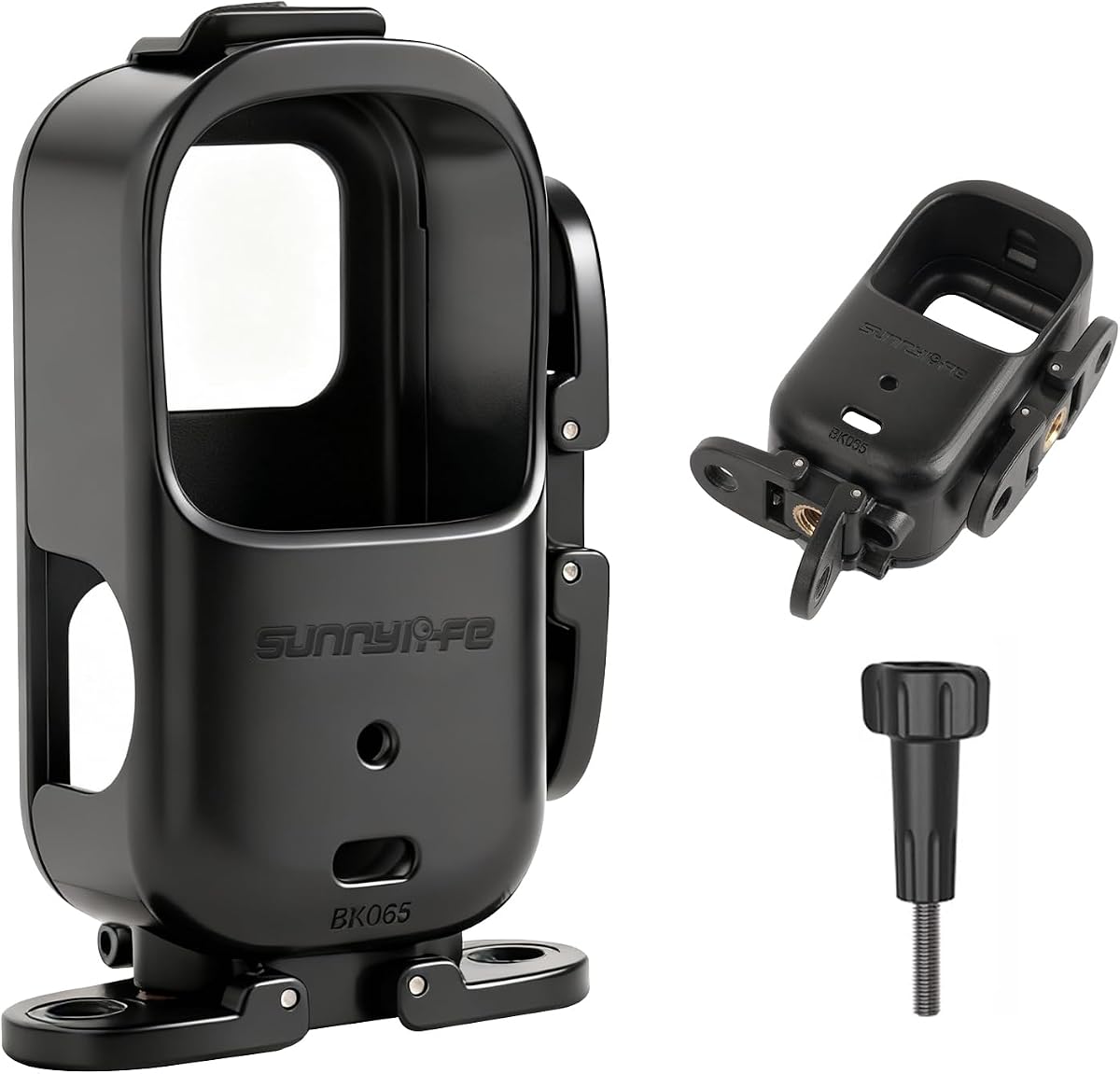
The JJC Upgrade Osmo Nano Cage is a compact expansion adapter rather than a traditional full-frame enclosure. At only 23 grams, it is designed to preserve the portable nature of the camera while adding more ways to connect accessories and explore unusual camera positions.
We may earn a commission when you buy through this link, at no additional cost to you.
One especially creative feature is the possibility of attaching the camera to a 1/4-20 extension rod for probe-lens-style perspectives. This can help creators reach into narrow spaces, frame miniature subjects, or position the camera close to the ground. The extension rod is not included, and using the cage with an original invisible selfie stick is recommended.
The design includes a cold shoe on top and another on the side, a rear 1/4-20 threaded hole, and a quick-release mount. Its full rear coverage includes a strong magnet that supports a stable connection, while the hollowed front remains compatible with the JJC Nano lens cap series. Because it is made from a compact polymer-style expansion design, it does not provide the same impact resistance as the aluminum cages in this guide.
This accessory is best for experimental and mobile creators who prioritize small size, filter compatibility, and creative positioning over heavy-duty drop protection. Its compatibility is specifically stated for the DJI Osmo Nano and Xtra Atto, so it should not be considered a universal cage.
Adding the expansion adapter to a compatible 1/4-20 extension rod can create miniature-style compositions or place the lens near a subject without building a large rig. It is a specialized option for creators experimenting with scale and unusual angles.
The rear coverage adds support without covering the front lens area, and compatible JJC filters can be replaced without removing the cage. The result is a compact expansion layer suited to travel and everyday recording.
We may earn a commission when you buy through this link, at no additional cost to you.
The Horizontal Vertical Mount Case focuses on making orientation changes fast and predictable. Its dual-mode adapter design allows the camera to move between horizontal and vertical shooting configurations, which is useful for creators switching between wide video, vertical social clips, and differently framed compositions.
We may earn a commission when you buy through this link, at no additional cost to you.
The connector supports a broad range of related accessories, including a selfie stick headband, chest strap, backpack clip, magnetic neck mount, visor bracket, car suction cup, bike clip, tripod, selfie stick, and extension pole. Its folding earpiece connectors are designed to fold when the camera is oriented vertically, reducing unnecessary protrusion in that configuration.
An easy-opening safety lock holds the frame securely to the camera body, while the structure adds minimal bulk and retains portability for travel and sports. The product does not provide the same rigid shell as a full aluminum cage, however, and the package includes only the cage mount rather than a camera or the listed compatible accessories.
This option makes the most sense for creators with an established collection of Osmo Nano mounting accessories who want a single adapter to connect them in different orientations. It is less suitable for someone seeking a self-contained protective system with substantial impact resistance.
The horizontal and vertical connectors let the user change shooting orientation in seconds. That convenience is valuable when moving between landscape footage and vertical content without slowing down for a complicated adapter change.
The broad accessory compatibility helps connect the camera to common travel, cycling, vehicle, chest, and head-mounted arrangements. It is particularly useful for users who already own several of the listed mounting systems.
We may earn a commission when you buy through this link, at no additional cost to you.
The Aluminum Split Protective Frame combines precision-machined aluminum with a design that can operate as a full set or with only the main body. This gives it a different balance between protection and modularity, allowing the user to retain or remove individual sections as the shooting situation changes.
We may earn a commission when you buy through this link, at no additional cost to you.
The open-frame geometry leaves the touchscreen, buttons, and charging port unobstructed. A cold shoe supports video lights and other compatible accessories, while a 1/4-20 threaded connection works with tripods and selfie sticks. Both horizontal and vertical orientations are supported, making the frame useful across different styles of content.
The quick-release design allows the protective structure to be installed or detached within seconds, reducing the time required to move between protected and bare-camera setups. The aluminum construction provides impact-resistant support, but the open frame does not surround the camera as completely as a full enclosure, and the two-piece arrangement may be more complex than a one-piece cage.
This frame is a strong option for creators who want CNC aluminum durability with the freedom to configure the camera in more than one way. It is particularly useful for travel and mixed production environments where complete protection, quick access, and tripod or light compatibility are all important.
The split construction can function as a complete protective set or be used with the main body alone. This makes it possible to match the amount of protection and bulk to the activity.
CNC machining supports a clean, precise structure, while the cold shoe, threaded hole, and orientation support give the frame a broad range of practical uses. Quick installation keeps the system moving at a natural pace.
We may earn a commission when you buy through this link, at no additional cost to you.
The right camera cage depends on how you shoot, how much protection you need, and which accessories you already use. Evaluate fit, mounting standards, access to controls, orientation handling, weight, and included components before choosing.
A full cage surrounds more of the camera and is generally the better choice when the Osmo Nano is carried in a crowded bag, used around vehicles, or taken into demanding outdoor environments. An open frame adds structural support around vulnerable areas while retaining the compact feel of the original system. A combined metal-and-silicone set offers a different balance, allowing the user to choose a rigid frame for support or a softer cover for scratch protection and comfortable handling.
In short, prioritize full coverage for drop-prone use and an open frame for minimal weight and quick access.
A cage that looks similar can still interfere with the Osmo Nano's magnetic system, lens area, controls, or rear attachments. Look for a design described as precision-engineered, molded to the original dimensions, or compatible with the camera's magnetic quick-release function. Products specifically limited to one module or one camera model should not be assumed to fit other devices, even if the physical dimensions appear similar.
Choose a cage that clearly identifies DJI Osmo Nano compatibility and preserves the connections you intend to use.
Cold shoes are useful for attaching microphones and LED lights, while a 1/4-20 threaded hole supports tripods, selfie sticks, gimbals, and quick-release plates. Some cages add magnetic adapters, side threads, or dedicated accessory ecosystems. Consider not only the mounts included with the cage, but also whether the camera can be oriented vertically or horizontally while attached and whether the cage interferes with a separate mount you already own.
Prioritize standard cold shoe and 1/4-20 connections if you want compatibility with the widest range of third-party accessories.
The Osmo Nano is valued partly for its compact modular design, so a heavy cage can undermine that advantage. The lightest options use minimal frames or compact polymer adapters, while full aluminum cages and integrated handles add more structure and bulk. Travel photographers, walkers, cyclists, and anyone who moves quickly between locations may place weight near the top of the decision-making process.
Choose the lightest cage that still provides the protection and mounting features required for your intended activities.
Protection is less useful when the cage blocks the touchscreen, recording controls, charging port, card slot, or battery. An open design or carefully positioned cutouts can preserve full operation without removing the frame. Battery replacement access is especially valuable for long sessions because it allows a swap without dismantling the entire cage. Also consider whether the orientation switch remains possible when the camera is installed.
Favor precise cutouts and full control access, especially if you record long takes or change batteries frequently.
Extended recording can generate heat, and an enclosing cage may affect how well air moves around the camera. Open-frame designs generally provide more ventilation, while products that specifically mention improved air circulation make that a central feature. Heat management matters most for continuous recording, demanding formats, and warm outdoor environments. It is less critical for brief, casual clips, but it remains a useful consideration when buying for professional use.
For long recording sessions, select an open or ventilated design and confirm that the frame does not restrict necessary cooling.
Some products are sold as a complete bundle, while others include only one frame or one adapter. The Osmo Nano Metal Cage includes a metal frame and silicone cover, the Handle Grip Cage Case includes a handle and hand strap, and several listings expressly exclude the camera and other accessories. Some manufacturer ecosystems also sell separate mounts, adapters, cases, and protectors. Compare the package list carefully so you know whether an extra purchase will be necessary.
Check what is included before ordering, especially when the listing refers to an ecosystem, a kit, or other compatible accessories.
A modular adapter may be ideal for unusual angles, filters, and lightweight travel. A full cage with multiple locking systems better suits active filming and accessory-heavy vlogging. An integrated handle is useful for street photography and stable low-angle placement, while a split frame gives users a choice between compact and fully protected configurations. Think about the shots you actually make rather than choosing solely by material or appearance.
Match the design to your workflow: modular for experimentation, full coverage for protection, and integrated handling for stable handheld shooting.
Begin by confirming that the cage is intended for the DJI Osmo Nano and checking whether it covers the main camera module, the full body, or a detachable combination of both. Before installation, inspect the frame, locking parts, threaded holes, and magnetic contact areas. Remove dust or debris from the camera and the cage so that neither the locking mechanism nor the mounting interface is obstructed.
Attach the cage according to its design, using the magnetic adapter, side lever, press lock, safety knob, or quick-release mechanism exactly as intended. Avoid forcing a connection that does not seat properly. After securing it, check that the camera is stable but not being pinched or compressed, and confirm that the screen, buttons, ports, microphone openings, and rear magnetic area remain accessible. If a tripod, selfie stick, light, or microphone is being added, connect that accessory before beginning the shot.
For care, clean the cage with a soft, dry or slightly damp cloth and avoid abrasive cleaners, excessive liquid, and forceful contact with the camera. Check silicone pads, foam, screws, locks, and threaded holes periodically because soft materials can collect dirt and threaded connections can accumulate debris. Store the camera in a dry protective area, and after use in rain, dust, or sand, remove loose particles before opening or operating the frame.
It depends on the design. Open-frame cages generally promote airflow and may be preferable for extended recording, while fully enclosing cages can retain more heat around the camera. Look for products that explicitly mention ventilation or open construction, and avoid placing the camera in a tight case while it is actively recording.
Yes, provided the cage preserves the Osmo Nano's rear magnetic connection. Some products are engineered with precise magnetic clearances, while others use a separate magnetic adapter. Check the product description for magnetic compatibility and confirm that the intended selfie stick attaches to the correct surface.
A full cage surrounds more of the camera and generally offers greater protection from bumps and impacts. An open frame adds structure around selected areas while preserving access, airflow, and a smaller overall profile. Full cages suit more demanding travel and action use, while open frames suit creators who prioritize low weight and native magnetic functionality.
No. Compatibility depends on the presence of a standard 1/4-20 threaded connection or a compatible quick-release interface. Several cages include one or more cold shoes and threaded holes, while the JJC expansion adapter places its threaded connection on the rear. Verify the mounting location and orientation before attaching a tripod.
A properly designed cage should leave the touchscreen and controls accessible. Products with precision cutouts or open frames are designed specifically for this purpose. Before purchasing, check whether the description mentions access to buttons, touchscreen functions, ports, the card slot, and battery replacement.
Not necessarily. A silicone cover can reduce scratches and may feel comfortable in the hand, but it does not replace the structural benefits of a rigid frame. Some users benefit from a two-piece set because they can choose soft protection for carrying and a metal cage for mounting, while others may need only one configuration.
Many designs support both orientations, but the exact method depends on the cage and the mount being used. Some include rotating or folding connectors, while others provide threaded points on multiple sides. Check the product details to confirm that the intended orientation remains accessible after installation.
Start by checking the package list, because some products include only the cage while others add a silicone cover, lanyard, screws, or hand strap. The camera is generally not included. You may also need a tripod, magnetic mount, light, microphone, or threaded adapter depending on your intended shooting setup.
The Aluminum Alloy Protective Frame Cage is the strongest all-around option because it combines dual-locking security, silicone padding, useful mounting points, and battery access without removal. The JJC Upgrade Osmo Nano Cage is the best compact and budget-oriented choice, while the SmallRig Full Cage offers the most complete premium expansion system for creators building a larger accessory ecosystem.
Prioritize exact compatibility, access to the controls you use, and a mounting method that matches your existing equipment. Heavy protection is most valuable for travel and action work, while frequent magnetic use and minimal bulk may favor a lighter open frame. A cage that fits your workflow will be used more often than one that offers more features than you need.
Before purchasing, confirm the current listing, package contents, dimensions, orientation support, and accessory requirements. Ratings and product availability can change, and seller details may vary. Reviewing the final product information and customer feedback at the time of purchase helps ensure that the cage you select fits both the camera and the way you shoot.