
Lenovo V15 Gen 4
4.5Editor score
Rugged military-tested design
300-nit anti-glare display
TPM 2.0 security
A laptop built to last should do more than survive a standard workday. It should tolerate frequent travel, maintain dependable performance, offer replaceable or serviceable components, and remain useful as its operating system and business requirements evolve. Longevity therefore depends on a combination of sturdy construction, capable hardware, manageable repair options, battery care, and manufacturer support.
This guide compares ten business-oriented and rugged laptops for longevity based on their documented construction, processor, memory, storage, display, connectivity, security, battery features, and included support. The selection covers premium ThinkBook and ThinkPad models, mainstream Dell and Lenovo systems, refreshed rugged equipment, and a large-screen HP designed for users who want long battery life without a premium price.
Each review highlights the reasons a model may remain useful over time, along with honest limitations such as older processors, modest memory, proprietary component considerations, or the nature of renewed equipment. Ratings and product details reflect the supplied listings, while prices and configurations can change, so shoppers should confirm current specifications and warranty terms before buying.
4.5Editor score

4.7Editor score

4.2Editor score
As an Amazon Associate we earn from qualifying purchases.
This side-by-side comparison highlights processor class, memory, storage, and display size for all ten models, making it easier to balance long-term durability with performance and portability.






The HP 17 inch Business Laptop combines a large anti-glare display, a Ryzen 5 processor, 16GB of memory, and a 512GB SSD in a design aimed at productivity. Its 4.5 rating reflects a generally favorable listing, and the most compelling longevity-related feature is its advertised long battery life. HP Fast Charge also reduces the disruption caused by long workdays and frequent travel.
We may earn a commission when you buy through this link, at no additional cost to you.
A 17.3-inch Full HD panel provides useful room for spreadsheets, documents, browser windows, and video calls. The full-size keyboard with numeric keypad is better suited to numerical work than a compact layout. Internally, 16GB of RAM gives the system a useful baseline for multitasking, while the SSD supports quicker startup and file access. The included 720p camera and digital microphones suit everyday conferencing.
The main compromises are size and uncertainty. This is a large laptop, so it will not be as easy to carry as a compact business model. The supplied information does not cite a military durability standard, detailed repairability rating, or onsite service, making it difficult to rank the chassis alongside purpose-built rugged systems. Its longevity case rests more on battery behavior, practical specifications, and HP Fast Charge than on documented physical toughness.
It is a sensible choice for students, home-office users, and general business professionals who value screen size, memory capacity, and battery endurance more than maximum portability. Buyers who expect to use the system for years should also maintain a regular backup routine, keep the battery partially charged when stored for long periods, and periodically install operating system and firmware updates. Overall, it is a balanced and accessible option in this guide.
The listing emphasizes long battery life and HP Fast Charge, making this model appealing for users who regularly work away from an outlet. Actual runtime depends on screen brightness, workload, wireless settings, and battery condition.
The 17.3-inch anti-glare display, 16GB of memory, and numeric keypad create a productive workspace for documents, browsing, and number-heavy tasks. The anti-glare finish also helps in bright environments.
We may earn a commission when you buy through this link, at no additional cost to you.
The Dell DC16251 stands out for practical enterprise support and a large 16-inch FHD+ display. Its 4.4 rating indicates strong customer reception, while the Intel Core 7 150U and 16GB of RAM provide a modern foundation for office applications, web-based work, and communication. The supplied listing does not specify storage, so buyers should confirm that detail before purchasing.
We may earn a commission when you buy through this link, at no additional cost to you.
Its 16:10 aspect ratio offers more vertical space than a conventional 16:9 panel, making side-by-side documents and long web pages easier to navigate. Dell ComfortView Plus is designed to reduce potentially uncomfortable blue-light exposure while preserving color. Adaptive thermal technology senses stable placement and adjusts power and thermals, a useful feature for extending efficient everyday operation.
One year of Dell Onsite Service is perhaps the strongest long-term ownership feature in the listing. If a covered hardware issue cannot be resolved remotely, Dell can provide support at the owner's home, office, or chosen location. That convenience can reduce downtime and avoid the need to transport a large laptop. The trade-offs are the unspecified storage configuration and use of Windows 11 Home rather than Pro.
Choose this model if you want a large, comfortable business display and value onsite service. It suits professionals, students, and hybrid workers who will use the laptop for extended sessions. Businesses requiring device-management, BitLocker, Remote Desktop, or other Pro-specific capabilities should verify their requirements, while buyers should also request confirmation of the SSD capacity and warranty coverage.
The included onsite service can be especially valuable for a 16-inch system that may be cumbersome to transport. It does not eliminate every possible repair issue, but covered hardware problems can be addressed without requiring an office visit.
ComfortView Plus and adaptive thermals address two common sources of everyday strain: uncomfortable viewing and inconsistent thermal behavior. Together with the spacious 16:10 screen, they support longer work sessions.
We may earn a commission when you buy through this link, at no additional cost to you.
This Lenovo V15 Gen 4 configuration combines an Intel Core i5-13420H processor with 16GB of RAM and a 512GB SSD according to its product title. It carries a 4.3 rating and is equipped with Windows 11 Pro, making it a practical choice for work, study, and small-business use where wired networking and a numeric keypad are useful.
We may earn a commission when you buy through this link, at no additional cost to you.
The processor provides eight cores, 12 threads, and boost performance up to 4.6GHz. That is adequate for document editing, spreadsheets, web browsing, conferencing, and moderate multitasking. The title identifies a 512GB SSD, while the supplied bullet list contains conflicting storage and memory figures, so the final retail configuration should be confirmed carefully before purchase.
Connectivity is a major strength. The listed ports include USB-A, USB-C, HDMI, RJ45 Ethernet, a headset connector, Wi-Fi, and Bluetooth. The wired Ethernet option is particularly useful in offices where wireless networks are inconsistent. Windows 11 Pro adds business-oriented functionality such as Remote Desktop, BitLocker, and organizational tools, although physical durability is not explicitly documented in the supplied information.
This laptop is a good match for students, administrators, office staff, and small businesses seeking Pro features without moving to a premium workstation. It may age well because the memory and storage are practical for demanding office workflows, but buyers should verify the exact internal specifications and consider a protective case for frequent mobile use. It is a sensible long-term choice when wired connectivity and Windows Pro matter most.
Windows 11 Pro supports BitLocker encryption, Remote Desktop, and organizational features that are unavailable in Home. Preconfigured layouts can also help users arrange applications more efficiently.
RJ45 Ethernet, HDMI, USB-A, and USB-C cover common office accessories. The numeric keypad and headset connection make the layout particularly practical for office workers.
We may earn a commission when you buy through this link, at no additional cost to you.
The Lenovo V15 with Ryzen 5 7520U is the most balanced choice in this guide, earning the highest rating among the new-style business listings at 4.7. Its strongest longevity credentials are a MIL-STD-810H-tested chassis, 16GB of DDR5 memory, a 512GB PCIe NVMe SSD, and a broad set of modern ports.
We may earn a commission when you buy through this link, at no additional cost to you.
MIL-STD-810H testing indicates that the design has been evaluated against demanding conditions such as temperature, pressure, humidity, and vibration. That makes it better suited to travel and demanding work environments than an ordinary office laptop. Internally, DDR5 memory and NVMe storage provide a modern foundation that should handle routine multitasking comfortably for years.
The Ryzen 5 7520U is not the newest processor in the group, and no detailed repairability rating is supplied. The listing also states that the computer has been resealed to upgrade the system and carries a one-year Lenovo warranty. Prospective buyers should therefore examine the exact warranty terms and condition language. These are reasonable trade-offs for the strong combination of construction, memory, and storage.
This is the most convincing general recommendation for owners who want durability without a premium workstation price. It suits students, educators, professionals, and small businesses that move between offices, homes, and client locations. The 15.6-inch anti-glare display, full-size keyboard, numeric keypad, Wi-Fi 6, Bluetooth 5, and privacy shutter add practical value. For a laptop expected to remain useful across multiple hardware cycles, it is the strongest overall balance in this list.
MIL-STD-810H testing provides stronger evidence of physical resilience than a generic business label alone. It does not make the laptop immune to damage, but it supports confidence for travel and demanding everyday use.
Sixteen gigabytes of DDR5 memory and a 512GB NVMe SSD are well matched to office multitasking. The storage uses the common PCIe M.2 form factor, which can make capacity upgrades more practical than with less flexible designs.
We may earn a commission when you buy through this link, at no additional cost to you.
The ThinkBook 16 Gen 8 is the premium selection, offering a 16-core Intel Core Ultra 7 255H, 32GB of DDR5 memory, and a 1TB PCIe NVMe SSD. Its 4.2 rating may be the lowest among several current business configurations, but the supplied specifications make this a powerful, expandable platform for demanding long-term owners.
We may earn a commission when you buy through this link, at no additional cost to you.
The 16-inch WUXGA IPS display provides a 16:10 ratio, anti-glare treatment, and 300 nits of brightness. Intel Arc 140T graphics add capability for video editing, CAD, and other creative workloads. A privacy shutter protects the 1080p camera, while Windows 11 Pro, TPM 2.0, BitLocker, and a fingerprint reader provide an enterprise-oriented security foundation.
Connectivity is particularly strong. Thunderbolt 4 supports high-speed transfers, charging, and display output, while two USB-A ports, HDMI 2.1, Gigabit Ethernet, Wi-Fi 6E, Bluetooth 5.3, an SD card reader, and an audio jack cover a wide range of needs. The Arctic Grey aluminum chassis weighs 3.75 pounds and measures 0.69 inches thick, balancing durability with portability.
This model is best for professionals, creators, and advanced students who can use the additional processing power, memory, storage, and connectivity. Its high specifications offer more headroom for demanding work than mainstream alternatives, reducing the likelihood that intensive tasks will overwhelm it during its first ownership cycle. The trade-off is a higher acquisition cost, and buyers should still seek a clear replacement and repair policy if long-term component changes are important.
The 32GB of DDR5 memory and 1TB SSD give demanding applications considerable room. Combined with Intel Arc graphics, the configuration suits content creation, data analysis, and extensive multitasking.
Thunderbolt 4, HDMI 2.1, USB-A, Ethernet, Wi-Fi 6E, and an SD reader cover most professional workflows. This broad selection can reduce the need for adapters and simplify a multi-monitor setup.
We may earn a commission when you buy through this link, at no additional cost to you.
The Lenovo V15 Gen 4 Ryzen 5 7430U pairs a business-oriented chassis with a 4.5 rating and a useful 15.6-inch IPS display. Its longevity appeal lies in documented military-grade toughness, responsible-material claims, and a range of security features, although the listed 8GB of memory is the most significant limitation for long-term ownership.
We may earn a commission when you buy through this link, at no additional cost to you.
The display produces 300 nits of brightness, uses an anti-glare finish, and has an 88-percent screen-to-body ratio. It should be easier to use in bright offices than a dimmer panel. Lenovo Smart Appearance, intelligent noise cancellation, and Dolby Audio improve the video-call experience, while a webcam privacy shutter adds a simple physical layer of privacy.
The machine is described as tested against harsh temperatures, pressure, humidity, and vibration. USB-A, USB-C, USB 2.0, HDMI, Ethernet, and an audio jack provide flexible connectivity. Software-based TPM 2.0 encryption and a Kensington NanoSaver lock slot add protection. The tradeoff is that 8GB of RAM and integrated Radeon graphics may constrain heavy multitasking or graphics-heavy applications sooner than the other configurations here.
This V15 is a sensible choice for users prioritizing physical resilience, security, and a bright display over maximum performance. It could serve well in education, office work, travel, or family use, and its sturdy construction may withstand more abuse than a conventional consumer notebook. Owners planning to keep it for many years should check whether the memory can be upgraded and avoid making that assumption until the listing confirms the internal design.
A camera shutter, TPM 2.0, and a Kensington lock slot cover three practical security needs. They are useful for shared offices, travel, and managed business deployments.
The 300-nit anti-glare IPS panel improves visibility in offices and classrooms. Its wide screen-to-body ratio preserves a conventional 15.6-inch diagonal without an overly bulky appearance.
We may earn a commission when you buy through this link, at no additional cost to you.
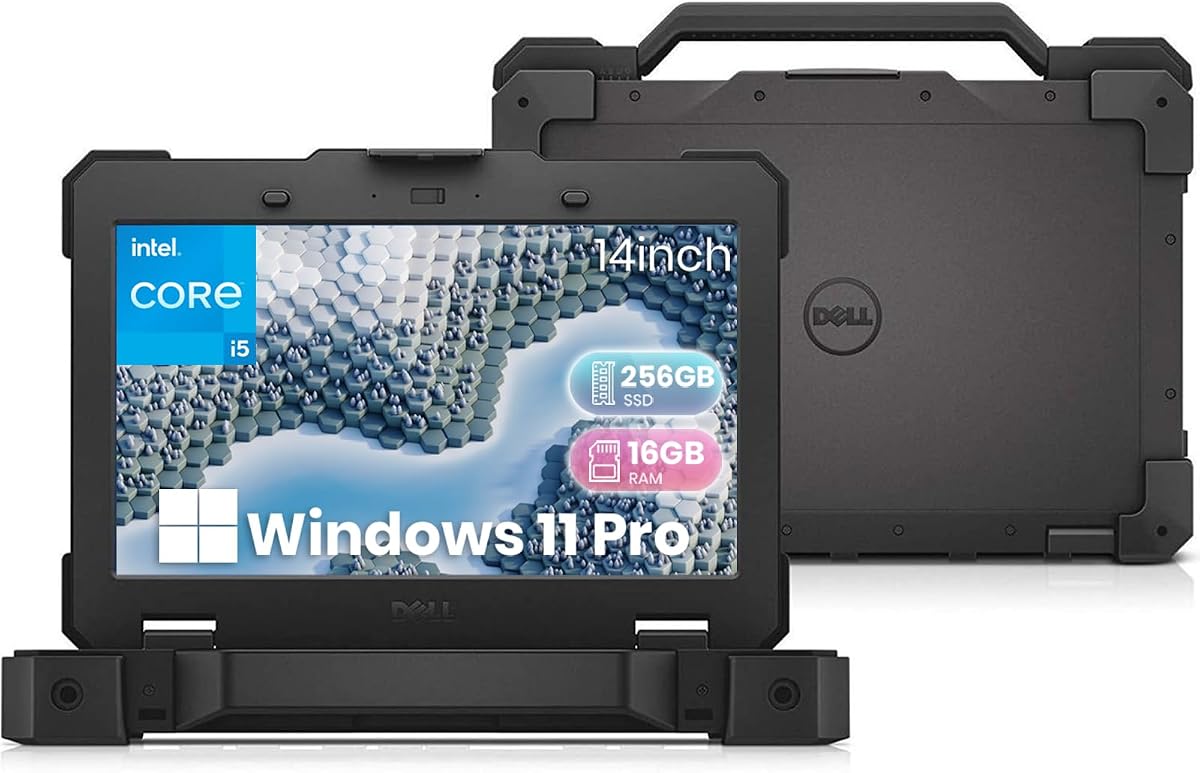
The renewed Dell Latitude Rugged 5420 has the highest listed rating in the guide at 5.0 and is tailored to field service, construction, warehousing, automotive diagnostics, and other demanding environments. Its reinforced chassis and sunlight-viewable 14-inch touchscreen are more meaningful longevity features than a fashionable design or thin profile.
We may earn a commission when you buy through this link, at no additional cost to you.
The 1920-by-1080 touch display provides clear visuals in bright conditions and adds practical value for inspections, mapping, equipment operation, or field forms. Sixteen gigabytes of DDR4 RAM and a 256GB M.2 SSD allow quick startup and responsive multitasking. USB 3.1, USB-C, HDMI, RJ45 Ethernet, and a universal audio jack provide the connectivity commonly required in mobile workplaces.
Windows 11 Pro adds security and management tools appropriate to enterprise deployments. The Intel Core i5-8350U is an older 8th-generation processor, and 256GB of storage is modest for extensive files. Because this is a renewed system, buyers should inspect the condition description, battery health expectations, included accessories, and available warranty carefully. A high listing rating does not eliminate normal variation among renewed units.
Choose the Latitude Rugged 5420 when the operating environment matters more than processor recency. Its compact touchscreen, wired connectivity, and rugged construction make it particularly suitable for technicians, mobile teams, and organizations maintaining standardized equipment. For ordinary office work, a lighter consumer laptop may be more comfortable, but for repeated field exposure, the Rugged 5420 offers a more defensible long-term durability case.
A reinforced chassis is designed to tolerate the kinds of impacts and handling associated with construction sites, warehouses, and mobile service work. The rugged construction is more valuable in those settings than slimness.
The outdoor-viewable Full HD touchscreen remains legible in bright conditions and can reduce the need for a separate device in the field. It is particularly convenient for workers wearing gloves or needing rapid touch-based controls.
We may earn a commission when you buy through this link, at no additional cost to you.
The Dell Latitude 5414 Rugged is built for unusually demanding conditions and carries a 5.0 listing rating. Its military-grade durability standard, resistance to drops, spills, dust, and extreme temperatures, and broad port selection make it an interesting choice for industrial work, although its sixth-generation Intel Core i5 processor is very dated.
We may earn a commission when you buy through this link, at no additional cost to you.
The supplied configuration includes 16GB of DDR4 memory, a 256GB SSD, and Windows 11 Pro. That combination can still support office documents, reporting, browsing, and basic enterprise tasks. Connectivity is a major strength: HDMI, VGA, three USB 3.0 ports, two USB 2.0 ports, RJ45 Ethernet, and an RS-232 serial interface can connect legacy equipment without numerous adapters.
The renewed listing states that the system was professionally inspected, tested, and restored by qualified suppliers, shows minimal wear, and includes a power adapter with a 90-day service. These details provide useful protections, but the processor and battery are both aging components. Long-term performance may therefore depend more on replacing the battery and confirming service history than on the system's original specification.
This laptop is best for industrial technicians, facilities teams, warehouses, or users maintaining older serial equipment. It is less suitable for buyers who need modern graphics, efficient battery operation, or many years of processor headroom. The rugged shell and plentiful ports can nevertheless extend the machine's useful life where environmental durability and legacy compatibility outweigh modern performance.
Documented resistance to drops, spills, dust, and temperature extremes makes the 5414 suitable for sites where an ordinary business laptop would be vulnerable. It is a specialized tool rather than a general-purpose prestige machine.
VGA and RS-232 connections remain useful in industrial and diagnostic environments where newer laptops may require inconvenient adapters. The mix of legacy and modern USB connectivity increases deployment flexibility.
We may earn a commission when you buy through this link, at no additional cost to you.
The Lenovo V15 Ryzen 7 is a specification-heavy workhorse with 40GB of RAM, a 1TB PCIe NVMe SSD, and an AMD Ryzen 7 5825U processor. Its 4.2 rating is solid, while the unusual amount of memory gives it unusually strong multitasking headroom compared with most business laptops in this guide.
We may earn a commission when you buy through this link, at no additional cost to you.
The eight-core, 16-thread processor has a listed boost frequency of 4.5GHz and integrated Radeon graphics. Together with 40GB of memory, it is well suited to many browser tabs, office applications, communication tools, and concurrent background work. A 1TB NVMe drive also reduces the need to manage local storage carefully, while Windows 11 Pro adds BitLocker, Remote Desktop, and business management features.
The 15.6-inch Full HD display, numeric keypad, webcam, Wi-Fi, and Bluetooth cover routine needs. Connectivity includes USB-C, two USB-A connections, HDMI, RJ45 Ethernet, and a headset jack. The key unanswered longevity question is physical durability: unlike the V15 configurations with explicit military testing, this listing does not provide a corresponding standard. The unusual 40GB memory configuration also deserves confirmation in the final retail listing.
This model is attractive for office-heavy users, students, creators running lighter applications, and teams that want generous memory without immediately approaching a premium workstation. It can remain comfortable under a demanding workload because the memory and storage are well provisioned. Those who regularly travel or work in harsh environments should instead consider a Lenovo V15 with documented toughness or a Dell Rugged system.
Forty gigabytes of RAM offers more room for browser-heavy workflows, large document sets, and multiple background applications. This headroom can delay the point at which the laptop feels constrained as software demands grow.
A 1TB NVMe SSD provides a practical balance of capacity and speed for business documents, media, and installed applications. The common M.2 form factor also supports more flexible servicing when the exact configuration permits.
We may earn a commission when you buy through this link, at no additional cost to you.
The ThinkPad L16 combines enterprise durability, modern Intel hardware, and unusually broad configuration choices. With a 4.4 rating, MIL-STD-810H certification, a 16-inch 400-nit anti-glare display, and a listed battery life of up to ten hours, it is designed to remain productive through demanding travel and office cycles.
We may earn a commission when you buy through this link, at no additional cost to you.
The Intel Core Ultra 5 225U provides 12 cores with boost performance up to 4.8GHz. Memory choices span 8GB to 64GB DDR5, while storage options range from 256GB to 2TB M.2 NVMe SSDs. This configurability allows owners to select capacity that matches present needs and creates a useful upgrade path, provided the seller and warranty support the chosen configuration.
Its display supports up to three external monitors, including 4K at 60Hz through HDMI and up to 8K at 60Hz through Thunderbolt 4. Two Thunderbolt 4 ports, two USB-A 3.2 ports, HDMI 2.1, Ethernet, Wi-Fi 6E, Bluetooth 5.3, a fingerprint reader, a backlit keyboard, and a numeric keypad make it a capable mobile office platform. The listing states that 80 percent of the battery can be charged in one hour.
The ThinkPad L16 is best for business professionals, students, and organizations that need a durable laptop with repair-friendly, scalable specifications. It is less convenient for shoppers who want one clearly defined configuration, because the product title lists several memory and storage choices. Confirming the exact hardware, battery condition, resealed-computer disclosure, and one-year seller warranty is essential before purchase.
DDR5 memory and M.2 NVMe storage are sensible foundations for a long ownership period. Available capacities range from practical mainstream levels to 64GB RAM and 2TB storage, allowing the owner to avoid paying for unused capacity.
The listed ten-hour battery target and one-hour 80-percent fast charge can make the L16 practical for travel and long meetings. Actual performance varies with workload, display settings, wireless activity, and battery health.
We may earn a commission when you buy through this link, at no additional cost to you.
Long-term laptop value depends on more than processor speed. The most durable ownership plan considers physical construction, component standards, battery endurance, security, cooling, support, and whether the hardware can be upgraded when needs change.
Choose documented toughness for travel, field work, or shared environments. Prioritize warranty coverage and protective accessories for ordinary office use.
Favor newer or efficient generations when the laptop must last many years. Older processors can still be suitable for lightweight work.
Prioritize 16GB or more and common M.2 storage. Confirm whether memory and drives can actually be replaced.
Compare claimed runtime, charging speed, and repair options. Keep the battery between moderate charge levels during long storage.
Choose brightness, anti-glare treatment, size, and aspect ratio according to your work environment. Avoid choosing a large display purely for specification appeal.
Match ports to current and future accessories. Include USB-A and Ethernet if legacy equipment matters.
Use hardware-backed encryption, login protection, and a physical camera shutter. Confirm that business management features remain available.
Compare warranty length, onsite coverage, and upgrade access. Treat renewed-condition terms as part of the product itself.
Start with a sensible backup routine. Keep important files synchronized to more than one location, with at least one copy away from the laptop. Use cloud storage for active documents, an external drive for large archives, and scheduled system backups for recovery. A physical backup is valuable when ransomware, accidental deletion, or a storage failure affects synchronized files.
Protect the hardware during use. Keep liquids away from openings, avoid placing heavy objects on the keyboard, use a ventilated surface, and protect the screen from direct pressure. A padded sleeve and a case for vehicles or construction environments can reduce impact. For a renewed or older system, inspect the battery for swelling and replace it promptly if the chassis becomes uneven or unusually warm.
Maintain the software and battery with equal attention. Install operating system, browser, firmware, and application updates promptly, enable trusted endpoint protection, and restart periodically. Avoid leaving a fully charged or fully depleted battery stored for months; moderate charge is generally more suitable. Back up before major upgrades, and remove accumulated files and unused applications to preserve responsiveness.
Longevity depends on a combination of sturdy construction, repairable components, adequate memory and storage, manageable thermals, dependable support, and battery care. A durable body alone cannot compensate for an underpowered processor or an internal battery that is difficult to replace. The best long-term purchase balances physical resilience with specifications that will remain adequate for expected workloads.
Rugged models are usually better for travel, industrial work, warehouses, and other environments where drops, dust, spills, or temperature changes are likely. For typical office use, a well-built business laptop may offer a lighter chassis, newer display, and better battery experience. Rugged construction should match the user's environment rather than serve as a substitute for a capable computer.
Sixteen gigabytes is a practical minimum for general business use, many browser tabs, and office applications. Thirty-two gigabytes offers better headroom for heavy multitasking, large data sets, and demanding applications. The supplied Lenovo V15 Ryzen 7 configuration lists 40GB, which is unusually generous, but buyers should confirm the final memory arrangement and upgradeability.
A renewed rugged laptop can be compelling when physical durability and legacy connectivity matter more than processor recency. Renewed systems can vary in cosmetic condition, battery health, and included accessories, so buyers should review the inspection details and service coverage. A newer business model is usually better for graphics-intensive work, compactness, and longer remaining software support.
Look for clear coverage, a meaningful support period, and convenient repair options. Dell's one-year onsite service can reduce downtime for covered hardware issues, while other models may benefit from standard manufacturer or seller warranties. A warranty is most valuable when its exclusions, battery terms, shipping costs, and turnaround expectations are clearly understood.
Not automatically. Faster processors can improve responsiveness, but thermals, battery condition, memory, storage, build quality, and repair support also determine useful life. The Core i5-6300U in the Dell Latitude 5414 is much older than modern alternatives, yet its rugged construction may be the better choice for a demanding industrial environment. Match the hardware to the work and operating conditions.
Avoid prolonged exposure to high heat, use the manufacturer's charger, and reduce unnecessary background activity. For long-term storage, leave the battery at a moderate charge rather than fully depleted or always plugged in. Periodic software updates and power checks can also reveal battery problems early. A swollen or unusually hot battery should be inspected and replaced by a qualified technician.
Windows 11 Pro adds features that can remain valuable in organizational environments, including BitLocker encryption, Remote Desktop, device management, and business layout options. It is especially useful for work computers and students who may need advanced networking or security features. Home editions can still serve everyday personal tasks, but Pro offers a more complete long-term management foundation.
The Lenovo V15 with Ryzen 5 7520U is the strongest overall choice because it combines a 4.7 rating, documented MIL-STD-810H testing, 16GB of DDR5 memory, a 512GB NVMe SSD, and extensive connectivity. The Lenovo V15 Gen 4 Ryzen 5 provides a rugged lower-cost alternative, while the ThinkBook 16 Gen 8 is the premium choice for users who need more processing power, memory, storage, and display flexibility.
For harsh environments, the Dell Latitude Rugged 5420 and Latitude 5414 are more compelling than their processor specifications may initially suggest. Their reinforced designs, field-oriented displays, and legacy connectivity can preserve usefulness where ordinary laptops would be vulnerable. Across every category, prioritize the combination your environment demands: proven durability, serviceability, battery support, sufficient headroom, and a warranty you understand.
Finally, confirm the current configuration and price before ordering because component combinations and retail terms can change. Check memory, storage, processor, screen size, operating-system edition, included accessories, and warranty coverage. With those details verified, you can select the longest-lasting laptop for your needs without assuming that the largest specification or most rugged label is automatically the right choice.