
Anozer Tablet Stand
4.6Editor score
Folds to pocket-friendly size
Adjustable 3.16 to 6.26-inch height
Compatible with screens up to 15.6 inches
A portable monitor stand can transform a tablet, iPad, or secondary display into a comfortable, hands-free workstation. The right model balances stability, viewing-angle control, device compatibility, and a genuinely manageable folded size, making it useful at home, in the office, or while traveling.
We compared all ten stands using the specifications and feature details provided for each product. The guide covers adjustable arms, clamp and weighted-base designs, screen-size limits, load capacity, cable management, folding mechanisms, and practical scenarios ranging from desk ergonomics to mobile work.
Each selection shows what makes the stand distinctive, where its design is strongest, and which users will benefit most. Rankings reflect the supplied product information, while product availability, features, and prices can change, so readers should verify the latest listing before buying.
4.6Editor score

4.7Editor score

4.4Editor score
As an Amazon Associate we earn from qualifying purchases.
The comparison below covers each stand's core design, adjustment range, device support, and portability, making it easier to identify the right model for a fixed desk or a mobile workstation.


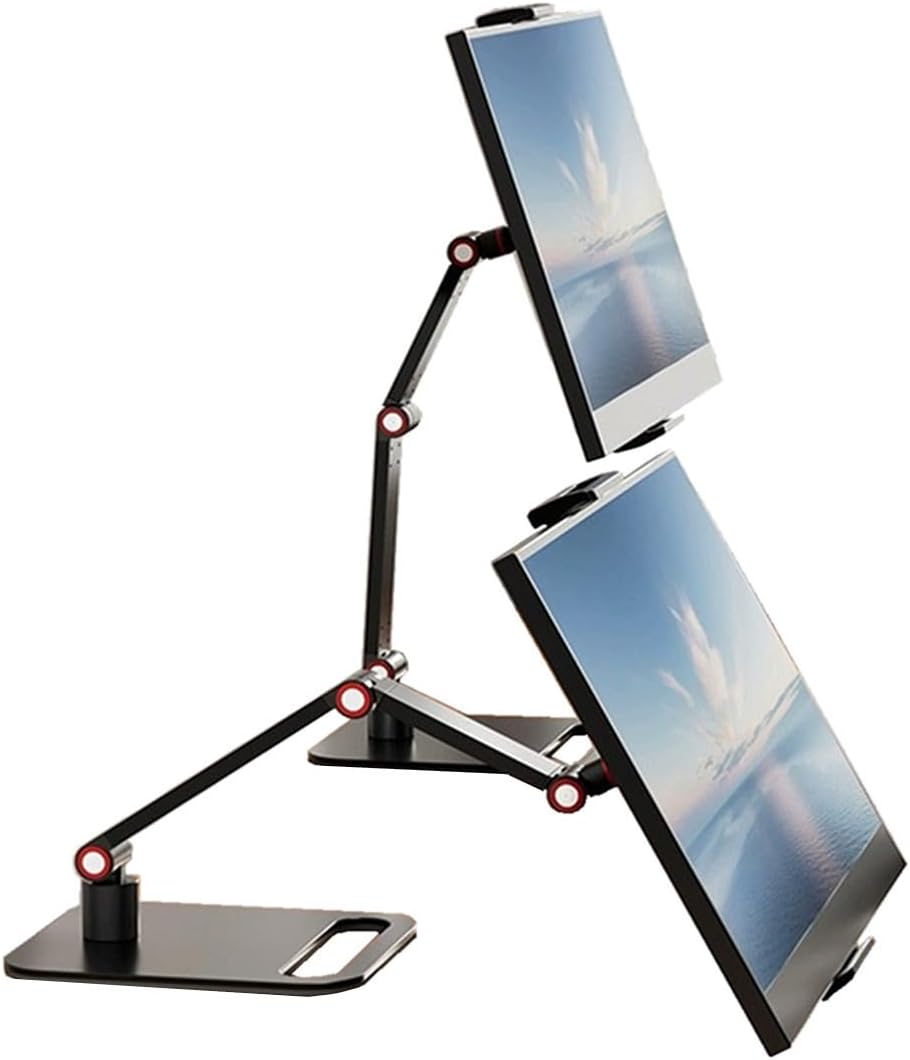


The Urmust Portable Monitor Stand combines a broad device range with an articulated desktop design and a supplied 4.5 rating. It supports screens and tablets from 4.9 to 18.5 inches, giving it unusual flexibility for a compact arm-style stand and making it suitable for more than one kind of daily setup.
We may earn a commission when you buy through this link, at no additional cost to you.
Its aircraft-grade aluminum alloy construction provides a more substantial feel than a basic plastic holder. Height and angle can be adjusted to suit the user, while the anti-slip base is intended to keep both the stand and device steady. Integrated cable clips are especially useful when the supported screen receives power or video through cables that otherwise gather behind the display.
There are two notable limitations. The stated load capacity is 2.76 pounds, which is lower than the capacity of several other stands in this guide, and the product is specifically designed for flat, stable surfaces rather than headboards or other uneven supports. Users must also follow the instruction to check component completeness and tighten the included wrench on the joints when necessary.
This is an excellent choice for a mixed-device household, a user who wants to alternate between a tablet and a portable monitor, or anyone who values tidy cable routing. It is less compelling for a heavier display that approaches the load limits of more robust competing designs, but within its stated envelope, the combination of adjustability and broad compatibility is difficult to ignore.
The 4.9-to-18.5-inch support range is one of the Urmust's strongest distinctions. It can accommodate iPads, Galaxy Tabs, iPhones, Kindles, and larger portable monitors, allowing one holder to serve several roles without changing the basic desktop arrangement.
Adjustable joints let users raise the screen and alter its angle, while the anti-slip base helps limit movement during typing or touch interactions. The included wrench is intended for tightening the joints when sagging or looseness appears.
We may earn a commission when you buy through this link, at no additional cost to you.
The LISEN iPad Stand is a lightweight, highly portable choice for users who want a dependable tablet holder without carrying a larger articulated arm. It earns a 4.6 rating and folds flat for travel, making it particularly appealing for remote work, business trips, and temporary setups in shared spaces.
We may earn a commission when you buy through this link, at no additional cost to you.
Instead of relying on magnets or retaining clips, the stand uses a gravity-based system in which the device's backward tilt helps keep it secure. The supporting angle can be adjusted, and a bridge screw provides another way to manage looseness after extended use. A metal panel with anti-slip silicone on the underside adds stability to the high-quality ABS plastic construction.
Compatibility extends from 4.0- to 15.9-inch devices, but the holder is not designed for heavy-duty cases, and device width must remain below 0.7 inches. Smartphones are supported only in landscape mode. Those restrictions make it less versatile for users who routinely use thick protective cases or need a portrait phone mount.
For students, travelers, and casual users, the LISEN is a practical way to elevate a tablet for video calls, reading, recipes, or entertainment. Its simple support system and compact fold are strong benefits, while those needing a broader arm, a larger case, or unrestricted phone orientation should look to one of the more adjustable metal stands.
The stand folds into a pocket-size form, so it can move easily between a home office, a travel bag, and a borrowed desk. Its simple structure also reduces the number of separate parts users need to carry between locations.
The gravity-based design keeps the tablet in place through its back tilt and offers stable operation when tapping or typing. This avoids dependence on magnetic accessories, which may be useful for users who prefer a stand that does not require a particular attachment method.
We may earn a commission when you buy through this link, at no additional cost to you.
The Foldable Portable Monitor Stand is a versatile mobile-work option with a 4.6 rating. It can support devices from 4.7 to 17 inches, offers a 10.8-to-17.3-inch height range, and provides 360-degree vertical rotation with 45-degree horizontal tilt for more precise screen positioning.
We may earn a commission when you buy through this link, at no additional cost to you.
Setup is unusually convenient: the stand unfolds in about one second and requires no tools, while its metal structure and four high-friction silicone pads provide stable support on a flat desk. A rear handle is designed to make the clamp easier to open while reducing the chance of pinched fingers, and the listed 4.4-pound capacity comfortably accommodates many portable monitors and tablets.
The main tradeoff is weight. At 1.2 pounds, it is heavier than a small foldable tablet stand, although that weight contributes to stability and makes it suitable for a more substantial portable display. Compatibility also depends on the device's width and thickness, so buyers with unusually large frames or thick cases should compare the stated dimensions before ordering.
This stand is well suited to business travelers, students, programmers, designers, and anyone who wants to switch quickly between home, hotel, café, and shared-office setups. It is a particularly balanced choice for users who need more adjustment than a basic reading stand but still value a one-second folding process.
A generous height range and broad tilt let users bring the display closer to eye level, whether working, studying, reading, or joining a call. The stated goal of reducing neck and shoulder strain makes this useful for extended desk sessions.
The one-second folding process and lack of required tools make setup and packing uncomplicated. Its stated use cases include business trips, camping, café work, remote work, and temporary dual-screen arrangements.
We may earn a commission when you buy through this link, at no additional cost to you.
The Portable Monitor Holder stands out for its long, flexible arms and a stated load capacity of 6.5 pounds, the highest among the products featured. With a 4.5 rating, it offers an appealing combination of substantial support and smooth directional positioning for compatible portable monitors.
We may earn a commission when you buy through this link, at no additional cost to you.
Its two long arms can be adjusted for preferred height and position, while the rotatable design allows the screen to swivel left or right. The aluminum alloy construction is intended to remain stable and durable, and the anti-slip pad beneath the stand helps prevent scratches and sliding on the desktop surface.
Adjustment is less immediate than designs with hand-operated levers. A screwdriver is included so users can tighten each joint if the arms become loose, and the clip extends only from 4.9 to 10.2 inches. Although the product is marketed for screens up to 17.3 inches, the supported screen's geometry must still fit the holder's working limits.
This model is best for a user with a relatively heavy portable monitor who values a strong base, long reach, and easy swiveling more than tool-free setup. It is also a sensible fixed-desk option for multitasking, where repositioning a second display between tasks can reduce the need to pick it up and move it manually.
A 6.5-pound capacity gives the stand a comfortable margin over the weight of many portable monitors. That makes it relevant to buyers who want a substantial arm and do not want to be constrained by a lighter-duty maximum load.
The 360-degree rotation makes it easier to share a screen, reposition a display, or shift attention between tasks. A desktop-based setup benefits most from this lateral movement, especially when the screen is used alongside a laptop.
We may earn a commission when you buy through this link, at no additional cost to you.
The Anozer Tablet Stand is a well-rounded 4.6-rated model for users who want a stable holder that can also travel. It supports 4.7- to 15.6-inch devices, includes a weighted metal base, and collapses to a pocket-size form for business trips and remote work.
We may earn a commission when you buy through this link, at no additional cost to you.
The stand can extend from 3.16 to 6.26 inches and reach a total height of 8.18 inches. Its clip tilts from 90 to 135 degrees, allowing users to choose between a more upright viewing position and a lower, relaxed angle. A silicone-covered pad, a wider rubber hook, and four rubber feet help protect the device and reduce movement during touch input.
Its primary limitation is the 15.6-inch maximum, which excludes larger portable displays such as 16-, 17.3-, or 18.5-inch models. It also offers less vertical travel than the larger articulated stands in this guide. These constraints do not diminish its value for tablets, e-readers, and mainstream portable monitors, but they narrow its use for oversized screens.
The Anozer is a strong recommendation for students, remote workers, and frequent travelers who use an iPad, Kindle, Galaxy Tab, Surface, smartphone, or 15.6-inch portable monitor. It delivers the most useful mix of weighted stability, angle control, and compact storage in this roundup.
The broad base and metal weighting help resist tipping without requiring the full-size structure of a desk clamp. This makes the stand useful on a lap desk, coffee-shop table, or temporary workstation where stability is still important.
The 90-to-135-degree tilt range covers both upright reading and a more reclined viewing position. Adjusting the screen can also support a more comfortable relationship between the display and the user's posture during long sessions.
We may earn a commission when you buy through this link, at no additional cost to you.
The Jakeko Magnetic Portable Monitor Stand provides one of the most sophisticated attachment systems in the guide. It can connect magnetically using the included pad or through a 75-by-75-millimeter VESA plate, and its stated compatibility extends across portable monitors from 8.3 to 18.5 inches.
We may earn a commission when you buy through this link, at no additional cost to you.
Mechanical gears allow 360-degree base rotation, 180-degree lower-arm movement, 360-degree joint movement, and 360-degree upper-arm positioning. A thumb wrench at the middle joint changes tension by hand, while cable clips keep power and display cables routed along the arm. The stand folds in two stages for travel and stores its matching wrench in a dedicated slot within the base.
The magnetic system is not MagSafe-compatible, and iPads need the supplied round metal sheets. Users should therefore check their device's mounting arrangement before purchase. A 4.4 rating indicates generally favorable reception, though the attachment and compatibility details require more attention than they would with a universal clamp.
This is an excellent premium option for users who alternate between compatible VESA monitors and magnetic displays, especially creators, remote workers, and frequent travelers. The wide articulated movement also makes it valuable when a display needs to move between landscape, portrait, viewing, and presentation positions without changing stands.
A VESA plate offers a secure, standardized option for compatible monitors, while the magnetic pad provides a quick connection path for supported portable screens. Buyers should verify mounting holes and device dimensions before ordering.
The geared joints provide several independent axes of movement and tactile control. This is useful for shared desks, recorded presentations, portrait reading, and workspaces where the screen must move frequently without being removed.
We may earn a commission when you buy through this link, at no additional cost to you.
The COOPER FlexArm Tablet Holder is built for users who want to reclaim desk space. Its 24-inch, two-segment arm can lift a supported device to eye level, swivel around the work area, and rotate between portrait and landscape orientations without occupying a large portion of the desktop.
We may earn a commission when you buy through this link, at no additional cost to you.
The silicone-padded jaws open from 4.7 to 10 inches and can hold devices weighing up to 3.3 pounds. The aluminum-alloy segments use three re-tightenable tension joints, and the full-metal desk clamp grips surfaces up to 3.5 inches thick. Integrated cable-holder clips help manage the wires connected to a tablet or portable display.
Its clamp format creates important limitations. It is not intended for bed frames or round posts, and users must have a compatible firm desk edge. The 10-inch jaw opening is narrower than the broad compatibility ranges offered by several universal stands, even though the product listing also refers to 17-inch portable monitors.
The FlexArm is well suited to hybrid workers, video-call users, creators, readers, and anyone with a dedicated desk who wants a screen near eye level. It is less appropriate for a bed, couch, round pedestal, or a very large display, but its clamp-based construction is a smart way to create a flexible workstation without a permanent base.
The clamp attaches to the desk rather than taking up a large footprint on top of it. That arrangement is useful when a laptop, keyboard, notebook, and external display all need to share the same working area.
The tall two-segment arm and broad swivel range can bring the screen closer to eye level. This may be especially helpful for prolonged calls, document review, recipe viewing, and hands-free reading.
We may earn a commission when you buy through this link, at no additional cost to you.
The Portable Monitor Stand Large Clamp is designed around rigidity, large-screen support, and quick adjustments. Its 4.4 rating reflects a feature set aimed at users who dislike the flex or vibration sometimes associated with lightweight stands, particularly when supporting larger portable monitors.
We may earn a commission when you buy through this link, at no additional cost to you.
Instead of hollow tubing, the body is described as precision die-cast industrial-grade aluminum alloy. An integrated seven-shape lever provides substantial locking force with one press, eliminating the need to hunt for a tool during height changes. The 1.9-pound counterweighted base helps prevent tipping, and a 360-degree geared base offers tactile rotation for changing screen orientation.
The stand supports devices from 6.5 to 18.5 inches and up to 4.4 pounds, so it is broad enough for large portable displays, tablets, e-readers, and drawing devices. It does not support smaller phones, and the 1.9-pound base means it offers a thinner 2.2-inch fold but not the lightest possible travel package.
This model is a strong fit for users who regularly work with large portable monitors and value a firm, vibration-resistant support over minimal weight. Its lever-based adjustment and compact fold also suit repeated changes between hotel desks, shared spaces, studio tables, and home workstations.
The one-piece die-cast construction is intended to limit flex, vibration, and sagging. Those attributes are particularly relevant when a larger portable monitor is touched, adjusted, or used with demanding applications.
The integrated lever delivers high mechanical leverage with a single press. Pre-tensioned upper and lower joints can be set for the supported device, simplifying repeated adjustments between different workstations.
We may earn a commission when you buy through this link, at no additional cost to you.
The tounee Tablet Holder Stand has a 4.7 rating, the highest among the ten listed products, and presents a balanced combination of stability, adjustability, and portability. Its dual-rod aluminum design supports screens from 4.7 to 16.9 inches and includes a locking mechanism for setting the height and angle.
We may earn a commission when you buy through this link, at no additional cost to you.
A weighted all-metal base gives the stand a substantial foundation, while silicone pads on the base and device holder help prevent slipping and protect both the screen and desktop. The stand can be used for low-profile typing, higher video-conferencing positions, reading, drawing, and hands-free entertainment, making its angle adjustment genuinely versatile.
It folds flat for storage and can fit into a bag, which is useful for traveling professionals and students. The product is not designed to hold a laptop, and its adjustment range is less expansive than that of taller 24-inch arms. Users with larger articulated-display needs may prefer a model built specifically for that range.
The tounee is a strong all-around recommendation for a broad range of screens and everyday applications. It is particularly appealing when a buyer wants a metal construction and weighted base without committing to a bulky clamp-mounted arm, while still needing a design that can move between home, school, and temporary workspaces.
The weighted metal base and locking adjustment mechanism prioritize a steady screen position. This makes the stand suitable for users who work with documents, make video calls, or watch content and want the display to remain where it is placed.
A broad device range and useful angle choices let the same stand handle typing, reading, drawing, video calls, and entertainment. The compact fold adds portability without changing the core desktop format.
We may earn a commission when you buy through this link, at no additional cost to you.
The COOPER TabHolder combines a 4.6 rating with a stable weighted base and a broad device range. It can support devices weighing up to 4.4 pounds, including iPad Pro models, Kindles, Samsung Galaxy Tabs, and 15.6- to 17-inch portable monitors.
We may earn a commission when you buy through this link, at no additional cost to you.
A telescoping range of 7 to 10 inches raises the screen toward eye level, and 270-degree tilt adjustment supports reading, calls, entertainment, and hands-free activities. Stability comes from three elements: a weighted metal base, EVA non-slip padding, and a holding plate that is described as 40 percent wider than standard alternatives.
This is a base-mounted design rather than a clamp, so it needs a flat surface and more desktop space. Its stated load limit is below the strongest arm in the list, and the 10-inch telescoping range offers less vertical reach than the tallest articulated models. These are trade-offs for a compact and sturdy format.
The TabHolder is a good choice for everyday iPad use, larger tablets, and mid-to-large portable monitors. Cooling vents and a triple-silicone-padded plate add practical value for extended use, while the steel base and weighted construction help keep the screen stable during touch interaction.
The weighted base, non-slip surface, wide holding plate, and rubberized support work together to reduce wobbling. That makes the stand useful for typing, drawing, scrolling, and other interactions that can move a lighter display.
Cooling vents in the holding plate provide airflow during extended use. The padded construction protects the device while allowing heat to dissipate, adding a thoughtful detail for regular productivity use.
We may earn a commission when you buy through this link, at no additional cost to you.
The most useful portable monitor stand is the one that fits your screen, matches your workspace, and stays stable during real use. Consider attachment method, adjustability, load rating, portability, and surface compatibility before making a selection.
Start with the dimensions of the device you intend to support, not just the diagonal screen size. Some stands advertise compatibility across a wide range but also impose separate width or thickness limits. The Urmust supports 4.9- to 18.5-inch devices, the tounee supports 4.7- to 16.9-inch devices, and the Foldable Portable Monitor Stand fits 4.7- to 17-inch devices within stated width and thickness boundaries. Heavy cases, attached keyboards, and unusual mounts can change whether a device truly fits.
Choose a stand with a clearly stated size range that comfortably contains your intended device. Measure the width and thickness first, and compare them with the product's jaw or clip specifications.
A stand should hold more than the weight of the device it supports, particularly when the screen will be touched or adjusted. Stated capacities in this guide range from 2.76 pounds for the Urmust to 6.5 pounds for the Portable Monitor Holder. Other strong options support up to 4.4 pounds. Material and base design also matter: weighted metal bases, silicone pads, high-friction feet, and rigid one-piece construction all help limit tipping and sliding.
Prioritize a load limit comfortably above your screen's weight, then consider whether the base is weighted, clamped, or dependent on a wide footprint. A higher rating alone does not guarantee stability if the stand is poorly balanced.
Height and angle control determine whether the stand can bring a display into a comfortable viewing position. The best designs allow users to raise the screen, tilt it, swivel it, or rotate it between portrait and landscape. The Foldable Portable Monitor Stand offers a 10.8- to 17.3-inch height range, 360-degree vertical rotation, and 45-degree horizontal tilt. The COOPER FlexArm uses a 24-inch arm to move a display more freely, while smaller stands may offer only a modest extension range.
Match adjustment to your task. Reading and video calls benefit from a higher position, typing may favor a lower angle, and shared workspaces benefit from swiveling. Check the range before purchasing rather than assuming every stand has similar movement.
Universal cradles are convenient but may be less stable than clamp-mounted arms. Magnetic and VESA systems provide a different user experience: the Jakeko stand supports a magnetic pad or a 75-by-75-millimeter VESA plate, while its supplied round sheets accommodate certain iPads. The COOPER FlexArm clamps to a desk up to 3.5 inches thick but cannot attach to bed frames or round posts. Desktop-base stands require a stable, flat surface and sufficient room for the base.
Choose the attachment method based on your device and workspace. Verify VESA dimensions, magnetic requirements, case thickness, desk material, and edge clearance before ordering.
Portable means more than merely being movable; it also involves how quickly the stand can be deployed and where it can be stored. The LISEN and Anozer fold into pocket-size forms, while the Urmust is a compact articulated option. The Jakeko uses a two-stage fold, and the Portable Monitor Stand Large Clamp collapses to 2.2 inches. The Foldable Portable Monitor Stand weighs 1.2 pounds and is stated to unfold or fold in one second, making it especially convenient for repeated mobile use.
Consider folded dimensions, carried weight, setup time, and tool requirements together. The best travel model is one you can comfortably pack and reposition without searching for a wrench or struggling with complicated joints.
A permanent office, kitchen, bedroom, and shared café table each present different structural demands. Clamp arms are excellent for reclaiming desk space but require a firm, compatible edge. Weighted desktop stands are more suitable for flat tables and nightstands, while folding cradles are convenient for remote and travel work. The LISEN's warning against headboards illustrates why surface type must be considered even when a product appears portable.
Map the stand to the place where it will actually be used. A model that works beautifully in an office may be inappropriate beside a soft bed or on a narrow temporary table.
A portable monitor or tablet may require power, display, or other cables, and poorly managed wiring can pull against the device or clutter a small desk. The Urmust includes integrated cable clips, the Jakeko provides clips along its arm, and the COOPER FlexArm incorporates cable-holder clips. Other stands focus primarily on mechanical support and may leave cable organization to the user.
Check whether your device runs primarily on battery or requires a permanent cable. If wiring is needed, prioritize a stand with clips or a natural channel for routing it neatly.
The most useful ergonomic setup places the active portion of a display near eye level and at a comfortable angle, reducing the need to hunch over a device lying flat. The LISEN is especially easy to adjust, the Urmust allows height and angle changes, and the tounee offers a locking mechanism for different tasks. Extra cooling vents may matter for long sessions, while a stable base is more important for touch interaction or a kitchen counter.
Define your main activity before choosing. Reading, calls, drawing, gaming, and full-time secondary-display work each place different demands on height, tilt, stability, and ventilation.
Begin by placing the stand on a flat, stable surface or attaching it to a compatible desk edge. Confirm that the base, feet, silicone pads, or clamp are fully seated, then loosen only the joints that need adjustment. Raise the arm gradually and tighten each locking point according to the product instructions, avoiding force beyond the stated tension range.
Place the device in the holder and center its weight over the support. For a tiltable cradle, keep the device at the lowest stated angle while tapping or typing to maximize stability. For magnetic or VESA mounts, verify that the attachment is secure and that all screws are properly tightened before positioning the arm or rotating the base.
For care, wipe the metal surfaces with a soft, slightly damp cloth and clean silicone pads with a mild solution appropriate for the material. Avoid abrasive cleaners, excessive moisture, and impacts to the joints. Check for loose screws, worn pads, or accumulated debris periodically, especially after frequent travel, and store the folded stand in a dry place where it will not be crushed.
Most stands in this guide are designed for tablets, e-readers, smartphones, and portable monitors rather than laptops. The tounee product specifically states that it is not designed for laptops. A larger, structurally rated laptop stand would be more appropriate if the computer's weight and cooling requirements exceed the listed device capacity.
Choose a stand whose stated compatibility range comfortably includes your screen's diagonal size, width, and thickness. A 15.6-inch tablet may fit a model supporting up to 17 or 18.5 inches, but cases and mounting hardware can alter the fit. Measure the device and compare those dimensions with the holder's jaw or clip limits before purchasing.
It depends on the stand's clamp depth and the case's thickness. The LISEN explicitly does not support heavy-duty tablet cases, and device width must remain below 0.7 inches. Other models use wider clamps or attachment systems, so buyers should check the stated dimensions and avoid assuming that every case is compatible.
Clamp-mounted stands can reclaim desk space and offer a wide range of motion, but they require a firm, compatible desk edge. Weighted-base stands are easier to move between locations and work on flat surfaces, making them convenient for travel or shared workspaces. The best choice depends on the desk, portability needs, and preferred adjustment range.
Yes, especially with a folding model such as the LISEN, Anozer, Foldable Portable Monitor Stand, Jakeko, or Large Clamp stand. Consider folded size, total weight, setup speed, and whether the product needs tools. Also check that the destination surface is flat and stable enough for the chosen base style.
Use the stand's lowest stable angle while touching or typing, and tighten any adjustable joints according to the instructions. Anti-slip pads, a wide base, and correct device centering also improve stability. If the holder remains loose, do not rely on excessive screen tension; tighten the mechanism or choose a model with a more appropriate load rating.
Not every universal holder does. The Jakeko model includes a 75-by-75-millimeter VESA plate, allowing compatible portable monitors to attach through standard holes. Other models may rely on a cradle, clamp, or magnetic pad, so buyers should check the attachment system and monitor dimensions before ordering.
It should comfortably support the actual device weight with some margin for movement and touch input. The listed limits range from 2.76 to 6.5 pounds across these ten products. Check both the device weight and the stand's rating, and do not exceed the manufacturer's stated limit.
The tounee Tablet Holder Stand stands out as the most balanced all-around choice, combining an all-metal weighted base, adjustable positioning, broad compatibility, and a portable fold. The Anozer is an economical, travel-friendly option for tablets and screens up to 15.6 inches, while the Jakeko offers the most flexible attachment and articulated movement for compatible magnetic or VESA displays.
Prioritize the features that affect daily use: choose a load rating above the device's weight, confirm that the screen or case fits, select the attachment method that suits the device, and make sure the workspace can support the base or clamp. Height and tilt matter most for comfort, while folded size and tool-free setup determine how convenient the stand will be on the move.
Product details and availability can change, so readers should check the current listing, included components, dimensions, and operating instructions before purchasing. Those final checks are especially important for case compatibility, VESA mounting, magnetic attachments, and any surface-specific safety guidance.