
Computer Desktop Tower Large Carrying Case
4.6Editor score
Spacious padded tower bag
Multiple accessory pockets
Backpack and hand carry
This guide compares Portable PC Case with Handle options on protection, capacity, compatibility, cooling, portability, and organization for informed shopping.
A portable PC case with handle brings together the protection of a padded travel bag and the convenience of a chassis designed to move. The best option depends on whether you are transporting a complete desktop tower, building a compact system, or carrying a portable monitor with essential accessories.
We compared carrying methods, interior protection, component compatibility, storage, airflow, dimensions, and practical organization across ten products. The list includes full-size padded tower bags, rolling cases, compact micro-ATX chassis, a small Mini-ITX build, and a portable monitor case for readers searching with a broader definition of portability.
Each review identifies the product's strongest use case, relevant specifications, and possible limitations. Ratings and product details reflect the supplied listings, while current offers and availability can change. Always verify the dimensions of your existing PC or planned components before ordering.
4.6Editor score

4.7Editor score

4.3Editor score
This side-by-side guide covers two distinct needs: padded transport bags for existing desktop towers and carry-handled chassis for portable builds. It also includes an adjacent monitor case, making it easy to identify the right solution for the equipment you actually need to move.


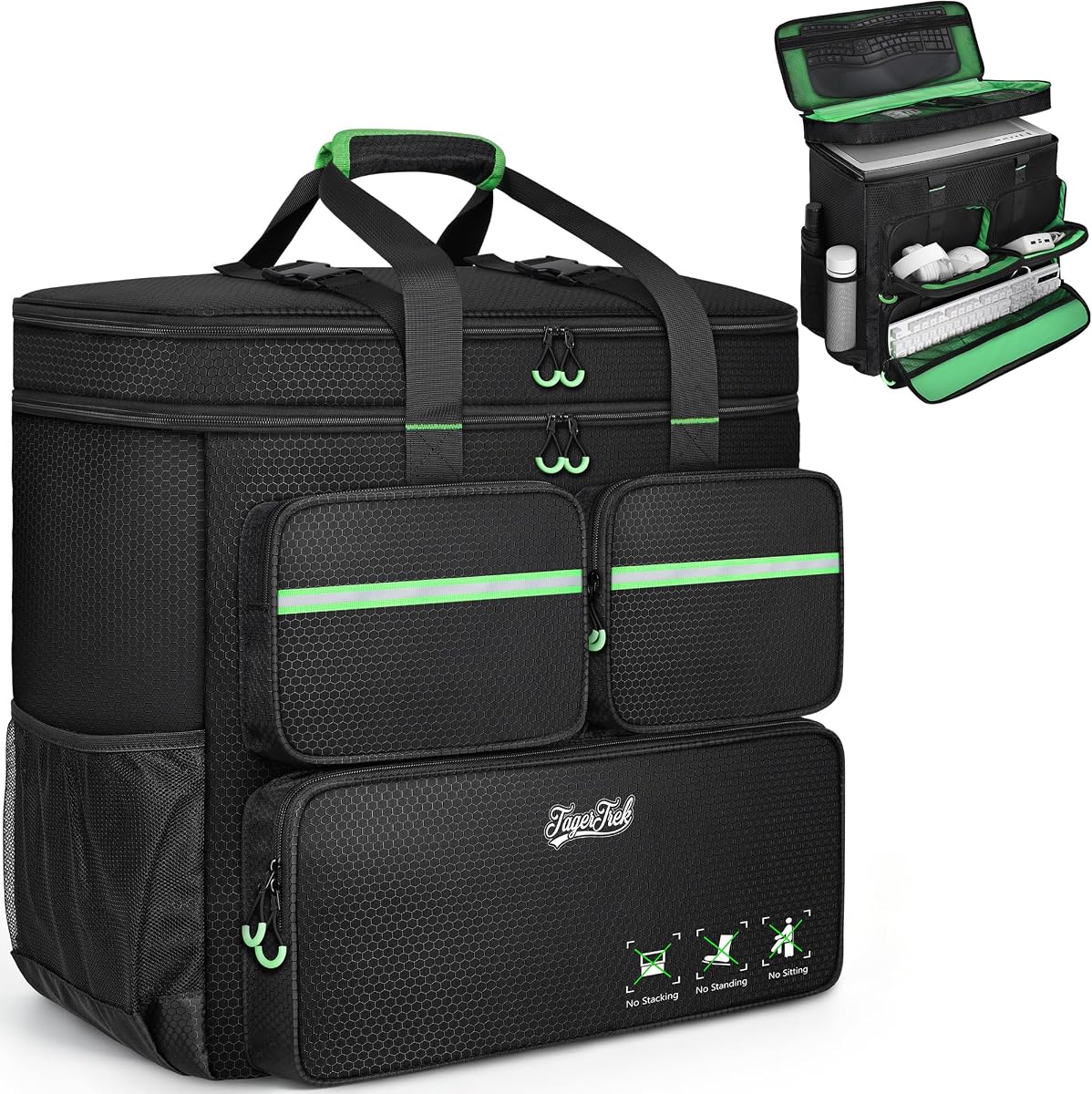


This large carrying bag is one of the most practical choices for protecting a desktop tower during a move, business trip, or gaming event. It carries a 4.6 rating and stands out for its roomy 20.67 by 9.8 by 18.9-inch size, high-density 5mm EPE lining, and wear-resistant 600D Oxford exterior. Unlike a carry-handled chassis, it lets you transport the desktop case you already own rather than requiring a new compact build.
We may earn a commission when you buy through this link, at no additional cost to you.
The main compartment is intended for a desktop tower, with extra room for accessories such as a graphics card or radiator. Organization is one of the bag's strongest features. Three front zippered pockets are assigned useful roles: a lower section for a keyboard, an upper-left section with elastic loops for cables, and a fleece-lined pocket for a mouse or power bank. Two side mesh pockets provide room for bottles, while a zippered mesh compartment beneath the top cover offers additional storage for a keyboard and mouse.
Its carrying design provides more than a basic top handle. The padded construction can be hand-carried or worn with both shoulders, and a releasable chest buckle helps stabilize the load and reduce shoulder movement. The tradeoff is bulk: this is a large backpack-style bag, and it lacks the convenience of spinner wheels. It may also feel more cumbersome than a slim chassis when moving through airports or narrow venues.
This is a strong recommendation for anyone who wants to move a conventional ATX or micro-ATX desktop without disassembling it and without buying a replacement PC case. It is especially helpful for students, LAN participants, remote workers, and households changing locations. Measure your tower and accessories first, and compare those dimensions with the listed internal fit before committing.
The combination of high-density EPE cushioning and a rugged Oxford outer layer is designed to absorb impact and vibration. Internal restraint and a structured soft-padded body help keep the tower and accessories from shifting during ordinary carrying.
Separate pockets reduce the need to place loose cables, a mouse, keyboard, or power bank in the main compartment. This makes the bag more useful for longer journeys where every accessory needs to remain easy to find.
We may earn a commission when you buy through this link, at no additional cost to you.
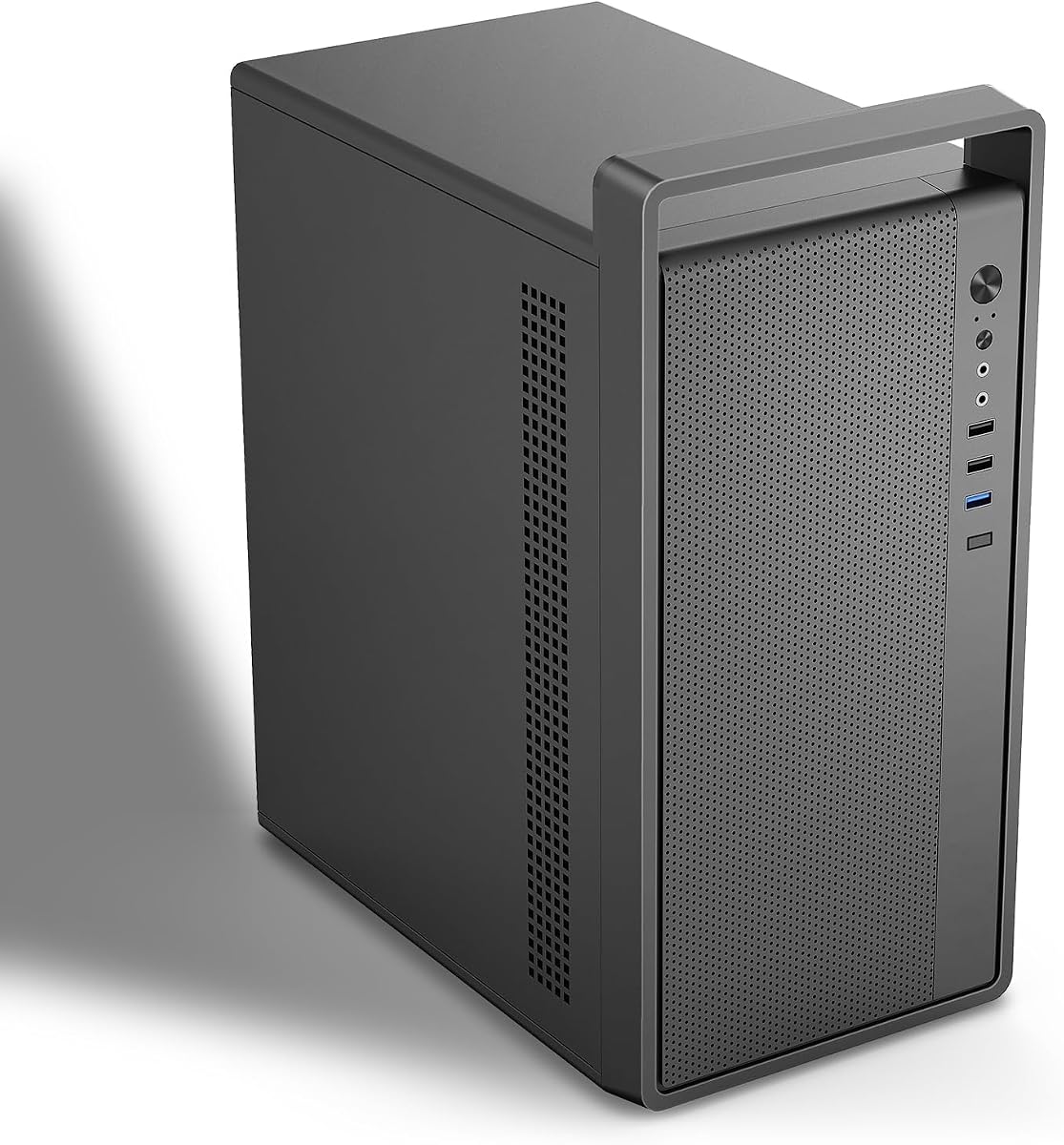
The JONSBO/JONSPLUS Z20 is an excellent example of a true portable PC case rather than simply a bag placed around a full-size tower. It has a 4.7 rating and a detachable carrying handle, making the hardware itself easier to move between a home office, studio, event space, or friend's house. Its approximately 20-liter micro-ATX format retains room for serious components without the footprint of a conventional desktop tower.
We may earn a commission when you buy through this link, at no additional cost to you.
Construction uses integrated bent-steel panels with a stated thickness of 2mm, while large square openings support cooling and give the enclosure a purposeful appearance. A removable PCI-E fixing piece simplifies installation, particularly when working with a longer graphics card. Cooling options are extensive: the listing calls for top and bottom positions accepting 120mm or 140mm fans, along with real 120mm and 92mm fan options. It also supports a 240mm AIO with a 60mm radiator thickness.
The main compromises concern scale and component fit. Maximum GPU clearance is listed as 363mm, but the usable result depends on the other installed hardware. CPU air cooler clearance is 164mm for Intel systems and 163mm for AMD systems. Storage is limited to combinations of two 2.5-inch SSDs and one 3.5-inch hard drive, or three 2.5-inch SSDs. Squeezing high-performance hardware into a small case also requires more care with cable routing and airflow.
Choose the Z20 when portability is central but you still want a conventional motherboard, a powerful graphics card, and flexible cooling. It is best for builders creating a dedicated travel or LAN system rather than buyers who simply want to move an existing tower. Check the compatibility image, radiator thickness, power supply arrangement, and installed cooler before selecting it.
A micro-ATX layout and four expansion slots provide meaningful room for everyday desktop components. The detachable handle adds mobility without turning the enclosure into a conventional luggage bag.
Support for 120mm and 140mm fans plus a 240mm AIO gives builders several airflow paths. Vent openings and a magnetic dust filter complement those mounting options.
We may earn a commission when you buy through this link, at no additional cost to you.
The darkFlash WD200 stands apart visually, combining a walnut wood front panel with a compact micro-ATX enclosure designed for creators and gamers. Its 4.3 rating reflects a product that prioritizes appearance, portability, and modern features. The integrated heavy-duty carry handle makes it suited to LAN parties, temporary studio arrangements, and flexible workstation environments where a full-size tower would be inconvenient.
We may earn a commission when you buy through this link, at no additional cost to you.
Its full mesh architecture supports airflow, while the enclosure can accept a 240mm liquid-cooling radiator and comes with a pre-installed ARGB PWM fan. Graphics-card support extends to 335mm, allowing many modern performance GPUs to fit inside the relatively compact body. The front panel includes USB Type-C, USB 3.0, and audio connections, and the interior is arranged for cable management plus flexible SSD and HDD storage.
The wood-style finish is the defining feature, but it is not universally appealing. Buyers wanting an all-metal, entirely black industrial appearance may prefer another option. The handle is integrated rather than detachable, which may make the case slightly less convenient to pack flat. As with other compact cases, cooling performance depends on the chosen fans, radiator configuration, and the workload placed on the CPU and GPU.
The WD200 is a compelling premium choice for a portable micro-ATX build that will also appear on camera or sit prominently in a studio. It combines genuine carry-handle convenience with a more refined appearance than most gaming chassis. Confirm GPU length, radiator placement, and storage arrangement against your planned build before purchasing.
The walnut front panel gives a portable workstation a furniture-like appearance. That makes the enclosure suitable for studio desks and creative spaces where a basic black box would feel visually disconnected.
Full mesh panels, radiator support, and an included ARGB fan cover the core cooling needs. Front USB Type-C, USB 3.0, and audio ports make the finished system convenient to operate.
We may earn a commission when you buy through this link, at no additional cost to you.
The M5 is a straightforward portable mini-tower for builders who want a handle, a compact footprint, and a straightforward set of mainstream compatibility rules. Its 4.2 rating reflects a practical design centered on micro-ATX and ITX motherboards. At 313 by 185 by 350mm, it is compact enough to move but remains larger than the 8.1-liter S300 and roughly comparable to other small micro-ATX chassis.
We may earn a commission when you buy through this link, at no additional cost to you.
The enclosure is made from 0.7mm SPCC steel, described as 16 percent thicker than 0.6mm alternatives. A pre-installed 120mm rear fan provides a useful starting point for airflow, and the integrated handle makes the finished computer easy to carry. It supports standard ATX power supplies, graphics cards up to 260mm, CPU coolers up to 160mm, two 3.5-inch hard drives, and two 2.5-inch SSDs.
Its primary limitation is GPU length. The 260mm ceiling is shorter than the 310mm to 335mm offered by several nearby products, and it may constrain some larger graphics cards. The fan-support description also appears less comprehensive than the most thoroughly documented alternatives, so builders should review the case layout carefully. The product is supplied without an explicitly stated fan bundle beyond the rear unit.
The M5 is a good fit for a portable office, dorm, or LAN build using a moderately sized GPU and standard power supply. It is less suitable when maximizing expansion-card clearance is the priority. Before buying, measure the graphics card including its power connector clearance, then compare it with the stated maximum.
The compact dimensions and integrated handle make the M5 easier to move than a conventional mid-tower. It offers a straightforward middle ground between a tiny ITX case and a full desktop.
Micro-ATX and ITX motherboards, standard ATX power supplies, and common storage combinations cover many everyday desktop builds. The included rear fan simplifies the initial cooling arrangement.
We may earn a commission when you buy through this link, at no additional cost to you.
This rolling PC carrying case is the clearest option in the group for moving a full desktop without relying entirely on shoulder strength. It has a 4.4 rating, a spacious 21 by 21 by 11-inch bag, and a detachable cart fitted with smooth swivel casters. The result is especially relevant for office moves, convention travel, LAN events, and any journey involving stairs, terminals, or long corridors.
We may earn a commission when you buy through this link, at no additional cost to you.
The cart folds flat and uses an aluminum pull handle with three height adjustments, while the bag's top handle fastens together with Velcro straps for a cushioned grip. A 600D polyester exterior is described as water-resistant and wear-resistant, and solid stitching is intended to withstand heavy loads. Bright green U-pull zippers make the openings easier to identify in transit. Thick internal padding helps absorb shock and vibration.
Organization is comprehensive. The top includes a zippered pocket and mesh sections, including a keyboard pocket for models under 19.7 inches long. Front pockets cover a keyboard, cables, and a mouse or charger, while side mesh pockets accommodate bottles. Listed compatible cases include the LIAN LI O11D MINI V2 ATX, LIAN LI LANCOOL 207 ATX, Lian Li A3 M-ATX, and MONTECH XR-B ATX.
This case is best for buyers who value smooth rolling movement over a compact folded package. The cart and casters add bulk and weight, and the bag itself is large. Measure your tower and keyboard before purchase, particularly if they will travel in the same bag, and use the secured cart attachment whenever the load is substantial.
The detachable folding cart turns the bag into a wheeled workstation carrier. Adjustable handle height and swivel casters reduce the effort involved in moving a loaded desktop.
Dedicated spaces for a keyboard, mouse, cables, and personal items allow a desktop system to travel as one organized kit. Reinforced stitching, protective padding, and water-resistant fabric support regular use.
We may earn a commission when you buy through this link, at no additional cost to you.
The Large PC Travel Case combines a roomy tower compartment with the familiar convenience of a backpack. Its 4.4 rating reflects a versatile option for moving an existing ATX or micro-ATX desktop while keeping peripherals close at hand. The main bag measures 21 by 21 by 11 inches and is listed as accommodating tower cases up to 21 by 18.5 by 11 inches.
We may earn a commission when you buy through this link, at no additional cost to you.
It can be worn as a backpack or carried by its sturdy handle. A chest strap helps distribute the load and limits side-to-side movement, while the top buckle keeps the contents from shifting. The polyester exterior is described as water-resistant and wear-resistant, and the stitching is intended to remain secure under substantial weight. Thick internal padding is the principal protection for the computer and accessories.
The bag includes many of the same travel conveniences found in the wheeled model. Front compartments are intended for a keyboard, cables, and a mouse or charger. Top zippered and mesh pockets provide additional storage, and side mesh pockets can hold water bottles. The trade-off is that there are no wheels, and the full-size backpack structure occupies considerable space even before the computer is loaded.
Choose this case when a walkable, hands-free style of transport matters more than rolling convenience. It is well suited to LAN parties, school-to-home commuting, office relocations, and gaming visits. Confirm both the tower and keyboard measurements, and distribute heavy components across the padded main section rather than concentrating all of the weight in small exterior pockets.
The backpack configuration, padded shoulder area, and chest strap create a balanced way to carry a heavy tower. The top handle provides a quick alternative for stairs or loading.
Thick padding helps manage shock and vibration, while a top buckle reduces movement inside the main compartment. Separate storage prevents small accessories from being forced against sensitive components.
We may earn a commission when you buy through this link, at no additional cost to you.
The S300 takes portability to a smaller scale than the micro-ATX cases in this guide. It is a 4.4-rated, 8.1-liter Mini-ITX enclosure measuring 12.2 by 5.3 by 7.6 inches. A small leather handle on top makes the case genuinely handheld, while three mesh panels encourage air exchange. It is designed for builders who value a compact gaming system over conventional expansion.
We may earn a commission when you buy through this link, at no additional cost to you.
It supports a standard 170 by 170mm Mini-ITX motherboard, an SFX or SFX-L power supply measuring 100 to 130mm, and graphics cards no longer than 305mm with a maximum height of 55mm or 2.5 slots. A PCIe 3.0 16X riser cable is included for compatible setups, and the front I/O includes USB 3.0 Type-C. A cable-management system helps keep the limited internal space orderly.
The constraints are significant. CPU cooler height is limited to 60mm, and the power supply must be a compact SFX model rather than a standard ATX unit. The riser also requires the motherboard BIOS PCIe setting to be changed to Gen3 when used with a 3.0 graphics card and extension cable. These conditions mean the case is best planned before components are purchased.
The S300 is a strong choice for a highly portable console-style PC, compact workstation, or travel build using low-profile or compact cooling. It is less appropriate for a conventional tower system or builders who want a standard power supply. Verify the graphics card's exact dimensions, cooler height, riser behavior, and power supply dimensions before building.
At only 8.1 liters, the S300 is substantially smaller than the micro-ATX options. Its compact footprint is ideal for desks, event tables, and mobile gaming setups where every inch matters.
The 60mm CPU cooler limit and restricted power-supply options reduce component freedom. Checking every major dimension before purchasing prevents an expensive mismatch later.
We may earn a commission when you buy through this link, at no additional cost to you.
This Micro ATX case is designed around flexibility, with an aluminum handle and compatibility for both ITX and micro-ATX motherboards. Its 4.0 rating is the lowest among the PC chassis featured, but the specification sheet provides a useful range of layout options. It accommodates motherboards up to 245 by 245mm, standard ATX or compact SFX power supplies, and graphics cards up to 310 by 135 by 64mm.
We may earn a commission when you buy through this link, at no additional cost to you.
The cooling specification is extensive. The case supports a 135mm CPU cooler, top fans in 80mm or 90mm sizes, a rear fan in the same sizes, bottom fans in 90mm or 120mm sizes, and a 240mm liquid radiator. The 0.8mm SPCC steel enclosure is offered in black or white. Storage options include one hard drive with two SSDs, or three SSDs, while internal cable management helps maintain a tidy build.
Two caveats deserve attention. Fans are not included, so cooling hardware must be added separately. In addition, installing a 240mm liquid cooler changes the power-supply situation: only an SFX power supply can then be installed. For graphics cards whose power connector is at the end, an additional 15mm of cable space is required.
This case suits a builder who wants more freedom than a strict Mini-ITX enclosure but less bulk than a full tower. The handle, broad motherboard support, and flexible power options make it useful for portable workstations and gaming PCs. Decide on the cooling and power configuration first, because the 240mm radiator and ATX power supply are not compatible together.
Support for ITX, micro-ATX, ATX, and SFX power supplies creates more choice than many compact chassis. Planning the power supply first helps preserve compatibility when additional cooling is installed.
Numerous fan positions and 240mm radiator support offer good thermal potential. The lack of included fans means buyers should budget for the exact fans and mounting hardware their build requires.
We may earn a commission when you buy through this link, at no additional cost to you.
The Large Computer Tower Carrying Case focuses on securing an ATX mid-tower in transit. It has a 4.3 rating, clearly stated exterior dimensions of 20.08 by 9.06 by 19.69 inches, and internal maximum dimensions of 19.88 by 8.86 by 19.69 inches. Those figures give buyers a more concrete basis for checking fit than a general full-size designation.
We may earn a commission when you buy through this link, at no additional cost to you.
A rear buckle fastener and internal securing straps reduce the chance of the desktop tipping or shifting. Protection comes from 5mm high-density EPE foam, while a reinforced base with anti-slip feet adds stability when the bag is set down. The weather-resistant Oxford exterior is intended to resist rain, dust, and routine scuffs. A full-height mesh panel provides visibility and convenient access.
Storage is divided among six compartments. Two front zippered pockets, one front buckle-flap pocket, two expandable side mesh pockets, and one top inner mesh pocket can organize a keyboard, mouse, headset, and cables. Padded handles support hand carrying, and adjustable chest straps distribute weight. Like the other large bags, however, it does not include wheels and may be awkward to carry over long distances.
This is a solid recommendation for moving a mid-tower while keeping the computer restrained and peripheral accessories separate. It is especially useful for office relocations, gaming travel, and event use. Measure both the outer tower and any protruding components, then use the internal straps and buckle before moving the case.
The combination of rear fastening and internal straps keeps the tower positioned during transit. Clear dimensional guidance helps prevent the common mistake of buying a bag that appears large but is too tight.
Six compartments separate commonly transported accessories, while the reinforced base and anti-slip feet make the bag steadier when set on a floor. The Oxford exterior adds resistance to everyday weather and dust.
We may earn a commission when you buy through this link, at no additional cost to you.
The Portable Monitor Carrying Case is not a desktop tower bag, but it is a relevant carry-handled solution for portable-computing users. It has a 4.7 rating and is designed for 15.6- or 16.1-inch portable monitors. Its internal dimensions are 15.35 by 9.84 by 1.26 inches, making it especially appropriate for people who travel with a compact display rather than a complete PC.
We may earn a commission when you buy through this link, at no additional cost to you.
The case uses 900D fabric described as water-resistant, scratch-resistant, and hard-wearing. A reinforced, thickened interior and extended edge help protect the display from accidental drops, while SBS zippers and a padded PU leather handle improve everyday handling. The handle can tuck away when the case is inserted into a larger travel bag, preserving a compact profile.
A large front pocket holds chargers, cables, hubs, power adapters, earphones, cards, and other small accessories. Two internal mesh pockets further organize smaller items. A side zipper opening allows the monitor to slide in or out more easily than through the main opening. The narrow 1.26-inch internal depth means this case cannot accommodate a desktop chassis or bulky accessories.
Choose this option for a portable monitor, compact laptop arrangement, or mobile productivity kit. It is not a substitute for a padded PC tower bag or a carry-handled computer chassis, but it completes the category for buyers who only need to transport a display. Check the monitor's exact dimensions before purchase and compare them with the listed internal measurements.
The case protects a compatible portable monitor without forcing users to place it in a general-purpose laptop sleeve. A structured interior and reinforced edges provide support around the display.
The roomy front pocket and two internal mesh pockets keep cables and small daily essentials together. A tuckable PU handle and side zipper make the package easy to pack and access.
We may earn a commission when you buy through this link, at no additional cost to you.
The best portable PC case with handle depends on what you are carrying, how far it must travel, and whether you want a bag for an existing computer or a compact chassis for a new build. Measure first, then compare the following practical factors.
Choose a bag for moving a finished tower; choose a chassis for a purpose-built portable PC.
Measure the device and every critical component, then check all three chassis dimensions.
Prioritize dense cushioning and restraints that keep the load from moving.
Match the carry system to the journey, whether that means hand carrying, wearing, or rolling.
Confirm fan sizes, radiator clearance, and cooling-induced layout restrictions.
Favor separate, securely closing pockets for peripherals and loose accessories.
Check front I/O, cable routing, storage positions, and expansion-slot requirements.
Balance structural material, finish, and practical details against your intended setting.
Before packing, power down the computer completely, disconnect every cable, and allow the system to cool. Remove any loose accessories, secure the graphics card and other expansion hardware when the manufacturer recommends it, and install the operating system's shutdown or sleep settings. For a tower bag, place the computer in the main padded compartment, tighten the internal straps, and make sure the bag closes without forcing it.
Distribute weight thoughtfully. Heavy desktop components belong in the reinforced main section, while small electronics and accessories should go in their dedicated pockets. Use the chest buckle and shoulder adjustment on backpack-style bags, fasten the top buckle, and carry rolling bags using the pull handle. For compact computer cases, use the handle only after every panel is secured and the system is not being assembled while suspended.
Clean the exterior with a slightly damp cloth and mild soap, then let it dry completely before storage. Do not machine-wash a padded bag unless its instructions explicitly permit it, and avoid soaking the zipper, handle, or buckle. Keep the interior dry, inspect seams and fasteners periodically, and allow a transported system to acclimate to a different environment before powering it on.
Capacity depends on the bag's internal dimensions rather than motherboard label alone. Many tower bags accept ATX and micro-ATX systems within a stated maximum, such as 21 by 18.5 by 11 inches. Measure the tower's length, width, and height, including feet and protrusions, and compare those figures with the case's internal dimensions before ordering.
A handled chassis is usually better for a purpose-built compact system because the computer and handle are permanently integrated. A padded bag is generally more convenient when moving an existing desktop without rebuilding it. Some users also prefer a bag for temporary travel because it keeps the regular chassis at home and offers separate storage for peripherals.
Yes, provided the tower fits within the bag's stated dimensions and the bag has appropriate padding and restraints. Large desktop cases can be heavy, so confirm the handle and stitching are designed for substantial loads. Use the chest strap, keep the weight close to your back, and avoid overloading exterior pockets with heavy accessories.
No case can guarantee protection from every drop or impact. Padding, reinforced panels, secure straps, and careful handling can substantially reduce risk. For a bag, dense foam and internal restraints help absorb shock; for a chassis, steel construction protects the enclosure while internal components still need to be mounted securely. The case remains vulnerable when dropped from a significant height.
Check motherboard format, graphics-card length and thickness, power-supply type, CPU cooler height, and radiator size. Some cases also restrict expansion-slot count, storage combinations, or the number of fans that can be installed. Review the product's compatibility guidance and compare every major component against those limits.
Rolling cases are usually easier over smooth floors, airport terminals, and long corridors because caster wheels support much of the load. Backpack cases are more practical on stairs, uneven ground, and crowded transit. A rolling model can still be lifted by its handle, but the cart and casters make the package larger and heavier when folded away.
Some laptops will fit if they are within the 15.35 by 9.84 by 1.26-inch internal dimensions, but the case is optimized for slim portable monitors. A thicker gaming laptop, tablet with a keyboard cover, or device with protruding feet may not sit securely. Check both the device's width, height, and thickness before using it for another purpose.
First verify that the system is completely shut down and disconnected. Protect vulnerable ports, secure the graphics card if appropriate, place the tower in the main compartment, and tighten all internal straps. Keep cables and accessories in separate pockets, balance the weight, and use the bag's backpack or rolling system according to the route.
The Computer Desktop Tower Large Carrying Case offers the strongest value for transporting an existing tower, while the JONSBO/JONSPLUS Z20 is the most balanced compact chassis with its detachable handle and extensive cooling options. The darkFlash WD200 takes the premium route with a walnut front panel, integrated heavy-duty handle, modern connectivity, and full mesh airflow.
Prioritize the right category for your equipment: padded tower bags for existing desktops, rolling cases for long routes over smooth surfaces, micro-ATX chassis for portable performance builds, and the monitor case only for compatible portable displays. Before buying, verify internal dimensions, graphics-card clearance, power-supply format, cooler height, cooling restrictions, and the number of included accessories.
Current prices and availability can change, so review the latest listing and component details before making a purchase. Doing so helps confirm that the case still matches your hardware, the included handle and storage features meet your needs, and the selected option remains the best fit for your particular portable PC setup.

