
WAVLINK USB4 to 10Gbps Ethernet Adapter
4.4Editor score
Ten-gigabit multi-gig networking
Thunderbolt 3 through 5 support
AQC113-B1 controller
Compact aluminum enclosure
This guide compares the 10 best Thunderbolt hubs with 10GBE Ethernet, covering speed, ports, compatibility, displays, power, and ideal uses for buyers.
Thunderbolt hubs with 10GBE Ethernet are built for people who need more than ordinary laptop connectivity. They combine high-speed wired networking with displays, storage, charging, and other peripherals, making them useful for NAS access, media production, virtualization, shared storage, and demanding home offices. A truly capable system also depends on a compatible host, appropriate cabling, and matching network hardware.
The products below were compared using their stated Ethernet capabilities, host interfaces, port layouts, display support, power delivery, driver requirements, physical design, and intended workflows. The list includes dedicated 10GbE adapters, dual-network docks, and broader Thunderbolt hubs whose Ethernet is 2.5GbE or 1GbE rather than 10GbE. Those distinctions are important because a broad port selection does not automatically mean full 10GbE performance.
Each review explains what the product does best, where its limitations matter, and who should consider it. The first three recommendations represent the strongest balance of 10GbE capability, specialized design, and practical value, while the remaining entries provide useful alternatives for particular needs. Product listings and prices can change, so verify current specifications, compatibility, and availability before purchasing.
4.4Editor score

4.5Editor score

The comparison below highlights Ethernet speed, host requirements, display capability, and major port features. Several entries are general-purpose docks with 2.5GbE or 1GbE Ethernet rather than true 10GbE, so those limitations are stated clearly rather than hidden by their Thunderbolt branding.





The OWC Thunderbolt 4 10G Ethernet Adapter is the most focused option in this guide. It does one major job exceptionally well: adding a fast 10GbE RJ45 connection to a Thunderbolt-equipped computer. Its 4.5 rating reflects a favorable balance of performance and usability, while the stated real-world transfer rate of over 900MB/s places it squarely among the most capable adapters for large files, editing media, live streaming, and fast NAS access.
We may earn a commission when you buy through this link, at no additional cost to you.
Rather than forcing users to connect multiple adapters for displays, charging, and data, OWC keeps this product focused on networking. The included 0.3-meter Thunderbolt USB-C cable makes the initial connection straightforward. Auto-negotiation supports 10Gb/s, 5Gb/s, 2.5Gb/s, 1Gb/s, and 100Mb/s, so it can work with both modern 10G infrastructure and older or lower-speed network devices without requiring manual configuration.
Cable reach is another meaningful advantage. The adapter supports runs of up to 100 meters with Cat6a for 10G, Cat6 for 5G, and Cat5e for 2.5G. That makes it suitable for connecting a mobile workstation to a distant server room, edit bay, or home network panel. Wake-on-LAN readiness and AVB support also distinguish it from basic USB Ethernet adapters, although those functions depend on the host, network, and application environment.
The tradeoff is intentional minimalism. This is not a docking station, so it does not add monitor outputs, USB-A ports, or laptop charging. Buyers who only need one fast Ethernet link will appreciate the lack of unnecessary complexity. For those requiring a full desk setup, the OWC dual-network dock is the more relevant product. As a dedicated 10GbE adapter, though, this model offers the strongest all-around combination of performance, compatibility, and focused design.
The adapter earns the Editor's Choice position because it delivers a specialized solution without excessive software complexity or an oversized port array. It is particularly attractive to Thunderbolt Mac and Windows users who already have a good display and charging arrangement but need a dependable 10GbE path to shared storage, production servers, or high-throughput networks.
A stated transfer rate above 900MB/s makes this adapter relevant to creative teams that routinely move large media libraries. Actual results still depend on the storage system, switch, cable, host controller, and network configuration, but the specification indicates that it is not limited to nominal 10GbE line-rate behavior.
Support for 100-meter Cat6a runs and automatic multi-gig negotiation makes the adapter practical in offices where replacing an entire network installation would be inconvenient. It can deliver 10G over appropriate infrastructure while remaining usable with lower-speed network equipment.
We may earn a commission when you buy through this link, at no additional cost to you.
The OWC Thunderbolt 5 Dual 10GbE Network Dock is the most complete high-end desk solution in the group. Its defining feature is not merely one Ethernet connection but two 10GbE RJ45 ports plus a front-facing 2.5GbE port. That network flexibility can support a direct workstation-to-NAS link, a second high-speed network path, and a separate multi-gig connection to other infrastructure at the same time.
We may earn a commission when you buy through this link, at no additional cost to you.
Its Thunderbolt 5 uplink can provide up to 80Gb/s of bidirectional data speed and up to 120Gb/s of display bandwidth. The dock also includes three downstream Thunderbolt 5 USB-C ports, one 10Gb/s USB-C port, and three 10Gb/s USB-A ports. Display configurations can reach three 8K displays at 60Hz with DSC, two 8K displays at 120Hz, or three 4K displays at 144Hz, subject to host capability.
Power delivery is designed for a full workstation. The included 90-watt external power supply charges the host through the uplink, while each Thunderbolt 5 device port can provide up to 15 watts. The USB-C 10Gb/s port can also provide up to 15 watts for bus-powered storage or device charging. This makes the dock less dependent on the host's ability to power several external accessories by itself.
Compatibility is broad but the operating-system requirements deserve attention. Thunderbolt 5 Macs require macOS 15.3.x or later, Windows systems require Windows 11 or later, and Linux support calls for the latest Ubuntu version. Some older Thunderbolt generations have narrower Mac or macOS support. Buyers should verify their exact host and operating system before expecting every listed feature to work.
The 3.3 rating should be weighed against the product's exceptional networking and display breadth. It is a large, premium solution rather than a portable adapter, and the external power supply adds another desk component. Even so, it is the natural choice for a stationary Thunderbolt 5 workstation that needs multiple 10GbE connections, extensive downstream data bandwidth, high-resolution displays, and a single-cable host arrangement.
The pair of 10GbE ports is especially valuable for users who want direct access to both a high-speed NAS and another networked system without giving up the dock's third multi-gig connection. It also provides room to separate storage traffic from another high-bandwidth network path.
Support for multiple high-resolution and high-refresh displays turns the product into more than a network adapter. Native Thunderbolt 5 displays or suitable USB-C and DisplayPort 2.1 equipment can be used, but the final arrangement depends on the host computer's capabilities.
We may earn a commission when you buy through this link, at no additional cost to you.
The WAVLINK USB4 to 10Gbps Ethernet Adapter combines a capable 10GbE controller with a compact adapter format, making it a strong value for users who do not need a full dock. Its 4.4 rating reflects a well-received product, and the AQC113-B1 chipset is designed for high-throughput, low-latency networking under sustained workloads such as NAS transfers, virtualization, 4K or 8K media handling, and local file movement.
We may earn a commission when you buy through this link, at no additional cost to you.
The adapter supports USB4 as well as Thunderbolt 3, Thunderbolt 4, and Thunderbolt 5 hosts. macOS includes native drivers, while Windows 10 or 11 and Linux require manual installation of the Marvell AQtion driver. Instructions are included and available from the manufacturer. Importantly, the product is not intended for USB 3.2, USB 3.1, USB 3.0, or USB 2.0 hosts, and it is not compatible with mobile phones or tablets.
Automatic negotiation across 10Gbps, 5Gbps, 2.5Gbps, 1Gbps, 100Mbps, and 10Mbps lets the adapter function across mixed network environments. Achieving full 10G results also requires a modem or router with 10G output, a Cat6a or better cable, and a host port that supports USB4 or a compatible Thunderbolt generation. Internet service speed alone does not create a 10Gbps local network path.
The aluminum housing is intended to dissipate heat passively, while dual LEDs provide a quick view of link speed and activity. The product is a better fit for performance-conscious desktop work than for mobile use, where a larger metal adapter may be less convenient. Driver setup also adds a step compared with systems that recognize the hardware immediately.
This is a compelling pick for buyers who want one dependable 10GbE RJ45 port without paying for a full multiport workstation. It can serve as a dedicated connection for shared storage or a high-speed local network while the computer's main USB-C connection remains available. Users should install the proper driver and use suitable infrastructure, but once those conditions are met, the specification is well aligned with demanding creative and technical workflows.
The AQC113-B1 controller is central to the adapter's positioning, providing a platform for stable 10GbE operation and low host CPU usage. Driver configuration can also expose options that matter in advanced local networks, such as jumbo frames and hardware offloading.
Automatic support for six speed levels means the adapter can connect to more than just dedicated 10GbE infrastructure. That is useful in studios and offices where switches, NAS units, and workstations may not all use the same Ethernet generation.
We may earn a commission when you buy through this link, at no additional cost to you.
The Sonnet Solo10G T5 is a specialized Thunderbolt 5, Thunderbolt 4, and USB4 adapter for professional 10GBASE-T networking. It is designed for users who need reliable high-speed access to shared storage, NAS and SAN systems, media servers, and large file workflows, but also value a quiet, bus-powered enclosure that can travel between a workstation, studio, and production location.
We may earn a commission when you buy through this link, at no additional cost to you.
The product uses a Marvell 10GbE controller with hardware acceleration, TCP and UDP checksum offloading, flow control, and low host CPU utilization. On Mac, it supports Audio Video Bridging through IEEE 802.1Qav, a meaningful consideration for professional audio and video environments where synchronization of multiple data streams is important.
Its RJ45 port supports 10GbE, 5GbE, and 2.5GbE. For 10G infrastructure, Cat6 can support distances of up to 55 meters, while Cat6A can extend that reach to 100 meters. NBASE-T allows 2.5GbE and 5GbE over Cat5e or better when the connected switch, router, or storage system also supports those speeds.
Compatibility is broad, covering Thunderbolt 5, Thunderbolt 4, USB4, and Thunderbolt 3 computers, including M-series and Intel Macs, Windows, Linux, and iPad Pro. The Thunderbolt-certified platform uses authenticated firmware and extensive compatibility validation. The included replaceable Thunderbolt 5 cable is useful because it can be swapped if damaged rather than requiring the entire adapter to be replaced.
No customer rating is supplied for this listing, so the product cannot be judged here by a numerical review history. That makes its published specifications and stated professional design particularly important. It is a focused one-port adapter without display or charging features, but for a mobile edit bay or a workstation that already has separate display and power arrangements, the bus-powered, silent design is a compelling reason to choose it.
At 7.5 watts, the Solo10G T5 draws bus power and needs no external power brick. Its small, rugged, fanless aluminum enclosure is suited to equipment bags and on-location work while remaining completely silent during operation.
Hardware acceleration and checksum offloading reduce the processing burden placed on the host computer. For sustained transfers to shared media or storage, that efficiency can be as valuable as headline throughput in a busy production environment.
We may earn a commission when you buy through this link, at no additional cost to you.
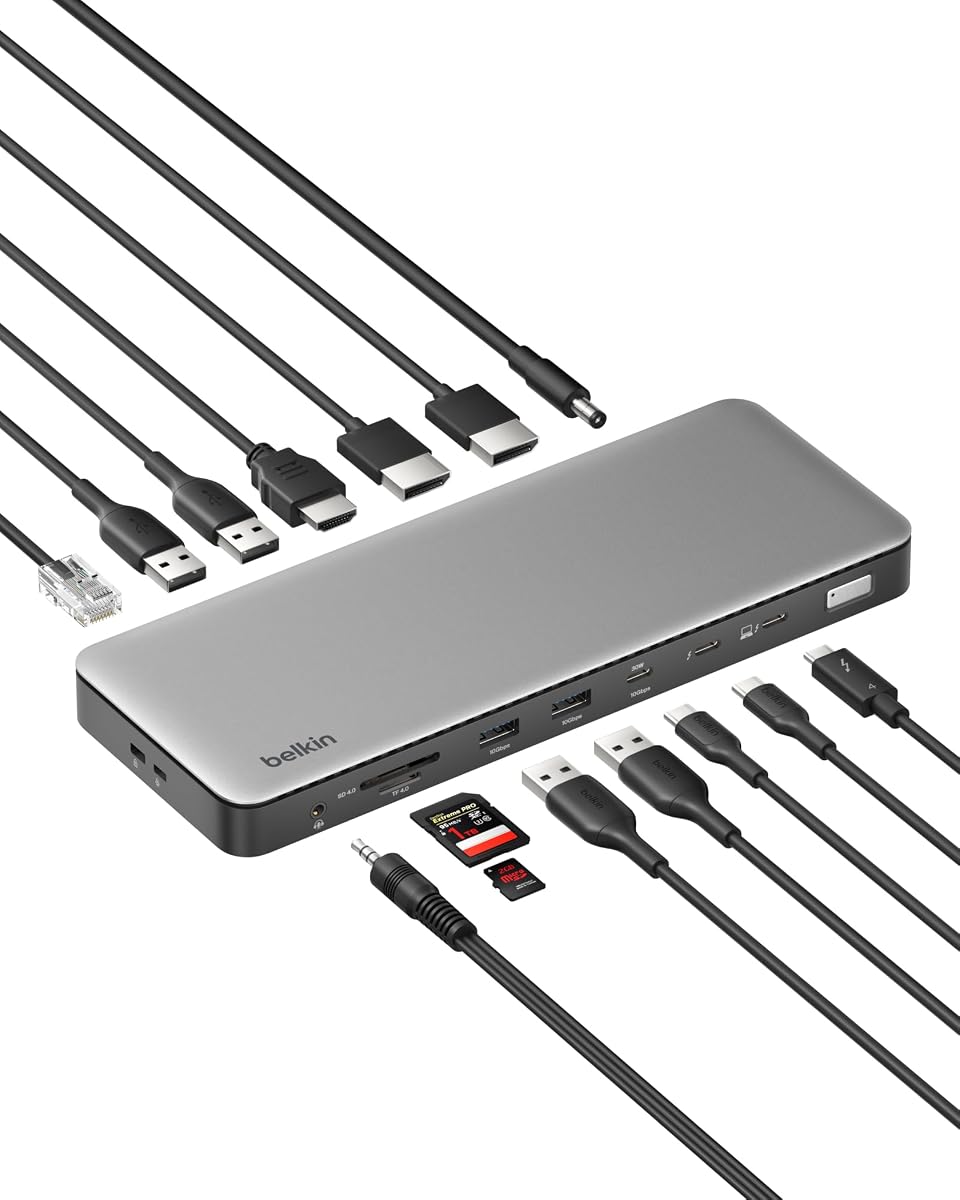
The Belkin Thunderbolt 4 Docking Station Triple Display 96W 14-in-1 USB-C Hub is a general-purpose productivity dock rather than a dedicated 10GbE product. Its Ethernet port supports up to 2.5Gb/s, making it substantially faster than 1GbE but unable to meet the full 10GbE requirement of the search term. For buyers who can work within that limit, its 4.6 rating is the highest in this selection.
We may earn a commission when you buy through this link, at no additional cost to you.
The larger appeal is the combination of 14 ports, display support, data bandwidth, and charging. It can connect as many as three extended monitors at 4K and 60Hz, move data at up to 40Gbps over Thunderbolt 4, and deliver up to 96 watts of power through one USB-C connection. Daisy chaining can extend the workstation with additional Thunderbolt devices while preserving a cleaner desk setup.
Its 2.5GbE connection is useful for modern homes and offices with compatible routers, switches, and storage. It can improve large transfers, video calls, and downloads compared with gigabit Ethernet, although it should not be mistaken for a 10GbE link. Users with 10G NAS equipment or production servers would gain materially more from one of the dedicated adapters in this guide.
The dock also includes a Kensington lock and Belkin's six-point safety system, covering over-voltage, overload, over-current, over-temperature, short-circuit protection, and fire-resistant materials. It arrives in plastic-free packaging and is backed by three-year coverage, adding confidence for a device expected to serve as the central connection point for a laptop and several peripherals.
This Belkin model is best for an office user who values one-cable simplicity, multiple displays, charging, and a large port inventory. It is not the correct choice for someone who needs true 10GbE networking, but it is a polished and highly rated all-around Thunderbolt 4 hub. Users should confirm that 2.5GbE is sufficient for the network, storage, and transfer demands of their workspace.
Simultaneous display, network, storage, peripheral, and charging connections reduce the need to keep multiple adapters attached to a laptop. This makes the dock most useful as a permanent desk centerpiece rather than a portable accessory.
A 2.5GbE link can be a meaningful improvement over 1GbE for NAS access, large downloads, and active calls. It remains below 10GbE, however, so high-end storage and media workflows should use a dedicated 10GbE adapter instead.
We may earn a commission when you buy through this link, at no additional cost to you.
The SABRENT Thunderbolt and USB4 10GbE Ethernet Adapter is a direct way to add a 10GbE RJ45 port to a modern computer. It supports Thunderbolt 3, Thunderbolt 4, Thunderbolt 5, and USB4 USB-C hosts while excluding USB 3.2, USB 3.1, and USB 3.0 connections. This host limitation is essential to understand because a USB-C connector by itself does not guarantee the required bandwidth.
We may earn a commission when you buy through this link, at no additional cost to you.
The adapter automatically negotiates 10GbE, 5GbE, 2.5GbE, 1GbE, and 100Mbps. A full 10G connection needs a compatible router, switch, or NAS at the other end, along with Cat6a or better cabling. The product's 3.6 rating is the second-lowest among rated specialized adapters, so buyers should be comfortable with the potential need for configuration rather than expecting every computer to recognize it immediately.
Its aluminum body also acts as a heatsink. During sustained 10G transfers, the housing may become hot as it removes heat from the chipset. The supplied guidance recommends leaving it in open air rather than placing it under a laptop, inside a bag, or in a closed drawer. That is a sensible operating instruction, but it does make the adapter more suitable for a desk than for an already congested mobile workspace.
Setup is generally straightforward. macOS and most Thunderbolt 4 or USB4 systems operate with plug-and-play behavior, while Windows and Linux may require the Marvell AQC113 driver. For the most stable 10G link on Windows, SABRENT recommends disabling Energy-Efficient Ethernet in the adapter's advanced settings. Jumbo frames and increased receive buffers can also be configured when the entire network supports them.
Wake-on-LAN and PXE boot support make the adapter relevant to IT-managed offices, remote-access systems, and network deployment environments. It is a strong choice for users who need a single high-speed wired link and value deployment features, but who do not need a full dock. Ensure adequate airflow and confirm driver requirements before settling on this model.
The aluminum enclosure passively transfers chipset heat away from the controller. Because sustained 10G transfers can make the surface warm, the adapter should be placed where airflow is available rather than enclosed or pressed against another device.
Wake-on-LAN and PXE boot are valuable for technicians and administrators who need remote wake-up or network-based deployment. These features can make an otherwise simple Ethernet adapter more useful in an enterprise or managed home environment.
We may earn a commission when you buy through this link, at no additional cost to you.
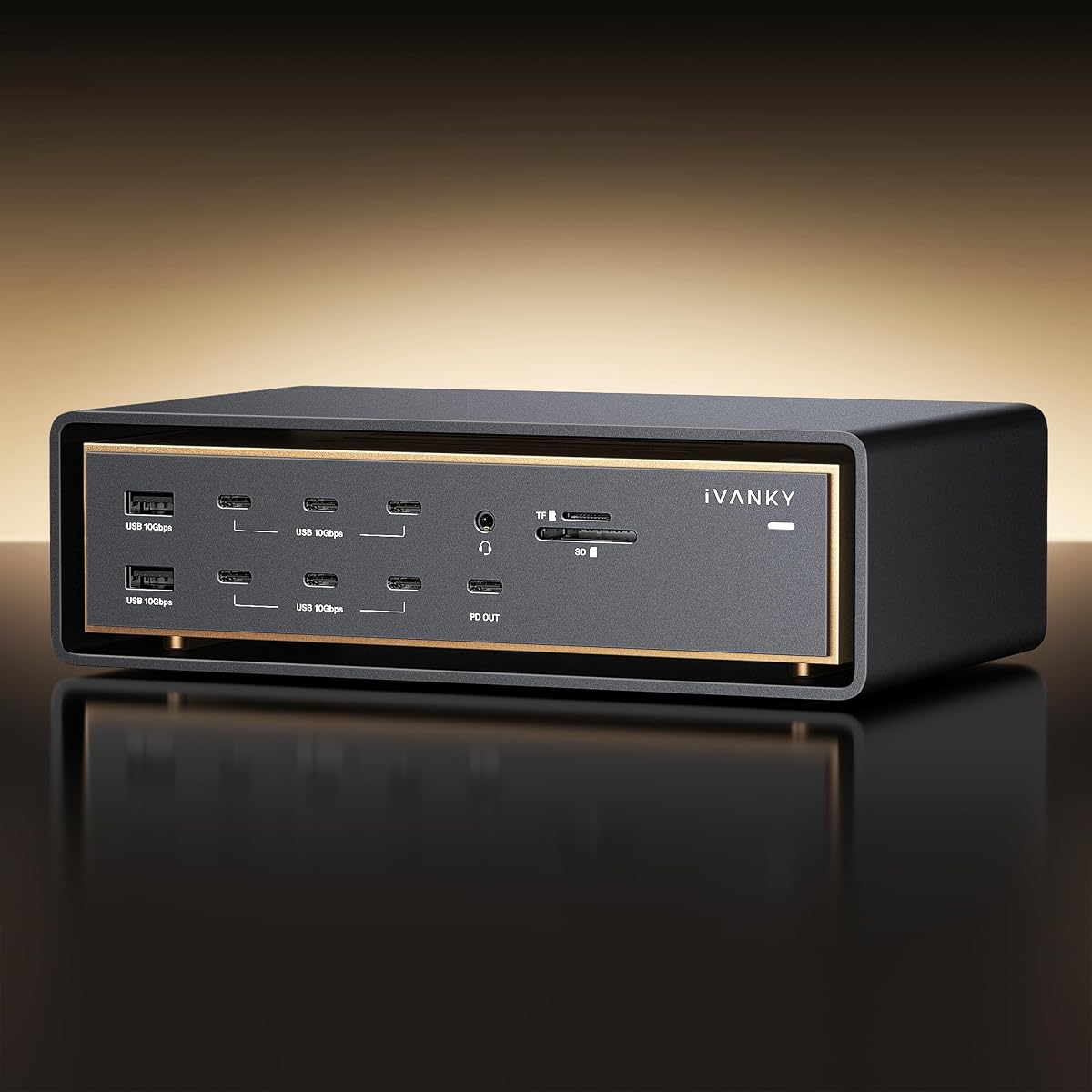
The iVANKY 26-in-1 FusionDock Ultra is a Mac-focused Thunderbolt 5 workstation with a 10Gbps RJ45 port, a very broad selection of connections, and substantial display capability. Its 4.2 rating indicates a generally positive reception, while the dual-chip architecture and 80–120Gbps bandwidth positioning distinguish it from ordinary laptop docks.
We may earn a commission when you buy through this link, at no additional cost to you.
Display support can reach two 8K displays at 60Hz or four 6K displays at 60Hz when used with suitable MacBook Pro configurations. The dock also offers four dedicated downstream USB-C ports with stated 80/120Gbps capabilities, a 10Gbps RJ45 network connection, and 140-watt power delivery for the host MacBook. The breadth makes it relevant to production environments that simultaneously use high-resolution displays and fast storage arrays.
Thermal management is unusually prominent in the product description. A three-layer system combines an NTC-controlled fan, internal copper heat sinks, and a floating chassis designed to create a chimney effect. That active approach is different from the silent passive adapters in this guide and is intended to sustain high bandwidth during extended workloads, including round-the-clock operation.
The product is explicitly exclusive to Mac, which is the largest constraint. Compatibility also varies among MacBook models and multi-display arrangements, so the linked documentation should be reviewed before buying. The interface suite includes optical audio, an SD 4.0 slot capable of 300MB/s photo transfers, and an independent 45-watt USB-C charging port for an iPad or iPhone.
A 24-month warranty and replacement-oriented customer support add some reassurance, but the size and complexity make this more of a permanent production dock than a travel accessory. Buyers should compare their exact MacBook, displays, and network against the compatibility chart. When those requirements align, it is a feature-rich way to combine 10GbE, fast storage, charging, and multiple high-resolution displays in one Mac-centric hub.
The 26-in-1 layout gives a MacBook-based edit or post-production system access to network, storage, card readers, charging, and displays without requiring a pile of separate adapters. The included SD 4.0 reader is particularly relevant to photographers moving large media files.
Combining an intelligent fan, copper heat sinks, and a chimney-style chassis addresses the heat generated by sustained high-bandwidth devices. This is particularly relevant for 24/7 use, although it also makes the dock larger and less discreet than a compact adapter.
We may earn a commission when you buy through this link, at no additional cost to you.
The Anker Prime TB5 Docking Station is a capable 14-in-1 Thunderbolt 5 dock with 2.5Gbps Ethernet. It is best understood as a high-speed general-purpose expansion dock rather than a solution for the full 10GbE requirement. Its 4.2 rating reflects a well-received overall product, while the 140-watt host charging and multiple downstream Thunderbolt connections remain its strongest features.
We may earn a commission when you buy through this link, at no additional cost to you.
The port selection includes one Thunderbolt 5 upstream port, two Thunderbolt 5 downstream ports, two USB-C ports, three USB-A ports, SD and TF card readers, an AC input, 2.5Gbps Ethernet, an audio jack, and an HDMI 2.1 or DisplayPort 2.1 connection. The upstream Thunderbolt 5 path supports data transfer up to 140Gbps, with a stated example of moving a 150GB file in 25 seconds under the manufacturer's stated conditions.
Display configurations can include one HDMI or DisplayPort output plus two Thunderbolt 5 downstream video outputs. A single display can run at 8K and 60Hz, and compatible Thunderbolt 5 Windows laptops can support dual 8K at 60Hz. Actual resolution and refresh rates depend on the computer, operating system, connected displays, and the allocation of data bandwidth.
The upstream port provides up to 140 watts under PD 3.1, while the two front USB-C ports share 45 watts. An advanced active cooling system is included to manage heat under full load. These details make the dock suitable for a demanding desk with multiple storage devices, displays, and peripherals that need consistent power delivery.
Its 2.5GbE network is a limitation for buyers chasing full 10GbE throughput. It may be perfectly adequate for typical office use, but high-speed NAS access, large media transfers, and server workflows deserve a dedicated 10GbE adapter. For a Windows-centric Thunderbolt 5 workstation, however, this dock provides a strong balance of charging, data expansion, card reading, and display connectivity.
Two downstream Thunderbolt 5 ports allow high-speed storage and peripherals to be added without exhausting the host's primary USB-C port. The claimed file-transfer example shows why this matters for large media workflows, provided the full storage chain can sustain comparable speed.
Up to 140 watts to the host supports demanding laptops, while the front USB-C ports add charging for accessories. Active cooling helps maintain performance when several data-intensive devices are connected at once.
We may earn a commission when you buy through this link, at no additional cost to you.
The Belkin USB-C Hub 8-in-1 is a practical everyday hub for users who want displays, charging, USB expansion, and reliable wired internet from one laptop. Its Ethernet is 1Gb rather than 10Gb, so it does not satisfy the core performance target, but its 4.4 rating and broad port selection make it a useful alternative for conventional office or home setups.
We may earn a commission when you buy through this link, at no additional cost to you.
A single USB-C connection provides HDMI, Ethernet, USB, and display connectivity. The hub supports two monitors at up to 4K and 60Hz, and a dedicated privacy button lets connected displays be switched off with one press. That feature is useful in shared spaces, presentations, or whenever sensitive information should not remain visible on screen.
Power delivery reaches 100 watts, enough to keep many compatible laptops charged while the hub is in use. Data connections can support transfers of up to 10Gbps, and the product is described as suitable for connecting as many as three hard drives. The 1Gb Ethernet link is stable and wired, but it is a significant step down from the dedicated 10GbE adapters included elsewhere in this guide.
Belkin's six-point safety system covers over-voltage, overload, over-current, over-temperature, short-circuit protection, and fire-resistant materials. The housing uses 75% post-consumer recycled materials and the product ships in plastic-free packaging. Three-year coverage adds a useful support term for a hub that may sit permanently on a desk.
This is the most approachable choice for someone whose networking needs are modest and whose priority is a compact all-in-one hub. It is particularly useful where Wi-Fi is unstable or unavailable, though calling the connection high-speed should be understood in the context of 1GbE. Users with NAS equipment, editing timelines, or shared servers should select a 2.5GbE or 10GbE alternative instead.
The eight-port arrangement covers the common needs of a laptop user: wired networking, one or two displays, charging, and USB peripherals. It simplifies daily connections without requiring the complexity of a Thunderbolt dock.
The dedicated privacy button is a thoughtful addition for offices and shared workspaces. It provides a quick way to blank connected screens when sensitive material should not be visible.
We may earn a commission when you buy through this link, at no additional cost to you.
The Belkin Connect Thunderbolt 4 Docking Station is a compact five-port hub centered on fast Thunderbolt 4 expansion, charging, and displays. Its 3.8 rating reflects a middling but usable general-purpose product. Most importantly for this guide, it has no Ethernet port, making it unsuitable for buyers seeking either 10GbE or even a basic wired network connection.
We may earn a commission when you buy through this link, at no additional cost to you.
Its connectivity consists of three upstream Thunderbolt 4 USB-C ports, one downstream Thunderbolt 4 USB-C port, and host power delivery. That arrangement can support up to six daisy-chained devices, with data transfer rates up to 40Gbps. It also supports dual monitors at up to 4K and 60Hz or one 8K display at 30Hz.
Power delivery reaches 96 watts through the host connection, with up to 15 watts of downstream charging available. The included Thunderbolt 4 cable and power supply make it a straightforward fixed-desk solution for compatible Mac or Windows systems. The compact format is a major advantage for users who want a cleaner desk without a large 14-port dock.
Its lack of Ethernet rules it out for NAS access, server workflows, reliable calls in places with poor Wi-Fi, and all 10GbE use cases. A buyer can pair it with a separate Ethernet adapter, but that adds another device and may be less convenient than choosing a dock with integrated networking. A dedicated 10GbE adapter such as the OWC, WAVLINK, SABRENT, or Sonnet model would serve the networking requirement more directly.
The Belkin Connect is still a sound minimalist Thunderbolt 4 hub for a display-and-storage workstation. It is best for users who already have satisfactory Wi-Fi or a separate network adapter and value fast downstream expansion, laptop charging, and a small footprint. For the specific goal of Thunderbolt hubs with 10GBE Ethernet, it belongs at the end of the list because it cannot provide a wired connection at all.
The five-port design keeps the desk uncluttered while preserving 40Gbps-class data links. Multiple Thunderbolt 4 ports allow peripherals and displays to be connected through a daisy chain, reducing dependence on limited laptop ports.
Ninety-six-watt host charging, dual 4K support, and single 8K output provide a capable core for a laptop workstation. Ethernet remains an obvious omission, so this model works best as a display dock rather than a complete connectivity hub.
We may earn a commission when you buy through this link, at no additional cost to you.
The most important decision is whether you need genuine 10GbE, a faster multi-gig connection, or simply a general-purpose dock. Host support, network infrastructure, cable quality, display plans, and power requirements should be evaluated before choosing a model.
A Thunderbolt label does not guarantee 10GbE Ethernet. Review the RJ45 specification carefully and distinguish 10GbE, 2.5GbE, and 1GbE. Dedicated 10GbE products such as the OWC adapter, WAVLINK adapter, Sonnet Solo10G T5, and SABRENT adapter support the target speed, while several full docks in this guide provide only 2.5GbE or 1GbE. The iVANKY dock is described as having a 10Gbps RJ45 Ethernet port, but its Mac-focused design and broad display feature set may make it more complex than a dedicated adapter.
Choose genuine 10GbE when your NAS, switch, router, and target files can sustain that rate. A 10G network adapter cannot make a 1G switch or internet plan deliver 10Gbps.
The computer must provide enough bandwidth and the correct controller for 10GbE networking. Thunderbolt 5, Thunderbolt 4, USB4, and some Thunderbolt 3 systems are supported by the dedicated adapters, but specific operating-system and driver requirements vary. Several products explicitly reject USB 3.0, USB 3.2, and older USB-C connections even when the connector shape is identical.
Check the Thunderbolt or USB4 symbol, confirm the host's generation, and review driver requirements before ordering. A USB-C port alone is not a guarantee of 10Gbps Ethernet performance.
The adapter is only one part of a 10G connection. The router, switch, NAS, workstation, and storage device must also support compatible Ethernet speeds, and the server or internet service must be able to provide faster throughput where relevant. Auto-negotiation is useful in mixed environments, allowing the adapter to fall back to 5GbE, 2.5GbE, 1GbE, or 100Mbps as appropriate.
For consistent 10G results, verify that the entire path is designed for that speed. An outdated home router can become the limiting device even when the computer and adapter are fast.
Cable grade and length influence both speed and reliability. Cat6a supports 10GbE runs up to 100 meters according to the OWC and Sonnet descriptions, while Cat6 is commonly used for shorter 10G installations. WAVLINK specifically recommends Cat6a or higher for its 10G performance, and Cat7 is also among the acceptable higher-grade options. Lower-category cables may work at reduced negotiated speeds depending on length and installation quality.
Use certified cable with good connectors and avoid sharply bent or damaged runs. For long cable paths, test the negotiated link speed rather than assuming the hardware supports 10G.
A dedicated adapter is usually simpler for a laptop that already has suitable display, charging, and USB arrangements. It places one high-quality 10GbE connection in a small device and leaves the main Thunderbolt port available for other functions. The WAVLINK, SABRENT, Sonnet, and basic OWC adapter follow this approach.
A dock makes more sense for a permanent workstation that needs networking, displays, charging, card readers, and several peripherals at once. The OWC dual-network dock, iVANKY FusionDock Ultra, and other 14-in-1 docks consolidate those functions, but they are larger and may include more features than a given user needs.
Display support is one of the biggest differences among these products. The OWC dual-network dock supports advanced Thunderbolt 5 arrangements, the iVANKY dock targets multiple 6K or 8K displays on compatible Macs, and several conventional docks support dual 4K output. The final resolution and refresh rate depend on the host, operating system, display, cable, and bandwidth allocation.
Power delivery also matters. Look for enough host charging for the laptop and additional bus power for storage or accessories. Docks with external power supplies can support more demanding configurations, while compact bus-powered adapters are easier to carry.
Driver support can determine how smooth the setup experience is. macOS and many Thunderbolt 4 or USB4 systems recognize compatible adapters immediately, but some Windows and Linux systems require the Marvell AQC113 driver. Once installed, advanced controls may expose jumbo frames, flow control, hardware offloading, receive buffers, and Energy-Efficient Ethernet settings.
Users comfortable with network tuning may appreciate these controls. Simpler setups can rely on automatic negotiation, while managed IT environments should verify WOL, PXE, security policies, and deployment requirements.
A 10GbE controller can generate meaningful heat, especially during sustained transfers. The SABRENT adapter uses its aluminum body as a heatsink and may become warm to the touch, requiring open airflow. Larger docks such as the iVANKY FusionDock Ultra use active cooling and a more substantial chassis. The compact WAVLINK adapter uses passive aluminum cooling, while the Sonnet Solo10G T5 is explicitly fanless and silent.
For a stationary desk, either active or passive cooling can work if placement is sensible. For travel, prioritize a small bus-powered design and leave sufficient space around the enclosure.
Begin by confirming that the computer has a compatible Thunderbolt or USB4 port and that the operating system meets the product's requirements. Connect the hub or adapter directly rather than through an unpowered generic USB-C splitter. For Windows or Linux systems that require drivers, install the supplied Marvell driver before beginning high-volume transfers. Once connected, inspect the link LEDs or network settings to confirm the negotiated speed.
Connect the RJ45 port to a properly rated switch, router, NAS, or workstation using Cat6a or the cable specification recommended by the manufacturer. Check that the other end of the path also supports 10GbE. For a shared 10G network, configure the same speed and duplex settings on compatible infrastructure, and avoid enabling jumbo frames unless every device and application path supports them. Use automatic negotiation when the network contains mixed-speed equipment.
For sustained work, provide airflow around compact adapters and keep them out of closed drawers, bags, and tight spaces beneath laptops. Monitor the enclosure temperature during large transfers, especially with the SABRENT model. Clean the RJ45 connector and ports with dry, soft materials, avoid liquids, and do not pull cables sideways from the socket. When a hub is not in use, disconnecting it can reduce unnecessary heat and prevent accidental physical strain.
No. Thunderbolt describes the host connection, while the Ethernet port has its own speed rating. Some Thunderbolt 4 and Thunderbolt 5 docks provide only 2.5GbE or 1GbE, and one product in this guide has no Ethernet port. Check the RJ45 specification rather than assuming that a premium or multiport dock includes 10GbE.
A 10GbE connection offers four times the nominal bandwidth of a 2.5GbE link. The difference is most noticeable with high-speed NAS systems, shared production storage, large media libraries, and local server transfers. For typical web browsing, office applications, and video calls, 2.5GbE may be sufficient, provided the router or switch supports it.
No. A USB-C connector may belong to a Thunderbolt 5, Thunderbolt 4, USB4, Thunderbolt 3, or slower USB interface. The dedicated 10GbE adapters generally require USB4 or a compatible Thunderbolt generation, and some explicitly exclude USB 3.0 or 3.2 hosts. Verify the port symbol, generation, and operating-system requirements before purchasing.
Cat6a is a safe choice for full 10GbE installations and supports longer runs, with the OWC and Sonnet products citing distances of up to 100 meters. Cat6 can support 10G over shorter distances, including up to 55 meters in the Sonnet description. Cable quality, installation, and connector condition also affect reliability.
The slowest compatible device in the path determines the negotiated rate. A 2.5GbE switch, 1GbE NAS, unsuitable cable, older host interface, or incorrect driver can limit performance. Review the negotiated link rate, update the driver, check Energy-Efficient Ethernet settings, and confirm that the router, switch, server, and storage all support the intended speed.
It can eliminate Wi-Fi bottlenecks and provide a fast local path, but it cannot exceed the speed delivered by the internet service. Local transfers to a 10GbE NAS or server can be dramatically faster because they do not depend on external bandwidth. For maximum local throughput, the storage device and every network component must also support 10G.
It depends on the adapter and operating system. macOS and many current Thunderbolt 4 or USB4 systems recognize compatible devices directly, while Windows and Linux may require the Marvell AQC113 driver. The WAVLINK and SABRENT descriptions specifically note possible manual driver installation, so check the included instructions and manufacturer support page.
Not necessarily. A warm aluminum housing can be normal because the enclosure is intended to dissipate controller heat during sustained 10G transfers. However, it should have access to airflow and should not be placed under a laptop, inside a bag, or in a closed drawer. Persistent instability, unusual odor, or damaged connectors should prompt power disconnection and support contact.
The strongest general recommendation is the OWC Thunderbolt 4 10G Ethernet Adapter because it combines stated real-world performance above 900MB/s, broad Mac and Windows compatibility, automatic multi-gig negotiation, and a simple dedicated form. The WAVLINK USB4 to 10Gbps Ethernet Adapter is a strong value-oriented alternative with the AQC113-B1 controller and broad Thunderbolt generation support, while the Sonnet Solo10G T5 stands out as the most specialized portable professional option.
Prioritize the Ethernet specification first, then verify the host interface, network infrastructure, cable grade, driver requirements, display plans, and power needs. A dock with many ports may be less suitable than a focused adapter if full 10GbE is the main requirement. Conversely, 2.5GbE and 1GbE docks can be better choices when the larger set of display, charging, and peripheral functions matters more than maximum network throughput.
Before buying, confirm the current product specification and the compatibility of your exact computer, operating system, network equipment, and cables. Prices, ratings, port configurations, and software requirements can change over time, so use the provided links to check the latest listing. The right choice is the one that supplies the actual bandwidth and connectivity your workflow needs without paying for functions you will never use.
