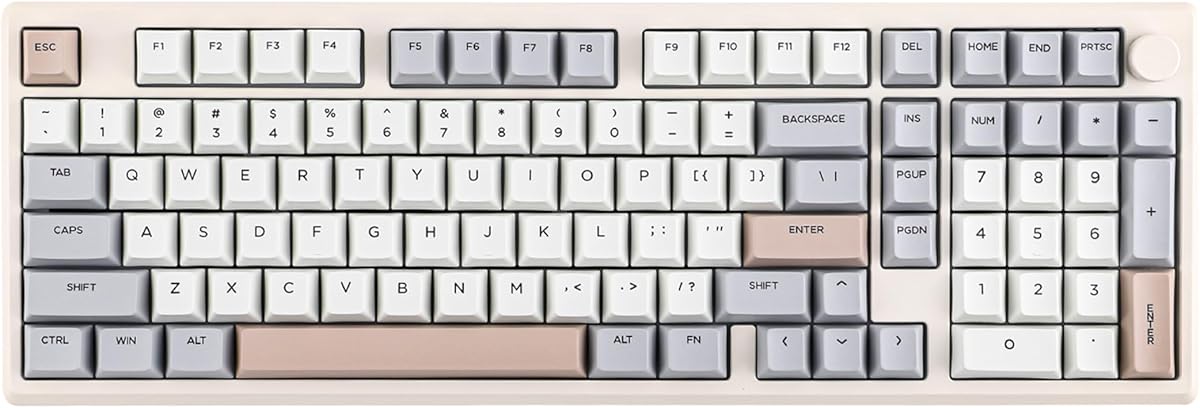
EPOMAKER Galaxy100
4.5Editor score
Full aluminum keyboard shell
QMK and VIA customization
Hot-swappable linear switches
Complete numpad and knob
This expert guide compares the best Epomaker keyboards for gaming, typing, wireless use, sound, layouts, and customization, helping you choose the right model.
Epomaker keyboards cover a wide range of needs, from compact gaming boards to full-size wireless models with screens, knobs, hot-swappable sockets, and advanced controls. A good keyboard should feel comfortable, respond reliably, and suit your preferred layout, software, and switching system rather than simply looking impressive.
We compared these ten boards by examining their stated layouts, connectivity, battery capacities, polling rates, switch support, acoustic construction, displays, customization features, and intended use cases. The list includes full-size, 96%, 80%, 75%, and Hall Effect models so you can compare practical differences without relying on specifications alone.
Each review identifies the board that stands out for a particular kind of user, from competitive gamers to spreadsheet-focused professionals. Ratings and technical details reflect the supplied product information, while prices and availability can change, so check the current listing before making a final purchase.
4.5Editor score
4.7Editor score

4.7Editor score
The table below compares the ten featured Epomaker keyboards by layout, connectivity, primary interface feature, and battery specification, providing a quick way to narrow the field before reading the full reviews.


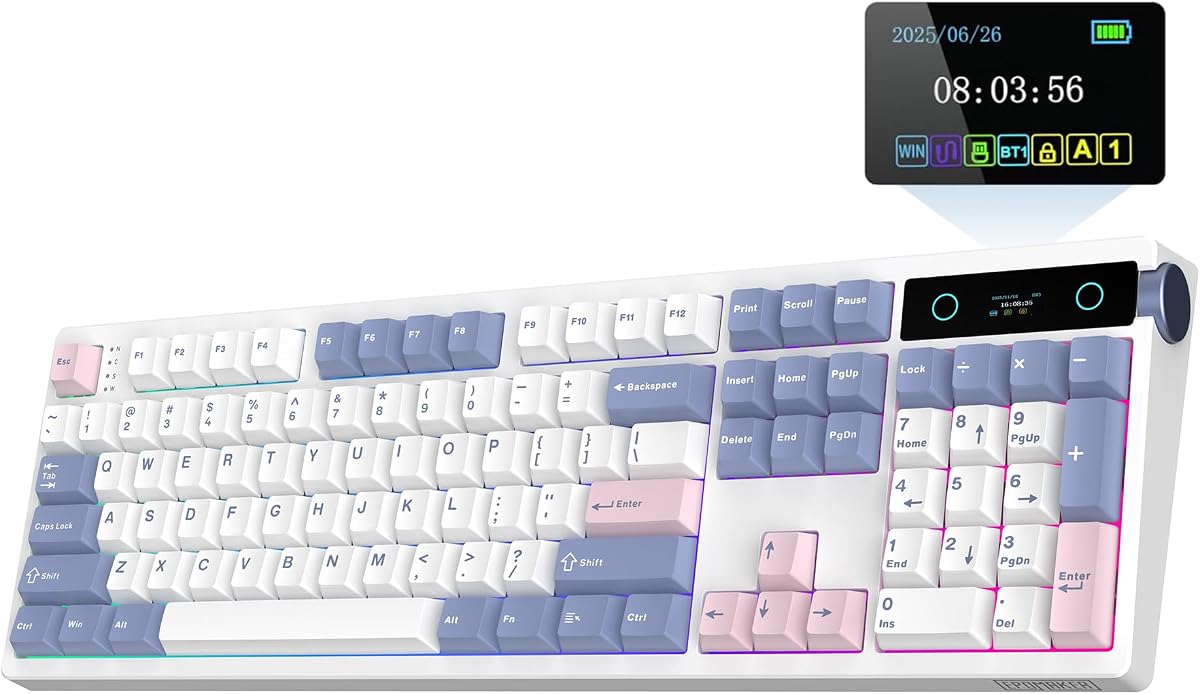
The EPOMAKER TH108 PRO is a full-size mechanical keyboard with a 4.7 rating that combines a familiar 104-key layout, a smart display, and a rotary knob. Its strongest appeal is the balance it strikes between everyday productivity and gaming features. The screen can present device status, time, backlight information, and uploaded pictures or GIFs, while the knob gives quick access to volume or screen navigation depending on the selected function.
We may earn a commission when you buy through this link, at no additional cost to you.
Performance specifications are aimed at responsive play. The supplied information lists 2ms latency in wired mode and 1,000Hz polling over 2.4GHz wireless. Its 10,000mAh battery is paired with an asserted 200-hour wireless runtime, and the keyboard can move among wired, 2.4GHz, and Bluetooth connections across as many as five paired devices. A five-layer gasket-mounted structure, including sandwich foam, IXPE, PET, socket foam, and silicone, supports a softer, more controlled acoustic profile.
The main compromise is size. This is not a compact board, so users with limited desk space may find the dedicated function row and number pad cumbersome. The screen and RGB lighting can also draw more power than a plain wired keyboard, although the stated battery capacity is generous. Another consideration is that advanced features depend on the supplied software and compatible computer setup, so buyers who want a simple plug-and-play device may prefer a less elaborate model.
Despite those limitations, the TH108 PRO is the strongest all-round choice in this collection. It suits gamers who want fast wireless performance, office users who need a number pad, and enthusiasts who appreciate a screen, knob, macro controls, and hot-swappable sockets. The broad feature set makes it particularly persuasive as a single keyboard for work, gaming, and everyday communication.
The smart screen and knob transform otherwise empty space above the number pad into a control area. Browsing status information, adjusting volume, changing lighting, and displaying custom media are more convenient here than navigating operating-system menus.
Tri-mode connectivity and multi-device pairing make this board useful when work, gaming, and personal devices share the same desk. The wired mode provides a low-latency option, while wireless modes reduce cable clutter.
We may earn a commission when you buy through this link, at no additional cost to you.
The EPOMAKER X Aula F75 MAX is a 75% gaming keyboard offering 80 programmable keys, a TFT screen, a knob, tri-mode connectivity, and hot-swappable sockets. Its 4.6 rating reflects a well-rounded specification sheet without relying on an oversized chassis. The design is particularly appealing to gamers and programmers who want a compact board that still provides dedicated navigation keys and a screen for status information.
We may earn a commission when you buy through this link, at no additional cost to you.
The F75 MAX uses a gasket-mounted structure and a flex-cut PC plate to soften bottom-out and reduce harshness. Factory-lubed linear switches and tuned stabilizers contribute to the advertised creamy, thocky sound, while multiple internal pads help reduce echo. It supports 1,000Hz polling in USB and 2.4GHz modes, NKRO input, and anti-ghosting, making it appropriate for fast-paced games that involve multiple simultaneous inputs.
Its 75% format is the central trade-off. It saves room compared with a full-size model, but users accustomed to a separated function row may find the condensed key arrangement less convenient. It also lacks a numeric keypad, which matters for spreadsheet entry, accounting, and data-heavy workflows. The TFT display, RGB effects, remapping, and macro editing are useful once configured, but they add complexity for buyers seeking a completely hands-off experience.
This keyboard is best for someone who wants a compact, visually distinctive board with a display and strong gaming functions. It handles PC, Mac, and Linux environments, making it a sensible option for cross-platform users. The F75 MAX stands out as a balanced compact choice, particularly when desk space and feature density matter more than having a number pad.
The 75% format preserves arrow keys and other frequently used controls while removing the separate function row and number pad. That makes it easier to move between gaming and productivity than a more aggressively compact design.
Gasket mounting, a flex-cut plate, factory-lubed switches, and layered sound materials work together to soften the keyboard's acoustic profile. The result is aimed at users who prefer a deeper, less hollow sound.
We may earn a commission when you buy through this link, at no additional cost to you.
The EPOMAKER Galaxy100 is the premium-focused entry in this roundup, combining a full-size 1800 layout with an aluminum alloy shell, a metal knob, and an 8,000mAh battery. Its 4.5 rating does not make it the highest-rated model here, but its combination of construction and open firmware support gives it a distinct identity. It is built for enthusiasts who value a substantial enclosure and extensive configuration options.
We may earn a commission when you buy through this link, at no additional cost to you.
QMK and VIA support are major attractions. Users can remap keys, edit macros, and create layers through VIA software, while compatibility with Windows, Mac, and Android broadens its practical appeal. The pre-lubed linear switches, hot-swappable PCB, gasket mount, and five cushioning layers—including Poron, IXPE, EMDP, and PET materials—are designed to create a stable, muted, and flexible typing experience. South-facing RGB LEDs and dye-sublimated PBT keycaps complete the premium appearance.
The weight and complete layout are important trade-offs. An aluminum full-size board naturally requires more desk space than the F75 MAX, F99, or G84 HE, and its substantial case is less convenient to reposition. The included battery offers strong wireless utility, although RGB use will reduce the stated runtime. Users who prefer deeper firmware control should also be comfortable configuring layers and remapping rather than relying exclusively on simpler onboard controls.
The Galaxy100 is the recommendation for users who want a premium full-size mechanical keyboard and do not need a display. It is particularly persuasive for programmers, office power users, and keyboard enthusiasts interested in QMK/VIA. If your priority is a screen and knob, the TH108 PRO offers more visible controls; if portability is the priority, a smaller model will serve better.
The aluminum alloy enclosure gives the keyboard a dense, stable feel, while the gasket mount and internal dampening materials temper the harshness normally associated with a rigid case. This combination emphasizes both refinement and acoustic control.
QMK and VIA support allows deeper remapping, layer creation, and macro editing than a basic driver. It is a strong fit for programmers and users who want their keyboard layout to evolve with their workflow.
We may earn a commission when you buy through this link, at no additional cost to you.
The EPOMAKER TH108 V2 PRO is a refined full-size wireless keyboard rated 4.7, with a 104-key layout, a display, and a rotary knob. It resembles the TH108 PRO in broad concept but places particular emphasis on multilingual web-based configuration and dedicated Mac modifier keys. That makes it a versatile choice for hybrid workers who move between Windows and Mac systems.
We may earn a commission when you buy through this link, at no additional cost to you.
Its 10,000mAh battery is stated to deliver as much as 200 hours of continuous use, while USB, 2.4GHz, and Bluetooth modes provide flexible device switching. The keyboard is also built for gaming, with a stated 1,000Hz polling rate and 2ms latency. A gasket structure and multiple cushioning layers—including PORON, latex, IXPE, silicone, and foam—are intended to create a soft, deep sound and reduce harsh vibration.
The screen is not merely decorative in this model. It can show real-time keyboard information, backlight settings, and user-uploaded GIFs, drawings, or photographs. The knob changes volume by default and can be reassigned for functions such as playlist control or macro activation. A limitation is that these tools depend on compatible browser-based software, and a user who dislikes installing or using configuration utilities may get less value from them.
The TH108 V2 PRO is best for someone who wants a conventional full-size keyboard with contemporary controls. It works particularly well for users who value Mac compatibility, a numpad, and wireless switching across devices. Compared with the Galaxy100, it offers a visible screen and a lighter plastic construction; compared with the TH108 PRO, it emphasizes the revised software experience and platform-specific keycaps.
Status information, time, lighting controls, and custom visuals make the screen more engaging than a plain indicator panel. Browser-based software also allows customization without relying on a large native desktop application.
Shortcut-based device switching and dedicated Mac modifier legends improve the experience of using one board with multiple computers. This is valuable for hybrid offices where the same keyboard may be shared between a Windows workstation and a Mac laptop.
We may earn a commission when you buy through this link, at no additional cost to you.
The EPOMAKER TH99 PRO combines a 96% layout with 98 keys, a glass display, a rotary knob, and a 10,000mAh battery. Its 4.6 rating and broad feature set make it a middle ground between a full-size productivity board and a compact gaming model. The inclusion of a complete number pad makes it especially interesting for users who want more desk space without giving up numeric entry.
We may earn a commission when you buy through this link, at no additional cost to you.
The display can present battery status, time, and other keyboard information, while also supporting GIFs and RGB control. Its knob provides immediate volume adjustment, and the web-based software adds remapping, macro recording, and lighting customization. The keyboard switches among PC, Android, and Mac devices through wired, 2.4GHz, and Bluetooth modes. Stated battery life ranges from 150 to 200 hours with RGB off and more than 40 hours with the display and lighting active.
A key consideration is that the 96% arrangement compresses some navigation keys to fit the numpad and screen. Users with extensive spreadsheet needs may still prefer the more familiar 104-key TH108 PRO, while competitive gamers seeking maximum mouse space may favor an 80% board. The stated weight of more than 1.2kg provides stability but also means the keyboard is not intended to be moved constantly.
The TH99 PRO is a strong recommendation for desk-conscious office users who still need a number pad. It offers more visible control options than the standard TH99 and more spatial efficiency than a conventional full-size model. For general productivity, mixed-device work, and moderate gaming, it delivers a particularly versatile balance.
The 96% layout preserves a complete number pad and separate arrow cluster while reducing some of the empty space around them. It is a practical compromise for spreadsheets, navigation, and mouse-oriented gaming.
The glass screen presents useful information at a glance, and the knob provides immediate volume control. Users can move beyond the screen to GIFs, lighting controls, macros, and custom key assignments.
We may earn a commission when you buy through this link, at no additional cost to you.
The EPOMAKER TH108 is a full-size wireless gaming keyboard with a 4.5 rating, a 108-key layout, hot-swappable sockets, and a 10,000mAh battery. It focuses on core mechanical-keyboard qualities rather than adding a screen or knob. For buyers who want a conventional full-size board with modern wireless convenience, that restraint can make the design easier to understand and use.
We may earn a commission when you buy through this link, at no additional cost to you.
Its performance figures include 2ms latency in wired mode and 1,000Hz polling over 2.4GHz. Wired, 2.4GHz, and Bluetooth connections support up to five paired devices, and the stated battery life reaches 160 hours. A five-layer gasket construction combines sandwich foam, IXPE, PET, PORON socket foam, and bottom silicone to reduce resonance and soften bottom-out. Factory-lubed Creamy Jade or Sea Salt Silent switches provide different sound profiles.
The main advantage is the balance of core features. It offers a stable body weighing more than 1.2kg, double-shot PBT keycaps, adjustable RGB lighting, and configurable macros and key mappings without filling the upper-right corner with extra controls. Its limitations are related to that simplicity: there is no display, knob, or QMK/VIA support, so users wanting deeper firmware control must rely on the supplied custom driver.
The TH108 is best for a full-size user who values wireless endurance, a substantial acoustic design, and switch customization. It also works well for mixed office and gaming setups because the layout includes a number pad and the wireless modes support several device types. Choose it when functionality matters more than decorative smart features.
The TH108 focuses on the fundamentals: a full-size map, long wireless endurance, adjustable lighting, and hot-swappable switches. That simplicity makes it approachable for office users who do not need a screen or advanced gaming controls.
Its weighted frame and broad base help keep the keyboard steady during rapid typing or gaming. The substantial layout also supports a complete number pad and familiar key spacing.
We may earn a commission when you buy through this link, at no additional cost to you.
The EPOMAKER G84 HE is built around Hall Effect magnetic switches, adjustable actuation, and a high polling rate rather than conventional physical contact switches. Its 4.7 rating and 8,000Hz polling specification make it the most competition-focused keyboard in this group. The 80% layout also preserves a compact footprint while offering dedicated navigation controls and a space-efficient desk arrangement.
We may earn a commission when you buy through this link, at no additional cost to you.
Actuation can be adjusted from 0.1mm to 3.3mm, with trigger and release control stated at 0.01mm precision. The keyboard supports SOCD snap-key logic, DKS dynamic key rollover, rapid trigger, and a 256K scan rate. These capabilities can reduce the travel required to register an input, which is useful in fast-paced competitive games. It also supports 1,000Hz polling in wired mode and offers a stated 0.125mm latency in 2.4GHz mode.
This advanced feature set comes with a learning curve. Users should follow the EPOMAKER software guidance to calibrate the magnetic switches properly and understand how DKS, SOCD, rapid trigger, and remapping affect normal typing. Hall Effect boards may not be ideal for everyone, especially those who want the familiar feel of a standard mechanical switch. Its 80% format also omits a number pad and dedicated function row.
The G84 HE is the clear choice for competitive gamers who value instant actuation and extensive control over key behavior. Its tri-mode connectivity, 8,000mAh battery, hidden 2.4GHz receiver storage, five-layer gasket construction, and shine-through PBT keycaps make it a complete gaming package. For standard office work, a conventional mechanical board may feel more familiar.
Magnetic switches allow the point at which a key registers to be changed without replacing the physical switch. Competitive players can shorten trigger travel for faster inputs or adjust release behavior to suit a particular game.
SOCD logic prioritizes the most recent opposing input, while DKS can assign different actions according to press depth. These tools support specialized movement commands, but they benefit from deliberate setup and practice.
We may earn a commission when you buy through this link, at no additional cost to you.
The EPOMAKER TH99 is a 96% wireless mechanical keyboard with 102 keys, a complete number pad, and a 4.6 rating. It serves as a practical workhorse for users who want more desk space than a traditional full-size model but still need numeric entry. Its tri-mode connection, 8,000mAh battery, and stated 800-hour runtime with the backlight off make it especially relevant to office-focused buyers.
We may earn a commission when you buy through this link, at no additional cost to you.
Performance remains gaming-capable, with 1,000Hz polling and 2ms latency in wired mode, plus 2.4GHz and Bluetooth 5.0 alternatives. The 1800-style layout includes a number pad and eight separate function keys, while Cherry-profile PBT keycaps and a two-stage kickstand support a practical typing angle. A five-layer gasket structure, lubed linear switches, and tuned plate-mount stabilizers are designed to produce a creamy, low-hollow sound.
The main compromise is that this version does not include the screen and knob found on the TH99 PRO. It therefore emphasizes conventional productivity and wireless utility rather than visible status information or quick contextual controls. RGB lighting is attractive, but users who routinely leave it on will see substantially shorter battery life than the backlight-off figure. The 96% key map may also require adjustment for users accustomed to a more separated layout.
The TH99 is a strong choice for hybrid work, data entry, and casual gaming. It offers a good balance of footprint, function, and battery life without smart-screen complexity. If you want similar productivity features plus a screen and encoder, the TH99 PRO is the more advanced option; if desk space is secondary, the TH108 provides a more traditional full-size alternative.
The compact 1800 layout includes eight separate function keys, a number pad, and arrow controls. It provides more direct productivity access than smaller 75% and 80% designs while preserving mouse space.
The stated 800-hour figure applies with the backlight off, so actual runtime depends heavily on lighting and usage. Even so, the 8,000mAh capacity provides a strong foundation for regular wireless work.
We may earn a commission when you buy through this link, at no additional cost to you.
The EPOMAKER Ajazz AK820 Pro is a compact 75% wireless keyboard that pairs a TFT display with a 75% layout, gasket mounting, and tri-mode connectivity. Its 4.7 rating makes it one of the strongest-rated products in the list. The display distinguishes it from many similarly sized boards by showing battery status, date, time, connectivity, operating-system information, and backlight effects.
We may earn a commission when you buy through this link, at no additional cost to you.
Connection options include Bluetooth 5.1, 2.4GHz wireless, and a detachable Type-C cable. The 4,000mAh battery is smaller than the capacities offered by most of the full-size and 96% models here, so the keyboard is best suited to users who recharge regularly or favor a compact desk arrangement. Its gasket-mounted structure and flex-cut PC plate and PCB are designed to reduce vibration and create a slightly flexible, cushioned feel.
As a 75% model, it is most appropriate for people who prioritize desk space and portability over a dedicated number pad. South-facing RGB lighting supports customizable visual effects, and the keyboard can switch between Windows and Mac modes. The gasket construction and flexible plate offer a more refined feel than a basic tray-mounted board, although it does not offer the same deep software customization as models with QMK, VIA, or extensive macro tools.
The AK820 Pro is the smart-display option for compact setups. It suits students, office workers, and casual gamers who want useful information close at hand and a clean, portable footprint. It is less suitable for intensive data entry, but for general productivity and gaming, the display, wireless modes, and flexible construction form a compelling package.
The TFT can present battery, time, date, connection, operating system, and lighting information. Those details make it easier to understand the keyboard's current status without opening a companion application.
The 75% format reduces desk requirements while retaining arrow keys and familiar spacing. Combined with wireless operation, it works well for users who regularly move between a home and office setup.
We may earn a commission when you buy through this link, at no additional cost to you.
The EPOMAKER x Aula F99 is a 96% wireless mechanical keyboard built around a 99-key layout, full-key hot-swapping, and a distinctive single-key-slotted FR4 PCB. Its 4.5 rating reflects a focused enthusiast design without a screen, knob, or advanced gaming firmware. It is aimed at users who prioritize tactile experimentation, a complete number pad, and a more compact footprint.
We may earn a commission when you buy through this link, at no additional cost to you.
Each key is independently slotted, which is intended to improve feedback and consistency. A five-layer acoustic structure combines IXPE under-shaft pads, PORON sound-absorbing material, and silicone bottom padding. The board includes factory-pre-lubricated linear switches and supports 3-pin and 5-pin replacements, making it easy to experiment with different switch families. Dual-tone PBT keycaps and a finished chassis provide a durable, enthusiast-oriented appearance.
Connectivity covers Bluetooth, 2.4GHz wireless, and wired USB Type-C, with compatibility listed for Windows, macOS, iOS, and Android. The 8,000mAh battery supports extended wireless use, while low-power consumption is intended to improve operating life. The trade-off is that the F99 does not offer a TFT display, programmable knob, or explicitly stated high polling rates, making it less focused on competitive gaming and smart desk functions.
The F99 is best for a user who wants a practical 96% board and enjoys changing switches. It balances a full number pad and arrow cluster with a relatively compact footprint, while the padded construction targets a softer sound. Consider the TH99 PRO if a screen is important, or the G84 HE if competitive actuation controls are the main priority.
The single-key-slotted FR4 PCB gives each switch its own section of board. This design is intended to create more consistent feedback and response than a shared plate area.
Full-key hot-swap sockets and factory-lubed linear switches make it simple to begin changing the feel and sound of the keyboard. Support for common 3-pin and 5-pin switches broadens the available options.
We may earn a commission when you buy through this link, at no additional cost to you.
The most suitable Epomaker keyboard depends on how you balance layout, responsiveness, acoustics, wireless convenience, and customization. These factors are more useful than comparing decorative features alone.
Layout is the first decision because it determines which functions are physically available and how much desk space the keyboard occupies. A full-size board such as the TH108 PRO or TH108 includes a number pad and separate function row, making it the safest choice for spreadsheets, accounting, and general office work. The 96% TH99 PRO, TH99, and x Aula F99 preserve a number pad in a more compact arrangement, while the 75% F75 MAX and AK820 Pro omit it. The 80% G84 HE favors navigation keys and mouse space over numeric entry.
All featured models support wired use, but the value of wireless depends on the connection technology and intended environment. Bluetooth is convenient for switching among laptops, tablets, and phones, while 2.4GHz is generally intended for responsive desktop gaming. Wired mode remains useful when charging, reducing latency concerns, or avoiding radio interference. When comparing tri-mode boards, check the number of paired devices, the receiver design, supported operating systems, and whether the USB connection is detachable.
Battery capacity is only one part of the endurance equation. The listed capacities range from 4,000mAh to 10,000mAh, but RGB lighting and display use can reduce runtime substantially. For example, the TH99's stated 800-hour figure applies with the backlight off, while the TH99 PRO is described as offering roughly 150 to 200 hours with RGB off and more than 40 hours with lighting and the display active. Look for real-use expectations rather than treating the largest capacity as automatically producing the longest runtime.
Competitive gamers should pay close attention to polling rates, latency, and the connection mode in which those figures apply. The G84 HE is the clear performance specialist, with 8,000Hz polling, 256K scanning, adjustable magnetic actuation, and rapid-trigger features. The TH108, TH108 PRO, TH108 V2 PRO, and TH99 offer 1,000Hz polling in relevant wired or wireless modes. Casual gamers and office users can prioritize feel, acoustics, and layout without needing the highest available polling specification.
Most boards in this guide use conventional hot-swappable mechanical sockets, usually accepting 3-pin and 5-pin switches. The G84 HE instead uses Hall Effect magnetic switches, allowing trigger and release points to be adjusted electronically. That approach is highly attractive for competitive games but requires calibration and is less necessary for conventional office typing. Mechanical users should also consider whether they prefer linear, tactile, clicky, or silent behavior and whether factory-lubed switches meet their preferences.
A keyboard's sound depends on the case, mounting system, plate, switches, stabilizers, and internal padding. The TH108 family, TH99 family, F99, F75 MAX, AK820 Pro, and G84 HE all use gasket-oriented construction to reduce harshness and hollow resonance. Multiple foam and silicone layers can deepen the sound further. If a quiet office is important, prioritize silent switch options or the G84 HE's dampening; if a fuller sound is desired, a gasket board with factory-lubed linear switches is often a practical starting point.
The level of control ranges from standard remapping and lighting tools to advanced functions. The Galaxy100 supports QMK and VIA, giving programmers and enthusiasts deeper layer and macro control. The TH108 PRO and TH108 V2 PRO use browser-based software for screen content, key remapping, and macros. Other boards offer dedicated drivers with backlight, sensitivity, and macro settings. Make sure the software supports your operating system and that you are comfortable configuring the board rather than expecting every feature to work without setup.
Displays and rotary knobs are useful only when they fit your routine. A TFT can show time, battery state, operating-system mode, GIFs, or lighting status, while a knob can adjust volume or trigger assigned functions. The TH108 PRO, F75 MAX, TH108 V2 PRO, and TH99 PRO combine these elements, and the AK820 Pro includes a display. If you mainly need a reliable full-size board, the standard TH108 and TH99 provide the core experience without the additional controls.
Begin by charging the keyboard fully and installing the appropriate connection method. Pair it through Bluetooth or connect the 2.4GHz receiver, then use the supplied controls to select the intended device. Check the operating-system mode before remapping keys, and update or open the relevant EPOMAKER or browser-based software if the model includes a display, knob, macros, adjustable RGB, or advanced actuation settings.
For hot-swappable models, power the keyboard down before changing switches. Remove the keycap and switch with the appropriate puller, align the replacement with the socket, and press it evenly into place. Users of the G84 HE should follow the manufacturer's calibration procedure whenever the keyboard is moved or its actuation behavior seems inconsistent. Avoid forcing switches, and do not place liquids or small debris around the sockets.
For daily care, disconnect the cable before cleaning and use a soft, dry microfiber cloth on the keycaps and surfaces. Compressed air can remove loose dust from between keys, while a lightly dampened cloth can clean the case, though it should never touch the charging port or enter the keyboard. Charge the board on a stable surface, avoid leaving the battery depleted for long periods, and reduce RGB or screen use when maximum wireless endurance is the priority.
The EPOMAKER G84 HE is the most specifically competition-focused model in the list. Its Hall Effect switches, adjustable actuation, 8,000Hz polling, 256K scan rate, SOCD logic, and DKS support are designed for fast input control. The TH108 family also offers 1,000Hz polling and low-latency wireless modes, but the G84 HE provides more granular control over trigger behavior.
The TH108 PRO is a strong all-purpose productivity option because it combines a complete 104-key layout, screen, knob, multi-device wireless connectivity, and hot-swappable switches. Users who need a number pad but want more desk space can consider the TH99 PRO. The Galaxy100 is also productive because QMK/VIA support, a full numpad, and a metal knob suit users who value long-term customization.
A full-size keyboard includes a number pad and a separate function row. A 96% layout usually keeps the number pad and arrow keys while compressing the upper section. An 80% board usually retains navigation keys but removes the number pad, and a 75% keyboard becomes more compact by condensing both the function row and navigation area. The right choice depends on whether desk space or dedicated numeric entry has greater priority.
Hot-swappable sockets are designed to let compatible mechanical switches be removed and replaced without soldering. The F99, TH99 PRO, TH108 family, F75 MAX, and Galaxy100 support this approach, with most accepting common 3-pin or 5-pin switches. Always power the keyboard down, use a suitable puller, align the replacement correctly, and avoid pulling the switch sideways.
Most featured models list Windows and Mac compatibility, and the TH108 V2 PRO and AK820 Pro make platform switching especially explicit. The F75 MAX also supports PC, Mac, and Linux, while the Galaxy100 supports Windows, Mac, and Android. Confirm the exact operating-system list for the model and update its software before beginning complex remapping.
RGB lighting can shorten runtime considerably, and the size of the reduction depends on brightness, effects, and the display. The TH99's stated 800-hour endurance applies with the backlight off, while the TH99 PRO is listed at roughly 150 to 200 hours with RGB disabled and more than 40 hours with lighting and the display active. Turning down brightness or disabling the screen helps preserve wireless life.
A screen and knob are worthwhile if you want quick access to volume, status information, lighting controls, custom images, or assigned functions. The TH108 PRO, F75 MAX, TH108 V2 PRO, and TH99 PRO are strong options in that category. If your priority is a conventional layout and straightforward mechanical feel, the standard TH108, TH99, or F99 may be more useful.
It matters most to programmers, productivity enthusiasts, and users who want layers, remapped controls, or advanced macros. The Galaxy100 supports both QMK and VIA, offering a deeper degree of configuration than the standard driver-based models. Casual users may not need it, but it can make a keyboard easier to adapt to specialized workflows over time.
The EPOMAKER TH108 PRO is the strongest overall selection because it combines a familiar full-size layout, a useful screen and knob, tri-mode wireless connectivity, hot-swappable switches, and a carefully padded gasket design. The Galaxy100 stands apart for users who prefer an aluminum case and QMK/VIA control, while the Ajazz AK820 Pro delivers the most approachable compact smart-display design.
Prioritize the feature that directly affects your daily work. Competitive players should examine the G84 HE's Hall Effect controls, spreadsheet users should favor a model with a full number pad, and desk-conscious enthusiasts may prefer the F75 MAX or x Aula F99. Software, operating-system support, and battery behavior are just as important as headline specifications.
Ratings, configuration options, and product listings can change over time, and current prices and availability should be checked on the linked Amazon pages before ordering. With the layout, connection method, switch system, and acoustic preference now clear, choosing among these ten Epomaker keyboards becomes a much more focused decision.