
Webcam Tripod Stand Extendable
4.5Editor score
Two adjustable height levels
360-degree rotating ball joint
Standard quarter-inch mounting screw
Includes smartphone holder
Best mini tripod for webcam guide comparing 10 compact stands for stability, height adjustment, angle control, portability, and device compatibility.
A mini tripod for webcam can transform a loosely positioned camera into a steadier, more practical setup for calls, streaming, recording, and virtual meetings. The right stand should hold your device securely, place it at a useful height, and let you reposition the viewing angle without repeatedly rearranging your desk.
We compared ten stands across height range, extension levels, mounting compatibility, load capacity, ball-head movement, desk stability, portability, and included accessories. The list covers tiny travel tripods, extendable desktop models, phone-ready stands, and compact options designed to support webcams, cameras, action cameras, ring lights, and other lightweight equipment.
Each pick highlights a different balance of stability, reach, and convenience, from a compact aluminum stand with a phone holder to a taller desktop tripod and a feature-rich vlogging support. Product availability and prices can change, so confirm the current listing and device compatibility before making a final purchase.
4.5Editor score

4.6Editor score

4.4Editor score
This side-by-side comparison highlights the major differences among compact webcam tripods, including extension range, mounting hardware, angle control, portability, maximum load, and whether a smartphone holder is included.




The Amazon Basics Lightweight Portable Mini Travel Tripod is a straightforward desktop support for people who want a small, uncomplicated way to stabilize a webcam or another lightweight device. Its 4.2 rating reflects a generally practical design, with the strongest qualities coming from its compact dimensions, metal legs, rubber feet, and 360-degree ball head.
We may earn a commission when you buy through this link, at no additional cost to you.
The legs extend from 4.76 inches to 7.5 inches, giving the camera a modest lift without creating a large desktop footprint. The ball head rotates through 360 degrees and tilts up to 90 degrees, making it easier to aim a webcam toward a seated user, adjust for portrait or landscape framing, or reposition the device after a call begins.
The primary limitation is its recommended maximum load of 1.1 pounds. That is appropriate for many compact webcams, action cameras, and small digital cameras, but it offers less margin than the heavier stands in this guide. A smartphone adapter is also not included, and the product is not intended for DSLRs.
This is a sensible choice for travelers, students, and anyone who needs a pocketable support for a light webcam. It will not provide the height of an extended desktop tripod, but it balances portability, adjustability, and simplicity particularly well for close-up calls and temporary setups.
The folded footprint is easy to carry in a laptop sleeve, backpack, or camera bag. That portability makes the tripod more useful than a fixed desktop accessory when your work or calls move from one location to another.
The 360-degree rotation and 90-degree tilt make on-the-fly framing changes possible. Although the adjustment is basic, it provides enough movement for close-up calls, demonstrations, and compact recording arrangements.
We may earn a commission when you buy through this link, at no additional cost to you.
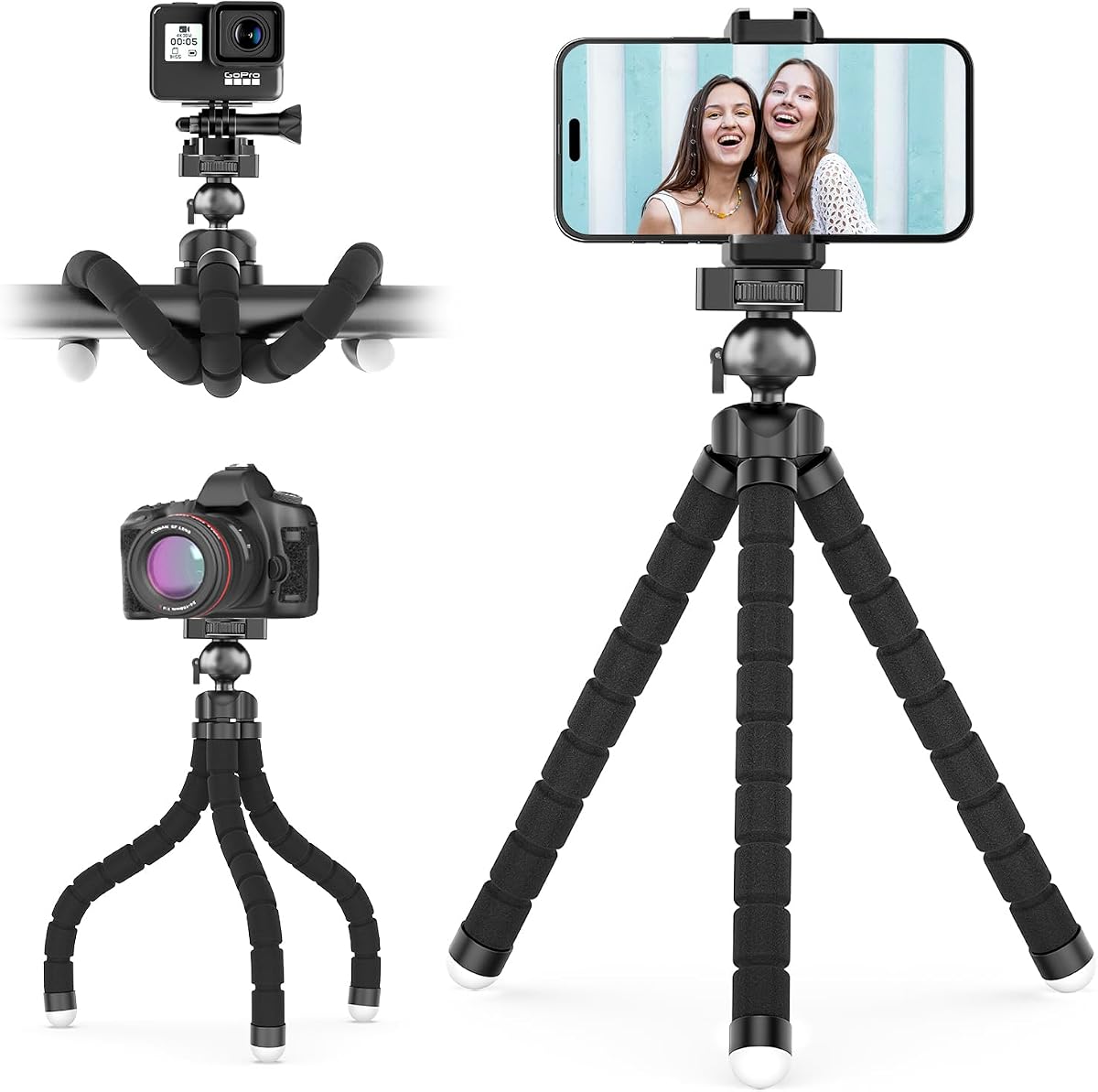
The JCWINY Webcam Tripod Stand combines an extendable desktop design with a strong package of accessories, earning a 4.5 rating. It is especially appealing for buyers who want one compact stand to handle a webcam, phone, compact camera, action camera, ring light, projector, microphone, or camcorder.
We may earn a commission when you buy through this link, at no additional cost to you.
Its metal and ABS construction is supported by non-slip rubber pads, which help limit sliding and bouncing on a desk. Two height levels raise the platform from 11.5 to 18 inches, while the ball joint permits 360-degree rotation and up to 90 degrees of tilt. That range is useful when moving between seated close-ups, presentations, and higher camera positions.
The stand has a listed maximum load of 1.5 kilograms, or 3.2 pounds, giving it more carrying capacity than many of the smallest travel tripods. However, the manufacturer advises against overly heavy camera setups, so it should not be treated as a support for large DSLRs, cinema rigs, or long accessory bundles.
This is an excellent value for a home office, streaming desk, or mobile creator who wants a taller webcam position. The included phone holder and universal quarter-inch screw broaden its usefulness, while the foldable structure keeps it manageable enough to carry when a fixed desktop is unavailable.
The two-stage extension adds meaningful height without turning the support into a full-size floor tripod. It can place a camera closer to eye level while preserving a reasonably small footprint for crowded workspaces.
The standard quarter-inch mount and included phone holder make the stand adaptable across common recording equipment. This versatility is particularly valuable for creators who alternate between a webcam, phone, and compact camera.
We may earn a commission when you buy through this link, at no additional cost to you.
The ULANZI MT-16 is designed as more than a basic webcam support, with a 4.4 rating and features aimed at mobile video creators. It combines four extension levels, a 360-degree ball head, an integrated cold shoe, and a portable 170-gram format in a package that can function as a handle grip, selfie stick, or desktop tripod.
We may earn a commission when you buy through this link, at no additional cost to you.
The cold shoe is the most distinctive feature. It provides a place to attach a small microphone or LED video light, potentially improving the presentation of a webcam or compact camera without requiring a larger support system. The ball head also permits vertical shooting, a useful option for short-form video, demonstrations, and hands-free recording.
Compatibility is broad through the universal quarter-inch screw, and the product data lists action cameras, several mirrorless camera families, DJI Osmo devices, and Insta360 models. A phone holder is not included, however, and the vertical mode has a 500-gram limit. These are important qualifications for buyers using more substantial camera equipment.
The MT-16 is a strong choice for vloggers and content creators who value accessories over maximum desktop height. For a conventional webcam call, it still provides a stable portable base, but the cold shoe and convertible grip are what distinguish it from simpler stands.
The compact 22.5-centimeter format can fit into a storage bag or backpack, while the rubberized grip and feet improve handling and slip resistance. It is designed to move easily between handheld shooting and a desktop support.
Mounting a compact light or microphone at the top can make the setup more presentable for recorded content. Buyers should still confirm the accessory weight and remain within the stated vertical-mode capacity.
We may earn a commission when you buy through this link, at no additional cost to you.
This Metal Mini Tripod for Webcam and Phone is a light, portable option for close-up calls, streaming, and video meetings. Its 4.2 rating reflects a straightforward balance of useful features, including an aluminum body, a standard mounting screw, an included phone holder, and a rotating ball head.
We may earn a commission when you buy through this link, at no additional cost to you.
The support extends from 4.9 to 6.9 inches through two stages of flexible extension. That range is most useful for low-angle and near-desk positioning rather than eye-level placement. A 360-degree metal ball head allows the mounted device to be turned or tilted, making it easier to frame yourself during a call.
The listed load limit is 2.2 pounds, or 1 kilogram, which is higher than the maximum stated for the smallest travel models in this guide. It is still intended for webcams, small projectors, GoPro-style cameras, and lightweight cameras rather than DSLRs. The included phone holder accommodates widths from 2.3 to 3.9 inches, so checking device dimensions is important.
This tripod is a good match for a home office, travel kit, or creator who wants a compact support that handles both webcams and phones. Its limited height is the main compromise, but the strong capacity and included holder provide more utility than many similarly small tabletop stands.
The short extended height keeps the camera relatively close to the desk, which can produce a more informal and direct viewpoint. It works well for close-up calls, demonstrations, and compact recording arrangements.
The included universal holder saves the need to buy a separate phone clamp. Users should compare the holder's stated width range with their device before relying on it for frequent smartphone use.
We may earn a commission when you buy through this link, at no additional cost to you.
The Four-to-Nine-Inch Metal Extendable Webcam Stand is our Editor's Choice because it combines the highest listed rating in the guide with one of the most useful height ranges among the genuinely small tripods. Its 4.6 rating, aluminum construction, phone holder, and five-stage extension make it a versatile everyday support.
We may earn a commission when you buy through this link, at no additional cost to you.
The legs expand from 4 to 9 inches, providing considerably more framing control than the shortest travel models. Each stage allows a user to raise the camera gradually instead of committing to one fixed position. The 360-degree metal ball head also supports easy changes between portrait, landscape, and slightly elevated or downward-facing angles.
Its maximum load of 2.2 pounds, or 1 kilogram, is suitable for many webcams, compact cameras, action cameras, and small projectors. The included phone holder supports devices between 2.3 and 3.9 inches wide, covering many common phones but not every large or unusually shaped model.
This is the most complete compact option in the guide for someone who wants a small stand without giving up meaningful height adjustment, rotation, or phone support. It is particularly suitable for video calls, desktop streaming, demonstrations, and low-angle content recorded near a desk.
Five extension stages make it possible to raise the camera in small increments. This is valuable when you need to move just above a monitor edge, improve the angle of a close-up shot, or accommodate a compact microphone.
The tripod combines a compact footprint, a useful one-kilogram capacity, ball-head movement, and an included phone holder. That mix covers common webcam tasks without requiring a larger or more specialized desktop rig.
We may earn a commission when you buy through this link, at no additional cost to you.
The EMEET Professional Webcam Mini Tripod is the premium choice in this guide because it delivers the tallest and widest extension range while remaining portable. Its 4.4 rating and stated 146-gram weight make it attractive for users who want more camera placement than a standard pocket tripod can offer.
We may earn a commission when you buy through this link, at no additional cost to you.
The stand adjusts from 6.7 to 18.5 inches, covering close-up call height, mid-level presentation framing, and higher full-body recording positions. A 360-degree swivel head changes the viewing direction smoothly, helping with portrait and landscape framing. That range is particularly useful in larger rooms or when a monitor is positioned unusually high.
Anti-skid rubber feet help prevent movement across desks with different surface materials. The product also uses a universal quarter-inch screw, allowing use with webcams, phones, GoPro cameras, and mirrorless cameras. A phone holder is not included, so smartphone users may need an additional adapter.
This tripod is best for a creator, remote professional, or presenter who wants eye-level framing without a full floor stand. One notable restriction is the EMEET C950 webcam, which the product information explicitly says is not compatible. Buyers should also verify their webcam's mounting arrangement before ordering.
The extended height provides much more placement flexibility than a four- or six-inch desktop model. It can raise a camera above a monitor, lower toward a tabletop, or reach a comfortable presentation position.
A stated weight of 146 grams and compact minimum dimensions make the stand easy to carry between rooms or work locations. It is substantially more travel-friendly than a conventional three-leg desk tripod.
We may earn a commission when you buy through this link, at no additional cost to you.
The Two-in-One Desktop Stand and Grip Handle is one of the smallest options here, with a listed weight of 2 ounces and an extended height of only 1.5 to 3.3 inches. Its 4.4 rating indicates a well-received approach for buyers who prioritize portability over stand height.
We may earn a commission when you buy through this link, at no additional cost to you.
The legs fold to create a pocket-sized desktop tripod and can convert into a handheld grip or selfie stick. A standard quarter-inch mount supports webcams, smartphones, action cameras, and cameras that use the common mounting pattern. The listed 2-pound load capacity is useful for a mini stand because it exceeds what the physical size might suggest.
Its biggest compromise is height. At a maximum of 3.3 inches, the camera will sit close to the desk and may not be high enough to resemble a conventional eye-level webcam arrangement. The product also does not list an included phone holder, so mounting a phone depends on the device's own threaded interface or a separate adapter.
Choose this model for travel, emergency call backup, and extremely compact kits. It is less suitable for presentations or anyone who wants to raise a camera above a tall monitor. Within that niche, its quick desktop-to-handheld conversion and minimal weight are highly useful.
The tiny folded body fits into spaces where conventional mini tripods feel cumbersome. It is a practical backup stand for a laptop bag, conference bag, or travel pouch.
Switching between the three-leg base and handheld grip allows the same support to handle stationary calls and moving shots. The conversion is especially convenient for users who alternate between a desk and a walk-and-talk recording.
We may earn a commission when you buy through this link, at no additional cost to you.
The UBeesize Phone Tripod Pro S uses flexible octopus-style legs to offer a different approach to desktop positioning. With a 4.4 rating, reinforced metal components, a metal ball joint, and a one-kilogram capacity, it is well suited to phones, action cameras, and compatible digital cameras that need flexible placement.
We may earn a commission when you buy through this link, at no additional cost to you.
The bendable legs can wrap around a desk edge, branch around an object, or form a stable three-point base. This flexibility can be more useful than a conventional fixed-leg tripod when the available surface is awkward. The non-slip feet help keep the support steady, while the ball joint holds the mounted device in position.
Its universal phone adapter accommodates smartphones up to 3.54 inches wide, and adapter screws are included for various camera types. The wireless remote can trigger portrait or landscape shots from up to 30 feet away, which is useful for group photos and remote-start recording. It is not a substitute for a live remote-control workflow, however.
This tripod is a compelling option for creators who want unusual angles, wrapped-around desk placement, or the ability to place a phone on a shelf or narrow surface. A traditional webcam user who needs extended height may prefer a telescoping model, but the UBeesize offers uncommon flexibility in a compact footprint.
The flexible legs can conform to edges and uneven surfaces, opening placement options that rigid tripods cannot easily match. This is especially helpful around monitors, shelves, and compact office furniture.
The included wireless remote makes it possible to take a phone photo or start a capture without returning to the device. Its range is helpful for group shots and solo content recording.
We may earn a commission when you buy through this link, at no additional cost to you.
The ULANZI MT-08 Mini Extension Pole Tripod is a compact three-in-one accessory that can work as a phone tripod, extension pole, or handheld selfie stick. Its 4.5 rating reflects a well-rounded package with an included phone holder, a cold shoe on top, and a listed weight of only 90 grams.
We may earn a commission when you buy through this link, at no additional cost to you.
The pole reaches a maximum extension of 4.7 inches, while the included holder supports most smartphones. A top-mounted cold shoe can accept a compact microphone, light, or other compatible accessory, giving creators a way to build a small mobile recording setup without carrying a larger stand.
Soft rubber covers the grip and feet, improving comfort and anti-slip performance. The unit is small enough for a camera bag, backpack, or pocket. Its compatibility list covers many smartphone brands, compact cameras, DJI Osmo models, Insta360 cameras, GoPro devices, and video lights, though exact fit should always be confirmed.
This model works best for creators who value a flexible handheld tool more than a high webcam position. It is a useful extension for a phone-centered kit, but buyers whose main goal is a stable monitor-level webcam should choose a telescoping desktop tripod instead.
At 90 grams, the MT-08 is easy to carry without turning a camera bag into a burden. Its compact form makes it useful as a supplemental support rather than a permanent desk fixture.
The top cold shoe provides a simple connection point for a small light or microphone. It helps a phone-based setup look and function more like a dedicated vlogging rig.
We may earn a commission when you buy through this link, at no additional cost to you.
The Extendable Webcam Stand for Desk offers a useful elevated alternative to the smallest tabletop tripods. Its 4.5 rating, 10-to-15.5-inch adjustment range, 360-degree ball joint, and 3.2-pound capacity make it a practical choice for webcams and other light equipment used in offices, studios, and streaming spaces.
We may earn a commission when you buy through this link, at no additional cost to you.
The head can rotate through 360 degrees and tilt up to 90 degrees, allowing the camera to be repositioned without removing it from the mount. Height adjustment provides enough lift to clear a monitor edge or improve the angle of a presentation. Iron legs and ABS plastic combine with non-slip pads to limit desktop movement.
The quarter-inch mounting pattern fits webcams, ring lights, GoPro cameras, small cameras, projectors, camcorders, and similar devices. A phone clip for 4-to-6.5-inch smartphones is included. Although the listing mentions broad compatibility, buyers should verify whether their specific webcam uses the expected threaded mount.
This stand is a strong fit for a permanent office or streaming desk where a taller position is important. Its listed weight of 260 grams makes it less travel-oriented than the compact options, and the manufacturer cautions against large or overly heavy camera rigs.
The 10-to-15.5-inch range provides a noticeable height increase over pocket tripods. It can improve framing when a monitor or display sits higher than the available desktop surface.
The mount and included phone clip cover several common production devices. A standard quarter-inch connection also makes the stand useful for compact cameras, lights, projectors, and other compatible accessories.
We may earn a commission when you buy through this link, at no additional cost to you.
The right mini tripod depends on where the camera will sit, how high it needs to be, what equipment it must carry, and whether portability matters more than a large desk footprint. Evaluate mounting, stability, reach, and included accessories together rather than focusing on one specification.
Begin by checking how your webcam attaches. A standard quarter-inch screw is the most versatile connection, allowing the same stand to support many webcams, compact cameras, action cameras, ring lights, projectors, and phone adapters. Some webcams use proprietary clips or an integrated base that will not accept a threaded mounting screw, while others may require an adapter. Always compare the product's stated compatibility list with the exact model you own rather than assuming every webcam uses the same connection.
A useful tripod should keep the camera steady without sliding, wobbling, or tipping when the legs are adjusted. Look for metal components, non-slip feet, a stable three-leg geometry, and a maximum load rating comfortably above the combined weight of the camera and accessories. The listed limits in this guide range from 1.1 pounds to 3.2 pounds. Most lightweight webcams fall well within those figures, but a mounted light, microphone, ring light, or camera can change the total significantly. Stability is not determined by load rating alone; a wide base, firm feet, and a low center of gravity also matter.
Height determines how naturally a webcam frames your face. A model that extends only a few inches is best for a low-angle close-up, while a taller stand can bring the lens closer to eye level or above a monitor. Pay attention to both the minimum and maximum height, since a tripod that starts too tall may be awkward beside a laptop. Telescoping stages offer finer control, and a wider range makes one stand suitable for calls, presentations, demonstrations, and full-body recording. Full-body framing may still require a larger support if the camera must be several feet away from the subject.
A ball head or swivel joint makes it easier to aim the camera after positioning the tripod. Rotation of 360 degrees supports switching between landscape and portrait views, while tilt lets you point the lens slightly downward or upward. Smooth movement is helpful for live framing, but security matters more: the joint should hold its position without drifting. Avoid a head that feels loose after adjustment. A tight, stable joint is particularly important for calls where a changing head angle would move the frame during the conversation.
Compact tripods vary dramatically in size. Ultra-mini models can fold into a pocket and are ideal for travel or emergency use, while extendable desk stands occupy more room but provide better positioning. Consider the footprint of the spread legs, not just the folded dimensions, because a broad base may extend beyond the edge of a narrow desk. If you travel frequently, weight and folded length should be balanced against the support required. For permanent use, a telescoping model that tucks away neatly is usually more practical than a pocket model with very limited adjustment.
A phone holder can make a webcam tripod more useful for mobile calls, vertical recording, and quick social content. Check the stated width range because universal clamps do not fit every large phone or case. A cold shoe adds another layer of functionality by providing a place for a compact microphone or LED light. It is particularly useful for vlogging, but accessory weight can affect stability and may exceed a stand's recommended capacity. Treat included accessories as conveniences rather than guarantees of full compatibility with every camera or phone.
Metal sections generally add strength where bending and extension occur, while ABS plastic can keep the overall weight low. Rubberized feet and grips improve grip on smooth surfaces and in the hand. Look for locking collars that do not gradually slip, smooth threads that do not cross-thread, and joints that retain their setting. Metal does not automatically make a tripod more stable, but stronger materials are useful when the product is extended. The best construction for your needs is sturdy enough for the load, light enough to move easily, and simple enough to adjust without tools.
A versatile stand can support a phone, compact camera, action camera, mirrorless body, ring light, projector, or small video light. This creates more value if you already own several compatible devices, but it is not essential for a user who only needs a stable webcam mount. Some listings include very broad compatibility claims while omitting the distinction between lightweight cameras and DSLRs. Review weight limits carefully, especially for vertical modes, where the product data may specify a lower capacity than desktop use.
Assemble the tripod on a flat, clean surface and fully tighten every locking collar before attaching a device. Check that the quarter-inch screw enters straight and do not force it if the threads feel resistant. Mount the camera securely, then extend the legs gradually while keeping the load centered over the base. For a ball-head model, make a small adjustment and verify that the joint holds without drifting.
Set the camera height before finalizing the frame. Place the lens near eye level for natural video calls, angle it slightly downward when the lens sits above your face, and use portrait orientation only when the application supports it. After connecting the webcam, check the preview for movement or bouncing. A stable image is more valuable than a large frame, so tighten the adjustment points before adding accessories.
For storage, collapse the legs fully and clean off dust or sticky residue from the rubber feet and threads. Do not leave a heavy device mounted while carrying the tripod in a bag. Inspect the locking mechanisms periodically, especially if the stand has been extended frequently, and avoid exceeding the stated load or using the vertical mode beyond its specified capacity.
The EMEET Professional Webcam Mini Tripod is the strongest eye-level option in this guide because it extends from 6.7 to 18.5 inches. The JCWINY and Extendable Webcam Stand also reach useful elevated positions at 18 and 15.5 inches, respectively. Choose based on your monitor height, desk clearance, and whether you need a phone holder.
Only if the webcam has a compatible quarter-inch mounting socket or an adapter that provides one. Check the exact model in the stand's compatibility list and compare it with your webcam's mounting design. A listed device weight should also remain below the tripod's maximum load.
A well-positioned mini tripod can be very stable for a lightweight webcam, especially on a flat desk with non-slip feet. Stability depends on the spread of the legs, the load, the condition of the locks, and the surface beneath the stand. Avoid extending the tripod beyond the height at which the feet remain flat and firmly planted.
Many models can support a phone through an included holder, a universal adapter, or the phone's own quarter-inch mount. Check the holder's stated width range and whether your case fits. If the phone is heavy or mounted vertically, confirm the stand's vertical load limit before recording.
The Two-in-One Desktop Stand and Grip is the most pocket-oriented choice listed, while the Amazon Basics and ULANZI MT-08 offer slightly larger but still portable designs. For travel, prioritize folded length, weight, and durability over a large extension range. Keep the device detached from the tripod while placing everything inside a bag.
A ball head is not essential for a fixed webcam position, but it makes framing much easier. It lets you tilt the lens toward your face, rotate between portrait and landscape, or correct the angle without moving the whole tripod. Ensure the joint locks firmly, since a loose head can shift during a live call.
Only certain models list DSLR or mirrorless camera support, and the tripod's weight limit still applies. Compact models with low capacity are better reserved for webcams, phones, action cameras, and small cameras. Check both the mounting pattern and the combined weight of the camera, lens, battery, and accessories.
Place the tripod on a level surface and ensure all rubber feet are clean and fully seated. Models with wider leg spacing and non-slip pads tend to resist movement better. Avoid placing the stand near a desk edge, and tighten the legs and head before connecting or adjusting the webcam.
The Four-to-Nine-Inch Webcam Tripod is the strongest all-around choice because its five-stage extension, rotating metal ball head, one-kilogram capacity, and included phone holder cover the needs of most webcam users. The JCWINY tripod is a compelling value pick for buyers who want more height and device options, while the EMEET tripod offers the greatest reach in a portable format.
Prioritize the factors that affect your actual setup: exact mounting compatibility, enough load capacity, a stable foot spread, and the height required for natural framing. A pocket-sized model works for travel and backup calls, whereas an extendable stand is better for a permanent desk. Features such as cold shoes and phone holders are useful only when they match the devices you already own.
Before purchasing, verify the webcam model, threaded mount, included accessories, and weight limits against the current product listing. Availability and prices change, but the compatibility and design information in this guide provides a practical basis for selecting a mini tripod that fits your workspace and recording habits.