
Redragon 60% Mechanical
4.6Editor score
Dedicated arrow keys
Programmable macro controls
Customizable RGB effects
Portable 68-key layout
Our expert guide compares the best keyboard with arrow keys for gaming, typing, compact desks, wireless setups, customization, build quality, and productivity.
A keyboard with arrow keys should make navigation intuitive rather than forcing you to layer functions or memorize awkward shortcuts. The right model balances a clearly separated arrow cluster with the switch feel, connectivity, dimensions, and features that suit your desk and routine.
We compared ten keyboards using dedicated arrow keys as a central requirement, then considered layout, key count, connection method, backlighting, switch behavior, programmability, portability, and everyday practicality. The list covers full-size, 75%, 65%, and 60% designs for work, gaming, travel, and tight workspaces.
Each review explains what a model does best, where compromises appear, and which user it suits. Ratings reflect the supplied customer feedback, while technical details come from the manufacturer information. Product details, software compatibility, and availability can change, so verify the current listing before buying.
4.6Editor score

4.6Editor score

4.3Editor score
This side-by-side comparison highlights each keyboard's layout, connectivity, lighting, and practical feature set, making it easier to identify the model that best fits your desk and priorities.



The Redragon K628 Pollux is the strongest all-around recommendation in this guide, combining a compact 75% layout with genuinely dedicated arrow keys, mechanical red switches, RGB lighting, and hot-swap sockets. Its 4.6 rating reflects strong customer satisfaction, while the feature set gives it an unusually broad appeal for gamers, typists, and keyboard enthusiasts.
We may earn a commission when you buy through this link, at no additional cost to you.
Its 78-key layout preserves separate arrow keys and a number row without carrying a full number pad. That makes it a strong middle ground for users who want more desk space than a traditional keyboard but do not want to give up dedicated navigation controls. The true hot-swap socket system supports switches compatible with the specified socket design, and the free-mod plate-mounted PCB creates a more enthusiast-friendly foundation than a sealed membrane board.
There are trade-offs. It is wired, so it is less convenient when moving between locations or sharing a desk. The supported software adds customization and macro options, but users who want an entirely configuration-free experience may find that unnecessary. Red switches also produce more sound than many quieter alternatives, making the board less attractive for shared offices or late-night use.
Choose the K628 if you want dedicated arrows, the freedom to change switches, attractive lighting, and a layout that remains practical for productivity. It is particularly well suited to gamers who also type regularly, as well as anyone starting a mechanical keyboard collection without committing to a full-size board. For those priorities, it delivers the most convincing combination of layout, flexibility, and functionality in the group.
The 75% arrangement preserves the navigation keys people use most often while removing the number pad. It is a particularly effective answer for spreadsheet users, programmers, and editors who need arrows but can enter numbers using the top row or a separate keypad.
Hot-swappable sockets, a free-mod plate-mounted PCB, RGB effects, and macro software make this more than a conventional gaming keyboard. The platform is well suited to users who want to experiment with compatible switches and build a configuration suited to their own habits.
We may earn a commission when you buy through this link, at no additional cost to you.
The Logitech K270 is a straightforward choice for anyone who wants a familiar full-size keyboard with dedicated arrow keys and no cable crossing the desk. Its 4.3 rating makes it one of the most proven options here, and the combination of a standard layout, wireless connectivity, and simple setup suits students, office workers, and general-purpose home users.
We may earn a commission when you buy through this link, at no additional cost to you.
The keyboard includes F-keys, a number pad, and a separate arrow group, so users are not forced to adopt shortcuts for basic navigation. Its 2.4 GHz wireless connection offers up to 33 feet of listed range, and the supplied Unifying receiver can support compatible devices. The advertised 24-month battery life also removes the inconvenience of regular charging, although real battery duration depends on use and environmental conditions.
The K270 is not aimed at enthusiasts. It has no backlighting, macro programming, mechanical switches, or adjustable typing angles comparable to some of the more specialized choices. It is also described as compatible with Windows 7, 8, 10, and later, so buyers using macOS or Linux should confirm basic operation and receiver support before making a final decision.
It remains an excellent recommendation for someone who values a conventional layout, dependable wireless operation, and straightforward setup more than gaming features. The dedicated arrow keys are easy to locate by touch, the keyboard requires no installation, and the full-size arrangement is useful for data entry. For those needs, the K270 delivers dependable everyday utility at a restrained feature level.
The K270 separates everyday typing from cable management and uses a long-lasting replaceable-battery design rather than a rechargeable cell. It is a practical fit for desks where a full-size keyboard is needed but a clean, wireless workspace is preferred.
The separate arrow group follows the familiar full-size arrangement, reducing the learning curve for new computer users. It also proves useful for document editing, spreadsheet navigation, and games that depend on directional controls.
We may earn a commission when you buy through this link, at no additional cost to you.
The Arteck Backlit USB is a compelling option for users who want full-size navigation, a number pad, and visible keys in low-light settings without reaching for a bulky traditional keyboard. It carries a 4.4 rating and uses a slim scissor-switch design to balance familiar full-size functionality with a lower-profile appearance.
We may earn a commission when you buy through this link, at no additional cost to you.
Backlighting is one of its strongest features. Seven LED color choices and three brightness levels make it easier to tailor the keyboard to different rooms or times of day. The keys themselves are low profile, and the stated dimensions measure 16.7 by 4.5 by 0.24 inches, helping it fit neatly on a smaller desk while retaining dedicated arrows, a number pad, and shortcut keys.
The wired USB connection is simple and dependable, but it will not suit users who want to move the keyboard freely or connect it to devices through a wireless receiver. It also lacks the deep programmability, hot-swap sockets, and extensive RGB customization found on enthusiast-oriented mechanical models. It is better viewed as a polished everyday and productivity keyboard than a competitive gaming platform.
The Arteck is a strong recommendation for office workers, students, travelers, and anyone who frequently types in dim conditions. Plugging it into a compatible computer is all that is required, and the combination of slim construction, full-size coverage, and adjustable lighting offers useful versatility. It is especially appealing for users who want a number pad but dislike the visual bulk of conventional desktop keyboards.
Seven colors and three brightness levels cover the main reasons users want illumination: visibility, comfort, and a more personalized desk. The straightforward controls make the feature approachable for everyday productivity rather than primarily decorative gaming.
Despite its thin enclosure, the keyboard retains arrow keys, a numeric keypad, and shortcut keys. That combination makes it a more complete choice than many compact boards that remove the number pad and force users to adopt alternative navigation methods.
We may earn a commission when you buy through this link, at no additional cost to you.
The GEODMAER 104-Key Gaming Keyboard is a feature-rich entry point for gamers who want proper arrow keys, a complete number pad, and a traditional full-size frame. Its 4.4 rating and extensive specification sheet make it especially relevant to new players who want anti-ghosting, backlighting, and media controls without moving into mechanical customization.
We may earn a commission when you buy through this link, at no additional cost to you.
The keyboard supports 19-key anti-ghosting through its 1.5-meter wired connection, allowing multiple registered inputs to be processed simultaneously. This is a meaningful advantage in games that depend on combinations of movement, abilities, and commands. The 104-key format also includes 12 dedicated multimedia keys, while the standard Windows lock can help prevent accidental operating system commands during play.
Its membrane construction is the primary compromise. Compared with mechanical models, it will feel less responsive to enthusiasts and may not satisfy users who prefer distinct switch feedback. The backlight supports constant and breathing modes with adjustable brightness and effect speed, but it is less elaborate than a multi-color RGB system. Its wired design is stable and latency-conscious, though not as flexible as a wireless alternative.
This GEODMAER model is best for new gamers, students, and office users who want one full-size keyboard for both productivity and play. Its keycap height, spill resistance, anti-fading treatment, and claimed lifespan of more than 10 million keystrokes all add practical value. Choose it when complete layout coverage and gaming-oriented controls matter more than mechanical refinement or wireless freedom.
Nineteen-key anti-ghosting reduces the chance that simultaneous inputs will be ignored or misinterpreted. That makes the keyboard more practical for action games, shortcuts, and fast keyboard combinations than a basic membrane model without the feature.
The full 104-key arrangement, numeric keypad, and multimedia controls let the board handle spreadsheets, document entry, communication, and gaming. A dedicated Windows lock is another useful detail for reducing accidental shortcuts during active play.
We may earn a commission when you buy through this link, at no additional cost to you.
The Lenovo 300 USB Keyboard is a restrained, dependable option focused on the fundamentals: a full-size layout, comfortable island-style keys, spill resistance, and adjustable tilt. Its 4.4 rating indicates a generally positive reception, and its straightforward USB connection makes it suitable for a broad range of desks, laptops, and basic computing tasks.
We may earn a commission when you buy through this link, at no additional cost to you.
The five-zone layout organizes the keyboard into familiar functional areas, while concave keycaps are shaped to fit the fingertips. That design can provide a more settled typing experience than completely flat keys, particularly for users who spend much of the day entering text. Adjustable tilt legs let users select a more comfortable angle, and spill-resistant keys with a board drain help protect against accidental liquid exposure.
There is no backlight, wireless receiver, macro engine, or gaming-oriented anti-ghosting specification. The board is focused on traditional productivity rather than illuminated or programmable use. It is also listed for Windows 7, 8, and 10, although the description notes OS-independent operation with computers that have a USB port, so current users should verify the desired operating environment.
The Lenovo 300 is a sensible pick for offices, classrooms, home workstations, and users who want a recognizable layout without extra software. It provides dedicated arrow keys and a separate number pad in a complete frame, making it useful for data entry and navigation. If your priorities are physical comfort, spill protection, and straightforward operation, this keyboard covers the essentials well.
Island-style keys and fingertip-shaped concave caps preserve the familiar appearance of a conventional desktop keyboard. Adjustable tilt adds another layer of comfort without requiring software, profile switching, or other complicated configuration.
The spill-resistant key construction and drainage system are designed to help contain accidental liquid exposure. That makes the Lenovo 300 a more reassuring choice in shared offices, classrooms, or home environments where drinks and crowded desks are common.
We may earn a commission when you buy through this link, at no additional cost to you.
The Logitech K120 is a strong recommendation for anyone seeking a no-nonsense wired keyboard with dedicated arrows. It shares the guide's highest listed rating at 4.6 and focuses on the proven basics: a full-size layout, deep-profile keys, spill resistance, adjustable tilt, and immediate plug-and-play operation.
We may earn a commission when you buy through this link, at no additional cost to you.
Its standard layout includes F-keys, a number pad, and a clearly separated arrow group, allowing users to navigate without learning new shortcuts. Connecting the keyboard through USB requires no software installation, which is valuable for new computers, temporary workstations, and users who dislike driver-based accessories. The sturdy tilt legs can raise the rear of the keyboard, while anti-fade printing is designed to preserve legends over time.
The trade-off is minimalism. There is no wireless receiver, adjustable backlighting, mechanical switch construction, or programmable macro support. Some users may also want dedicated media keys, but the K120 focuses on the core typing and navigation experience rather than shortcuts for common applications. It is designed for Windows 7, 8, 10, and later systems.
The K120 is best for offices, schools, home computers, and anyone who values a familiar layout with essentially no setup effort. Its uncomplicated design also makes it a strong replacement keyboard for a workspace that is used primarily by different people. When reliability, straightforward USB operation, and a complete arrow cluster matter most, this model remains one of the safest recommendations in the lineup.
Deep-profile keys, standard spacing, and a full-size frame reduce the adaptation period for new and experienced typists. Dedicated arrows remain where most users expect them, which is especially helpful when editing text or moving through menus.
The keyboard works through a direct USB connection without additional software. That simplifies deployment across multiple computers and reduces the number of accessories a user must store, charge, or troubleshoot.
We may earn a commission when you buy through this link, at no additional cost to you.
The Arteck 2.4G Wireless Keyboard combines a complete full-size layout with a slim stainless steel body and a rechargeable wireless connection. Its 4.4 rating makes it a notable option for users who want a number pad and dedicated arrow keys but also value a tidy, cable-free desk.
We may earn a commission when you buy through this link, at no additional cost to you.
The included nano receiver allows the keyboard to connect through 2.4 GHz wireless technology, and the package includes a USB charging cable. Its rechargeable lithium battery is advertised to last up to six months based on approximately two hours of daily use, which should reduce charging frequency for many office routines. The full-size arrangement still provides separate arrow keys, a numeric keypad, and shortcut keys.
Because it uses a rechargeable cell, this is not as maintenance-free as a keyboard with replaceable batteries. It also lacks adjustable backlighting, and its slim low-profile design may offer less palm support than a taller traditional keyboard. Users who move between many computers may find it less convenient than a model with broader Bluetooth multi-device switching.
The Arteck wireless model suits shared desks, flexible offices, and anyone who wants a full-size keyboard without a permanent cable. Its stated dimensions of 16.9 by 4.9 by 0.6 inches and weight of 14.9 ounces preserve mobility, while the stainless steel construction adds a more substantial feel than many plastic alternatives. It is a balanced choice when wireless freedom and full layout coverage are the principal priorities.
The built-in lithium battery and included charging cable remove disposable battery replacements. Based on the stated usage assumptions, the battery is designed to support ordinary office use for extended periods between charges.
The slim stainless steel enclosure makes the keyboard easier to store and move than many conventional desktop models. It still retains the numeric keypad and arrow cluster, providing full navigation coverage for productivity tasks.
We may earn a commission when you buy through this link, at no additional cost to you.
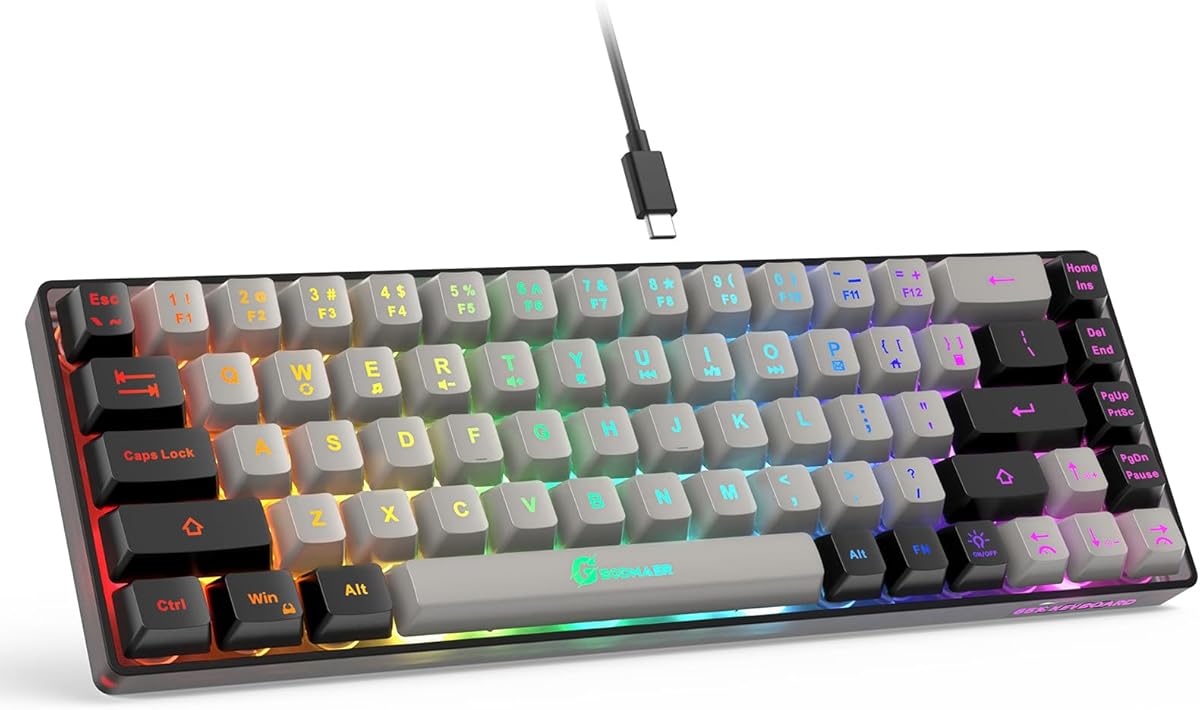
The GEODMAER 65% is aimed at users who want a considerably smaller desk footprint without accepting the compromises of a very small layout. It retains a distinct arrow key cluster, provides 68 keys, and carries a 4.3 rating. The result is a practical middle ground for mobile setups, compact workspaces, and users who do not need a numeric keypad.
We may earn a commission when you buy through this link, at no additional cost to you.
Its detachable USB-C connection is convenient for transport and allows the cable to be removed while the board is stored. Twenty-six-key no-conflict support is useful for game commands, while the backlight can be turned off, held constant, or set to a breathing effect. Brightness is adjusted with the arrow keys, and the left and right arrows also change the breathing rate.
The keyboard uses membrane technology to provide an imitation mechanical feel, and it is quieter than a board with genuine mechanical switches. Enthusiasts may find the resulting response less refined, however, and the absence of a number pad will matter to spreadsheet and accounting users. The 65% arrangement also compresses the typing area compared with a tenkeyless design, so it is not the most spacious option for long sessions.
The GEODMAER 65% is a sensible recommendation for students, travelers, casual gamers, and office workers with limited desk space. It is particularly attractive when a keyboard must fit into a backpack or share a small surface with other equipment. Users who prioritize clear arrows, compact dimensions, lighting, and quiet operation will find it more compelling than those seeking premium mechanical refinement.
The separate arrow cluster is the most important feature in this compact design. It preserves familiar directional control without forcing users to depend on alternate functions, while the shortened 65% layout saves desk space.
A detachable USB-C cable simplifies packing and storage, while the illuminated keycaps support constant and breathing modes. Using the arrow keys to adjust illumination also keeps these controls close to the navigation group.
We may earn a commission when you buy through this link, at no additional cost to you.
The Redragon 60% Mechanical Gaming Keyboard delivers a rare combination of a very small footprint and genuinely dedicated arrow keys. Its 4.6 rating, red mechanical switches, programmable macros, and customizable RGB lighting make it a particularly compelling premium option for gaming and productivity users who want a compact command center.
We may earn a commission when you buy through this link, at no additional cost to you.
The 68-key layout includes the arrow group, navigation keys, and F-keys without the bulk of a number pad. Red linear switches offer smooth top-to-bottom travel, relatively low actuation force, and no-conflict operation across all 68 keys. The keyboard's 2-in-1 USB-C cable includes a USB-A adapter, making it usable with different computer connections and convenient to carry.
Its biggest caveat is platform-specific programmability. The supplied information says the keyboard works across major computer brands and gaming PCs, including listed Windows versions, but the programmable driver cannot be used with Mac OS. Users on Apple systems should therefore distinguish between ordinary typing compatibility and access to macros, custom lighting modes, and full software control.
This model is an excellent fit for gamers who want arrows without a large tenkeyless board, as well as writers and developers who prefer a visually clean desk. The premium benefits come from the combination of mechanical response, macro control, RGB customization, and a genuinely portable footprint. If software is important, use a Windows-based system; if macOS is your primary environment, verify the required features before purchase.
Red linear switches deliver a smooth mechanical feel with relatively light actuation. Combined with the 68-key footprint, they let users retain responsive controls and dedicated arrows without carrying a larger gaming keyboard between locations.
Macro programming can shorten repetitive sequences or map alternate commands, while RGB effects and brightness add visual personalization. These features make the board useful beyond gaming, provided the primary computer runs a compatible software environment.
We may earn a commission when you buy through this link, at no additional cost to you.
The TMKB T68SE is a distinctive 60% mechanical keyboard aimed at users who want dedicated arrow keys, strong tactile feedback, and a very compact profile. Its 4.4 rating and blue switches set it apart from the linear red-switch models in this guide, making it most interesting to typists who prefer a noticeable bump and crisp click.
We may earn a commission when you buy through this link, at no additional cost to you.
The 68-key arrangement preserves separate arrow and commonly used control keys, a welcome improvement over compact boards that crowd navigation into secondary layers. Blue tactile switches offer distinct feedback and a satisfying sound, while full-key anti-ghosting is designed to support simultaneous commands. LED illumination includes 19 built-in modes, and shortcut controls adjust brightness and lighting speed.
The trade-offs are predictable for a small mechanical board. Blue switches are louder than linear or membrane alternatives, which may be undesirable in shared offices, libraries, or late-night settings. The fixed-color lighting is less flexible than multi-color RGB, and there is no indication of macro programming, wireless connectivity, or multi-device switching. A 60% layout also leaves no numeric keypad for frequent data entry.
The T68SE is best for personal use, especially for typists who enjoy tactile feedback and gamers who want a compact board with clear arrows. It supports listed Windows versions, while Mac OS, Vista, and Linux are described as compatible for typing and office functions. Buyers should therefore choose it for its switch feel and compact layout rather than expecting the broad software control found on more programmable premium models.
Blue switches provide a distinct tactile bump and crisp acoustic response. That makes the T68SE especially appealing to users who want more input feedback than a standard membrane keyboard without moving to a full-size mechanical model.
The dedicated arrow and control groups preserve straightforward navigation on a 68-key board. It is a more practical choice for movement-heavy games and document editing than a miniature keyboard that removes directional keys entirely.
We may earn a commission when you buy through this link, at no additional cost to you.
The right keyboard with arrow keys depends on layout, connectivity, switch behavior, lighting, and the amount of desk space available. Use the following factors to narrow the choices before making a final decision.
A keyboard can be compact and still provide genuinely separate arrow keys, but the label is not always enough to prove it. Look for a visible directional group with left, right, up, and down keys that can be identified by touch. Some mini keyboards use symbols printed on other keys, while others use a compact inverted-T cluster that can take time to learn. The products in this guide advertise dedicated arrow keys, although their placement differs between full-size, 75%, 65%, and 60% formats.
Full-size boards include a number pad and usually provide the greatest separation between navigation keys and alphanumeric typing. A 75% design removes the number pad for additional space, while 65% and 60% models become progressively smaller. The smallest boards save the most desk area but place more pressure on users who type extensively or need a numeric keypad. Choose based on your desk dimensions and the tasks you perform rather than on portability alone.
Wired keyboards offer a stable connection, consistent input, and a simple setup with no battery management. Wireless models create a cleaner desk and allow easier movement between locations, but they introduce receiver storage, charging or battery replacement, and possible range limitations. The 2.4 GHz models in this guide use dedicated nano receivers. If you regularly move between desks or devices, wireless may be worth the extra accessory management; if you want the simplest stable setup, a wired board is usually preferable.
Mechanical switches provide individual key feedback, distinct sound, and a more involved typing feel. Red linear switches are smooth and relatively light, blue switches add a tactile bump and click, and membrane keyboards deliver a softer, quieter experience with a different construction. The Arteck models use scissor-style mechanisms, while the GEODMAER gaming boards use membrane technology. Consider both the sound and the amount of tactile feedback you prefer, especially in shared spaces.
Anti-ghosting allows the keyboard to register several keys pressed at the same time, which is valuable for game commands and complex shortcuts. Full-key or multi-key anti-ghosting provides broader support than a three-key rollover limit. Macro programming goes further by assigning longer commands to a single key. It can improve workflow efficiency, but software compatibility matters: some programmable drivers work with Windows while ordinary typing functions may still work on other operating systems.
Backlighting can improve visibility in dim rooms and add visual appeal, but the feature varies considerably. Single-color LED, selectable backlight colors, breathing effects, and full RGB are not interchangeable. Dedicated brightness controls are convenient, while software-controlled lighting offers more color and effect choices but adds setup requirements. If you work mostly in a lit room, lighting may be less important than switch feel, layout, or connectivity.
A keyboard used daily should feel stable, offer a suitable typing angle, and withstand ordinary wear. Some models include adjustable tilt, island or concave keycaps, stainless steel enclosures, or spill-resistant drainage. These details can influence comfort and longevity more than a long list of secondary features. For shared or high-traffic environments, prioritize a sturdy construction, straightforward key legends, and easy cleaning. For travel, weight and dimensions may deserve equal attention.
Basic typing functions often work across more operating systems than advanced features. Windows compatibility is explicitly highlighted for several models, while some provide more limited Mac, Linux, or Vista support. Before buying, verify that your preferred operating system can handle the functions you need. Pay particular attention to programmable macros, RGB controls, and media shortcuts, which may depend on a Windows-only application even when the keyboard can send ordinary keystrokes elsewhere.
Connect the keyboard using the method specified in its instructions: a direct USB plug for wired models, or the supplied nano receiver for wireless models. Place it at a comfortable distance from the edge of the desk, keep the arrow group clear of nearby objects, and adjust the tilt or feet before beginning a long typing session. If the keyboard includes software, install it only when you need programmable macros or custom lighting.
For a mechanical keyboard, learn the functions of any Fn shortcuts before changing lighting or locking keys. Test arrow behavior in a document, game, or settings menu, and confirm that all four directions register correctly. Avoid resting drinks near the keyboard, periodically clear dust between the keys with compressed air or a soft brush, and disconnect the cable or receiver before moving the keyboard between locations.
Clean the surface with a soft, slightly damp cloth and avoid spraying liquid directly onto the keys or switches. Replace batteries when a wireless keyboard becomes unreliable, or charge a rechargeable model according to its instructions. For hot-swappable mechanical boards, switch off and unplug the keyboard before changing compatible switches, and take care not to bend the switch legs or damage the socket.
The main difference is how much of the traditional layout each design retains. A 60% board is the smallest category here, while 65% and 75% designs add slightly more spacing or navigation coverage. A full-size model includes the number pad. All four groups in this guide advertise dedicated arrow keys, but the size and position of the cluster differ.
They can, especially when the arrow keys are clearly separated and the top row includes a number pad for quick entry. However, frequent accounting and data-entry work may still benefit from a full-size keyboard because the dedicated numeric keypad is faster and more familiar. Consider how often you type numbers before removing that section from your shortlist.
Not universally. Mechanical switches generally provide stronger feedback and a more distinct feel, while membrane models are quieter, simpler, and often less expensive. Blue mechanical switches are especially noticeable acoustically, whereas red linear switches are smoother. The best choice depends on your preference for feedback, sound, maintenance, and customization.
Anti-ghosting helps the keyboard register multiple keys pressed simultaneously without ignoring or confusing commands. It is particularly useful in games that require several movement or ability keys at once. It can also benefit complex editing shortcuts, though most modern keyboards handle ordinary typing combinations without difficulty.
Basic typing may work, but advanced functions can depend on the manufacturer's software. The Redragon 60% model specifically states that its programmable driver cannot be used with Mac OS. Other operating systems may support basic typing without granting access to macros or custom lighting. Verify the latest compatibility details before purchasing.
A wired keyboard is usually easier to set up and maintain because it connects directly and does not require charging. A wireless model offers a cleaner desk and greater freedom of movement, but the receiver or charging system must be managed. Frequent travel or shared workspaces may favor wireless, while a permanent workstation may benefit from wired simplicity.
They can be well suited to games that primarily use the letter keys, modifiers, function keys, and directional controls. The 68-key models here retain arrow and common control keys, which avoids the need to remap basic navigation. Games requiring a numeric keypad or many dedicated macro keys may still benefit from a larger layout.
Disconnect or switch off the keyboard first, then use compressed air or a soft brush to remove loose dust. Wipe keycaps and the frame with a soft cloth lightly dampened with water, and avoid pouring cleaner directly onto the keyboard. Mechanical users should also avoid excess moisture around the switches and sockets.
The Redragon K628 Pollux stands out as the most complete recommendation because it combines a 75% layout, dedicated arrows, hot-swappable mechanical switches, RGB lighting, and macro support. The Redragon 60% Mechanical is the strongest premium compact option, while the Logitech K270 provides the most approachable wireless full-size experience.
Prioritize the layout you can comfortably use, not merely the smallest or most feature-rich model. A full-size keyboard serves number-heavy work, 75% balances navigation and footprint, and 60% or 65% designs suit compact desks and travel. Next, match the connection, switch feedback, lighting, and software support to your habits and operating system.
Before purchasing, confirm the current product listing, compatibility details, included accessories, and warranty information. Keyboard features and software behavior can change over time, so checking the latest manufacturer information helps ensure that the model still matches your specific needs.