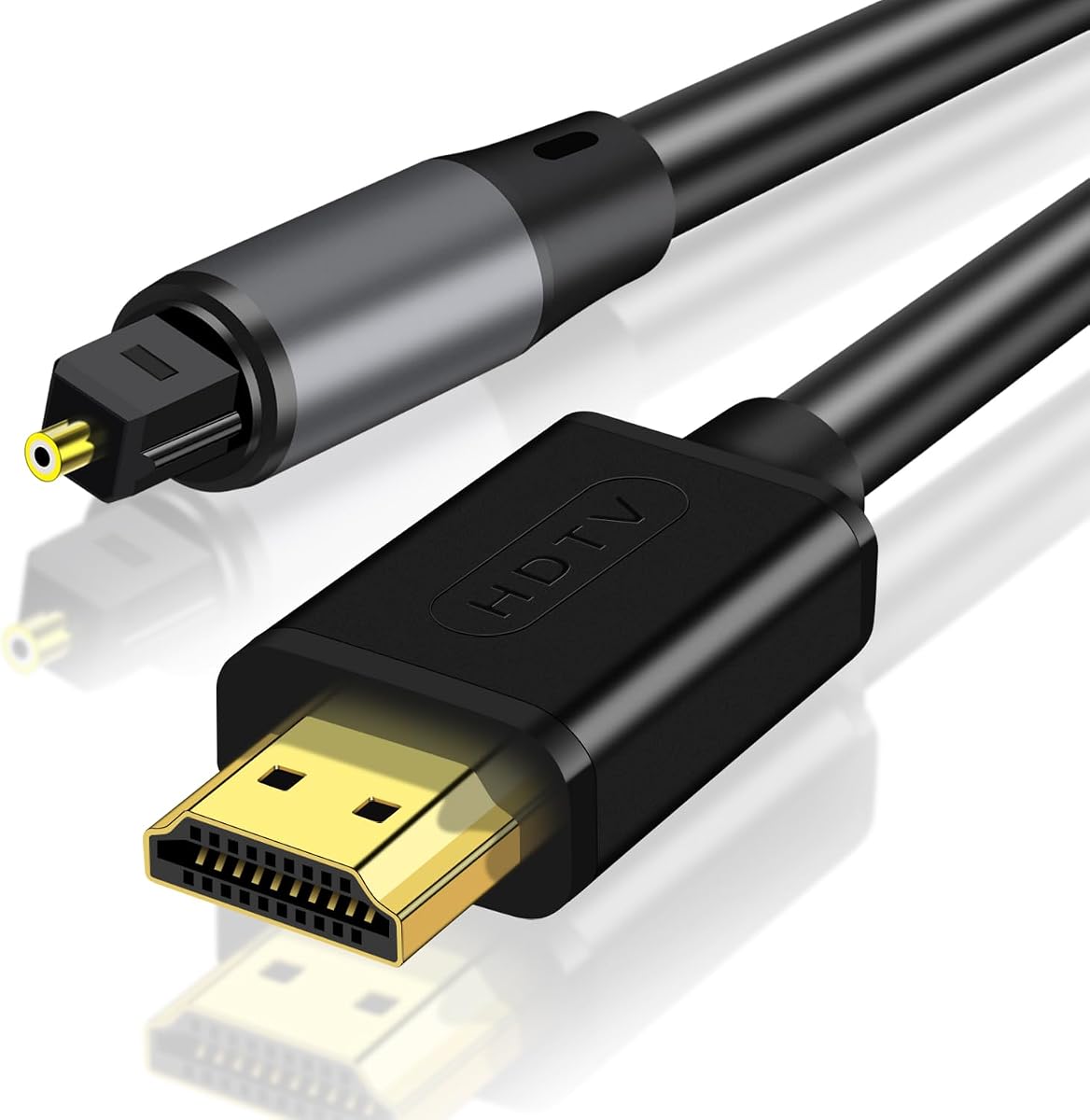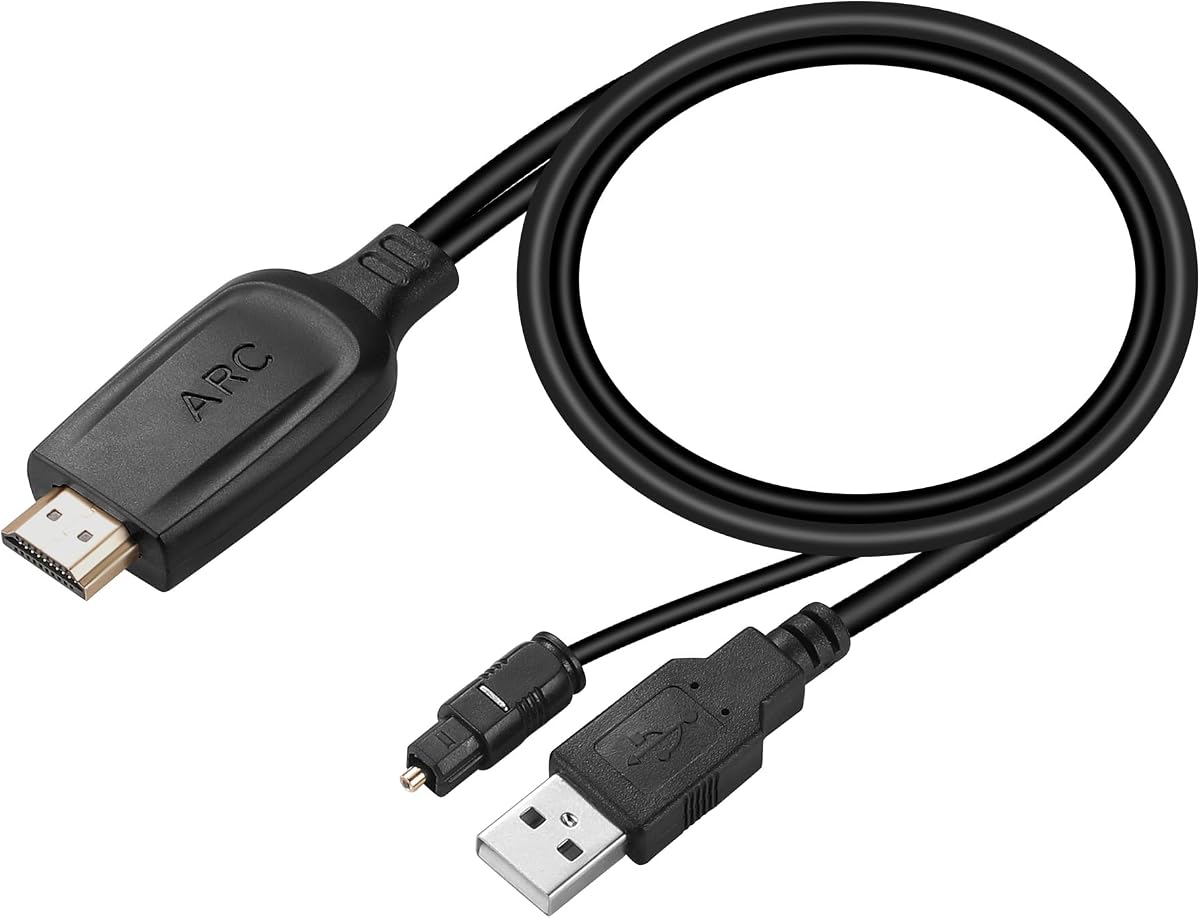
Unstincer 192KHz HDMI ARC to Optical Audio Converter
4.2Editor score
Focused ARC-to-optical conversion
24-bit, 192kHz support
Built-in 41-inch optical cable
Simple USB-powered setup
The best HDMI Arc Adapter for Soundbar guide compares ARC and eARC models, output types, audio formats, compatibility, setup, and limitations for buyers.
An HDMI ARC adapter for a soundbar bridges the gap between a television’s HDMI audio-return connection and a soundbar, amplifier, or speaker system that expects optical, analog, or coaxial audio. The best unit matches your TV’s ARC or eARC capabilities, delivers the output your soundbar accepts, and translates the signal without adding unnecessary complexity.
This guide compares ten adapters by input compatibility, output configuration, supported audio formats, sampling rate, included cables, power requirements, and remote-control limitations. It covers converters designed specifically for optical-only soundbars as well as hybrid models offering 3.5 mm, L/R, or coaxial connections for broader compatibility.
The selections show why cable compatibility matters more than headline specifications, why optical output cannot carry TV-remote volume control, and when PCM is safer than surround formats. Ratings and specifications reflect the available product information, while prices and availability can change at any time.
4.2Editor score

4.9Editor score

4.4Editor score
The table below compares all ten adapters by television input, available audio outputs, maximum stated sampling rate, and format support. It is designed to make the most important compatibility decisions clear before you buy.


The eSynic Professional 192Khz eARC & ARC to Optical Audio Extractor-No CEC is a purpose-built bridge between a television’s audio-return port and an optical soundbar. Its 4.3 rating reflects a generally appealing combination of straightforward operation and broad ARC/eARC support. Rather than trying to serve every possible speaker arrangement, it concentrates on one common problem: sending television audio to equipment with a Toslink optical input.
We may earn a commission when you buy through this link, at no additional cost to you.
The adapter supports HDMI eARC and ARC input and produces a digital optical output, making it suitable for soundbars, amplifiers, active speakers, and wireless headphone bases that accept optical audio. The supplied package includes the extractor, an optical cable, an HDMI eARC/ARC cable, and a USB power cable. That bundle helps reduce the number of separate accessories required for a basic installation, while the dedicated optical output avoids adding unused analog jacks to the entertainment setup.
The principal compromise is the absence of CEC volume control over the optical link. The product information is explicit that volume must be changed on the soundbar, amplifier, or headphones. This is a limitation of the output path rather than a defect unique to the model, but it can disappoint someone expecting the television remote to behave exactly as it does with a native HDMI soundbar connection.
This is a strong recommendation for a new television with ARC or eARC and an older optical-only soundbar. Buyers should confirm that the television has a port labeled ARC or eARC, enable the appropriate CEC or eARC setting, select the ARC device as the television’s audio output, and use the included cable. It is less suitable if you require TV-remote volume control or an analog headphone output.
The dedicated Toslink output makes this converter especially useful for a soundbar that predates HDMI audio return. It connects modern television audio to legacy optical equipment without introducing a receiver, complex control box, or collection of unused sockets.
The package includes both HDMI and optical cables plus USB power, so a basic setup can be completed without separately sourcing every required lead. Buyers should still confirm that the included cable lengths suit the intended placement.
We may earn a commission when you buy through this link, at no additional cost to you.
The HDMI ARC Adapter 4K60Hz HDMI ARC Audio Extractor with 3.5mm and L/R Stereo Audio stands out from optical-only converters by offering two analog output paths. Its 4.1 rating reflects a useful device for users whose soundbars or amplifiers lack optical input. L/R stereo and 3.5mm outputs can be connected simultaneously, providing more placement flexibility than a converter with a single analog jack.
We may earn a commission when you buy through this link, at no additional cost to you.
The device pulls return audio from an ARC-enabled television and distributes it through left/right channels and a 3.5mm headphone-style connection. Its stated sampling rates range from 32kHz through 192kHz, while the aluminum housing is designed for durability and heat dissipation. The product is aimed primarily at HDTVs and sound systems, and the supplied information says it should not be treated as a general-purpose HDMI adapter for arbitrary source devices.
Format limitations are important. The converter is not an HDMI audio decoder for raw 5.1 or 7.1 streams such as DTS or DSD, so the television should be configured to output PCM 2.0 for reliable operation. As with most optical or analog extractors, CEC volume control is unavailable, meaning sound levels must be adjusted on the connected playback device.
Choose this model when your equipment uses analog RCA or 3.5mm audio rather than optical. It is particularly handy for older amplifiers, compact speakers, and headphone systems. Do not choose it solely for the 4K60Hz wording if your priority is decoded surround audio, because the product’s actual function is television audio extraction rather than video pass-through or advanced audio decoding.
The L/R and 3.5mm outputs make this extractor a practical bridge to equipment that predates optical audio. Simultaneous output support can also simplify setups that feed more than one analog audio system.
PCM 2.0 is the most dependable television setting for this converter. Its advertised sampling rate does not mean it can decode raw DTS, DSD, or other compressed surround streams independently.
We may earn a commission when you buy through this link, at no additional cost to you.
The HDMI eARC to Optical Audio Converter combines a 4.4 rating with support for both ARC and eARC television ports. That combination makes it a strong all-around option for modern televisions, including models from Samsung, LG, and Sony. It is designed to resolve the common mismatch created when a contemporary television lacks a usable optical output but an existing soundbar or amplifier expects one.
We may earn a commission when you buy through this link, at no additional cost to you.
The converter supports 24-bit audio at sampling rates up to 192kHz and sends the converted signal through a digital optical interface. It can serve soundbars, amplifiers, and active speakers with optical inputs. The supplied package includes an HDMI input connector, digital optical cable, and 5V USB power cable, while the plug-and-play design avoids driver or software installation.
The TV-side configuration deserves attention. The instructions call for enabling CEC, enabling eARC when the television supports it, selecting the ARC device as the audio output, and choosing PCM or a compatible Dolby/DTS 5.1 format. If a surround format is used, the connected sound system must also support it. Optical output cannot carry CEC volume control, so users will adjust volume on the soundbar or amplifier.
This converter is a strong recommendation for someone who wants a simple optical connection from an ARC or eARC television and values a clear setup process. It is especially appropriate when the existing playback equipment has no HDMI input. Confirm the television’s port label and settings before ordering, and be prepared to control volume from the audio device rather than the television remote.
Supporting eARC as well as ordinary ARC means the converter can serve newer televisions while remaining relevant to sets that only provide the older return-audio function. The HDMI input must still be connected to a specifically labeled ARC or eARC port.
PCM offers the simplest route to consistent playback, while Dolby or DTS 5.1 can provide surround when both the television and sound system support the selected format. Match the output setting to the capabilities of the connected equipment.
We may earn a commission when you buy through this link, at no additional cost to you.
The Unstincer 192KHz HDMI ARC to Optical Audio Converter is a focused option for connecting an ARC television to an optical soundbar. Its 4.2 rating and single-purpose design make it a practical value-oriented pick. The built-in 1.05-meter, or 41-inch, optical cable is a useful feature because the most common installation requires a short run between a television and nearby soundbar.
We may earn a commission when you buy through this link, at no additional cost to you.
This model converts television ARC audio to optical digital output and supports a stated 24-bit/192kHz sampling rate. The television must have an ARC-labeled port, with CEC turned on, audio output directed to ARC, and the digital format set appropriately. PCM is the safest baseline, while the information also lists Dolby 5.1 and DTS 5.1 as possible settings when the connected sound system supports them.
The main limitation is input scope. It is designed for televisions with an ARC interface rather than an eARC-only workflow, and its single optical output is ideal for one sound system but less flexible than hybrid converters. The optical path also cannot transport CEC, so television-remote volume control is unavailable and must be handled on the soundbar, amplifier, or other playback device.
This is a sensible recommendation for buyers who need a straightforward TV-to-optical adapter and do not need analog or coaxial connections. Verify that the television offers ARC, check the physical placement so the built-in cable reaches the soundbar, and accept that volume control remains on the playback device.
The integrated optical cable reduces setup friction for a soundbar placed immediately below or beside the television. Its 41-inch length provides practical flexibility for many living-room arrangements without adding a permanently dangling adapter.
The converter avoids complicated controls and unnecessary outputs, which can make setup easier for a first-time user. Its limitations are equally clear: it is an ARC-focused, optical-only solution without television-remote volume control.
We may earn a commission when you buy through this link, at no additional cost to you.
The VPFET HDMI eARC Audio Extractor is built for installations that need more than one digital audio destination. It converts a television’s ARC or eARC return audio into both Toslink optical and coaxial output. Its 4.1 rating reflects a useful feature set, particularly the ability to feed speakers, amplifiers, DACs, or headphone amplifiers with either type of digital connection.
We may earn a commission when you buy through this link, at no additional cost to you.
The stated audio support reaches 24-bit/192kHz, and the extractor includes a dedicated status indicator for its ARC/eARC operation. It can be useful with streaming television content, external speakers, amplifiers, and headphones when the television has no convenient optical or coaxial output. The package includes the converter, a Type-C power cable, a 19+1 HDMI cable, an optical cable, and a manual.
Setup still requires a television with an ARC or eARC-labeled port. On some televisions, eARC must be enabled manually and the built-in TV speakers may need to be disabled. The product guidance also notes that not every television supports ARC volume control. Because the outputs are digital audio paths without CEC return, volume should be adjusted on the connected playback equipment.
This extractor is a good fit for a user who wants simultaneous optical and coaxial access or anticipates connecting several types of digital audio hardware. It is less appropriate as a universal HDMI adapter because the supplied information specifically limits use to television ARC/eARC functionality. Check your source, output, and power arrangements before purchasing.
Simultaneous Toslink and coaxial outputs offer useful flexibility for older amplifiers and modern soundbars. The feature can support several device types without changing the television’s source connection.
This is not a general HDMI input converter for game consoles or disc players. It is intended to receive television audio through an ARC or eARC port, so source-device compatibility should be confirmed before purchase.
We may earn a commission when you buy through this link, at no additional cost to you.
The 192kHz HDMI eARC to Optical Audio Adapter combines ARC/eARC television compatibility with a 6.6-foot optical connection. Its 4.2 rating makes it a viable option for soundbars, amplifiers, and active speakers that use Toslink. The longer cable gives users more freedom to position a soundbar on a wider console or place an amplifier away from the immediate television area.
We may earn a commission when you buy through this link, at no additional cost to you.
The adapter supports 24-bit/192kHz audio and requires no software or driver installation. Basic installation consists of linking the television’s ARC or eARC port to the converter, powering it through USB, and connecting the optical output to the audio system. The television must be set to output to an ARC device, and the format can be PCM or Dolby/DTS 5.1 when supported by the playback equipment.
The specifications carry an important caution: this model does not support Dolby Atmos, 5.1/7.1 PCM multichannel, or related multichannel PCM arrangements as listed. Dolby and DTS 5.1 also require compatible decoding in the sound system. Additionally, optical output does not support CEC volume control, so the television remote cannot adjust the connected device’s volume through this route.
Choose this adapter when cable reach and straightforward optical conversion are priorities, particularly for an ARC or eARC television paired with an optical soundbar. It is less suitable for users expecting advanced multichannel decoding, Atmos, or television-remote volume control. Verify the source format and soundbar capabilities before making a final choice.
The 6.6-foot optical cable can simplify installations where the soundbar or amplifier is not directly beneath the television. It reduces the need to substitute another cable merely to obtain sufficient reach.
The high stated sampling rate should not be mistaken for unlimited surround decoding. Use a compatible television format and confirm that the soundbar can decode any surround stream you intend to send.
We may earn a commission when you buy through this link, at no additional cost to you.
The HDMI ARC to Optical Audio Adapter for TV Soundbar stands out with a 4.9 rating, the highest listed score in this group. It is designed specifically for a television with an HDMI ARC port and a soundbar or home-theater system with optical Toslink input. Its strongest distinguishing feature is the broad set of audio formats stated as decodable, including PCM, LPCM, AAC, DSD, Dolby 2.0/2.1/5.1, and DTS 5.1.
We may earn a commission when you buy through this link, at no additional cost to you.
It advertises 24-bit/192kHz sampling, a compact design intended to fit behind a television stand, gold-plated HDMI and optical connectors, and an included 4.9-foot optical cable. The no-driver, no-app approach keeps setup simple: connect ARC, connect optical, and supply USB power. Status LEDs provide a visual indication of power and signal.
Compatibility is broad across Samsung, LG, Sony, Vizio, Hisense, TCL, and other televisions with HDMI ARC. However, the product explicitly states that it is not compatible with HDMI eARC, so a buyer must not assume that every “HDMI audio return” label qualifies. Volume also remains under the control of the soundbar or amplifier because optical output cannot carry CEC commands.
This is the leading recommendation for a buyer with a conventional ARC television and a soundbar that accepts optical audio while supporting one of the listed formats. The 4.9 rating and broad decoder claims make it especially compelling, although the absence of eARC support and remote-control volume should be confirmed before ordering. It is less appropriate for a television that offers only eARC.
The stated decoder support gives this adapter more flexibility than converters limited to PCM-only television output. It can accommodate several common formats, although the soundbar must ultimately be capable of playing the selected surround stream.
Gold-plated connectors, status lighting, and a slim enclosure support a tidy installation. The included 4.9-foot optical cable also provides enough reach for many common soundbar placements.
We may earn a commission when you buy through this link, at no additional cost to you.
The LiNKFOR HDMI eARC ARC to Optical Audio Converter pairs a 4.4 rating with a clean feature set for modern home entertainment. It supports both eARC and ARC television ports, converts their return audio to optical output, and lists a maximum 24-bit/192kHz sampling rate. It is suitable for soundbars, home theater systems, and wireless headphone bases that accept a digital optical signal.
We may earn a commission when you buy through this link, at no additional cost to you.
The converter supports PCM 2.0, Dolby 5.1, and DTS 5.1, with channel indicators intended to make the active format easier to understand. It uses plug-and-play operation without software or drivers. The stated use cases extend beyond conventional television viewing to sports, streaming, and content associated with game systems, provided the television itself is receiving the source and the ARC/eARC input is being used for return audio.
As with the other optical converters, CEC volume control is unavailable because the fiber-optic output cannot carry those HDMI control commands. Users should adjust volume on the soundbar, amplifier, or headphone system. Another consideration is that support for an audio format must be shared across the chain: the television must send it, the converter must accept it, and the playback device must decode it.
This is a strong recommendation for a current television that has eARC and an existing optical soundbar, particularly when Dolby or DTS support is desired. It is also suitable for users who want a simple converter without analog jacks and extra controls. Confirm the television port label, enable the appropriate CEC or eARC setting, and use PCM 2.0 first if troubleshooting.
The dual ARC/eARC designation gives the converter flexibility across television generations. It still requires a specifically labeled return-audio port, not an arbitrary HDMI socket.
Dolby and DTS 5.1 support can improve the experience when the television and soundbar are both prepared. The converter acts as a format pathway, so the complete audio chain determines which options actually work.
We may earn a commission when you buy through this link, at no additional cost to you.
The HDMI ARC Audio Converter, ARC to Toslink Optical & 3.5mm AUX Adapter offers two practical ways to connect television audio. Its optical output serves modern soundbars and amplifiers, while the 3.5mm AUX output supports headphones, powered speakers, and older analog systems. The 4.3 rating and combination of outputs make it a flexible option for mixed audio setups.
We may earn a commission when you buy through this link, at no additional cost to you.
The converter supports PCM 2.0 and 5.1-channel surround sound, with the product information noting that 5.1 is available through the SPDIF or coaxial path. Maximum stated resolution is 24-bit/192kHz. Setup involves powering the unit through a 5V USB charger, choosing HDMI ARC as the television’s speaker output, and selecting PCM when using the 3.5mm connection.
The 3.5mm output is best treated as a stereo path rather than a general-purpose multichannel connection. Remote-control volume does not function with this arrangement, so the playback device must handle volume. No drivers or complicated software are required, and the package includes a USB power cable and HDMI 2.0 cable.
This converter is a good recommendation when you want one small unit to cover both an optical soundbar and analog headphones or speakers. It is less suitable when the primary goal is advanced object-based audio or Atmos, because the supplied specifications do not claim that capability. Confirm the physical jack and format requirements of every connected device before purchasing.
Having both Toslink and 3.5mm outputs makes the converter adaptable to a soundbar, powered speaker, amplifier, or headphone system. This is useful when an installation includes both digital and analog equipment.
Use the digital route for compatible surround formats and the 3.5mm route for straightforward stereo listening. Setting the television to PCM is especially important when using the analog jack.
We may earn a commission when you buy through this link, at no additional cost to you.
The 192KHZ HDMI eARC to Optical Audio Adapter, HDMI to Optical Cable – 6.6FT is a practical converter for bridging an ARC or eARC television to optical audio equipment. It carries a 4.2 rating and focuses on a single digital output. The included 6.6-foot optical cable is its most visible convenience, making it easier to connect a soundbar, amplifier, or active speaker without sourcing a longer lead.
We may earn a commission when you buy through this link, at no additional cost to you.
The stated 24-bit/192kHz support and broad compatibility make it relevant to smart televisions and modern audio systems. Setup requires selecting an ARC device as the television’s audio output, choosing a suitable digital format, and connecting USB power. If audio is missing, the guidance recommends restarting the television and the playback equipment, which can clear an unrecognized output setting or handshake issue.
There are important boundaries. The product information states that it does not support Dolby Atmos, 5.1/7.1 PCM multichannel formats, or the other listed advanced arrangements. Dolby and DTS 5.1 also require a compatible sound system. CEC volume control is also unavailable over optical, requiring sound-level adjustment on the connected device.
This adapter is a sensible choice for a common home-theater setup in which the television has ARC or eARC and the existing audio equipment has optical input. Its long included cable makes placement easier. Buyers seeking advanced surround decoding, Atmos, or television-remote volume control should instead select a converter with those specific capabilities, if available.
The 6.6-foot optical lead provides enough reach for many entertainment centers and adjacent amplifier placements. It is especially useful when the soundbar is wider than the television’s central stand area.
If the television has already been connected and changed to a new output configuration, restarting both devices may help them complete the handshake again. Confirm all settings before assuming a hardware fault exists.
We may earn a commission when you buy through this link, at no additional cost to you.
The right adapter depends primarily on the ports your television and soundbar already have. Audio-format support, cable length, power, and remote-control behavior help determine whether a model will work smoothly in your particular setup.
ARC and eARC are television features that return audio from the TV to a connected sound system. Check the physical HDMI port for an ARC or eARC label, because a normal HDMI input does not automatically provide return audio. Some adapters support only ARC, while others accept both. If your television has eARC but not conventional ARC, you should avoid a converter that explicitly limits itself to ARC.
Also inspect the television’s settings menu. Depending on the brand and model, CEC, eARC, Simplink, Bravia Sync, or another related control may need to be enabled. Choose an adapter that matches the label and capabilities of the port you will actually use.
An optical-only soundbar needs a converter with a Toslink output. Older amplifiers and powered speakers may instead require left/right RCA audio, a 3.5mm jack, or coaxial digital input. Hybrid adapters can provide several outputs, but a focused optical model may be easier to operate and place.
Make a simple connection chart before buying: television port, adapter input, adapter output, soundbar input, power source, and cable lengths. This prevents purchasing an adapter with the wrong connector or discovering that its included optical cable cannot reach the intended soundbar position.
PCM 2.0 is the most broadly compatible television output and is often the best first setting for troubleshooting. Some adapters also accept Dolby or DTS 5.1, but the connected soundbar must decode the same format. A high sampling-rate figure does not automatically mean the converter supports every surround or object-based audio format.
For the most reliable experience, begin with PCM, confirm that sound is present, and then test Dolby or DTS only after checking both the television and soundbar. If either end lacks the required decoder, the result may be silence, distortion, or an incorrect channel presentation.
Optical, analog, and coaxial audio outputs do not carry HDMI CEC control commands. This means the television remote generally cannot adjust volume on a soundbar connected through one of these converted outputs. You will need to use the soundbar, amplifier, or headphone control instead.
If losing television-remote volume control is unacceptable, look for a soundbar with native HDMI ARC or eARC input. An adapter is most useful when the soundbar is older or offers only optical, analog, or coaxial input, so this trade-off is common.
Several adapters include an HDMI cable, optical lead, and USB power lead, while others have a fixed or built-in optical cable. A complete package can make installation faster, but cable length and connector type still matter. A long lead is useful for a wide console or a soundbar positioned away from the center of the television.
Verify whether the included HDMI lead is suitable for ARC/eARC and whether the optical cable reaches your chosen placement. If the soundbar sits several feet away, a 6.6-foot option may be more practical than a short 41-inch lead.
Most compact converters require USB power, either from the television or a separate 5V power source. Check whether your television has a convenient USB port and whether it supplies adequate power during playback. A small adapter that can sit behind the television also helps reduce cable clutter.
Many products use status LEDs to show power, signal, or ARC/eARC activity. LEDs can be useful during setup, but they may be distracting in a dark room. Position the converter so that indicators remain visible while troubleshooting and are not directly facing the viewing area afterward.
Many ARC extractors are designed only to receive audio from a television’s ARC/eARC port. They may not work as general-purpose HDMI-to-optical converters connected to a game console, disc player, or streaming box. The product descriptions for several models make this television-only limitation explicit.
If you want to route a separate source device, choose a converter expressly described as an HDMI audio extractor with source-device input support. Otherwise, connect the source to the television and use the television’s ARC/eARC return path.
Begin by identifying the television’s ARC or eARC port and the soundbar’s available input. Connect the HDMI lead between that television port and the adapter, then connect the adapter’s optical, coaxial, L/R, or 3.5mm output to the matching soundbar input. If the converter has a fixed cable, position it so the cable reaches without being sharply bent.
Supply power through the included USB cable. On the television, enable CEC or the brand-equivalent feature, enable eARC if the television offers it, select the ARC device as the audio output, and begin with PCM 2.0. Turn up the soundbar volume before testing, because the television remote may not control it through the converted output.
If there is no sound, verify that the adapter’s power and signal indicators are active, confirm that the correct television port is selected, check the output format, and restart the television and soundbar. Disconnect the adapter before changing incompatible cables, keep optical connectors covered when unused, and avoid placing the unit in a cramped or overheated cabinet unless the manufacturer permits it.
Only if the soundbar has an input matching the adapter’s output. Most converters are designed for optical Toslink input, while some also offer coaxial, L/R, or 3.5mm outputs. The television must also have an ARC or eARC port, and a standard HDMI port will not necessarily return audio.
ARC and eARC are television return-audio features, and an eARC-capable adapter can generally work with either type of port. An ARC-only adapter may not be suitable for a television that offers eARC without conventional ARC. Always check the exact port label and the adapter’s compatibility statement before ordering.
Optical, analog, and coaxial audio connections do not carry HDMI CEC control commands. The soundbar, amplifier, or headphone system must be used to change the volume. If remote volume control is essential, a soundbar with native HDMI ARC or eARC input is the more suitable solution.
PCM 2.0 is the best starting point because it is simple and broadly compatible. Dolby or DTS 5.1 can work when the television, converter, and soundbar all support the selected format. A 192kHz sampling figure alone does not guarantee support for every surround or object-based format.
The most common causes are an HDMI port without ARC/eARC, disabled CEC, incorrect television audio-output settings, a missing power connection, or an incompatible surround format. Start with PCM 2.0, reconnect every cable, power the adapter, and restart the television and soundbar before trying a more advanced format.
The adapter’s own input and the television’s ARC/eARC port determine the needed cable, and many products recommend a high-speed HDMI cable. Several included cables are described as HDMI 2.0, while one manufacturer specifies a 19+1 high-pin standard. Using the supplied cable is generally the simplest option when it is long enough for the installation.
Not directly in most cases. Many products in this category accept audio only from a television’s ARC or eARC port and explicitly exclude other HDMI sources. To use a console with the soundbar, connect it to the television and return the audio through the television’s supported ARC/eARC path, or purchase a general-purpose HDMI audio extractor.
No. The practical result depends on the television’s output settings, the content, the converter, and the connected sound system. A 24-bit/192kHz rating is useful only within a compatible chain, and it does not automatically provide Atmos, advanced surround decoding, or improved sound in a setup limited by another component.
The HDMI ARC to Optical Audio Adapter for TV Soundbar leads the list for its 4.9 rating, broad stated format support, and included 4.9-foot optical cable. It is especially attractive when your television has a conventional ARC port, although its lack of eARC compatibility must be checked. The Unstincer converter is the budget-focused option for a straightforward ARC-to-optical setup.
Prioritize port compatibility before any other specification. Confirm that the television offers ARC or eARC, identify the exact input on the soundbar, and decide whether optical, analog, or coaxial output is required. Then verify the television format, remote-volume expectations, cable length, and power arrangement. For modern eARC televisions, the LiNKFOR or eSynic-style converter may provide a more suitable input path.
Product ratings, availability, and prices can change, and television menus vary by brand. Review the current listing and manual before purchasing, then check the adapter’s stated limitations. The right choice is the one that matches your complete signal path without adding outputs, format requirements, or remote-control compromises that your setup does not need.