
Keychron C0 HE 8K
4.3Editor score
8K wired polling
Rapid Trigger magnetic switches
Browser-based configuration
Our One Handed Gaming Keyboard guide compares ten compact gaming keypads for speed, wireless freedom, programmable macros, RGB lighting, comfort, and everyday
A one handed gaming keyboard is a compact keypad that keeps essential movement, action, and shortcut keys under one hand while leaving the other free to control the mouse. The right choice depends on switch feel, wireless reliability, macro support, key layout, lighting, and the size of your desk and gaming space.
This guide compares ten products using their published specifications, listed features, compatibility information, and customer ratings. It covers wired and wireless mini keyboards, membrane, mechanical, and magnetic switches, programmable macro pads, RGB lighting, wrist support, and options intended for competitive, casual, and mobile setups.
Each review explains the strongest reasons to consider a particular keypad, along with its practical limitations and ideal user. The featured products vary considerably in design and feature set, showing that the most suitable one handed gaming keyboard depends on the games, controls, and portability needs of its owner. Current prices and availability can change.
4.3Editor score

4.7Editor score

4.3Editor score
The table below highlights the connection methods, switch types, key counts, and standout capabilities of each compact keyboard, making it easier to identify the model that best matches your preferred controls and gaming setup.




The RedThunder One Handed Gaming Keyboard is a 35-key wired mini keypad rated 4.4 out of 5 by customers. It combines a compact one-handed layout, anti-ghosting support, a built-in gaming chip, and a reported three millisecond response time. Its appeal comes from offering the most common mini-keypad features without requiring driver installation or a complicated setup process.
We may earn a commission when you buy through this link, at no additional cost to you.
Two dedicated macro recording combinations make the keypad more versatile for games that benefit from repeatable actions. The included procedure is straightforward: enter recording mode with the designated function and Escape combination, perform the sequence, and save it to one of two macro slots. The keypad also includes an ergonomic wrist rest, which makes its small footprint more practical during long sessions, while seven static colors and a breathing mode provide a modest RGB experience.
Its main limitation is that it is a simple 35-key gaming keypad rather than a conventional full-size board. There is no numeric keypad, dedicated function row, or room for extensive additional controls, and the two macro slots are modest compared with dedicated multi-key designs. The seven-color lighting system is also simpler than models that offer millions of colors and multiple dynamic effects. Nevertheless, those limitations are reasonable for a buyer who prioritizes portability, straightforward operation, and essential gaming controls.
This is a good fit for a PC gamer who wants one-hand movement keys without installing software or carrying a full keyboard. It also suits casual players, students, and anyone working with a crowded desk. The best reasons to select it are its broad compatibility, anti-ghosting behavior, onboard macro recording, and comfortable palm support, making it a practical entry point into the compact gaming keypad category.
The ability to record two macro sequences directly from the keypad is especially convenient when changing setups frequently. It allows common commands to remain available without requiring a permanent background application, although players with extensive binding needs should look for a model with more dedicated macro keys.
Its compact enclosure and large wrist rest create a more comfortable one-handed surface than a bare block of keys. The footprint remains small enough for travel, while the supported platform list covers major desktop operating systems and several Linux environments.
We may earn a commission when you buy through this link, at no additional cost to you.
The Razer Tartarus V2 Left-Handed Gaming Keypad carries a 4.3 customer rating and differs from most products in this list by placing its directional controls on the left side. That arrangement makes it particularly relevant to left-handed players who want movement and directional inputs close to their primary hand. It offers 32 fully programmable keys and a dedicated eight-way thumbpad.
We may earn a commission when you buy through this link, at no additional cost to you.
Its mecha-membrane switch design aims to provide the tactile response associated with mechanical keys while retaining a softer, cushioned feel. Full programmability is the major advantage over simpler mini keypads: every key and key combination can be remapped through Razer Hypershift, allowing complex commands to be assigned to fewer physical buttons. Razer Chroma adds individually backlit keys and synchronization with supported games, other Razer hardware, Philips Hue, and more than 30 partners.
The trade-off is specialization. A left-handed thumbpad is excellent for the intended user, but it can feel less natural for right-handed players who want the directional cluster on the opposite side. The keypad also depends on Razer software for its most useful remapping features, unlike products with straightforward onboard macro recording. Those considerations matter if you want a device that can be configured immediately and used without additional setup.
Choose the left-handed Tartarus V2 if its directional arrangement matches your hand and you want a mature, highly programmable control surface. It is particularly suitable for creative workflows involving layers of commands as well as gaming. For users who cannot operate the left-side thumb controls comfortably, one of the right-oriented 34- or 35-key alternatives will be easier to adapt to.
The eight-way directional control provides more distinct input directions than a conventional arrow-key cluster. For players who repeatedly change direction, that separation can make movement commands easier to access without moving the entire hand away from the mouse.
Razer Hypershift can turn the keypad into a layered command surface for editing, streaming, or productivity software. The extensive lighting integration also helps it fit into an existing Razer setup rather than appearing visually isolated from the rest of a gaming desk.
We may earn a commission when you buy through this link, at no additional cost to you.
The MageGee Wireless One Handed Gaming Keyboard has a 4.7 customer rating, the highest among the ten products included here. Its 34-key layout combines Bluetooth, 2.4GHz wireless, and direct USB operation, providing more flexibility than a single-mode wired or wireless keypad. Linear red switches, non-conflict behavior, and a generous palm rest form the core of its gaming design.
We may earn a commission when you buy through this link, at no additional cost to you.
The switch specification is especially relevant to fast input. Linear switches offer a smooth press with minimal resistance and no pronounced tactile bump, which can support repeated actions and rapid tapping. All 34 keys are specified as non-conflict, helping multiple commands register reliably. On the lighting side, the keypad offers static and dynamic effects, brightness controls, color selection, and lighting-effect changes through clearly listed function-key combinations.
The absence of a prominent tactile bump may not suit everyone. Players who rely on physical feedback to confirm a keypress, or typists who prefer a more pronounced mechanical sensation, may find the smooth linear feel less informative. The supplied feature list also does not describe a dedicated onboard macro system, so buyers needing advanced rebinding should verify software requirements before purchasing. Those are qualifications rather than universal drawbacks, especially for a flexible wireless design.
This keypad is an excellent choice for a gamer who regularly moves between computers, dislikes cable clutter, or wants one compact peripheral for gaming and work. It supports both Windows and Mac, requires no driver for direct USB use, and works with a wide collection of desktop systems. Its connectivity versatility, high customer rating, and comfortable support make it the most balanced wireless option in this guide.
Bluetooth supports convenient wireless use, 2.4GHz provides a dedicated receiver-based connection, and USB offers a straightforward wired route. This flexibility is useful for a desk that hosts different systems or for a user who wants a dependable connection option when wireless conditions are uncertain.
The red linear switches are described as light, smooth, and free of a pronounced tactile bump. They are well matched to repeated taps and quick command sequences, although users who rely on feedback from a bump or click will need to consider their personal preference.
We may earn a commission when you buy through this link, at no additional cost to you.
The MechLands AJAZZ AK029 is a 29-key wired gaming keypad with a 4.4 customer rating. It is built around speed-focused specifications, including 8K polling, a 128K scan rate, and a stated response time as low as 0.125 milliseconds. Its layout is smaller than many alternatives, saving desktop area while concentrating the essential controls needed for one-handed gaming.
We may earn a commission when you buy through this link, at no additional cost to you.
The AK029's standout features are its 0.01 millimeter actuation precision, SOCD or Snap Key behavior, and DKS or Dynamic Keystroke support. These functions are intended to eliminate dead zones, permit faster reset behavior, and execute advanced command combinations through single-key inputs. Such features are particularly relevant to competitive movement, double-tap actions, crouch-jump sequences, and rapid weapon changes, provided the game and software support them.
Construction and acoustics are also carefully addressed. The keypad uses an aluminum plate and five layers of internal sound dampening, including switch pads and bottom cushioning. Dye-sublimated, double-shot ABS keycaps support south-facing RGB illumination, while the overall design is intended to remain comfortable during extended use. The trade-off is the 29-key count: it saves space but gives you fewer physical shortcuts than the 34- and 35-key products, and it does not offer wireless connectivity.
Buy the AK029 if rapid response and competitive control are your highest priorities and you are comfortable using a wired device. It is a compelling match for FPS players who value actuation control, high polling, and mouse freedom. Users who need more macro keys, broader command access, or cable-free operation should compare it with the larger Keychron C0 HE 8K or one of the wireless MageGee and Redragon options.
An 8K polling rate and 128K scanning specification help the keyboard capture changes at a high frequency. These figures are particularly relevant to fast movement and repeated actions, where a rapid reset can influence how quickly the next command is recognized.
SOCD and DKS support can translate common movement combinations into simpler inputs. This is valuable when the compact layout leaves limited room for dedicated keys, although players should confirm that their chosen title and configuration method behave as intended.
We may earn a commission when you buy through this link, at no additional cost to you.
The RedThunder Wireless One-Handed Gaming Keyboard is a 35-key 2.4GHz keypad with a 3.7 customer rating. Its defining feature is cord-free operation through a USB receiver, supported by a rechargeable 2000mAh battery. The stated battery life reaches 15 to 20 hours with RGB lighting on and as many as 30 hours with the lights disabled.
We may earn a commission when you buy through this link, at no additional cost to you.
The 35-key layout includes movement controls, common modifiers, and multimedia shortcuts, while full anti-ghosting is specified for simultaneous commands. RGB lighting offers seven static colors and a dynamic breathing mode with adjustable brightness and speed. An integrated, sloped wrist rest and non-slip pads are designed to improve comfort and stability, both useful details for a compact gaming device.
Its lower rating warrants attention. The most important limitation is that it offers 2.4GHz wireless rather than Bluetooth, so it cannot serve as a broadly connected tablet or laptop accessory in the same way as a tri-mode model. Users must insert the receiver and turn on the keypad before use, and the rechargeable cell introduces another component that eventually requires replacement. The supplied information also clearly positions it as a gaming keypad rather than a daily typing keyboard.
This model makes sense for a PC gamer who wants a dedicated wireless movement pad and values long advertised battery life. It is useful for LAN events, travel, and desks where a wired cable would interfere with mouse movement. Before choosing it, confirm that the computer has an available USB port for the receiver and that 2.4GHz operation meets your preferred level of setup simplicity.
The advertised 15- to 20-hour runtime with illumination active is substantial for a gaming keypad. Automatic sleep after several minutes of inactivity further protects the charge, while the detachable Type-C cable allows charging through a compatible computer port.
The 2.4GHz receiver avoids the more involved pairing process associated with many Bluetooth accessories. The trade-off is that the connection is tied to its included USB receiver rather than the broader wireless standards supported by tri-mode alternatives.
We may earn a commission when you buy through this link, at no additional cost to you.
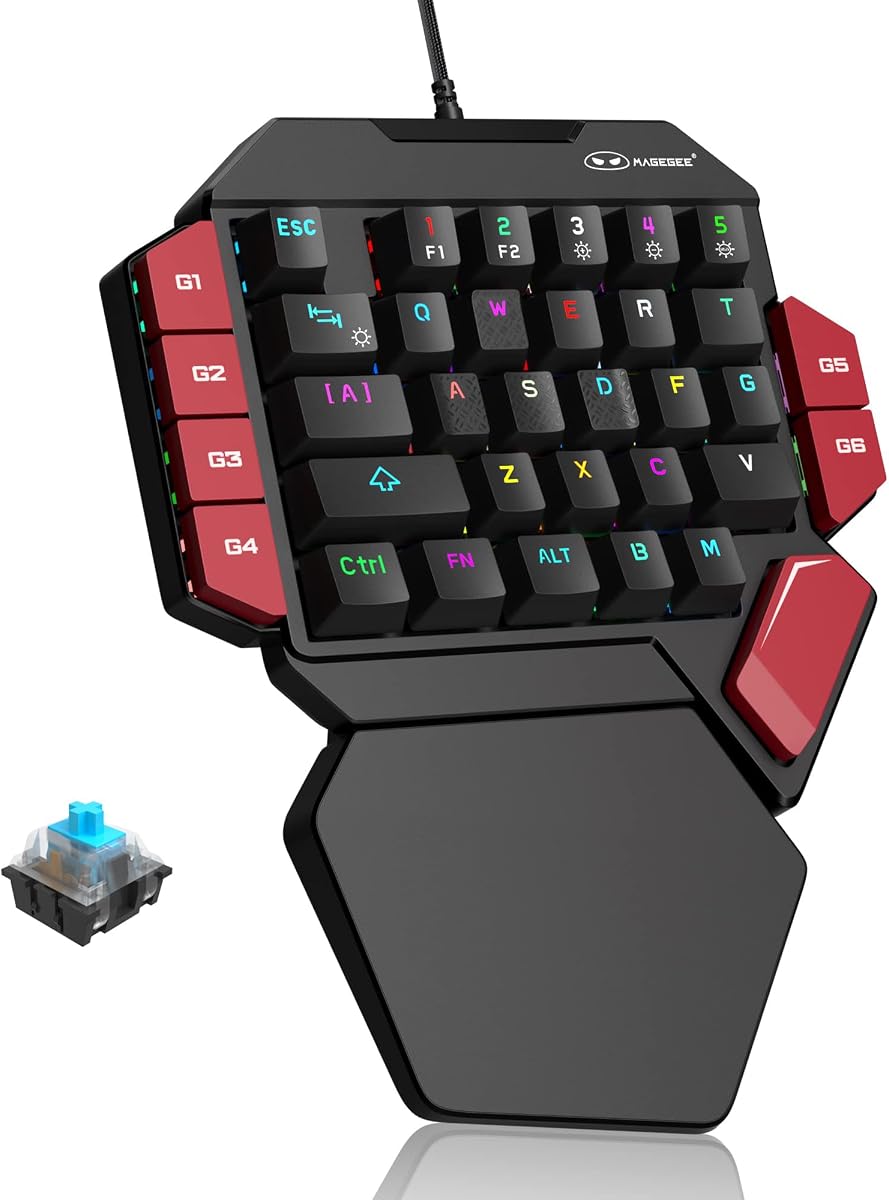
The MageGee One Handed Professional Gaming Keyboard is a 35-key wired mechanical keypad with a 4.3 customer rating. It stands out in the budget-oriented portion of the guide through six dedicated macro recording keys, blue mechanical switches, RGB lighting, and a substantial palm rest. Direct USB operation and driver-free setup keep the initial configuration simple.
We may earn a commission when you buy through this link, at no additional cost to you.
All 35 keys are described as non-conflict, allowing multiple commands to register together. The blue switches provide a clear click, pronounced mechanical sensation, and tactile feedback that many gaming players use to confirm actions. Macro keys labeled G1 through G6 can record sequences directly on the device, and the supplied procedure explains both recording and clearing assigned commands. Brightness, color, and effect changes are handled through a set of function-key combinations.
The main compromise is acoustic. Clicking blue switches are louder than linear, tactile, or membrane alternatives, which can be a drawback in shared rooms, live-streaming environments, or sessions using a nearby headset microphone. The feature list does not state a full color count, so buyers should not assume the same customization depth as devices advertising millions of colors. Like the other compact mechanical keypads, it is built for gaming and shortcuts rather than full-document typing.
This is a strong selection for a gamer who wants more onboard macro storage than a basic mini keypad without moving into premium competitive hardware. It suits PC, Mac, and Linux systems, needs no dedicated driver, and offers a large supported area for the wrist. The combination of six macros, mechanical feedback, RGB lighting, and direct USB makes it a practical budget choice.
A six-slot macro system gives the keypad more room for useful shortcuts than most basic one-handed boards. Onboard recording also keeps command setup attached to the device, reducing reliance on a permanently installed configuration program.
The blue switches deliver noticeable click and tactile feedback, while the large palm rest helps distribute wrist pressure during longer play sessions. The result is a more conventional mechanical feel than a membrane keypad without requiring a full-size desk footprint.
We may earn a commission when you buy through this link, at no additional cost to you.
The Redragon K776WL Wireless One-Handed Mechanical Keyboard has a 4.8 customer rating, the highest in this comparison. It combines wireless operation, mechanical switches, three dedicated macro buttons, a multifunction volume knob, and extensive RGB options. The result is a feature-rich compact keyboard for users who want both gaming controls and desktop convenience.
We may earn a commission when you buy through this link, at no additional cost to you.
Connectivity includes Bluetooth and 2.4GHz wireless, while the 4000mAh battery is designed to reduce charging concerns. Pre-lubricated linear switches provide a smooth, low-resistance feel with rapid response, and the hot-swap sockets allow compatible switches to be changed without soldering. The available hot-swap specification specifically mentions 3-pin and 5-pin support, giving owners more freedom to tune the feel of the board.
The physical M1 through M3 macro buttons are more convenient than hunting through software for frequently used commands, while downloadable drivers expand control over lighting and key customization. Eighteen RGB modes and support for 16.8 million colors provide a richer lighting system than seven-color keypads. The knob can adjust volume and lighting, adding functionality beyond the keys. The trade-off is that advanced setup requires software, and the listed connection modes do not include a wired operating mode.
Choose the K776WL if you want a wireless mechanical keypad that remains customizable after purchase. It is well suited to gamers who appreciate a smooth linear press, a dedicated knob, and easy access to physical macros. Compared with the Redragon's feature set, the MageGee wired model offers simpler plug-and-play operation, while the K776WL makes a stronger case for users who value wireless freedom and future switch changes.
Compatible switch sockets make it possible to change the feel of the keyboard without a soldering setup. Pre-lubricated linear switches provide a smooth starting point, while the broad 3-pin and 5-pin support gives experienced users room to experiment.
A dedicated volume control is useful during gaming and communication sessions because it can be adjusted without opening a software menu. The same knob can also control lighting, reducing the need for repeated function-key commands.
We may earn a commission when you buy through this link, at no additional cost to you.
The Keychron C0 HE 8K is a premium 35-key wired gaming keypad built around Hall Effect magnetic switches and an 8K polling rate. Its 4.3 customer rating reflects a specialized product aimed at competitive FPS players, creators, streamers, and power users who want precise control over actuation, reset behavior, mapping, and lighting.
We may earn a commission when you buy through this link, at no additional cost to you.
Rapid Trigger is the defining feature. Instead of relying only on a fixed physical contact point, the magnetic switches detect key travel in real time and allow actuation points to be adjusted with 0.01 millimeter precision. Players can fine-tune when a key registers and how quickly it resets, which is useful for rapid movement, strafing, and double-tap actions. The 8K polling rate further supports frequent input detection in fast competitive scenes.
Customization is handled through a web-based configurator, allowing key mappings, actuation settings, and per-key RGB lighting to be adjusted in a browser without installing a traditional desktop application. The keypad supports Windows and macOS and can also serve creators by triggering streaming scenes, push-to-talk commands, editing shortcuts, and timeline functions. Its limitations are meaningful for some users: it is wired rather than wireless, and getting the most from the magnetic behavior requires deliberate configuration rather than simply plugging it in and playing.
This is the strongest recommendation for a buyer who treats input precision as the highest priority. It is particularly suitable for competitive shooters such as Valorant and CS2, where the product description specifically highlights movement control. It is less convincing for casual users who only need WASD, basic modifiers, and lighting, but for a high-end one handed gaming keyboard, the adjustable magnetic switches and rapid reset behavior provide a clear technical distinction.
Adjustable actuation lets a user choose exactly how far a key must travel before the game recognizes it. Rapid Trigger can then register a reset before the key returns fully, making it possible to repeat movement commands without waiting for a complete mechanical cycle.
Using a web-based configurator avoids the need for a conventional installed utility for mapping and lighting changes. This can make it easier to tune the keypad on either Windows or macOS, although the advanced options still reward time spent learning the settings.
We may earn a commission when you buy through this link, at no additional cost to you.
The Razer Tartarus V2 Mecha-Membrane Gaming Keypad is a 32-key programmable pad with a 4.2 customer rating. It focuses on compact gaming input, layered customization, and a softer mecha-membrane action. Its established position in the Razer ecosystem makes it relevant to players who want familiar software and lighting integration without carrying a full-size keyboard.
We may earn a commission when you buy through this link, at no additional cost to you.
The 32 keys can be programmed, allowing frequently used actions to be grouped on a dedicated surface. Razer Hypershift supports remapping keys and combinations, which is valuable for games with several abilities, weapon commands, or communication shortcuts. The mecha-membrane construction is designed to balance mechanical-style feedback with a cushioned rubber-dome feel, while the directional thumb control provides an additional way to issue movement inputs.
Compared with the 34- and 35-key products in the guide, this model has fewer physical keys and no more advanced wireless or magnetic-switch features. The supplied listing information is sparse, so details such as exact dimensions, connection method, lighting modes, and battery support should be verified before purchase. Its main appeal is therefore the established programmable control experience rather than a broad set of headline specifications.
The Tartarus V2 is best for a gamer who values software-based customization and wants a compact, dedicated command pad. It can also support creative workflows through programmable command layers. If you need wireless connectivity, adjustable magnetic actuation, or a larger collection of onboard shortcut keys, the MageGee, Redragon, or Keychron models in this guide provide more clearly documented options for those requirements.
A dedicated programmable pad can keep secondary actions close at hand without forcing every command onto a crowded full keyboard. The ability to remap keys and combinations makes it useful for games with layered abilities as well as editing and streaming applications.
The mecha-membrane design offers a middle ground between a conventional rubber membrane and a mechanical keyboard. The result is generally less rigid than a standard mechanical switch while preserving a more deliberate feel than many basic membrane keypads.
We may earn a commission when you buy through this link, at no additional cost to you.
The Razer Ornata V3 is the only conventional full-size keyboard in this comparison, and it earns a 4.5 customer rating. Although it does not match the space-saving focus of a dedicated one-handed keypad, it offers an alternative for users who want gaming performance, low-profile keys, dedicated media controls, and a full complement of familiar keys in one device.
We may earn a commission when you buy through this link, at no additional cost to you.
Slimmer keycaps and shorter switches are designed to promote natural hand positioning during long sessions. The mecha-membrane action combines a snappy, clicky response with a conventional keyboard feel, while UV-coated keycaps are intended to resist fading and everyday wear. Dedicated media keys provide direct control over playback, brightness, and volume, reducing the need to leave the game for system adjustments.
A magnetic soft-touch wrist rest snaps neatly to the keyboard and supplies additional palm support. The trade-off is desk footprint. The Ornata V3 is not engineered as a one-hand movement pad, does not free the other hand through a mini layout, and will not compete with a 29- to 35-key keypad for mouse freedom. It is included because some buyers interpret the category broadly and prefer complete typing ability in a low-profile gaming keyboard.
Choose the Ornata V3 if you need a normal keyboard for work and gaming rather than a dedicated action pad. It is a good option for users who appreciate Razer software, want physical media controls, and prefer low-profile mechanics for general desktop use. If the central goal is a compact one handed gaming keyboard, however, one of the dedicated mini keypads will offer a more focused layout and better use of limited desk space.
Shorter switches and slimmer keycaps can keep the wrists in a more natural position than a tall mechanical keyboard. The design is particularly relevant for users who game for long periods or alternate regularly between gaming and everyday typing.
Unlike the dedicated keypads, the Ornata V3 includes a conventional typing layout and dedicated media controls. That makes it more versatile for productivity, although it sacrifices the uncluttered mouse area that motivates many players to choose a one-handed gaming keyboard in the first place.
We may earn a commission when you buy through this link, at no additional cost to you.
The right one handed gaming keyboard depends less on the number of buttons than on how those buttons fit your games, preferred switch feel, connection method, and physical setup. Use the following factors to narrow the field before making a final choice.
Switch technology determines how a key feels and sounds as well as how quickly it can be pressed repeatedly. Linear switches are smooth and light, with minimal tactile interruption, making them suitable for fast tapping and players who do not want a visible bump during a command. Blue mechanical switches add a pronounced click and tactile confirmation, which some users find helpful but others find loud. Mecha-membrane hybrids seek a middle ground by combining some mechanical-style feedback with a softer, cushioned action. Hall Effect magnetic switches add a different level of control because they detect travel electronically and permit adjustable actuation points.
A wired keypad offers a direct connection, consistent behavior, and no battery management, making it a natural choice for a stationary gaming desk. A 2.4GHz receiver removes the cable while preserving a dedicated gaming connection, although the receiver occupies a USB port and must be inserted before use. Bluetooth offers broader device compatibility and is especially useful for switching between a desktop and laptop or tablet. Tri-mode models support Bluetooth, 2.4GHz, and USB, providing the most flexible arrangement at the cost of additional setup and a potentially larger footprint.
Compact keypads commonly contain between 29 and 35 keys. A smaller layout preserves the greatest amount of mouse space and can place every important command under one hand, but it provides fewer keys for abilities, macros, and secondary actions. Larger mini layouts usually retain essential movement, modifier, and shortcut keys while offering more room for customization. Left-handed and right-handed directional arrangements also feel very different, and some thumbpads may be more comfortable for one hand position than another. Review the actual placement rather than judging by key count alone.
Onboard macro keys provide fast access to recorded sequences without opening configuration software, while software-based programmability supports deeper customization, layers, and complex remapping. More macro buttons do not automatically mean better control: easy-to-reach dedicated keys are more useful than a large collection placed in awkward positions. Check whether macros are stored on the device, whether multiple profiles are supported, and whether the required software works with your operating system. Browser-based configuration can be convenient, while a dedicated application may offer more advanced control.
Polling rate indicates how frequently the keyboard checks for input, while actuation determines when a physical press is registered. High polling and rapid scanning can benefit competitive movement, and adjustable magnetic actuation gives finer control over repeated inputs. These specifications matter most in fast competitive games where reset timing, strafing, double taps, and weapon switching occur at high frequency. For casual play, macro use, or productivity shortcuts, a dependable standard keypad may be enough. Advanced modes can also require software setup and careful testing before they are used in a live match.
A one-handed device places more demand on a limited support area, so the shape and quality of the wrist rest can be as important as the switch type. A broad, gently sloped palm rest helps distribute pressure and keeps the hand from resting directly on a hard edge. Low-profile keys can also reduce wrist extension compared with tall mechanical switches. The keypad should sit securely on the desk, and its orientation should match the hand controlling it. A compact layout that feels cramped after a short session is not a good choice for a long gaming night.
RGB lighting can make a compact gaming setup more cohesive while also helping you identify keys in a dim room. Basic models may offer several static colors and a breathing effect, whereas advanced devices can display millions of colors, multiple dynamic modes, and per-key effects. Compatibility is equally important: a keypad that synchronizes with your existing gaming hardware can look more integrated, but software requirements may also add complexity. The listed operating systems provide a useful starting point, yet you should also verify the game, lighting utility, and configuration program you intend to use.
A compact one-handed gaming keyboard can save desk space, travel conveniently, and reduce mouse obstruction, but it is not a complete replacement for a normal keyboard. Dedicated keypads are optimized for movement, actions, and shortcuts, making them less suitable for long documents. If the device will serve as your only keyboard, choose one that includes enough ordinary keys or plan to retain a full-size board. If it is a dedicated gaming accessory, prioritize a layout and connection style that fit how you move between a desk, a travel bag, and different computers.
Begin by placing the keypad where your hand can rest naturally without forcing the wrist upward or outward. Keep the movement keys under the hand that normally controls the mouse, and use the other hand to adjust the angle, pressure, and distance. Connect the keypad using its specified USB, receiver, or Bluetooth method, then install any required configuration utility before assigning macros or lighting. Test a few movement commands in a practice environment before relying on them in a competitive match.
For a wired model, connect the USB cable before power-on and avoid sharply bending it at the plug. For 2.4GHz models, insert the supplied receiver into a suitable USB port and turn on the keypad before use. Bluetooth devices should be paired according to the manufacturer's instructions, while tri-mode products need the intended connection mode selected. Wireless models should be charged with a compatible source, and their automatic sleep settings can help preserve battery life during inactive periods.
Keep the keyboard away from drinks, dust, and forceful impacts. Clean the keycaps and palm rest with a soft, slightly damp cloth, and do not pour liquid directly onto the switches or connection port. Avoid turning the RGB lighting or wireless functions off without a practical reason, but lower the brightness when the keypad is not in use if that improves battery life. Periodically review macro assignments, update configuration software when appropriate, and confirm that every button still performs its intended action.
Usually, a one handed gaming keyboard is designed as a compact gaming pad rather than a complete replacement for standard typing. It usually lacks a full function row, number pad, and enough conventional keys for documents or work. You can use one for movement and action commands while retaining a regular keyboard for text entry, or pair it with a separate mouse and monitor setup if your applications require little typing.
A wired keypad is usually the simplest option for a permanent PC gaming desk because it has no battery to charge and no receiver to pair. Wireless is more convenient when cable clutter, travel, or switching between computers matters. The best wireless choice depends on whether you value broad Bluetooth compatibility, a dedicated 2.4GHz receiver, or the flexibility of a tri-mode connection.
Linear switches move smoothly without a pronounced tactile bump, which many competitive players prefer during rapid repeated actions. Tactile switches include a noticeable bump that confirms the actuation point and can help users feel the input without looking. Blue mechanical switches add a click as well as tactile feedback, making them more audible than most linear or tactile alternatives.
No. More keys can provide more shortcuts, but placement and comfort are equally important. A smaller 29-key layout can create more mouse space and keep every control close, while a 35-key layout may be better for macros, abilities, and secondary actions. Choose the arrangement that your hand can reach naturally and that contains the commands your games actually require.
Many do, but their capabilities differ. Some include dedicated onboard keys for recording sequences, while others require downloadable software to assign commands, layers, or profiles. Onboard recording is convenient for portable setups, and software-based customization is more flexible for complicated bindings. Confirm that the configuration tool supports your operating system and the game you play.
An 8K polling rate checks for input at a very high frequency and is aimed at competitive scenarios involving rapid movement and repeated commands. The visible benefit depends on your monitor, game, sensitivity, and overall system performance, so it should be considered alongside actuation behavior and switch feel rather than in isolation. Casual players may notice little difference in everyday use.
Several products in this guide explicitly support Mac systems, including the MageGee keypads and the Keychron C0 HE 8K. Compatibility may involve different function-key behavior or a limited set of lighting and configuration controls, so review the platform instructions. If you alternate between Windows and Mac, a tri-mode model with broad operating system support offers the greatest convenience.
Place the keypad so your forearm and wrist remain in a natural line, and use the included palm rest rather than pressing the edge of the device into your wrist. Keep the device close enough that you do not have to reach for it, but not so close that your elbow must lift. Low-profile switches and a roomy, sloped support area can also reduce strain during extended sessions.
The strongest overall options serve different priorities. The Keychron C0 HE 8K stands out for premium competition-focused performance, Hall Effect magnetic switches, 8K polling, Rapid Trigger behavior, and detailed browser-based configuration. The MageGee Wireless 34-Key is the most versatile everyday option, combining tri-mode connectivity, smooth linear switches, broad platform support, RGB lighting, and a strong customer rating. The MageGee Wired 35-Key offers the best budget balance of mechanical feedback, six onboard macro keys, and simple USB operation.
Before buying, prioritize the factors that affect your actual play. Competitive FPS players should examine polling, actuation, reset behavior, and advanced key functions. Macro-heavy or MMO players may place more value on programmable buttons and software support. Travelers and multi-computer users should look for wireless options, while a fixed desk setup may be best served by a dependable wired design. A comfortable wrist rest and sensible left- or right-hand orientation matter in every case.
Finally, check the current listing details, supported software, game compatibility, and availability before placing an order. Product features and prices can change over time, and manufacturer revisions may alter the information available for a particular model. Comparing the latest specifications against your preferred games, desk space, and connection habits will help you select a one handed gaming keyboard that remains useful and comfortable for the way you play.