
BENFEI USB C Hub 5-in-1
4.6Editor score
Up to 90W passthrough charging
Certified 4K HDMI output
10Gbps USB-A transfer
Explore the best Power Delivery Hub options, comparing charging power, port layouts, display support, data speeds, compatibility, and portability.
A power delivery hub turns one USB-C connection into a more capable workstation by combining charging, data transfer, display output, and peripheral connections. The best model depends on your laptop, power requirements, number of devices, and whether you need to mirror or extend a screen while working.
We compared the ten featured hubs by examining their port configurations, charging capabilities, transfer speeds, display support, power requirements, compatibility claims, and physical designs. The list covers compact travel adapters, multiport desktop hubs, powered models, and options designed to deliver both high-speed data and convenient power delivery.
Each review explains where the product stands out, what limitations to consider, and the type of user it best suits. Ratings and specifications reflect the supplied product information, while availability and prices change frequently, so readers should confirm the current listing and requirements before purchasing.
4.6Editor score

4.4Editor score

4.5Editor score
The comparison highlights the most important differences among these ten hubs, including charging capacity, port mix, video support, transfer speed, and whether a separate power adapter is required.



The UGREEN Revodok Pro USB-C Hub 6 in 1 combines six useful connections with up to 100W Power Delivery, giving it an unusually balanced feature set. Its 4.4 rating reflects a product that addresses the everyday needs of laptop users without requiring a large desktop dock. The strongest appeal is the combination of modern data speeds, display support, and charging in one compact adapter.
We may earn a commission when you buy through this link, at no additional cost to you.
Two USB-C 3.2 Gen 2 ports and two USB-A 3.2 Gen 2 ports support data rates up to 10Gbps, making the hub suitable for fast storage, file movement, and demanding peripherals. Its HDMI output supports 4K at 60Hz for creative work, presentations, and an expanded desktop. Power can pass through the host USB-C connection at up to 100W, with up to 85W listed for laptop charging while the hub remains active.
The trade-off is that this is primarily a laptop adapter rather than a full desk setup. It does not offer the large port count or independently switched connections found in powered desktop hubs. Actual charging output depends on the host device, connected equipment, and the power adapter supplied with the computer. Users should also confirm that their USB-C port supports display output and the required power-delivery profile.
This is the strongest general recommendation for a professional who needs one dependable hub for charging, an external display, and several high-speed peripherals. It is especially useful for MacBook-style workflows, content creation, and travel, provided the laptop supports the necessary USB-C functions. Few compact hubs combine four 10Gbps ports, 4K 60Hz video, and 100W charging as neatly.
This hub reduces the need to carry several adapters. Its mix of USB-C, USB-A, HDMI, and power delivery covers common storage, input, charging, and display connections in a single body.
The 4K 60Hz HDMI output and four 10Gbps data ports make this more versatile than a basic charging adapter. That combination suits users who regularly move files, connect accessories, and use an external display.
We may earn a commission when you buy through this link, at no additional cost to you.
The UGREEN USB C Hub 4 Ports is aimed at travelers and mobile workers who want a small way to add USB-C connections without carrying a full dock. It has a 4.3 rating and includes a dedicated power-delivery port capable of supplying up to 95W to a compatible host device. Its 4.1 by 1.5 by 0.5-inch size and 50-gram weight make it particularly easy to pack.
We may earn a commission when you buy through this link, at no additional cost to you.
The hub supports USB-C 3.2 data transfer at up to 10Gbps, with the supplied information noting a 20GB transfer example of 16.4 seconds. Plug-and-play operation spans major desktop and mobile operating systems, including Windows, macOS, Linux, iPadOS, iOS, and Android. Compatibility also extends to many recent laptops, tablets, and phones with USB-C or Thunderbolt connections.
This is not a display adapter, and its USB-C data ports do not support video output or power delivery to peripherals. A charger and charging cable are not included, so buyers must already own a suitable USB-C power supply. Users who need an external monitor or broader wired connectivity should consider a more specialized hub.
Choose this model for a minimal laptop setup, frequent travel, or a desk where desk space matters. It offers the most attractive combination of compact dimensions, high-speed USB-C data, and serious host charging in the list. It is less appropriate as a complete workstation solution, but excellent when the goal is a portable charging and peripheral adapter.
The hub weighs only 50 grams and has a low-profile rectangular shape. It can sit beside a laptop in a carry-on or remain attached to a tablet or phone without taking up much room.
The dedicated 100W PD input can deliver up to 95W to the host laptop or tablet. This is useful when the same USB-C port must handle both power and data through the adapter.
We may earn a commission when you buy through this link, at no additional cost to you.
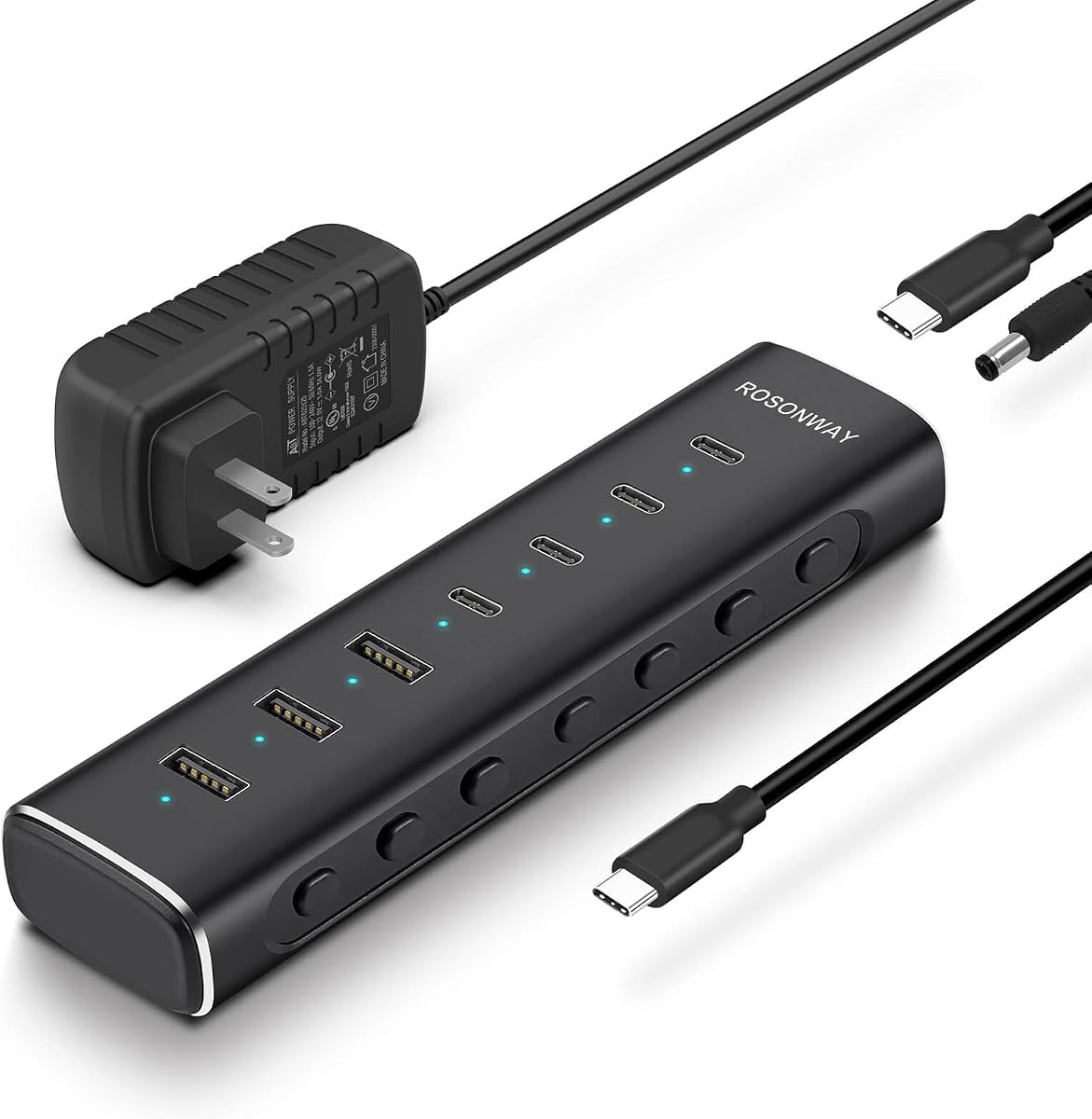
The Rosonway RSH-H7C4 is a powered hub for users who need more ports than a typical travel adapter can offer. Its seven-port arrangement includes four USB-C 3.2 and three USB-A 3.2 connections, each described as supporting data rates up to 10Gbps. The 4.4 rating reflects a flexible expansion option with a detachable cable and individual port controls.
We may earn a commission when you buy through this link, at no additional cost to you.
A 36W, 12V/3A power adapter provides stable power when several devices are connected. Built-in surge, overvoltage, and overcurrent protection adds reassurance for a hub that may serve multiple external drives, input devices, or accessories. The aluminum housing is designed for heat dissipation, while blue LEDs make the operating status of each port easy to identify.
A key limitation is that this is a data hub rather than a notebook power-delivery dock. Its USB-C ports support data transfer and standard 1.5A charging, but they do not support PD charging or DisplayPort Alt Mode video output. The individual switches are useful for power control, but they cannot compensate for the missing display function.
This model is best for expanding a laptop, desktop, or compatible gaming setup with numerous high-speed ports. It suits users who already have a separate charging arrangement and want granular control over connected devices. For a monitor, the Belkin or UGREEN display-equipped options are more appropriate.
Each port has its own electronic switch and status light. A short press activates a port, while holding it for two seconds turns it off, reducing unnecessary power draw without unplugging every accessory.
The included external adapter helps maintain stable operation when numerous devices are connected. It also separates hub power from host-device charging, making the model a practical data expansion tool.
We may earn a commission when you buy through this link, at no additional cost to you.
The Satechi 4-in-1 USB-C Hub focuses on a refined four-port design built around USB-C connectivity. It offers up to 100W Power Delivery and four USB-C 3.2 Gen 2 data ports capable of 10Gbps transfers. Its 4.1 rating is respectable, although it reflects a more specialized proposition than hubs offering HDMI and legacy USB-A connections.
We may earn a commission when you buy through this link, at no additional cost to you.
The aluminum enclosure, chamfered edges, braided cable, and reinforced cable neck create a premium appearance and a durable daily accessory. At 6 by 6 by 1.05 centimeters, the hub is small enough for travel while remaining comfortable to handle. Its compatibility list covers numerous MacBook, iPad, Surface, Dell XPS, Pixelbook, HP, Razer, and Huawei devices.
The important compromise is the absence of display output. Users who need to connect a monitor should choose a hub with HDMI or another video output. Four USB-C-only data ports also favor newer accessories, while devices using traditional USB-A connectors will require an additional adapter.
This is a compelling choice for a modern all-USB-C workspace where charging and fast data connections matter more than video. It is especially attractive for professionals who value a compact aluminum design and straightforward compatibility. The included two-year limited warranty adds confidence for regular mobile use.
When most accessories use USB-C, four matching 10Gbps ports simplify cable management. External storage, flash drives, and modern input devices can connect without relying on legacy adapters.
The reinforced braided cable and compact aluminum housing suit frequent travel. Its dimensions remain easy to manage in a laptop bag while providing a more substantial feel than a lightweight plastic adapter.
We may earn a commission when you buy through this link, at no additional cost to you.
The Belkin 100W 10Gbps Multiport USB-C Hub Adapter is built for modern peripherals that need both high-speed data and power. It has a 4.2 rating and four USB-C 3.2 Gen 2 ports, each supporting transfers up to 10Gbps. Pass-through charging can provide up to 100W to connected devices while the hub itself remains active.
We may earn a commission when you buy through this link, at no additional cost to you.
One distinctive feature is its support for headphones, speakers, and audio interfaces, which makes it more useful for creative and communication setups than a plain data adapter. Fast Role Swap is intended to prevent data loss or interruption when a USB power source is added or removed. The design also supports backwards compatibility across MacBook, iPad, PC, and other compatible hosts.
Its USB-C-only port layout may be an advantage for a new ecosystem but a limitation for users with older flash drives, printers, or other USB-A accessories. There is also no integrated display output, so it cannot replace a multimedia dock for a multi-monitor setup.
The Belkin is a good fit for users centered on fast USB-C storage, audio equipment, and reliable charging. It offers a polished alternative to a basic adapter and should appeal especially to MacBook and iPad users with modern accessories. Display-dependent workers should select a different model from the list.
Four 10Gbps USB-C ports support demanding storage and accessory connections. The result is a clean one-cable setup for devices built around the latest USB-C ecosystem.
Fast Role Swap helps manage changes to the power source while reducing interruption. That makes the hub more practical for setups where a charger may be connected or disconnected during the day.
We may earn a commission when you buy through this link, at no additional cost to you.
The SABRENT 7-Port USB-C Hub is a powered desktop-style adapter for adding a mixed collection of peripherals. It has a 4.1 rating and combines three USB-A with four USB-C 3.2 Gen 1×1 data ports. The hub supports Mac, PC, Steam Deck, and ROG Ally systems, making it relevant to gaming devices as well as conventional computers.
We may earn a commission when you buy through this link, at no additional cost to you.
Every connection has a dedicated on/off switch and white LED indicator, offering more granular control than many compact hubs. One USB-C port supports up to 20W PD for accessories or charging, while the other three USB-C ports deliver 5V/900mA. A 48W power adapter and aluminum housing are included to support stable operation and heat dissipation under load.
The main technical compromise is a maximum 5Gbps data rate rather than the 10Gbps available on several leading models. It also does not provide host power-delivery passthrough, so it is primarily a peripheral expansion hub rather than a laptop charger. Users needing maximum transfer speed or a single-cable powered dock should look elsewhere.
Choose the SABRENT for a broad mix of older and newer USB peripherals, especially if port-level switches are useful. Its seven ports reduce adapter clutter, and the included power supply supports dependable operation. It is a balanced option for desktop builders, shared workstations, and compatible gaming handhelds.
Three USB-A ports preserve support for common keyboards, mice, drives, and other accessories. Four USB-C ports extend the hub's usefulness with newer peripherals and compact portable setups.
Individual switches make it easy to isolate devices without unplugging them. White LEDs provide a quick visual indication of which connections are active.
We may earn a commission when you buy through this link, at no additional cost to you.
The Gitfos Powered 15-in-1 Hub is the most extensive desktop expansion option in this guide. It has a 4.4 rating and combines a 100W USB-C PD host connection with multiple USB-C and USB-A data and charging ports. It is designed for users who want to turn one computer connection into a broad, powered peripheral station.
We may earn a commission when you buy through this link, at no additional cost to you.
Its 15 connections include USB-C 3.2 and USB-A 3.2 data ports rated up to 10Gbps, several USB-A 3.0 data ports at 5Gbps, and charging-focused USB-C and USB-A connections. The included 65W adapter supplies stable power and must be connected for operation. Two dedicated charging ports can deliver up to 45W individually or 20W each when used together.
No port supports video output, which is a major limitation for a device with this many connections. The charging ports are also not recommended for computers or other high-power appliances. The laptop should be connected to the 100W PD port using its original power adapter, according to the supplied instructions, and the included 65W adapter powers the hub itself.
This is the best pick for IT professionals, photographers, editors, remote workers, and students who need many connections more than an external display. Its angled trapezoidal aluminum body, non-slip feet, and heat-dissipation design suit a permanent desk. It is less appropriate for users who need a compact travel adapter or video output.
The extensive port roster supports several storage devices, input accessories, charging devices, and legacy USB equipment at once. It can substantially reduce the need for multiple adapters on a crowded desk.
The bundled 65W adapter and aluminum chassis support a stable setup with multiple active devices. Non-slip feet and the raised angle also improve access and keep the hub securely positioned.
We may earn a commission when you buy through this link, at no additional cost to you.
The UGREEN USB C Hub 5 in 1 is a straightforward adapter for adding a display, charging, and several USB devices. It carries a 4.6 rating and combines a 4K HDMI port, 100W USB-C PD connection, one 5Gbps USB-A data port, and two 480Mbps USB-A ports. That layout makes it most useful for a keyboard, mouse, display, and host charging.
We may earn a commission when you buy through this link, at no additional cost to you.
The HDMI connection allows a compatible laptop to send video to an external display, while the PD port keeps the computer powered through a single cable. The high-speed USB-A port handles storage or other faster accessories, and the two remaining ports are intended for lower-bandwidth devices such as keyboards and mice.
The slower 480Mbps ports are a meaningful limitation compared with the 10Gbps options elsewhere in the list. The product also offers fewer connections and less fine-grained control than powered desktop hubs. Host compatibility for display output and charging remains essential, so not every USB-C device will support every function.
Choose this UGREEN for a straightforward desk connection where an external display and a few basic peripherals are the main requirements. It is easy to understand, compact, and well rated. Users with extensive storage or many accessories should select a higher-speed or larger-port model instead.
The five-port configuration covers the most common mobile-office needs. It lets a compatible laptop use one host connection for power, video, and essential accessories.
The 5Gbps port suits more demanding storage, while the 480Mbps connections are better reserved for keyboards, mice, and similar low-bandwidth equipment. Assigning devices accordingly avoids unnecessary bottlenecks.
We may earn a commission when you buy through this link, at no additional cost to you.
The BENFEI USB C Hub 5-in-1 combines useful display, charging, and data connections in a portable aluminum case. It has a 4.6 rating and is one of the most approachable options in the guide. Its five functions include certified 4K HDMI, a USB-C charging connection, and three USB-A ports, covering the basics of a portable workstation.
We may earn a commission when you buy through this link, at no additional cost to you.
The charging port can pass through up to 90W to the host laptop, with 10W reserved for hub operations. The HDMI output supports resolutions up to 4K at 30Hz, and the primary USB-A 3.2 port supports data transfer up to 10Gbps. Two additional USB-A 2.0 ports handle slower accessories such as keyboards and mice.
Its 4K mode is limited to 30Hz, making it less suitable for smooth high-refresh gaming or demanding video work than the 4K 60Hz options in this list. The host's USB-C port must support video output, and the charging function likewise depends on device support. The included 20-centimeter silicone-woven cable is soft and designed to resist knotting.
This is an excellent value-oriented choice for students, office workers, and travelers who need a dependable one-cable hub. It offers more speed and polish than a basic adapter without moving into the largest desktop-style category. The 18-month warranty and 24-hour response policy add further reassurance.
The compact aluminum case and short silicone cable are easy to carry. The hub can move between a laptop, tablet, or compatible phone setup without requiring a separate collection of adapters.
A 10Gbps USB-A port supports fast file movement with compatible storage, while the two 480Mbps ports remain practical for basic input devices. This tiered approach balances speed with cost.
We may earn a commission when you buy through this link, at no additional cost to you.
The Belkin USB-C Hub 5-Port combines external display support, high-speed data, and up to 100W host-device charging in a travel-friendly body. Its 4.5 rating reflects a well-rounded feature set. The hub provides HDMI 2.0 output at up to 4K 60Hz, making it a stronger option for smooth external-display use than adapters limited to 30Hz.
We may earn a commission when you buy through this link, at no additional cost to you.
A dedicated two-in-one USB-C port can charge the host and transfer data simultaneously, while the hub's USB-C power output totals 12W across its USB-C connections. Data transfers reach 10Gbps, twice the rate associated with conventional USB 3.0 connections. This makes the hub suitable for external storage, media workflows, and active peripheral connections alongside a display.
The shared USB-C output means users should not assume every USB-C peripheral can receive its full requested charging requirement. Actual host charging depends on the computer, its charger, and the connected workload. Compatibility with display mode, USB-C data, and power delivery must also be confirmed on the host device.
This Belkin is the most complete compact option in the guide because it does not ask users to choose between charging, 4K 60Hz video, and 10Gbps data. It is ideal for mobile professionals, students, and MacBook or iPad users who need one dependable travel dock. The five-point safety system and two-year coverage further support long-term use.
HDMI 2.0 support for 4K at 60Hz is useful for productivity, creative review, and presentations. It also makes the hub more versatile than most entry-level display adapters.
The five-port arrangement provides display, charging, data, and peripheral connections without the bulk of a full desktop dock. Its slim housing and light construction suit frequent movement between workspaces.
We may earn a commission when you buy through this link, at no additional cost to you.
Choosing a power delivery hub starts with the host device, required connections, and workload. The most important distinctions are charging capability, display support, data speed, port format, and whether the design is intended for travel or a permanent desk.
Power Delivery ratings describe the maximum capability of a hub, not necessarily the amount every connected device will receive. A host charger, host compatibility, and the number and power demands of connected peripherals can all affect the final output. Review whether the charging port is intended to power the laptop, charge peripheral devices, or do both. Some models also reserve part of the stated capacity for hub operations.
A hub with an HDMI or DisplayPort output can add or extend a desktop, but the host's USB-C port must support the required display mode. Resolution and refresh rate matter: 4K at 60Hz is a stronger specification than 4K at 30Hz. Some high-speed data hubs intentionally provide no video output, making them suitable for peripherals but not monitors.
The listed 10Gbps and 5Gbps figures describe the maximum theoretical performance of compatible ports, not the speed of every connected device. External drives, cables, host controllers, and the file format can reduce real-world results. Ports rated at 480Mbps are best for keyboards, mice, and other low-bandwidth accessories rather than large media libraries.
USB-C and USB-A devices have different physical connectors, even if they support similar data standards. Count the exact peripherals you intend to connect, including storage, input devices, webcams, capture cards, and audio equipment. A five-port travel hub may be ideal for a minimal setup, while a 15-port powered model is better for a crowded desktop.
Bus-powered hubs draw energy from the computer and are convenient for travel. Powered hubs include an external adapter and are better suited to numerous or power-hungry peripherals. Some desktop hubs require their power adapter to operate at all, while others are designed specifically to pass host charging through a separate USB-C connection.
Individual switches and status indicators make it easier to identify active devices and disconnect power without unplugging cables. They are useful in shared workstations, multi-device desks, and setups with external storage. Compact adapters generally prioritize portability and therefore offer fewer physical controls, which may be perfectly acceptable for one or two peripherals.
A travel hub should be small, light, and easy to position near the host device. A desktop hub can afford a larger footprint if it improves stability, cable reach, and heat dissipation. Cable length and flexibility also matter: a short silicone cable can be easier to pack, while a detachable cable may be more convenient for a permanent installation.
Longer coverage can provide added confidence for an adapter used daily with valuable equipment. Look for clear manufacturer support, included documentation, and protection against common electrical issues. Warranty terms are most useful alongside verified device compatibility, because coverage does not resolve an unsupported USB-C mode or an inadequate host charger.
Before connecting the hub, inspect the host port, cable, and adapter for damage. Confirm that the computer supports the functions you intend to use, especially DisplayPort Alt Mode for an external screen and the required USB-C power-delivery profile. For a powered model, connect the supplied DC adapter before attaching important storage devices, and allow the hub to initialize before moving large files.
Connect the hub to the host with the designated USB-C cable, then attach the display and other accessories in a sensible order. Use the high-speed ports for compatible storage or demanding accessories and reserve slower USB-A ports for keyboards, mice, and similar devices. If a port does not operate, disconnect the accessory, power-cycle the hub if required, and verify that the host supports the selected function.
Keep the hub uncovered and away from liquids, excessive heat, and long periods of direct sunlight. Do not use damaged cables or undersized chargers. When a powered hub is not in use, unplug its external adapter, and periodically check connections for dust. Clean the enclosure with a soft dry or lightly damp cloth rather than abrasive material, and store any detachable cable without a tight bend.
A power delivery hub combines a USB-C connection with charging, data, and often display ports. It lets a compatible laptop or tablet use one host connection for an external monitor and multiple accessories while receiving power through the same setup. The exact functions depend on the hub and the capabilities of the host device.
No. A 100W label describes the hub's maximum stated charging capability, not guaranteed output to every device. The host computer, charger, cable, hub operating draw, and connected peripherals can all affect available power. Users should check the laptop's charging requirements and use a compatible power adapter.
No. The laptop's USB-C port must support the required video and power-delivery functions. Many modern USB-C and Thunderbolt systems do, but compatibility varies by model and operating system. A computer with USB-C data alone may not produce HDMI output or accept pass-through charging through the hub.
Not necessarily. The actual transfer rate depends on both connected devices, cables, host controllers, and the files being moved. A 10Gbps port can be significantly faster with compatible external storage, while a 5Gbps connection may be limited by the attached drive. For keyboards and mice, the difference is rarely noticeable.
A bus-powered hub is convenient for travel and a small number of lightweight accessories. A powered hub is usually better for several devices, external storage, or sustained operation because it has a dedicated power source. Verify whether a model includes an adapter and whether the adapter is required for normal operation.
Both modes can display a 4K resolution, but 60Hz refreshes the image twice as often as 30Hz. The higher refresh rate produces smoother scrolling, animation, cursor movement, and some video content. A 4K 60Hz hub is generally preferable for productivity and modern displays, provided the host and display support it.
The most common causes are a host port without display support, an unsupported display mode, an inadequate cable, or a display that is not detected correctly. Check the hub and computer specifications, reconnect the adapter, and confirm that the selected resolution and refresh rate are supported. It is also important to distinguish a data-only USB-C port from one supporting DisplayPort Alt Mode.
That depends on the desktop's USB-C implementation. The port must support data, the required charging profile, and DisplayPort Alt Mode if you want a monitor through the hub. Some desktop cases expose only standard USB-C data, while others support full docking features. A powered hub can also serve as a USB expansion device if the host only supports data.
The BENFEI USB C Hub 5-in-1 stands out as the best budget option, combining a 10Gbps USB-A port, 4K HDMI, and up to 90W passthrough charging in a compact body. The UGREEN Revodok Pro earns the Editor's Choice designation for its balanced mix of four 10Gbps ports, 4K 60Hz video, and 100W Power Delivery. For the best premium travel experience, the Belkin 5-Port model adds 4K 60Hz HDMI, 10Gbps transfers, and 100W host charging.
Prioritize the features your workflow actually requires. A frequent traveler may value the small BENFEI or UGREEN designs, while a permanent workstation may benefit from the Rosonway or SABRENT powered options. A creative professional needing 60Hz video should focus on the UGREEN Revodok Pro or Belkin 5-Port Hub, and users needing maximum expansion should examine the 15-port Gitfos model.
Finally, verify host compatibility, supported display modes, charger requirements, and port speeds before ordering. Product prices and availability can change, so check the current listing and compare the complete package contents. Choosing the right combination of charging, data, display, and physical design will produce the most useful daily setup.