
PowerA Solo Charging Stand
4.6Editor score
Official Xbox licensing
Charges one controller
Includes rechargeable battery
Discover the best Controller Charging Station for Xbox, comparing dual charging, battery life, compatibility, safety, lighting, design, and everyday setup.
A good Xbox controller charging station keeps controllers organized, protected, and ready to play without disposable batteries. The best models combine dependable charging with broad controller compatibility, useful status lights, and a stable place to store each device.
We compared the ten featured stations across battery configuration, supported Xbox controller families, charging approach, safety features, lighting, included accessories, and practical design. The list covers compact single-controller stands as well as dual-controller docks with rechargeable battery packs.
Each review explains what stands out, where limitations may matter, and which type of gamer the product best serves. Ratings and availability can change over time, and prices fluctuate, so compare the current listing details before making a purchase.
4.6Editor score
5.0Editor score

4.4Editor score
The comparison below highlights controller capacity, included battery options, compatibility, and the most visible practical feature of each station.


This dual charging station combines a dock, two 6200mWh rechargeable battery packs, and four replacement battery covers. Its 4.6 rating reflects a strong balance of endurance and convenience, particularly for players who regularly use rechargeable batteries and want one station to handle two controllers. The dock keeps charging hardware and spare covers together instead of scattering them around the gaming area.
We may earn a commission when you buy through this link, at no additional cost to you.
The most notable feature is the pair of relatively high-capacity battery packs. The stated runtime is 18 to 25 hours per battery, with a charging time of approximately four to five hours. That balance suits long gaming sessions and players who do not want to interrupt a match to wait for disposable batteries to recharge. Two independent X-shaped indicators show red while charging and green when a pack is full or in standby.
Compatibility is broad across Xbox One, Xbox One X, Xbox One S, Xbox One Elite, Xbox Series X, and Xbox Series S controllers. The four included covers cover both generations. The important limitation is that the listed compatibility applies to official controllers; the product information specifically says that the batteries do not support third-party Xbox controllers. Controllers themselves are also not part of the package.
The charging system includes protection against overcharging, excessive current, overheating, and short circuits. It can remain populated when charging is complete, making the dock useful as a storage stand. This is an attractive choice for households with multiple official Xbox controllers, particularly when long playtime and fewer battery interruptions matter more than having a controller included in the box.
The stated 18 to 25 hours of runtime makes these packs useful for extended play sessions. Two controllers can be prepared together, reducing the chance that a second player will be limited by disposable battery life.
The dual slots, individual status indicators, and four included battery covers create a more complete setup than a basic single-controller stand. It is particularly convenient for families or local multiplayer sessions.
We may earn a commission when you buy through this link, at no additional cost to you.
Fosmon's Dual 2 MAX is a two-controller charging dock supplied with two 5280mWh, or 2200mAh, NiMH rechargeable batteries. Its 4.5 rating places it among the stronger options for players seeking long playtime and a simple drop-and-charge design. Rather than leaving batteries loose, the product keeps each controller aligned with its metal charging contact and the entire unit ready for storage.
We may earn a commission when you buy through this link, at no additional cost to you.
The stated battery life reaches up to 40 to 45 hours per charge, which is a major selling point for the included packs. The capacity is described as SGS certified, and the intelligent charging board provides overheating and short-circuit protection. It also stops charging automatically when a battery is full. Separate indicators show the status of each slot, making it easier to identify whether one controller is still charging.
Compatibility covers Xbox Series X, Xbox Series S, Xbox One, Xbox One S, Xbox One X, and Elite Series 1 controllers. The explicit exception is the Xbox Elite Series 2 controller. That matters for owners of newer premium controllers, because broad wording elsewhere in the category should not be treated as a guarantee for every model. The included limited lifetime warranty also adds useful support for buyers seeking long-term coverage.
This station is a sensible recommendation for a gamer who regularly uses two compatible official controllers and values substantial battery life over elaborate lighting or display-oriented features. Its straightforward charging process, protective electronics, and warranty make it a practical option for a shared console, family gaming area, or regular local multiplayer setup.
With up to 40 to 45 hours claimed per charge, the included NiMH packs are intended for extended play. They reduce reliance on disposable AA batteries and are convenient for multiplayer households.
Overheating and short-circuit protection help protect the charging process, while automatic cutoff prevents continued charging after a battery reaches full capacity.
We may earn a commission when you buy through this link, at no additional cost to you.
The PowerA Solo is a clean, officially licensed charging stand designed primarily for one Xbox controller. Its 4.6 rating indicates a favorable reception, and the restrained design suits players who want a reliable charging point without a large dual-controller dock. It charges and displays Xbox Series X, Series S, or Xbox One wireless controllers while keeping the controller within easy reach.
We may earn a commission when you buy through this link, at no additional cost to you.
The package includes a 1100mAh rechargeable battery, two battery doors, and a 3.3-foot, or one-meter, USB charging cable. Those components cover the basic needs of replacing disposable batteries and organizing a controller. The one-meter cable is useful for placing the stand near a console, television, or powered USB source, although a longer cable may be needed for a more distant entertainment unit.
The major trade-off is capacity. With one charging position and one modest 1100mAh battery, it does not offer the convenience of preparing two controllers at once. Its advantage is a smaller and potentially more appropriate footprint for a single-player setup, dorm room, or compact shelf. The official licensing also gives buyers an identifiable design intended to fit within the Xbox ecosystem.
The Solo is a strong recommendation for one-controller households and for anyone prioritizing a straightforward, compact, officially licensed station over high-capacity replacement packs. It is less suitable for competitive local multiplayer sessions where two controllers need to recharge simultaneously, but it handles the core task with fewer components and a clean presentation.
The stand both charges and displays a compatible wireless controller, giving it a dual purpose as a functional accessory and a convenient place to keep the controller between sessions.
A single dock is easier to place in compact spaces and avoids carrying two battery systems. It is a practical choice for a primary Xbox setup with only one regularly used wireless controller.
We may earn a commission when you buy through this link, at no additional cost to you.
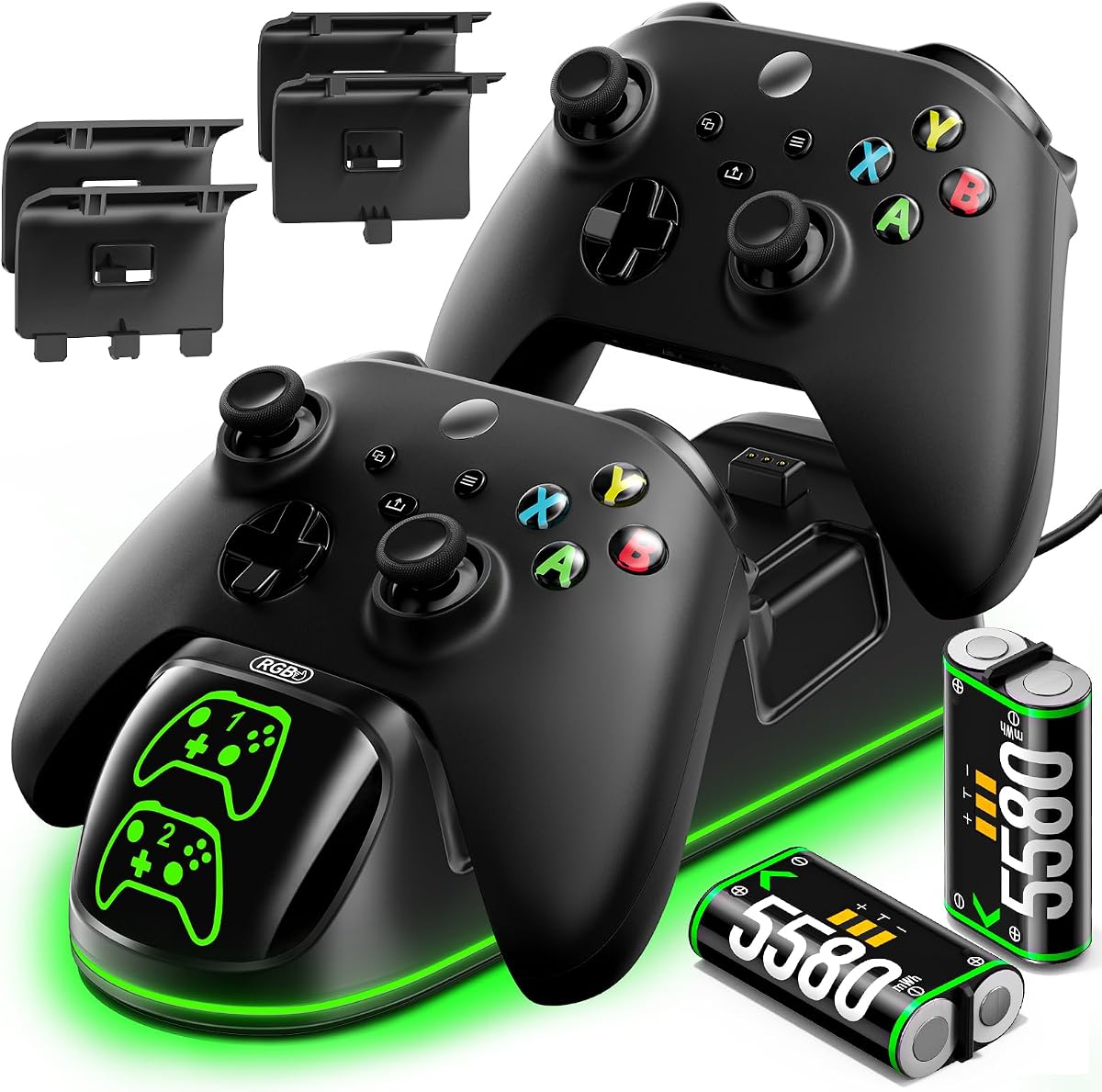
The OlVO XSX Controller Charger is a complete charging kit built around two rechargeable 5580mWh battery packs and a dual-controller dock. Its 5.0 rating is the highest among the featured products, although ratings alone do not guarantee a perfect fit for every setup. The combination of fast charging, broad controller support, included covers, and clear indicators makes it one of the most complete options in the category.
We may earn a commission when you buy through this link, at no additional cost to you.
Two controllers can charge simultaneously in under 2.5 hours. The batteries are described as offering around 20 hours of playtime and as supporting more than 3,000 recharge cycles. Separate red and green indicators make charging status easy to read, with red indicating charging and green representing full or standby. A 31.5-inch USB-C cable provides enough reach for many entertainment setups while maintaining a neat connection.
The batteries and covers are designed for Xbox Series X, Series S, Xbox One X, Xbox One S, Xbox One, and Elite controllers. The package includes two Series-era covers and two Xbox One-era covers, allowing the owner to use the kit across both hardware families. It does not support Xbox 360 or third-party Xbox controllers, and no controllers are included. Battery polarity must also be observed during installation.
This is our top overall recommendation for gamers who want two official controllers charging together and value a generous accessory package. The stated recharge cycle count, relatively quick charge time, and included covers reduce setup friction. Its exclusions are meaningful for Xbox 360 owners or users of third-party pads, but for modern official Xbox hardware, it offers one of the most balanced and practical configurations.
The under-2.5-hour charging claim makes the dock useful before multiplayer sessions. Both controllers and both rechargeable packs can be handled through one centralized setup.
Four battery covers support both Xbox One-style and Series-style controllers. This is especially helpful for households that still use older official controllers alongside newer hardware.
We may earn a commission when you buy through this link, at no additional cost to you.
The 8BitDo Charging Dock is an officially licensed single-controller station for Xbox Series X, Series S, and Xbox One wireless controllers. Its 4.6 rating suggests that buyers appreciate the combination of magnetic charging, a restrained design, and a straightforward way to keep a controller stored. The dock is designed to complement first-party Xbox controllers rather than imitate them with a visually unrelated shape.
We may earn a commission when you buy through this link, at no additional cost to you.
Magnetic contacts help secure the controller in the correct position and reduce the chance of an interrupted connection. The status light glows amber while charging and turns white when the controller is fully charged. A light adjustment feature gives users some control over the illumination, making the dock easier to integrate into a bedroom, media console, or streamer setup where bright indicators can be distracting.
The package includes one 1100mAh rechargeable battery pack and two battery doors. A storage compartment is incorporated into the design, which gives the dock a second role as a home for the controller and small accessories. Like the PowerA Solo, however, it has only one charging position, and its battery capacity is modest compared with dual docks that include larger packs.
The 8BitDo dock is best for a single-player who values official licensing, magnetic alignment, and a refined visual treatment. It should appeal particularly to owners who want magnetic charging without moving to a large dual-controller system. Buyers who regularly rotate two players or want extended battery endurance should consider a dual dock with higher-capacity rechargeable packs instead.
The magnetic contact system guides the controller into the correct charging position. That secure connection is useful on a shared shelf where the controller may be placed and removed frequently.
Adjustable light levels let the user tone down the indicator when needed. Amber and white status colors still provide a clear visual distinction between charging and a completed charge.
We may earn a commission when you buy through this link, at no additional cost to you.
This dual dock bundles two 5520mWh rechargeable batteries, four controller covers, a charging cable, and a station designed for Xbox One and Series controllers. Its 4.6 rating reflects a well-received package that emphasizes useful controls and a high included battery capacity. It is a strong alternative to other dual stations for buyers who want substantial endurance without settling for a plain setup.
We may earn a commission when you buy through this link, at no additional cost to you.
The stated battery performance is 18 to 25 hours of gameplay after a charging cycle of approximately four hours. Batteries can be recharged as many as 2,000 times according to the product information. The dock supports Xbox One, One S, One X, Elite, Series S, and Series X controllers, with two covers supplied for the One-style family and two for the Series family.
A top button turns the LED indicators on or off without affecting charging, which is helpful when the dock's lights would be distracting. Red indicates active charging and green indicates a full battery. A lower battery compartment keeps spare packs from being misplaced. Charging protection covers overcharge, overcurrent, overheating, and short-circuit risks.
The main trade-off is aesthetic. Its robot helmet-inspired front is intentionally distinctive and may not fit every entertainment unit. It also does not include a controller. Even so, the combination of two sizable batteries, four covers, controllable lighting, protected charging, and built-in storage makes this a strong choice for a shared Xbox setup where both function and accessory organization are priorities.
The top control allows the indicators to be switched off without interrupting charging. This is a useful detail for late-night gaming, display shelves, and shared living spaces.
A dedicated lower compartment stores spare batteries, while the dock itself holds controllers. The result is a tidier setup with fewer loose accessories around the console.
We may earn a commission when you buy through this link, at no additional cost to you.
The Nyko station is a dual-controller dock designed for Xbox Series X, Series S, and Xbox One wireless controllers. Its 4.2 rating is the lowest in this roundup, but the product still offers a practical combination of dual charging, an extra USB port, and a simple drop-and-charge design. It is a relevant option for users who prioritize function and physical connectivity over elaborate battery specifications.
We may earn a commission when you buy through this link, at no additional cost to you.
Two 1100mAh rechargeable batteries are included, and each is described as delivering up to 15 hours of playtime per charge. The dock connects through USB and includes a USB-C charging cable. Its additional USB port can be useful for another compatible peripheral, reducing the need for a second free port on a console, television, or charging adapter.
The dual drop-and-charge base is easy to understand: place a controller on the dock and charging begins. Green lights on the charging hub indicate when charging is complete. This approach minimizes cable clutter and gives the controllers a permanent home. The trade-off is that the included 1100mAh batteries provide less endurance than the higher-capacity packs found in several other dual docks.
The Nyko station makes sense for gamers with two compatible controllers who want an extra USB port and a straightforward charging hub. It may be especially useful near a television or console with limited connectivity. Those wanting longer battery life, stronger protection specifications, or a wider battery package should compare the Fosmon, OlVO, and other higher-capacity dual docks.
The additional USB port adds flexibility in entertainment centers where every socket may already be occupied. It can accommodate a compatible accessory without taking away the dock's charging input.
The dock removes the need to connect a charging cable to each controller individually. Once play ends, the controller can be placed directly on the base to begin charging.
We may earn a commission when you buy through this link, at no additional cost to you.
Controller Gear's Pulse Red stand combines official Xbox styling with magnetic charging and a 1100mAh rechargeable battery. Its 4.6 rating indicates that many buyers appreciate the premium appearance and practical contact system. The stand is designed to resemble the materials and color associated with the modern Xbox Series X controller, making it visually distinct from more industrial charging bases.
We may earn a commission when you buy through this link, at no additional cost to you.
Magnetic contacts help maintain a secure connection while the controller rests on the stand. The ergonomic shape is intended to allow one-handed navigation through the Xbox dashboard while the controller is docked. That feature adds convenience for basic menu browsing without removing the controller from its charging position, though it is not a substitute for using the controller normally in a game.
Compatibility covers Xbox Series X, Series S, Xbox One X, Xbox One S, Xbox One, and Elite Series 1 controllers. Official licensing supports the product's positioning as part of the Xbox accessory ecosystem. Only one controller can be charged at a time, and the included 1100mAh battery is smaller than the packs bundled with most of the dual-station options.
This stand is an excellent match for a single-controller setup in which appearance and tactile quality matter. The licensed design, magnetic charging, and one-handed access distinguish it from basic stands. It is less appropriate for a household that regularly charges two official controllers at once, where a dual dock with additional batteries would be more efficient.
The materials, color, and proportions are coordinated with modern Xbox hardware. That makes the stand easier to integrate into a clean entertainment setup than a utilitarian utility dock.
The ergonomic design supports one-handed dashboard navigation while the controller remains on the stand. It is helpful for checking settings or moving through menus between games.
We may earn a commission when you buy through this link, at no additional cost to you.
The Razer Universal Quick Charging Stand is a premium single-controller station designed to complement the look of official Xbox Series X and Series S controllers. Its 4.4 rating is solid, and its strongest features are magnetic contact alignment, a fast stated charge time, and the ability to navigate the dashboard while the controller remains docked. The blue finish gives it a distinctive appearance.
We may earn a commission when you buy through this link, at no additional cost to you.
A full charge can be completed in under three hours according to the product information. Overcharge protection is included to help prevent overheating and short circuits. The magnetic contact system keeps the controller securely mounted, reducing the likelihood of a poor connection when the stand is bumped or touched.
The stand is described as compatible with Xbox controllers across modern, previous, and older generations, with the explicit exception of the Xbox Elite Series 2. Because compatibility language can be broad in this category, buyers should still verify the exact controller model they own. It also charges only one controller at a time, although the broader support is valuable for people who switch between controller generations.
USB power gives the stand flexibility because it can connect to an Xbox, PC, or a compatible wall adapter. Its matching materials, color, and magnetic system make it a premium display piece as well as a charging accessory. It is best for a single-controller owner who values aesthetics, stable contact, and straightforward dashboard navigation more than dual-battery convenience.
Magnetic mounting keeps the controller aligned and helps protect the charging connection. The approach also makes returning the controller to its resting position feel more deliberate.
USB power allows use with an Xbox, PC, or suitable wall plug. One-handed dashboard access makes the mounted controller useful for basic setup and navigation between games.
We may earn a commission when you buy through this link, at no additional cost to you.
The 6200mWh RGB Dual Charger combines two high-capacity rechargeable battery packs with a customizable two-controller lighting station. Its 4.5 rating reflects a strong feature set, particularly for gamers who want long battery life and an entertainment-focused setup. Four controller covers, two charging positions, and several lighting choices make it more than a basic storage dock.
We may earn a commission when you buy through this link, at no additional cost to you.
Each included 6200mWh battery has a stated full-charge time of approximately three to three-and-a-half hours and offers 25 to 30 hours of gaming use. The batteries support up to 3,000 recharge cycles. Compatibility extends across Xbox One, Xbox One X, Xbox One S, Xbox One Elite, Xbox Series X, and Xbox Series S controllers, with two covers for each controller-generation family.
Lighting is the distinguishing feature. The station offers two multicolor modes and seven single-color modes, including red, orange, yellow, green, cyan, blue, and purple. A light switch changes the effect, while a long press turns the lighting on or off. The automatic output adjustment is designed to protect against overcharging, excessive current, excessive voltage, and short circuits.
This dock is a good match for a visible gaming setup where customization is part of the appeal and two controllers are used regularly. It also serves as a storage and display stand when charging is not required. The absence of one-handed dashboard navigation distinguishes it from premium single stands, and some buyers may find the lighting too prominent. For most official-controller owners, however, the battery capacity and dual-controller convenience are the stronger priorities.
Nine available lighting configurations range from restrained single colors to animated multicolor effects. A long press disables the lights when a more understated appearance is preferred.
The stated 25 to 30 hours of runtime and up to 3,000 recharge cycles make the included packs well suited to regular use. Two controllers can be charged together from the same central hub.
We may earn a commission when you buy through this link, at no additional cost to you.
The right Xbox controller charging station depends on how many controllers you use, which models you own, and whether appearance, battery runtime, or compact storage matters most.
Start with the exact models in your gaming setup. Most stations support current Xbox Series X and Series S controllers plus Xbox One, One S, One X, and Elite Series 1 pads, but exceptions are common. The Fosmon and Razer products specifically exclude the Elite Series 2. The OlVO option also excludes Xbox 360 and third-party controllers, while the top-ranked dual charger supports official controllers rather than third-party models.
Compatibility also involves battery covers and charging contacts. A product may fit a controller physically while still lacking a matching cover or the correct contact arrangement. Review the included cover generations and note whether the stand charges a controller directly or requires user-replaceable rechargeable batteries.
Choose only a station that explicitly supports the controllers you actually own. Broad phrases such as universal compatibility should be checked against the listed exclusions before ordering.
A single-controller stand is sufficient when only one wireless pad is used regularly. It usually takes less space, creates less visual clutter, and can be placed closer to the gaming display. The PowerA Solo, 8BitDo dock, Controller Gear stand, and Razer stand all use this format. Their 1100mAh batteries are also easier to keep organized because the user is managing only one rechargeable pack.
A dual-controller dock is more convenient for local multiplayer, households with multiple Xbox players, or anyone who wants both controllers charged at the same time. Dual stations usually include two battery packs and provide individual status indicators. They take up more room but reduce the need to rotate a single dock between controllers.
Match capacity to your routine rather than to the largest possible configuration. One well-placed station may serve a solo player better than a larger dual dock, while two-player gaming makes dual charging a meaningful daily benefit.
Battery capacity is one of the most consequential specifications because it determines how much playtime is available between charges. In this roundup, included packs range from 1100mAh on single-controller stands and the Nyko dock to 6200mWh on two high-capacity dual chargers. Stated runtime varies from about 15 hours for Nyko's packs to as much as 30 hours for the Froncha system's batteries, while Fosmon advertises 40 to 45 hours for its 5280mWh packs.
Compare the stated runtime rather than treating watt-hours and milliampere-hours as interchangeable. Actual playtime can vary with the controller model, battery age, settings, and use. A larger pack is most helpful for long sessions, but it should not be the only consideration because charger size, recharge time, and included accessories also affect the experience.
Prioritize the balance that fits your routine. Smaller packs are convenient for a compact stand, while larger packs make sense for players who want fewer charging interruptions and already own a dual dock.
Charging time determines how quickly a station can prepare controllers for another session. The OlVO charger states that two batteries can charge in under 2.5 hours, the Razer stand can complete a charge in under three hours, and the Froncha system lists a three-to-three-and-a-half-hour cycle. The upper-ranked 6200mWh station lists four to five hours because it contains larger packs.
Status indicators improve usability by showing whether a controller is actively charging, already full, or in standby. Red and green are common, while the 8BitDo dock uses amber for charging and white when complete. Some stations offer controls for switching the indicators off, which can reduce distraction during normal television viewing.
Choose a dock whose charging time and light behavior suit your space. A station with adjustable lighting is especially useful for a shared room, while fast charging is more valuable for frequent multiplayer sessions.
A charging station sits close to a valuable controller and should include sensible electrical protections. Common protections named across these products include overcharge prevention, overcurrent control, overheating safeguards, and short-circuit protection. The Razer stand specifically mentions overcharge protection, while the high-capacity dual systems also describe automatic output adjustment.
Look for automatic charging cutoff or a standby mode as well. That prevents a fully charged battery from receiving unnecessary power while the controller remains docked. Safety claims should be compared with the product documentation and manufacturer information rather than inferred solely from a status light.
A protected charging design is especially valuable for stations that remain plugged in overnight or hold controllers for long periods. Always follow the manufacturer's power and handling instructions.
Magnetic charging contacts can make a stand easier to use by guiding the controller into the proper position. The 8BitDo, Controller Gear, and Razer products use magnetic systems. This is particularly helpful in a busy entertainment area where a controller may be placed down quickly or moved by other people.
Magnetic contact does not necessarily mean the station has more than one charging position. It describes how one controller is held and connected. Buyers looking for two simultaneous charging sessions still need a dual dock, even if that dock uses magnetic alignment.
Consider contact stability and the need for consistent placement. For a single-controller display stand, magnetic alignment can be the feature that makes daily charging feel effortless.
A useful charging station also gives controllers a consistent home. The 8BitDo model includes a storage compartment, the OlVO charger includes a lower battery-storage area, and the 5520mWh dual station uses its bottom compartment for spare batteries. These details can keep small accessories organized and make controllers easier to find between sessions.
Check what else is in the box. Several dual chargers include two rechargeable packs, four battery covers, and a USB-C cable. The PowerA Solo includes a rechargeable battery, two doors, and a one-meter USB cable. Controllers are generally not included, so buyers who do not already own a compatible wireless controller must purchase one separately.
Included accessories can determine the total setup cost. A station with sufficient covers and batteries may be more convenient than a cheaper-looking option that requires several additional purchases.
Design should match how the station will look in the room. The Controller Gear and Razer stands intentionally coordinate with modern Xbox controller styling, while the 8BitDo dock follows a similarly restrained approach. The 5520mWh dual station uses a robot-inspired appearance, and the Froncha model emphasizes RGB lighting with nine configurations.
Lighting can communicate charging status, match a gaming setup, or create unwanted distraction. The 8BitDo stand allows light adjustment, while the 5520mWh model can turn its indicators off with the top button. The Froncha dock also supports switching its lighting on and off, giving it similar flexibility despite its more decorative design.
Choose visual features that enhance the setup rather than compete with the television. A subtle licensed design may work best in a living room, while customizable RGB may suit a dedicated gaming display.
Before first use, identify the charging method supplied with the station. Some products charge a controller through contacts on a dock, while others rely on rechargeable NiMH packs inserted behind the controller's battery door. Open the appropriate cover, observe the required battery polarity, and install only a compatible rechargeable pack. The OlVO product specifically notes that polarity must be followed during installation.
Connect the station to the specified USB power source, then place each compatible controller in the proper position. A magnetic or drop-in dock should make contact automatically. Watch the status indicator until it changes from charging to full or standby. Do not force a controller into position, and do not use a dock with a controller model that the product information excludes.
Remove controllers before playing and place them back on the station afterward. Keep the charging area dry, ventilated, and free from cables that could pull the stand or controller off a surface. Check the manufacturer's instructions before leaving a station connected continuously. If a controller, cable, or battery becomes unusually hot, damaged, or behaves abnormally, disconnect the station and stop using the affected component.
No single station in this roundup supports every Xbox controller generation without exceptions. Most cover current Series X and Series S controllers and Xbox One-family pads, but some exclude Elite Series 2, Xbox 360, or third-party controllers. Check the exact model names in the product listing before purchasing.
No. The featured products take several approaches, and some include one or two rechargeable NiMH packs while others emphasize a magnetic charging contact or a specific battery system. Review the package contents carefully, because a controller may also need a compatible rechargeable pack for the station to work as intended.
Only if you select a dual-controller station. The Fosmon, OlVO, Nyko, 5520mWh, and Froncha options are dual-controller docks. The PowerA Solo, 8BitDo, Controller Gear, and Razer stands are designed for one controller at a time.
Both approaches place the controller on a charging contact, but a magnetic system helps pull and hold the controller in alignment. Drop-in charging relies more heavily on the user positioning the controller correctly. The 8BitDo, Controller Gear, and Razer stands specifically feature magnetic contacts.
The stated runtime varies substantially across this roundup, from about 15 hours for the included Nyko batteries to claims of 40 to 45 hours for Fosmon's packs. Other dual systems list approximately 18 to 30 hours. Actual performance can vary with controller model, battery condition, and use.
Support is limited and product-specific. The OlVO charger specifically states that it does not support third-party Xbox controllers, and the top-ranked dual charger says its batteries are intended for official controllers. Users of third-party pads should verify compatibility directly with the manufacturer before buying.
It depends on the controller and battery design. Several dual chargers include four covers for both Xbox One-style and Series-style controllers, while the PowerA Solo and 8BitDo dock each include two doors. A magnetic-contact stand may need a compatible rechargeable pack or a particular battery configuration to charge properly.
The top-ranked product states that it is safe to leave controllers on the dock when fully charged, and several alternatives include automatic cutoff or overcharge protection. Even so, buyers should follow the specific product instructions and discontinue use if any abnormal heating, damage, or charging behavior occurs.
The OlVO XSX Controller Charger is the strongest all-around recommendation because it combines two rechargeable packs, rapid dual charging, four covers, broad official-controller compatibility, and clear status indicators. The PowerA Solo is a concise choice for a single-controller setup, while the Razer stand stands out for premium styling, magnetic contact, and flexible USB power.
Prioritize compatibility first, then decide between a single and dual format based on how many controllers you use. Battery capacity matters for long sessions, magnetic alignment improves daily convenience, and adjustable lighting can make a station more comfortable in a shared room. Always verify exclusions, included accessories, cable length, and power requirements before ordering.
The right Xbox controller charging station should make charging automatic rather than memorable. It should hold the controller securely, provide a clear charging status, and fit naturally into your setup. Check current ratings, product details, availability, and prices on the retailer listing, since all can change over time.