
Brook Sniper 2
4.0Editor score
Explicit Switch 2 support
Smart macro and loop functions
Companion app and OTA updates
Our Nintendo Switch 2 Keyboard guide compares ten keyboard and adapter options for compatibility, mapping, portability, and easier setup.
Using a keyboard and mouse on the Nintendo Switch 2 can make shooters, strategy games, and competitive multiplayer titles more precise, but the right accessory depends heavily on console compatibility and input method. A useful setup should recognize standard USB peripherals, offer dependable key mapping, and connect without turning a simple session into a troubleshooting project.
This guide compares ten keyboard, keyboard-and-mouse, and USB-sharing products using the supplied specifications, customer ratings, platform support, mapping options, connection requirements, and included accessories. The list covers adapters designed for the Switch 2, devices intended for the original Switch and Switch OLED, and general USB keyboards that may suit different gaming setups.
Each review explains what the product offers, where it fits best, and which compatibility limitations deserve attention before purchase. Ratings reflect the information available for each listing, while practical features such as controller authentication, wired support, profiles, macros, and portable design determine the recommendations. Prices and promotions can change, so confirm the current offer when shopping.
4.0Editor score

3.8Editor score

3.5Editor score
The table below compares all ten products by their most important characteristics, including explicit Switch 2 support, broader console compatibility, mapping options, connection style, and portability.


The Joso Keyboard and Mouse Adapter for Nintendo Switch holds a 4.1 rating and offers an unusually deep set of configuration options for a plug-and-play adapter. Its standout feature is the ability to remap controls through an official controller while storing as many as eight distinct profiles, making it particularly appealing for players who move between shooters, strategy games, and other genres.
We may earn a commission when you buy through this link, at no additional cost to you.
The adapter supports original Switch systems, including dock mode, as well as Xbox One and PS4 or PS3 platforms. It accepts wired USB and 2.4G keyboards and mice without requiring software, although Bluetooth devices are unsupported. A wired connection is recommended for the strongest assurance of consistent performance, while controller guidance helps users translate keyboard and mouse actions into console inputs.
The central limitation is explicit: this model is not compatible with the Nintendo Switch 2. Buyers searching specifically for that console should choose an adapter that lists Switch 2 support. The Joso also requires an official controller for key mapping and for certain platform authentication processes, which may make setup more involved than a basic USB keyboard installation.
This is a strong option for original Switch and Switch OLED owners who want extensive remapping and several game-specific profiles. It suits players willing to complete an initial controller-guided setup and understand that wired or 2.4G peripherals are the safest inputs. For a Switch 2 purchase, however, it should not be considered despite its otherwise capable feature set.
Eight profile slots make this adapter useful for games with different control expectations. Players can save separate configurations and switch between them without reconnecting the entire setup each time.
Supporting both wired and 2.4G peripherals gives the adapter more flexibility than a fixed wired design, although Bluetooth is excluded and wired input is the recommended path for dependable play.
We may earn a commission when you buy through this link, at no additional cost to you.
The BLADER Keyboard Mouse Adapter for Switch, Xbox, PlayStation has a 3.5 rating and prioritizes simplicity, portability, and broad console use. It converts keyboard and mouse activity into controller signals and can be connected to a Nintendo Switch, Xbox One, Xbox Series X or S, or PS4 with the corresponding original controller.
We may earn a commission when you buy through this link, at no additional cost to you.
Shortcut controls provide access to key mapping and sensitivity adjustment, which allows players to tune the adapter for FPS, TPS, and RTS experiences. Setup does not require complicated installation or additional software, and the lightweight housing is small enough to fit comfortably in a backpack or gaming bag.
Several caveats make this less straightforward than the newer Switch 2-specific options. Switch 2 compatibility is not listed, so it should not be assumed to work with the new console. The product requires an original controller, does not support mice needing driver installation, and disables the controller's 3.5mm headphone jack once connected.
Choose the BLADER when you use one of its explicitly supported consoles and want a small adapter with basic mapping and sensitivity controls. It is a sensible portable option for travel or shared gaming spaces, provided you already own a compatible original controller and do not need Switch 2 support.
The lightweight adapter is easy to pack and deploy, making BLADER more convenient for gaming away from a permanent desk. Its size does not reduce its basic mapping and sensitivity functions.
A corresponding original controller must be connected to the console through the adapter. This requirement also means the adapter's controller headphone jack will not remain available for private audio.
We may earn a commission when you buy through this link, at no additional cost to you.
The arVin Keyboard and Mouse Adapter carries a 4.0 rating and combines broad legacy-console support with substantial remapping flexibility. It is designed for the original Switch and Switch OLED, several PlayStation and Xbox models, and works with wired or 2.4G wireless keyboards and mice for shooting, RPG, and strategy titles.
We may earn a commission when you buy through this link, at no additional cost to you.
Custom mapping can store up to eight sets of keyboard and mouse assignments, with a designated keyboard shortcut used to switch between them. The adapter also offers mouse sensitivity adjustment and is guided through setup by an original controller, allowing keyboard and mouse buttons to be assigned to console controls without downloading an app or installing drivers.
Its exclusions are important. The product does not support the Switch 2, Switch Lite, PS5, Xbox Series consoles, Bluetooth peripherals, or third-party controllers. The supplied information also advises reading the manual or video instructions carefully, which suggests that setup benefits from a deliberate first-time configuration session.
For an original Switch owner who wants a full keyboard and mouse setup and frequently changes games, arVin offers one of the strongest profile systems in this list. It is less appropriate for a new console setup centered on the Switch 2, where explicit compatibility should take priority over legacy features.
Eight stored configurations allow distinct layouts to be prepared for different genres. This is especially valuable for games that assign movement, aiming, and actions differently.
Support extends across original Switch, Switch OLED, PS4, PS3, Xbox One, and Xbox 360 variants. That breadth is valuable for players with older hardware, but it does not translate into Switch 2 support.
We may earn a commission when you buy through this link, at no additional cost to you.
The T1 Gaming Keyboard and Mouse Combo has a 3.7 rating and offers a more self-contained package than a standalone adapter. It includes a wired 39-key keyboard with rainbow LED backlighting, an RGB gaming mouse, and a converter that can connect the set to the original Nintendo Switch, Xbox One, Xbox 360, PS4, PS3, and Windows.
We may earn a commission when you buy through this link, at no additional cost to you.
The compact keyboard includes an integrated palm rest and anti-ghosting support, while its lighting and small footprint are aimed at focused gaming sessions. The included converter supports driverless key binding and mouse sensitivity adjustment, and the instructions explain how to change mappings without downloading software.
The product is not described as designed for a specific game, which gives it broader potential than a title-specific peripheral but also means users may need to configure buttons themselves. Its abbreviated 39-key layout is better suited to gaming than long-form typing, and the listing does not identify compatibility with the Switch 2.
This combo makes the most sense for a player who wants both peripherals and a converter in one package, particularly when portability matters. It is less suitable for buyers who already own a comfortable keyboard and mouse or require a full-size layout. Confirm Switch 2 compatibility separately before choosing it for the new console.
The keyboard, mouse, and converter are included together, removing the need to source separate peripherals. This makes the set convenient for a ready-to-configure gaming station.
The 39-key arrangement is intended to conserve space and suit gaming, while anti-ghosting helps simultaneous inputs register more reliably. It sacrifices the familiarity of a full-size keyboard.
We may earn a commission when you buy through this link, at no additional cost to you.
The Brook Sniper 2 has a 4.0 rating and is the most feature-rich product in this guide. It explicitly supports the Nintendo Switch 2 alongside the original Switch, PS5, PS4, Xbox Series X or S, Xbox One, PC, and mobile devices, making it a practical choice for players who move among multiple systems.
We may earn a commission when you buy through this link, at no additional cost to you.
Its companion app provides detailed control over sensitivity, key mapping, and controller tuning. Smart macros can be configured as tap, hold, or loop actions, which adds automation for repetitive inputs. Built-in memory stores multiple profiles and allows players to switch them without reconnecting to the app, while the adjustable RGB lighting adds visible customization.
The platform requirements are not entirely uniform. Xbox authentication requires an official controller, and mobile use is limited to controller-mode games and requires a secondary phone during setup. Despite these conditions, the product offers the broadest configuration toolkit among the explicitly Switch 2-compatible choices in this roundup.
Brook Sniper 2 is the strongest recommendation for a buyer who wants a capable keyboard and mouse control system for the Switch 2 and other current platforms. It is especially well suited to players who value macros, persistent profiles, and detailed tuning rather than a minimal adapter that simply translates inputs.
Tap, hold, and loop macro options can streamline repeated commands when configured for a compatible title. They offer more flexibility than simple one-to-one button remapping.
Built-in memory lets users save and switch among multiple profiles without reconnecting to the companion app. That is useful when a console setup must be ready to play immediately.
We may earn a commission when you buy through this link, at no additional cost to you.
The IOGEAR KeyMander 2 has a 3.6 rating and distinguishes itself with built-in Bluetooth and a controller crossover function. It lets users move a controller between compatible PS4, Xbox One, and Nintendo Switch setups while using keyboard and mouse input as a controller alternative.
We may earn a commission when you buy through this link, at no additional cost to you.
Configuration is handled through the downloadable K2 app, allowing sensitivity and control assignments to be adjusted rather than relying entirely on hardware shortcuts. Standard and OLED Switch models are supported, as are Xbox Series X or S, Xbox One, and PS4. The product guide and manual provide additional troubleshooting information for setup and platform behavior.
Compatibility has notable boundaries. Switch 2 is not listed, and PS5 is not fully supported; the product information points toward remote play or Beloader Pro for that platform. Xbox Series controllers also require a USB-C charge-and-sync cable because of their connector arrangement.
The KeyMander 2 is most appropriate for owners of the original Switch or Switch OLED who want an app-guided setup and the ability to move a controller between console ecosystems. It is not the first choice for a Switch 2 buyer, and the platform-specific requirements make it less convenient than the Joso or Brook options.
The crossover feature can simplify setups involving PS4, Xbox One, and Switch by allowing a controller to be moved between supported systems. It adds flexibility for multi-console households.
The K2 app centralizes settings that would otherwise require a more complicated manual process. Buyers should still verify that their preferred keyboard, mouse, and console are supported before setup.
We may earn a commission when you buy through this link, at no additional cost to you.
The Joso Keyboard and Mouse Adapter Compatible with Switch 2 and Switch 1 has a 3.8 rating and delivers a focused, uncomplicated route to keyboard and mouse control. It explicitly supports the Nintendo Switch 2, making it one of the few products here that directly addresses the console named in this guide.
We may earn a commission when you buy through this link, at no additional cost to you.
The adapter supports the Switch 2 and all original Switch models, Xbox Series X or S, Xbox One, PS4, and PS3, but not PS5. Custom key mapping, mouse sensitivity adjustment, and four saved profiles provide enough control for FPS, TPS, and strategy games without requiring drivers or downloadable software.
Most wired USB and 2.4G keyboard-and-mouse combinations are supported, while Bluetooth and driver-dependent devices are excluded. A complete package includes the adapter, USB-C-to-USB-A cable, OTG converter, and user manual. An official controller is recommended during setup, and the manufacturer's website offers tutorial videos for configuration and compatibility.
For a Switch 2 owner who values simple installation and useful profile support, this Joso model is a strong middle ground between basic adapters and app-driven premium devices. The lack of macro functions and four rather than eight profile slots are limitations, but the straightforward operation makes it easier to recommend for everyday use.
Explicit support for the Switch 2 removes the guesswork associated with many older adapters. The package also includes the cable and OTG converter needed to organize the connection.
Four profiles let players keep separate mappings for different games and switch between them instantly. The feature is simpler than larger profile systems but remains useful for common multi-genre play.
We may earn a commission when you buy through this link, at no additional cost to you.
The UGREEN USB Switch Selector has a 4.4 rating, the highest customer rating among these products. It is designed to share up to four USB 2.0 peripherals between two computers with a single button press, covering devices such as keyboards, mice, printers, scanners, card readers, and flash drives.
We may earn a commission when you buy through this link, at no additional cost to you.
An LED indicator identifies the active computer, and the included USB A-to-A cables simplify the basic connection arrangement. The switch works with numerous Windows, Mac, Linux, and Chrome OS versions, while a separate micro-USB power input can provide additional power when several demanding devices are used together.
It is important not to confuse this product with a Nintendo Switch adapter. The UGREEN selector is not a KVM switch, does not carry monitor video, and does not provide console key mapping, mouse emulation, or Switch 2 support. Its 4.4 rating reflects its USB-sharing function rather than gaming performance.
This product fits buyers who operate a keyboard and mouse across two PCs and want a cleaner connection. It may be useful as part of a broader home-computer setup, but a console-focused shopper should choose one of the explicitly compatible adapters. Its strong rating and straightforward operation nevertheless make it a practical peripheral-management tool.
The central switch routes connected USB devices between two computers without repeatedly unplugging each peripheral. The illuminated indicator makes the active side easy to identify.
This unit shares USB data connections only. It does not transfer display output, translate mouse input for a console, or perform the mapping required to use a keyboard with the Switch 2.
We may earn a commission when you buy through this link, at no additional cost to you.
The Cyber Gadget Cyber/USB Keyboard has a 3.6 rating and offers a different approach from full converter-based accessories. It is a compact, wired 55-key Japanese keyboard designed to connect to the USB port on the left or right side of the Switch dock's Joy-Con rails while the console is in docked mode.
We may earn a commission when you buy through this link, at no additional cost to you.
Its primary use is entering information in online games, and its small size avoids taking up much room while playing with Joy-Con controllers. The keyboard is lightweight and convenient to carry. It can also be used with the Cyber Gadget CYBER double-style controller for Switch, adding another route for using the peripheral with supported accessories.
The device does not provide mouse emulation, programmable controller mapping, or the broader features found in dedicated keyboard-and-mouse adapters. Switch 2 compatibility is not listed, and the Japanese layout may be inconvenient for users accustomed to a different arrangement. The product also lacks a Joy-Con power-supply function.
Choose this keyboard when portability, docked text entry, and a dedicated Switch design matter more than complete control mapping. It is a compact companion for the original Switch and Switch OLED, but it is not a comprehensive solution for competitive keyboard-and-mouse play or a confirmed Switch 2 setup.
The side-mounted dock connection is designed to keep the keyboard available during docked use without forcing the player to sit at a full-size desk keyboard. It is particularly relevant to text-heavy online menus and chat.
The 55-key Japanese layout keeps the device small and portable, though users who require familiar full-size lettering or additional function keys may find it less versatile.
We may earn a commission when you buy through this link, at no additional cost to you.
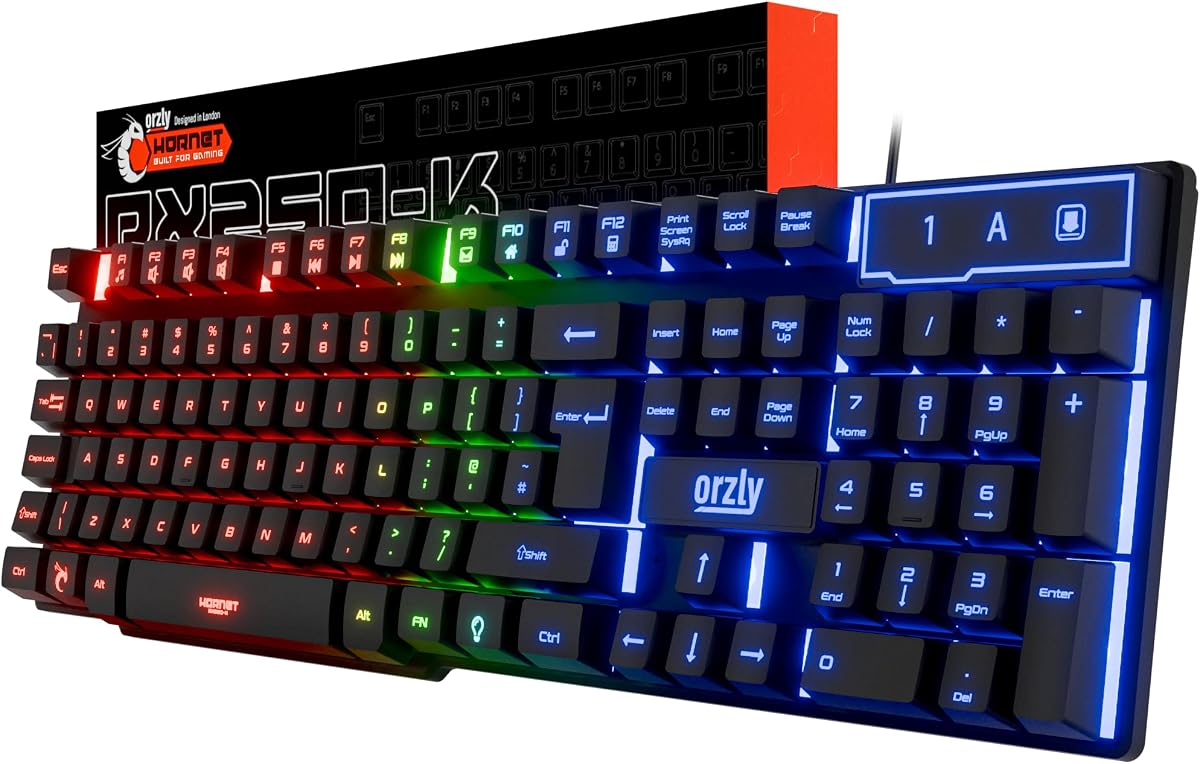
The Orzly RX-250 Hornet has a 4.1 rating and is a conventional full-size gaming keyboard rather than a dedicated Switch adapter. Its 104-key wired membrane layout, 19-key rollover, and anti-ghosting technology provide a familiar platform for FPS games, everyday typing, and productivity use.
We may earn a commission when you buy through this link, at no additional cost to you.
The keyboard supports PS5, PS4, Xbox Series X or S, Xbox One, Steam Deck, ROG Ally, Windows, Mac, laptops, and the Nintendo Switch according to the listing. Setup is described as true plug-and-play without extra software or drivers, which makes it broadly useful across desktop and handheld gaming devices.
Rainbow backlighting includes three lighting modes, four brightness levels, and dynamic breathing effects. Foldable anti-slip feet help position the keyboard, while the membrane switches are designed to remain quiet. Integrated drainage ports and a claimed key durability rating of up to eight million presses add practical value for regular use.
The RX-250 is best for someone who wants a versatile full-size keyboard for the Switch 2 alongside other devices, assuming the console's supported USB input behavior is suitable for the intended game. It does not provide dedicated mouse emulation, custom profiles, macros, or an adapter, so competitive users seeking complete keyboard-and-mouse control should examine the Joso or Brook options instead.
A complete 104-key layout makes the RX-250 more suitable for long sessions that mix chat, menus, and gameplay. The 19-key rollover and anti-ghosting features support reliable input when several keys are pressed together.
Membrane switches offer a softer, quieter feel than many mechanical keyboards. The wired connection removes charging and wireless pairing concerns from the setup.
We may earn a commission when you buy through this link, at no additional cost to you.
The most important choice is whether the product explicitly supports the Nintendo Switch 2 and the way you intend to use it. Beyond that, controller authentication, mapping depth, peripheral compatibility, portability, and setup complexity can determine which option offers the better experience.
Compatibility should be the first filter because many keyboard and mouse adapters were designed only for the original Switch, Switch OLED, or earlier Xbox and PlayStation systems. The Brook Sniper 2 and the later Joso Switch 2 adapter explicitly list Nintendo Switch 2 support. Other products in this guide do not make that claim, including the Joso model intended for the original Switch and several broad multi-platform adapters. A USB keyboard can physically fit into a compatible USB port, but physical connection alone does not guarantee that the console will accept keyboard input or translate mouse movement as desired.
A listing's compatibility table should be checked against the exact console model and the intended use. If Switch 2 support is not written clearly, treat that as a reason to seek confirmation rather than assuming backward compatibility. This distinction prevents the most common disappointment in this category: buying a well-regarded adapter for an older console and finding that its connection protocol or firmware does not fit the newer hardware.
Some products translate keyboard and mouse signals into controller inputs, while others are simply wired keyboards intended for text entry. The Brook Sniper 2, both Joso adapters, arVin, BLADER, and IOGEAR KeyMander 2 provide dedicated conversion or control functions. The Cyber Gadget keyboard is designed for docked text entry, and the Orzly RX-250 is a general-purpose USB keyboard. The UGREEN unit shares peripherals between computers and does not translate console input. Choosing the correct category prevents a buyer from expecting mouse emulation or programmable controller actions from a device that only acts as a standard keyboard.
For competitive shooters or strategy games, look for an adapter that converts movement, aiming, and button actions. For account creation, chat, and menu navigation, a standard wired USB keyboard may be enough. The game itself must also support the relevant input method for precise mouse control to be available.
Many console adapters need an official controller connected during setup or for platform authentication. This is especially relevant to the Joso products, arVin, BLADER, and the Brook Sniper 2 on Xbox. The original Switch generally has its own compatible controllers available, but players should confirm what they own before planning a new setup. The IOGEAR KeyMander 2 also includes a crossover feature, and its Xbox Series controller connection requires a USB-C charge-and-sync cable.
A controller requirement is not necessarily a dealbreaker, but it affects convenience and portability. The best solution is one that already works with the console and the input method the player wants. Official controllers may also be necessary when a game performs authentication checks, even if the adapter itself can eventually operate without a controller during play.
Mapping determines how keyboard keys and mouse buttons behave inside a game. The original Joso adapter stores eight profiles, arVin also offers eight mapping sets, and the Switch 2 Joso stores four. The BLADER provides shortcut-based mapping and sensitivity adjustment, while the Brook Sniper 2 adds controller tuning, tap, hold, and loop macros. These features are particularly useful when one game expects conventional controller inputs and another assigns abilities differently.
For most players, several profiles and easy sensitivity changes are enough. Advanced macro users may prefer the Brook's more extensive toolkit. Mapping depth matters less if the intended use is simply typing, so buyers should avoid paying for complex configuration features they will never use.
Peripheral support is another critical distinction. Both Joso adapters and arVin support wired and 2.4G devices but exclude Bluetooth. BLADER does not support mice that require driver installation. The Brook Sniper 2 supports wired or wireless keyboard and mouse operation according to its listing, giving it broader flexibility for Switch 2 owners. A wired connection is the most straightforward option because it removes pairing, battery, and signal-interference concerns.
For a competitive setup, use a dependable wired mouse and keyboard when possible. Wireless peripherals can be convenient, but users should verify the adapter's supported wireless technology and ensure that their devices do not rely on drivers or special receivers that the adapter cannot communicate with.
The best setup depends on where the console is used. The BLADER and Cyber Gadget keyboard are both compact and easy to carry, while the Joso and arVin adapters also use relatively small housings. The Brook Sniper 2 is better suited to a permanent gaming station because its app, macros, lighting, and tuning create a more involved configuration process. Plug-and-play products require less initial work, although nearly every keyboard-and-mouse adapter still requires some mapping work.
For travel, prioritize a small footprint, simple cabling, and support for the peripherals you already own. For a permanent setup, a larger feature set and deeper profile management may be worth considering. A USB-C dock, OTG arrangement, and the console's controller requirements should all be included when judging how portable the system really is.
The T1 combo includes a 39-key keyboard, RGB mouse, and converter, while the other dedicated products generally require the buyer to supply peripherals. A full bundle can be convenient for a new setup, but compact gaming keyboards may not suit players who want a conventional layout. The Orzly RX-250 is a full-size wired option that can also be used with PCs and other systems, offering more versatility than a console-specific compact keyboard.
Before choosing a bundle, consider desk space, typing needs, mouse sensitivity, and whether the supplied keyboard feels comfortable. Existing peripherals should be checked against the adapter's connection requirements. Owning a preferred mouse and keyboard is often better than replacing them to fit an all-in-one package.
Before connecting anything, verify that the adapter explicitly supports the Nintendo Switch 2 and review the included instructions or setup videos. Connect the console and any required official controller as directed, then attach the keyboard and mouse. For a product with mapping controls, begin with a basic profile and confirm that the game recognizes the translated controller input before assigning more complex functions.
If input is not detected, check the physical connections, move between wired and supported 2.4G modes, and make sure the required controller is powered on or connected. Some Switch games may prioritize a wireless controller over keyboard and mouse input, while others may require a specific profile or game setting. Test movement, aiming, and secondary buttons separately so the source of a problem is easier to identify.
Care for the device by keeping its ports free of dust, avoiding repeated cable strain, and following the manufacturer's guidance for remapping software or firmware. Update the Brook Sniper 2 through its companion app when updates are offered, and keep mappings backed up if the product stores them internally. Store portable adapters in a small case and avoid using unsupported Bluetooth or driver-dependent peripherals.
The Brook Sniper 2 and the Joso Keyboard and Mouse Adapter Compatible with Switch 2 and Switch 1 explicitly list Nintendo Switch 2 support. Several other products support the original Switch or Switch OLED without claiming compatibility with the new console. Always verify the exact model because a USB connector may fit physically even when the adapter protocol is incompatible.
Many of the adapters require an official controller during setup or for console authentication. The Joso products, arVin, BLADER, and the Brook Sniper 2 on Xbox all have relevant controller conditions described in their specifications. An official controller may still be needed even when the adapter can later provide translated input during gameplay.
That depends on the adapter. The original Joso, Switch 2 Joso, and arVin products do not support Bluetooth peripherals, while their wired and 2.4G options provide more predictable results. The Brook Sniper 2 lists wired and wireless keyboard and mouse support, but buyers should confirm the exact peripherals they own are compatible before setup.
A standard wired USB keyboard may handle basic text entry, but keyboard-and-mouse gaming depends on the console recognizing the device and the game supporting translated input. Dedicated adapters add controller mapping, profile storage, and sensitivity controls that a general keyboard does not provide. The Orzly RX-250 is a general USB keyboard, while the Joso and Brook products are designed specifically for translated control.
The number of profiles determines how many distinct control layouts can be saved and recalled. The Switch 2 Joso stores four, while the original Joso and arVin store eight. More profiles help players who use many games or repeatedly change layouts, but the best choice also depends on how easy each adapter makes profile switching.
No. The UGREEN product shares USB peripherals between two computers and does not translate keyboard or mouse input into console controller signals. It is useful for managing devices on a dual-PC desk setup, but it lacks the mapping, mouse emulation, and explicit Switch 2 compatibility required for console gaming.
They are not necessary for every player. The Brook Sniper 2 offers tap, hold, and loop macros for users who want repeatable actions, while simpler adapters are sufficient for movement, aiming, and standard button remapping. Check the rules and behavior of the specific game before using macros in competitive or online play.
Wired devices offer the most straightforward connection and eliminate charging, pairing, and interference concerns. Wireless can be more convenient when supported, but 2.4G and Bluetooth are not interchangeable, and some adapters exclude Bluetooth or driver-dependent devices. For competitive play, a supported wired setup is generally the least complicated starting point.
The Brook Sniper 2 stands out as the most capable recommendation for the Nintendo Switch 2 because it combines explicit console support with sensitivity controls, smart macros, stored profiles, RGB lighting, and over-the-air updates. The Joso Switch 2 adapter offers a cleaner, driver-free alternative for players who mainly need custom mapping and four profiles, while the compact BLADER provides a budget-oriented option for older supported consoles.
Prioritize exact console compatibility before any other feature. Mouse support, controller authentication, mapping depth, wireless standards, and the peripherals you already own determine whether a setup will work smoothly. Products intended for the original Switch should not be mistaken for Switch 2 accessories, and a general USB keyboard or computer-sharing switch does not provide the translated controls needed for a competitive keyboard-and-mouse experience.
Finally, check the current offer, included cables, controller requirements, and warranty information before ordering. Prices and promotions can change, but the compatibility and feature distinctions in this guide remain the most useful basis for choosing a Nintendo Switch 2 keyboard setup.