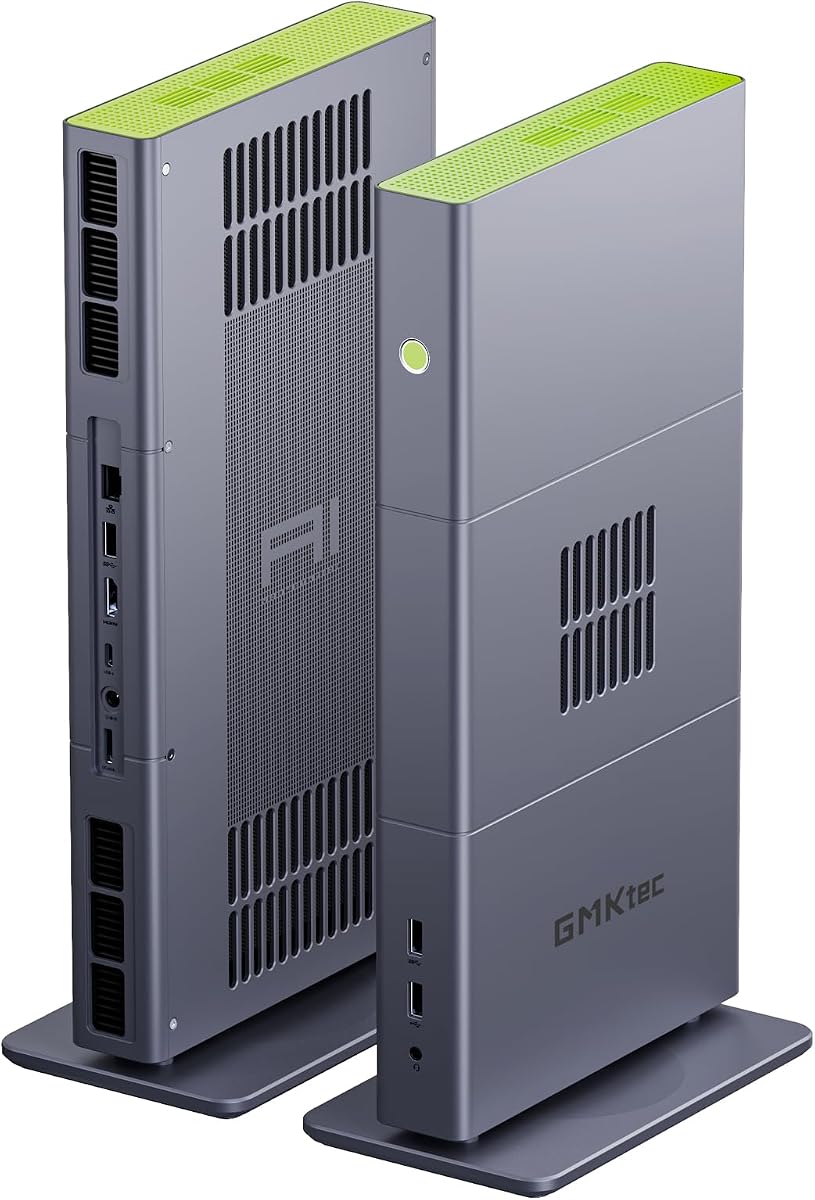
GMKtec X3 AI Mini PC
4.1Editor score
Radeon 8060S integrated graphics
Ryzen AI Max+ 395 processor
128GB LPDDR5X memory
OCuLink external GPU support
Mini PC for World of Warcraft guide compares ten compact systems on graphics, processor speed, memory, storage, cooling, connectivity, and gaming suitability.
A compact PC can provide an appealing way to play World of Warcraft without occupying an entire desk, but not every mini PC has the graphics power, memory, cooling, or storage needed for a satisfying MMO experience. The strongest candidates balance strong processor performance with capable integrated graphics or room for a dedicated GPU.
This guide compares ten products using their documented processor specifications, graphics capabilities, memory, storage options, display support, networking features, power management, and warranty coverage. It also distinguishes conventional gaming computers from compact systems better suited to WoW’s older settings, add-ons, background tasks, and supplementary entertainment use.
The selections show that the best overall option is not necessarily the best choice for every player. Some systems prioritize dedicated graphics, others emphasize expandability, and a few focus on value for basic WoW play. Product availability and prices change, so confirm the current listing and configuration before making a purchase.
4.1Editor score

5.0Editor score

4.8Editor score
The comparison below organizes every listed product around the factors that matter most to World of Warcraft players, including graphics capability, processor resources, memory, storage, connectivity, and physical practicality.


The Sinbun Mini Gaming PC is the strongest all-around choice in this guide for World of Warcraft because it pairs an Intel Core i9-13900HX processor with a dedicated GeForce RTX 4070 8GB graphics card. Unlike a mini PC relying entirely on integrated graphics, it has dedicated GDDR6 memory and enough graphical headroom for more demanding visual settings, add-ons, and the possibility of playing other demanding games on the same machine.
We may earn a commission when you buy through this link, at no additional cost to you.
The processor provides 24 cores, 32 threads, 36MB of cache, and boost speeds up to 5.4GHz. That is substantially more processing capability than a typical entry-level mini PC, making the system well suited to running World of Warcraft alongside Discord, a browser, voice chat, recording utilities, and other background applications. Its 32GB of dual-channel DDR4 memory is also a useful amount for modern gaming, and the manufacturer lists upgradeability to 64GB.
Storage and connectivity are similarly well considered. A 1TB NVMe SSD is included for the operating system, game installation, and add-ons, while an additional 2.5-inch SATA bay supports further capacity. The system includes WiFi 6E, Bluetooth 5.2, 2.5GbE Ethernet, and display outputs through HDMI, DisplayPort, and USB Type-C. Its cooling system uses twin smart fans and a copper heat spreader, with the manufacturer stating operation below 38dB.
The trade-off is power use and size relative to systems with efficient integrated graphics. A dedicated RTX 4070 mini PC also represents a much more substantial hardware investment, so it may be unnecessary for players who only want to run WoW at modest settings. Even so, for buyers who want a compact PC that can handle the game comfortably now and potentially serve demanding gaming or creative workloads later, this is the most balanced and persuasive recommendation in the guide.
The RTX 4070 gives the system dedicated graphics memory and substantially more graphical capability than the integrated processors used by many competitors. That extra headroom is valuable if you want higher resolutions, richer visual effects, add-ons, or a system capable of handling more than one modern game.
The included 32GB of memory is comfortable for World of Warcraft and everyday multitasking, while the documented 64GB upgrade ceiling provides additional longevity. Multiple storage options also reduce the chance that the system will become constrained as the operating system, client patches, add-ons, and other software accumulate.
We may earn a commission when you buy through this link, at no additional cost to you.
The KAMRUI E3B combines a Ryzen 7 7730U processor, 16GB of LPDDR4X memory, and a 1TB M.2 SSD in a compact package. Its eight cores and 16 threads provide enough CPU capability for World of Warcraft, add-ons, multitasking, and ordinary desktop work, while the integrated Radeon graphics make it a realistic entry point for players who do not need maximum graphical settings.
We may earn a commission when you buy through this link, at no additional cost to you.
A useful detail is the inclusion of two M.2 2280 storage positions. The occupied slot contains a 1TB drive, while the second can accept a compatible SATA or PCIe NVMe drive, allowing the owner to add storage without replacing the existing one. The system also supports three displays through HDMI, DisplayPort, and USB Type-C, with 4K at 60Hz listed for the display configuration.
Networking is designed around online play and general connectivity. The product description lists a gigabit RJ45 connection, a claim of up to 2500Mbps data transmission, WiFi 6, and Bluetooth 5.2. Those features are useful for online multiplayer sessions, although a wired Ethernet connection is generally the more consistent choice for a stationary gaming computer.
The main limitation is integrated graphics. World of Warcraft is not especially demanding, but the most demanding visual settings, heavy add-on combinations, and high resolutions can still expose the limits of a Radeon 680M-class solution. The KAMRUI is best recommended for players who value storage, efficient multitasking, and a compact price-conscious system more than maximum frame rates or future gaming ambitions.
A 1TB starting capacity is generous for the game client, system files, and a broad selection of add-ons. The second M.2 slot also makes it practical to preserve an existing game library or create a separate drive for media, backups, and other applications.
The eight-core Ryzen 7 processor is well suited to keeping the game, voice chat, browser, and administrative tools active at the same time. Its power-saving and performance modes in the BIOS also let the owner balance quieter operation against stronger performance during gameplay.
We may earn a commission when you buy through this link, at no additional cost to you.
The Glorlin Ryzen 7 6800H is a particularly balanced compact PC because it combines eight processor cores, Radeon 680M integrated graphics, 16GB of LPDDR5 memory, and NVMe storage. The processor boosts up to 4.7GHz, giving it ample performance for World of Warcraft and common desktop tasks without requiring the power draw of a dedicated gaming GPU.
We may earn a commission when you buy through this link, at no additional cost to you.
Its Radeon 680M graphics are more capable than the graphics found in many budget mini PCs, although they remain integrated and share system memory. That makes the Glorlin appropriate for WoW at common settings and resolutions, particularly when paired with a high-refresh monitor. It also gives the system useful potential for esports titles and other less graphically demanding games.
Memory runs at 6400MT/s in a dual-channel configuration, which should help responsiveness when the game is paired with Discord, a browser, streaming software, or multiple background applications. Storage starts at 512GB, and the two M.2 positions provide room to expand. The extensive port selection includes dual LAN, USB 3.2, USB 2.0, Type-C, HDMI, and DisplayPort, along with WiFi 6 and Bluetooth 5.3.
The 512GB drive and lack of a dedicated GPU are the two principal compromises. A larger drive would be useful for a large game library, while graphics enthusiasts may eventually need a stronger system. For a player seeking a tidy, efficient, and capable everyday computer that can also run World of Warcraft, however, the Glorlin remains one of the most attractive choices in the group.
The Radeon 680M is a meaningful step above basic integrated graphics, making the Glorlin suitable for smooth WoW play with sensible settings. It is not equivalent to a dedicated gaming GPU, but it offers a useful balance of graphics capability, efficiency, and cost for a compact gaming computer.
Triple-display support makes the mini PC practical for placing game guides, chat, maps, and video on separate screens. Dual LAN also gives owners more networking flexibility, although most players will only need one wired connection and the wireless networking for peripherals.
We may earn a commission when you buy through this link, at no additional cost to you.
The Glorlin Ryzen 5 3501U is designed primarily for work, study, browsing, and everyday computing, but its specifications are sufficient for World of Warcraft. The four-core, eight-thread processor boosts up to 3.7GHz, while 16GB of DDR4 memory provides enough capacity for the game, several browser tabs, voice chat, and standard background applications.
We may earn a commission when you buy through this link, at no additional cost to you.
Its integrated Radeon graphics are the limiting factor for players seeking high resolutions or demanding visual settings. The product is best viewed as a compact secondary gaming computer, a travel-friendly WoW machine, or a general-purpose small PC that can also handle the game at reduced settings. The 512GB SSD supports the operating system, the WoW client, and a selection of add-ons.
Despite its modest gaming credentials, the system is practical. It supports up to three displays through HDMI and USB-C, and the listed connectivity includes WiFi 6, Bluetooth 5.3, USB, Ethernet, and audio connections. Those features are useful for building a flexible desk setup or using the computer for media, remote work, and gaming in different locations.
Buyers should choose this Glorlin when affordability and basic functionality are more important than maximum frame rates. It is also a reasonable choice for an MMO enthusiast who plays at 1080p, uses moderate settings, and values a small footprint. A more powerful graphics option is the better route for large expansions, high-resolution displays, or a system intended to handle demanding modern games as well.
The small chassis is useful for players who want WoW access without maintaining a large desktop tower. Its modern networking and multiple display outputs also make it easy to connect to different displays, networks, and peripherals as the setup changes.
Sixteen gigabytes of RAM is a sensible minimum for a modern gaming system, even one using a more modest processor. It reduces the likelihood of memory-related stuttering when World of Warcraft, Discord, a browser, and background utilities are all open.
We may earn a commission when you buy through this link, at no additional cost to you.
The Sarmoth Common [Toy] is a World of Warcraft miniature rather than a miniature computer. It represents the Sarmoth Common character from the game and is included in this comparison because it appears in the supplied product set and directly references World of Warcraft. It does not function as a PC and cannot be used to launch or play the game.
We may earn a commission when you buy through this link, at no additional cost to you.
As a collectible, its value lies in its Warcraft theme and place within a larger display collection. The product is small by nature and requires no operating system, graphics hardware, memory, cooling, or display setup. It is therefore useful for a player who already owns a capable gaming computer but wants a physical reminder of the game in miniature form.
The product is not a substitute for any of the computational systems in this guide. None of its characteristics improve frame rates, load times, memory capacity, or the overall quality of a World of Warcraft session. Players searching for a compact computer to run the game should disregard this item and focus on the systems equipped with an actual processor and graphics hardware.
The correct recommendation is therefore highly specific: consider the Sarmoth Common if the goal is collecting a recognizable Warcraft miniature. Do not consider it for gaming, streaming, add-on testing, emulation, or any other computer-related use. It complements a WoW setup visually but plays no functional role in the gaming experience.
The miniature is best displayed alongside other Warcraft figures or game memorabilia. Its scale and character theme make it more appropriate for a shelf, desk, or collection cabinet than for any practical computing role.
A themed miniature can complement a gaming setup, but hardware selection should be based on graphics, processing, memory, and cooling. Use one of the actual mini PCs in this guide when the objective is to run World of Warcraft.
We may earn a commission when you buy through this link, at no additional cost to you.
The GMKtec M6 Ultra is built around the Ryzen 5 7640HS, a six-core, 12-thread Zen 4 processor that runs at 4.3GHz and boosts to 5.0GHz. The included 32GB of dual-channel DDR5 memory provides a particularly strong foundation for World of Warcraft, heavy add-on use, and multitasking with multiple applications open.
We may earn a commission when you buy through this link, at no additional cost to you.
Graphics come from the Radeon 760M integrated GPU with eight compute units and a maximum listed clock of 2600MHz. That is suitable for World of Warcraft, especially at conventional resolutions and adjusted settings, but it is not intended to replace a dedicated gaming graphics card. The system is therefore more compelling as an efficient, expandable everyday PC with gaming capability than as a high-end graphics platform.
Expandability is a major strength. The manufacturer lists support for up to 128GB of RAM and a second PCIe 4.0 storage position capable of accommodating a larger SSD, although upgrade components are not included. The included 1TB PCIe 3.0 M.2 drive is a practical starting point for the operating system, WoW, and add-ons.
The M6 Ultra also supports three simultaneous displays, including 8K at 60Hz through USB4 according to the product information, plus 4K at 60Hz through HDMI and DisplayPort. A 2.5GbE port, WiFi 6, Bluetooth 5.2, and a broad USB selection complete the package. It is a strong recommendation for a player who values memory, future upgrades, efficient performance, and a tidy multi-screen setup.
The unusually high documented memory ceiling and dual storage positions mean the owner can add capacity later instead of replacing the entire mini PC. This is valuable for WoW players who accumulate add-ons, retain large game libraries, or use the system for increasingly demanding multitasking.
The Ryzen 5 7640HS and 32GB of DDR5 memory form a capable platform for online play and background applications. The processor is designed to deliver strong performance without the power requirements of a full-size gaming desktop.
We may earn a commission when you buy through this link, at no additional cost to you.
The ACEMAGICIAN S3A stands out for its combination of modern processing, capable integrated graphics, flexible power modes, and extensive connectivity. Its Ryzen 7 H 255 provides eight cores and 16 threads with boost speeds up to 4.9GHz, while the Radeon 780M uses 12 compute units at up to 2600MHz and RDNA 3 architecture.
We may earn a commission when you buy through this link, at no additional cost to you.
That graphics configuration is more than sufficient for World of Warcraft at typical settings, and it also gives the system credible potential for esports games and other titles that do not demand a dedicated GPU. Sixteen gigabytes of LPDDR5 memory at 6400MT/s supports smooth multitasking, while the 512GB PCIe 4.0 NVMe drive provides fast startup and application loading.
The three performance modes are particularly relevant to a compact gaming computer. Silent Mode is listed at 20–35W and as low as 35dB, Auto Mode covers balanced workloads at 30–45W, and Performance Mode offers 40–54W for demanding applications. A dual-fan cooling system, customizable RGB lighting, and tool-free removable storage add flexibility and visual appeal.
Three 4K displays can be connected through HDMI 2.0, DisplayPort 2.0, and full-function USB4 Type-C. The system also includes LAN, USB 3.2, and a two-year warranty with lifetime technical support. The main constraints are the 512GB starting drive and soldered LPDDR5 memory. Even so, the S3A is an attractive all-round choice for WoW players who also stream, create content, or program.
Silent mode is useful for menus, browsing, and less demanding sessions, while performance mode can provide additional headroom during crowded encounters or heavy multitasking. Automatic mode offers a convenient compromise for players who do not want to manage system profiles manually.
The Ryzen 7 H 255 and Radeon 780M combination offers enough capability for WoW while remaining useful for streaming, photo and video work, programming, and 3D design. It is a better general-purpose investment than a bare-bones system built only for simple office tasks.
We may earn a commission when you buy through this link, at no additional cost to you.
The GMKtec X3 AI is the premium option in this guide, combining the Ryzen AI Max+ 395 with 128GB of LPDDR5X memory, a 2TB PCIe 4.0 SSD, and Radeon 8060S integrated graphics. The processor supplies 16 Zen 5 cores, 32 threads, and boost speeds up to 5.1GHz, creating considerable processing power for World of Warcraft and demanding concurrent applications.
We may earn a commission when you buy through this link, at no additional cost to you.
Its integrated GPU is unusually capable for a mini PC. The Radeon 8060S has 40 RDNA 3.5 compute units operating up to 2.9GHz, and the manufacturer positions it between laptop-class RTX 4060 and RTX 4070 graphics. That provides much more graphical headroom than the integrated solutions in the other systems, making this a strong choice for high-resolution WoW, high visual quality, and other demanding games.
The 128GB of LPDDR5X memory is the system’s defining specification. It can be shared between the CPU, integrated graphics, and local AI workloads, and the manufacturer highlights applications such as LM Studio and large language models. A 2TB PCIe 4.0 drive provides abundant space for a large game collection, add-ons, creative media, and development tools.
The X3 also has an OCuLink interface for connecting an external graphics dock, offering another route to desktop-class graphics if the integrated GPU is eventually insufficient. WiFi 7, Bluetooth 5.4, 2.5GbE, and a one-year warranty round out the package. Its capabilities and cost are excessive for ordinary WoW play, but the premium is defensible for an enthusiast who wants one compact system to cover gaming, creation, development, and local AI work.
The Radeon 8060S is the most capable integrated graphics solution in the group, providing a significant upgrade over standard office-oriented mini PC graphics. It makes the X3 relevant to players who want a small system but do not want to accept low settings.
OCuLink support gives the compact system a path to a more powerful external GPU. This makes it unusually adaptable for users who may begin with integrated gaming performance and later add desktop-oriented graphics without replacing the entire computer.
We may earn a commission when you buy through this link, at no additional cost to you.
The KAMRUI E3B Ryzen 7 7730U is one of the most space-conscious systems in the guide. Its enclosure measures only 5.04 by 5.04 by 1.63 inches, and the included VESA bracket makes it possible to mount the computer behind a compatible display. That makes it particularly attractive for a dedicated WoW station where desk space matters.
We may earn a commission when you buy through this link, at no additional cost to you.
The Ryzen 7 7730U offers eight cores and 16 threads with a maximum boost of 4.5GHz. It has enough processing power for the game, add-ons, chat applications, and common background software. The Radeon integrated graphics run at 2000MHz and support 4K at 60Hz, though players should expect to tune World of Warcraft’s visual settings rather than assume dedicated-GPU performance.
The system includes 16GB of LPDDR4X memory and a 512GB M.2 2280 NVMe drive. Two M.2 positions are available, with the product information stating support for a combined total of 4TB using 2TB drives. Connectivity includes 2.5GbE auto-negotiating Ethernet, WiFi 6, Bluetooth 5.2, HDMI, DisplayPort, full-function USB Type-C, and several USB ports.
A quiet cooling fan, triple-display support, and monitor mounting make this a tidy WoW solution. The included 512GB capacity is the most obvious limitation, so owners with extensive add-on libraries may want to add storage immediately. It is nevertheless a compelling recommendation for a compact second PC, a travel setup, or a dedicated gaming station where physical footprint matters more than dedicated graphics.
The VESA bracket and extremely small footprint allow the system to disappear behind a display once the initial setup is complete. This is ideal for World of Warcraft players who want a dedicated PC without giving up valuable desk space.
The 2.5GbE Ethernet option provides a strong wired connection for online play, while WiFi 6 and Bluetooth 5.2 cover wireless peripherals and flexible placement. A wired connection is still advisable when consistent latency and download performance are priorities.
We may earn a commission when you buy through this link, at no additional cost to you.
The Getorli Ryzen 5 3501U is an entry-level compact PC aimed at home office use, browsing, media, streaming, and light gaming. The four-core, eight-thread processor operates between 2.1GHz and 3.7GHz, with a listed power range of 15W to 25W. These specifications are sufficient to run World of Warcraft, particularly at standard settings and a conventional 1080p resolution.
We may earn a commission when you buy through this link, at no additional cost to you.
The system includes 16GB of DDR4 memory, which is expandable to 32GB, and a 512GB NVMe SSD. Fast storage improves startup and loading times, while the memory allowance provides enough room for the game, a browser, voice chat, and several background services. A dedicated GPU is absent, so high-resolution or maximum-quality configurations are not the intended use case.
Two HDMI outputs can drive one or two 4K displays, making it easy to keep a game guide, chat window, or second screen alongside World of Warcraft. The port list also includes two USB 2.0 ports, two USB 3.0 ports, and USB Type-C connections. WiFi 6 and Bluetooth 5.3 provide convenient wireless connectivity for headsets, keyboards, and other peripherals.
There is no published customer rating for this listing, which makes direct comparison with the rated products less meaningful. The Getorli is best recommended to a buyer who wants a low-cost, compact PC primarily for WoW and everyday tasks rather than demanding graphics. It should be considered a basic entry point, with the expectation of more conservative game settings and limited future performance headroom.
Sixteen gigabytes of RAM and an NVMe drive are important foundations for a compact gaming computer. They provide faster loading and enough working memory for the WoW client alongside common companion applications without moving into expensive dedicated-GPU territory.
The dual HDMI arrangement makes it convenient to separate the game from chat, guides, videos, or a performance monitor. This adds practical value for an entry-level system whose graphics performance is more likely to suit one detailed game window than an excessive number of demanding 3D windows.
We may earn a commission when you buy through this link, at no additional cost to you.
World of Warcraft is demanding enough to benefit from a capable processor, adequate memory, and responsive storage, but it does not always require the graphics power of a top gaming desktop. The right mini PC depends on resolution, visual settings, add-ons, competing applications, and whether you expect the system to handle other games later.
Integrated graphics are the main reason many compact PCs remain affordable and efficient. Models with the Radeon 680M, 760M, 780M, or 8060S offer progressively stronger integrated performance, but the final choice still depends on the selected processor. A dedicated RTX 4070 provides a much clearer path to high settings, high resolution, ray tracing, DLSS, and other demanding games beyond WoW.
Choose a dedicated GPU if you play at 1440p or 4K, use maximum visual settings, value smooth frame rates, or plan to use the same system for demanding modern games. Choose capable integrated graphics if 1080p, adjusted settings, efficient operation, and a smaller financial commitment matter more.
Modern WoW performance benefits from a processor that can keep the game client, add-ons, voice chat, browsers, and background applications responsive. Eight-core processors such as the Ryzen 7 7730U, 6800H, H 255, and Core i9-13900HX provide useful multitasking headroom. Four-core models can work, but they offer less room for demanding add-on combinations and concurrent applications.
For a mini PC that will primarily run the game, a current six-core or eight-core processor is the practical target. If the computer will also handle streaming, video editing, programming, or another demanding game, favor more cores, higher boost clocks, and a larger cooling design.
World of Warcraft itself is not especially memory intensive, but players routinely use Discord, browsers, streaming tools, voice chat, and add-ons at the same time. Sixteen gigabytes is the sensible starting point for a compact PC, while 32GB provides more comfortable multitasking headroom. Systems with soldered LPDDR memory cannot be upgraded, so buyers should choose enough memory initially.
Aim for 16GB when the computer will handle WoW and light productivity, and 32GB when streaming, heavy add-ons, creative software, or multiple games are priorities. Memory that can be expanded to 64GB or more is useful for longevity, although users should verify the type, speed, and supported module configuration before purchasing an upgrade.
The game client, operating system, shader cache, and add-ons all consume storage, so a 512GB drive can fill up sooner than buyers expect. A 1TB drive offers a more comfortable starting point, while a 2TB drive makes sense for large collections, video, and creative work. NVMe SSDs also reduce load times and keep the system responsive compared with a traditional hard drive.
Prefer NVMe storage, and check the number of M.2 slots. Two slots provide an easy expansion path and may allow the included drive to remain intact. Capacity requirements vary, but 1TB is a sensible target for a new World of Warcraft installation that may also be used for other games.
Compact systems generate heat because their components operate in a restricted space. Adequate cooling helps processors sustain higher performance and keeps fans from becoming the dominant source of noise. Some models offer automatic, silent, and performance modes, allowing the owner to balance noise, power, and responsiveness without repeatedly entering a menu.
Look for multiple fans, a stated thermal design, or documented low-noise operation. During WoW, a performance mode can help in crowded areas, while silent mode is useful for menus or general desktop use. Sustained fan noise and throttling are more important than a short peak-clock specification.
WoW players often use more than one screen for maps, guides, chat, videos, and performance information. A mini PC with two or three display outputs adds flexibility, but the supported resolution and refresh rate of each output matter. HDMI, DisplayPort, and full-function USB Type-C are the most common modern options.
Check the exact port inventory and whether the Type-C port supports video output. A wired Ethernet port is preferable for consistent online play, while WiFi 6 or newer, Bluetooth, and multiple USB ports simplify peripheral connections. Headset compatibility should also be checked through the available 3.5mm jack or USB audio support.
A mini PC is meant to save space, but the best compact design is one you can actually maintain. VESA mounting, replaceable storage, accessible memory, and a well-organized port layout make installation easier. Warranty duration and technical support are also relevant for electronics that may be mounted behind a monitor or used as a dedicated gaming appliance.
Choose a system that suits the intended location, whether beside a monitor, behind a display, or in an entertainment center. Prefer hardware with documented storage or memory expansion when long-term use matters. A one-year warranty is common in this group, while longer coverage may provide additional reassurance.
Begin by confirming that the system has a suitable display, mouse, keyboard, and network connection, then complete the initial operating-system setup before installing World of Warcraft. Create separate user accounts if other people will use the computer, update the system and graphics driver, and run a hardware diagnostic to confirm that the processor, memory, storage, networking, and display outputs are recognized correctly.
Install the game on the fastest available NVMe drive and leave additional free capacity for patches, shaders, logs, and add-ons. Use the graphics menu to match quality settings to the selected mini PC and monitor. Wired Ethernet is recommended for online sessions, while Bluetooth or USB can be used for the keyboard, mouse, and headset. If multiple displays are supported, arrange the WoW window and secondary information before adjusting the interface.
For maintenance, leave clearance around the chassis and any vents, clean dust from the exterior regularly, and avoid placing the mini PC inside a closed cabinet without airflow. Use the available performance modes to control the balance between quiet operation and gaming performance. Back up valuable add-on configurations, monitor storage and memory use, and restart the system periodically so temporary files and background applications do not accumulate.
Yes, when it has a current processor, at least 16GB of memory, and suitable integrated or dedicated graphics. World of Warcraft is generally manageable on 1080p with adjusted settings, while a dedicated GPU is preferable for high resolutions, maximum visual quality, and heavy add-on use. The processor also matters because the client, add-ons, and background applications all compete for system resources.
A dedicated GPU is not essential for basic WoW play. Radeon 680M, 760M, 780M, and 8060S integrated graphics can run the game, with the stronger options providing more headroom. A dedicated RTX 4070 is the clearer choice for 1440p or 4K, high settings, and other demanding modern games that may also run on the same computer.
Sixteen gigabytes is a practical minimum for WoW, Discord, a browser, and other normal background applications. Thirty-two gigabytes is preferable for heavy add-on collections, streaming, recording, and multitasking. If a mini PC has soldered LPDDR memory, buyers should choose a larger configuration from the outset because the installed memory cannot be upgraded later.
It can be enough for the operating system, the game client, and a moderate selection of add-ons. However, the base installation, updates, shader cache, logs, and additional software continue consuming space over time. A 1TB drive is a safer starting point, and two M.2 slots make it easy to add more storage later.
Most of the systems in this guide are designed for both roles. The Ryzen 5 and Ryzen 7 models handle office work, browsing, streaming, and media, while their integrated graphics can run World of Warcraft at sensible settings. The RTX 4070 and premium X3 configurations are better suited to demanding games and creation alongside ordinary productivity.
Ethernet is generally preferable because it usually offers a more consistent connection with lower latency and fewer interruptions. Modern WiFi 6, WiFi 6E, and WiFi 7 systems can also work well when the signal is strong and the router is not congested. Bluetooth is mainly useful for keyboards, mice, headsets, and other peripherals rather than the main game connection.
No, but it can be useful. One display is enough for normal play, while two screens make it easier to keep a guide, map, chat window, or video visible. Three-display support is more relevant to traders, streamers, creators, and players who regularly monitor system information alongside the game.
No. The Sarmoth Common [Toy] is a collectible miniature and has no processor, graphics, memory, operating system, or display hardware. It can complement a World of Warcraft collection, but a functioning mini PC is required to launch and play the game.
The Sinbun RTX 4070 Mini PC is the strongest overall recommendation because its dedicated graphics card, Core i9 processor, 32GB of memory, 1TB NVMe drive, and broad connectivity provide the most convincing combination of gaming power and compact practicality. The GMKtec X3 AI is the premium choice for exceptional integrated graphics, 128GB of unified memory, extensive storage, and OCuLink expansion, while the Glorlin Ryzen 7 6800H represents the most balanced value-oriented integrated-graphics option.
Players with more modest requirements can consider the KAMRUI E3B, GMKtec M6 Ultra, ACEMAGICIAN S3A, and smaller Ryzen 5 systems. The important distinction is between adequate WoW performance and premium capability. Match the system to your resolution, visual settings, add-on intensity, and other applications rather than assuming the most powerful option is automatically necessary.
Before ordering, verify the current configuration, included storage, memory type, display outputs, operating-system details, and warranty coverage on the live listing. Prices and availability change, and the same model family may appear in different configurations. Recheck those details before purchase to ensure the selected mini PC meets your specific World of Warcraft setup.