
TM-10B Barcode Scanner
4.3Editor score
Bluetooth, 2.4G, and USB
1D and 2D decoding
130,000 offline records
350 scans per second
Compare the best barcode scanner for iPad options, including 1D, 2D, wireless, wired, and clip-on models for retail, inventory, and mobile work needs.
A barcode scanner for iPad can turn a tablet into a much more efficient tool for inventory, retail, libraries, warehouses, and mobile business. The right model should pair dependable decoding with a connection method your tablet and software can actually use, while fitting the way and location where you work.
We compared ten scanners on barcode support, iPad and iOS compatibility, connection modes, scanning range, battery life, portability, offline storage, and workflow features. The list covers handheld, desktop, compact, and tablet-mounted designs, including dedicated 1D readers and more flexible 1D and 2D models.
Each entry explains the product's strongest use case, practical limitations, and ideal buyer, helping you separate essential features from optional extras. Product availability and pricing can change, so confirm the current listing and test a scanner with your iPad and software before making a final purchase.
4.3Editor score

4.4Editor score
4.9Editor score
This side-by-side comparison highlights each scanner's supported code types, connection methods, storage capacity, power options, and most useful form factor. Because iPad workflows vary considerably, compatibility with your applications matters as much as raw decoding specifications.


The NETUM Bluetooth Barcode Scanner is a well-rounded choice for iPad users who need more than basic 1D scanning. It carries a 4.4 rating and supports Bluetooth, 2.4G wireless, and wired operation, giving it broader workflow flexibility than a basic one-mode reader. Its 2500-pixel CCD engine is designed to decode 1D and stacked barcodes from labels, screens, and packaging.
We may earn a commission when you buy through this link, at no additional cost to you.
One of its strongest features is offline storage. The scanner can retain as many as 100,000 barcodes while away from a receiver and upload them when a connection returns. This is useful for stock counts in large rooms, warehouse aisles, or mobile routes where the iPad may lose a reliable link. Manual trigger, continuous, and auto-sensing modes make it adaptable to both individual items and rapid passes.
Programmability is another strength. Users can add prefixes or suffixes, remove characters, insert keyboard commands, select terminators, and disable barcode types. A 2,600mAh battery also supports extended use, with the manufacturer describing up to 200,000 continuous scans and roughly a month of typical operation after a full charge. The trade-off is that Square, Divalto, DoorDash, and Lightspeed POS systems are explicitly unsupported.
This scanner is best for inventory staff, retailers, librarians, and warehouse teams that need flexible connections and reliable offline capture. It is our top overall pick because it combines useful 1D decoding, screen scanning, extensive storage, and broad configuration support in a single handheld device. Confirm compatibility with your iPad app before ordering, especially if the workflow depends on a specific point-of-sale platform.
Bluetooth keeps the iPad free of cables, while 2.4G provides an alternative receiver link and USB offers a stable wired path. This range makes the scanner useful for both stationary counters and mobile stock-taking routes.
The storage mode can hold up to 100,000 records, allowing users to continue scanning when the iPad is temporarily out of range. Uploading later reduces interruptions in locations where maintaining a constant connection is difficult.
We may earn a commission when you buy through this link, at no additional cost to you.
The Eyoyo Mini 1D Bluetooth Barcode Scanner is built for portability. At 35 grams, it is among the smallest devices in this guide, making it well suited to retail counters, libraries, event registration, and mobile inventory tasks. Its 4.3 rating reflects a generally positive reception, and the product supports Bluetooth, 2.4G, and USB wired connections.
We may earn a commission when you buy through this link, at no additional cost to you.
The scanner targets common printed 1D formats, including UPC/EAN, Code 39, Interleaved 2 of 5, Code 93, Code 128, Codabar, and Industrial 25. It can handle damaged, distorted, colorful, and reflective labels according to the product information. Transmission reaches up to 30 meters in 2.4G mode and 50 meters in Bluetooth mode under the stated conditions.
Its compactness comes with clear boundaries. The scanner does not read codes displayed on a phone, computer, or tablet, and it cannot decode printed QR codes or other 2D formats. Square POS and Square Register systems are also excluded. The 650mAh battery supports around eight hours of continuous operation, while the auto-off feature can extend total standby life when usage is lighter.
Choose this model when your iPad workflow only requires traditional printed 1D barcodes and you value a lightweight, unobtrusive reader. It is especially appealing for librarians or associates who carry an iPad and scanner together. Applications that scan QR codes from digital receipts or mobile coupons require a 1D-and-2D model instead.
The 35-gram housing is easy to keep in a pocket, pouch, or small case. That portability makes the scanner particularly attractive for people who move between shelves, registers, and temporary workstations throughout the day.
Vibration feedback lets users confirm a successful scan without generating a beep. This is useful in libraries, customer-facing areas, and other environments where audible alerts may be disruptive.
We may earn a commission when you buy through this link, at no additional cost to you.
The TM-10B combines 1D and 2D decoding with three connection methods at a budget-oriented position. It has a 4.3 rating and supports 2.4G wireless, Bluetooth, and USB wired operation, making it versatile for iPad, iPhone, Android, Windows, Mac, and Linux workflows.
We may earn a commission when you buy through this link, at no additional cost to you.
The scanner handles common linear formats as well as QR codes, Data Matrix, Micro PDF417, Aztec, and Hanxin. That broader support is valuable when the same worker encounters retail UPC labels, package codes, and modern mobile or inventory symbols. Its listed scanning speed reaches up to 350 times per second, while a 2,600mAh battery provides more than nine hours of continuous scanning.
Offline storage can hold as many as 130,000 barcodes, allowing a user to scan beyond receiver range and synchronize later. This makes the device practical for lengthy audits, warehouse visits, and mobile workflows. The important limitation is compatibility: the product is specifically noted as incompatible with Square, so buyers using that platform need to verify an alternative solution.
This is a strong choice for cost-conscious users who need more than 1D scanning without moving to a premium clip-on design. It suits retail, libraries, stock counts, and general iPad business applications where QR and Data Matrix codes may appear. For anyone working in a fixed checkout lane, its wireless convenience is useful, although a desktop scanner may be easier to position consistently.
QR, Data Matrix, PDF417, and related formats broaden the types of labels and screens the scanner can handle. This versatility reduces the need for separate devices when both linear and modern matrix codes are part of a workflow.
The stated scan rate supports rapid consecutive captures, while offline storage lets users continue away from the receiver. Together, these features are valuable during long or mobile inventory sessions.
We may earn a commission when you buy through this link, at no additional cost to you.
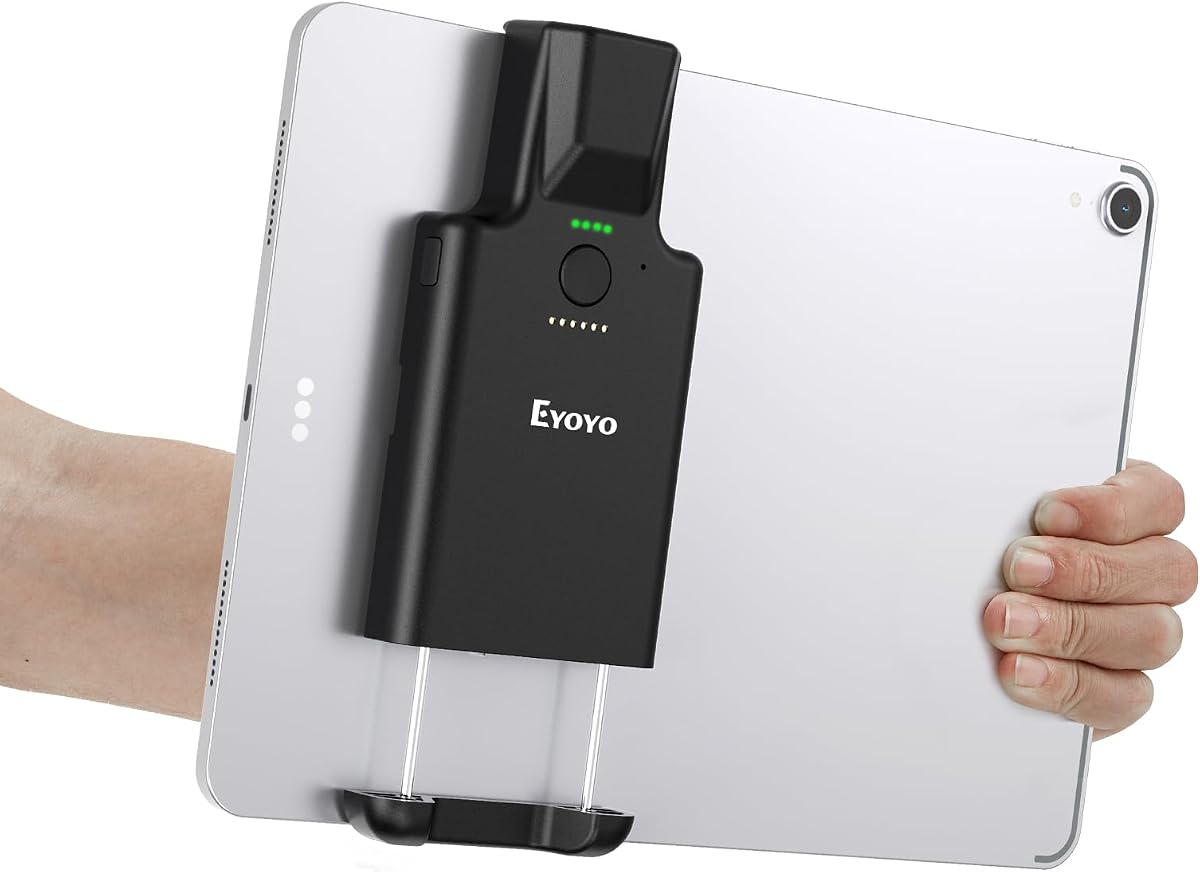
The Eyoyo 1D 2D Portable Bluetooth Barcode Scanner is the most specialized option in the guide. Its 4.9 rating, expandable clip, and 2D imaging engine are designed for users who want a dedicated reader mounted directly to an iPad or other compatible mobile device.
We may earn a commission when you buy through this link, at no additional cost to you.
The retractable clip extends from 5.7 to 7.1 inches, accommodating listed iPad, iPad Air, iPad Pro, Surface Go 3, tablet, and large-phone sizes. That mounting concept keeps the scanner close to the tablet and reduces the need to hold two separate devices. It supports Bluetooth and wired USB operation, but not 2.4G, so buyers should not expect the same three-mode flexibility as several alternatives.
Its CMOS imaging technology reads 1D and 2D formats, including QR, Data Matrix, PDF417, and standard product codes. It can also read digital coupons, e-wallets, loyalty cards, and codes displayed on screens. A 3,000mAh battery is rated for up to 30 hours of continuous scanning, with LED indicators showing charge levels and operating status.
This scanner is ideal for mobile inventory, retail, field service, and fulfillment teams that value a hands-free, tablet-mounted setup. The trade-off is the narrower clip range and absence of 2.4G. Measure the device before ordering, confirm the app supports keyboard-style Bluetooth input, and consider whether Bluetooth alone satisfies your mobility and connection requirements.
The reinforced vertical clip expands to accommodate several tablet sizes and keeps the reader close at hand. This integrated approach is particularly useful when both hands are needed to handle inventory, packages, or customers.
2D CMOS imaging handles paper labels, mobile coupons, and other digital codes. Support for poor, curved, or low-contrast symbols also makes it more adaptable than a basic 1D-only reader.
We may earn a commission when you buy through this link, at no additional cost to you.
The NetumScan Desktop Barcode Scanner is intended for fixed counters and stations where a user repeatedly passes items beneath a reader. It holds a 4.6 rating and combines omnidirectional scanning with an induction-triggered auto-sensing system, making it convenient for retail counters, intake desks, and rapid cataloging.
We may earn a commission when you buy through this link, at no additional cost to you.
The scanner reads 1D and 2D codes from labels, paper, and mobile or computer displays. It is advertised as capable of handling damaged, distorted, colorful, and reflective codes when presented within a suitable range. Its sleep mode saves energy when inactive, after which movement near the viewing window wakes it for another scan.
Unlike handheld options, this unit remains on a desk and communicates through a USB cable. That arrangement trades mobility for stability and removes the need to lift the device for every item. A non-slip base, anti-vibration construction, and IP54 dust protection suit frequent commercial use. Plug-and-play operation supports Windows, Mac, and Linux, although Square, Clover, and Shopify are excluded.
Choose this model when your iPad is stationed at a counter and most scans are performed repeatedly from a fixed position. It is less appropriate for warehouse aisles, mobile deliveries, or temporary events. Confirm that your software recognizes a USB keyboard-style scanner, since the product's direct platform exclusions make application compatibility especially important.
Auto-sensing lets staff move a product through the reading window without picking up a scanner. That hands-free pattern can reduce repeated motions and make the station approachable for new employees.
The weighted, non-slip base is more appropriate to a fixed counter than a handheld model. Anti-vibration construction and dust protection further support regular operation in busy retail or intake environments.
We may earn a commission when you buy through this link, at no additional cost to you.
The NetumScan U820 combines a pocket-sized 2D scanner with a multifunctional charging dock. It has a 4.1 rating and is explicitly positioned for iPhone, iPad, and Android use, making it relevant for mobile inventory, retail, and bookstore environments.
We may earn a commission when you buy through this link, at no additional cost to you.
The scanner switches among Bluetooth, 2.4G, and wired USB modes. Its CMOS sensor reads 1D and 2D QR codes from paper and electronic screens, including distorted or low-contrast examples. The base serves as both a charging station and a receiver, reducing the number of separate accessories needed at a shared workstation.
A 1,200mAh rechargeable battery charges fully in four hours and is intended to support extended shifts. The pocket-sized ABS body offers a rounded, lightweight alternative to industrial gun-style scanners. Users can choose a buzzer or vibration feedback, which is helpful in quiet spaces such as libraries and offices.
This model is a sensible fit for teams that alternate between counter and mobile work but want a dedicated dock for charging and stable reception. The product is not compatible with Square, so businesses using that service should choose a different model. Its lower customer rating also makes it wise to verify fit, decoding performance, and app compatibility before committing.
The base combines a charging point with the wireless receiver, simplifying the workstation. It also provides a natural home for a compact scanner that is frequently used in both stationary and mobile tasks.
Vibration mode communicates a successful read without adding noise around customers or coworkers. It is a practical setting for libraries, small offices, and quiet retail counters.
We may earn a commission when you buy through this link, at no additional cost to you.
The NetumScan Bluetooth Barcode Scanner with Charging Doc is a compact, rugged-oriented option for iPad-based retail and warehouse work. Its 4.9 rating is among the highest listed, while the physical design focuses on simple controls, reliable wireless pairing, and 1D-and-2D reading.
We may earn a commission when you buy through this link, at no additional cost to you.
Three connection modes are supported: Bluetooth, 2.4G wireless, and USB wired. A global-shutter CMOS sensor captures linear and QR-style codes from paper, tags, and digital screens, including smudged or distorted examples. A dedicated multifunctional dock handles charging and data reception, while a 1,200mAh rechargeable battery provides the portable power source.
The dual-button layout is thoughtful. A side button handles power and mode changes, while the central button serves only as the scan trigger, reducing the chance of accidental shutdowns during intensive work. The housing is made from modified ABS plastic and is listed as able to withstand drops from two meters. Buzzer and vibration modes offer different feedback styles.
This is a strong candidate for warehouse teams, field operators, and retail staff who want a compact reader with a dock and rugged construction. It is not compatible with Square POS. Before buying, verify that your iPad application accepts keyboard-wedge or HID Bluetooth input and that the dock's receiver works with the intended iPad model.
Separating the scan trigger from the power and mode button reduces accidental changes during sustained scanning. The result is a clearer control layout for workers who handle many items in succession.
The stated two-meter drop protection and durable ABS shell suit retail, warehouse, and field use. The compact shape also makes the scanner less cumbersome than a large industrial gun.
We may earn a commission when you buy through this link, at no additional cost to you.
The Wireless Handheld Barcode Scanner with Base offers 1D and 2D scanning across Bluetooth, 2.4G wireless, and USB wired modes. Its 3.8 rating is the lowest among the products in this guide, so buyers should assess the available documentation and support carefully before choosing it over better-rated alternatives.
We may earn a commission when you buy through this link, at no additional cost to you.
The scanner supports numerous traditional and two-dimensional formats, including UPC, EAN, Code 128, Code 39, PDF417, Data Matrix, Maxicode, QR, Micro QR, and Aztec. It can connect to Windows and Mac through the 2.4G receiver and to Android, iOS, and iPads through Bluetooth. Password bypass and automatic reconnection features are included for supported workflows.
Offline memory is listed at 16MB with capacity for 50,000 codes. The body weighs 110 grams and has a contoured grip intended to reduce fatigue during extended use. A physical side switch must be turned on before scanning, which adds a step but also gives users a clear visual control over active operation.
The product is best for a buyer seeking several connection paths, broad code support, and a traditional handheld shape. It is not compatible with Square or Shopify POS, and its lower rating may reflect concerns that are not detailed in the supplied information. Test its keyboard output with your preferred inventory application and confirm the base receiver works with the iPad setup.
Bluetooth supports mobile devices, 2.4G works through the included base receiver, and USB provides a wired alternative. This makes the scanner adaptable across shared workstations and mobile routes.
The 110-gram body is designed around an ergonomic grip for prolonged use. Its rounded handheld format may appeal to warehouse and field workers who prefer a conventional scanner over a tablet-mounted design.
We may earn a commission when you buy through this link, at no additional cost to you.
The KUIIYER 2D Scanner is a rugged handheld option with a 4.3 rating and an 800 x 600-pixel CMOS sensor. It supports 1D and 2D formats, screen scanning, omnidirectional reading, and broad application support, making it suitable for retail, libraries, logistics, hospitality, and field work.
We may earn a commission when you buy through this link, at no additional cost to you.
The scanner can connect to a PC or POS system through its 2.4GHz USB receiver or a USB cable, while Bluetooth supports iPad, iPhone, Android, and tablet connections. Manual trigger, auto-sensing, and continuous scan modes cover different working rhythms. It can also store more than 50,000 codes for later upload, useful when users move beyond receiver range.
A built-in auxiliary light improves operation in different lighting conditions, while the CMOS engine is designed to read fuzzy, damaged, curved, colorful, and screen-based codes. The ABS-and-PC shell carries an IP54 dust and waterproof rating and is stated to withstand drops from 1.5 meters. Thirty-two language settings broaden its international scope.
This is a good general-purpose scanner for teams that need a sturdy body and broad decoding support rather than a minimal 1D reader. It is not compatible with Square POS. The relatively substantial handheld design may be less attractive for users wanting a pocket model, and the listed protection rating should not be treated as permission to submerge the device.
The 800 x 600-pixel CMOS sensor provides a higher-resolution option for reading difficult symbols. The auxiliary light adds another layer of support when labels are dim, reflective, or otherwise hard to capture.
An IP54 rating helps protect against dust and water in practical operating conditions, while the reinforced shell is designed for common drops. These features suit warehouses, stockrooms, and field assignments.
We may earn a commission when you buy through this link, at no additional cost to you.
The Inateck BCST-70 is a dedicated 1D Bluetooth scanner for users who need long wireless reach and durable construction. It carries a 4.5 rating, supports iOS and iPad among its listed platforms, and can connect in approximately three seconds out of the box.
We may earn a commission when you buy through this link, at no additional cost to you.
The scanner reads a range of 1D barcode types and is described as capable of handling blurry or broken codes under strong and dim lighting. Its connection distance reaches above 115 feet according to the product information. A 2,600mAh rechargeable battery provides up to 180 days of standby, making it a practical choice for intermittent use.
Physical protection is a major selling point. The outer TPU case is described as twice as thick as similar products, while internal components use triple consolidation treatment. The unit is listed to withstand repeated drops from six feet onto concrete. Editable prefixes or suffixes can reach 32 digits, and users can hide part of a barcode.
Choose the BCST-70 for warehouse, retail, or library work that only uses printed 1D labels and values long-range Bluetooth. It is not a choice for QR codes, Data Matrix, or other 2D symbols, and it lacks the multi-mode flexibility of several competitors. Confirm that your intended iPad app accepts its keyboard input before ordering.
A listed range above 115 feet gives the scanner more freedom than a compact desktop receiver. It is useful in large storage areas where the iPad and scanned inventory may be separated by shelving or aisles.
The thick TPU exterior and repeated six-foot drop tolerance suit demanding mobile environments. The long standby time also makes the scanner practical for intermittent rather than continuous work.
We may earn a commission when you buy through this link, at no additional cost to you.
The most important decision is compatibility: a scanner may decode a code perfectly yet still fail to transfer it into your iPad application. After confirming that foundation, compare code formats, connection methods, workflow controls, battery needs, and physical design.
Check whether the scanner communicates as a Bluetooth keyboard or keyboard-wedge device and whether your inventory, retail, or warehouse application accepts that input method. iOS compatibility alone does not guarantee that every app will accept scan data. Some products also carry explicit exclusions for Square, Clover, Shopify, Lightspeed, Divalto, or DoorDash workflows, so read the platform notes carefully.
Choose a scanner that explicitly supports iPads and iOS, then verify the required pairing or receiver procedure. The safest approach is to test the intended software before deploying the device across a team.
Traditional 1D codes include UPC, EAN, Code 39, Code 128, Codabar, and Interleaved 2 of 5. A 2D-capable scanner adds QR, Data Matrix, PDF417, Aztec, and related formats. This distinction matters for modern retail packaging, mobile coupons, e-wallets, loyalty cards, and digital receipts, since a 1D-only model cannot read those matrix-style symbols.
Choose 2D support if your labels or screens may include QR codes. Choose 1D-only capability when every code is a conventional printed linear barcode and the smallest, least expensive device is the priority.
Bluetooth offers the most natural cable-free link for an iPad, but pairing behavior should be tested with the target app. A 2.4G receiver can be convenient for a shared workstation because the dongle may establish the connection automatically. USB wired operation provides a stable alternative for fixed counters. Some scanners support all three, while others intentionally limit the available modes.
Prioritize the mode that matches your actual workflow rather than selecting by feature count. Mobile users need dependable Bluetooth, while fixed users may benefit more from a receiver base or wired stability.
CCD and CMOS imaging systems can read codes displayed on monitors, phones, and tablets as well as printed labels. This is essential for scanning digital coupons, mobile tickets, online order confirmations, and QR codes shown on a customer's screen. Reflective, low-contrast, damaged, curved, and poorly printed labels can also challenge weaker readers, so broad imaging specifications are useful in retail and logistics.
Prioritize a model that explicitly mentions screen-code support. If your work is exclusively on printed 1D labels, a more compact 1D scanner may be sufficient.
Offline storage lets a worker continue scanning when the iPad loses its connection, then synchronize the records later. Capacities among these products range from 50,000 to 130,000 barcodes, with the NETUM model listing up to 100,000. The exact upload procedure and app support should be checked, since storage is only useful if the records can be reviewed and transferred correctly.
Choose generous storage for large audits, warehouse routes, and event registration. A wired counter workflow may need little offline capacity, making other features more valuable.
Battery life depends on scan volume, wireless mode, screen brightness, and whether the device is left connected continuously. Some models offer approximately nine or 30 hours of continuous use, while others focus on exceptionally long standby. Docked models can make charging routine by keeping the scanner and receiver together, while handheld models need direct charging when away from the base.
Match the power system to your shift length. Frequent mobile work favors a high-capacity rechargeable cell or compact dock, while a permanent counter may benefit more from a stable wired desktop reader.
Handheld scanners suit mobile routes and provide natural pointing control. Desktop models are faster for repetitive counter work because they remain stationary and can scan hands-free. Clip-on readers attach directly to an iPad, reducing the need to carry two separate devices but requiring attention to device dimensions and weight. The listed Eyoyo clip range extends from 5.7 to 7.1 inches, so measuring the tablet is essential.
Choose a desktop reader for a fixed checkout station, a handheld model for aisle and field work, or a clip-on scanner when hands-free tablet portability is the priority. Consider grip comfort, switch placement, and whether the device can be operated with gloves.
Manual trigger, continuous, and auto-sensing modes serve different work patterns. Manual triggering suits deliberate item-by-item scans, continuous mode speeds repetitive workflows, and auto-sensing starts a read when a code enters the field. Configurable prefixes, suffixes, hidden characters, terminators, and keyboard commands help the scanner fit specific software fields. Vibration is also useful in quiet libraries, offices, and customer-facing spaces.
Prioritize controls you will actually use. A long list of settings is less valuable than reliable triggering, clear feedback, and the ability to format output consistently with your iPad application.
Begin by fully charging the scanner, installing the required application on your iPad, and checking the app's scanning-input instructions. For Bluetooth pairing, put the scanner into the correct wireless mode and select it from the iPad's device list. Models that use a 2.4G base require the supplied receiver to be plugged into the computer or tablet accessory that runs the software. Set the prefix, suffix, terminator, and scanning mode to match the app's required fields before processing real inventory.
Test the setup with several familiar labels before beginning a larger job. Include printed 1D codes, QR or Data Matrix symbols, and any digital codes your staff expect to use. Check the first and last characters of the imported record, confirm that scans appear in the correct field, and test the offline mode in an area where the connection is intentionally unavailable. If storage upload is available, verify that previously scanned records reach the app after reconnection.
For care, keep the reading window clean and use a soft, lint-free cloth rather than abrasive chemicals. Store the device away from excessive heat, moisture, and direct prolonged sunlight, and keep its battery partially charged during long periods of inactivity. Inspect protective cases, clips, and charging contacts regularly. Replace cracked accessories, avoid immersing the scanner even when its rating mentions water resistance, and test the complete setup again whenever the iPad, operating system, application, or scanner configuration changes.
Most Bluetooth scanners in this guide act like a keyboard and send decoded characters to the active iPad field. Your application must support keyboard-wedge or HID-style scanner input, and the scanner's prefix, suffix, and terminator settings must match what the app expects. Confirm compatibility before buying, especially for proprietary point-of-sale workflows.
Yes. A 1D-only scanner reads traditional linear barcodes such as UPC, EAN, and Code 128, but it cannot decode QR codes, Data Matrix, PDF417, or most other 2D formats. Choose a 1D-and-2D model if you will scan mobile coupons, digital receipts, loyalty cards, modern package labels, or codes shown on a screen.
Bluetooth connects directly with the iPad and is the most natural mobile option. A 2.4G connection normally uses a small USB receiver that communicates with the scanner, which can make setup and reconnection easier around a shared workstation. Products with both modes give users a choice based on mobility and connection reliability.
Several models support offline storage mode, allowing users to scan records while disconnected and upload them later. Listed capacities range from 50,000 to 130,000 barcodes, depending on the model. Verify that the scanner and your chosen app use the same storage format and that the app supports importing previously stored scans.
No. Although a scanner may list iPad or iOS support, individual inventory and point-of-sale apps can impose their own requirements. Some products are also explicitly incompatible with Square, Clover, Shopify, Lightspeed, DoorDash, or Divalto. Test keyboard input, pairing, and data transfer with the exact app before purchasing.
Choose a handheld model for mobile stock counts, warehouse aisles, and field work. A desktop scanner is efficient for repetitive counter tasks because it stays in one position and can use auto-sensing. A clip-on scanner keeps the reader attached to the iPad and is convenient for two-handed mobile workflows, but you should verify that the tablet dimensions fit the clip range.
Only models with suitable 1D-and-2D imaging generally support reliable screen scanning. The NETUM, TM-10B, Eyoyo clip model, NetumScan desktop, and other 2D-capable options are better choices for this task. The compact Eyoyo Mini is limited to printed 1D codes and should not be expected to read a QR code from a display.
Use the correct scanning mode, clean the lens, and test difficult labels under the actual lighting conditions. Continuous mode is useful for rapid repetitive scans, while manual triggering can reduce accidental reads. Configure prefixes, suffixes, and terminators correctly, keep the device stable, and train workers to present labels at the recommended angle and distance.
The NETUM Bluetooth Barcode Scanner is the most balanced overall pick, combining 1D and stacked-code decoding, three connection modes, extensive offline storage, and extensive configuration controls. The TM-10B stands out as the budget choice for buyers who need 1D and 2D support, while the Eyoyo 1D 2D clip scanner offers the strongest premium package for users who want the reader mounted directly to a tablet.
Prioritize application compatibility before every other feature. Confirm the required iPad input method, review any point-of-sale exclusions, and determine whether your team needs printed 1D codes, mixed 2D formats, or screen-based scanning. After that, choose the form factor that matches the work: a compact handheld for mobility, a desktop reader for a fixed counter, or a clip-on model for integrated tablet work.
Finally, check the current product listing and pricing before purchasing, since availability and costs can change. Review battery needs, connection stability, storage capacity, and included accessories against your real workflow, then test the scanner with the iPad and application you plan to use.