
Belkin 100W Compact GaN Charger
4.5Editor score
Compact 100W charging design
Four-point safety protection system
Five-foot USB-C cable included
Discover the best 100W GaN fast charger options, comparing power, ports, portability, displays, safety, and device compatibility.
A 100W GaN fast charger is designed to combine laptop-level power with a compact wall-plug form, making it useful for travel, desks, and shared charging spaces. The strongest choices offer USB-C Power Delivery, intelligent power allocation, broad device compatibility, thermal protection, and enough ports to charge several devices without carrying multiple adapters.
This guide compares ten current charging products based on their stated maximum output, port configurations, included cables, displays, safety features, physical design, and compatibility claims. It highlights options for different needs, including multi-laptop charging, budget-conscious buyers, compact travel setups, and users who want real-time charging information.
Each review explains the charger’s strongest benefits, practical limitations, and ideal use case without treating manufacturer claims as independently verified results. Rankings reflect the balance of useful power, charging flexibility, portability, feature depth, and customer ratings. Prices and promotions can change, so confirm current listings before purchasing.
4.5Editor score

4.7Editor score

4.7Editor score
The table below compares each charger’s stated power, port count, portability features, monitoring options, and extra equipment. One listing actually delivers up to 160W overall rather than 100W, while another two-pack has a maximum port output of 65W, so the included notes clarify these important distinctions.



The UGREEN Nexode 100W GaN USB C Charger combines a 100W maximum output with four ports, making it a balanced option for anyone who alternates between a laptop, phone, tablet, and smaller accessories. Its 4.6 rating reflects a strong customer reception, while the stated compatibility list covers MacBook, iPhone, Galaxy, iPad, and Steam Deck devices.
We may earn a commission when you buy through this link, at no additional cost to you.
Its most useful feature is the ability to deliver up to 100W through a single USB-C connection, provided the device and 100W-rated cable support the required power profile. At the same time, three USB-C ports and one USB-A port allow several devices to charge together. Dynamic temperature sensors and an intelligent PWM chip help the charger regulate output and reduce the chance of excessive heat.
There are important compatibility caveats. UGREEN notes that protocol limitations in some Dell and Lenovo laptops prevent them from charging at full speed, so the charger is not automatically optimized for every notebook. Multi-device charging also means power is shared, making a laptop-only connection the clearest route to the advertised 100W maximum.
This is a strong recommendation for a travel kit, mixed-device household, or desk that needs one adapter instead of several. It offers more ports and greater power than a typical phone charger while remaining compact enough for a pocket or carry-on. Users seeking the absolute highest power from one port should check their laptop’s charging requirements and use an appropriate 100W cable.
A single high-power USB-C connection makes the adapter suitable for demanding notebooks and other devices that benefit from a larger power budget. The manufacturer specifically states that a 100W cable and a single connected device are needed to reach the maximum output.
The mix of three USB-C ports and one USB-A port lets phones, tablets, laptops, and legacy USB-A accessories share one outlet. Intelligent power allocation handles competing demands, although the highest laptop speeds are most realistic with fewer devices attached.
We may earn a commission when you buy through this link, at no additional cost to you.
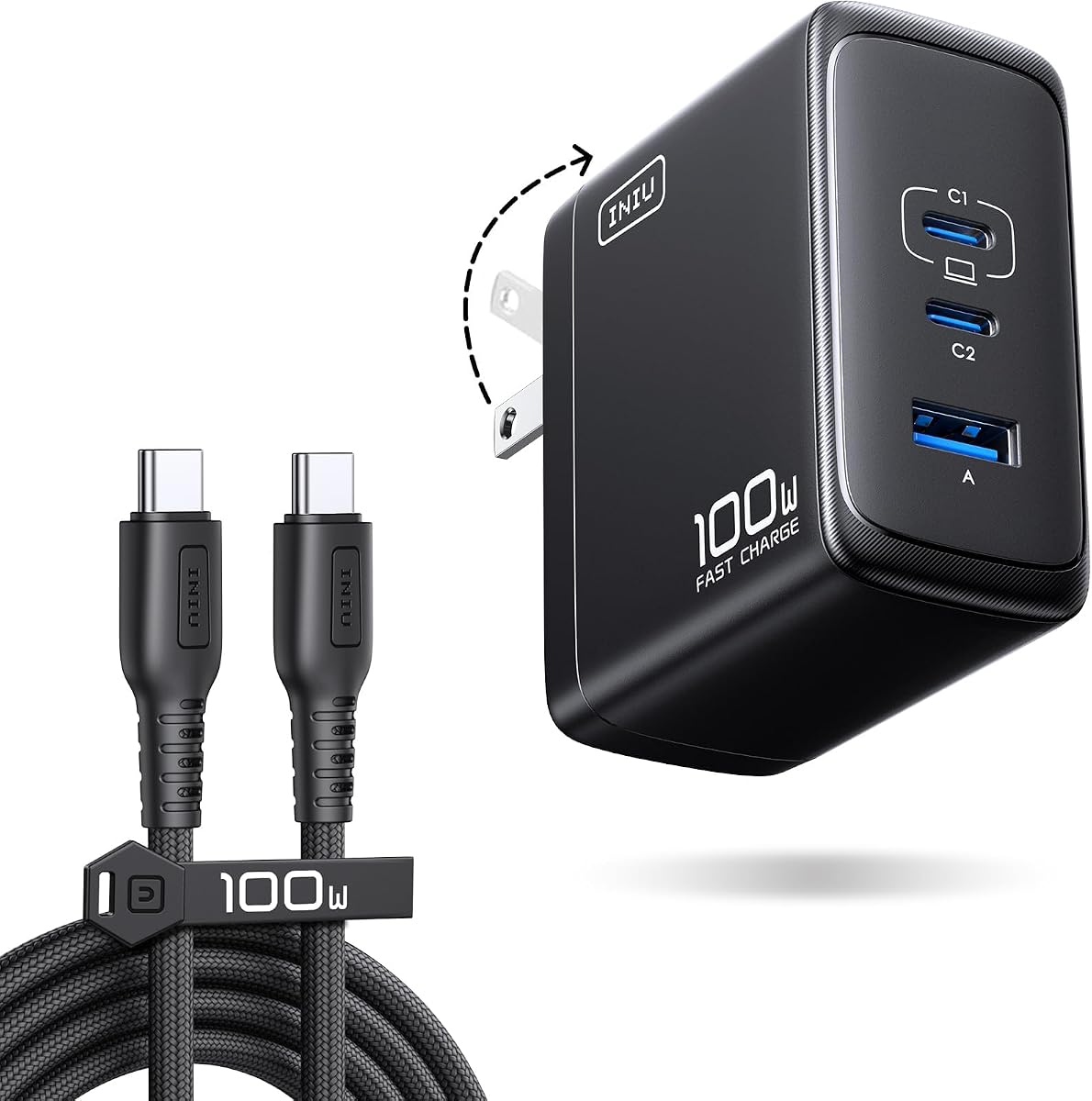
The INIU 100W USB C Laptop Charger is a travel-oriented four-port adapter that includes a five-foot, 1.5-meter nylon-braided USB-C cable. Its 4.5 rating and comprehensive package make it appealing to users who want the charger and a high-power cable together, especially when the included cable may otherwise have been a separate purchase.
We may earn a commission when you buy through this link, at no additional cost to you.
INIU states that the unit can provide 100W through one port, 70W plus 30W across two devices, or 45W plus 30W plus 22.5W across three devices. Those explicit allocations are useful because they help buyers understand what each connected device may receive rather than relying on a vague multi-device charging claim.
The trade-off is the absence of a display, so users cannot inspect real-time wattage, temperatures, or protocol negotiation. The stated percentages for particular phones and computers also depend on compatible devices, suitable cables, and the connected-device arrangement. As with any compact multiport charger, it will not provide two full 100W outputs simultaneously.
Choose this charger if a ready-to-pack travel set matters more than monitoring. The foldable plug, compact body, included cable, and clear power-allocation figures create a particularly convenient package for a laptop user who also charges smaller devices.
The included nylon-braided USB-C cable is rated for 100W by the manufacturer, removing uncertainty about pairing the charger with an underspecified cable. Its five-foot length is practical for a desk or hotel room without being unusually bulky.
Stated outputs of 70W plus 30W for two devices and 45W plus 30W plus 22.5W for three devices clarify the charger’s flexibility. Users can select a connection pattern based on whether a notebook or several smaller devices need the greatest share.
We may earn a commission when you buy through this link, at no additional cost to you.
The Anker 100W Max USB C Charger stands out through its high-definition smart display, which presents charging status, temperature, and port performance. It carries a 4.7 rating and combines that visibility with 100W maximum output, three ports, GaN construction, and a notably small body measuring 2.72 by 2.17 by 1.34 inches.
We may earn a commission when you buy through this link, at no additional cost to you.
The display makes the charger more useful for diagnosing slow charging or understanding how power is divided. Its automatic low-current mode is another thoughtful feature: when output remains at or below 5W for a minute, USB-C2 or USB-A can switch to 95W plus 5W low-current behavior for compatible accessories such as earbuds.
Anker includes a 4.9-foot USB-C-to-USB-C cable, a welcome guide, and an 18-month warranty. The main compromise is that three ports provide less simultaneous flexibility than the four- and five-port alternatives in this guide. Users who value a screen should also accept a slightly more complex block than a basic adapter.
This is the most appealing choice for someone who likes visible feedback and wants a compact charger with meaningful diagnostics. It is particularly suited to a mixed charging station where checking temperature and port allocation is valuable, provided its three-port layout meets the user’s device count.
The screen reports more than a headline number, including temperature and port performance. That makes it easier to identify whether a cable, device, or connection is the limiting factor when charging does not proceed as expected.
The small footprint and folding plug make the unit easier to pack than a full-size laptop brick. It is a sensible option for commuting or travel, while the screen remains most useful when the charger is placed somewhere visible.
We may earn a commission when you buy through this link, at no additional cost to you.
The Anker Nano 100W MacBook Charger focuses on delivering laptop-class power from a compact GaN II block. Both USB-C ports are described as supporting up to 100W, and the package includes a five-foot 100W USB-C-to-USB-C cable with an E-Marker chip. Its 4.2 rating is the lowest among the listed products, but its compactness and three-device capability remain attractive.
We may earn a commission when you buy through this link, at no additional cost to you.
Anker describes the charger as 34 percent smaller than an original 96W MacBook power brick. Its stacked GaN II circuit design is intended to increase operating frequency while reducing physical size. The ability to power a MacBook, iPhone, and AirPods simultaneously is useful for travelers who want fewer separate adapters.
The main limitation is that it lacks the smart display found on the more advanced Anker model. Its 4.2 rating may also suggest that some buyers have found aspects of the value or performance less compelling, though the supplied data does not explain individual customer feedback. Simultaneous multi-device use will also require the system to divide its power budget.
Buyers prioritizing the smallest practical travel footprint should give this model serious consideration. It is particularly useful for MacBook owners who already recognize USB-C charging and want a compact adapter, bundled cable, and the ability to top up two smaller devices.
GaN II and the stacked internal layout are the main reasons the charger can offer 100W-class output in a small enclosure. For users replacing a bulky notebook brick, the reduction in size and weight can be a meaningful everyday improvement.
Two USB-C connections and one additional port support a laptop, phone, and wireless-earbud case at the same time. The arrangement is simple rather than elaborate, which makes it attractive for travelers who value low-friction packing.
We may earn a commission when you buy through this link, at no additional cost to you.
The Belkin MacBook Charger provides up to 100W through USB-C and emphasizes protection, portability, and straightforward device compatibility. Its 4.5 rating reflects a favorable customer reception, while the included five-foot USB-C-to-USB-C cable makes it immediately usable with compatible laptops, phones, tablets, and accessories.
We may earn a commission when you buy through this link, at no additional cost to you.
Belkin’s eight-point SmartProTect system covers over-voltage, over-wattage, short circuits, surges, over-temperature, over-current, signal interference, and electrostatic discharge. Over-heat protection is also emphasized as part of the GaN design. These safeguards make the charger appealing for anyone who prioritizes thermal management and a broad protective feature set.
Its stated size is 33 percent smaller than the original 96W MacBook charger, and the folding prongs help prevent damage to bags and pockets. On the other hand, the product description emphasizes USB-C charging rather than a large mixed-port array. Buyers who regularly need several USB-A accessories may prefer a four- or five-port charger.
The Belkin is a well-rounded recommendation for a USB-C-centric setup, especially one centered on a MacBook or similarly compact laptop. It combines a useful 100W ceiling with a strong safety framework, a bundled cable, and environmentally conscious construction details without relying on a display.
The SmartProTect system is broader than a simple temperature check, addressing voltage, wattage, current, surge, short-circuit, interference, and electrostatic-discharge concerns. That breadth makes thermal and electrical safeguards a central selling point.
Belkin states that the charger uses PCR materials and arrives in plastic-free packaging. Combined with folding prongs and a smaller enclosure, it targets travelers who want a durable notebook charger with less packing bulk.
We may earn a commission when you buy through this link, at no additional cost to you.
The Lenovo 100W USB C Charger is built around broad notebook compatibility and a two-USB-C, two-USB-A layout. It has the highest customer rating in the group at 4.8 and includes a 4.9-foot 240W-rated USB-C cable. Its stated compatibility list covers ThinkPad, ThinkBook, Yoga, MacBook, Dell XPS, and HP devices, along with phones, tablets, wearables, and game consoles.
We may earn a commission when you buy through this link, at no additional cost to you.
GaN III CoolTech is the defining technical feature. Lenovo states that its heat dissipation and over-temperature controls can keep the charger 40 percent cooler than traditional chargers. The block is also described as 30 percent smaller than the original laptop charger, with a folding plug and a shared 100W output budget.
The wording is important: the charger’s 100W figure represents total output across all connected devices, rather than 100W available from every port simultaneously. That makes it excellent for broad compatibility and flexible charging but less suitable for driving two demanding notebooks at their individual maximum ratings. No display is provided, so real-time output must be judged from device behavior or external tools.
Choose the Lenovo for a mixed office or travel kit where several device families must be supported. It is especially attractive to ThinkPad and MacBook owners who want a reputable 100W block, four ports, strong thermal engineering, and a high-power cable without paying for a monitoring screen.
The supported-device list extends beyond Lenovo hardware to Apple, Dell, and HP models. Lenovo also says its labs tested and verified the charger for improved compatibility with Lenovo laptops, which adds context to its broader cross-brand claims.
CoolTech combines GaN III components with heat dissipation and thermal safeguards. The claimed cooler operation is especially relevant when phones, tablets, and a laptop draw from the total power budget at the same time.
We may earn a commission when you buy through this link, at no additional cost to you.
The UGREEN Nexode 100W GaN USB C Charger is a four-port model built entirely around USB-C. It carries a 4.6 rating and stands out because USB-C1 and USB-C2 can each reach a maximum of 100W, while the charger can also support two laptops at the same time. That focus makes it especially relevant to modern USB-C-only setups.
We may earn a commission when you buy through this link, at no additional cost to you.
The GaN implementation is described as producing faster, cooler charging with protection against overheating. A folding plug keeps the body compact for travel, while compatibility claims include MacBook Pro and Air, Dell XPS, recent iPhone and Galaxy models, iPad, Pixel, and Steam Deck devices.
The absence of USB-A can be a drawback for older accessories, while the lack of a display makes it harder to see real-time port allocation. Users should also recognize that two laptop claims do not mean two full 100W outputs; the charger must distribute its available power intelligently.
This Nexode is a strong choice for households whose devices have moved entirely to USB-C and whose priorities include many modern ports. It may be less suitable for a desk still full of legacy drives, adapters, or peripherals that require USB-A.
Having four USB-C ports avoids the need to hunt for a USB-A adapter when most connected accessories use Type-C. It also simplifies desk and travel organization because one charger can serve several current-generation devices.
UGREEN states that two laptops can charge simultaneously through USB-C1 and USB-C2. This is valuable for users moving between a primary notebook and a secondary device, though realistic speeds depend on the power demands and charging protocols of both machines.
We may earn a commission when you buy through this link, at no additional cost to you.
The UGREEN Nexode Pro 100W GaN USB C Charger combines a five-port layout with one of the most informative displays in the guide. Its 4.7 rating reflects strong customer reception, and the touch screen can show total output, individual port power, active PD or QC protocols, connected-device battery levels, and the charger core temperature.
We may earn a commission when you buy through this link, at no additional cost to you.
Four USB-C ports and one USB-A port allow up to five devices to charge simultaneously. UGREEN describes intelligent power distribution as preventing power competition between connected devices, while the overall charger still has a 100W maximum PD ceiling. A MacBook Pro M4 14-inch is claimed to reach 54 percent in 30 minutes under suitable conditions.
The display is valuable for users who want to confirm that a cable or device is negotiating an appropriate protocol. It also adds complexity and makes the charger more conspicuous than a plain block. Simultaneous five-device charging will not preserve every device’s maximum rate, so users should treat the port count as flexibility rather than unlimited capacity.
This is the most feature-rich conventional 100W option here, balancing five ports, detailed monitoring, and a layered protection system. It suits a visible desk setup, shared office, or advanced user who wants to see exactly what each port is doing.
The display brings port wattage, protocol, device battery level, and internal temperature into one view. That level of detail can help users identify a weak cable, an unsupported fast-charging mode, or an unexpectedly low allocation.
The charging system includes over-voltage, over-current, over-heat, short-circuit, and over-charge protection, plus automatic temperature adjustment. A 94-V0 fire-resistant PC shell adds another layer of construction-focused reassurance.
We may earn a commission when you buy through this link, at no additional cost to you.
This listing is titled as a 100W two-pack, but its supplied product data states that each charger has a maximum output of 65W, with a three-port configuration rated at 65W, 20W, and 18W. Buyers searching specifically for a genuine 100W charger should note that discrepancy. The pack nevertheless offers a distinctive proposition: two complete GaN wall chargers for separate outlets.
We may earn a commission when you buy through this link, at no additional cost to you.
Both blocks support PD 3.1, PD 3.0, PPS, QC 3.0, AFC, and Samsung Super Fast Charging 2.0. The 65W USB-C port is positioned for laptops such as the MacBook Air M2 and newer iPhone models, while the remaining ports handle phones, tablets, and smaller accessories. Their size is stated as 38 percent smaller thanks to GaN II technology.
Because the main port tops out at 65W rather than 100W, this is not the right choice for a user requiring full 100W laptop charging. No cables are included, and simultaneous charging will reduce individual outputs. The listing’s broad compatibility language should also be checked against the exact device and protocol requirements before purchase.
The two-pack makes sense for separate travel and office locations, a couple who needs one charger each, or users who prefer multiple small adapters over one more complex hub. For the stated 100W GaN category, however, it should be considered a 65W solution rather than a full substitute.
The package includes two identical three-port chargers, allowing one to remain at home while another travels. That avoids carrying a single high-capacity adapter between locations and may be more convenient for shared households.
Support for PD, PPS, QC, AFC, and Samsung fast-charging standards makes the blocks versatile across modern phones and tablets. The 65W primary port also offers more headroom than a basic phone charger for compatible lightweight notebooks.
We may earn a commission when you buy through this link, at no additional cost to you.
The UGREEN Nexode Pro 160W is the most powerful model in this guide, offering 160W total output and up to 140W from either of its first two USB-C ports. Although the keyword centers on 100W chargers, this model earns inclusion because its extra headroom can suit high-end notebooks and demanding multi-device setups. Its customer rating is 4.7.
We may earn a commission when you buy through this link, at no additional cost to you.
The five-port arrangement consists of four USB-C connections and one USB-A port. A rotatable touch display provides total wattage, per-port figures, active protocol, and internal temperature information. UGREEN states that a MacBook Pro 16-inch M4 Max can reach 56 percent in 30 minutes, making this the natural choice among the listed products for very large or performance-oriented computers.
Because this is a 160W charger, some laptops and cables may require different negotiation than they would with a standard 100W adapter. The buyer should confirm device and cable support, especially for repeated high-power use. Its greater capacity may also make it less attractive for travelers who only need to replenish a phone and lightweight tablet.
The UGREEN is recommended for power users who want more than the typical 100W ceiling while retaining five ports, intelligent allocation, and detailed monitoring. For everyone else, one of the 100W models may be simpler, smaller, and easier to justify.
The ability to deliver up to 140W to one port provides meaningful additional capacity for demanding 16-inch laptops. This is the clearest reason to consider the model despite its classification outside a strict 100W-only shortlist.
The touch display can be repositioned and used to inspect total output, per-port allocation, protocol, and temperature. That makes the charger practical for a desk where visibility and diagnostics matter more than minimalism.
We may earn a commission when you buy through this link, at no additional cost to you.
A useful 100W GaN charger should do more than provide a high headline wattage. Port layout, cable support, thermal engineering, device compatibility, power allocation, and travel design determine whether that capacity becomes a genuinely convenient charging system.
The advertised 100W usually describes the maximum available to one compatible USB-C device rather than the output of every port. For a laptop that consumes substantial power, prioritize a charger with a clearly documented 100W single-port mode. Check whether the cable is rated for that level and whether your computer supports the required USB Power Delivery profile. Some chargers also reduce output when multiple high-power devices are connected.
Bottom line: confirm 100W per-device support, not merely a 100W total label.
More ports create opportunities to reduce the number of wall adapters needed, but they also require power sharing. A three-port design may suit a laptop, phone, and earbud case, while four or five ports can support larger mixed-device households. USB-C-only layouts suit modern accessories, while USB-A remains useful for older phones, flash drives, and legacy peripherals. Consider both present and future devices before choosing.
Bottom line: select the smallest port mix that comfortably covers your regular charging routine.
A charger cannot reach its maximum output through an ordinary cable that lacks the required current rating. Several products include a five-foot 100W or 240W USB-C-to-USB-C cable, which improves convenience and reduces the chance of buying an incompatible accessory separately. Other models include no cable at all, so budget accordingly. Cable length, flexibility, durability, and the presence of an E-Marker chip are all relevant at high power levels.
Bottom line: use a properly rated cable and verify whether one is included before ordering.
Good chargers explain how output changes when several devices are connected. Published combinations such as 70W plus 30W or 45W plus 30W plus 22.5W provide a clearer picture than a generic claim of simultaneous charging. The most useful arrangement depends on your routine: a single laptop plus two phones requires a different balance from four accessories or two notebooks. Look for intelligent distribution that recognizes device demands without promising unrealistic maximum speeds to every port.
Bottom line: examine realistic multi-port allocations, not just the number of sockets.
High output in a small enclosure produces heat, so thermal management is central to safe performance. Look for temperature sensors, automatic output adjustment, over-temperature protection, and controls for over-voltage, over-current, short circuits, and overcharging. Belkin highlights an eight-point system, while Anker and UGREEN describe dedicated thermal monitoring or adjustment. These manufacturer claims offer useful context, but users should also follow normal charging guidance and inspect damaged cables or adapters.
Bottom line: favor chargers with layered electrical and thermal protections.
GaN technology enables smaller high-power adapters, but additional ports and screens can increase bulk. Compare stated dimensions and weight, then consider the folding plug, which helps prevent damage to bags and pockets. A charger that is easy to carry may matter more than a marginally smaller but difficult-to-access design. The included cable also affects packing volume, so consider the entire kit rather than judging the wall block alone.
Bottom line: compare the charger, prongs, and cable together for realistic travel convenience.
USB Power Delivery is central to modern laptop charging, but fast phone charging can depend on PPS, QC, AFC, or proprietary standards. Check the exact devices you intend to charge and any stated exceptions. UGREEN notes limitations for some Dell and Lenovo laptops on one model, while Lenovo emphasizes testing across ThinkPad, MacBook, Dell, and HP systems. USB-A devices may also charge more slowly because their protocols and connector wiring differ.
Bottom line: verify device-level compatibility rather than relying on a generic compatibility list.
A smart display can show real-time port wattage, temperature, protocol, and sometimes connected-device battery level. This information makes troubleshooting easier and helps confirm whether a charger is delivering the expected mode. It is especially attractive for shared desks, technical users, or setups with multiple high-power devices. If portability and simplicity matter more, a display-free block is quieter visually, simpler to operate, and potentially less expensive.
Bottom line: choose a display for visibility and diagnostics, or omit it for simplicity.
Begin by confirming that your device supports USB-C Power Delivery and that the connected cable is rated for the power level you need. For maximum 100W laptop performance, use one compatible USB-C port where possible and connect fewer high-draw devices. Place the charger on a stable, hard, ventilated surface rather than beneath bedding, cushions, documents, or other heat-insulating materials.
For repeated multi-device use, check the display or connected-device charging screens to confirm that the expected power allocation has been negotiated. If charging seems slow, test a different compatible cable, move to a single-device connection, and inspect the port for debris. Never force a connector, bend the wall prongs, or use the charger with a damaged cable or casing.
Unplug the charger when it is no longer needed, especially during long periods of inactivity or travel. Keep the folding prongs retracted while packed so they do not press against other items. Store the charger and cable in a dry location, follow the manufacturer’s warranty terms, and replace the unit if it becomes unusually hot, smells odd, discolors, or behaves erratically.
A compatible 100W GaN charger is generally suitable for a laptop that supports USB-C Power Delivery. Charging negotiation allows the laptop to request an appropriate amount of power rather than accepting the full rating indiscriminately. Use a cable rated for high-power charging and check whether the manufacturer lists any model-specific limitations. Follow the device and charger instructions, and stop using the adapter if it shows physical damage or unusual behavior.
Some multiport chargers can support two laptops, but the total 100W budget must be divided between them. One laptop may receive a high single-port output while the other receives a smaller allocation, or both may receive moderate power. Actual results depend on the charger’s allocation logic, both computers’ requirements, and the connected cables. Confirm the manufacturer’s supported combination before relying on simultaneous laptop charging.
Yes, the cable must support the required current and power delivery profile. A cable that works for a phone may not safely or effectively carry 100W to a laptop. Several chargers in this guide include a cable rated at 100W or 240W, while others include no cable. For an existing cable, look for an appropriate USB-C rating and check whether it includes an E-Marker chip where required by the charger or device manufacturer.
GaN components can improve power efficiency and reduce heat compared with older silicon-based designs, allowing high output in a smaller enclosure. Actual temperatures also depend on output, the number of connected devices, ambient conditions, and the charger’s internal design. Belkin, Lenovo, Anker, and UGREEN all describe thermal-monitoring or heat-management features in their respective products.
Chargers with thermal, over-voltage, over-current, and over-charge protection are designed for continuous use, but safe operation still depends on correct placement and sound components. Place the charger on a hard, ventilated surface and keep it away from fabric, paper, and other heat traps. Unplugging it when not needed can reduce unnecessary wear and energy use, particularly in a travel kit.
A smart display can reveal real-time total output, individual port allocation, charging protocol, device battery level, and internal temperature. These readings help identify an underperforming cable, unsupported fast-charging mode, or unexpectedly low port allocation. The Anker 100W Max and UGREEN Nexode Pro models offer this monitoring, while simpler chargers remain more compact and easier to operate.
A 160W charger is only better when a device and its cable can use the additional power and the charging arrangement benefits from greater total capacity. It may be excessive for a phone or ordinary ultraportable computer, while offering valuable headroom for demanding 16-inch notebooks or multiple connected devices. The UGREEN Nexode Pro 160W is included here as a higher-output alternative rather than a strict 100W replacement.
It depends on whether you need power in two locations at the same time. Two compact chargers can be more convenient for a home-and-office or travel-and-home arrangement, and they may serve several phones well. A single 100W charger is the better fit when one device needs full laptop-class power or when minimizing the number of adapters is the priority. The two-pack in this guide does not provide a true 100W port maximum.
The Anker 100W Max is the leading all-around recommendation for its combination of 100W output, three ports, compact construction, and a genuinely useful status display. The Belkin 100W Compact GaN stands out as the budget-conscious choice with extensive safety protections and an included cable, while the UGREEN Nexode Pro 100W leads the premium group with five ports and unusually detailed monitoring.
Prioritize the setup you will actually use. Choose a simple compact model for a laptop, phone, and earbuds; a four- or five-port adapter for a busy mixed-device desk; a display-equipped charger if diagnosing performance matters; and a higher-output unit only when your largest device genuinely needs more than 100W. In every case, confirm the cable rating and the charger’s realistic multi-device power allocation.
Amazon ratings, promotions, product configurations, and prices can change over time, so review the current listing before making a final decision. Compare the included accessories, stated compatibility, warranty coverage, and return terms alongside the technical specifications. The right charger is the one that provides your required power safely while fitting naturally into your devices and routine.