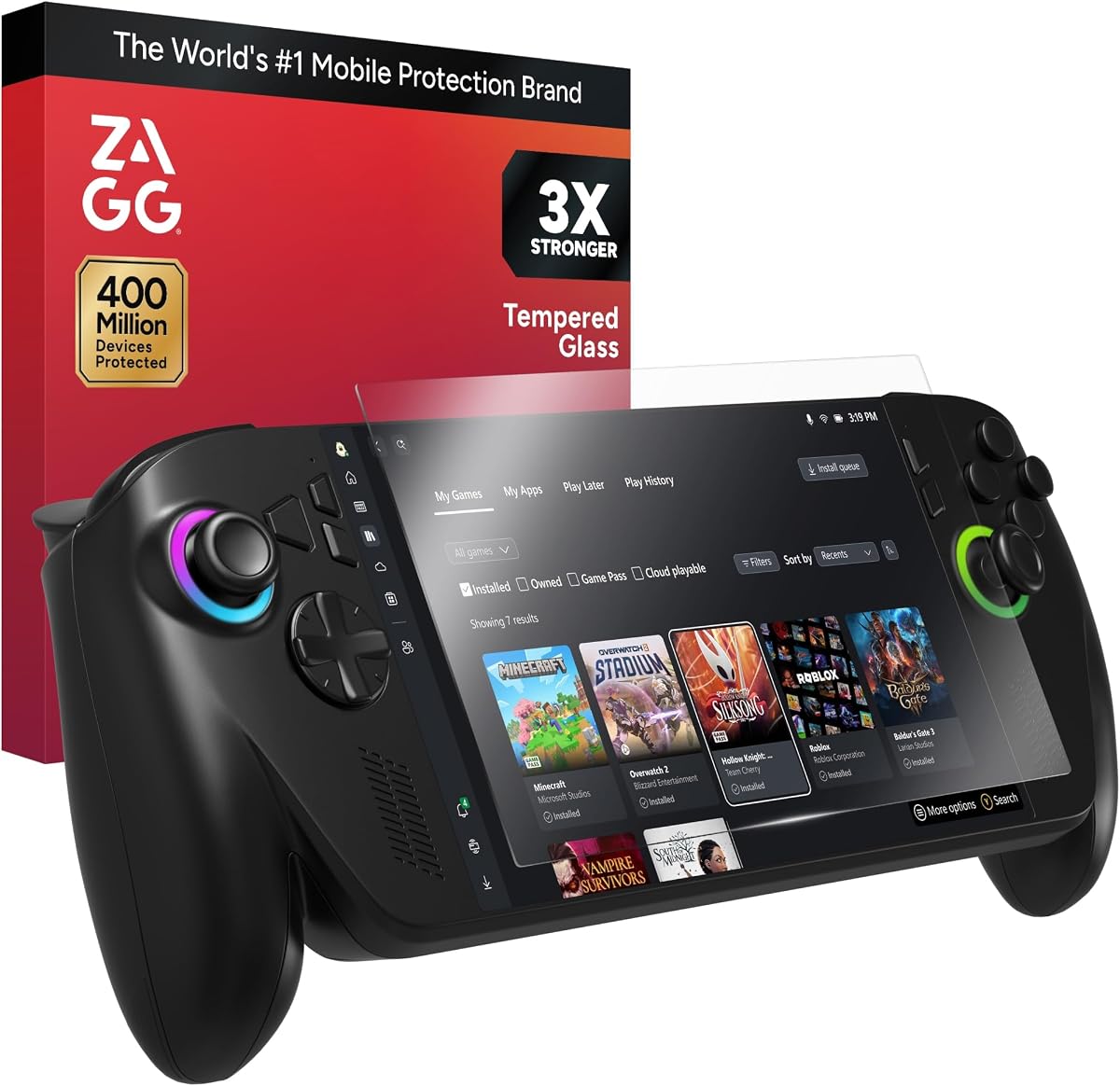
ZAGG Glass+ Screen Protector for ROG Xbox Ally X & ROG Xbox Ally
4.3Editor score
Up to three-times stronger glass
Tray-based bubble-free alignment
Smudge-resistant oleophobic finish
An ASUS ROG Ally screen protector should do more than prevent scratches. It should preserve display clarity, maintain responsive touchscreen controls, fit securely around the device's edges, and withstand the frequent handling associated with portable gaming. The best choice depends heavily on your exact model and whether you prefer an ultra-clear finish or a matte surface that reduces reflections.
This guide compares ten protectors designed for the original ASUS ROG Ally and compatible handheld models, including ROG Ally X, ROG Xbox Ally, and selected MSI Claw A1M variants. We evaluated the supplied specifications for device compatibility, glass or film construction, surface hardness, transparency, coatings, installation method, case fit, and touchscreen responsiveness.
Each review explains who the protector suits best, where its design stands out, and what trade-offs buyers should consider. Every pick appears in the side-by-side table, while the top selections are grouped separately for quick recommendations. Product details and availability can change, so confirm your handheld model and current listing before buying.
4.3Editor score

4.6Editor score

4.6Editor score
As an Amazon Associate we earn from qualifying purchases.
The comparison below organizes all ten options by their most important design details, including supported hardware, protective construction, surface treatment, installation approach, and touch or visibility characteristics.




The amFilm Screen Protector for ASUS ROG Xbox Ally X & Ally/ROG Ally X & Ally earns the Editor's Choice position because it combines unusually broad device compatibility with a thin, responsive design. Its 4.6 rating reflects a well-received product, while the 99.9% transparency claim and 0.3mm thickness make it particularly attractive to gamers who prioritize visual quality and unobtrusive protection.
We may earn a commission when you buy through this link, at no additional cost to you.
Compatibility is a major strength. The stated fit covers the ASUS ROG Xbox Ally X 2025, ROG Xbox Ally 2025, ROG Ally 2023, ROG Ally X 2024, and MSI Claw A1M. That makes this an unusually practical option for buyers who may move between compatible handhelds or need one protector type for several devices. Its 9H surface and oleophobic coating also address two common problems: scratches from daily handling and fingerprints that can make a display look hazy.
The main limitation is its film-like thickness. At 0.3mm, it should be less visually intrusive than a thick glass sheet and preserve touch sensitivity, but buyers seeking the reassuring rigidity of a layered tempered-glass protector may prefer a heavier option. Installation also calls for care because a thin protector can trap bubbles if the screen is not properly cleaned and the material is aligned before adhesion.
This is the strongest general recommendation for someone who wants one protector to cover several supported handheld models. The included three protectors, microfiber cloth, cleaning wipes, and installation manual make it particularly convenient for protecting more than one device or keeping a replacement on hand. Confirm the precise model and case arrangement before ordering, then follow the included installation process carefully.
The listed support for original ROG Ally, ROG Ally X, newer ROG Xbox Ally variants, and MSI Claw A1M gives this protector unusual flexibility. Buyers with compatible hardware can use the same installation and care approach without searching for a different product family.
At just 0.3mm, the protector is designed to avoid a bulky edge while maintaining sensitive touchscreen interaction. Its high transparency and oleophobic finish make it a practical middle ground for portability, visibility, and everyday maintenance.
We may earn a commission when you buy through this link, at no additional cost to you.
ZAGG Glass+ is the premium choice in this guide, offering a more rigid and impact-oriented alternative to flexible films. Its 4.3 rating, 3X-strength claim, precision surface finish, and advanced oleophobic coating make it suited to buyers who regularly travel with their handheld or simply want a substantial layer over the display.
We may earn a commission when you buy through this link, at no additional cost to you.
The standout feature is its guided installation system. An EZ Apply tray and tabs help position the glass accurately, which addresses one of the most common frustrations associated with screen protection: bubbles and off-center placement. The product is also designed to provide smooth, precise input across taps, swipes, and gestures, an important consideration for a device controlled through both conventional buttons and a touchscreen.
Protection is supported by scratch-resistant finishing, while the anti-fingerprint coating helps limit the oil and smudge buildup that normally accompanies long gaming sessions. The silky touch is another meaningful benefit because a protector that feels coarse or unresponsive can undermine the appeal of a premium gaming handheld. Together, these features make Glass+ more about the complete ownership experience than simply adding a layer of glass.
The trade-off is that it does not list compatibility for the original ROG Ally as broadly as some alternatives. Its stated coverage focuses on ROG Xbox Ally X and ROG Xbox Ally. Buyers with an older Ally or Ally X should verify model details before buying. For a compatible device, however, the combination of reinforced glass and a carefully designed installation tray makes this an attractive premium recommendation.
The advertised 3X-strength design targets scratches and impacts that can occur during transport and use. While no screen protector can make a handheld indestructible, a rigid glass layer can provide a more substantial barrier than a very thin flexible film.
The EZ Apply tray is especially valuable for buyers nervous about fitting a full-sheet glass protector. Its alignment tabs are intended to simplify positioning and reduce dust-related defects during the process.
We may earn a commission when you buy through this link, at no additional cost to you.
The 4 Pack for ASUS ROG Ally 2023 Screen Protector Tempered Glass provides four individual sheets, making it a strong choice for owners who want multiple replacements or who share a compatible device with family members. Its 4.4 rating and tempered-glass construction give it a solid balance of protection, clarity, and installation convenience.
We may earn a commission when you buy through this link, at no additional cost to you.
The 0.33mm glass is thin enough to preserve a relatively natural display profile while offering a more substantial feel than a basic film. A 9H hardness rating indicates resistance to scratches, and the anti-shatter feature adds another layer of everyday protection. Its hydrophobic, transparent coating is designed to reduce persistent fingerprint oils and make the surface easier to keep clean.
Installation is based on auto-adhesion technology, allowing the glass to be placed without a separate frame. The listed result is a gap-free, bubble-resistant finish designed to preserve display color and gaming visibility. This combination makes the product appealing to users who want the familiarity of tempered glass but do not want to manage a complex alignment frame.
Its principal limitation is compatibility specificity. The title and supplied details focus on the 2023 ROG Ally, so owners of Ally X, ROG Xbox Ally, or newer variants should verify dimensions before purchasing. A four-pack also offers more protection than many buyers need. Still, for a compatible original Ally, the combination of multiple sheets, high transparency, and easy frame-free placement makes this a compelling practical option.
Multiple protectors are useful for preserving a fresh installation, sharing a device, or replacing a sheet after it becomes heavily scratched. The pack offers convenience without requiring separate installation materials for every unit.
The transparent high-definition finish is designed to restore original display color while maintaining sensitive touch response. A 0.33mm profile helps keep the protector relatively unobtrusive during portable use.
We may earn a commission when you buy through this link, at no additional cost to you.
This two-pack tempered glass protector combines a strong 4.6 rating with support for several important ASUS handheld models. It is designed for the ROG Xbox Ally X 2025, ROG Xbox Ally 2025, ROG Ally X 2024, and ROG Ally 2023, making it a practical budget-oriented option for buyers who need flexibility across different generations.
We may earn a commission when you buy through this link, at no additional cost to you.
The protector uses 0.33mm 9H-hardness glass and claims 99.9% transparency, supporting a clear view of the handheld's display. Its 99.99% response-sensitivity claim is especially relevant for touch-driven menus and in-game controls. A plasma oleophobic coating helps resist fingerprints from sweat and grease, allowing the screen to be wiped clean more easily after extended sessions.
Its case-friendly design is a particularly thoughtful feature. The glass is 0.5mm smaller than the ROG Xbox Ally X screen, leaving space at the perimeter to reduce edge lifting and accommodate protective cases without warping. Rounded 2.5D corners also soften the edges for a more comfortable touch and add durability around vulnerable areas.
The deliberate inset means this is not full edge-to-edge coverage, so buyers who prioritize maximum surface coverage may prefer another design. Installation still depends on removing dust and aligning the sheet correctly. Even so, the multi-model fit, strong rating, touch sensitivity, and case-friendly construction justify its position as the leading value-focused recommendation.
The 0.5mm perimeter gap is intentional, allowing the glass to sit inside the display boundary without interfering with a case. This can reduce the risk of a raised edge catching during installation or daily use.
The plasma oleophobic treatment is intended to reduce the oily residue associated with fingerprints and sweat. Combined with 99.9% transparency, it supports a clear viewing experience and straightforward cleaning.
We may earn a commission when you buy through this link, at no additional cost to you.
The amFilm OneTouch is built around one of the biggest practical challenges in screen protection: installing a full sheet of glass without misalignment. Its automatic alignment kit is advertised as completing the process in about 30 seconds, giving this protector a clear advantage for buyers who have previously struggled with bubbles or crooked placement.
We may earn a commission when you buy through this link, at no additional cost to you.
Protection comes from ultra 9H glass, designed to resist scratches and everyday impacts. The high-quality materials and coating technology are intended to preserve a clear visual experience and smooth, sensitive response across taps, swipes, and gaming actions. Its hydrophobic, oil-repellent surface is also designed to suppress fingerprint buildup, although exact performance can vary with skin oils and handling habits.
The alignment tray is both the central benefit and the main practical trade-off. It simplifies installation but takes up more storage space than a simple adhesive sheet. A precise fit also depends on the selected model, and the listed compatibility centers on the ASUS ROG Xbox Ally X and ROG Ally 2025 rather than the entire ROG Ally family.
For a compatible ROG Xbox Ally X or ROG Ally 2025, OneTouch is an excellent choice for a user who prioritizes straightforward setup. The 4.4 rating, strong 9H hardness, clear touch response, and fingerprint resistance create a well-rounded package without requiring advanced screen-protection experience.
The tray guides the glass into position before adhesion begins. This reduces the need to hold a flexible or slippery sheet over the display by hand, which can help prevent dust and crooked placement.
A hydrophobic, oil-repellent coating helps limit the visible residue left by sweat and fingerprints. The screen remains easier to wipe clean, although a microfiber cloth is still important for routine maintenance.
We may earn a commission when you buy through this link, at no additional cost to you.
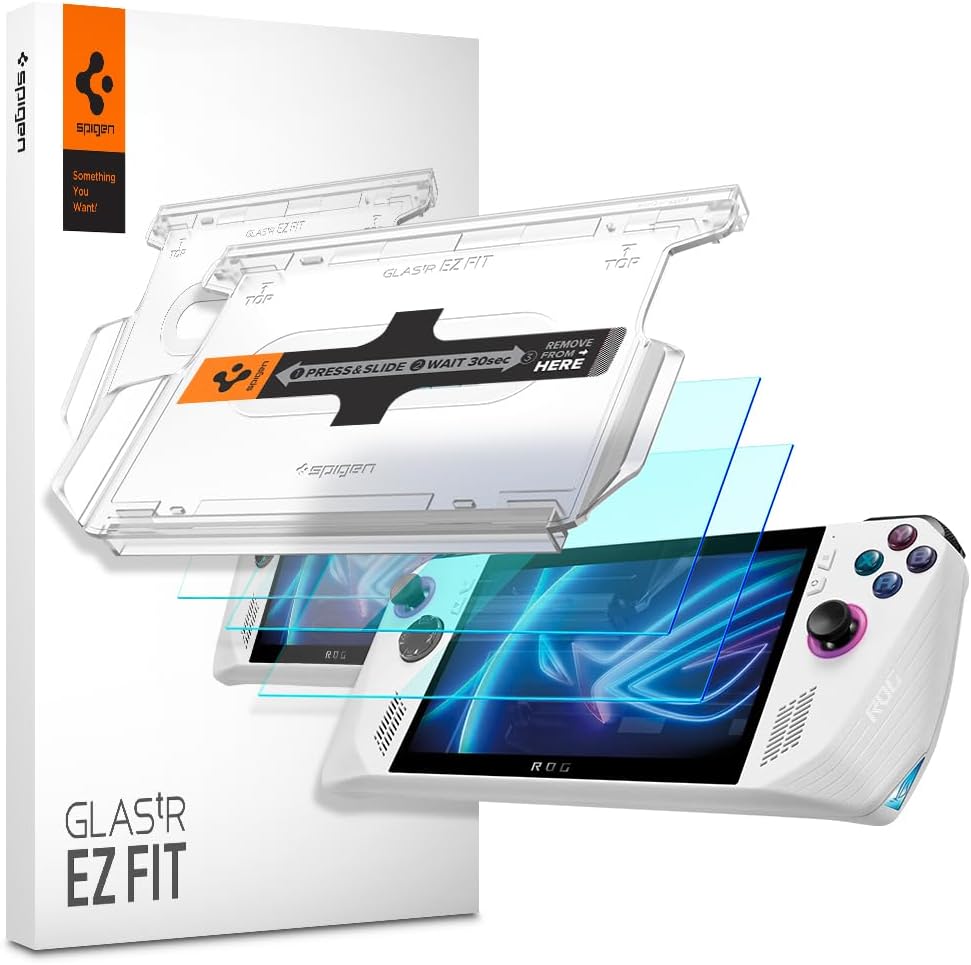
Spigen GlasTR EZ FIT is a polished, installation-focused option for the original ASUS ROG Ally. Its 4.5 rating, 9H hardness, and independently lab-tested 100% optical clarity make it a confident choice for buyers who care equally about visual fidelity and scratch protection.
We may earn a commission when you buy through this link, at no additional cost to you.
The 9H surface is positioned to resist marks from everyday hazards such as keys, coins, and other sharp objects. At the same time, the clarity claim is designed to preserve the vivid colors and sharpness of the bare display. An oleophobic coating reduces smudges and oil marks, while specially crafted adhesive is intended to preserve responsive touch without lag or added resistance.
The EZ FIT tray makes alignment quick and straightforward, and the package includes two protectors, two installation trays, dust-removal stickers, and a microfiber cloth. Its slim, edge-inset cut is designed to avoid lifting when used with compatible Spigen cases and most third-party cases. An anti-shatter layer can also help contain fragments if the glass fractures.
The important limitation is explicit: this protector is not compatible with ROG Xbox Ally. It is intended for the ASUS ROG Ally, so buyers with Ally X or newer Xbox-branded models should not assume it fits. Buyers of the original model will receive a thoughtful, complete package with a strong combination of clarity, touch response, alignment tools, and everyday scratch resistance.
The 100% clarity claim is especially useful for gaming, where dark scenes, saturated colors, and fine interface details benefit from an unobstructed image. The protector is designed to feel visually unobtrusive once installed.
Two installation trays, dust-removal stickers, and a microfiber cloth cover the main stages of a clean application. Having the accessories together makes it easier to prepare the display and replace a damaged sheet later.
We may earn a commission when you buy through this link, at no additional cost to you.
The magglass Anti-Glare Matte is the dedicated choice for gamers who dislike reflections. It is designed for the ASUS ROG Ally and ROG Ally X models from 2023 and 2024, and its matte finish reduces harsh reflections while maintaining the underlying benefits of a tempered-glass display guard.
We may earn a commission when you buy through this link, at no additional cost to you.
The 4.1 rating is the lowest among the ten products here, but that does not make it unsuitable. Its main appeal addresses a specific viewing condition: bright surroundings, overhead lighting, or frequent use in environments where a glossy surface can look washed out. The anti-glare texture is also highly resistant to oil smudges and fingerprint marks, improving the appearance of the screen between cleanings.
The protector is described as edge-to-edge and is shipped with a cleaning kit. Its tempered-glass construction gives it a more substantial tactile feel than a thin film, while the matte texture should make it less prone to showing greasy fingerprints. Retail packaging and support from the Encased brand add a more traditional accessory presentation to the purchase.
The key trade-off is that matte finishes can slightly soften contrast or fine detail compared with a completely transparent gloss layer. Gamers who prioritize absolute image brightness, deep blacks, or maximum sharpness may prefer a clear protector. Conversely, users who game under variable lighting or frequently notice reflections will find this anti-glare design particularly useful.
The textured surface disperses reflections rather than allowing them to appear as bright mirrored shapes. This is particularly helpful under overhead lights and in brighter travel environments.
The matte coating resists fingerprints and oily smudges, improving the screen's appearance during extended play. Routine cleaning remains necessary, but residue is generally less conspicuous than on a glossy surface.
We may earn a commission when you buy through this link, at no additional cost to you.
The Mr.Shield 2-Pack combines a strong 4.6 rating with a straightforward tempered-glass design for the ASUS ROG Ally. Two protectors are included, providing a spare for later replacement, while Japan Hardnest glass and a high-grade oleophobic coating emphasize durability and a clear viewing experience.
We may earn a commission when you buy through this link, at no additional cost to you.
The protector claims 99.99% HD clarity and touch accuracy, making it suitable for gamers who do not want visible haze or a degraded touchscreen experience. Silicone adhesives are used for viewing clarity and easier installation and removal. That combination is useful when a buyer wants a conventional glass protector without a bulky alignment system.
The brand describes the set as Ballistic Glass, and the listing states protection from scratches through high-impact drops. As with every screen protector, the exact level of drop protection depends on the device, the surrounding surface, and the direction of impact. Even so, a rigid glass layer with strong scratch resistance can reduce the likelihood of cosmetic damage to the exposed display.
The main drawback is narrower compatibility. The title identifies the ASUS ROG Ally rather than the broader ROG Ally X, ROG Xbox Ally, and MSI Claw A1M lineup covered by several competitors. A dedicated alignment tray is not listed either. For an original ROG Ally owner who values clarity, simple installation, and a spare sheet, this is a balanced recommendation.
The 99.99% clarity claim and silicone adhesive are intended to keep the display bright and unobstructed. The result should suit users who prefer a conventional transparent finish over a matte texture.
Keeping a second protector allows for a fresh installation without another purchase. It is also useful for protecting a second compatible device or replacing a sheet that has accumulated scratches and coating wear.
We may earn a commission when you buy through this link, at no additional cost to you.
This two-pack 9H tempered glass protector has the highest customer rating in the guide at 4.8, making it a strong choice based on buyer satisfaction. It supports the ASUS ROG Ally X RC72LA, original ASUS ROG Ally RC71L, and MSI Claw A1M, giving it broad coverage across several seven-inch gaming handhelds.
We may earn a commission when you buy through this link, at no additional cost to you.
The tempered glass carries a 9H hardness rating for resistance to scratches caused by keys, dust, and other hard objects. Its high transparency and touch-sensitivity claims are designed to preserve the display's visual quality and interaction. A non-adhesive backing is also notable because it allows removal without leaving sticky residue on the screen, which can be reassuring for owners who may upgrade devices or change cases.
Installation is described as direct and simple. Unlike tray-based systems, this design does not appear to provide a guided frame, so careful alignment matters. The screen should be thoroughly cleaned, the protector should be positioned before adhesion, and the installation should proceed slowly to reduce the chance of bubbles or contamination.
The limitation is that the stated compatibility does not include ROG Xbox Ally. It also lacks some of the elaborate alignment features offered by premium products. Nevertheless, the 4.8 rating, 9H hardness, multi-model support, and residue-free non-adhesive design make it an excellent choice for owners of the original Ally, Ally X, or MSI Claw A1M.
A 4.8 rating is the strongest numerical result among the products compared. While ratings do not replace checking fit and features, they provide a useful signal that many buyers have been satisfied with the overall product.
The backing is designed to avoid leaving adhesive residue on the display. This makes the protector more practical for temporary use, resale preparation, or owners who expect to change accessories frequently.
We may earn a commission when you buy through this link, at no additional cost to you.
The Mr.Shield Screen Protector for ASUS ROG Ally X, ROG Xbox Ally, and MSI Claw A1M is a versatile two-pack with a 4.6 rating. Its tempered glass is laser cut with polished, rounded edges, combining a clean appearance with smoother contact around the perimeter of the display.
We may earn a commission when you buy through this link, at no additional cost to you.
The 9H surface is designed to resist scratches and endure daily use, while 99.99% HD clarity and touchscreen accuracy preserve the look and responsiveness of the underlying screen. Those qualities matter for a gaming handheld whose display is used for menus, configuration screens, and interactive controls as well as conventional game output.
A particular strength is the use of high-technology adhesives intended to create a bubble-free result. That claim is most likely to be achieved when the screen is clean, dry, and free of dust before application. The included set contains two tailored-fit protectors, providing either a spare or coverage for more than one supported device.
Compatibility is the deciding detail. Although the title includes ROG Ally X, ROG Xbox Ally, and MSI Claw A1M, it does not explicitly list the original 2023 ROG Ally. Owners of that base model should look for a protector that explicitly names it. For the supported models, this is a polished, clear, and durable option with a reassuring two-pack format.
The polished, rounded laser-cut design avoids harsh corners around the protector's perimeter. This creates a smoother surface along the display edge and reduces the feel of an abrupt border when interacting near the margins.
Support for ROG Ally X, ROG Xbox Ally, and MSI Claw A1M makes the two-pack useful across multiple compatible handhelds. Exact dimensions should still be confirmed because similarly named models can have different screen or chassis designs.
We may earn a commission when you buy through this link, at no additional cost to you.
The best protector is the one that fits your exact handheld, preserves the display experience, and offers realistic protection without creating installation or case problems. Compatibility, material, coatings, and alignment method deserve careful consideration before purchase.
The ROG Ally family includes original ROG Ally, ROG Ally X, newer ROG Xbox Ally models, and related designs that may share dimensions but differ in the display area, bezel, chassis, or case interface. Some listings combine several supported models, while others focus on one exact version or model number. Check the model label on your device, compare the screen dimensions, and read the full compatibility list rather than relying on the general product title.
A thin flexible film can be nearly invisible and preserve a light, natural touchscreen feel, but it may offer less resistance to bending and impact than rigid glass. Tempered glass generally feels more substantial, resists scratches well, and may provide stronger everyday impact protection. Its edges can appear more noticeable, however, and a poorly installed glass sheet can trap conspicuous bubbles. Consider your tolerance for edge visibility, installation risk, and the handling profile of your device.
Most quality options in this category use a 9H hardness surface, which is intended to protect against scratches from keys, coins, grit, and other hard objects encountered in a bag or on a desk. Hardness is not the same as a guarantee against every impact, so claims about shatter resistance and drop protection should be treated as added benefits rather than absolute promises. A rigid protector and a protective carrying case offer more complete everyday protection than either one alone.
High-transparency clear protectors are the safest choice when preserving color, contrast, and image sharpness is the priority. Anti-glare matte versions scatter reflections and are often preferable under bright lights or during travel, but their textured surface can make the image appear slightly less crisp or vibrant. Compare the transparency claims and decide whether glare control is more valuable than maximum visual purity for the way you normally use your handheld.
Oleophobic or hydrophobic coatings help repel fingerprints, skin oils, and sweat, keeping the display clearer and easier to wipe down. No coating prevents every mark, particularly when hands are moist or the screen has already accumulated residue. Look for a smooth surface treatment and plan to clean the protector with a soft microfiber cloth. A coating that feels smoother also tends to support more comfortable swipes and touch input.
The protector should preserve accurate touch and pressure response without adding resistance. Thin profiles generally feel closest to the original screen, while thick glass may feel more substantial. Rounded corners and a smooth edge can improve comfort near the display border. Also consider whether you use a case, because an edge-raised protector may lift, shift, or interfere with a snug protective shell.
Alignment trays, frames, and pull tabs can make full-sheet glass much easier to position. Auto-alignment systems are particularly useful if you have never installed a protector or if the display has narrow bezels. Simpler adhesive sheets may be less bulky, but they demand slower, more deliberate placement. Before applying anything, clean the screen, remove dust, work in a dust-free area, and follow the included instructions rather than improvising.
Two- and four-sheet packs are useful when protecting multiple devices, sharing a handheld, or keeping a clean replacement available. A single protector can be sufficient for one device and a carefully managed screen. The number of sheets should follow your actual need rather than the number alone, since additional protectors are useful only if you can store them in a dust-free sleeve and are comfortable replacing a used sheet.
Begin by confirming compatibility and gathering any tray, cleaning wipes, dust-removal stickers, or microfiber cloth included with the protector. Power off the handheld, release the case if necessary, and clean the display with a suitable lint-free cloth. Remove existing adhesive marks before installation, then dry the surface completely so dust does not become trapped beneath the new sheet.
Follow the protector's own installation sequence. For a tray-based system, remove or peel backing tabs as directed while lowering the glass into the alignment guide. For a simple adhesive sheet, hold one edge in place, align it carefully, and lower it gradually rather than dropping it onto the display. Apply pressure only where recommended, inspect for bubbles, and avoid pressing unnecessarily on the center of the glass.
For ongoing care, use a soft microfiber cloth and avoid abrasive pads, solvent-based cleaners, and sharp objects. Clean the screen when fingerprints become distracting, especially before placing the handheld in a bag. If a large bubble, edge lift, or crack appears, remove the sheet carefully and install a fresh protector rather than trying to repair a damaged layer with tape or adhesive.
Not always. The original ROG Ally, ROG Ally X, ROG Xbox Ally, and ROG Xbox Ally X may have similar dimensions but differ in display boundaries, bezels, and case integration. Some products explicitly support several models, while others are precision-cut for one version. Always compare the model number and dimensions, and follow the manufacturer's compatibility statement before installing a protector.
A properly fitted quality protector should preserve the intended touch experience, but thickness and installation quality can affect how the screen feels. Thin profiles and products designed for high touch response generally feel more natural. Large bubbles, trapped debris, or misaligned edges may interfere with gestures, so cleaning the surface and installing the sheet carefully are essential.
Choose matte if reflections, overhead lights, and visible fingerprints are your main concerns. Matte textures are especially useful during travel or gaming in bright environments. Choose clear if maximum color fidelity, contrast, and sharpness matter most to you. A high-transparency clear protector will generally give the most native-looking display, while matte glass prioritizes glare control.
No. A 9H surface indicates strong scratch resistance, but it does not guarantee that the display or protector will survive drops, pressure, or impacts. Tempered glass can reduce cosmetic damage and may help manage fragments, yet the handheld should still be transported in a padded case and handled carefully to protect the screen from direct impacts.
It depends on the case and edge design. A slim, edge-inset protector may fit beneath a compatible shell, while a glass sheet that extends too close to the bezel may lift or create tension. It is usually easier to install the protector before attaching a tight-fitting case. Check the protector and case listings for compatibility guidance and leave adequate edge clearance.
Warm the adhesive slightly with a hair dryer on a low setting, keep the device powered off, and lift one corner slowly rather than pulling sharply across the screen. Peel at a shallow angle while supporting the display area. Remove residue with a suitable screen-safe cleaner and a microfiber cloth, then clean and dry the screen thoroughly before installing the replacement.
A multi-pack is useful if you own more than one compatible handheld, want a fresh replacement, or expect to replace the protector after visible wear. For one carefully maintained device, a single sheet can be sufficient. Store spare protectors in a clean, dust-free sleeve because installation is much easier when the replacement has not collected particles.
Only if the manufacturer explicitly lists both models or confirms matching dimensions. Similar screen sizes do not guarantee identical cutouts, rounded corners, bezel coverage, or case clearance. The reverse is equally important: a protector for the original ROG Ally may not be suitable for ROG Xbox Ally. Verify the exact model before ordering to avoid an improper fit.
The amFilm Multi-Model Protector stands out as the most versatile overall choice, offering broad supported-device coverage, a 0.3mm profile, 99.9% transparency, and a 9H oleophobic surface. ZAGG Glass+ is the premium option for buyers who prioritize stronger glass and guided installation, while the two-pack tempered glass protector provides a well-rounded budget alternative with multi-model support and case-friendly clearance.
For a different set of priorities, the magglass matte model is the strongest choice when reflections are a recurring problem. Spigen GlasTR EZ FIT offers a complete installation kit for the original ROG Ally, and the two-pack 9H tempered glass option carries the highest customer rating while supporting the original Ally, Ally X, and MSI Claw A1M. Always prioritize exact model fit before choosing based on hardness, clarity, or pack size.
Screen-protection listings, included accessories, compatibility details, and prices can change over time, so confirm the current product information before purchasing. Use the current listing to verify fit for your specific handheld, case arrangement, and preferred finish. With the correct model confirmed, any of these well-specified options can provide a useful layer of everyday scratch and smudge protection.