
14Pcs 3D Printer Scraper Tool
4.4Editor score
Dual metal and plastic tools
Twelve replacement plastic blades
Broad printer compatibility
A build plate scraper is a small but essential tool for removing completed 3D prints without damaging the model, printer, or build surface. The right choice depends on whether you prefer a flexible plastic blade for delicate plates or a rigid steel blade for stubborn adhesion, along with grip, angle, and compatibility.
We compared all ten products by their material, blade design, leverage, handling, surface protection, included accessories, and stated printer compatibility. The list covers metal spatulas, plastic scrapers, dual-tool kits, replacement-blade systems, and general-purpose scraping tools that can also serve printer maintenance.
Each review explains the most useful features and realistic trade-offs of its product. Ratings reflect the supplied customer feedback, while missing ratings are shown as unavailable. Product details, availability, and seller information can change, so readers should confirm the current listing before purchasing.
4.4Editor score

5.0Editor score

4.6Editor score
As an Amazon Associate we earn from qualifying purchases.
This side-by-side comparison highlights each scraper's blade material, handling system, intended use, and accessory package, helping readers identify the safest and most effective option for their printer and preferred build surface.


The 14Pcs 3D Printer Scraper Tool is a versatile dual-scraper kit with a 4.4 customer rating. It combines a rigid, angled metal spatula with a flexible 0.2mm plastic blade, allowing users to select a gentler or more forceful removal method without buying separate tools. The package also includes twelve spare plastic blades for continued use.
We may earn a commission when you buy through this link, at no additional cost to you.
The metal component is positioned at a precise 15-degree angle and uses a rigid 0.4mm blade. That geometry is intended to create controlled prying leverage when lifting prints from glass or textured PEI surfaces. The plastic tool is much thinner and more flexible, making it the more considerate option when the model is delicate or the build plate has a coating that should not be contacted aggressively.
Its main trade-off is that it asks users to understand the difference between the two included tools. A rigid steel blade can scratch a print or plate if pushed in the wrong direction, while the flexible blade may not be sufficient for unusually strong adhesion. Nevertheless, having both options addresses a genuine limitation of single-material scraper kits and makes the set practical for varied post-printing tasks.
This is a strong choice for new printer owners, hobbyists with more than one build surface, and users who want a complete but straightforward removal setup. Start with the plastic scraper, reserve the metal tool for stubborn edges, and replace the plastic blade as soon as it becomes dull or nicked.
The included plastic scraper is the safer first choice for delicate models and coated build plates because its thin edge can flex against the surface. The metal scraper provides the rigidity needed when a print has fused more firmly or when lifting a large brim requires controlled mechanical advantage.
Twelve replacement plastic blades make the kit more useful over time than a single fixed-edge scraper. Keeping a fresh blade in reserve can restore clean lifting performance and reduce the temptation to force an already damaged edge under the model.
We may earn a commission when you buy through this link, at no additional cost to you.
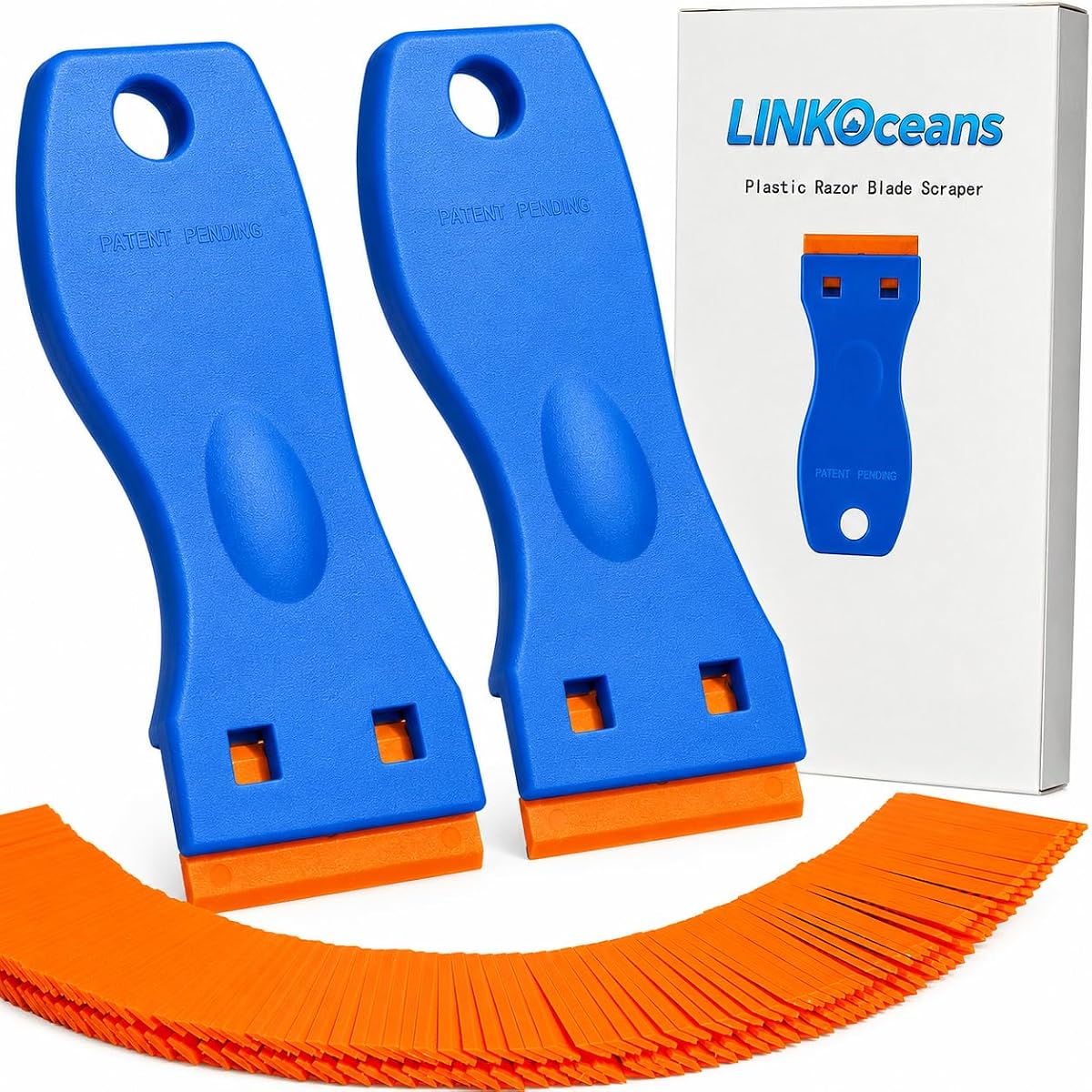
The FOSHIO Plastic Razor Blade Scraper has a 4.6 rating and stands out for its unusually large accessory package: two scraper tools and one hundred double-edge plastic blades. Although its origin is in removing labels, decals, adhesive, and gasket residue, the angled heads and replaceable edges also make it practical for light build-plate cleaning and model removal.
We may earn a commission when you buy through this link, at no additional cost to you.
The plastic material is lightweight, rustproof, and flexible enough to conform somewhat to the work surface. Angled scraper heads are intended to improve control and strength, while the clip system allows blades to be changed quickly. Those characteristics make the set useful for thin films and residue that can be coaxed loose without substantial downward pressure.
This is not the tool to choose when a large TPU print is bonded aggressively to a glass bed. A plastic razor blade lacks the stiffness and mechanical leverage of a dedicated steel spatula, and forcing it under such a model could bend the handle or damage the blade. Even so, the large blade inventory makes it exceptionally practical for routine cleaning tasks and occasional light-duty print removal.
Choose this scraper if you print on smooth surfaces, remove models cleanly without significant adhesion, or want one tool for printer maintenance and household decal removal. It is less appropriate as the only scraper in a workshop that frequently handles high-adhesion materials or large models.
One hundred replacement blades cover many cleaning sessions and can be useful for separating labels, adhesive residue, and dried material from flat surfaces. The clear advantage is availability, although users should still dispose of used blades responsibly.
The angled plastic head helps the user work underneath a model edge with limited downward force. Because the edge is flexible and double-sided, it can be oriented to suit the task while preserving more control over delicate finished surfaces.
We may earn a commission when you buy through this link, at no additional cost to you.
The BIQU Panda Edge 3D Printer Scraper combines a 4.6 rating with a refined all-metal design. Its 6061 aluminum grip is CNC machined and anodized, giving it a durable, decorative appearance suited to a visible desktop setup. The kit includes the Panda Edge scraper and three extra blades compatible with official Bambu-Lab printed grips and blades.
We may earn a commission when you buy through this link, at no additional cost to you.
Integrated magnets allow the tool to attach to a suitable metal surface, such as the exterior of specified Bambu-Lab X1 and P1S models. A desktop vertical holder STL is also offered through the manufacturer's wiki, adding a way to keep the scraper organized when it is not attached to a printer. The SK5 steel blades are designed for easy removal and installation using the fastening screw.
The product emphasizes safe removal, but that outcome depends on technique. Users are instructed to press the end of the spatula grip firmly against the plate before prying and to avoid a steep blade angle. Those cautions are sensible because a sharp metal edge can mark a build surface if the tool is allowed to slide uncontrolled.
This scraper is best for enthusiasts who value materials, machining quality, convenient storage, and direct compatibility with an existing Bambu-Lab-style blade system. It is a particularly polished option for a tidy workshop, though the magnetic holder and replacement ecosystem are not required for every printer.
The anodized 6061 aluminum grip is more than a visual upgrade; it provides a rigid frame that resists flexing under moderate lifting forces. Its finish also helps the tool fit neatly into a visible desktop or workshop arrangement rather than disappearing into a drawer.
Built-in magnets provide an immediate place to keep the scraper on a compatible metal surface. For a permanent workstation setup, the supplied STL holder file adds another organized option without requiring a separate proprietary storage accessory.
We may earn a commission when you buy through this link, at no additional cost to you.
The 22Pcs 3D Printer Scrapers Model Removal Kit is built around a simple premise: a single scraper cannot safely handle every build plate and filament combination. It includes an upgraded plastic scraper with a reinforced stainless steel core and a separate heavy-duty stainless steel tool for prints that adhere aggressively. A customer rating is not available in the supplied information.
We may earn a commission when you buy through this link, at no additional cost to you.
The plastic tool uses twenty included non-scratch blades secured by a brass-and-steel thumbscrew. Its 25-degree head angle is designed to help the edge slide beneath brims and thin layers with less downward force. The steel tool provides the rigidity required for TPU, PETG, ABS, nylon, and other materials that may bond strongly to glass, aluminum, or tape-covered plates.
The extensive package may be more than a user with one printer and one build surface needs. It also includes fixed-position components that may not offer the same modular feel as a dedicated quick-change handle. Even so, the combination of twenty plastic replacements, locking hardware, and separate rigid tooling offers broad practical coverage for a mixed-material workshop.
This kit is a sensible choice for users who alternate between delicate textured PEI sheets and difficult smooth surfaces. It also suits people who want a more substantial package rather than a minimal one-piece spatula. As with any sharp steel tool, the most important practice is to keep the blade angle shallow and avoid dragging it across the plate.
Use the plastic-bladed scraper when preserving a delicate coating is the priority. Move to the rigid stainless steel tool only when a print has enough adhesion that a flexible edge cannot be worked underneath safely, reducing the chance of uncontrolled scratches.
The thumbscrew clamp helps hold the double-edge plastic blade in place and limits movement during use. A stable blade is particularly useful when approaching the model from an angle, where shifting hardware could otherwise change the cutting depth unexpectedly.
We may earn a commission when you buy through this link, at no additional cost to you.
The 3D Printer Tool Removal Scraper Kit has a 4.3 rating and emphasizes versatility through a broad stainless steel scraper with both curved and straight edges. Its one-and-a-half-inch width and 0.4-inch thickness give it enough rigidity for resin residue, stubborn brims, and difficult deposits while also supporting a variety of general cleaning tasks.
We may earn a commission when you buy through this link, at no additional cost to you.
The straight edge is suited to flat build plates and broad residue, whereas the curved section can reach into molds and around rounded surfaces. This distinction makes the tool more adaptable than a single-edge spatula. A hang hole in the handle allows it to be stored within reach, and the stated rust resistance supports continued use around moisture and cleaning residue.
The same rigidity that makes this tool effective also limits its forgiveness. A stainless steel edge can scratch glass, textured coatings, or a finished model if it is dragged across the surface. It is therefore best used with a controlled, shallow approach and paired with a gentler plastic scraper if your plate is especially delicate.
This product fits users who remove resin prints, clean flat plates, or want a sturdy scraper for several workshop chores. It is less attractive as the sole solution for someone who frequently prints delicate models on fragile PEI sheets, but its dual-edge design gives it useful value beyond the printer.
The curved edge can negotiate rounded or recessed areas that a flat blade cannot reach as easily. This makes the tool useful for residue around molds, appliance seams, and similar surfaces, while the straight section handles broad, flat cleaning tasks efficiently.
The thick stainless steel blade resists flexing when inserted beneath a firmly attached brim. That rigidity gives the user more predictable feedback, although it should still be lifted rather than pulled sideways so the edge does not contact the build surface.
We may earn a commission when you buy through this link, at no additional cost to you.
The SARDVISA Professional 3D Printer Tool is a polished stainless steel spatula with a 4.5 rating. Its 2.3-inch blade provides a useful amount of working area for peeling larger prints, while the handle uses a nonslip sleeve shaped to fit the hand. A smooth transition between the blade and handle supports controlled positioning.
We may earn a commission when you buy through this link, at no additional cost to you.
The mirror-polished finish is described as wear-resistant and scratch-resistant, and the rounded transition is intended to reduce accidental contact between a sharp edge and the print or build plate. The broad blade area can make it easier to slide beneath a large brim and lift several contact points together rather than relying on one small corner.
There is no flexible alternative in this set, so users with especially delicate textured plates may want to keep a separate plastic scraper. A polished steel tool still has to be handled deliberately, and its rounded transition cannot guarantee that a model will never be marked. The absence of a stated angle or replaceable blade system also limits fine adjustment compared with modular tools.
This spatula is a good fit for users who prefer a simple, solid, full-width removal tool with a comfortable grip. It may be especially useful for larger models and workshop tasks where broad leverage matters more than minimal contact with the build surface.
A 2.3-inch working edge gives the user a broader purchase point beneath a model brim. That can distribute the lifting action and make large removals feel more balanced, provided the blade is positioned fully under the print before force is applied.
The contoured nonslip sleeve improves purchase and reduces the chance of the hand shifting on the handle. That control is valuable during repeated post-processing sessions, especially when a sharp tool is being positioned close to a delicate build surface.
We may earn a commission when you buy through this link, at no additional cost to you.
The Universal 3D Printer Scraper Tool Kit has a 4.9 rating, making it one of the strongest customer-rated options in this guide. It pairs a CNC-machined, anodized 6061 aluminum handle with three SK5 steel blades and a quick-change fastening system. The package also includes six screws and a 2.0mm hexagon wrench.
We may earn a commission when you buy through this link, at no additional cost to you.
The product description emphasizes balanced weight and a comfortable grip, addressing two common weaknesses of simple metal spatulas. Replaceable SK5 steel blades are intended to remain sharp through repeated use, while the handle dimensions and machining create a rigid frame for controlled model removal. Its stated compatibility includes Bambu Lab X1 and P1-style blades and broader 3D printer use.
A quick-change design is more convenient than working with a permanently fixed edge, but it does mean the screws and wrench must be kept together. The listing does not mention magnetic storage, so this kit may be less tidy on a compatible printer frame than options that include integrated magnets. It also lacks the second, flexible plastic blade found in dual-tool kits.
This scraper is an excellent general choice for users who want a refined rigid tool, several replacement blades, and a straightforward installation process. It is particularly attractive for Bambu Lab X1 or P1 owners who can use compatible blades and for anyone who wants a durable, balanced handle for frequent model removal.
The product is built around a rigid, CNC-machined handle rather than a lightweight plastic shell. Its stated balance and comfortable grip can make fine placement easier, helping the user keep the blade shallow and reduce unintended contact with the build plate.
Three SK5 steel blades allow rotation to a fresh edge when one becomes dull or develops a small imperfection. The included wrench and screws make the system straightforward to assemble, and spare blades help avoid the need to force a compromised cutting edge.
We may earn a commission when you buy through this link, at no additional cost to you.
The D Printer Scraper with 3 Blades has a perfect 5 customer rating and a compact, all-metal design. It combines a CNC-machined 6061 aluminum handle with three SK5 steel blades that are compatible with Bambu-Lab-style spatula blades. Threaded connections secure the blade to the handle and are intended to improve wear resistance and durability.
We may earn a commission when you buy through this link, at no additional cost to you.
A thumb rest supports a natural grip, while the handle's balance and center of gravity are designed to make the tool comfortable during use. A magnet on the back allows the scraper to attach to a compatible metal surface, including the exterior of X1 and P1S-style printers. Blade changes are direct: unscrew the old blade, insert a replacement, and tighten it again.
Its reliance on threaded connections and screw installation means the user should check the screws periodically, especially if the tool is used often. The package is rigid and offers no plastic blade for delicate surfaces, so users may need a separate gentle scraper for especially fragile PEI coatings. It also concentrates its strongest selling points on the Bambu-Lab-style ecosystem.
This is the most complete and balanced pick for a user who values a strong rating, refined metal construction, simple blade changes, and unobtrusive magnetic storage. It handles normal model removal well and feels like a purpose-built bench tool rather than a general household scraper.
The threaded hole connection gives the handle and blade a more positive mechanical link than a simple clip. It is well suited to repeated removal and replacement, provided the fastener is tightened evenly and checked before every use.
A rear magnet keeps the scraper within reach on a suitable metal printer panel or other metal surface. This reduces desk clutter and makes it easier to put the tool away after a print, supporting a smoother workshop routine.
We may earn a commission when you buy through this link, at no additional cost to you.
The 3D Printer Cooktop Scrapers carry a 4.7 rating and focus on broad compatibility across Bambu Lab, Anycubic Kobra, and Creality printer families. Each blade is steel, and the package includes three scraper blades plus eight screws. It is primarily a blade-and-mounting system rather than a complete handheld tool.
We may earn a commission when you buy through this link, at no additional cost to you.
The dual-edge design gives users a sharp side for tough prints and an unsharpened side for delicate adjustments. That choice can help prevent accidental gouging when cleaning small residue deposits from PEI or glass. The stated compatibility list covers numerous Bambu Lab A1, P1, and X1 variants, selected Anycubic Kobra series, and several Creality Ender and K-series printers.
The main limitation is obvious: handles are not included, and users need to print or otherwise obtain one. That makes the kit attractive to makers who enjoy creating their own tool components and less convenient for someone who wants to remove a model immediately. Compatibility should still be checked against the specific mount and printer design before installation.
This product is best for technically inclined users who want a versatile replacement-blade system and already work with custom handles. It offers strong rating and compatibility breadth, but it is not the simplest first scraper for a new printer owner.
The sharp edge is intended for stubborn prints and residue, while the unsharpened edge provides a safer option for fine adjustments. Users can rotate or orient the blade according to the task instead of relying on one edge for every situation.
Because the package contains blades and screws but no handle, it fits a maker-focused workflow in which users print a holder and assemble a personalized tool. That flexibility may also allow the handle shape and length to be matched to a particular printer or preferred grip.
We may earn a commission when you buy through this link, at no additional cost to you.
The Plastic Razor Blade Scraper 2 Pack has a 4.5 rating and emphasizes safe, organized cleaning. It includes two curved plastic handles, one hundred double-edge replacement blades, and a clear storage case. Its intended tasks extend from stickers, paint, grease, and caulk to cleaning 3D printer beds and removing lightly attached models.
We may earn a commission when you buy through this link, at no additional cost to you.
POM plastic construction provides a useful middle ground between a completely rigid metal edge and a thin flexible card. The blades are tough against residue but are presented as safer for glass, stainless steel, painted finishes, and screens. The curved handle and thumb grip improve control, while the hanging hole supports portable storage.
This tool offers less mechanical leverage than a thick steel spatula, so it is not the first choice for a large print that has fused to the bed. Even a plastic blade can scratch a very soft or easily marked surface if dragged. Its strength lies in controlled residue removal and routine maintenance rather than aggressive prying.
Choose this set for light model removal, print-bed cleanup, and general household adhesive work. The large blade count and dedicated case are especially appealing for users who dislike loose blades in a drawer and want a dedicated, gentle scraping solution for multiple surfaces.
The POM plastic blade is designed to work against stubborn residue while presenting less risk than a rigid steel edge. It is still important to test an inconspicuous area and avoid pulling the blade sideways, particularly on glass or glossy appliances.
The clear case keeps two handles and one hundred blades together and reduces the chance of loose replacement pieces being misplaced. Its compact format and hanging hole make the set convenient to move between a workshop, vehicle, kitchen, or cleaning cabinet.
We may earn a commission when you buy through this link, at no additional cost to you.
The best build plate scraper balances edge rigidity, surface protection, leverage, grip, and compatibility. Consider the build plates, filaments, and model sizes you use before deciding whether a gentle plastic blade, a rigid steel spatula, or a dual-tool kit will serve your workflow best.
Choose plastic for routine removal and steel for difficult adhesion. A dual-tool kit offers the most adaptable balance.
Prioritize a plastic edge for fragile coatings and a rigid edge for glass. Confirm any printer-specific compatibility before assembly.
Favor a rigid, shallow-angle system for stubborn prints. Always lift the model rather than dragging the blade sideways.
Look for a nonslip grip, stable wrist position, and balanced weight. Secure handling reduces accidental blade contact.
Choose a secure, convenient replacement mechanism. Keep spare blades organized and replace a damaged edge promptly.
Use plastic for easy removals and steel for large, high-adhesion prints. Own both styles if your materials vary widely.
Prioritize a magnetic mount, hanging hole, or enclosed case. Organized tools are safer, cleaner, and easier to find.
Check the entire contents and intended tasks. Choose useful extras over a larger but less relevant bundle.
Allow the build plate and printed model to cool before attempting removal. Heat can affect both the plastic model and the behavior of certain build surfaces, while a warm plate may make handling less comfortable. Clear loose objects from the work area, then inspect the model to find the best access point beneath a brim, raft, skirt, or support footprint. A shallow edge and a flat tool position are safer than starting in the middle of the model.
Slide the blade under the model only as far as needed. If the material is not strongly adhered, use a plastic blade and apply light, even pressure. For a rigid print, use a steel tool with a controlled shallow angle, pressing the handle close to the plate before lifting. Do not pull the scraper sideways across the surface, and avoid rocking it so aggressively that the edge can strike the plate or the underside of the model.
After use, remove loose filament and residue with a dry or lightly damp cloth as appropriate for the tool, then dry the metal components before storage. Replace a blade when it is dull, bent, or nicked, and tighten screws or clamps before the next job. Keep loose blades in their case or another protected container, and store the scraper on its magnetic attachment, hanging hole, or holder so the cutting edge remains protected and accessible.
A thin, flexible plastic blade is generally the safest first choice for a textured PEI plate because it is less likely than a rigid steel edge to gouge the coating. Work at a shallow angle, lift rather than drag, and test the tool in a less visible area. If the print is strongly bonded, use controlled steel leverage only after positioning the edge safely beneath the model.
Yes, if the scraper has a rigid steel edge and sufficient leverage. TPU can adhere firmly to smooth build surfaces, so a flexible plastic blade may flex or slip. Approach from a low angle, work under a solid brim, and apply gradual force to reduce the chance of scratching the plate or deforming the print.
Yes, especially if the edge is dull, bent, chipped, or developing visible lines on the build surface. A damaged blade can slip, tear a model, or scrape the plate. Replace it before forcing the tool farther under the print, and tighten the retaining screw or clamp fully after installation.
Neither material is universally better. Metal provides stiffness and leverage for stubborn prints, while plastic is gentler on delicate models and coated surfaces. A dual-tool kit is useful for printers that handle both easy and high-adhesion materials, but a separate plastic scraper can serve the same role in a simpler setup.
Yes, as long as the blade is appropriate for the surface and the tool is used carefully. Plastic blade sets are useful for labels, adhesive, and light residue, while metal blades can handle tougher deposits. Avoid dragging the edge across glass or a textured plate, and do not use force if the model is not ready to release.
Clean the glass before removal, use a fresh undamaged blade, and keep the scraper nearly flat while inserting it beneath the print. Lift the model slowly instead of sliding the tool sideways. A plastic blade is the safer choice when adhesion is low; reserve a metal edge for prints that require more substantial leverage.
No, magnetic storage is a convenience rather than a requirement. A hanging hole, desktop stand, drawer organizer, or enclosed case can work just as well. Magnetic storage is particularly helpful when a compatible printer panel or metal surface is available near the work area.
It is usually best to let the model and plate cool before using a scraper. A cooler model is less likely to deform, and handling a cool tool is easier and more consistent. Follow the printer and filament manufacturers' guidance for heated removal, and avoid introducing abrupt cooling that could affect the printed part.
The 14Pcs 3D Printer Scraper Tool is the strongest budget-oriented all-rounder because it pairs rigid metal leverage with a flexible plastic blade and twelve replacements. The D Printer Scraper with 3 Blades stands out as the editor's choice for its five rating, balanced aluminum handle, magnetic storage, and quick-change SK5 blades. For a more refined premium setup, the BIQU Panda Edge offers attractive machining, magnetic storage, a holder file, and Bambu-Lab-style compatibility.
Prioritize the build surface and material you use most often. Choose flexible plastic for delicate coatings, rigid steel for strong adhesion or large models, and a dual-tool system if your workflow includes both. Also consider whether blade replacement, magnetic storage, angled geometry, or a dedicated carry case will make your routine more convenient and safer.
Before ordering, confirm the printer and build-plate compatibility, inspect the complete package, and verify the latest listing details and availability. Product information, seller offers, and customer feedback can change over time, so the current product page remains the best source for final purchasing decisions.


