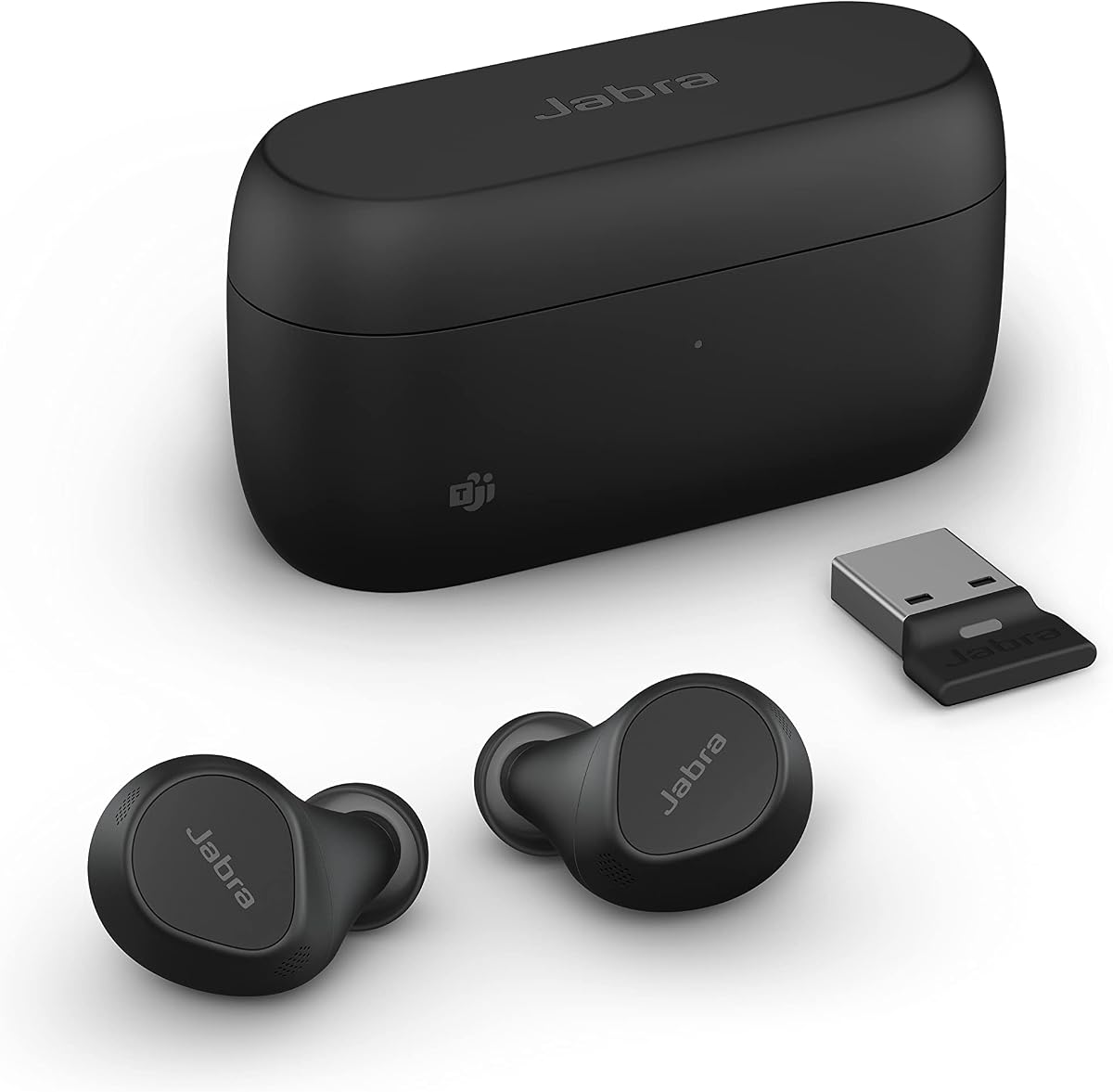
Jabra Evolve2 True Wireless
3.5Editor score
Microsoft Teams certified
Four-mic MultiSensor system
Bluetooth Multipoint connectivity
USB dongle included
Compare the best earbuds for Teams meetings, evaluating call clarity, noise control, multipoint connectivity, comfort, battery life, and device support.
Earbuds for Teams meetings must do more than reproduce music clearly. They need to capture your voice accurately, limit distracting background noise, connect reliably to a computer, and remain comfortable through back-to-back calls. The strongest options also support convenient device switching and offer controls that let you manage meetings without reaching for your laptop.
We compared the ten models below using their published specifications and product information, focusing on microphone systems, active noise cancellation, transparency modes, multipoint Bluetooth, USB receiver support, platform compatibility, controls, fit, battery life, and workplace features. The list includes dedicated business earbuds, certified meeting models, and more versatile wireless earbuds suitable for Teams.
Each review explains where a model stands out and where compromises remain. Product ratings and feature details can change as manufacturers release updates, while prices fluctuate frequently, so readers should verify the current listing and their own Teams setup before buying. The recommendations reflect the information available in November 2026.
3.5Editor score

3.7Editor score
4.1Editor score
The table below compares all ten earbuds across meeting-focused characteristics, including microphone design, connection options, noise-control features, battery specifications, and Teams or conferencing compatibility.


The Dell Pro Plus EB525 is built around a straightforward premise: your voice should remain clear even when the workspace around you is not. It carries a 4.1 rating and combines an AI-based noise-cancelling microphone, Adaptive ANC, and an enhanced transparency mode. That combination makes it particularly interesting for users who regularly move between calls, focused work, and conversations with nearby colleagues.
We may earn a commission when you buy through this link, at no additional cost to you.
The microphone is the central feature. Dell says the system recognizes your voice and filters background noise, while the earbuds also include pinch controls for handling calls. Adaptive ANC is intended to reduce environmental distraction, and a simple pinch switches between deep-focus listening and heightened awareness. These controls reduce the need to open Teams settings or remove an earbud when a colleague asks for your attention.
On-device touch controls add convenience, but the absence of an explicit Microsoft Teams certification in the supplied information means buyers should confirm compatibility for their exact workflow. There is also no listed USB receiver, so connection depends on the computer's Bluetooth implementation. Those are meaningful limitations for office users who need a consistently stable dedicated link rather than relying on wireless pairing alone.
The EB525 is best for a worker who wants a compact, modern-looking pair with serious attention to call pickup and quick mode switching. It is also attractive for hybrid employees who alternate between focus time and spoken collaboration. Confirm that your Teams device supports the required Bluetooth profile and test the microphone in your normal environment, but for voice-first use, this Dell model deserves close attention.
The AI-based noise-cancelling microphone is the feature that most directly serves meeting participants. Its stated purpose is to isolate speech from surrounding noise, making the earbuds relevant to shared offices, home workspaces, and busy public settings.
Pinch gestures move between Adaptive ANC and enhanced transparency without requiring the charging case or phone. On-device volume swipes and call controls further reduce the need for software interaction during a meeting.
We may earn a commission when you buy through this link, at no additional cost to you.
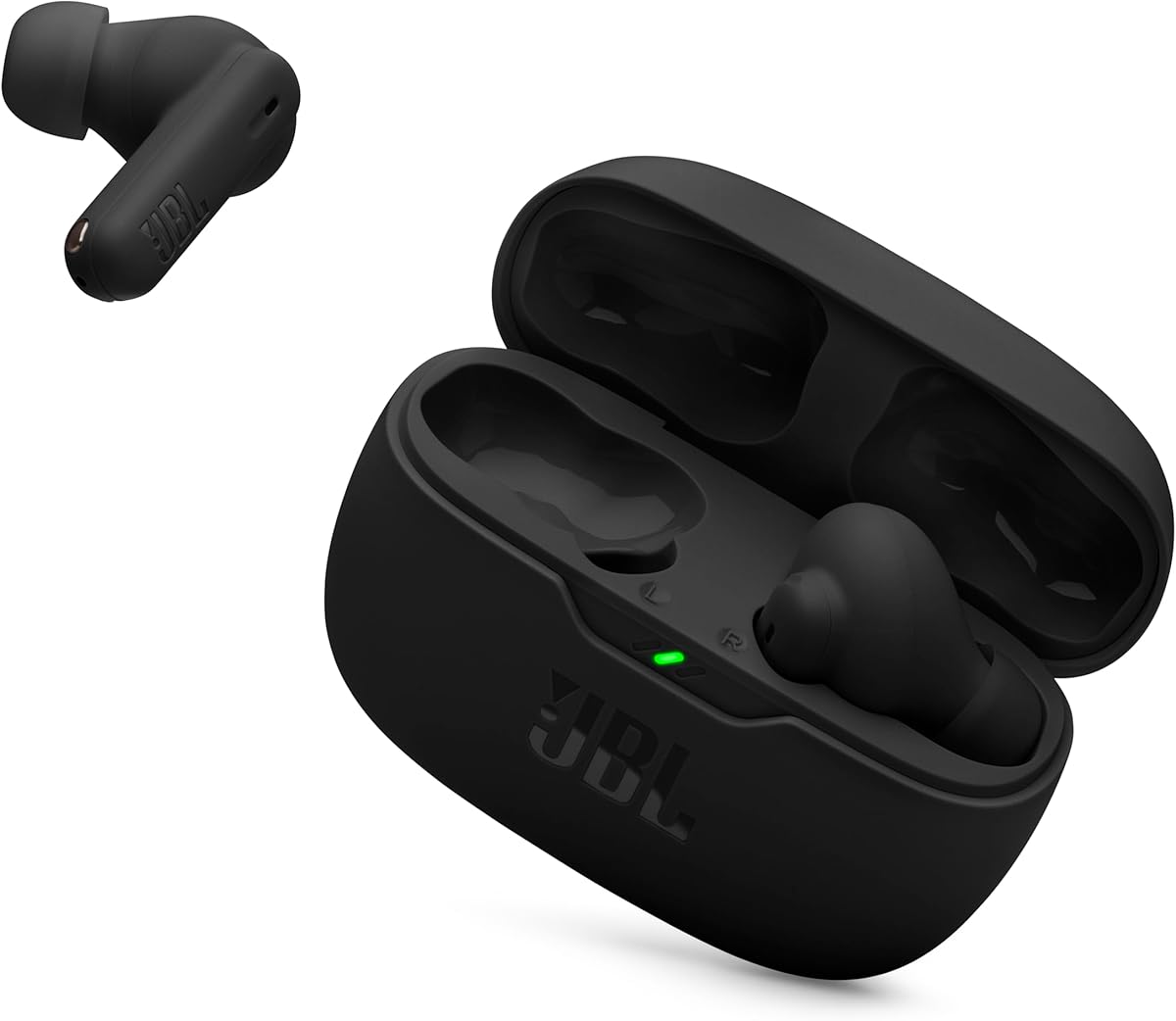
The JBL Vibe Beam 2 is a balanced pick for people who want one pair of earbuds to handle Teams conversations, music, and everyday listening. Its 4.1 rating reflects a broadly capable feature set, including active noise cancellation, four microphones, an ambient-awareness control, and a 4.1-star balance of utility and customer reception. The standard in-ear format also suits users who prefer something less bulky than a headset.
We may earn a commission when you buy through this link, at no additional cost to you.
JBL equips each earbud with two microphones, creating a four-microphone arrangement intended to transmit the user's voice clearly while canceling ambient noise. That is particularly relevant when joining a meeting from a shared room, café, or street. Active noise cancellation filters distracting sound, while Smart Ambient lets users hear their surroundings and remain aware without removing the earbuds.
The app adds EQ selection, custom profiles, voice prompts, and Relax Mode. Those features extend the product beyond meetings, although the supplied specifications do not mention multipoint connectivity, a USB receiver, or formal Teams certification. The earbuds provide up to 10 hours of playback per charge and up to 40 hours with the case when ANC is off, with a short USB-C charge adding three hours of playback.
This is an attractive choice for a hybrid worker who wants credible call tools and strong everyday audio without moving into a dedicated enterprise headset. It may be especially useful for people who take a few meetings each week and also want a dependable pair for music, podcasts, and travel. Teams users should verify their computer's Bluetooth behavior and microphone permissions before committing.
Two microphones in each earbud create a four-microphone call system. JBL describes this arrangement as a way to transmit the wearer's voice clearly while canceling environmental noise, a useful combination in unpredictable workspaces.
The JBL Headphones app supports EQ selection, custom settings, voice prompts, and Relax Mode. That makes the earbuds easier to adapt to changing work and leisure routines without replacing the hardware.
We may earn a commission when you buy through this link, at no additional cost to you.
The Logitech Zone True Wireless stands apart as the most explicitly meeting-oriented option in this roundup. It is certified for Microsoft Teams, Zoom, Google Meet, and Google Voice, and it can connect through native Bluetooth or an included USB receiver. With a 3.7 rating, it is not the highest-rated model, but certification and platform management remain compelling advantages for professional users.
We may earn a commission when you buy through this link, at no additional cost to you.
Each earbud contains three microphones, producing a six-microphone total. The system combines beamforming, cascaded noise reduction, and dynamic processing to distinguish a wearer's voice from surrounding sound. Hybrid active noise cancellation reduces distractions, while Transparency mode allows outside sound to pass through. For computers, the supplied USB receiver offers a dedicated connection path that can be more consistent than relying entirely on Bluetooth.
Logi Tune provides five-band EQ controls, while Logitech Sync gives administrators a centralized way to deploy updates and modify settings across supported video-calling devices. That device-management layer may matter to organizations buying for multiple employees. On the other hand, a consumer who only needs one pair for personal Teams calls may not need the broader management platform or the expense associated with an enterprise-oriented accessory.
Three sizes of removable ear gels help improve fit, isolation, and comfort over long sessions. The Zone True Wireless is best for organizations that value recognized meeting compatibility, straightforward USB connectivity, and centralized management. Despite its modest rating, it remains a focused recommendation for anyone whose daily workflow revolves around desktop video calls and consistent headset deployment.
Certification for Microsoft Teams, Zoom, Google Meet, and Google Voice provides reassurance that the earbuds are intended for common communication environments. That does not replace an in-person microphone test, but it narrows the compatibility question.
The included USB receiver gives users an alternative to the computer's native Bluetooth radio. This can simplify pairing and provide a more consistent connection when a meeting platform is the primary destination.
We may earn a commission when you buy through this link, at no additional cost to you.
The Jabra Evolve2 True Wireless is designed as a portable meeting headset rather than simply an earbud with microphone features. It carries a 3.5 rating and combines four microphones, intelligent algorithms, bone-conduction sensors, adjustable active noise cancellation, Bluetooth Multipoint, and an included USB dongle. It is also Microsoft Teams certified and described as compatible with all meeting apps.
We may earn a commission when you buy through this link, at no additional cost to you.
Its call system is the defining feature. The microphones and bone-conduction sensors work together to reduce background noise and help the wearer hear and be heard clearly. The USB dongle is especially relevant for online meetings, providing a stable connection and an alternate route to the computer. Bluetooth Multipoint keeps the earbuds connected to a laptop and smartphone, allowing users to move between devices without manually disconnecting one.
The trade-off is that its 3.5 rating is the lowest among the listed products, which suggests some users have been less satisfied with the overall experience. The supplied information calls the earbuds water resistant but does not provide a specific ingress rating, so the durability claim should not be interpreted as permission to expose them to every type of water. Its meeting credentials remain strong despite the lower rating.
Choose the Evolve2 when calls are the primary purpose and reliable device switching matters more than a broad entertainment feature set. It suits commuters, mobile employees, and office users who regularly move between a laptop and phone. Anyone concerned about fit should test the in-ear design, while buyers prioritizing a longer list of listening features should compare it with the Soundcore Liberty 5 Pro Max.
The four-microphone MultiSensor arrangement works with algorithms and bone-conduction sensors. Those combined technologies are intended to improve voice pickup and reduce the chance that background noise overwhelms your side of a conversation.
Bluetooth Multipoint keeps a laptop and smartphone available at the same time. The included USB dongle adds another dependable meeting connection option, making the earbuds suitable for mixed office and mobile workflows.
We may earn a commission when you buy through this link, at no additional cost to you.
The XIAOWTEK S58 Pro is the highest-rated product in this guide, with a 4.9 rating and a feature set aimed at users who want more than basic meeting support. It combines Bluetooth 5.4, a four-microphone ENC system, touch controls, a visible case display, and up to 50 hours of total playback. Its stated compatibility with phones, tablets, and laptops makes it a plausible fit for a broad range of Teams setups.
We may earn a commission when you buy through this link, at no additional cost to you.
The call system uses ENC technology that the manufacturer says captures the user's voice while blocking up to 80% of background noise. Bluetooth 5.4 is intended to provide a stable connection, and the product description cites lower power consumption and stronger signal penetration than Bluetooth 5.3. A stated range of up to 15 meters gives users room to move around a home office or shared workspace without immediately losing the link.
There are trade-offs. The supplied information does not mention Microsoft Teams certification, multipoint connectivity, or a USB receiver. For a professional who depends on the computer link every day, those omissions matter more than a high customer rating or the earbud display. The IPX7 rating is also a benefit for commuting and workouts, but it should not distract from checking Teams microphone behavior in a real meeting.
This model is best for buyers who want high-rated general-purpose earbuds with generous claimed battery life, modern wireless features, and dependable call-oriented ENC. It may be particularly attractive to people splitting time between meetings, music, and exercise. Teams professionals should first confirm that their device supports the necessary Bluetooth audio functions and then test the microphones in their usual environment.
Its 4.9 rating is the highest among the products compared here. That makes the S58 Pro an encouraging choice when customer feedback is an important part of the selection process, although ratings remain a snapshot rather than a guarantee of fit or call performance.
Dual digital indicators display the charging-case and earbud power levels. The earbuds are stated to run for six hours per charge, with the 470mAh case providing four additional full charges for a claimed 50-hour total.
We may earn a commission when you buy through this link, at no additional cost to you.
The TAGRY Hybrid ANC combines a 4.4 rating with a distinctive earhook design, hybrid active noise cancellation, and a claimed 80-hour total battery life. It is presented as a work-capable pair for phones, tablets, laptops, smart TVs, and other Bluetooth devices. The earhooks are the most immediately recognizable feature and may appeal to users who have found ordinary in-ear earbuds less secure.
We may earn a commission when you buy through this link, at no additional cost to you.
The integrated chip dynamically adjusts noise optimization, and TAGRY states that the system can reduce ambient noise by up to 90%. Transparency mode is accessed through a triple-tap on the multifunction button, allowing outside sound to enter while music continues. Bluetooth 5.4 is used for transmission efficiency and lower latency, while the stated connection range reaches up to 33 feet.
The biggest uncertainty for a Teams buyer is that the supplied specifications do not mention a dedicated microphone array, explicit Teams certification, multipoint connectivity, or a USB receiver. Its broad compatibility is useful, but it may not offer the same level of enterprise IT support or desktop integration as the Logitech and Jabra models. The earhook shape itself may also be less comfortable for users who prefer a completely discreet profile.
TAGRY is best for someone who values stable placement, long battery life, and active noise cancellation for both work and travel. It can serve as a solid choice for mobile employees who move frequently and want awareness of their surroundings. For a business laptop workflow, check Bluetooth permissions, ensure the earbuds are selected as the microphone and output device, and conduct a short call test before committing.
Soft composite earhooks wrap around the outer ear to improve stability. That design can be particularly useful during commuting or active work, where a conventional in-ear bud may feel less secure.
The earbuds are stated to deliver up to 10 hours per charge, while the case expands the claimed total to 80 hours. LED displays show the status of both the earbuds and case, and a full Type-C recharge takes about one hour.
We may earn a commission when you buy through this link, at no additional cost to you.
The Soundcore P30i delivers a balanced mix of meeting tools, active noise cancellation, app-based personalization, and travel-friendly features. It has a 4.3 rating and uses four microphones with an AI algorithm for call clarity. Adaptive noise cancellation detects external sound and selects a level intended to suit the listener, while a transparency mode restores awareness when needed.
We may earn a commission when you buy through this link, at no additional cost to you.
For Teams users, the four-microphone AI-enhanced call system is the most relevant feature. The 10mm drivers and BassUp technology also make the earbuds practical for music between meetings. Bluetooth 5.4 supports straightforward pairing and automatic reconnection to the last device, and the soundcore app provides EQ modes, ANC settings, and over-the-air firmware updates.
The P30i is not presented as a certified enterprise headset, and the supplied information does not list multipoint or a USB receiver. That means it is best suited to people whose computer has dependable Bluetooth audio and who do not require centralized device administration. Another unusual feature is the case's folding phone stand, which is more relevant to watching video than to online meetings but adds value to travel days.
This is a practical recommendation for budget-conscious professionals who want respectable call microphones, adaptive ANC, and app controls in one familiar package. It also makes sense for users who alternate among calls, video, music, and short breaks. Confirm your Teams microphone selection, test the noise handling in a realistic room, and update the app before relying on adjustable settings.
The noise-control system detects external sound and selects an appropriate cancellation level. That automation can make transitions between a noisy commute and a quiet desk less distracting.
The soundcore app exposes EQ modes and adjustable ANC settings while also providing firmware updates. Users can adapt the earbuds to different environments without relying on the physical controls alone.
We may earn a commission when you buy through this link, at no additional cost to you.
The Soundcore Liberty 5 Pro Max is the most feature-dense option in this roundup, combining a 4.2 rating, advanced call processing, sophisticated noise cancellation, and a charging case with an AI note-taker. It uses ten sensors for Whisper-Clear Calls and eight sensors for active noise cancellation, with the company stating that its Thus AI Chip processes more than 384,000 noise signals per second.
We may earn a commission when you buy through this link, at no additional cost to you.
The case adds genuinely unusual meeting-adjacent functionality. Its built-in microphone can record in-person meetings and interviews, then create transcriptions, summaries, key points, and action items. It explicitly does not capture online meetings, video calls, or phone calls, so it is not a Teams recording solution. A 1.78-inch AMOLED display provides access to recording, ANC, and other earbud settings, while the soundcore app manages personalization and hearing profiles.
Privacy controls are an important part of the proposition. The product information states that local AES-256 encryption secures conversations, temporary cloud files are deleted when cloud sync is disabled, and the software follows a range of stated security standards. Users should still review organizational policies and subscription terms before recording sensitive conversations, because AI transcription includes service tiers and usage limits.
The Liberty 5 Pro Max is best for a professional who wants top-tier voice pickup, powerful noise control, and in-room note capture in one ecosystem. It is less appropriate if the primary goal is Teams transcription, since the case explicitly cannot capture online meetings. Buyers should also consider the subscription structure and confirm that the advanced features match their actual workday before purchasing.
Ten call sensors and the Thus AI Chip support voice pickup in environments described by the manufacturer as extremely noisy. HearID 5.0 and an AI audio enhancer personalize the listening result for the individual user.
The charging case can record and summarize in-person conversations, but it does not capture online meetings, video calls, or phone calls. Teams users should treat it as an adjacent productivity tool rather than a meeting recorder.
We may earn a commission when you buy through this link, at no additional cost to you.
The JLab Work Buds take a headset-style approach to the true wireless category. They include a detachable noise-cancelling boom microphone, in-ear audio, Bluetooth Multipoint, and a USB-C charging dock. With a 3.9 rating, they are especially interesting for workers who prioritize a clearly positioned microphone over the smallest possible profile.
We may earn a commission when you buy through this link, at no additional cost to you.
The boom mic is intended to deliver a clearer, more consistent voice pickup in busy offices and on city streets. Because it can be worn on either ear, users can choose the side that feels most comfortable and keep the other ear open. Removing the microphone switches the product between call mode and regular listening, while the underlying earbuds retain MEMS microphones for everyday use.
The dock does more than recharge. It is designed to keep the earbuds and microphone organized while adding a claimed 45 hours of playback, bringing the total to more than 55 hours. The earbuds themselves run for more than 10 hours per charge, including more than six hours of talk time. Bluetooth 5.3, a range above 30 feet, and multipoint support make them practical for laptop-and-phone workflows.
The principal trade-off is bulk. A boom microphone makes the setup less discreet than a conventional earbud, and the supplied specifications list no water-resistance rating, so the product is best treated as a work-focused option. It is a strong recommendation for users who often speak in noisy environments, dislike headset bands, and want the stability of a directional microphone without giving up true wireless earbuds.
The detachable boom mic places the voice pickup close to the mouth and away from much of the surrounding noise. That visible positioning also communicates clearly to colleagues when a person is in a call.
The USB-C dock charges the earbuds and provides a dedicated home for the work set. Its additional claimed playback makes it convenient to keep the complete setup available at a desk between sessions.
We may earn a commission when you buy through this link, at no additional cost to you.
The TOZO NC3 combines a 4.3 rating with six microphones, hybrid active noise cancellation, IPX8 protection, and a claimed 68-hour total battery life. Its specification explicitly mentions phone calls and online meetings, making it a practical general-purpose option for users who want stronger call-related hardware and extensive customization in a conventional in-ear design.
We may earn a commission when you buy through this link, at no additional cost to you.
The six-microphone ENC system is designed to reduce background noise so the user's voice comes through more clearly in calls and online meetings. Hybrid ANC targets steady low-frequency sounds such as transit rumble, aircraft engines, and air-conditioning hum. Multiple ear-tip sizes help create a seal, which is important because an imperfect fit can undermine both isolation and microphone performance.
The TOZO app adds 32 EQ presets, custom sound controls, sharing options, and AI assistance features. Playtime reaches a claimed 13 hours per charge with ANC off and nine and a half hours with ANC on, while the case provides 68 hours when ANC is disabled and 40 hours when it is enabled. A ten-minute top-up supplies up to one hour of playback.
TOZO NC3 is best for a budget-minded professional who wants a feature-rich pair for Teams, music, workouts, and travel. It is less conclusive as an enterprise headset because the information does not list Teams certification, multipoint connectivity, or a USB receiver. Check Bluetooth permissions and perform a call test, particularly if you regularly speak from a room with substantial reverberation or background conversation.
The six-microphone ENC arrangement is intended to improve voice clarity in busy offices, cafés, and public locations. It gives the NC3 a more elaborate call specification than many similarly positioned earbuds.
The companion app offers 32 EQ presets and custom sound profiles, including a balanced option for meetings or speech. Users can also share EQ settings through the app's EQ Zone.
We may earn a commission when you buy through this link, at no additional cost to you.
The right meeting earbuds should prioritize reliable voice pickup, dependable computer connectivity, comfortable long-session wear, and useful noise controls. The following factors help separate a general-purpose earbud from a headset that can handle the demands of a full calendar of Teams conversations.
The number of microphones is only a starting point because placement, beamforming, and noise-processing algorithms affect real-world clarity. For Teams meetings, look for a dedicated call system, multiple outward-facing microphones, and features designed to separate a wearer's voice from room noise. Products such as the Logitech Zone True Wireless use three microphones per earbud, while the Jabra Evolve2 combines four microphones with bone-conduction sensors and the TOZO NC3 uses a six-microphone ENC arrangement. Reviewing the manufacturer's intended environments is helpful, but the only meaningful test is a short call in the room where you actually work.
Bluetooth is convenient, but it is not the only connection method. A dedicated USB receiver can provide a more stable path to a computer and reduce pairing uncertainty, which is why the Logitech Zone and Jabra Evolve2 include one. Other models rely on native Bluetooth 5.3 or 5.4. Check whether your computer supports the required Bluetooth profiles, how the earbuds appear after restarting, and whether the selected microphone remains the Teams input. If you regularly move between a phone and laptop, multipoint connectivity is particularly valuable because it allows both devices to remain connected.
Formal certification provides a stronger indication that a product has been evaluated for a particular meeting ecosystem. The Logitech Zone True Wireless and Jabra Evolve2 are explicitly Microsoft Teams certified in the supplied information and also support common platforms such as Zoom and Google Meet. Certification does not guarantee that every microphone behaves ideally in every room, but it can simplify IT selection and compatibility decisions. For models without explicit certification, confirm the current product listing and test microphone permissions before purchasing.
Active noise cancellation can make a long meeting easier to follow by reducing steady distractions such as ventilation, traffic, and office chatter. It is most useful when your own voice is transmitted clearly. Transparency mode serves a different purpose: it lets outside sound enter so you can hear a colleague, an announcement, or a cashier. Dell calls its system Adaptive ANC, Logitech uses hybrid ANC, and TAGRY and TOZO also offer hybrid cancellation. A three-position control or clearly marked mode button is useful because it makes the transition faster than digging through an app.
Meeting earbuds may remain in your ears for an hour or more, so fit affects both comfort and performance. An inadequate seal can let in noise and reduce the benefit of active cancellation. The Logitech Zone includes three sizes of removable ear gels, while TOZO emphasizes multiple tip sizes. TAGRY uses soft composite earhooks for stability, and the Jabra Evolve2 takes a compact in-ear approach. The JLab Work Buds add a boom mic, which creates a more headset-like profile. Consider both the physical size and the pressure points, and test the model for at least one extended meeting before committing.
Meeting-day battery needs depend on how many calls you take and whether noise cancellation remains enabled. Published totals usually combine several earbud charges with the case, so compare the per-charge figure as well. The JBL Vibe Beam 2 offers 10 hours per charge with 40 hours through the case when ANC is off. TOZO advertises 68 hours with ANC disabled, TAGRY claims 80 hours, and JLab's boom-mic model includes a desktop dock. For shorter schedules, fast charging may be more useful: JBL states that ten minutes of charging adds three hours, while Soundcore P30i states that a ten-minute charge adds two hours.
Useful controls let you handle calls and listening modes without opening Teams or your phone. Dell provides pinch gestures and swipe volume controls, TAGRY uses a multifunction button, and several competitors support voice prompts or app controls. Software can also provide EQ, firmware updates, ANC settings, and device management. The Logitech Zone has a distinct enterprise advantage through Logi Tune and Logitech Sync, while Soundcore products expose EQ and ANC controls in their app. Choose a control scheme that remains easy to find once your attention is divided between colleagues and the meeting.
Some work-focused earbuds add capabilities beyond audio, such as multipoint connectivity, desktop charging docks, case displays, or in-room recording. The Soundcore Liberty 5 Pro Max can transcribe and summarize in-person conversations through its case, but it explicitly does not capture online meetings, video calls, or phone calls. It also uses subscription tiers for extended transcription. Before enabling recording or cloud processing, review organizational rules, understand what audio is retained, and confirm whether a meeting feature actually supports your Teams workflow.
Begin by fully charging the earbuds and case, then install any companion app before your first meeting. Update the firmware, pair the earbuds with your computer, and confirm that Windows recognizes them as separate microphone and speaker devices. If the model includes a USB receiver, connect it directly to the computer and use that route when a call is especially important. Set the selected microphone in the Teams audio menu, then make a short test call to confirm both that your voice is clear and that the other participant sounds natural.
Choose ANC for sustained noise, but switch to transparency when you need to hear the physical workspace. Keep the earbuds seated firmly because a poor seal can reduce noise isolation and microphone consistency. Use the physical controls to accept or end calls, adjust volume, and move between modes without opening an app. When the earbuds support multipoint, keep both the laptop and phone connected, but verify manually which device is currently selected before every important meeting.
Care for the earbuds by cleaning the tips and microphone openings with a soft, dry cloth or a lightly dampened cloth compatible with the material. Keep the charging contacts free of dust, avoid storing the earbuds wet, and do not exceed the charging case's input rating. Replace removable tips or ear gels as they wear out, and use the supplied case or a protected compartment during travel. Periodic app checks can reveal firmware updates, while a short microphone test before major calls helps identify a failing tip, dirty port, or unstable connection early.
Certification generally means the product has been evaluated for compatibility and expected behavior within the Teams ecosystem. It can simplify deployment for IT teams and reduce uncertainty about meeting controls. However, certification does not eliminate room acoustics, fit, or computer-configuration differences, so a real microphone test remains advisable.
A USB receiver can provide a more consistent dedicated connection to a desktop computer and often makes device selection easier. Standard Bluetooth is more convenient when you frequently switch between a laptop, tablet, and phone. If your setup relies on one office computer, a receiver is worth considering; if mobility matters most, confirm that native Bluetooth is stable on your devices.
ANC can reduce persistent environmental noise and make it easier to focus on what colleagues are saying. It is especially helpful near air-conditioning, traffic, printers, or other steady sound. It is less effective against unpredictable nearby speech, so microphone processing, a good seal, and suitable room acoustics still matter.
The supplied information does not identify any model as a direct Teams recorder. The Soundcore Liberty 5 Pro Max can record in-room conversations through its charging case, but it explicitly excludes online meetings, video calls, and phone calls. Use approved meeting software and organizational recording policies when you need to capture a Teams session.
Multipoint is useful when your work involves both a computer and phone. It can keep both devices connected and reduce the need to manually re-pair each time you switch. You still need to check which device is selected as the active audio source before joining a meeting, because multipoint maintains connections rather than automatically choosing the intended one.
Open the Teams audio settings before joining and select the specific earbuds or USB-connected headset from the microphone menu. Verify the speaker and microphone choices in the operating system's sound panel as well, because Teams follows the default device selection. A short test call can reveal a mismatch before a larger meeting begins.
Look for multiple microphones, directional or beamforming behavior, dedicated noise processing, and a design that keeps the voice pickup well positioned. The microphone count alone does not guarantee clarity, so test the earbuds in the environment where you regularly work. Fit is also important because a loose ear tip can allow noise to leak around the microphone.
A full workday is easiest when the earbuds provide at least several hours of talk time and the case can recharge them between meetings. Published playback figures often assume ANC is off, while active noise cancellation usually reduces runtime. Check both figures and the quick-charge behavior if you have back-to-back calls or forget to charge the case regularly.
The Logitech Zone True Wireless is the most straightforward enterprise-oriented recommendation because of its explicit Teams certification, included USB receiver, six-microphone design, and centralized device management. Jabra Evolve2 is the strongest alternative for users who prioritize multipoint connectivity, multiple call sensors, and stable meeting-app support. The JBL Vibe Beam 2 offers a more balanced and accessible general-purpose option with four microphones, ANC, and app-based personalization.
The right choice depends on the weakest link in your setup. A certified business model and USB receiver make sense for a fixed office computer, while multipoint is valuable for people moving between a laptop and phone. For casual or hybrid workers, adaptive ANC, solid ENC microphones, a comfortable fit, and long battery life may matter more than deployment features. In every case, test the microphone in your real room and ensure the earbud tips create a proper seal.
Ratings, software capabilities, firmware behavior, and prices can change, so check the current Amazon listing before purchasing. Also confirm the latest Teams and operating-system compatibility, review any business-management or subscription terms, and verify the included accessories. Those final checks can prevent a technically capable pair of earbuds from becoming a frustrating addition to your meeting setup.