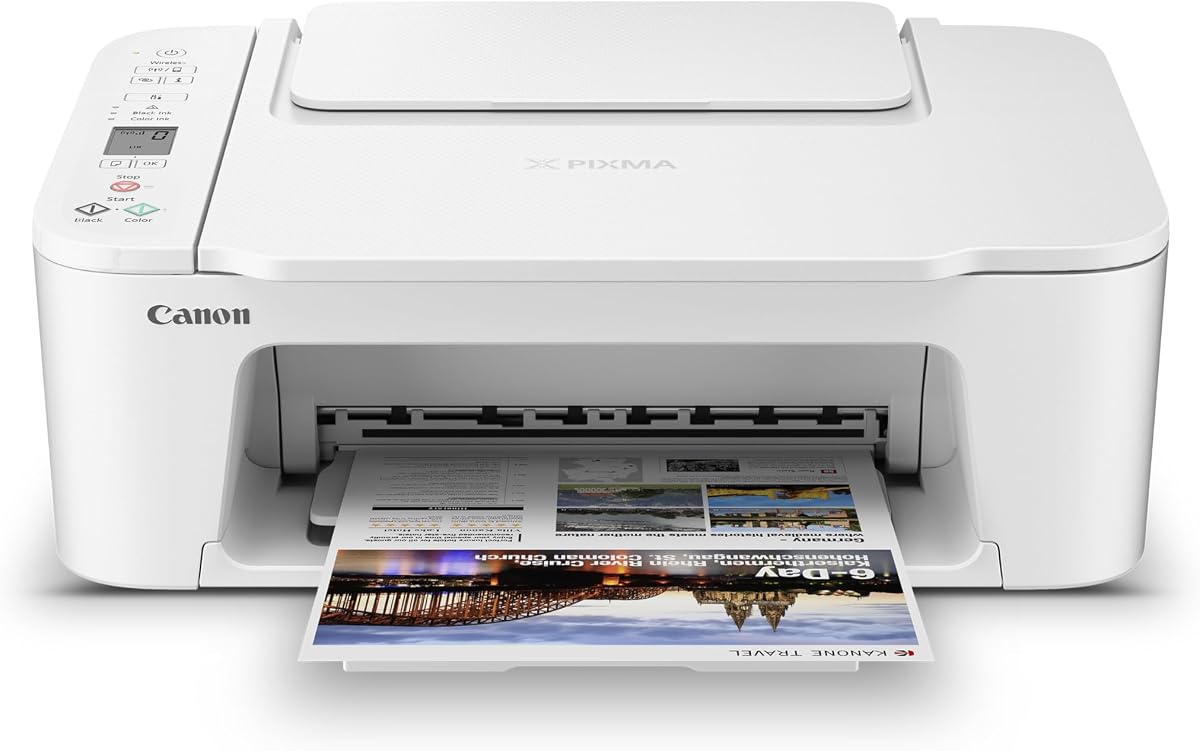
Canon PIXMA TS6520
4.2Editor score
Automatic two-sided printing
Two-cartridge ink system
Compact OLED status display
Dual-band wireless printing
A home printer can be inexpensive to buy yet unexpectedly expensive to operate, especially when frequent color jobs leave conventional ink cartridges empty. The most economical choices combine affordable hardware with refillable tanks, generous included ink, or cartridge systems that keep long-term material costs under control.
We compared these ten printers on the factors that shape everyday ownership: ink system, included ink, estimated page capacity, automatic duplex printing, document handling, wireless connectivity, controls, and intended home workload. The list covers standard cartridge models, premium all-in-ones, and high-volume ink-tank printers.
Each review explains what distinguishes the model, where it offers the strongest value, and which types of users should consider it. Product ratings and retail pricing can change, so check the current listing and ink terms before making a final purchase.
4.2Editor score

4.2Editor score

4.1Editor score
As an Amazon Associate we earn from qualifying purchases.
The comparison below highlights the major differences among cartridge-based and ink-tank printers, including duplex capability, document handling, connectivity, display type, and the amount of included ink. These details help identify the model that fits a particular home-printing routine.






The HP DeskJet 2955 is a basic wireless all-in-one aimed at homes that need color documents, occasional photos, copying, and scanning without advanced office features. Its 3.7 rating places it behind several stronger competitors, but its straightforward approach may suit users who prioritize simplicity over productivity extras.
We may earn a commission when you buy through this link, at no additional cost to you.
Its main advantage is the combination of printing, scanning, and copying in one unit, along with wireless support and a three-month Instant Ink trial. The model weighs 10.450 pounds, which reinforces its portable, home-oriented design. It is a sensible option for homework, recipes, invitations, and light color projects, although the supplied details do not mention an automatic document feeder or automatic duplex printing.
The principal trade-off is its modest feature set. Compared with the HP Envy 6155, the DeskJet lacks a color touchscreen, larger 100-sheet tray specification, and automatic two-sided printing. Its lower rating also suggests that some buyers may have encountered an experience that does not match the convenience of more capable models. For users who simply need basic wireless output, those limitations may be acceptable.
Choose the DeskJet 2955 if your printing needs are light, you want an uncomplicated all-in-one, and the included ink trial fits your habits. It is less compelling for heavy school projects, frequent multipage documents, or users who want to minimize paper use. Those needs are better met by a model with automatic duplex printing and more substantial paper handling.
Wireless printing removes the need to run a USB cable from a computer every time a document is needed. The printer's basic print, scan, and copy functions make it a flexible addition to a kitchen office, dorm, or mixed-use home workspace.
The included three-month Instant Ink trial can be attractive to households that want to evaluate ink delivery before committing. Users should review the service terms and cancellation details, since a monthly fee applies after the trial unless canceled.
We may earn a commission when you buy through this link, at no additional cost to you.
The HP Envy 6155 combines a 4.2 rating with the convenience expected from a well-equipped home printer. It supports color printing, scanning, copying, automatic duplex printing, wireless connectivity, and a 100-sheet input tray, making it a strong general-purpose choice for families and hybrid workers.
We may earn a commission when you buy through this link, at no additional cost to you.
The 2.4-inch color touchscreen is one of its most useful features. It gives users an intuitive way to navigate settings without relying entirely on a computer or phone. Dual-band Wi-Fi can also improve connection reliability, while HP AI helps format web pages and emails for cleaner output. Printing speeds reach up to 10 pages per minute in black and seven pages per minute in color.
Its biggest ownership consideration is the ink arrangement. The printer includes a three-month Instant Ink trial, after which a monthly service fee applies unless canceled. Some buyers may prefer that predictable delivery model, while others may want greater control over cartridge purchasing. The printer is also restricted to cartridges with original HP chips or circuitry, which should be considered before buying third-party replacements.
For most households seeking one versatile printer, the Envy 6155 is an easy recommendation. It offers more useful everyday capabilities than the DeskJet 2955, including automatic duplex printing, a larger input tray, and a more advanced display. Choose it over tank-focused alternatives when you want polished controls and balanced home-office features without moving to the highest-capacity ink system.
The color touchscreen gives the Envy 6155 a clear advantage over models with small segment displays or no panel. Combined with HP AI-assisted page formatting, it makes routine documents easier to prepare and reduces awkward layouts or unnecessary pages.
Automatic two-sided printing is valuable for reports, worksheets, and long web articles. It can reduce paper consumption and make finished documents look more polished without requiring manual page flipping.
We may earn a commission when you buy through this link, at no additional cost to you.
The Canon PIXMA TS6520 is a compact, highly rated all-in-one that brings duplex printing to an affordable home-printer format. Its 4.2 rating matches the HP Envy 6155, while the 1.42-inch OLED display offers clear status information in a compact enclosure.
We may earn a commission when you buy through this link, at no additional cost to you.
Its two-cartridge hybrid ink system is designed to produce sharp text and vivid colors for documents and photos. Automatic two-sided printing helps conserve paper, while dual-band Wi-Fi supports dependable wireless operation. The printer handles media up to 8.5 by 11 inches with or without borders and works with the Canon PRINT app, Apple AirPrint, and Mopria Print Service.
The main limitation is that this remains a cartridge-based printer. That makes it less naturally suited to very high-volume printing than the Canon MegaTank G3270 or HP Smart Tank 5003. It also lacks an automatic document feeder, so multipage copying and scanning require manual page handling. Nevertheless, its compact footprint and useful feature set are meaningful advantages for a smaller workspace.
This is a strong budget recommendation for users who print a mixture of schoolwork, household documents, and color photos and want automatic duplex printing. It may be the better fit than a bulkier office model when desk space matters. For high-volume ink needs, move up to an ink-tank printer rather than choosing it solely for its attractive entry-level configuration.
The small footprint helps the TS6520 fit into areas where a full office printer would be impractical. Its OLED display provides quick visibility into ink levels, printer status, and settings without making the controls the dominant feature.
Support for bordered and borderless output makes this model useful beyond plain text documents. Mobile printing options also make it convenient to produce quick photos and creative projects from a phone or tablet.
We may earn a commission when you buy through this link, at no additional cost to you.
The Canon PIXMA TS4320 is a budget-focused wireless all-in-one for home users and hybrid workers. Its 3.9 rating is solid, and the combination of printing, copying, scanning, automatic duplex printing, and dual-band Wi-Fi gives it more capability than the most basic printers.
We may earn a commission when you buy through this link, at no additional cost to you.
The two-cartridge hybrid ink system supports sharp text and vivid colors for everyday documents and photos. Setup can be completed from a smartphone or computer, and the printer supports Canon PRINT, Apple AirPrint, and Mopria Print Service. Its EPEAT Silver and ENERGY STAR certifications may appeal to buyers who want a more environmentally conscious home setup.
Compared with the TS6520, the TS4320 has a slightly lower rating and does not highlight an OLED status display. Both models use a similar cartridge-based approach and lack a specified automatic document feeder. As a result, the TS4320 is most compelling when its supported functions and certifications matter more than premium controls or a faster workflow for long documents.
Consider the TS4320 if your household needs affordable daily color output, automatic duplexing, and wireless printing in a relatively compact unit. It is a reasonable middle ground for assignments, grocery lists, reports, and occasional photos. Users who routinely scan or copy lengthy documents should favor the TR7120 or TR4720 for their automatic document feeders.
Automatic two-sided printing is a particularly useful feature in a compact model, allowing long documents to print efficiently on both sides of the paper. Dual-band Wi-Fi also supports more flexible placement within the home.
EPEAT Silver and ENERGY STAR certifications provide useful environmental context for shoppers. They do not eliminate ink use, but they indicate attention to efficiency and recognized product standards.
We may earn a commission when you buy through this link, at no additional cost to you.
The Canon MegaTank G3270 is the standout choice for buyers who want to minimize ink replacement frequency. Its refillable tanks come with up to two years of ink, and Canon states that one set can produce up to 6,000 black-and-white pages or 7,700 color pages.
We may earn a commission when you buy through this link, at no additional cost to you.
That included capacity changes the economics for households that print regularly. Rather than treating every cartridge replacement as a routine event, users can refill the larger tanks and print substantial volumes between services. The printer supports wireless printing, copying, and scanning, while a 1.35-inch square LCD gives basic visibility into settings and status.
Its main limitation is that the stated feature set includes single-sided printing only. That makes it less appealing for users who routinely print lengthy reports and want automatic duplexing. Although the G3270's ink advantage is substantial, the upfront hardware cost is also higher than that of many cartridge models, so low-volume users may get less value from its larger tanks.
Choose the MegaTank G3270 for families, educators, freelancers, or home offices that regularly produce color pages, lesson plans, coupons, or work documents. It is especially compelling when avoiding repeated cartridge purchases matters more than duplex printing. For occasional printing, one of the Canon PIXMA models may be the more sensible investment.
The ability to print up to 7,700 color pages or 6,000 black-and-white pages from a set of inks gives the G3270 a clear advantage for high-volume users. The included supply can reduce early replacement concerns.
Refillable tanks are designed for fewer, larger ink additions rather than frequent cartridge swaps. That makes the printer a strong fit for consistent printing where cartridge logistics would become repetitive.
We may earn a commission when you buy through this link, at no additional cost to you.
The Brother Work Smart 1360 is built for home offices that need more than a basic printer. Its 3.8 rating is the lowest among these ten models, but the documented hardware is productive: it includes automatic duplex printing, a 20-sheet automatic document feeder, and a 150-sheet paper tray.
We may earn a commission when you buy through this link, at no additional cost to you.
The compact design does not prevent useful office workflow features. Print speeds reach up to 16 pages per minute in black and nine pages per minute in color. A 1.8-inch color display provides on-device access to popular cloud services including Google Drive, Dropbox, Box, and OneDrive, while USB and wireless connections offer setup flexibility.
Its central weakness is that the product does not offer the refillable-tank economics of the MegaTank G3270 or Smart Tank 5003. Buyers focused exclusively on the lowest possible ongoing ink cost may find a tank model more compelling. The 3.8 rating also warrants checking recent customer feedback for any recurring setup or reliability concerns.
The Work Smart 1360 is best for users who regularly process multipage documents and value the included feeder, duplex capability, and roomy tray. Choose it when workflow efficiency is as important as ink affordability. For occasional documents, a simpler cartridge printer may provide adequate performance with fewer features to manage.
The 20-sheet automatic document feeder makes the printer substantially more useful for multi-page copying and scanning. It is a meaningful advantage over compact all-in-ones that require each page to be placed on the glass.
The 1.8-inch color display can connect to widely used cloud storage platforms, reducing the need to move files through a computer first. Brother Mobile Connect also centralizes printing, copying, scanning, and ink monitoring.
We may earn a commission when you buy through this link, at no additional cost to you.
The HP Smart Tank 5003 is designed around low-cost, high-volume printing and includes up to three years of HP ink. HP states that the box can contain enough ink for up to 6,000 color or black pages, positioning it as a practical solution for households that print frequently.
We may earn a commission when you buy through this link, at no additional cost to you.
Its cartridge-free ink tanks use a straightforward refill process: users connect ink bottles to the tank and allow the ink to drain without squeezing. The printer supports printing, copying, scanning, borderless output, and mobile and wireless printing. That combination gives it broad flexibility for documents, photos, and routine household projects.
Automatic duplex printing is not included in the supplied feature list, so users who prioritize two-sided reports should verify the specification or compare it with cartridge models such as the Envy 6155 and TS6520. Its premium position also requires a larger initial commitment than basic inkjet printers. Even so, the included ink allowance and refill-oriented design strongly favor consistent volume.
This printer is an excellent choice for high-volume households that want to avoid frequent cartridge replacements and value easy refilling. It may be particularly useful for a family with children, a teacher, or a work-from-home user producing frequent color and black documents. Light users may find more of the included capacity than they need.
The stated ink allowance reaches up to three years and supports up to 6,000 pages from the box. This is the most generous included-supply claim in the group and can make total ownership costs more predictable.
The tank system accepts refill bottles that drain into the reservoir without squeezing or typical cartridge handling. The result is a system designed to reduce mess and make large-volume replenishment more approachable.
We may earn a commission when you buy through this link, at no additional cost to you.
The Canon PIXMA TR4720 is a four-function wireless printer that combines printing, copying, scanning, and faxing. Its 3.9 rating reflects a balanced home-use proposition, and the automatic document feeder and automatic duplex printing help it handle multi-page tasks more effectively than many simpler models.
We may earn a commission when you buy through this link, at no additional cost to you.
Its paper capacity is 100 sheets, and it supports documents, photos, and borderless output up to 8.5 by 11 inches. Black document speed reaches approximately 8.8 images per minute, while color output reaches about 4.4 images per minute. Four-by-six-inch borderless photos take approximately 65 seconds under the stated test conditions.
A notable practical feature is Alexa integration for low-ink notifications and optional smart reordering. However, users must enroll in smart reorders and can cancel the need for a subscription, so the feature is optional rather than mandatory. The conventional cartridge system also makes this model less compelling for very high-volume printing than refillable tank alternatives.
Choose the TR4720 when a household still values fax capability or wants a broader four-function device without moving to a larger tank printer. It is particularly useful for managing paperwork at home because the feeder and duplex function reduce repetitive handling. Very heavy color printing should be directed toward the MegaTank or Smart Tank models.
The built-in fax function differentiates the TR4720 from many current inkjet models. Combined with printing, copying, and scanning, it offers a broad administrative toolkit in a single home unit.
Alexa can notify users when ink runs low and may place a smart reorder from Amazon when enrolled. This adds a convenient monitoring option without making a subscription necessary.
We may earn a commission when you buy through this link, at no additional cost to you.
The Canon PIXMA TS3720 is the most straightforward starting point in this group. It provides color printing, copying, and scanning, along with a 4.0 rating, making it a credible option for basic home use where advanced office functions are unnecessary.
We may earn a commission when you buy through this link, at no additional cost to you.
Setup is designed to be completed in a few minutes, and dual-band Wi-Fi can be configured without a computer. The printer works with the Canon PRINT app, Apple AirPrint, and Mopria Print Service, while also supporting Chromebook printing. Its 1.5-inch segment LCD gives basic access to ink and printer controls.
Its main limitations are single-sided printing only and the lack of an automatic document feeder. The two-cartridge system also lacks the refillable-tank economics available on higher-ranked premium choices. Media support includes envelopes, photos, high-resolution paper, banners, five-inch square photos, and borderless output up to five by seven inches.
Choose the TS3720 for occasional schoolwork, personal documents, recipes, and small photo projects. It is well suited to first-time printer owners who want simple wireless setup and easy cartridge changes. If you expect regular multipage reports or heavy color output, step up to a duplex-equipped or ink-tank model instead.
The streamlined setup process and ability to configure Wi-Fi without a computer remove common installation barriers. Mobile printing support makes the printer useful soon after unpacking and initial setup.
Support for banners, envelopes, square photos, and borderless images broadens its appeal beyond routine documents. It can serve as a compact creative printer for light projects around the home.
We may earn a commission when you buy through this link, at no additional cost to you.
The Canon PIXMA TR7120 is one of the strongest all-around choices in the list. Its 4.2 rating, automatic duplex printing, automatic document feeder, and OLED display give it a more complete feature set than many similarly compact home printers.
We may earn a commission when you buy through this link, at no additional cost to you.
Its two-cartridge hybrid ink system is intended to balance sharp text with vivid color output for documents and photos. The automatic document feeder simplifies multipage copying and scanning, while automatic two-sided printing saves paper on longer jobs. A 1.42-inch monochrome OLED provides quick access to ink levels, status, and settings.
Dual-band Wi-Fi, Canon PRINT, Apple AirPrint, and Mopria support cover common connection needs. The printer handles media up to 8.5 by 11 inches with or without borders and maintains a compact design. Its limitation is ink economics: frequent high-volume users may obtain a better long-term result from the MegaTank G3270 or HP Smart Tank 5003.
The TR7120 is an excellent recommendation for a home office that regularly scans, copies, and prints multipage documents but does not need the included capacity of a large tank system. It combines several workflow features that would otherwise require a larger printer. Choose the tank models only when recurring ink replacement is a greater concern than upfront hardware cost.
The automatic document feeder handles multipage copying and scanning with less manual effort. Paired with automatic duplex printing, it creates a well-rounded setup for reports, forms, and household paperwork.
The monochrome OLED gives users a concise view of ink levels, status, and settings without enlarging the printer. It is a practical middle ground between a bare segment display and a full color touchscreen.
We may earn a commission when you buy through this link, at no additional cost to you.
The right low-ink printer depends on how much you print, which pages you produce, and how much hands-on maintenance you accept. Ink capacity, included supply, duplex support, and paper handling usually matter more than small differences in printer speed.
Conventional cartridge printers are easiest to compare page by page and may be more appropriate for occasional use. Their operating cost can rise quickly if the household prints many photos, school projects, or full-color pages. Refillable tank printers shift the economics by supplying larger amounts of ink and reducing the frequency of replacements. The Canon MegaTank G3270 and HP Smart Tank 5003 are the clearest choices in this category, with stated included capacities of up to two and three years respectively.
Short answer: choose a refillable tank when consistent printing volume is the priority, and consider cartridges when usage is light.
A large included ink allowance can make a printer exceptionally economical during its early ownership period. The Smart Tank 5003 includes up to three years of ink and supports up to 6,000 pages from the box. The MegaTank G3270 includes up to two years of ink and states capacity for up to 6,000 black-and-white or 7,700 color pages. These estimates are not guaranteed for every user, but they clearly indicate where these models are most competitive.
Short answer: review the claimed included page capacity and compare it with your typical monthly usage before purchasing.
Families that print photos, invitations, charts, and craft projects need a color-capable inkjet, but color volume is what separates economical models from inexpensive ones. A two-cartridge hybrid system can provide sharp text and vivid color without the complexity of individual color tanks. Tank printers are better when frequent color output is expected because their larger supplies reduce how often users must replenish ink.
Short answer: match color capability to real usage, and favor a tank model if color pages are a routine rather than occasional task.
Automatic duplex printing produces two-sided documents without manual page flipping. It reduces paper consumption and is a major workflow advantage for reports, lessons, recipes, and long web articles. The HP Envy 6155, Canon PIXMA TS6520, TS4320, TR4720, TR7120, and Brother Work Smart 1360 are identified as supporting automatic duplex printing. The MegaTank G3270 and TS3720 are single-sided in their supplied specifications.
Short answer: automatic duplex printing is worth prioritizing for regular multipage documents and anyone conscious of paper use.
An automatic document feeder accepts multiple pages for copying or scanning and is one of the most visible productivity differences in this roundup. The Brother Work Smart 1360 includes a 20-sheet feeder, while the Canon TR7120 and TR4720 also include automatic document feeders. Models without one require users to place each sheet individually on the scanner glass, which can become tiring during lengthy jobs.
Short answer: if you routinely copy, scan, or file paperwork, prioritize a model with an automatic document feeder.
All ten products are aimed at wireless home use, and several specify dual-band Wi-Fi capable of operating on 2.4GHz or 5GHz networks. Canon models support the Canon PRINT app, Apple AirPrint, and Mopria Print Service, while Brother provides the Mobile Connect app and direct cloud connections. HP models support printing from the HP app. Stable wireless access is especially useful for printing schoolwork, recipes, tickets, and photos without moving to a computer.
Short answer: check that your preferred app and wireless band are supported before setup, then place the printer where the signal is reliable.
The control interface affects how easily users choose paper, ink, copy, and maintenance settings. The HP Envy 6155 has a 2.4-inch color touchscreen, while the TS6520 and TR7120 use a 1.42-inch monochrome OLED. The Brother Work Smart 1360 uses a 1.8-inch color display, and the MegaTank G3270 uses a 1.35-inch square LCD. The TS3720 has a 1.5-inch segment LCD, which is more limited but appropriate for basic operation.
Short answer: larger interactive displays are convenient, but consider whether you will use advanced controls often enough to justify them.
Low operating cost sometimes depends on a delivery service rather than simply buying standard cartridges. The HP DeskJet 2955 and Envy 6155 include three-month Instant Ink trials, after which a monthly fee applies unless canceled. The Canon TR4720 offers optional Alexa smart reordering without requiring a subscription. Compare convenience, cancellation rules, cartridge compatibility, and your actual printing volume rather than treating the trial alone as a permanent savings feature.
Short answer: read the current service terms and calculate costs from your own usage before relying on a trial or subscription.
Begin with the printer's setup instructions, remove any packing material, and install the supplied ink before the first print. Connect the unit by Wi-Fi or USB as appropriate, install the manufacturer's app if you want mobile controls, and perform a test page to confirm alignment, color, and paper handling. For a tank printer, add ink to the indicated reservoir level without overfilling it.
Match the selected media to the job. Use ordinary paper for schoolwork and drafts, supported photo paper for borderless images, and envelopes or banners only when the printer supports the appropriate size. Automatic duplex is best for clean, long documents, while single-sided output can prevent feed problems in very large jobs. Use the automatic document feeder for clean multi-page sheets and the scanner glass for fragile or unusually sized originals.
Care for ink by keeping cartridges or tanks within the manufacturer's recommended temperature range, avoiding long periods of unused printing, and cleaning the print head or nozzles through the printer's maintenance menu when needed. For tank models, wipe spills promptly and keep refill bottles properly closed. Check paper trays for obstructions, update printer software and firmware, and periodically verify ink status so a job does not fail midway because a reservoir or cartridge is empty.
Usually, ink-tank printers have lower ink costs per page when you print regularly because the tanks hold larger amounts of ink and require less frequent replacement. They also reduce cartridge-shopping frequency. For very light use, a cartridge printer may be sufficient, so compare the printer's operating cost with your actual monthly volume rather than relying only on the ink system name.
The HP Smart Tank 5003 has the largest stated allowance in this roundup, with up to three years of ink and up to 6,000 pages from the box. The Canon MegaTank G3270 follows with up to two years of ink and stated capacity for up to 6,000 black-and-white or 7,700 color pages. Actual results depend on the documents and pages printed.
It can save paper by placing two pages on each sheet. That is especially useful for reports, worksheets, recipes, and other long documents. It may also reduce trips to refill the paper tray. The benefit is greatest for frequent multipage printing, while a single-page job receives no immediate reduction in paper use.
An automatic document feeder is valuable if you often copy, scan, or organize several pages at once. It saves time and reduces mistakes compared with placing each page on the scanner glass. If your home printing consists mostly of direct prints from a phone or computer, a simpler model without a feeder can still be adequate.
The Canon TS3720 explicitly supports Wi-Fi setup without a computer, and the other models are designed primarily for wireless home use. Canon models also support Apple AirPrint and Mopria, while HP models use the HP app. You will still need a compatible phone, tablet, or computer to create the document being printed.
It can be worthwhile if you regularly print and enjoy having ink delivered before running out. You should first review the current plan terms, eligible printers, and cancellation process. A trial is not automatically the cheapest option for every household, particularly one with unpredictable or very low printing volume.
A tank printer makes the most sense when you print consistently, produce many color pages, or want to minimize replacement frequency. For occasional use, a conventional cartridge model may meet your needs with a smaller initial commitment. The key factor is your expected volume over time, not simply the type of ink container.
The HP Envy 6155, Canon TS6520, Brother Work Smart 1360, Canon TR4720, and Canon TR7120 all provide automatic duplex printing and wireless connectivity. Models with an automatic document feeder, such as the Brother Work Smart 1360, Canon TR4720, and Canon TR7120, are strongest for frequent copying and scanning. High-volume ink users should also consider the MegaTank G3270.
The HP Envy 6155 stands out as the most balanced overall choice, combining a strong rating with automatic duplex printing, a color touchscreen, a 100-sheet tray, and dependable dual-band Wi-Fi. The Canon PIXMA TS6520 is a compact budget alternative, while the Canon MegaTank G3270 is the premium selection for buyers who want refillable tanks and a substantial included ink supply.
Prioritize refillable tanks for frequent volume, automatic duplex for multipage documents, and an automatic document feeder for busy copying and scanning workflows. The HP Smart Tank 5003 is worth comparing closely with the MegaTank G3270 because it advertises an even longer included-ink period, while the Canon TR7120 balances duplexing, scanning, and a useful display in a conventional cartridge format.
Before ordering, verify the current listing, included accessories, ink-system requirements, service terms, and product availability. Ratings and retail pricing can change, and the best model for one household may not match another. Use your typical monthly color and black page volume to make the final decision.