
Argon NEO 5 Aluminum Case
4.5Editor score
Built-in 30mm PWM fan
Aluminum passive cooling fins
Open access to ports
Our Raspberry Pi 5 Cases guide compares cooling, storage, ports, quality, and expandability to help you choose the right enclosure for your project with
A Raspberry Pi 5 case does more than protect a single-board computer. It influences cooling, storage options, port access, expandability, and the convenience of building anything from a compact desktop to an always-on home server. The best enclosure matches the board to its workload rather than treating every project as if it has identical requirements.
We compared these ten cases by examining their cooling designs, materials, included components, supported accessories, port access, storage capabilities, and intended project types. The list covers simple official enclosures, basic metal shells, actively cooled aluminum cases, and elaborate mini-PC and AI-focused systems so readers can compare both simplicity and specialized functionality.
Each review identifies the features that make a case useful and the compromises that may affect a particular build. Ratings and specifications reflect the supplied product information, while practical fit, fan configuration, expansion support, and cooling needs still require a careful final check. Product availability and prices can change, so confirm current details before purchasing.
4.5Editor score

4.4Editor score
4.0Editor score
This side-by-side comparison organizes the cases by enclosure style, cooling approach, storage expansion, and display features, making it easier to identify the right level of complexity for your Raspberry Pi 5 project.


The Argon NEO 5 combines an aluminum Raspberry Pi 5 enclosure with passive cooling fins and a built-in 30mm PWM fan. Its 4.5 rating reflects a balanced design that adds meaningful thermal support without turning the board into a complex mini PC. Open access to every port makes it particularly convenient for projects that routinely connect and disconnect USB, Ethernet, display, and power cables.
We may earn a commission when you buy through this link, at no additional cost to you.
The aluminum shell acts as a broad heatsink surface, while the integrated fan directs moving air across the board. This approach is a practical middle ground between a basic protective shell and a large tower-style cooler. PWM control also allows the fan speed to respond to operating conditions when paired with appropriate Raspberry Pi 5 software, helping avoid unnecessary noise during lighter tasks.
The main limitation is storage expansion. Unlike the Pironman cases and the Argon NEO 5 M.2 version, this enclosure does not include an NVMe slot or a PCIe switch. It is therefore better suited to projects that rely on a microSD card, USB storage, or network storage than to builders planning a high-speed dual-drive NAS.
Choose the Argon NEO 5 when you want a sleek aluminum enclosure, straightforward installation, open port access, and active cooling without paying for storage hardware or a large display system. It is a particularly strong choice for compact servers, desktop replacements, Home Assistant installations, and general Raspberry Pi 5 projects that need dependable thermal management in a clean enclosure.
The case uses aluminum fins to increase the available surface area for heat dissipation, then supplements that passive design with a 30mm PWM fan. This combination is well suited to continuous Raspberry Pi 5 workloads without requiring the space occupied by a tower cooler and multiple case fans.
Open access to the board ports reduces the need to remove the enclosure during setup or maintenance. Mounting screw points on the bottom plate also make it easier to secure the Raspberry Pi 5 without forcing the case around the board.
We may earn a commission when you buy through this link, at no additional cost to you.
The Pironman 5-MAX is a feature-heavy enclosure for Raspberry Pi 5 users who want a compact mini PC rather than a basic board cover. Its 4.4 rating reflects a strong combination of dual NVMe support, a PCIe Gen2 switch, RAID 0/1 capability, advanced cooling, RGB fans, an OLED display, and a safe-shutdown button. The Raspberry Pi 5 itself is not included.
We may earn a commission when you buy through this link, at no additional cost to you.
Two M.2 slots accept 2230-through-2280 drives, allowing a builder to create a high-speed NAS or combine NVMe storage with a Hailo-8L accelerator. The integrated PCIe Gen2 switch is central to that flexibility. A tower cooler and dual RGB fans create a much more ambitious thermal system than a single small fan, while transparent panels give the finished build a desktop-computer appearance.
The OLED module is one of the most useful additions. It can present CPU usage, memory use, temperature, IP address, and disk status, and its vibration-triggered wake function allows the display to sleep when it is not needed. Full-size HDMI, an external GPIO extender, RTC battery support, cable management, and a metal power button round out the feature set.
The complexity is the trade-off. This case is best for advanced builders who understand M.2 installation, PCIe routing, RAID configuration, and Raspberry Pi power management. Pick it if your project benefits from fast local storage, real-time monitoring, AI acceleration, or a polished NAS-style enclosure. A simpler project may gain little from the additional complexity.
Dual M.2 slots distinguish this model from most Raspberry Pi 5 cases. RAID 0 prioritizes throughput, while RAID 1 favors redundancy, giving builders a useful choice between speed and data resilience for a compact NAS.
The 0.96-inch OLED gives quick access to important system information without occupying another display. Vibration wake-up is especially useful in a desktop setup because the screen can remain dark during ordinary use and return with a light tap.
We may earn a commission when you buy through this link, at no additional cost to you.
The Pironman 5 builds the Raspberry Pi 5 into a polished aluminum mini PC with an NVMe slot, tower cooler, dual RGB fans, and an OLED module. Its 4.5 rating makes it one of the strongest all-around choices in the group. It supports storage sizes from 2230 to 2280 and can also accommodate a Hailo-8L accelerator for edge AI work.
We may earn a commission when you buy through this link, at no additional cost to you.
Cooling is handled through a dedicated tower cooler and two RGB fans, with dust filters included to support long-term maintenance. That arrangement is more substantial than a compact single-fan case and is intended to cool the Raspberry Pi 5 and installed NVMe or AI hardware during demanding workloads. A removable top section and clear assembly guide make the build approachable despite its substantial hardware.
The 0.96-inch OLED reports CPU and RAM usage, temperature, IP address, and other operational details. Dual full-size HDMI outputs, an IR receiver, an external GPIO extender, a safe-shutdown control, and customizable lighting make the enclosure feel like a finished appliance rather than a temporary board holder.
Its limitation is storage scale: there is one NVMe slot rather than two. Choose this case when you want a refined single-drive system with excellent cooling and monitoring but do not require RAID, dual NVMe devices, or a larger integrated touchscreen. It is a versatile option for NAS duties, media projects, Home Assistant, gaming, and AI development.
Cooling the installed NVMe drive is important because a compact M.2 module can become a heat source in a confined enclosure. The tower-and-fan arrangement provides more deliberate airflow around the board and storage area than a simple ventilated shell.
Dual full-size HDMI, a safe-shutdown button, RGB lighting, and an OLED panel create a more appliance-like experience. These are practical features for a permanent desktop or server that may be connected and controlled without opening the case.
We may earn a commission when you buy through this link, at no additional cost to you.
The Argon NEO 5 M.2 adds fast NVMe storage to the established formula of an aluminum Raspberry Pi 5 enclosure with active cooling. Its 4.2 rating reflects a focused design for builders who want boot-from-NVMe capability without moving to a large tower-style mini PC case. The M.2 interface uses the Raspberry Pi 5 PCIe connection for faster storage access.
We may earn a commission when you buy through this link, at no additional cost to you.
A built-in heatsink helps keep the M.2 drive cool, while the case's aluminum construction assists with overall heat dissipation. The included impedance-controlled FPC cable is designed to support reliable, consistent data transfer. Compatibility extends to M-key M.2 NVMe drives up to the 2280 size, covering common compact and standard-length modules.
This is a more specialized enclosure than the standard Argon NEO 5, and it does not offer the Pironman 5's OLED module, RGB lighting, full-size HDMI arrangement, or tower cooler. Its appeal lies in delivering the essentials of active cooling and local NVMe storage in a more focused package.
Buy the Argon NEO 5 M.2 for a compact Raspberry Pi 5 server, desktop, or development system that benefits from fast storage but does not need multiple drives, RAID, elaborate displays, or extensive accessory management. It is a strong middle ground for users who want storage integrated directly into the case.
Booting from NVMe can improve perceived system responsiveness and make a Raspberry Pi 5 more suitable for storage-intensive work. Integrating the drive into the enclosure also reduces the need for an exposed USB-to-SSD adapter.
The included M.2 heatsink addresses a common weakness of compact boards. It is especially relevant when the enclosure has active cooling and the drive is used continuously rather than only as occasional scratch storage.
We may earn a commission when you buy through this link, at no additional cost to you.
The iUniker Metal Case is a flexible, ventilated aluminum shell designed to accommodate the Raspberry Pi 5 and several common expansion arrangements. Its 4.3 rating comes from a useful combination of extra internal clearance, accessible openings, and a straightforward package that includes screws, a screwdriver, rubber feet, a silicone power-button pad, and a user guide.
We may earn a commission when you buy through this link, at no additional cost to you.
Unlike integrated mini PC cases, this enclosure can be used with compatible active coolers, passive coolers, PCIe-to-M.2 NVMe HATs, PoE HATs, and other low-profile expansion boards. Top and side ventilation help airflow, and the taller layout gives the builder more room than a tight snap-fit shell. Expansion height and cable routing still need to be checked before assembly.
The cutouts provide access to USB-C power, micro HDMI, USB, Ethernet, the microSD area, the power button, and the GPIO header. A side opening helps keep the board indicator LEDs visible. The silicone pad allows the onboard power button to be pressed after the board is enclosed, though users should confirm that it does not remain depressed.
Choose this case if you want the freedom to select your own cooling and storage hardware. It is a good option for a modular NAS, home server, media center, or maker project. It is less suitable for buyers seeking a finished system with an integrated fan, NVMe connector, OLED display, or fixed cooling arrangement.
The case's extra internal height makes it possible to combine a compatible cooler with an NVMe or PoE HAT. This modular approach can be more economical than a case that arrives with a cooling system and storage controller already attached.
Purposeful cutouts keep the principal board interfaces reachable, including less frequently used connectors such as GPIO and microSD. The side opening also preserves visibility of the status LEDs, which is useful during initial configuration.
We may earn a commission when you buy through this link, at no additional cost to you.
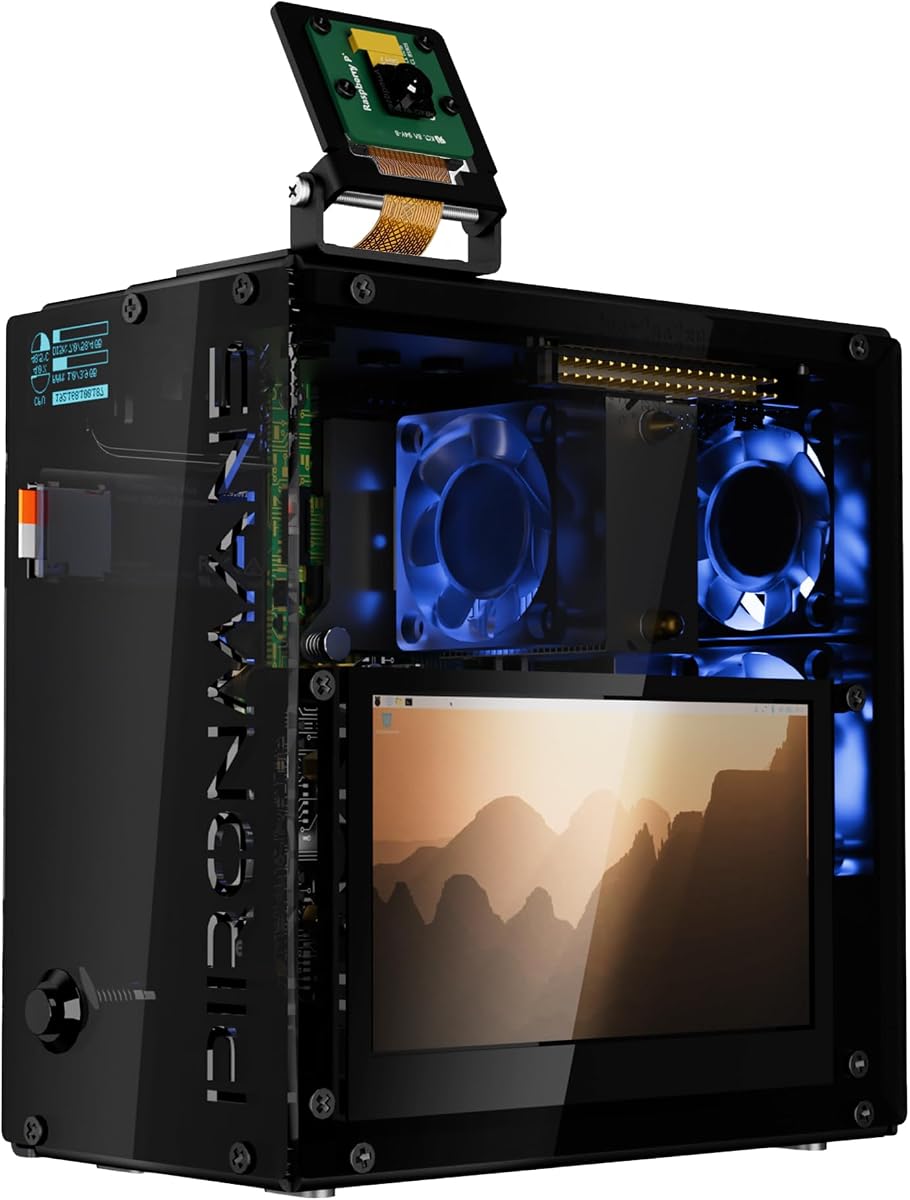
The Pironman 5 Pro Max is the most interactive enclosure in this guide, combining a Raspberry Pi 5 with a 4.3-inch capacitive IPS touchscreen, adjustable camera, USB microphone, and built-in audio amplifier. Its 4.0 rating reflects a highly ambitious design whose strengths are clearest in AI desktops, development stations, interactive smart-home panels, and multimedia projects.
We may earn a commission when you buy through this link, at no additional cost to you.
Storage and compute expandability are also exceptional. Two M.2 slots support 2230-through-2280 NVMe drives, RAID 0/1 configurations, or combinations with a Hailo-8L accelerator. A PCIe Gen2 switch handles the storage devices, while a tower cooler and triple PWM RGB fans provide active cooling. The dual transparent panels make the internal arrangement visible.
The integrated screen supports a more natural interface than the smaller OLED used by other Pironman models. The camera enables visual input, the microphone supports voice interaction, and the amplifier supports audio output. An OLED status module, vibration wake-up, RTC battery support, GPIO expansion, dual full-size HDMI, and a safe-shutdown button complete the platform.
This is a premium specialty case, not a universal first enclosure. The larger enclosure, greater power requirements, and number of included functions may be excessive for a headless server or simple desktop. Choose it when the touchscreen and integrated input and output devices are central to your project and you value a self-contained interactive system.
The 4.3-inch IPS capacitive display can serve as a local control panel for development tools, dashboards, smart-home interfaces, and media functions. It reduces the need for a separate monitor in projects designed around visual interaction.
An adjustable camera and USB microphone allow the enclosure to support visual recognition, voice input, and interactive AI workflows. The built-in audio amplifier also creates a more integrated path for sound output.
We may earn a commission when you buy through this link, at no additional cost to you.
The Official Raspberry Pi 5 Case provides a straightforward, purpose-designed enclosure with an integrated cooling fan and heatsink. Its 4.5 rating makes it an appealing choice for users who want a simple Raspberry Pi-native setup without tower coolers, RGB lighting, storage controllers, or other specialized hardware.
We may earn a commission when you buy through this link, at no additional cost to you.
The fan moves 2.79 CFM of air and supports PWM speed control, while a tachometer function can provide fan-speed feedback. Temperature control allows the cooling system to respond to board conditions, which is useful for sustained workloads. The case uses ABS and PC materials and includes a silicone bumper and feet for protection and stability.
A removable lid makes the fan and GPIO ports easy to reach, while the integrated mounting system supports stacking and compatible HATs. This is a practical benefit for projects using official accessories, although the design remains less protective against impact than the aluminum and steel options in the list.
Choose the official case for general Raspberry Pi 5 development, education, automation, and standard desktop projects. It provides dependable cooling with a familiar, straightforward layout. Buyers requiring NVMe boot support, a metal shell, multiple fans, an integrated display, or a more finished mini-PC appearance should consider one of the specialized alternatives.
PWM speed control allows the 2.79 CFM fan to respond to temperature rather than run continuously at a fixed speed. This can provide useful cooling under load while keeping a lightly used board quieter.
The integrated mounting system is designed to support stacking and additional HATs. Its removable lid also improves service access, making it easier to reach GPIO connections or inspect the cooling assembly.
We may earn a commission when you buy through this link, at no additional cost to you.
The GeeekPi Armor Lite combines a lightweight ABS Raspberry Pi 5 enclosure with the Armor Lite V5 active cooler. Its 4.3 rating reflects a convenient package for buyers who want a case and cooling solution in one purchase. The Raspberry Pi 5 board is not included.
We may earn a commission when you buy through this link, at no additional cost to you.
The cooler pairs an aluminum heatsink with a 3510 ultra-quiet PWM fan and thermal pads. PWM regulation allows fan speed to be managed within Raspberry Pi OS, helping the system respond to changing workloads. The removable top cover gives access to the GPIO and camera connectors, while designed cutouts reach the USB-C power port, micro HDMI, USB, Ethernet, microSD slot, and power button.
The included package contains the ABS case, Armor Lite V5 cooler, thermal pads, screws, and a screwdriver. That makes setup relatively self-contained. ABS is lighter than metal, although it does not provide the same rigidity or impact resistance as an aluminum shell.
This is a practical choice for standard development, automation, media, and educational projects. It is less appropriate for a compact NVMe NAS unless you add separate storage hardware, and it lacks the elaborate cooling, displays, and cable management of the Pironman enclosures. For uncomplicated active cooling at a modest level of complexity, it remains easy to recommend.
Including the Armor Lite V5 cooler removes the need to select a separate active cooler and determine its physical compatibility. Thermal pads and mounting hardware are also included in the package.
The removable cover makes it easier to reach GPIO and camera connections or inspect the installed cooler. Port cutouts preserve access to the connectors used most often during setup and routine operation.
We may earn a commission when you buy through this link, at no additional cost to you.
The GeeekPi Metal Case combines a protective metal enclosure with support for the Official Raspberry Pi 5 Active Cooler and several PCIe peripheral boards. Its 4.7 rating is the highest among the supplied products, although a rating alone does not establish fit or suitability for every project. The included package focuses on the case rather than the cooler or expansion hardware.
We may earn a commission when you buy through this link, at no additional cost to you.
Compatibility extends to the X1000, X1001, X1003, N04, and N05 PCIe peripheral boards. Those supported devices can include PCIe-to-M.2 NVMe shields, allowing the metal shell to serve a more advanced storage build without adopting a permanently integrated mini-PC design. The official active cooler can also be used, subject to the case's fit and clearance.
Cutouts provide access to USB-C power, micro HDMI, USB, Ethernet, the microSD slot, the power button, and GPIO. The package includes a screwdriver, screw set, and four rubber feet. The feet improve normal desk stability and reduce direct contact between the metal enclosure and the work surface.
Choose this case for users who want metal protection, official cooler support, and a path toward PCIe expansion. It is a sensible middle ground between a simple shell and an all-in-one advanced case. Check the dimensions of the specific HAT, board, cooler, and cable arrangement before assembly because supported hardware must still fit together without obstruction.
A rigid metal shell shields the board from knocks and incidental contact better than a lightweight plastic enclosure. It is useful for desktop installations, servers, and maker projects that will remain assembled.
Support for several named PCIe peripheral boards expands the case beyond a basic board holder. An approved PCIe-to-M.2 shield can add fast storage, while the open architecture leaves room for different project configurations.
We may earn a commission when you buy through this link, at no additional cost to you.
The GeeekPi P33 M.2 NVMe PoE+ Hat bundle is a specialized case-and-expansion solution for Raspberry Pi 5 projects that need fast storage, network power, and active cooling. Its 4.3 rating reflects a cohesive design that combines the P33 HAT, Official Raspberry Pi 5 Active Cooler, and an aluminum case rather than presenting a loose collection of parts.
We may earn a commission when you buy through this link, at no additional cost to you.
The HAT uses the Raspberry Pi 5 PCIe interface for M.2 NVMe communication and supports 2230, 2242, 2260, and 2280 drive sizes. Power over Ethernet capability allows the Raspberry Pi 5 to receive power through the Ethernet connection, which can simplify a fixed network installation by reducing the number of required cables.
The included active cooler combines an aluminum heatsink and PWM fan to support operating temperature control. The case is designed around the P33 HAT and retains access to most Raspberry Pi board ports. Because the storage and PoE functions are tied to a particular HAT, the design is less interchangeable than a general-purpose enclosure.
Choose this package for a compact network-attached storage project, managed network device, or headless server where PoE and NVMe are central requirements. It offers a more focused solution than buying a general case, HAT, cooler, and enclosure independently. It is less appropriate for users who need multiple NVMe slots, RAID, a touchscreen, or broad HAT flexibility.
PoE+ can deliver power and network connectivity through one Ethernet connection. That can reduce cable clutter in fixed installations and make the system easier to deploy where a nearby power socket is inconvenient.
The P33 HAT and aluminum enclosure are designed to work together, eliminating much of the guesswork involved in combining separate storage, cooling, and case components. It remains important to check the full cable and cooler arrangement during installation.
We may earn a commission when you buy through this link, at no additional cost to you.
The right Raspberry Pi 5 case depends on cooling demand, storage plans, expansion hardware, accessibility, and how the finished system will be used. Review these factors before comparing enclosure styles so the case supports rather than constrains the project.
Raspberry Pi 5 generates significant heat, particularly during sustained computing, video decoding, compilation, and other demanding tasks. A basic ventilated shell may be adequate for light work, while an actively cooled case offers more consistent temperature management. The Official case and GeeekPi Armor Lite use a single PWM fan, whereas the Pironman models add a tower cooler and multiple RGB fans. The Argon cases use aluminum passive fins combined with active airflow.
NVMe support can provide faster storage access and allow a Raspberry Pi 5 to boot from an internal solid-state drive. The Argon NEO 5 M.2 and GeeekPi P33 include M.2 support, while the Pironman 5 and 5-MAX provide integrated M.2 slots. The 5-MAX and Pro Max support two drives and RAID 0/1, making them more appropriate for NAS-oriented projects. The basic Argon NEO 5 has no integrated M.2 slot.
Cases that support HATs, PCIe boards, cameras, displays, and GPIO accessories can become difficult to assemble if the available clearance is too small. The iUniker and GeeekPi metal cases are more flexible for user-selected expansion hardware, whereas Pironman products route expansion through integrated designs. Check the height of the active cooler, the position of the M.2 or PCIe connector, and the path of every ribbon or power cable.
Everyday usability depends on whether the case keeps power, Ethernet, USB, micro HDMI, microSD, GPIO, and the onboard button accessible. Open-sided aluminum designs make cabling easy, while mini PC cases may route connections through dedicated full-size HDMI ports. A GPIO side opening can prevent frequent case removal, and the iUniker includes a silicone pad for reaching the power button through its cutout.
A local display can make a Raspberry Pi 5 system more independent of an external monitor. The Pironman 5 and 5-MAX use a 0.96-inch OLED for CPU, memory, temperature, IP address, and disk information. The Pro Max adds a 4.3-inch capacitive touch screen, camera, USB microphone, and audio amplifier. Cases without a display are quieter visually and often better suited to headless servers.
Aluminum and steel offer greater rigidity and impact resistance than lightweight ABS, while aluminum also conducts heat away from components when the design supports that path. The official case uses ABS and PC, and the GeeekPi Armor Lite uses ABS. Metal is advantageous for permanently installed systems, but adequate ventilation remains essential because a protective shell can trap heat if openings are poorly positioned.
A complex case can offer more functionality but also require more assembly and cable management. The Pironman models include detailed guides and support resources, while the iUniker package includes a screwdriver, screws, rubber feet, and a user guide. Consider whether the case uses dust filters, removable panels, dedicated drive access, and modular storage. A design that is easy to open is valuable when storage or cooling components need replacement.
The power and networking design of a case can determine where it can be installed. The GeeekPi P33 adds PoE+ so the system can receive power through Ethernet, which is useful in fixed network deployments. Other cases may require separate power and data cables. Consider whether the project is portable, permanently mounted, connected to a display, or operated headlessly, then ensure the enclosure supports that operating pattern.
Before assembly, compare the case cutouts with every port and component that will be installed. Fit the Raspberry Pi 5, storage module, HAT, active cooler, and display in the approximate final positions, then route cables before tightening the enclosure. Check that the board does not sit against metal and that the silicone power-button pad, if supplied, can release freely.
Install the operating system and required drivers before closing a case with a sophisticated display, fan controller, or storage interface. Configure PWM fan control, verify that the tachometer and OLED information work when applicable, and confirm that the storage device is detected through PCIe or the M.2 interface. For RAID, create the array only after confirming that both drives are visible and correctly sized.
For routine care, keep vents and dust filters clear, especially in the Pironman tower-cooling systems. Check that fans spin freely and that cables have not moved into a fan path. Power down and disconnect the system before opening the case or changing storage hardware. If the enclosure uses a metal heatsink, make sure thermal pads remain properly positioned rather than being folded, shifted, or removed.
It depends on the workload, but active cooling is generally sensible for sustained demanding tasks. A Raspberry Pi 5 can benefit from PWM-controlled airflow during development, media processing, server use, and extended computing. A ventilated passive case may be sufficient for light work, while a tower-and-multiple-fan design offers more margin for compact, continuously running systems. Consider both cooling capacity and acceptable fan noise.
The Official Raspberry Pi 5 Case is among the most straightforward options because it has a defined design, a removable lid, and integrated cooling. The GeeekPi Armor Lite and iUniker Metal Case are also approachable, with included mounting hardware and broad port access. The Pironman models provide more features but require more involved assembly and configuration, particularly when installing NVMe drives, displays, or multiple fans.
An NVMe-compatible case can support faster internal storage and boot the operating system from a solid-state drive rather than relying only on a microSD card. That can make projects feel more responsive and provide more capacity for files, databases, containers, and media. Check the supported M.2 key and physical length, ensure the drive has suitable clearance, and confirm that the case includes or supports the required PCIe or HAT connection.
Several can, particularly the Pironman 5-MAX and Pironman 5 Pro Max with dual NVMe slots and RAID 0/1 support. The Argon NEO 5 M.2 and GeeekPi P33 can also suit single-drive network storage projects, while the GeeekPi Metal Case can accommodate supported PCIe-to-M.2 boards. Your choice should reflect the number of drives, redundancy requirements, cooling expectations, and whether the system needs a local display.
Only if your project benefits from local status information or interaction. An OLED can show temperature, CPU and memory usage, IP address, and disk status without taking space on a desk, while a larger touchscreen can provide a complete control interface. A headless server, basic automation controller, or background NAS may not need either feature, making a simpler and potentially quieter enclosure more appropriate.
Not necessarily, because well-designed metal cases use their construction to dissipate heat and include airflow openings. However, a sealed or poorly ventilated metal shell can trap heat. Review the case's ventilation pattern, use a compatible cooler, ensure thermal pads contact the processor correctly, and monitor temperatures during sustained workloads. Aluminum cases with fins can be particularly effective when the metal is part of the thermal path.
Several products explicitly exclude the Raspberry Pi 5 board, and the listed SSDs and Hailo accelerators are also generally not included. The Official case listing covers one case package, while the GeeekPi Armor Lite includes its case and cooler but not the board. Always check the package contents for the specific product, especially when purchasing a prebuilt combination such as the GeeekPi P33 bundle.
Choose one slot for a compact desktop, development system, or single-drive server that benefits from faster storage without needing redundancy. Two slots are preferable for RAID, separate application and data volumes, or combining an NVMe drive with a Hailo accelerator. Confirm that the case's PCIe architecture supports the layout and that your software or operating system includes the required RAID and storage-management tools.
The Argon NEO 5 is a strong balanced choice for straightforward active cooling in a compact aluminum enclosure, while the Pironman 5-MAX stands out for dual NVMe storage, RAID, an OLED, and a full mini-PC cooling system. For the most interactive option, the Pironman 5 Pro Max adds a large touchscreen, camera, microphone, and audio hardware.
Most buyers should prioritize the requirements of the finished project over the number of features. A simple official case or basic metal shell may be enough for education and general automation, whereas a NAS, AI workstation, or permanent desktop benefits from integrated storage, stronger cooling, and accessible controls. Always verify cooler clearance, HAT dimensions, drive format, port access, and cable routing before buying.
Ratings, package contents, and product configurations can evolve, and prices and availability change over time. Confirm the current listing and compatibility details at the time of purchase. With the correct enclosure, a Raspberry Pi 5 can become a cleaner, cooler, and more capable system for everything from a small server to an interactive AI platform.