
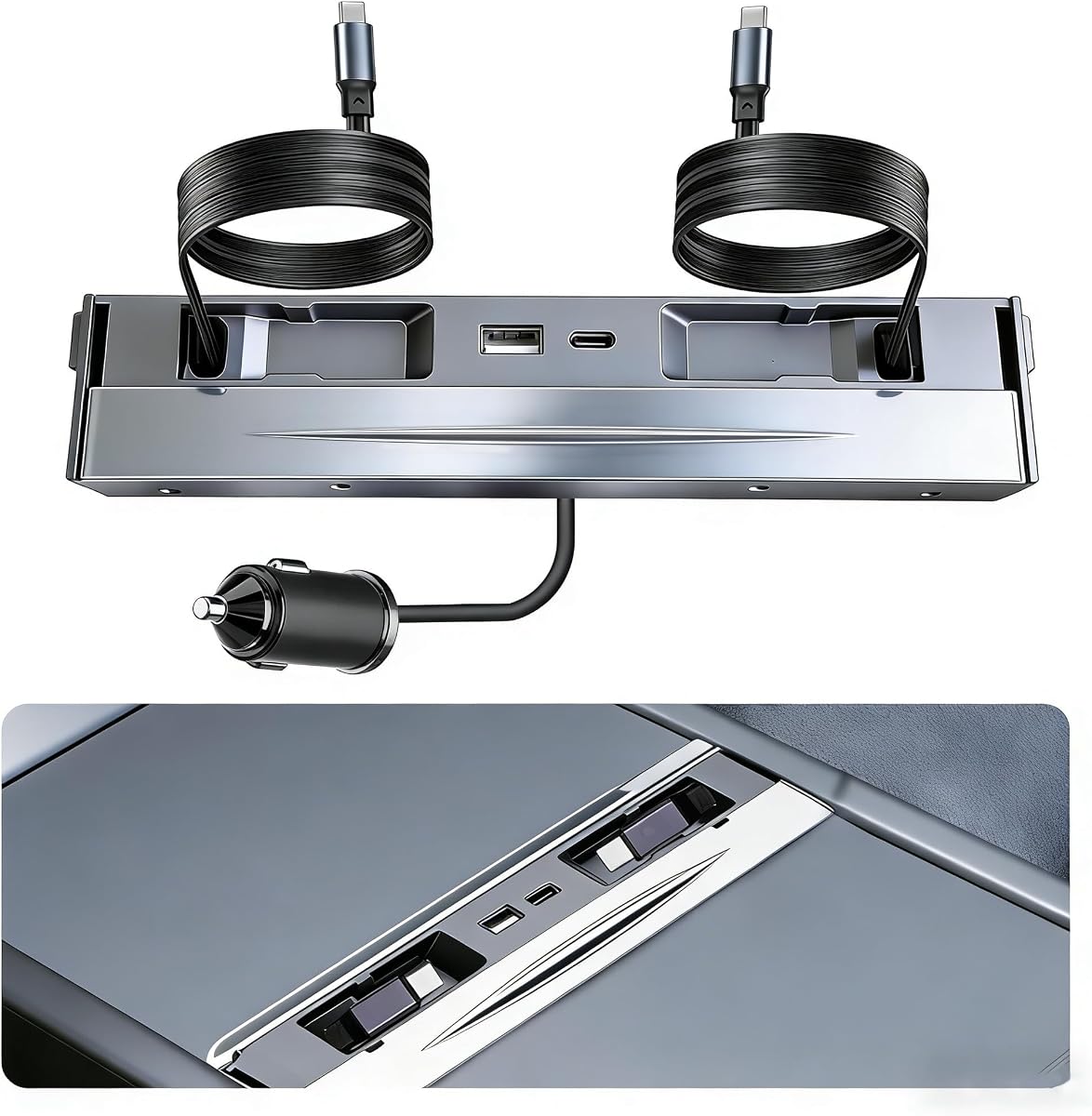
30W Fast USB Hub for Tesla Model 3/Y 2021–2024 (Not Model 3-2024)
4.5Editor score
30W rapid charging output
Dual retractable Type-C cables
USB-A and Type-C ports
Waterproof sliding cover
Explore the best Tesla USB Hub options for Model 3 and Model Y, carefully comparing ports, charging speed, cable design, fit, features, and compatibility.
A Tesla USB hub can make the center console or glove box more useful by adding convenient charging ports, data connections, and retractable cables. The right accessory depends heavily on your Tesla model, production year, port layout, charging needs, and preference for a clean OEM-style installation.
We compared ten USB hubs and charging docks based on vehicle compatibility, port configuration, charging capabilities, installation method, cable management, protective features, and listed customer ratings. The guide covers both glove box data hubs and center console charging docks for older and newer Model 3 and Model Y configurations.
Each review explains the strongest use case and important limitations of the selected product. Ratings and specifications can change over time, and prices fluctuate, so confirm the current listing, fit, and vehicle compatibility before making a purchase.
4.5Editor score

5.0Editor score

4.1Editor score
The products below fall into two main categories: glove box USB hubs for data-heavy accessories and center console charging docks for phones, tablets, laptops, and rear passengers. Model-year compatibility is the most important dividing line, while charging output, retractable cable length, data support, and protective design help determine which option best fits a particular owner.




This glove box hub is designed for Model Y vehicles from 2021 through 2024 and Model 3 vehicles from 2021 through 2023. It has a 4.2 rating and stands out as a practical data expansion solution for owners who want to connect several accessories without replacing the factory glove box USB-A connection.
We may earn a commission when you buy through this link, at no additional cost to you.
The hub converts the original single USB-A port into one blue USB 3.0 port and three USB 2.0 ports. The faster blue port is intended for a dashcam USB drive and can support an SSD up to 2TB, while the remaining ports accommodate flash drives, game controllers, ambient lighting, phones, tablets, headphones, and other compatible electronics.
Its slim black housing follows the glove box arc without carrying a prominent logo, giving it an understated, factory-accessory appearance. ABS and PC construction provides rigidity, while overcurrent, overcharging, and overheating safeguards address common electrical concerns. The glove box lid should still open and close normally.
The main limitation is vehicle compatibility. It does not support Model 3 Highland 2024–2026, Cybertruck 2024–2026, or the newer Model Y Juniper 2025–2026. Owners who need fast data ports for a dashcam, controller, or multiple storage devices should choose this hub after confirming their exact vehicle configuration.
The four-port layout turns a crowded single connection into a more flexible setup. A dashcam drive can occupy the high-speed USB 3.0 connection while conventional peripherals use the other three ports.
The contoured, low-profile housing is intended to sit inconspicuously inside the glove box. It expands connectivity without creating a visible dashboard accessory or interfering with the normal opening of the compartment.
We may earn a commission when you buy through this link, at no additional cost to you.
This glove box hub targets the latest Model 3 Highland and Model Y Juniper layouts, along with Cybertruck 2024–2026 vehicles. Its 4.2 rating reflects a generally favorable customer response, while the four-port design addresses a common limitation of the newer glove box connection.
We may earn a commission when you buy through this link, at no additional cost to you.
Like the first selection, it provides one USB 3.0 port and three USB 2.0 ports. The blue high-speed port is positioned for the dashcam USB drive, and the additional connections are intended for flash drives, game controllers, music, charging, and other everyday USB accessories. Multiple devices can be connected at the same time.
Installation involves first attaching the dashcam drive to the blue port and any other devices to the hub, then connecting the assembly to the vehicle's glove box USB-A port. The slim black housing follows the glove box arc, lacks unnecessary branding, and is designed to preserve access to the compartment.
Compatibility is the decisive caveat. It is not intended for Model 3 vehicles from 2017 through 2023, Model Y vehicles from 2020 through 2024, Model S, or Model X. It also offers no stated data-transfer specification, so buyers seeking explicit high-speed data performance should review the listing and manufacturer documentation carefully.
This is a more useful purchase for a Highland or Juniper owner than an older-generation glove box hub. Its fit is designed around the newer center console and glove box geometry rather than relying on a universal adapter.
The blue USB 3.0 connection handles the dashcam drive, while three USB 2.0 ports support routine accessories. That balance suits owners who need a dedicated recording connection and additional charging or controller ports.
We may earn a commission when you buy through this link, at no additional cost to you.
This 30W center console charging hub is intended for the older Model 3 and Model Y console layout. It carries a 4.5 rating, the highest among the products for older vehicles, and combines two retractable Type-C cables with USB-A and Type-C connections.
We may earn a commission when you buy through this link, at no additional cost to you.
The principal advantage is flexible charging in a relatively compact form. Each retractable cable extends to approximately 31.5 inches and has no Lightning connector, while the fixed ports accommodate additional devices. A stated 30W maximum output supports faster charging than a conventional low-power car outlet.
A sliding cover helps protect the connection area from liquids and dust, which is useful because the center console also contains cup holders. The low-profile unit is intended to sit flush without blocking the console lid, and its integrated cables reduce the need to keep separate charging leads stored in the vehicle.
The fit is not universal. It excludes the 2024 Model 3 and also does not support Model 3 Highland or Model Y Juniper. The listing does not make a clear data-transfer claim, so this is best treated as a charging dock rather than a data hub. It is a strong all-around pick for compatible older Model 3 and Model Y owners.
The retractable Type-C leads can be extended when a passenger needs a connection and returned into the console afterward. This reduces clutter while preserving convenient access to charging.
Two cable connections plus one USB-A and one Type-C port provide several ways to power phones, headphones, controllers, and other accessories. The arrangement is more useful than a simple single-port adapter for shared vehicles.
We may earn a commission when you buy through this link, at no additional cost to you.
This four-port glove box docking station is tailored to Model 3 Highland 2024–2025, Cybertruck, and the refreshed Model Y Juniper. Its 4.4 rating is strong for an accessory with a narrow fitment range, and the design emphasizes a minimal, OEM-matching appearance.
We may earn a commission when you buy through this link, at no additional cost to you.
The hub transforms a single USB-A connection into one blue USB 3.0 port and three USB 2.0 ports. The high-speed port is designated for a dashcam thumb drive, while the additional ports support flash drives, game controllers, music libraries, and charging accessories. The listing states that all four can operate at once without producing vehicle system alerts.
Installation is presented as tool-free, with the contoured housing following the glove box arc. The product uses ABS and PC materials and includes overcurrent, overcharging, and temperature protection. It also remains out of the way so the glove box lid can operate normally.
This is primarily a data and peripheral hub rather than a high-output charging station. There are no retractable cables, and most of the other connections are USB 2.0, so it is most appropriate for owners of the listed newer vehicles who want a clean, discreet connection for a dashcam and several smaller accessories.
A razor-thin black housing and the absence of visible branding help the dock blend into the newer Tesla glove box. It is designed for owners who prefer an integrated look over a conspicuous add-on.
The four-port layout is more versatile than the original single connection. It offers a logical division between fast dashcam storage and slower peripheral connections.
We may earn a commission when you buy through this link, at no additional cost to you.
This center console hub is designed for Model 3 2021–2023 and Model Y 2021–2024 owners. It has a 4.1 rating and focuses on a practical mix of charging capacity, retractable cables, and a protected integrated design rather than data transfer.
We may earn a commission when you buy through this link, at no additional cost to you.
Two retractable Type-C cables provide 27W each and extend to approximately 3.2 feet. The fixed USB-A and USB-C charging ports deliver 15W, allowing several compatible devices to charge while limiting loose cable clutter. The magnetic cable slots make it easy to draw the leads back into the console after use.
An integrated aluminium sliding cover helps keep dust and water away from the port area. The dock installs at an angle in the center console and connects to the vehicle's USB-C interface without requiring drilling, cutting, or adhesive. It is also designed not to interfere with console lighting or the center console lid.
The key trade-off is that data transfer is explicitly unsupported. This is a charging solution, not a way to connect a flash drive, controller, or other data peripheral. It also does not fit the 2024–2026 Model 3 Highland or the 2025–2026 Model Y Juniper, so buyers must verify their vehicle year and console.
The combination of two 27W cables and two 15W ports covers many daily charging needs. It is a straightforward way to avoid carrying separate leads and relying on a single low-output connection.
Magnetic retention helps the cables remain neatly stowed, while the sliding cover protects the hub when the console doubles as a cup holder area. The result is cleaner and more resilient than an exposed adapter.
We may earn a commission when you buy through this link, at no additional cost to you.
This center console docking station is made for Model Y 2025–2026 and Model 3 2024–2026 vehicles. Its 4.3 rating and broad fit within the newer platforms make it a straightforward all-purpose charging upgrade for owners who want an integrated appearance.
We may earn a commission when you buy through this link, at no additional cost to you.
Two built-in retractable cables extend to serve connected devices and return neatly when no longer needed. Fixed USB-A and USB-C ports allow additional compatible devices to charge simultaneously, which is useful during commuting, family travel, and longer road trips.
The docking station is shaped to blend with the factory console. Installation requires no drilling, cutting, adhesive, or permanent alteration; it is fitted into the console and secured in place. This makes it a more approachable option for owners who want extra connectivity without modifying visible trim.
The listing does not provide a detailed total wattage or explicitly promise data transfer. Consequently, it is best viewed as a charging and cable-management solution rather than a USB data hub. Its appeal comes from the combination of current-platform fit, retractable leads, multiple fixed ports, and a straightforward installation process.
Unlike accessories designed for the original center console, this dock is tailored to the Model 3 Highland and Model Y Juniper layout. That makes it a better fit for owners purchasing an accessory for a newer vehicle.
Retractable cables can be extended for a passenger and withdrawn afterward, while the fixed ports handle additional devices. This reduces loose wires during everyday driving.
We may earn a commission when you buy through this link, at no additional cost to you.
This 134W center console USB hub is designed for Model 3 Highland 2024–2026 and Model Y Juniper 2025–2026 vehicles. It has a 5.0 rating, and its combination of high charging output, unusually long retractable cables, and a secure flush installation makes it the strongest overall option in this guide.
We may earn a commission when you buy through this link, at no additional cost to you.
The stated total output is divided between a 65W retractable Type-C cable and a 45W Type-C cable. A USB-A port and an additional Type-C port each provide 5V/2.4A output. The two 39-inch flat-wire cables can reach rear passengers, retract with a gentle tug, and are designed to resist tangling and repeated bending.
Installation uses a twist-and-lock mechanism that seats the hub diagonally before locking it flush. The color-matched housing is intended to reduce visible gaps and rattling. A sliding shield conceals the connections when they are not in use, helping protect them from dust, debris, and accidental liquid spills near the cup holders.
The product is not stated to fit Standard RWD or Standard AWD versions, making trim verification important. The 134W figure is an aggregate maximum rather than a guarantee that every connected device receives that amount simultaneously. Even so, it offers the most complete charging arrangement for compatible newer vehicles, especially when rear-seat access matters.
The 65W cable is suitable for demanding compatible electronics, while the second cable and fixed USB ports handle additional devices. This gives the hub broader utility than a basic phone-charging adapter.
At 39 inches, the retractable leads offer more reach than shorter console cables. The flat-wire construction and gentle-retraction design help preserve a tidy cabin when passengers are not using them.
The sliding shield helps guard ports from accidental spills, and the twist-lock mounting keeps the hub stable on uneven roads. The flush profile also preserves the minimalist appearance of the console.
We may earn a commission when you buy through this link, at no additional cost to you.
This high-output console hub targets Model 3 Highland 2024–2026 and Model Y Juniper 2025–2026 owners. It has a 4.2 rating and provides a four-connection charging arrangement with two long retractable Type-C cables.
We may earn a commission when you buy through this link, at no additional cost to you.
The listing describes 130W total output and identifies one cable as 65W. However, its title also says 65W plus 45W, creating an inconsistency with the stated 130W total. Buyers who require exact output should consult the current manufacturer information and device compatibility details before depending on the full rating.
Both retractable cables measure 39 inches and use flat-wire construction intended to resist tangling and wear. A USB-A port and an extra Type-C port each provide 5V/2.4A, while the larger cable outputs support faster charging for compatible phones, tablets, and notebooks. The four options can be used simultaneously according to the listing.
A sliding shield protects the ports from dust and accidental spills, and the diagonal insert-and-twist installation secures the unit without tools. The flush, color-matched appearance is intended to avoid gaps and rattling. Overall, it is a capable alternative to the 134W hub, but the conflicting cable-output wording deserves attention.
Two dedicated retractable cables and two fixed connections offer more choice than a basic console adapter. This is useful when driver and passenger devices need power at the same time.
The discrepancy between 130W total and 65W plus 45W cable ratings should be clarified before purchase. Checking the latest listing helps buyers set realistic charging expectations.
We may earn a commission when you buy through this link, at no additional cost to you.
This 4-in-1 charging hub is built for Model 3 and Model Y vehicles from 2021 through 2024. Its 4.2 rating and compact design make it a practical option for owners focused on everyday phone and tablet charging rather than storage expansion or high-power laptop charging.
We may earn a commission when you buy through this link, at no additional cost to you.
The hub combines two 2.6-foot retractable Type-C cables with one USB-C port and one USB-A port. Up to 27W fast charging is supported for compatible devices, and the listing states that a compatible phone can charge from zero to 50 percent in 30 minutes. The shorter cables are intended for front-seat use rather than reaching rear passengers.
A color-matched, precision-molded housing is designed to fit the older Model 3 and Y console without interfering with the lid or console light. The metal magnetic sliding cover helps protect the connection area from splashes, while the Type-C flat cord uses thickened TPE material that has reportedly passed more than 10,000 pull tests.
The product does not support data transfer, so it should not be chosen to read flash drives or connect data accessories. Installation requires no tools or adhesive. For owners who need many charging points in a compact package, it provides a strong feature set, although the 27W ceiling is lower than the highest-output new-platform docks.
The 2.6-foot retractable cables are long enough for common front-seat use while remaining easier to manage than substantially longer leads. The hub can supply both cable and fixed-port connections at once.
The magnetic metal cover reduces exposure to drinks and everyday spills. A precision-molded shell and tool-free installation help the unit blend into the center console.
We may earn a commission when you buy through this link, at no additional cost to you.
This center console charger is made for Model Y Juniper 2025–2026 and Model 3 Highland 2024–2026. It has a 4.1 rating and offers the highest stated aggregate output in the guide, making it especially relevant to owners who regularly charge laptops or other power-hungry devices in the car.
We may earn a commission when you buy through this link, at no additional cost to you.
The charging arrangement includes a 65W retractable Type-C cable, a 30W retractable Type-C cable, a 30W USB-C port, and an 18W USB-C port. The stated total is 143W, with the 65W connection intended to support compatible laptops. Both cables extend to approximately 3.2 feet and use magnetic slots for easy retraction.
An integrated sliding aluminium cover helps keep dust and water out of the connection area. The unit is installed by tilting it into the center console, sliding it toward the bottom, and connecting it to the vehicle's cigarette-lighter socket. Its understated shape is designed to resemble a factory accessory.
This hub explicitly does not support data transfer and is not compatible with 2026 Model 3 or Model Y Standard versions, nor with older Model 3 and Model Y configurations. The aggregate wattage should also be understood as the maximum combined capability rather than the output of every port at once. For a compatible owner with high charging needs, however, it is a feature-rich option.
The 65W retractable cable offers useful headroom for compatible notebooks and other demanding electronics. Additional Type-C connections provide charging options for passengers and everyday devices.
Magnetic retention keeps each cable accessible while allowing it to disappear into the console after use. The sliding cover further protects the hub from dust and accidental spills.
We may earn a commission when you buy through this link, at no additional cost to you.
The right Tesla USB hub depends first on exact vehicle compatibility, then on whether you need data expansion, high-output charging, retractable cables, or a combination of these features. Checking the console or glove box layout before ordering can prevent an otherwise capable product from being unsuitable.
Tesla model names and production years are not enough on their own because the console and glove box designs changed during the Model 3 and Model Y generations. Older vehicles generally use the 2021–2023 Model 3 or 2021–2024 Model Y layout, while Highland and Juniper describe newer interior designs. Cybertruck, Standard trims, and some 2026 configurations have separate limitations. A product that looks similar may still sit loosely, fail to connect, or interfere with the console lid if it was molded for another version.
Match the listing's production years, trim restrictions, and connection point to your vehicle before buying. If the model year is uncertain, check the vehicle identification information and compare the accessory's stated exclusions rather than relying on appearance.
Glove box hubs are primarily data accessories. A blue USB 3.0 port can support faster storage devices and is commonly assigned to a dashcam drive, while USB 2.0 ports handle controllers, flash drives, and lower-speed peripherals. Center console docks are generally designed around charging and cable management. Some include both USB-A and USB-C power ports, but many do not support data transfer at all.
Decide whether you need to connect a drive or controller or simply provide more places to charge a phone. Choose a data hub for storage and peripherals, and a charging dock for high wattage, retractable cables, and multi-device power.
Charging capacity should be judged by both the advertised aggregate output and the output of each connection. A dock with a 65W cable can be valuable for a compatible laptop, while 27W or 30W may be sufficient for phones and many accessories. A large total wattage figure does not mean every port delivers that amount simultaneously, and actual charging speed depends on the device, its charging protocol, and the power available from the vehicle.
Prioritize the highest-output connection you will actually use. If all passengers only need phones, an ambitious laptop rating may add little, while a balanced set of USB-C and USB-A ports may be more useful.
Retractable cables are valuable because they eliminate loose charging leads, but their length determines where a device can be used. Leads around 2.6 feet suit front seats, approximately three-foot cables offer more flexibility, and 39-inch cables can reach rear passengers. Flat-wire construction may be easier to manage, while magnetic retention or self-retraction helps keep each lead seated when not in use.
Consider who will use the connection. Choose a short cable for personal front-seat charging and a longer retractable lead when rear passengers need power or when a laptop must remain connected in the back.
A four-port hub can serve several accessories, but port speed and placement still matter. In glove box designs, one USB 3.0 port may be reserved for the dashcam drive while three USB 2.0 ports handle other devices. In charging docks, fixed USB-A and USB-C ports are easier for small accessories, while retractable Type-C leads provide dedicated charging for phones, tablets, and notebooks.
Count both permanently connected devices and occasional ones. A dashcam owner needs a reliable storage connection, while a family may value separate Type-C ports for each passenger.
The center console is also a common place for drinks, food crumbs, dust, and small objects. A sliding cover helps keep those contaminants away from electrical contacts, and safety claims such as overcurrent, overcharging, overheating, and short-circuit protection add useful layers of protection. A flush or locked installation can also prevent the hub from shifting or rattling during travel.
Look for a close console fit, a mechanism that holds the unit securely, and a cover that slides without obstructing the console lid. Verify that the accessory does not interfere with console lighting or nearby storage.
Tesla interiors use clean, minimal forms, so an integrated-looking accessory can make a noticeable difference. Low-profile housings, color-matched finishes, and concealed cables preserve the factory appearance. Some docks slide into the console and connect directly to its existing power source, while glove box hubs may plug into a factory USB-A port. All of the listed products are presented as non-destructive additions rather than permanent modifications.
Choose the installation style that matches your comfort level and vehicle layout. A tool-free dock is convenient, while a glove box hub is useful when you want expanded ports hidden away until needed.
Begin by confirming the vehicle fit and following the product's stated installation sequence. Glove box hubs generally require connecting the dashcam drive to the blue USB 3.0 port and attaching any other peripherals before plugging the assembly into the glove box. Center console docks are inserted at the specified angle, slid or twisted into position, and connected to the appropriate vehicle power interface.
When charging, connect only devices that support the port and protocol being used. For a dashcam, keep the storage drive in the designated blue port. Do not force a connector, and avoid inserting damaged cables or flash drives. If a device does not charge, reconnect the vehicle-side plug and test the device with a known-good cable before assuming the hub is faulty.
Use the sliding cover when the hub is not actively charging, particularly if drinks or food are present in the center console. Retract cables gently rather than pulling sideways, keep connectors free of debris, and inspect the housing for looseness during routine vehicle maintenance. Owners should also follow the manufacturer's instructions regarding supported devices, ventilation, and warranty coverage.
No. Compatibility depends on the production year, interior generation, trim, and the specific connection point used by the hub. Older Model 3 and Model Y vehicles generally need a dock designed for their original center console, while Highland and Juniper owners need a newer design. Always check both the supported years and listed exclusions before ordering.
A glove box hub is primarily designed to add data connections, including a USB 3.0 port for a dashcam drive and additional USB 2.0 ports. A center console charging dock adds retractable cables and fixed USB charging ports, often with much higher wattage. Some charging docks explicitly do not support data transfer, so the intended use should determine which type to buy.
It depends on the hub and the laptop. The 65W retractable connection on the 143W Juniper and Highland dock is specifically described as suitable for laptop charging, and the 65W connection on the 130W model may also suit compatible notebooks. Charging speed still depends on the laptop, its charger requirements, and whether power is being shared among connected devices.
Several center console charging docks state that data transfer is not supported. These are intended for power delivery rather than flash-drive, controller, or other peripheral connections. Glove box data hubs are a different category and include USB-A connections designed for storage and accessories, but buyers should verify the speeds and supported functions in the listing.
The listed docks are designed to sit in the center console without blocking the lid, although fit depends on using the correct vehicle version. Some models use a twist-lock installation, while others tilt and slide into position. Verify that the selected listing explicitly covers your production year and trim before installation.
Choose a hub with a sliding shield or integrated cover and close it whenever the console is being used for beverages or food. Do not charge a wet device, and do not pour liquid into an exposed port. Even with a cover, prompt cleanup and periodic inspection are advisable because no accessory is completely immune to accidental spills.
No. Aggregate wattage represents the combined maximum capability of the hub under supported conditions. Individual ports have their own ratings, and connected devices may negotiate different levels of power. When several devices are charging simultaneously, output can be distributed according to the design, so check the per-port specifications for the most important device.
Do not force the unit into the console or glove box. Reconfirm your exact model year, production version, trim, and whether the accessory requires a different center console or glove box arrangement. If the listing appears accurate, contact the manufacturer or seller for fitment guidance. A visually similar accessory may have a different internal mounting geometry.
The 134W Highland and Juniper hub is the strongest all-around option for compatible newer vehicles, combining high aggregate output, long retractable cables, a secure twist-lock installation, and a protective sliding cover. The 30W Fast USB Hub is a balanced premium choice for older Model 3 and Model Y configurations, while the dual-cable glove box hubs serve owners who prioritize USB data expansion.
Prioritize exact vehicle compatibility before considering output or cable length. Decide whether your primary need is dashcam storage, controller connectivity, phone charging, rear-passenger access, or laptop power. Also verify data support because many high-output charging docks provide power only. Once those requirements are clear, the appropriate hub should integrate cleanly and serve your everyday device setup without creating unnecessary cable clutter.
Customer ratings, availability, vehicle configurations, and prices can change, so review the current Amazon listing before purchasing. Confirm the supported production years, trim exclusions, port functions, charging outputs, and installation method. Those checks are especially important because even visually similar Tesla console accessories can have materially different fitments and capabilities.