
ROOFULL ECD829-Y
4.4Editor score
Dual USB-C and USB-A
Eight-speed DVD performance
Protective carrying sleeve
Our guide compares the best external CD drives for ripping, covering speed, compatibility, disc support, portability, and ease of use for laptops and desktops.
External CD drives give laptops and modern desktops a practical way to read physical discs, rip audio or video files, create backups, and handle legacy media. A useful ripping drive should combine stable hardware, broad computer compatibility, reliable disc handling, and software that can transfer content efficiently.
This guide compares ten external optical drives based on the supplied specifications, ratings, connection options, disc-format support, portability features, and manufacturer guidance. The list covers budget USB models, slim dual-interface drives, and premium options with advanced writing or security features.
Each pick reveals what makes that model attractive, along with restrictions that may affect ripping older or unusual media. Ratings and availability can change over time, and prices fluctuate, so readers should confirm current details before purchasing a drive for their particular computer and collection.
4.4Editor score
4.3Editor score

4.5Editor score
The table below compares all ten drives by interface, stated media performance, portability, and notable features. These specifications help narrow the field before considering operating-system support, disc-format restrictions, and the software required for actual ripping.


The Amicool External DVD Drive is a versatile option for ripping standard CDs and DVDs on computers that lack a built-in optical drive. Its 4.2 rating reflects a generally capable design that combines a slim body, USB 3.0, and a Type-C connection. The manufacturer emphasizes straightforward detection and broad support for Windows, Linux, and macOS computers.
We may earn a commission when you buy through this link, at no additional cost to you.
Its most useful feature for a ripper is the integrated dual-interface cable, which avoids carrying a separate adapter for newer USB-C laptops. The drive supports DVD+R, DVD-R, CD-R, and CD-RW, with maximum stated DVD read speed of 8x and CD read and write speed of 24x. Intelligent error correction and anti-shock features are also useful when handling older, scratched, or imperfectly manufactured media.
There are important format limitations. The drive does not support DVD-RAM, Blu-ray discs, or certain proprietary formats, so it is better suited to ordinary audio CDs and pressed DVDs than broad archival media. On Mac systems with M1, M2, or M3 processors, the manufacturer recommends a powered USB-C hub if the computer cannot provide sufficient power. The drive also lacks native macOS disc playback, although VLC Player can be used after recognition.
This is a sensible pick for someone who wants flexible connections, standard disc support, and a portable format without paying for a specialized premium writer. Buy it if your collection consists mainly of conventional CDs and DVDs and you already have suitable ripping software. For users who regularly handle DVD-RAM, want Blu-ray capability, or prefer a turnkey software package, one of the ASUS or LG alternatives may be a closer fit.
The built-in USB-A and Type-C cable makes this model convenient for switching between desktop and modern laptop systems. Its slim enclosure also makes it easier to carry than a full external writer.
Stated 24x CD and 8x DVD performance, combined with error-correction features, should suit routine extraction of music CDs and standard DVD content. Stable power remains essential, especially on laptops.
We may earn a commission when you buy through this link, at no additional cost to you.
The Rioddas External CD/DVD Drive is a strong general-purpose choice for users who want to read, write, and duplicate conventional optical media. It holds a 4.3 rating and distinguishes itself through broad disc support, including CD-ROM, CD-R, CD-RW, DVD-ROM, DVD-R, DVD+R, DVD-RW, DVD+RW, DVD-R DL, DVD+R DL, and VCD media.
We may earn a commission when you buy through this link, at no additional cost to you.
The USB 3.0 interface is backward compatible with USB 2.0 and is specified for transfer speeds up to 5Gbps. Strong fault tolerance is intended to reduce freezing, skipping, and errors, which matters when ripping damaged or frequently handled discs. A physical eject button provides a useful recovery option when the computer fails to recognize the drive, preventing the need to force the tray open after a software or power issue.
The embedded cable and brushed-texture shell improve portability and organization. Compatibility extends across modern and older Windows releases, Linux, and macOS 10.16 or later, with support for common laptops and desktops from HP, Dell, Lenovo, ASUS, and Samsung. However, it should not be expected to work with ChromeOS, smartphones, tablets, TVs, projectors, vehicles, Blu-ray discs, or 4K formats. Connecting to a rear motherboard USB port is recommended for desktop stability.
Choose this drive if your disc collection extends beyond basic audio CDs and you value a physical recovery eject button. It is a strong candidate for duplicating standard DVD formats as well as ripping them. Users needing archival M-DISC features, advanced encryption, or native macOS burning assistance may prefer an ASUS model, while those shopping primarily for the lowest cost may find one of the newer entry-level options more appropriate.
Support for single-layer and dual-layer DVD-R and DVD+R media gives the drive broader utility than models limited to basic CD and DVD-R formats. It remains unsuitable for Blu-ray and 4K discs.
The eject button can release a disc even if the computer does not recognize the drive. This is particularly helpful after a connection problem, frozen application, or unexpected shutdown.
We may earn a commission when you buy through this link, at no additional cost to you.
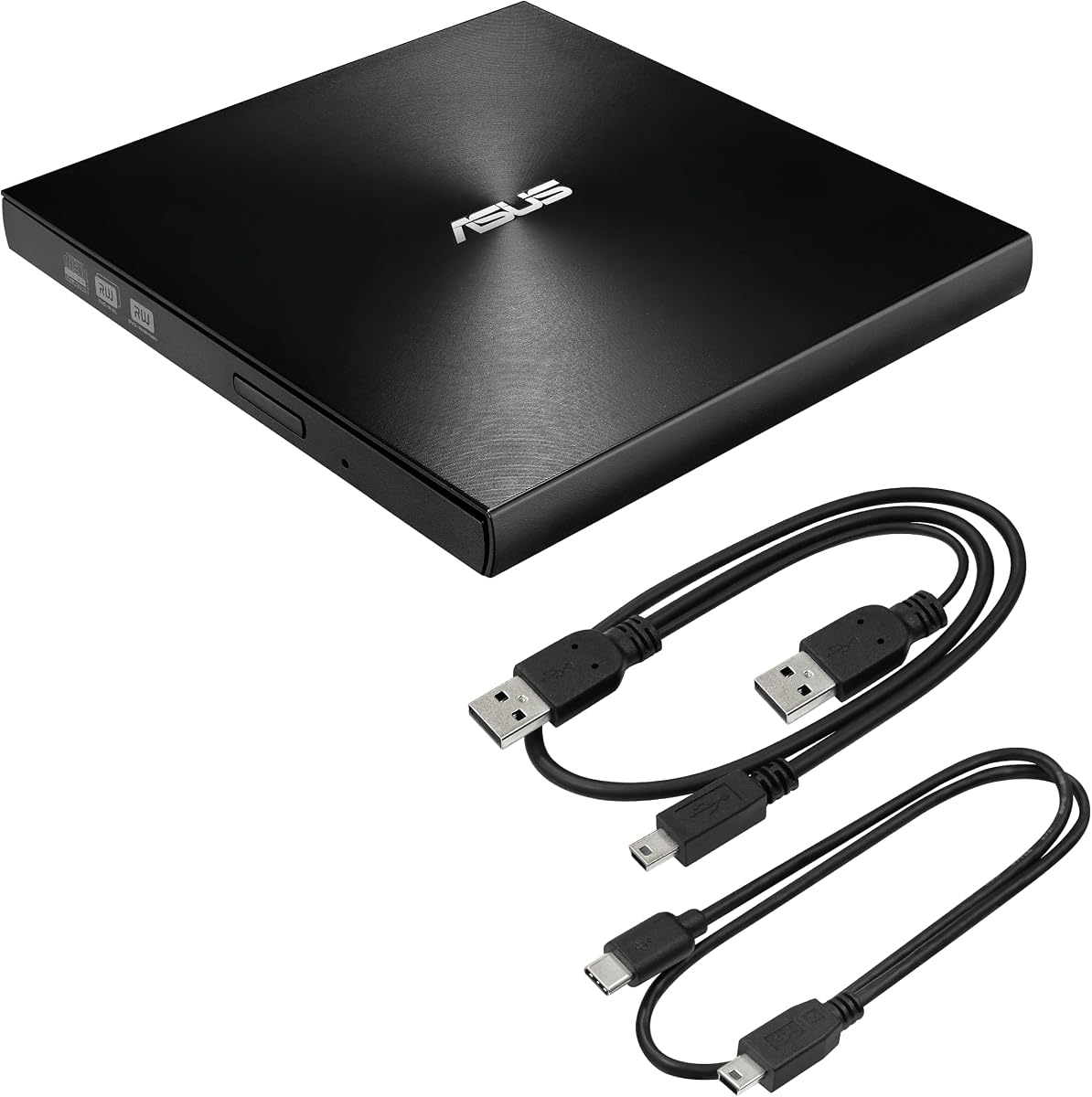
The ASUS ZenDrive is the most balanced premium-style option in this guide, earning the Editor's Choice designation for its slim construction, cross-platform support, M-DISC capability, and included cables. Its 4.3 rating reflects a well-rounded product for users who want to rip discs on both Windows and Mac systems without carrying multiple adapters.
We may earn a commission when you buy through this link, at no additional cost to you.
Both USB 2.0 and Type-C cables are included, and the 13mm profile makes this one of the easiest drives to carry. The drive functions as an 8x DVD burner with +/-RW support, while M-DISC compatibility expands its relevance for users creating archival-quality recorded media. DISC Encryption II adds password control and hidden-file functionality, giving it an advantage for users who also create protected discs.
Nero BackItUp support is another useful addition for the stated platform compatibility, including Android devices. The main compromise is that the ZenDrive uses USB 2.0 rather than the USB 3.0 interface offered by many competitors. That limitation makes it less appealing for users handling very large files or expecting the fastest possible transfers, although ordinary CD ripping is not necessarily constrained in a way that affects every workflow. No Blu-ray support is listed.
This is the most attractive all-around pick for a portable ripping setup, particularly for someone moving between Mac and Windows computers. It is also a good choice if M-DISC or disc encryption matters to the user's workflow. Buyers prioritizing USB 3.0 speed should examine the Amicool, ROOFULL, or LG options instead, while those seeking an even more compact premium design can also consider ASUS's newer SDRW-08V1M-U.
Mac and Windows support removes much of the guesswork when one computer cannot accept a particular disc format or connector. Included USB and Type-C cables simplify setup at the desk or while traveling.
M-DISC support and DISC Encryption II distinguish the ZenDrive from basic utility drives. These features benefit users who create long-term recorded media or need password protection and hidden-file control.
We may earn a commission when you buy through this link, at no additional cost to you.
The ROOFULL ECD829-Y stands out as the Best Budget pick in this guide, combining a 4.4 rating with USB 3.0, Type-C, strong read and write specifications, and a carrying case. It is a well-rounded choice for users who want to rip standard music CDs and DVDs without buying a premium specialist drive.
We may earn a commission when you buy through this link, at no additional cost to you.
The built-in 2-in-1 cable provides USB-A and Type-C connections, while the USB 3.0 interface is stated to support transfer rates up to 5Gbps. Maximum read and write speeds are listed at 8x for DVDs and 24x for CDs. The manufacturer also highlights strong error correction, noise reduction, and smooth operation, all of which are relevant when extracting data from discs that have scratches, fingerprints, or other surface defects.
ROOFULL explicitly describes the drive as suitable for ripping audio and video into digital formats such as MP3, WMA, and MP4, provided the user installs appropriate software. On macOS, the disc icon may not appear until a disc has been read successfully, and the tray button may not eject media because of system restrictions. In addition, it cannot read Blu-ray or 4K discs, and it is not intended for ChromeOS devices, mobile systems, televisions, projectors, or gaming consoles.
This is a compelling choice for students, travelers, and general users who want a straightforward USB 3.0 drive and a protective case. It may be the most balanced entry for standard ripping needs, though it is not the cheapest option in the list and lacks the archival and encryption functions of the ASUS drives. Check the included warranty and support terms, confirm your operating system, and select a suitable ripping application before buying.
The integrated USB-A and Type-C cable reduces adapter clutter, while the extra-thick sleeve protects the enclosure from dust, scratches, and minor impacts. That makes the package practical for commuting or travel.
Up to 24x CD and 8x DVD speeds are useful specifications for routine media extraction. Error correction should improve stability, although real-world results depend on disc condition and the chosen software.
We may earn a commission when you buy through this link, at no additional cost to you.
The ORIGBELIE External CD/DVD Drive offers an unusually broad list of supported disc formats for a compact 13mm unit. It carries a 4.2 rating and is aimed at users who need a portable reader, writer, and duplicator with support for CD and DVD-RAM media.
We may earn a commission when you buy through this link, at no additional cost to you.
Its integrated cable includes USB-A and Type-C connectors, and the USB 3.0 connection is backward compatible with USB 2.0 and 1.1. Stated performance reaches 8x for DVD reading and writing and 24x for CD reading and writing, with data transfer rates presented as up to 5Gbps or 625MB per second. Error correction, noise reduction, shock resistance, and low power consumption are all highlighted.
Supported formats include CD±R, CD±RW, CD-ROM, DVD±R, DVD±RW, DVD-ROM, DVD-RAM, DVD+R DL, DVD-R DL, VCD, and SVCD. This broad compatibility makes it useful for users who encounter older or uncommon optical formats. The package includes a drive, storage bag, user manual, and a USB-A-to-DC 5V charging cable that can provide supplemental power when a computer's port cannot supply enough.
The significant restriction is operating-system support: the stated list explicitly excludes Ubuntu, as well as ChromeOS, mobile devices, tablets, some Surface models, vehicles, projectors, and game consoles. That makes the product less flexible for Linux users than models that list Linux without exception. Its 200-gram weight and 13mm profile are excellent for travel, while the storage bag adds useful protection. It is a good match for users who prioritize DVD-RAM support and portability over a bundled full software suite.
DVD-RAM, dual-layer DVD-R and DVD+R, CD rewritable formats, VCD, and SVCD support gives the drive useful coverage for mixed media collections. Confirm that your particular discs are readable before transferring an entire archive.
At 13mm thick and 200 grams, the drive is easy to carry, and its integrated cable avoids losing a vital connection. A separate 5V charging lead can help when computer power is marginal.
We may earn a commission when you buy through this link, at no additional cost to you.
The 8-in-1 External CD/DVD Drive is a straightforward USB 3.0 and Type-C option for standard CD and DVD ripping. Its 4.1 rating is slightly lower than several alternatives, but the supplied specifications describe a capable drive for home and office computers that need to read, write, and burn conventional optical media.
We may earn a commission when you buy through this link, at no additional cost to you.
The USB 3.0 connection is specified for transfer speeds up to 5Gbps, with maximum DVD read speed of 8x and CD read and write speeds of 24x. Intelligent error correction and anti-shock technology are intended to promote stable operation, while the pop-up button and hidden integrated cable improve convenience. An additional USB power cable is included for situations where the computer cannot provide enough power; this cable supplies power rather than data.
Operating-system support includes Windows XP through Windows 11, Linux, and all stated macOS versions. It is designed for laptops, desktops, all-in-one computers, and mini PCs, including systems from Apple, Dell, HP, Lenovo, ASUS, and Samsung. The manufacturer specifically advises using a rear USB port on desktops for better stability. As with many similarly priced models, it cannot read DVD-RAM, Blu-ray, or proprietary formats.
This model is most appropriate for someone who wants a conventional dual-interface drive and values simple automatic recognition. It is less compelling for collectors who need uncommon formats because of its DVD-RAM restriction, and its 4.1 rating gives less customer feedback confidence than the ROOFULL and LG selections. Nevertheless, the performance figures, power-assistance cable, and portable construction form a practical package for everyday ripping.
The included supplemental cable can help the drive start or operate when a laptop supplies limited current. Users should still connect the data plug directly whenever possible for the most stable connection.
USB 3.0, Type-C, 8x DVD reading, and 24x CD writing cover the requirements of most routine extraction tasks. The model is designed for computers rather than televisions, tablets, or in-car systems.
We may earn a commission when you buy through this link, at no additional cost to you.
The External CD/DVD Drive for Laptop is a budget-oriented option that can act as a player, reader, writer, burner, and ripper. Its 4.2 rating indicates a generally positive reception, and the listed USB 3.0 performance is more substantial than the entry price might imply.
We may earn a commission when you buy through this link, at no additional cost to you.
Maximum data transfer speed is stated as 5Gbps, with write speeds of 8x for DVDs and 24x for CDs. It is compatible with USB 3.0, USB 2.0, and USB 1.0, while the integrated cable offers both USB-A and USB-C connections. Supported media include CD-ROM, CD-R, CD+/-RW, DVD-ROM, DVD-R, DVD+/-RW, DVD-R DL, and VCD-ROM discs.
A noteworthy physical feature is the additional clearance inside the disc bay, which the manufacturer says helps avoid loading problems caused by unusually thick printed labels. The anti-skid rubber base also helps prevent movement while a disc is spinning, an important detail when a computer is positioned on a desk or table. The enclosure is described as compact and light, with an embedded cable slot for convenient storage.
The operating-system list is less current than some rivals. It includes Windows 98, SE, ME, XP, Vista, 7, 8, and 10, Linux, Mojave, and other listed Mac versions, but the product is explicitly not supported for TVs, cars, iPads, Chromebooks, Surface Pro, or Ubuntu. Prospective buyers using a recent Windows release should verify recognition before committing. Subject to that limitation, it is a functional choice for standard disc extraction.
Having both USB-A and USB-C available from the integrated cable simplifies use with older desktops and newer laptops. It avoids the need to carry a separate adapter for most computer connections.
The widened bay accommodates discs with thick labels more comfortably, while the rubber base helps prevent movement during rotation. These details can reduce interruptions during a long extraction or burning task.
We may earn a commission when you buy through this link, at no additional cost to you.
The 2-in-1 External CD/DVD Drive is among the most affordable models listed and provides a practical way to add optical media support to a computer. Its 4.0 rating is the lowest in the group, so buyers should place greater emphasis on the stated capabilities and their compatibility with their own equipment.
We may earn a commission when you buy through this link, at no additional cost to you.
The integrated dual-port cable supports USB-A and USB-C, with no separate driver or external power supply required for normal use. USB 3.0 is specified for transfer rates up to 5Gbps and remains backward compatible with USB 2.0 and 1.1. Maximum read and write performance is listed at 8x for DVDs and 24x for CDs. Upgraded error correction and noise reduction are intended to reduce data loss and operating noise.
Supported media includes CD-ROM, CD-R, CD±RW, DVD-ROM, DVD-R, DVD±RW, DVD-R DL, and VCD-ROM. The widened inner disc-bay space is designed to accommodate discs with thick printed labels, while the embedded cable slot keeps the connector organized. The brushed exterior and anti-slip pads improve durability and stability on a desktop.
The system list is extensive for Windows and Linux and includes macOS 10.16 or later, but some Surface models and ChromeOS devices are excluded. There is also no DVD-RAM, Blu-ray, or 4K support. This makes the drive suitable for basic CD ripping and ordinary DVD extraction but less useful for unusual media. It is a sensible low-cost choice when the primary goal is reading standard discs rather than advanced archival work.
The integrated USB-A and USB-C cable allows quick connection to many laptops and desktops without a separate adapter. Normal use is powered through the computer's USB port.
The widened disc-bay area is intended to improve loading reliability for media with unusually thick printed labels. That can reduce physical interference during reading, burning, or ripping.
We may earn a commission when you buy through this link, at no additional cost to you.
The LG GP60NS50 is a highly rated premium option with a 4.4 rating, USB 3.0 compatibility, an ultra-slim portable design, and M-DISC support. It is particularly attractive for users who want a recognized optical-drive platform that can handle standard DVD and CD tasks while also offering archival recording capability.
We may earn a commission when you buy through this link, at no additional cost to you.
Maximum DVD-R writing speed is listed at 8x, which is appropriate for creating recorded media as well as reading discs. The Super-Multi designation indicates broad conventional optical-media support, while M-DISC compatibility gives it a distinct advantage over many basic external drives. Its slim silver enclosure makes it suitable for travel, and its stated PC, Windows, Linux, Mac OS, and Surface Pro 3 and 4 compatibility broadens the potential user base.
TV connectivity is also listed, making this one of the few models in the guide whose stated use extends beyond computers. That feature does not directly improve ripping, but it increases flexibility for users who want to play ordinary discs on a television. The drive is still an external optical device rather than a dedicated streaming box, and buyers should verify their television's connection and format requirements before relying on that function.
This model is a strong selection for someone who values M-DISC, slim portability, and a strong customer rating in a more established-style package. It may be particularly appealing to users moving between PCs, Macs, and supported Surface devices. Those who want the newest physical design, included Type-C cable, or drag-and-burn workflow should compare the ASUS alternatives. For standard ripping alone, the LG remains a capable premium option.
M-DISC compatibility makes the drive useful for creating archival recorded discs as well as extracting conventional media. It offers a clear reason to consider this model beyond basic playback.
Windows, Linux, Mac OS, and listed Surface Pro support are helpful for users with mixed computers. The ultra-slim construction also makes the drive convenient to carry between locations.
We may earn a commission when you buy through this link, at no additional cost to you.
The ASUS SDRW-08V1M-U is the Best Premium pick and the highest-rated product in this guide at 4.5. It combines a slim 14.6mm body, USB Type-C connectivity, 8x DVD writing, M-DISC support, disc encryption, and Nero BackItUp features in a design aimed at Mac and Windows users who want more than a basic reader.
We may earn a commission when you buy through this link, at no additional cost to you.
Its built-in 24cm cable can be stored neatly inside the housing, reducing the chance of leaving the essential connection behind when traveling. Cross-platform support makes it appropriate for mixed computer environments. Disk encryption provides password control and hidden folders, useful for protecting recorded material, while M-DISC support expands its relevance for archival recording. Nero BackItUp adds backup functionality, and E-Green and E-Media are listed as part of the product feature set.
The drive includes an intuitive drag-and-burn workflow for creating a disc in three steps, but that particular function is Windows-only. Mac users can still use the hardware for compatible disc tasks, yet should not expect the identical drag-and-burn interface. No Blu-ray capability is advertised, so it should be selected for conventional DVD and CD media rather than high-definition disc workflows. As with every optical drive, actual ripping quality also depends on the disc condition and software.
This model is the strongest all-around premium recommendation for users who value design, storage, cross-platform use, archival media, and security. It is also a logical choice when the lower-rated ASUS ZenDrive appeals but its newer USB Type-C-oriented design and more extensive bundled feature set are desired. For users focused strictly on extracting ordinary music CDs, a less expensive dual-interface model may deliver greater value.
The integrated 24cm Type-C cable is stored with the drive, helping prevent the common problem of arriving with a reader but no usable connection. The design is particularly convenient for frequent travel.
Password control and hidden-file functionality make disc encryption useful for sensitive or private material. M-DISC support adds archival value, while the Windows-only drag-and-burn interface simplifies routine disc creation.
We may earn a commission when you buy through this link, at no additional cost to you.
Choosing an external drive for ripping involves balancing connection speed, disc-format support, computer compatibility, power requirements, and software. The most important distinction is whether the collection contains only standard music CDs and pressed DVDs or also includes archival, rewritable, double-layer, DVD-RAM, or high-definition media.
USB 3.0 and Type-C are the most modern interfaces found across the leading models in this guide. The stated USB 3.0 transfer ceiling of 5Gbps is ample for ordinary CD and DVD ripping, although disc rotational speed is usually the more relevant practical limit for audio extraction. USB 2.0 can still handle standard discs, but it is less attractive when a computer offers USB 3.0 or Thunderbolt-style modern connectivity.
Prioritize a drive with both USB-A and Type-C when working across older desktops and newer laptops.
Most drives cover CD-ROM, CD-R, CD-RW, DVD-ROM, DVD-R, DVD+R, and rewritable DVD formats. Some models add DVD-RAM, dual-layer DVD-R and DVD+R media, VCD, or SVCD. Blu-ray and 4K support is absent from every product in this guide, so anyone handling those formats must look beyond this category.
Match the drive's supported list to your collection rather than assuming every DVD variation will work.
Windows 11, 10, and 8.1 receive broad support across the list, while Linux and macOS are also common capabilities. However, individual manufacturers impose exclusions. Ubuntu is specifically unsupported for the ORIGBELIE, ChromeOS is excluded by most products, and some Surface models are not compatible with every drive. The ASUS ZenDrive and ASUS SDRW-08V1M-U offer particularly clear Mac and Windows positioning.
Check the exact operating-system and device restrictions before ordering, especially for older or specialized computers.
On macOS, an external optical drive may not display a disc icon until readable media has been inserted and recognized. Some computers, particularly those using M1, M2, or M3 processors, may also provide insufficient current for some drives. The Amicool model specifically recommends a powered USB-C hub in those situations, while other products include a supplemental power lead or recommend a rear desktop USB port.
For Mac use, favor direct connections and keep a powered hub or supplemental power cable nearby if needed.
A hardware drive is only part of a complete ripping workflow. The computer needs software that can recognize the optical drive, identify tracks or titles, extract audio in the desired format, and handle errors without stopping the entire job. ROOFULL explicitly notes that users must install proper software before playing or burning, and most other models similarly rely on separate playback, backup, or ripping applications.
Budget time to select a reputable application suited to your chosen operating system and output format.
External drives are most useful when they can move easily between locations. The slimmest models are approximately 13mm thick, while the ASUS SDRW-08V1M-U measures 14.6mm. Integrated cables prevent a separate adapter from being misplaced, and the ROOFULL and ORIGBELIE packages include protective bags or sleeves. The ROOFULL bundle goes further by providing a thick protective sleeve designed to resist dust, scratches, and drops.
For frequent travel, favor a compact body, integrated cable, and dedicated protective storage.
M-DISC support appears on the ASUS ZenDrive, LG GP60NS50, and ASUS SDRW-08V1M-U. Disc encryption is listed on both ASUS models, with password controls and hidden-file functionality. Nero BackItUp appears in the ASUS product descriptions, while the newer ASUS writer includes a drag-and-burn workflow restricted to Windows. These features add value when the user is creating recorded or protected discs in addition to ripping.
Extra software and archival features are worthwhile only if they match your actual workflow.
Error correction, noise reduction, anti-shock protection, and strong fault tolerance can all support stable extraction from imperfect discs. Physical details also matter: anti-slip pads help prevent the unit moving while the disc spins, a physical eject button can release media after a recognition failure, and wider disc-bay clearance may help with unusually thick labels. The Rioddas drive's eject button is particularly useful in recovery situations.
Choose a design that supports stable loading and gives you a practical way to recover a disc if software fails.
Begin by confirming that the drive's connection type matches the computer and that the operating system is included in its compatibility list. Connect the drive directly to the computer before inserting a disc, then insert the disc and wait for the operating system to recognize it. On Mac systems, a drive icon may not appear until readable media has been successfully detected. If recognition fails, restart the computer, move to a different USB port, and avoid hubs or extension cables.
Open a reputable application designed for the type of content being ripped. For music CDs, choose the desired audio format and metadata options before beginning extraction. For video DVDs, select the desired quality, output folder, and title-handling rules. Let the drive read the disc consistently without moving the computer or drive, and do not force-eject a disc while a transfer or burn is active. Use the physical eject button where available if the system has become unresponsive.
After each session, eject the disc through the computer and allow the drive to return the tray before disconnecting it. Keep the enclosure away from moisture, dust, impact, and excessive heat. Store the integrated cable securely so it cannot become pinched, and use a sleeve or bag during travel. If errors occur, try a clean, standard recordable disc to determine whether the problem lies with the source media rather than the drive.
If your laptop or desktop no longer has a built-in optical drive, you need compatible hardware to read a physical audio CD. An external drive such as the ROOFULL, Rioddas, or ASUS ZenDrive can handle this role. You also need ripping software that identifies tracks, extracts audio, and saves the files in a format your music player and editing applications support.
Yes. Every product in this guide is described as a CD/DVD reader, and all are intended to handle conventional CD and DVD media. Their exact format lists differ, however, so confirm that the drive supports the specific DVD-R, DVD+R, rewritable, double-layer, or DVD-RAM discs in your collection before making a large purchase.
A USB 3.0 connection can provide more than enough bandwidth for ordinary optical media, so the limiting factor is often disc speed, condition, and software rather than the cable. Models listed at 24x CD and 8x DVD performance should feel responsive. A modern connection is still useful for firmware access, file copying, and smoother operation on current computers.
Most are, including the ASUS ZenDrive, ASUS SDRW-08V1M-U, LG GP60NS50, ROOFULL, Rioddas, and Amicool models. The Mac may need time to recognize the hardware, and some drives do not display an icon until a disc is inserted. Insufficient power is possible on some USB-C systems, so a powered hub or supplemental power connection may be necessary.
Both are common writable DVD formats, but they use different recording approaches and can have compatibility differences across players and burners. A drive supporting DVD+R and DVD-R offers the safest choice for a mixed collection. The Rioddas, ROOFULL, ORIGBELIE, and several other models list support for both formats.
These are separate format categories. Most models in the guide cannot read Blu-ray or 4K discs, and only the ORIGBELIE explicitly lists DVD-RAM support. The ASUS ZenDrive, LG GP60NS50, and ASUS SDRW-08V1M-U add M-DISC support, which is distinct from Blu-ray and should not be treated as an equivalent capability.
The most common causes are insufficient power, an unsuitable port, a hub or extension cable, or an operating-system mismatch. Connect directly to the computer, try another port, restart the system, and keep the laptop connected to power. On a desktop, the manufacturer often recommends a rear motherboard USB port. If the issue continues, test with a clean standard CD-R or DVD-R.
Yes, you need software capable of reading the disc and extracting its contents. The drives provide the hardware interface, but they do not necessarily include a complete operating-system-specific ripper. Install reputable software that supports your chosen format, test it on a short track, and confirm that extracted files play correctly before processing an entire collection.
The ASUS ZenDrive is the most balanced Editor's Choice, combining a slim 13mm body, included USB and Type-C cables, M-DISC support, encryption, and Mac and Windows compatibility. The ROOFULL ECD829-Y is the strongest value-oriented option, while the ASUS SDRW-08V1M-U stands out as the premium selection with its 4.5 rating, built-in cable, archival support, and security features.
Prioritize disc-format coverage and power reliability over specifications alone. Standard audio CDs and conventional DVDs are widely supported, but DVD-RAM remains less common, Blu-ray is unavailable throughout this guide, and Ubuntu or certain Surface and ChromeOS systems may not work with particular models. Check the exact compatibility statement and ensure that the appropriate ripping software is available before purchasing.
Ratings and prices change over time, and the final value depends on the features a buyer actually needs. Review the current product listing, macOS or Windows requirements, included accessories, warranty terms, and available accessories before making a final choice. Once those details are confirmed, the right drive can provide a dependable bridge between physical media collections and a modern digital library.